+


    Robin J Phillips

    Digital Director,
    The Reynolds Center for Business Journalism
+
    Biggest Rolodex EVER!

                         150 million users

                         200 countries

                         Professional focus

                         Updated by users

                         Very portable

                         Carry past colleagues with you

                         Sorted by company, industry,
                          geography

                         Updated by users
+
+
    LinkedIn highlights

       Founded in 2003

       Alexa ranks LinkedIn.com No. 12 site in world, No. 9 in U.S.

       Becoming more social - FB and Twitter connections

       Supports groups – more than 1 million of them

       May 2011 IPO, opening price jump from $45 to $122.70 ($93.05 a
        week ago)

       Rolled out an “Apply with LinkedIn” feature in November

       BBC traffic from LinkedIn increased tenfold January to June 2011

       Huge database for journalists to dig into
+
    Simple tips

       Maintain a current profile (even if you’re not looking for a job)

       Complete your profile & have at least 50 connections

       Don’t use a cut-and-paste of your resume

       Make your profile public & give it a custom URL

       Recommend people (anyone you’d write a reference for IRL)

       But avoid recommendation “swapping”

       Join groups, discussion boards, eavesdrop and get involved

       Keep non-professional SM accounts separate from LinkedIn
+
+
    Using LinkedIn as a
    (well-organized)
    database


                       intuitive
+
    What we’ll talk about today


       LinkedIn as a database      Searching people at
                                     companies
       Personal use
                                    Finding current employees
       Groups
                                    Finding former employees
       Jobs
                                    Digging into company data
       Skills
                                    How to search in stealth mode
       Searching for people
+
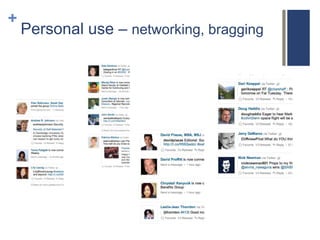
    Personal use – networking, bragging
+
+
+
+
+
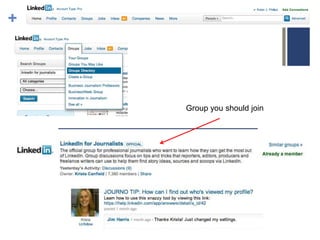
    Groups – belong to or search

       Alumni

       Corporate

       Professional

       Conference

       Networking

       Non-profits

       … other
+


    Group you should join
+
+
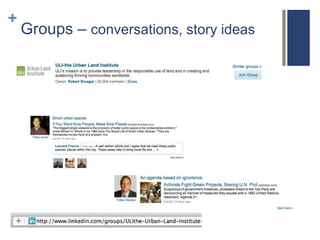
    Groups – conversations, story ideas
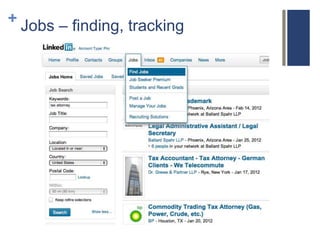
+ Jobs – finding, tracking
+
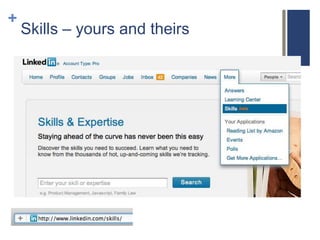
    Skills – yours and theirs
+
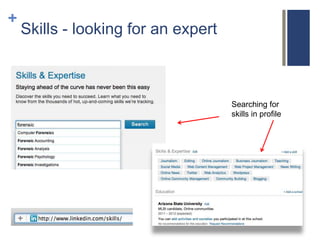
    Skills - looking for an expert


                                     Searching for
                                     skills in profile
+
+
    People search, company
+
    Narrowing
    the field
+
    Advanced search
+
Employees


Drill
deeper
+
    Drill deeper
+
    Past employees
+
    Company search
+
    Company search
+
    Insight Statistics: Liz Claiborne
+
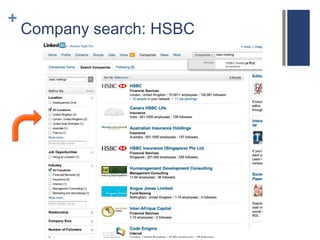
    Company search: HSBC
+
    Company search: HSBC
+
    Company search: HSBC
+
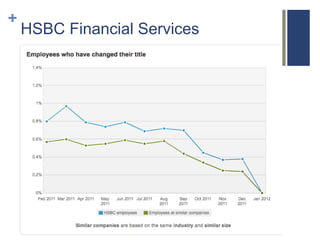
    HSBC Financial Services
+
    HSBC Financial Services
+
    HSBC Financial Services
+
    HSBC Financial Services
+
    HSBC Financial Services
+
    HSBC Financial Services
+
    Staff with new titles
+


                 top
    Full
    page
    insightful
    statistics
    Netflix


                       bottom
+
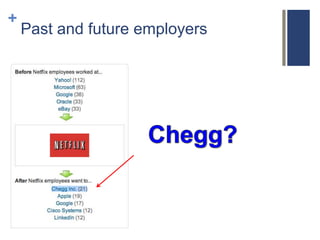
    Past and future employers
+
    Past and future employers
+
    Chegg
+
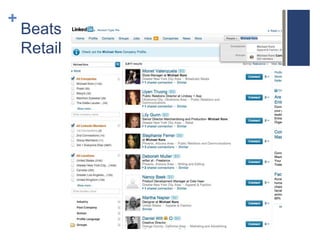
    Beats
    Retail
+


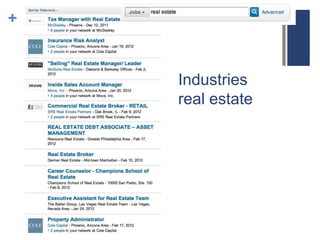
    Industries
    real estate
+
    Search in stealth mode

    As a journalist, you may not want people to know that you're
    following a company (or look for a job). If you want to follow
    companies in stealth mode, here's what you do:

    1. Hover over your name in the top right hand corner of LinkedIn

    2. Click "Settings" when it appears in the drop down menu.

    3. On the next page, under, "Privacy Controls," you should see a
    link that says, "Turn on/off your activity broadcasts." Click that
    link.

    4. Uncheck the box next to, "Let people know when you change
    your profile, make recommendations, or follow companies.”
+
    Your LinkedIn guru
   Follow Krista Canfield and       Former reporter who thinks
    attend one of her sessions.       like a journalist
+
    What you learned today


       LinkedIn as a database            Searching people at
                                           companies
       Personal use
                                          Finding current employees
       Groups
                                          Finding former employees
       Jobs
                                          Digging into company data
       Skills
                                          How to search in stealth mode
       Searching for people


    Slides are in handouts or send   Robin.Phillips@businessjournalism.org
                        me a note

LinkedIn for Journalists

  • 1.
    + Robin J Phillips Digital Director, The Reynolds Center for Business Journalism
  • 2.
    + Biggest Rolodex EVER!  150 million users  200 countries  Professional focus  Updated by users  Very portable  Carry past colleagues with you  Sorted by company, industry, geography  Updated by users
  • 3.
  • 4.
    + LinkedIn highlights  Founded in 2003  Alexa ranks LinkedIn.com No. 12 site in world, No. 9 in U.S.  Becoming more social - FB and Twitter connections  Supports groups – more than 1 million of them  May 2011 IPO, opening price jump from $45 to $122.70 ($93.05 a week ago)  Rolled out an “Apply with LinkedIn” feature in November  BBC traffic from LinkedIn increased tenfold January to June 2011  Huge database for journalists to dig into
  • 5.
    + Simple tips  Maintain a current profile (even if you’re not looking for a job)  Complete your profile & have at least 50 connections  Don’t use a cut-and-paste of your resume  Make your profile public & give it a custom URL  Recommend people (anyone you’d write a reference for IRL)  But avoid recommendation “swapping”  Join groups, discussion boards, eavesdrop and get involved  Keep non-professional SM accounts separate from LinkedIn
  • 6.
  • 7.
    + Using LinkedIn as a (well-organized) database intuitive
  • 8.
    + What we’ll talk about today  LinkedIn as a database  Searching people at companies  Personal use  Finding current employees  Groups  Finding former employees  Jobs  Digging into company data  Skills  How to search in stealth mode  Searching for people
  • 9.
    + Personal use – networking, bragging
  • 10.
  • 11.
  • 12.
  • 13.
  • 14.
    + Groups – belong to or search  Alumni  Corporate  Professional  Conference  Networking  Non-profits  … other
  • 15.
    + Group you should join
  • 16.
  • 17.
    + Groups – conversations, story ideas
  • 18.
    + Jobs –finding, tracking
  • 19.
    + Skills – yours and theirs
  • 20.
    + Skills - looking for an expert Searching for skills in profile
  • 21.
  • 22.
    + People search, company
  • 23.
    + Narrowing the field
  • 24.
    + Advanced search
  • 25.
  • 26.
    + Drill deeper
  • 27.
    + Past employees
  • 28.
    + Company search
  • 29.
    + Company search
  • 30.
    + Insight Statistics: Liz Claiborne
  • 31.
    + Company search: HSBC
  • 32.
    + Company search: HSBC
  • 33.
    + Company search: HSBC
  • 34.
    + HSBC Financial Services
  • 35.
    + HSBC Financial Services
  • 36.
    + HSBC Financial Services
  • 37.
    + HSBC Financial Services
  • 38.
    + HSBC Financial Services
  • 39.
    + HSBC Financial Services
  • 40.
    + Staff with new titles
  • 41.
    + top Full page insightful statistics Netflix bottom
  • 42.
    + Past and future employers
  • 43.
    + Past and future employers
  • 44.
    + Chegg
  • 45.
    + Beats Retail
  • 46.
    + Industries real estate
  • 47.
    + Search in stealth mode As a journalist, you may not want people to know that you're following a company (or look for a job). If you want to follow companies in stealth mode, here's what you do: 1. Hover over your name in the top right hand corner of LinkedIn 2. Click "Settings" when it appears in the drop down menu. 3. On the next page, under, "Privacy Controls," you should see a link that says, "Turn on/off your activity broadcasts." Click that link. 4. Uncheck the box next to, "Let people know when you change your profile, make recommendations, or follow companies.”
  • 48.
    + Your LinkedIn guru  Follow Krista Canfield and  Former reporter who thinks attend one of her sessions. like a journalist
  • 49.
    + What you learned today  LinkedIn as a database  Searching people at companies  Personal use  Finding current employees  Groups  Finding former employees  Jobs  Digging into company data  Skills  How to search in stealth mode  Searching for people Slides are in handouts or send Robin.Phillips@businessjournalism.org me a note

Editor's Notes

  • #3 Up from 130 in November 2011
  • #5 Alexa data: http://www.alexa.com/siteinfo/linkedin.com#
  • #18 Insiders conversations may lead to story ideas
  • #22 People, related skills and expertise, related companies, and groups
  • #25 Advanced search gives you a people finder … you can drill down
  • #32 8 companies
  • #33 8 companies
  • #34 8 companies
  • #49 Can we update?