Linear Algebra and MATLAB Tutorial
Jia-Bin Huang
University of Illinois, Urbana-Champaign
www.jiabinhuang.com
jbhuang1@Illinois.edu
Today’s class
• Introduction to MATLAB
• Linear algebra refresher
• Writing fast MATLAB code
Working with MATLAB
Learning by doing
• Let’s work through an example!
• Download the example script here
• Topics
• Basic types in Matlab
• Operations on vectors and matrices
• Control statements & vectorization
• Saving/loading your work
• Creating scripts or functions using m-files
• Plotting
• Working with images
Questions?
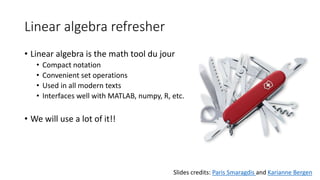
Linear algebra refresher
• Linear algebra is the math tool du jour
• Compact notation
• Convenient set operations
• Used in all modern texts
• Interfaces well with MATLAB, numpy, R, etc.
• We will use a lot of it!!
Slides credits: Paris Smaragdis and Karianne Bergen
Filtering, linear transformation
-> extracting frequency sub-bands
Vector dot products
-> measure patch similarities
Hybrid Image Image Quilting Gradient Domain Fusion
Solving linear systems
-> solve for pixel values
Image-based Lighting
Solving linear systems -> solve for radiance map
Video Stitching and Processing
Solving linear systems -> solve for geometric transform
Scalars, Vectors, Matrices, Tensors
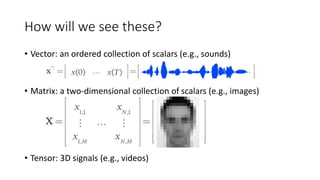
How will we see these?
• Vector: an ordered collection of scalars (e.g., sounds)
• Matrix: a two-dimensional collection of scalars (e.g., images)
• Tensor: 3D signals (e.g., videos)
Element-wise operations
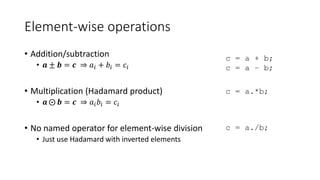
• Addition/subtraction
• 𝒂 ± 𝒃 = 𝒄 ⇒ 𝑎𝑖 + 𝑏𝑖 = 𝑐𝑖
• Multiplication (Hadamard product)
• 𝒂 𝒃 = 𝒄 ⇒ 𝑎𝑖 𝑏𝑖 = 𝑐𝑖
• No named operator for element-wise division
• Just use Hadamard with inverted elements
c = a + b;
c = a – b;
c = a.*b;
c = a./b;
Which division?
Left Right
Array division C = ldivide(A, B);
C = A.B;
C = rdivide(A, B);
C = A./B;
Matrix division C = mldivide(A, B);
C = A/B;
C = mldivide(A, B);
C = AB;
EX: Array division
A = [1 2; 3, 4];
B = [1,1; 1, 1];
C1 = A.B;
C2 = A./B;
C1 =
1.0000 0.5000
0.3333 0.2500
C2 =
1 2
3 4
EX: Matrix division
X = AB;
-> the (least-square) solution to AX = B
X = A/B;
-> the (least-square) solution to XB = A
B/A = (A'B')'
Transpose
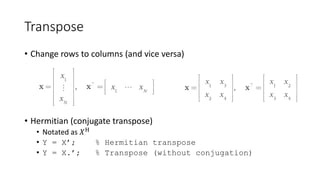
• Change rows to columns (and vice versa)
• Hermitian (conjugate transpose)
• Notated as 𝑋H
• Y = X’; % Hermitian transpose
• Y = X.’; % Transpose (without conjugation)
Visualizing transposition
• Mostly pointless for 1D signals
• Swap dimensions for 2D signals
Reshaping operators
• The vec operator
• Unrolls elements column-wise
• Useful for getting rid of matrices/tensors
• B = A(:);
• The reshape operator
• B = reshape(A, sz);
• prod(sz) must be the same as
numel(A)
EX: Reshape
A = 1:12;
B = reshape(A,[3,4]);
B =
1 4 7 10
2 5 8 11
3 6 9 12
Trace and diag
• Matrix trace
• Sum of diagonal elements
• The diag operator EX: trace
A = [1, 2; 3, 4];
t = trace(A);
Q: What’s t?
EX: diag
x = diag(A);
D = diag(x);
Q: What’s x and D?
Vector norm (how “big" a vector is)
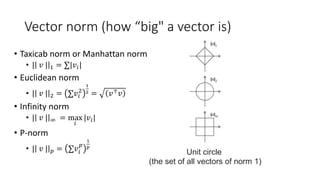
• Taxicab norm or Manhattan norm
• | 𝑣 | 1 = ∑|𝑣𝑖|
• Euclidean norm
• | 𝑣 | 2 = ∑𝑣𝑖
2
1
2 = 𝑣⊤ 𝑣
• Infinity norm
• | 𝑣 | ∞ = max
𝑖
|𝑣𝑖|
• P-norm
• | 𝑣 | 𝑝 = ∑𝑣𝑖
𝑝
1
𝑝
Unit circle
(the set of all vectors of norm 1)
Which norm to use?
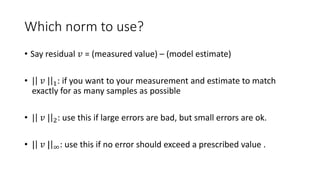
• Say residual 𝑣 = (measured value) – (model estimate)
• | 𝑣 | 1: if you want to your measurement and estimate to match
exactly for as many samples as possible
• | 𝑣 | 2: use this if large errors are bad, but small errors are ok.
• | 𝑣 | ∞: use this if no error should exceed a prescribed value .
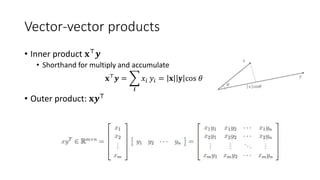
Vector-vector products
• Inner product 𝐱⊤ 𝒚
• Shorthand for multiply and accumulate
𝐱⊤ 𝒚 =
𝒊
𝑥𝑖 𝑦𝑖 = 𝐱 𝐲 cos 𝜃
• Outer product: 𝐱𝒚⊤
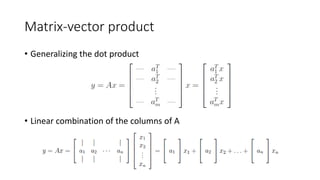
Matrix-vector product
• Generalizing the dot product
• Linear combination of the columns of A
Matrix-matrix product C = AB
Definition: as inner products
𝐶𝑖𝑗 = 𝑎𝑖
⊤
𝑏𝑗
As sum of outer productsAs a set of matrix-vector products
• matrix 𝐴 and columns of B
• rows of 𝐴 and matrix B
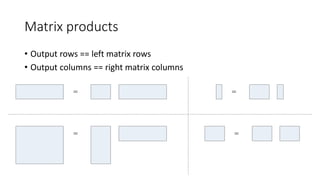
Matrix products
• Output rows == left matrix rows
• Output columns == right matrix columns
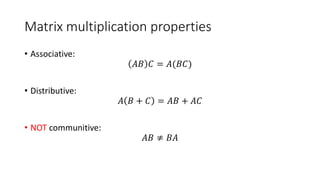
Matrix multiplication properties
• Associative:
𝐴𝐵 𝐶 = 𝐴(𝐵𝐶)
• Distributive:
𝐴 𝐵 + 𝐶 = 𝐴𝐵 + 𝐴𝐶
• NOT communitive:
𝐴𝐵 ≠ 𝐵𝐴
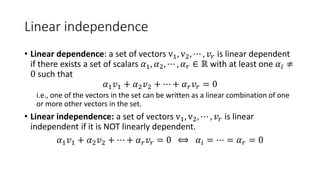
Linear independence
• Linear dependence: a set of vectors v1, v2, ⋯ , 𝑣𝑟 is linear dependent
if there exists a set of scalars 𝛼1, 𝛼2, ⋯ , 𝛼 𝑟 ∈ ℝ with at least one 𝛼𝑖 ≠
0 such that
𝛼1 𝑣1 + 𝛼2 𝑣2 + ⋯ + 𝛼 𝑟 𝑣𝑟 = 0
i.e., one of the vectors in the set can be written as a linear combination of one
or more other vectors in the set.
• Linear independence: a set of vectors v1, v2, ⋯ , 𝑣𝑟 is linear
independent if it is NOT linearly dependent.
𝛼1 𝑣1 + 𝛼2 𝑣2 + ⋯ + 𝛼 𝑟 𝑣𝑟 = 0 ⟺ 𝛼𝑖 = ⋯ = 𝛼 𝑟 = 0
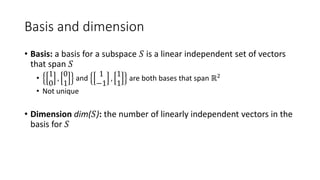
Basis and dimension
• Basis: a basis for a subspace 𝑆 is a linear independent set of vectors
that span 𝑆
•
1
0
,
0
1
and
1
−1
,
1
1
are both bases that span ℝ2
• Not unique
• Dimension dim(𝑆): the number of linearly independent vectors in the
basis for 𝑆
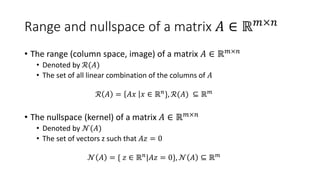
Range and nullspace of a matrix 𝐴 ∈ ℝ 𝑚×𝑛
• The range (column space, image) of a matrix 𝐴 ∈ ℝ 𝑚×𝑛
• Denoted by ℛ(𝐴)
• The set of all linear combination of the columns of 𝐴
ℛ 𝐴 = 𝐴𝑥 𝑥 ∈ ℝ 𝑛
}, ℛ(𝐴) ⊆ ℝ 𝑚
• The nullspace (kernel) of a matrix 𝐴 ∈ ℝ 𝑚×𝑛
• Denoted by 𝒩(𝐴)
• The set of vectors z such that 𝐴𝑧 = 0
𝒩 𝐴 = { 𝑧 ∈ ℝ 𝑛|𝐴𝑧 = 0}, 𝒩 𝐴 ⊆ ℝ 𝑚
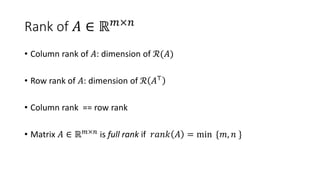
Rank of 𝐴 ∈ ℝ 𝑚×𝑛
• Column rank of 𝐴: dimension of ℛ(𝐴)
• Row rank of 𝐴: dimension of ℛ 𝐴⊤
• Column rank == row rank
• Matrix 𝐴 ∈ ℝ 𝑚×𝑛 is full rank if 𝑟𝑎𝑛𝑘 𝐴 = min {𝑚, 𝑛 }
System of linear equations
• Ex: Find values 𝑥1, 𝑥2, 𝑥3 ∈ ℝ that satisfy
• 3𝑥1 + 2𝑥2 − 𝑥3 − 1 = 0
• 2𝑥1 − 2𝑥2 + 𝑥3 + 2 = 0
• −𝑥1 −
1
2
𝑥2 − 𝑥3 = 0
Solution:
• Step 1: write the system of linear equations as a matrix equation
𝐴 =
3 2 −1
2 −2 1
−1 −
1
2
−1
, 𝑥 =
𝑥1
𝑥2
𝑥3
, 𝑏 =
1
−2
0
.
• Step 2: Solve for 𝐴𝑥 = 𝑏
Mini-quiz 1
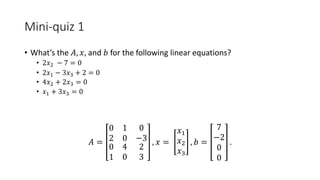
• What’s the 𝐴, 𝑥, and 𝑏 for the following linear equations?
• 2𝑥2 − 7 = 0
• 2𝑥1 − 3𝑥3 + 2 = 0
• 4𝑥2 + 2𝑥3 = 0
• 𝑥1 + 3𝑥3 = 0
𝐴 =
0 1 0
2 0 −3
0
1
4
0
2
3
, 𝑥 =
𝑥1
𝑥2
𝑥3
, 𝑏 =
7
−2
0
0
.
Mini-quiz 2
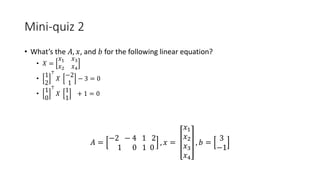
• What’s the 𝐴, 𝑥, and 𝑏 for the following linear equation?
• 𝑋 =
𝑥1 𝑥3
𝑥2 𝑥4
•
1
2
⊤
𝑋
−2
1
− 3 = 0
•
1
0
⊤
𝑋
1
1
+ 1 = 0
𝐴 =
−2 − 4 1 2
1 0 1 0
, 𝑥 =
𝑥1
𝑥2
𝑥3
𝑥4
, 𝑏 =
3
−1
Solving system of linear equations
• Given 𝐴 ∈ ℝ 𝑚×𝑛 and b ∈ ℝ 𝑚, find x ∈ ℝ 𝑛 such that 𝐴𝑥 = 𝑏
• Special case: a square matrix 𝐴 ∈ ℝ 𝑛×𝑛
• The solution: 𝐴−1 𝑏
• The matrix inverse A−1exists and is unique if and only if
• 𝐴 is a squared matrix of full rank
• “Undoes” a matrix multiplication
• 𝐴−1 𝐴 = 𝐼
• 𝐴−1 𝐴𝑌 = 𝑌
• Y𝐴𝐴−1 = 𝑌
Least square problems
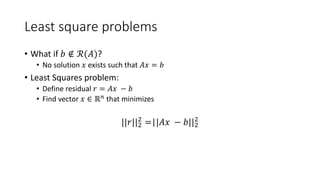
• What if 𝑏 ∉ ℛ(𝐴)?
• No solution 𝑥 exists such that 𝐴𝑥 = 𝑏
• Least Squares problem:
• Define residual 𝑟 = 𝐴𝑥 − 𝑏
• Find vector 𝑥 ∈ ℝ 𝑛 that minimizes
||𝑟||2
2
=||𝐴𝑥 − 𝑏||2
2
Least square problems
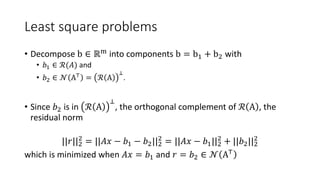
• Decompose b ∈ ℝm into components b = b1 + b2 with
• 𝑏1 ∈ ℛ(𝐴) and
• 𝑏2 ∈ 𝒩 A⊤ = ℛ A
⊥
.
• Since 𝑏2 is in ℛ A
⊥
, the orthogonal complement of ℛ A , the
residual norm
||𝑟||2
2
= ||𝐴𝑥 − 𝑏1 − 𝑏2||2
2
= ||𝐴𝑥 − 𝑏1||2
2
+ ||𝑏2||2
2
which is minimized when 𝐴𝑥 = 𝑏1 and 𝑟 = 𝑏2 ∈ 𝒩 A⊤
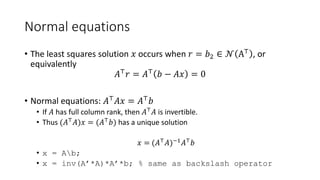
Normal equations
• The least squares solution 𝑥 occurs when 𝑟 = 𝑏2 ∈ 𝒩 A⊤ , or
equivalently
𝐴⊤ 𝑟 = 𝐴⊤ 𝑏 − 𝐴𝑥 = 0
• Normal equations: 𝐴⊤ 𝐴𝑥 = 𝐴⊤ 𝑏
• If 𝐴 has full column rank, then 𝐴⊤ 𝐴 is invertible.
• Thus (𝐴⊤ 𝐴)𝑥 = (𝐴⊤ 𝑏) has a unique solution
𝑥 = (𝐴⊤ 𝐴)−1 𝐴⊤ 𝑏
• x = Ab;
• x = inv(A’*A)*A’*b; % same as backslash operator
Questions?
Writing Fast MATLAB Code
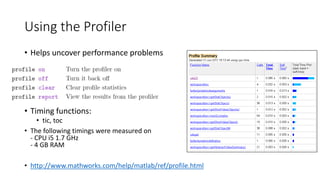
Using the Profiler
• Helps uncover performance problems
• Timing functions:
• tic, toc
• The following timings were measured on
- CPU i5 1.7 GHz
- 4 GB RAM
• http://www.mathworks.com/help/matlab/ref/profile.html
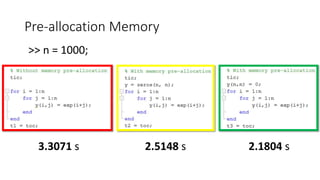
Pre-allocation Memory
3.3071 s
>> n = 1000;
2.1804 s2.5148 s
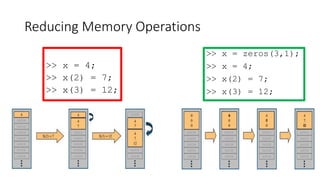
Reducing Memory Operations
>> x = 4;
>> x(2) = 7;
>> x(3) = 12;
>> x = zeros(3,1);
>> x = 4;
>> x(2) = 7;
>> x(3) = 12;
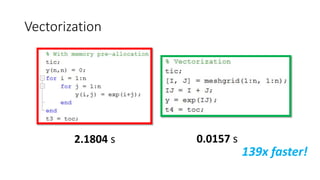
Vectorization
2.1804 s 0.0157 s
139x faster!
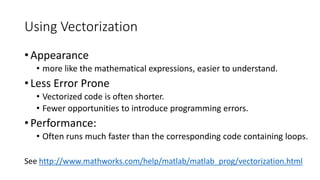
Using Vectorization
• Appearance
• more like the mathematical expressions, easier to understand.
• Less Error Prone
• Vectorized code is often shorter.
• Fewer opportunities to introduce programming errors.
• Performance:
• Often runs much faster than the corresponding code containing loops.
See http://www.mathworks.com/help/matlab/matlab_prog/vectorization.html
Binary Singleton Expansion Function
• Make each column in A zero mean
>> n1 = 5000;
>> n2 = 10000;
>> A = randn(n1, n2);
• See http://blogs.mathworks.com/loren/2008/08/04/comparing-repmat-and-bsxfun-
performance/
0.2994 s 0.2251 s
Why bsxfun is faster than repmat?
- bsxfun handles replication of the array
implicitly, thus avoid memory allocation
- Bsxfun supports multi-thread
Loop, Vector and Boolean Indexing
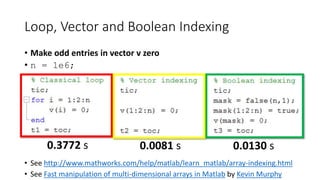
• Make odd entries in vector v zero
• n = 1e6;
• See http://www.mathworks.com/help/matlab/learn_matlab/array-indexing.html
• See Fast manipulation of multi-dimensional arrays in Matlab by Kevin Murphy
0.3772 s 0.0081 s 0.0130 s
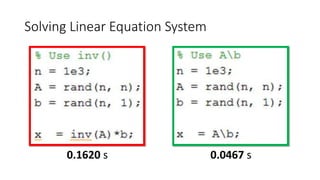
Solving Linear Equation System
0.1620 s 0.0467 s
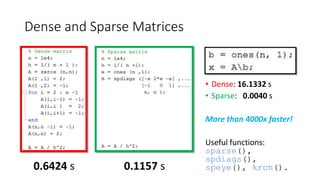
Dense and Sparse Matrices
• Dense: 16.1332 s
• Sparse: 0.0040 s
More than 4000x faster!
Useful functions:
sparse(),
spdiags(),
speye(), kron().0.6424 s 0.1157 s
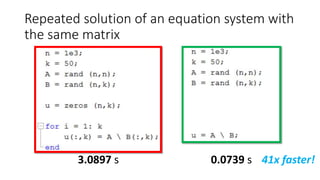
Repeated solution of an equation system with
the same matrix
3.0897 s 0.0739 s 41x faster!
Iterative Methods for Larger Problems
• Iterative solvers in MATLAB:
• bicg, bicgstab, cgs, gmres, lsqr, minres, pcg, symmlq, qmr
• [x,flag,relres,iter,resvec] = method(A,b,tol,maxit,M1,M2,x0)
• source: Writing Fast Matlab Code by Pascal Getreuer
Solving Ax = b when A is a Special Matrix
• Circulant matrices
• Matrices corresponding to cyclic convolution
Ax = conv(h, x) are diagonalized in the Fourier domain
>> x = ifft( fft(b)./fft(h) );
• Triangular and banded
• Efficiently solved by sparse LU factorization
>> [L,U] = lu(sparse(A));
>> x = U(Lb);
• Poisson problems
• See http://www.cs.berkeley.edu/~demmel/cs267/lecture25/lecture25.html
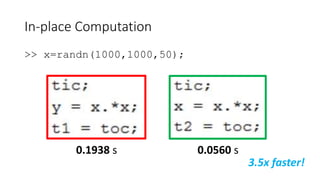
In-place Computation
>> x=randn(1000,1000,50);
0.1938 s 0.0560 s
3.5x faster!
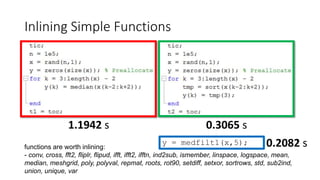
Inlining Simple Functions
1.1942 s 0.3065 s
functions are worth inlining:
- conv, cross, fft2, fliplr, flipud, ifft, ifft2, ifftn, ind2sub, ismember, linspace, logspace, mean,
median, meshgrid, poly, polyval, repmat, roots, rot90, setdiff, setxor, sortrows, std, sub2ind,
union, unique, var
y = medfilt1(x,5); 0.2082 s
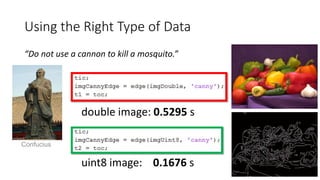
Using the Right Type of Data
“Do not use a cannon to kill a mosquito.”
double image: 0.5295 s
uint8 image: 0.1676 s
Confucius
Matlab Organize its Arrays as Column-Major
• Assign A to zero row-by-row or column-by-column
>> n = 1e4;
>> A = randn(n, n);
0.1041 s2.1740 s 21x faster!
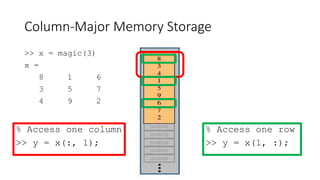
Column-Major Memory Storage
>> x = magic(3)
x =
8 1 6
3 5 7
4 9 2
% Access one column
>> y = x(:, 1);
% Access one row
>> y = x(1, :);
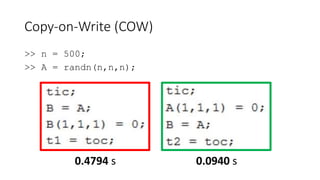
Copy-on-Write (COW)
>> n = 500;
>> A = randn(n,n,n);
0.4794 s 0.0940 s
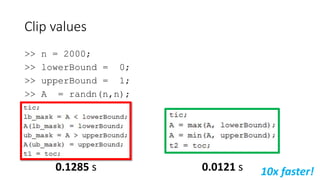
Clip values
>> n = 2000;
>> lowerBound = 0;
>> upperBound = 1;
>> A = randn(n,n);
0.0121 s0.1285 s 10x faster!
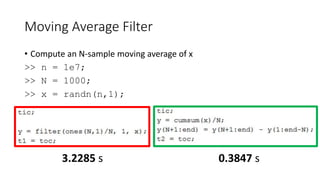
Moving Average Filter
• Compute an N-sample moving average of x
>> n = 1e7;
>> N = 1000;
>> x = randn(n,1);
3.2285 s 0.3847 s
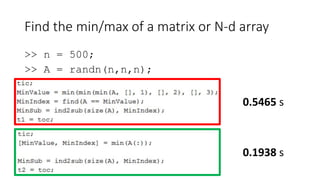
Find the min/max of a matrix or N-d array
>> n = 500;
>> A = randn(n,n,n);
0.5465 s
0.1938 s
Acceleration using MEX (Matlab Executable)
• Call your C, C++, or Fortran codes from the MATLAB
• Speed up specific subroutines
• See http://www.mathworks.com/help/matlab/matlab_external/introducing-mex-
files.html
MATLAB Coder
• MATLAB Coder™ generates standalone C and C++ code from
MATLAB® code
• See video examples in http://www.mathworks.com/products/matlab-
coder/videos.html
• See http://www.mathworks.com/products/matlab-coder/
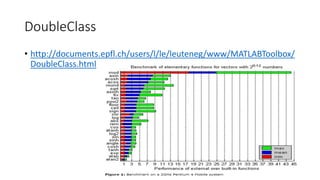
DoubleClass
• http://documents.epfl.ch/users/l/le/leuteneg/www/MATLABToolbox/
DoubleClass.html
parfor for parallel processing
• Requirements
• Task independent
• Order independent
See http://www.mathworks.com/products/parallel-computing/
Parallel Processing in Matlab
• MatlabMPI
• multicore
• pMatlab: Parallel Matlab Toolbox
• Parallel Computing Toolbox (Mathworks)
• Distributed Computing Server (Mathworks)
• MATLAB plug-in for CUDA (CUDA is a library that used an nVidia board)
• Source: http://www-h.eng.cam.ac.uk/help/tpl/programs/Matlab/faster_scripts.html
Resources for your final projects
• Awesome computer vision by Jia-Bin Huang
• A curated list of computer vision resources
• VLFeat
• features extraction and matching, segmentation, clustering
• Piotr's Computer Vision Matlab Toolbox
• Filters, channels, detectors, image/video manipulation
• OpenCV (MexOpenCV by Kota Yamaguchi)
• General purpose computer vision library
Resources
• Linear Algebra
• Linear Algebra Review and Reference
• Linear algebra refresher course
• Quick Review of Matrix and Real Linear Algebra
• MATLAB Tutorial
• Resource collection
• MATLAB F&Q
• Writing Fast MATLAB code
• Techniques for Improving Performance by Mathwork
• Writing Fast Matlab Code by Pascal Getreuer
• Guidelines for writing clean and fast code in MATLAB by Nico Schlömer

Linear Algebra and Matlab tutorial

  • 1.
    Linear Algebra andMATLAB Tutorial Jia-Bin Huang University of Illinois, Urbana-Champaign www.jiabinhuang.com jbhuang1@Illinois.edu
  • 2.
    Today’s class • Introductionto MATLAB • Linear algebra refresher • Writing fast MATLAB code
  • 3.
  • 4.
    Learning by doing •Let’s work through an example! • Download the example script here • Topics • Basic types in Matlab • Operations on vectors and matrices • Control statements & vectorization • Saving/loading your work • Creating scripts or functions using m-files • Plotting • Working with images
  • 5.
  • 6.
    Linear algebra refresher •Linear algebra is the math tool du jour • Compact notation • Convenient set operations • Used in all modern texts • Interfaces well with MATLAB, numpy, R, etc. • We will use a lot of it!! Slides credits: Paris Smaragdis and Karianne Bergen
  • 7.
    Filtering, linear transformation ->extracting frequency sub-bands Vector dot products -> measure patch similarities Hybrid Image Image Quilting Gradient Domain Fusion Solving linear systems -> solve for pixel values Image-based Lighting Solving linear systems -> solve for radiance map Video Stitching and Processing Solving linear systems -> solve for geometric transform
  • 8.
  • 9.
    How will wesee these? • Vector: an ordered collection of scalars (e.g., sounds) • Matrix: a two-dimensional collection of scalars (e.g., images) • Tensor: 3D signals (e.g., videos)
  • 10.
    Element-wise operations • Addition/subtraction •𝒂 ± 𝒃 = 𝒄 ⇒ 𝑎𝑖 + 𝑏𝑖 = 𝑐𝑖 • Multiplication (Hadamard product) • 𝒂 𝒃 = 𝒄 ⇒ 𝑎𝑖 𝑏𝑖 = 𝑐𝑖 • No named operator for element-wise division • Just use Hadamard with inverted elements c = a + b; c = a – b; c = a.*b; c = a./b;
  • 11.
    Which division? Left Right Arraydivision C = ldivide(A, B); C = A.B; C = rdivide(A, B); C = A./B; Matrix division C = mldivide(A, B); C = A/B; C = mldivide(A, B); C = AB; EX: Array division A = [1 2; 3, 4]; B = [1,1; 1, 1]; C1 = A.B; C2 = A./B; C1 = 1.0000 0.5000 0.3333 0.2500 C2 = 1 2 3 4 EX: Matrix division X = AB; -> the (least-square) solution to AX = B X = A/B; -> the (least-square) solution to XB = A B/A = (A'B')'
  • 12.
    Transpose • Change rowsto columns (and vice versa) • Hermitian (conjugate transpose) • Notated as 𝑋H • Y = X’; % Hermitian transpose • Y = X.’; % Transpose (without conjugation)
  • 13.
    Visualizing transposition • Mostlypointless for 1D signals • Swap dimensions for 2D signals
  • 14.
    Reshaping operators • Thevec operator • Unrolls elements column-wise • Useful for getting rid of matrices/tensors • B = A(:); • The reshape operator • B = reshape(A, sz); • prod(sz) must be the same as numel(A) EX: Reshape A = 1:12; B = reshape(A,[3,4]); B = 1 4 7 10 2 5 8 11 3 6 9 12
  • 15.
    Trace and diag •Matrix trace • Sum of diagonal elements • The diag operator EX: trace A = [1, 2; 3, 4]; t = trace(A); Q: What’s t? EX: diag x = diag(A); D = diag(x); Q: What’s x and D?
  • 16.
    Vector norm (how“big" a vector is) • Taxicab norm or Manhattan norm • | 𝑣 | 1 = ∑|𝑣𝑖| • Euclidean norm • | 𝑣 | 2 = ∑𝑣𝑖 2 1 2 = 𝑣⊤ 𝑣 • Infinity norm • | 𝑣 | ∞ = max 𝑖 |𝑣𝑖| • P-norm • | 𝑣 | 𝑝 = ∑𝑣𝑖 𝑝 1 𝑝 Unit circle (the set of all vectors of norm 1)
  • 17.
    Which norm touse? • Say residual 𝑣 = (measured value) – (model estimate) • | 𝑣 | 1: if you want to your measurement and estimate to match exactly for as many samples as possible • | 𝑣 | 2: use this if large errors are bad, but small errors are ok. • | 𝑣 | ∞: use this if no error should exceed a prescribed value .
  • 18.
    Vector-vector products • Innerproduct 𝐱⊤ 𝒚 • Shorthand for multiply and accumulate 𝐱⊤ 𝒚 = 𝒊 𝑥𝑖 𝑦𝑖 = 𝐱 𝐲 cos 𝜃 • Outer product: 𝐱𝒚⊤
  • 19.
    Matrix-vector product • Generalizingthe dot product • Linear combination of the columns of A
  • 20.
    Matrix-matrix product C= AB Definition: as inner products 𝐶𝑖𝑗 = 𝑎𝑖 ⊤ 𝑏𝑗 As sum of outer productsAs a set of matrix-vector products • matrix 𝐴 and columns of B • rows of 𝐴 and matrix B
  • 21.
    Matrix products • Outputrows == left matrix rows • Output columns == right matrix columns
  • 22.
    Matrix multiplication properties •Associative: 𝐴𝐵 𝐶 = 𝐴(𝐵𝐶) • Distributive: 𝐴 𝐵 + 𝐶 = 𝐴𝐵 + 𝐴𝐶 • NOT communitive: 𝐴𝐵 ≠ 𝐵𝐴
  • 23.
    Linear independence • Lineardependence: a set of vectors v1, v2, ⋯ , 𝑣𝑟 is linear dependent if there exists a set of scalars 𝛼1, 𝛼2, ⋯ , 𝛼 𝑟 ∈ ℝ with at least one 𝛼𝑖 ≠ 0 such that 𝛼1 𝑣1 + 𝛼2 𝑣2 + ⋯ + 𝛼 𝑟 𝑣𝑟 = 0 i.e., one of the vectors in the set can be written as a linear combination of one or more other vectors in the set. • Linear independence: a set of vectors v1, v2, ⋯ , 𝑣𝑟 is linear independent if it is NOT linearly dependent. 𝛼1 𝑣1 + 𝛼2 𝑣2 + ⋯ + 𝛼 𝑟 𝑣𝑟 = 0 ⟺ 𝛼𝑖 = ⋯ = 𝛼 𝑟 = 0
  • 24.
    Basis and dimension •Basis: a basis for a subspace 𝑆 is a linear independent set of vectors that span 𝑆 • 1 0 , 0 1 and 1 −1 , 1 1 are both bases that span ℝ2 • Not unique • Dimension dim(𝑆): the number of linearly independent vectors in the basis for 𝑆
  • 25.
    Range and nullspaceof a matrix 𝐴 ∈ ℝ 𝑚×𝑛 • The range (column space, image) of a matrix 𝐴 ∈ ℝ 𝑚×𝑛 • Denoted by ℛ(𝐴) • The set of all linear combination of the columns of 𝐴 ℛ 𝐴 = 𝐴𝑥 𝑥 ∈ ℝ 𝑛 }, ℛ(𝐴) ⊆ ℝ 𝑚 • The nullspace (kernel) of a matrix 𝐴 ∈ ℝ 𝑚×𝑛 • Denoted by 𝒩(𝐴) • The set of vectors z such that 𝐴𝑧 = 0 𝒩 𝐴 = { 𝑧 ∈ ℝ 𝑛|𝐴𝑧 = 0}, 𝒩 𝐴 ⊆ ℝ 𝑚
  • 26.
    Rank of 𝐴∈ ℝ 𝑚×𝑛 • Column rank of 𝐴: dimension of ℛ(𝐴) • Row rank of 𝐴: dimension of ℛ 𝐴⊤ • Column rank == row rank • Matrix 𝐴 ∈ ℝ 𝑚×𝑛 is full rank if 𝑟𝑎𝑛𝑘 𝐴 = min {𝑚, 𝑛 }
  • 27.
    System of linearequations • Ex: Find values 𝑥1, 𝑥2, 𝑥3 ∈ ℝ that satisfy • 3𝑥1 + 2𝑥2 − 𝑥3 − 1 = 0 • 2𝑥1 − 2𝑥2 + 𝑥3 + 2 = 0 • −𝑥1 − 1 2 𝑥2 − 𝑥3 = 0 Solution: • Step 1: write the system of linear equations as a matrix equation 𝐴 = 3 2 −1 2 −2 1 −1 − 1 2 −1 , 𝑥 = 𝑥1 𝑥2 𝑥3 , 𝑏 = 1 −2 0 . • Step 2: Solve for 𝐴𝑥 = 𝑏
  • 28.
    Mini-quiz 1 • What’sthe 𝐴, 𝑥, and 𝑏 for the following linear equations? • 2𝑥2 − 7 = 0 • 2𝑥1 − 3𝑥3 + 2 = 0 • 4𝑥2 + 2𝑥3 = 0 • 𝑥1 + 3𝑥3 = 0 𝐴 = 0 1 0 2 0 −3 0 1 4 0 2 3 , 𝑥 = 𝑥1 𝑥2 𝑥3 , 𝑏 = 7 −2 0 0 .
  • 29.
    Mini-quiz 2 • What’sthe 𝐴, 𝑥, and 𝑏 for the following linear equation? • 𝑋 = 𝑥1 𝑥3 𝑥2 𝑥4 • 1 2 ⊤ 𝑋 −2 1 − 3 = 0 • 1 0 ⊤ 𝑋 1 1 + 1 = 0 𝐴 = −2 − 4 1 2 1 0 1 0 , 𝑥 = 𝑥1 𝑥2 𝑥3 𝑥4 , 𝑏 = 3 −1
  • 30.
    Solving system oflinear equations • Given 𝐴 ∈ ℝ 𝑚×𝑛 and b ∈ ℝ 𝑚, find x ∈ ℝ 𝑛 such that 𝐴𝑥 = 𝑏 • Special case: a square matrix 𝐴 ∈ ℝ 𝑛×𝑛 • The solution: 𝐴−1 𝑏 • The matrix inverse A−1exists and is unique if and only if • 𝐴 is a squared matrix of full rank • “Undoes” a matrix multiplication • 𝐴−1 𝐴 = 𝐼 • 𝐴−1 𝐴𝑌 = 𝑌 • Y𝐴𝐴−1 = 𝑌
  • 31.
    Least square problems •What if 𝑏 ∉ ℛ(𝐴)? • No solution 𝑥 exists such that 𝐴𝑥 = 𝑏 • Least Squares problem: • Define residual 𝑟 = 𝐴𝑥 − 𝑏 • Find vector 𝑥 ∈ ℝ 𝑛 that minimizes ||𝑟||2 2 =||𝐴𝑥 − 𝑏||2 2
  • 32.
    Least square problems •Decompose b ∈ ℝm into components b = b1 + b2 with • 𝑏1 ∈ ℛ(𝐴) and • 𝑏2 ∈ 𝒩 A⊤ = ℛ A ⊥ . • Since 𝑏2 is in ℛ A ⊥ , the orthogonal complement of ℛ A , the residual norm ||𝑟||2 2 = ||𝐴𝑥 − 𝑏1 − 𝑏2||2 2 = ||𝐴𝑥 − 𝑏1||2 2 + ||𝑏2||2 2 which is minimized when 𝐴𝑥 = 𝑏1 and 𝑟 = 𝑏2 ∈ 𝒩 A⊤
  • 33.
    Normal equations • Theleast squares solution 𝑥 occurs when 𝑟 = 𝑏2 ∈ 𝒩 A⊤ , or equivalently 𝐴⊤ 𝑟 = 𝐴⊤ 𝑏 − 𝐴𝑥 = 0 • Normal equations: 𝐴⊤ 𝐴𝑥 = 𝐴⊤ 𝑏 • If 𝐴 has full column rank, then 𝐴⊤ 𝐴 is invertible. • Thus (𝐴⊤ 𝐴)𝑥 = (𝐴⊤ 𝑏) has a unique solution 𝑥 = (𝐴⊤ 𝐴)−1 𝐴⊤ 𝑏 • x = Ab; • x = inv(A’*A)*A’*b; % same as backslash operator
  • 34.
  • 35.
  • 36.
    Using the Profiler •Helps uncover performance problems • Timing functions: • tic, toc • The following timings were measured on - CPU i5 1.7 GHz - 4 GB RAM • http://www.mathworks.com/help/matlab/ref/profile.html
  • 37.
    Pre-allocation Memory 3.3071 s >>n = 1000; 2.1804 s2.5148 s
  • 38.
    Reducing Memory Operations >>x = 4; >> x(2) = 7; >> x(3) = 12; >> x = zeros(3,1); >> x = 4; >> x(2) = 7; >> x(3) = 12;
  • 39.
  • 40.
    Using Vectorization • Appearance •more like the mathematical expressions, easier to understand. • Less Error Prone • Vectorized code is often shorter. • Fewer opportunities to introduce programming errors. • Performance: • Often runs much faster than the corresponding code containing loops. See http://www.mathworks.com/help/matlab/matlab_prog/vectorization.html
  • 41.
    Binary Singleton ExpansionFunction • Make each column in A zero mean >> n1 = 5000; >> n2 = 10000; >> A = randn(n1, n2); • See http://blogs.mathworks.com/loren/2008/08/04/comparing-repmat-and-bsxfun- performance/ 0.2994 s 0.2251 s Why bsxfun is faster than repmat? - bsxfun handles replication of the array implicitly, thus avoid memory allocation - Bsxfun supports multi-thread
  • 42.
    Loop, Vector andBoolean Indexing • Make odd entries in vector v zero • n = 1e6; • See http://www.mathworks.com/help/matlab/learn_matlab/array-indexing.html • See Fast manipulation of multi-dimensional arrays in Matlab by Kevin Murphy 0.3772 s 0.0081 s 0.0130 s
  • 43.
    Solving Linear EquationSystem 0.1620 s 0.0467 s
  • 44.
    Dense and SparseMatrices • Dense: 16.1332 s • Sparse: 0.0040 s More than 4000x faster! Useful functions: sparse(), spdiags(), speye(), kron().0.6424 s 0.1157 s
  • 45.
    Repeated solution ofan equation system with the same matrix 3.0897 s 0.0739 s 41x faster!
  • 46.
    Iterative Methods forLarger Problems • Iterative solvers in MATLAB: • bicg, bicgstab, cgs, gmres, lsqr, minres, pcg, symmlq, qmr • [x,flag,relres,iter,resvec] = method(A,b,tol,maxit,M1,M2,x0) • source: Writing Fast Matlab Code by Pascal Getreuer
  • 47.
    Solving Ax =b when A is a Special Matrix • Circulant matrices • Matrices corresponding to cyclic convolution Ax = conv(h, x) are diagonalized in the Fourier domain >> x = ifft( fft(b)./fft(h) ); • Triangular and banded • Efficiently solved by sparse LU factorization >> [L,U] = lu(sparse(A)); >> x = U(Lb); • Poisson problems • See http://www.cs.berkeley.edu/~demmel/cs267/lecture25/lecture25.html
  • 48.
  • 49.
    Inlining Simple Functions 1.1942s 0.3065 s functions are worth inlining: - conv, cross, fft2, fliplr, flipud, ifft, ifft2, ifftn, ind2sub, ismember, linspace, logspace, mean, median, meshgrid, poly, polyval, repmat, roots, rot90, setdiff, setxor, sortrows, std, sub2ind, union, unique, var y = medfilt1(x,5); 0.2082 s
  • 50.
    Using the RightType of Data “Do not use a cannon to kill a mosquito.” double image: 0.5295 s uint8 image: 0.1676 s Confucius
  • 51.
    Matlab Organize itsArrays as Column-Major • Assign A to zero row-by-row or column-by-column >> n = 1e4; >> A = randn(n, n); 0.1041 s2.1740 s 21x faster!
  • 52.
    Column-Major Memory Storage >>x = magic(3) x = 8 1 6 3 5 7 4 9 2 % Access one column >> y = x(:, 1); % Access one row >> y = x(1, :);
  • 53.
    Copy-on-Write (COW) >> n= 500; >> A = randn(n,n,n); 0.4794 s 0.0940 s
  • 54.
    Clip values >> n= 2000; >> lowerBound = 0; >> upperBound = 1; >> A = randn(n,n); 0.0121 s0.1285 s 10x faster!
  • 55.
    Moving Average Filter •Compute an N-sample moving average of x >> n = 1e7; >> N = 1000; >> x = randn(n,1); 3.2285 s 0.3847 s
  • 56.
    Find the min/maxof a matrix or N-d array >> n = 500; >> A = randn(n,n,n); 0.5465 s 0.1938 s
  • 57.
    Acceleration using MEX(Matlab Executable) • Call your C, C++, or Fortran codes from the MATLAB • Speed up specific subroutines • See http://www.mathworks.com/help/matlab/matlab_external/introducing-mex- files.html
  • 58.
    MATLAB Coder • MATLABCoder™ generates standalone C and C++ code from MATLAB® code • See video examples in http://www.mathworks.com/products/matlab- coder/videos.html • See http://www.mathworks.com/products/matlab-coder/
  • 59.
  • 60.
    parfor for parallelprocessing • Requirements • Task independent • Order independent See http://www.mathworks.com/products/parallel-computing/
  • 61.
    Parallel Processing inMatlab • MatlabMPI • multicore • pMatlab: Parallel Matlab Toolbox • Parallel Computing Toolbox (Mathworks) • Distributed Computing Server (Mathworks) • MATLAB plug-in for CUDA (CUDA is a library that used an nVidia board) • Source: http://www-h.eng.cam.ac.uk/help/tpl/programs/Matlab/faster_scripts.html
  • 62.
    Resources for yourfinal projects • Awesome computer vision by Jia-Bin Huang • A curated list of computer vision resources • VLFeat • features extraction and matching, segmentation, clustering • Piotr's Computer Vision Matlab Toolbox • Filters, channels, detectors, image/video manipulation • OpenCV (MexOpenCV by Kota Yamaguchi) • General purpose computer vision library
  • 63.
    Resources • Linear Algebra •Linear Algebra Review and Reference • Linear algebra refresher course • Quick Review of Matrix and Real Linear Algebra • MATLAB Tutorial • Resource collection • MATLAB F&Q • Writing Fast MATLAB code • Techniques for Improving Performance by Mathwork • Writing Fast Matlab Code by Pascal Getreuer • Guidelines for writing clean and fast code in MATLAB by Nico Schlömer

Editor's Notes

  • #8 How is linear algebra applied to this course?
  • #39 Repeatedly expanding the size of an array over time, (for example, adding more elements to it each time through a programming loop), can adversely affect the performance of your program. This is because 1) MATLAB has to spend time allocating more memory each time you increase the size of the array. 2) This newly allocated memory is likely to be noncontiguous, thus slowing down any operations that MATLAB needs to perform on the array.