Writing Fast MATLAB Code
Jia-Bin Huang
University of Illinois, Urbana-Champaign
www.jiabinhuang.com
jbhuang1@Illinois.edu
Resources
• Techniques for Improving Performance by Mathwork
• Writing Fast Matlab Code by Pascal Getreuer
• Guidelines for writing clean and fast code in MATLAB by Nico Schlömer
• http://www.slideshare.net/UNISTSupercomputingCenter/speeding-
upmatlabapplications
• http://www.matlabtips.com/
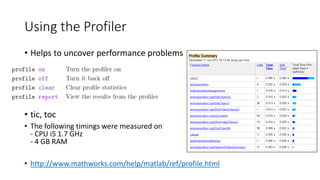
Using the Profiler
• Helps uncover performance problems
• Timing functions:
• tic, toc
• The following timings were measured on
- CPU i5 1.7 GHz
- 4 GB RAM
• http://www.mathworks.com/help/matlab/ref/profile.html
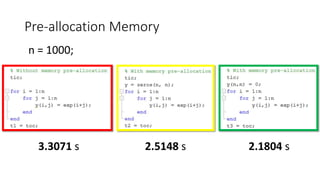
Pre-allocation Memory
3.3071 s
>> n = 1000;
2.1804 s2.5148 s
Reducing Memory Operations
>> x = 4;
>> x(2) = 7;
>> x(3) = 12;
>> x = zeros(3,1);
>> x = 4;
>> x(2) = 7;
>> x(3) = 12;
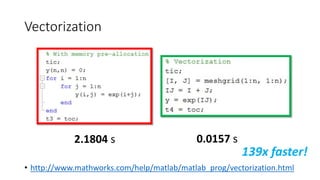
Vectorization
• http://www.mathworks.com/help/matlab/matlab_prog/vectorization.html
2.1804 s 0.0157 s
139x faster!
Using Vectorization
• Appearance
• more like the mathematical expressions, easier to understand.
• Less Error Prone
• Vectorized code is often shorter.
• Fewer opportunities to introduce programming errors.
• Performance:
• Often runs much faster than the corresponding code containing loops.
See http://www.mathworks.com/help/matlab/matlab_prog/vectorization.html
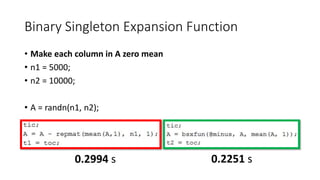
Binary Singleton Expansion Function
• Make each column in A zero mean
>> n1 = 5000;
>> n2 = 10000;
>> A = randn(n1, n2);
• See http://blogs.mathworks.com/loren/2008/08/04/comparing-repmat-and-bsxfun-
performance/
0.2994 s 0.2251 s
Why bsxfun is faster than repmat?
- bsxfun handles replication of the array
implicitly, thus avoid memory allocation
- Bsxfun supports multi-thread
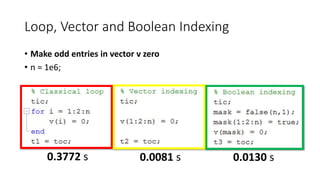
Loop, Vector and Boolean Indexing
• Make odd entries in vector v zero
• n = 1e6;
• See http://www.mathworks.com/help/matlab/learn_matlab/array-indexing.html
• See Fast manipulation of multi-dimensional arrays in Matlab by Kevin Murphy
0.3772 s 0.0081 s 0.0130 s
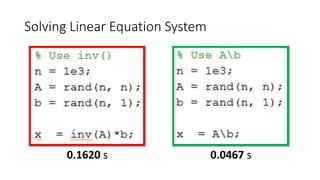
Solving Linear Equation System
0.1620 s 0.0467 s
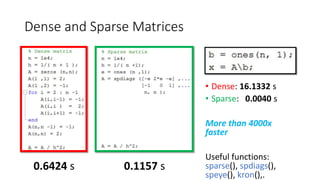
Dense and Sparse Matrices
• Dense: 16.1332 s
• Sparse: 0.0040 s
More than 4000x
faster!
Useful functions:
sparse(), spdiags(),
speye(), kron().
0.6424 s 0.1157 s
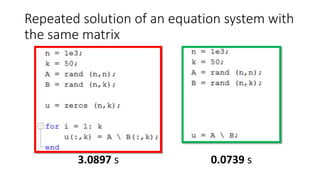
Repeated solution of an equation system with
the same matrix
3.0897 s 0.0739 s
Iterative Methods for Larger Problems
• Iterative solvers in MATLAB:
• bicg, bicgstab, cgs, gmres, lsqr, minres, pcg, symmlq, qmr
• [x,flag,relres,iter,resvec] = method(A,b,tol,maxit,M1,M2,x0)
• source: Writing Fast Matlab Code by Pascal Getreuer
Solving Ax = b when A is a Special Matrix
• Circulant matrices
• Matrices corresponding to cyclic convolution
Ax = conv(h, x) are diagonalized in the Fourier domain
>> x = ifft( fft(b) ./ fft(h) );
• Triangular and banded
• Efficiently solved by sparse LU factorization
>> [L,U] = lu(sparse(A));
>> x = U(Lb);
• Poisson problems
• See http://www.cs.berkeley.edu/~demmel/cs267/lecture25/lecture25.html
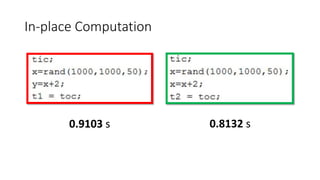
In-place Computation
>> x=randn(1000,1000,50);
0.1938 s 0.0560 s
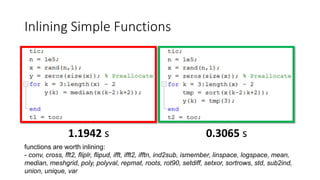
Inlining Simple Functions
1.1942 s 0.3065 s
functions are worth inlining:
- conv, cross, fft2, fliplr, flipud, ifft, ifft2, ifftn, ind2sub, ismember, linspace, logspace, mean,
median, meshgrid, poly, polyval, repmat, roots, rot90, setdiff, setxor, sortrows, std, sub2ind,
union, unique, var
y = medfilt1(x,5); 0.2082 s
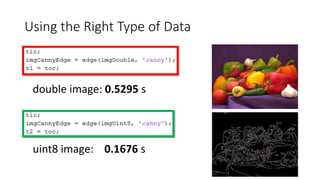
Using the Right Type of Data
“Do not use a cannon to kill a mosquito.”
double image: 0.5295 s
uint8 image: 0.1676 s
Confucius
Matlab Organize its Arrays as Column-Major
• Assign A to zero row-by-row or column-by-column
>> n = 1e4;
>> A = randn(n, n);
0.1041 s2.1740 s
Column-Major Memory Storage
>> x = magic(3)
x =
8 1 6
3 5 7
4 9 2
% Access one column
>> y = x(:, 1);
% Access one row
>> y = x(1, :);
Copy-on-Write (COW)
>> n = 500;
>> A = randn(n,n,n);
0.4794 s 0.0940 s
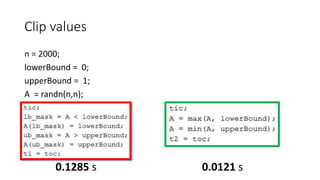
Clip values
>> n = 2000;
>> lowerBound = 0;
>> upperBound = 1;
>> A = randn(n,n);
0.0121 s0.1285 s
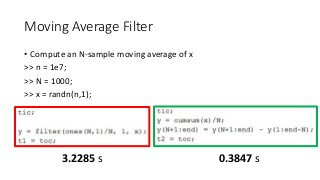
Moving Average Filter
• Compute an N-sample moving average of x
>> n = 1e7;
>> N = 1000;
>> x = randn(n,1);
3.2285 s 0.3847 s
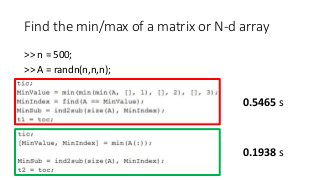
Find the min/max of a matrix or N-d array
>> n = 500;
>> A = randn(n,n,n);
0.5465 s
0.1938 s
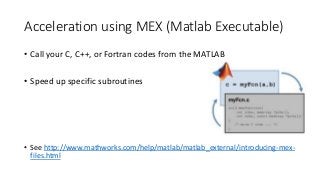
Acceleration using MEX (Matlab Executable)
• Call your C, C++, or Fortran codes from the MATLAB
• Speed up specific subroutines
• See http://www.mathworks.com/help/matlab/matlab_external/introducing-mex-
files.html
MATLAB Coder
• MATLAB Coder™ generates standalone C and C++ code from
MATLAB® code
• See video examples in http://www.mathworks.com/products/matlab-
coder/videos.html
• See http://www.mathworks.com/products/matlab-coder/
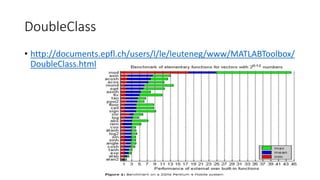
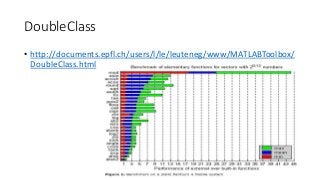
DoubleClass
• http://documents.epfl.ch/users/l/le/leuteneg/www/MATLABToolbox/
DoubleClass.html
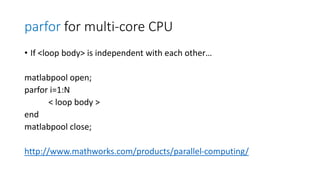
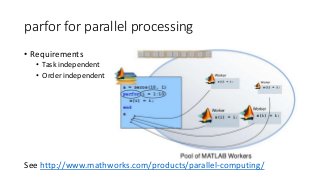
parfor for parallel processing
• Requirements
• Task independent
• Order independent
See http://www.mathworks.com/products/parallel-computing/
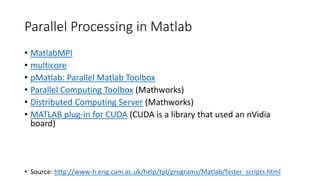
Parallel Processing in Matlab
• MatlabMPI
• multicore
• pMatlab: Parallel Matlab Toolbox
• Parallel Computing Toolbox (Mathworks)
• Distributed Computing Server (Mathworks)
• MATLAB plug-in for CUDA (CUDA is a library that used an nVidia
board)
• Source: http://www-h.eng.cam.ac.uk/help/tpl/programs/Matlab/faster_scripts.html
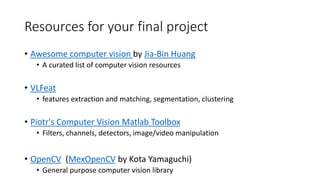
Resources for your final project
• Awesome computer vision by Jia-Bin Huang
• A curated list of computer vision resources
• VLFeat
• features extraction and matching, segmentation, clustering
• Piotr's Computer Vision Matlab Toolbox
• Filters, channels, detectors, image/video manipulation
• OpenCV (MexOpenCV by Kota Yamaguchi)
• General purpose computer vision library

Writing Fast MATLAB Code

  • 1.
    Writing Fast MATLABCode Jia-Bin Huang University of Illinois, Urbana-Champaign www.jiabinhuang.com jbhuang1@Illinois.edu
  • 2.
    Resources • Techniques forImproving Performance by Mathwork • Writing Fast Matlab Code by Pascal Getreuer • Guidelines for writing clean and fast code in MATLAB by Nico Schlömer • http://www.slideshare.net/UNISTSupercomputingCenter/speeding- upmatlabapplications • http://www.matlabtips.com/
  • 3.
    Using the Profiler •Helps uncover performance problems • Timing functions: • tic, toc • The following timings were measured on - CPU i5 1.7 GHz - 4 GB RAM • http://www.mathworks.com/help/matlab/ref/profile.html
  • 4.
    Pre-allocation Memory 3.3071 s >>n = 1000; 2.1804 s2.5148 s
  • 5.
    Reducing Memory Operations >>x = 4; >> x(2) = 7; >> x(3) = 12; >> x = zeros(3,1); >> x = 4; >> x(2) = 7; >> x(3) = 12;
  • 6.
  • 7.
    Using Vectorization • Appearance •more like the mathematical expressions, easier to understand. • Less Error Prone • Vectorized code is often shorter. • Fewer opportunities to introduce programming errors. • Performance: • Often runs much faster than the corresponding code containing loops. See http://www.mathworks.com/help/matlab/matlab_prog/vectorization.html
  • 8.
    Binary Singleton ExpansionFunction • Make each column in A zero mean >> n1 = 5000; >> n2 = 10000; >> A = randn(n1, n2); • See http://blogs.mathworks.com/loren/2008/08/04/comparing-repmat-and-bsxfun- performance/ 0.2994 s 0.2251 s Why bsxfun is faster than repmat? - bsxfun handles replication of the array implicitly, thus avoid memory allocation - Bsxfun supports multi-thread
  • 9.
    Loop, Vector andBoolean Indexing • Make odd entries in vector v zero • n = 1e6; • See http://www.mathworks.com/help/matlab/learn_matlab/array-indexing.html • See Fast manipulation of multi-dimensional arrays in Matlab by Kevin Murphy 0.3772 s 0.0081 s 0.0130 s
  • 10.
    Solving Linear EquationSystem 0.1620 s 0.0467 s
  • 11.
    Dense and SparseMatrices • Dense: 16.1332 s • Sparse: 0.0040 s More than 4000x faster! Useful functions: sparse(), spdiags(), speye(), kron(). 0.6424 s 0.1157 s
  • 12.
    Repeated solution ofan equation system with the same matrix 3.0897 s 0.0739 s
  • 13.
    Iterative Methods forLarger Problems • Iterative solvers in MATLAB: • bicg, bicgstab, cgs, gmres, lsqr, minres, pcg, symmlq, qmr • [x,flag,relres,iter,resvec] = method(A,b,tol,maxit,M1,M2,x0) • source: Writing Fast Matlab Code by Pascal Getreuer
  • 14.
    Solving Ax =b when A is a Special Matrix • Circulant matrices • Matrices corresponding to cyclic convolution Ax = conv(h, x) are diagonalized in the Fourier domain >> x = ifft( fft(b) ./ fft(h) ); • Triangular and banded • Efficiently solved by sparse LU factorization >> [L,U] = lu(sparse(A)); >> x = U(Lb); • Poisson problems • See http://www.cs.berkeley.edu/~demmel/cs267/lecture25/lecture25.html
  • 15.
  • 16.
    Inlining Simple Functions 1.1942s 0.3065 s functions are worth inlining: - conv, cross, fft2, fliplr, flipud, ifft, ifft2, ifftn, ind2sub, ismember, linspace, logspace, mean, median, meshgrid, poly, polyval, repmat, roots, rot90, setdiff, setxor, sortrows, std, sub2ind, union, unique, var y = medfilt1(x,5); 0.2082 s
  • 17.
    Using the RightType of Data “Do not use a cannon to kill a mosquito.” double image: 0.5295 s uint8 image: 0.1676 s Confucius
  • 18.
    Matlab Organize itsArrays as Column-Major • Assign A to zero row-by-row or column-by-column >> n = 1e4; >> A = randn(n, n); 0.1041 s2.1740 s
  • 19.
    Column-Major Memory Storage >>x = magic(3) x = 8 1 6 3 5 7 4 9 2 % Access one column >> y = x(:, 1); % Access one row >> y = x(1, :);
  • 20.
    Copy-on-Write (COW) >> n= 500; >> A = randn(n,n,n); 0.4794 s 0.0940 s
  • 21.
    Clip values >> n= 2000; >> lowerBound = 0; >> upperBound = 1; >> A = randn(n,n); 0.0121 s0.1285 s
  • 22.
    Moving Average Filter •Compute an N-sample moving average of x >> n = 1e7; >> N = 1000; >> x = randn(n,1); 3.2285 s 0.3847 s
  • 23.
    Find the min/maxof a matrix or N-d array >> n = 500; >> A = randn(n,n,n); 0.5465 s 0.1938 s
  • 24.
    Acceleration using MEX(Matlab Executable) • Call your C, C++, or Fortran codes from the MATLAB • Speed up specific subroutines • See http://www.mathworks.com/help/matlab/matlab_external/introducing-mex- files.html
  • 25.
    MATLAB Coder • MATLABCoder™ generates standalone C and C++ code from MATLAB® code • See video examples in http://www.mathworks.com/products/matlab- coder/videos.html • See http://www.mathworks.com/products/matlab-coder/
  • 26.
  • 27.
    parfor for parallelprocessing • Requirements • Task independent • Order independent See http://www.mathworks.com/products/parallel-computing/
  • 28.
    Parallel Processing inMatlab • MatlabMPI • multicore • pMatlab: Parallel Matlab Toolbox • Parallel Computing Toolbox (Mathworks) • Distributed Computing Server (Mathworks) • MATLAB plug-in for CUDA (CUDA is a library that used an nVidia board) • Source: http://www-h.eng.cam.ac.uk/help/tpl/programs/Matlab/faster_scripts.html
  • 29.
    Resources for yourfinal project • Awesome computer vision by Jia-Bin Huang • A curated list of computer vision resources • VLFeat • features extraction and matching, segmentation, clustering • Piotr's Computer Vision Matlab Toolbox • Filters, channels, detectors, image/video manipulation • OpenCV (MexOpenCV by Kota Yamaguchi) • General purpose computer vision library

Editor's Notes

  • #6 Repeatedly expanding the size of an array over time, (for example, adding more elements to it each time through a programming loop), can adversely affect the performance of your program. This is because 1) MATLAB has to spend time allocating more memory each time you increase the size of the array. 2) This newly allocated memory is likely to be noncontiguous, thus slowing down any operations that MATLAB needs to perform on the array.