College Of Engineering And Technology
Project Presentation
BCA 3rd Year Spring Semester
2017-2018
LIBRARY MANAGEMENT SYSTEM
Submitted by :
Ankita Jangir (150428)
Under the guidance of:
Dr. Sanjeev Patwa
Introduction
 Library Management System is designed to make
the everyday working of the library very easy and
simple. It can be done wherever we are by just
using the application. It keeps track of issued,
returned, reserved, requested, added books in the
library.
 It helps to provide all the information to the user
as well as the library administrator. It provides all
the facilities to the user. It has three logins that
are one for the Administrator, one for the Teacher
and one for the Student. By using this application
we can save our time and cost.
Introduction
 In Admin Login Admin can add new student, add new
teacher, add new book, issue the book, submit the book,
delete the book, delete student, delete teacher, change
account password, search for any book and can see the list
of issued, reserved, requested books.
 In Teacher Login teachers can request for a new book,
reserve a book, upload notes for the students, can see the
notes uploaded by them, change their account password, and
search for a book.
 In Student Login students can request for a new book,
reserve a book, view notes uploaded by teacher for their
batch and year, search for a book, and change their account
password.
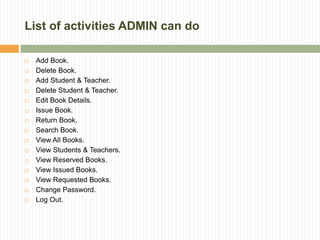
List of activities ADMIN can do
 Add Book.
 Delete Book.
 Add Student & Teacher.
 Delete Student & Teacher.
 Edit Book Details.
 Issue Book.
 Return Book.
 Search Book.
 View All Books.
 View Students & Teachers.
 View Reserved Books.
 View Issued Books.
 View Requested Books.
 Change Password.
 Log Out.
List of activities TEACHER can do
 Request New Book.
 Reserve Book.
 Search Book.
 Upload Notes.
 View Issued Books.
 View Reserved Books.
 View Requested Books.
 View Uploaded Notes.
 Change Password.
 Log Out.
List of activities STUDENT can do
 Request New Book.
 Reserve Book.
 Search Book.
 View Issued Books.
 View Reserved Books.
 View Requested Books.
 View Uploaded Notes.
 Change Password.
 Log Out.
LIMITATIONS OF THE EXISTING SYSTEM
1
• Only Librarian has details about the books,
students and faculties.
2
• All the work should be done from the desktop
only.
3
• Students and faculties have no access to their
accounts.
4
• They cannot see the list of books issued by
them and reserved by them.
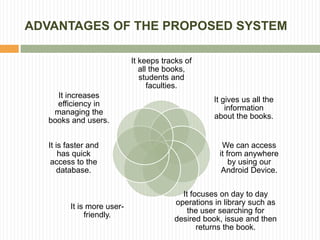
ADVANTAGES OF THE PROPOSED SYSTEM
It keeps tracks of
all the books,
students and
faculties.
It gives us all the
information
about the books.
We can access
it from anywhere
by using our
Android Device.
It focuses on day to day
operations in library such as
the user searching for
desired book, issue and then
returns the book.
It is more user-
friendly.
It is faster and
has quick
access to the
database.
It increases
efficiency in
managing the
books and users.
Tools & Techniques used
Java:-
• Java is a general-
purpose computer-
programming
language that
is concurrent, class-
based, object-
oriented, and specifically
designed to have as few
implementation
dependencies as
possible.
Android:-
• Android is a mobile
operating
system developed
by Google, based on a
modified version of
the Linux kernel and
other open
source software and
designed primarily
for touch screen mobile
devices such as smart
phones and tablets.
Tools & Techniques used
PHP:-
• The PHP Hypertext
Preprocessor (PHP) is
a programming
language that allows
web developers to
create dynamic content
that interacts with
databases. PHP is
basically used for
developing web based
software applications.
Web Services:-
• Web services are open
standard (XML, SOAP,
HTTP, etc.) based web
applications that interact
with other web
applications for the
purpose of exchanging
data. Web services can
convert your existing
applications into web
applications.
Hardware & Software
Requirements
• Windows 7/8/10.
• JAVA 1.8.
• Android Studio.
Software
Requirements:-
• 160 GB Hard Disk.
• 8 GB RAM.
• Android Device.
Hardware
Requirements:-
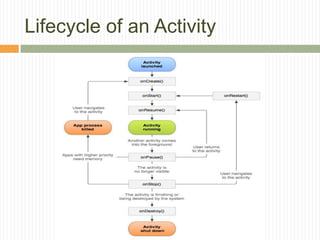
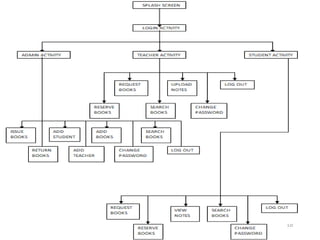
Lifecycle of an Activity
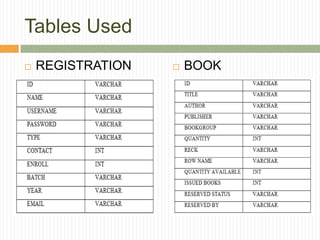
Tables Used
 REGISTRATION  BOOK
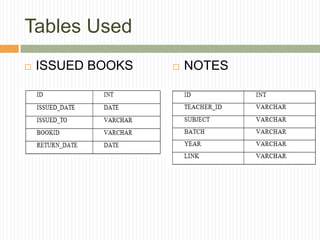
Tables Used
 ISSUED BOOKS  NOTES
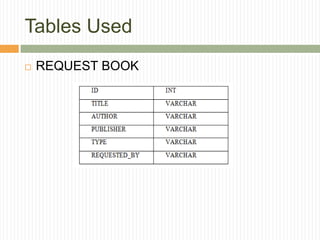
Tables Used
 REQUEST BOOK
Screenshots
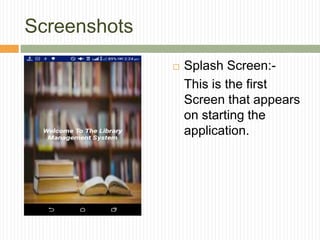
 Splash Screen:-
This is the first
Screen that appears
on starting the
application.
Screenshots
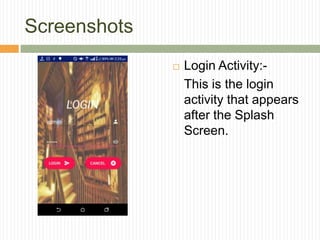
 Login Activity:-
This is the login
activity that appears
after the Splash
Screen.
Screenshots
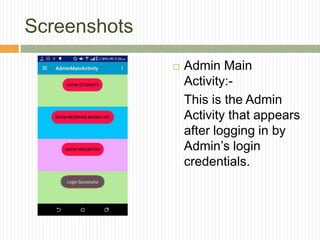
 Admin Main
Activity:-
This is the Admin
Activity that appears
after logging in by
Admin’s login
credentials.
Screenshots
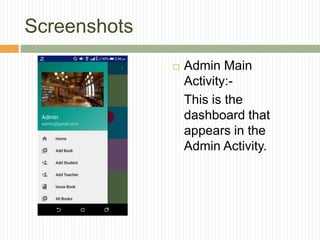
 Admin Main
Activity:-
This is the
dashboard that
appears in the
Admin Activity.
Screenshots
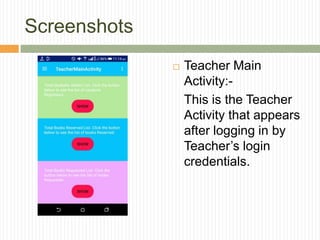
 Teacher Main
Activity:-
This is the Teacher
Activity that appears
after logging in by
Teacher’s login
credentials.
Screenshots
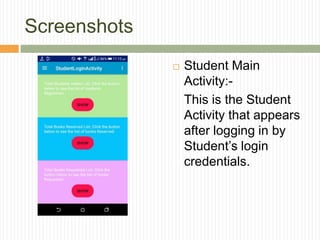
 Student Main
Activity:-
This is the Student
Activity that appears
after logging in by
Student’s login
credentials.
Conclusion
 This project is developed by using Android,
Web Services. By developing this project I
learnt Android Studio, Web Services, PHP.
 By this project, we can generate reports like
Total Students Registered, Total Faculty
Members Registered, Number of Books in the
Library, Number of Books Issued, Number of
Books Left, Number of Books Reserved, etc.
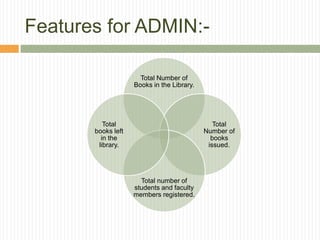
Features for ADMIN:-
Total Number of
Books in the Library.
Total
Number of
books
issued.
Total number of
students and faculty
members registered.
Total
books left
in the
library.
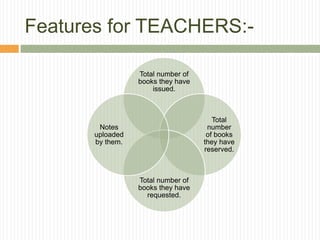
Features for TEACHERS:-
Total number of
books they have
issued.
Total
number
of books
they have
reserved.
Total number of
books they have
requested.
Notes
uploaded
by them.
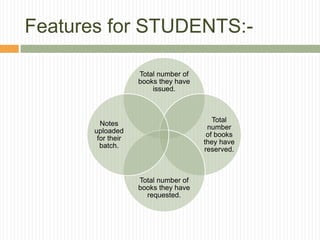
Features for STUDENTS:-
Total number of
books they have
issued.
Total
number
of books
they have
reserved.
Total number of
books they have
requested.
Notes
uploaded
for their
batch.
Reports Generated By The
Application:-
 List of Students and Faculties registered.
 List of books available in the Library.
 List of Books issued.
 List of Books reserved.
 List of Books requested.
 List of Notes Uploaded.
Future Work
 This Project can be enhanced in future by
expanding it to the Institute Management
Level. So, that it can be used for more
purposes. This project only deals with the
Library Management of any Institute but by
expanding it we can manage the Institute by
this Android Application.
References
 [1] Ashutosh Tripathi& Ashish Srivastava,
Online LibraryManagement System, IOSR
Journal of Engineering (IOSRJEN),Vol. 2 Issue
2, Feb.2012, pp. 180- 186.
 [2]https://www.freeprojectz.com/andriod/androi
d-project-library-management-system.
 [3] https://web.iiit.ac.in/~sireesh/pr_5/library.
THANK YOU

Library Management System

  • 1.
    College Of EngineeringAnd Technology Project Presentation BCA 3rd Year Spring Semester 2017-2018 LIBRARY MANAGEMENT SYSTEM Submitted by : Ankita Jangir (150428) Under the guidance of: Dr. Sanjeev Patwa
  • 2.
    Introduction  Library ManagementSystem is designed to make the everyday working of the library very easy and simple. It can be done wherever we are by just using the application. It keeps track of issued, returned, reserved, requested, added books in the library.  It helps to provide all the information to the user as well as the library administrator. It provides all the facilities to the user. It has three logins that are one for the Administrator, one for the Teacher and one for the Student. By using this application we can save our time and cost.
  • 3.
    Introduction  In AdminLogin Admin can add new student, add new teacher, add new book, issue the book, submit the book, delete the book, delete student, delete teacher, change account password, search for any book and can see the list of issued, reserved, requested books.  In Teacher Login teachers can request for a new book, reserve a book, upload notes for the students, can see the notes uploaded by them, change their account password, and search for a book.  In Student Login students can request for a new book, reserve a book, view notes uploaded by teacher for their batch and year, search for a book, and change their account password.
  • 4.
    List of activitiesADMIN can do  Add Book.  Delete Book.  Add Student & Teacher.  Delete Student & Teacher.  Edit Book Details.  Issue Book.  Return Book.  Search Book.  View All Books.  View Students & Teachers.  View Reserved Books.  View Issued Books.  View Requested Books.  Change Password.  Log Out.
  • 5.
    List of activitiesTEACHER can do  Request New Book.  Reserve Book.  Search Book.  Upload Notes.  View Issued Books.  View Reserved Books.  View Requested Books.  View Uploaded Notes.  Change Password.  Log Out.
  • 6.
    List of activitiesSTUDENT can do  Request New Book.  Reserve Book.  Search Book.  View Issued Books.  View Reserved Books.  View Requested Books.  View Uploaded Notes.  Change Password.  Log Out.
  • 7.
    LIMITATIONS OF THEEXISTING SYSTEM 1 • Only Librarian has details about the books, students and faculties. 2 • All the work should be done from the desktop only. 3 • Students and faculties have no access to their accounts. 4 • They cannot see the list of books issued by them and reserved by them.
  • 8.
    ADVANTAGES OF THEPROPOSED SYSTEM It keeps tracks of all the books, students and faculties. It gives us all the information about the books. We can access it from anywhere by using our Android Device. It focuses on day to day operations in library such as the user searching for desired book, issue and then returns the book. It is more user- friendly. It is faster and has quick access to the database. It increases efficiency in managing the books and users.
  • 9.
    Tools & Techniquesused Java:- • Java is a general- purpose computer- programming language that is concurrent, class- based, object- oriented, and specifically designed to have as few implementation dependencies as possible. Android:- • Android is a mobile operating system developed by Google, based on a modified version of the Linux kernel and other open source software and designed primarily for touch screen mobile devices such as smart phones and tablets.
  • 10.
    Tools & Techniquesused PHP:- • The PHP Hypertext Preprocessor (PHP) is a programming language that allows web developers to create dynamic content that interacts with databases. PHP is basically used for developing web based software applications. Web Services:- • Web services are open standard (XML, SOAP, HTTP, etc.) based web applications that interact with other web applications for the purpose of exchanging data. Web services can convert your existing applications into web applications.
  • 11.
    Hardware & Software Requirements •Windows 7/8/10. • JAVA 1.8. • Android Studio. Software Requirements:- • 160 GB Hard Disk. • 8 GB RAM. • Android Device. Hardware Requirements:-
  • 12.
  • 14.
  • 15.
    Tables Used  ISSUEDBOOKS  NOTES
  • 16.
  • 17.
    Screenshots  Splash Screen:- Thisis the first Screen that appears on starting the application.
  • 18.
    Screenshots  Login Activity:- Thisis the login activity that appears after the Splash Screen.
  • 19.
    Screenshots  Admin Main Activity:- Thisis the Admin Activity that appears after logging in by Admin’s login credentials.
  • 20.
    Screenshots  Admin Main Activity:- Thisis the dashboard that appears in the Admin Activity.
  • 21.
    Screenshots  Teacher Main Activity:- Thisis the Teacher Activity that appears after logging in by Teacher’s login credentials.
  • 22.
    Screenshots  Student Main Activity:- Thisis the Student Activity that appears after logging in by Student’s login credentials.
  • 23.
    Conclusion  This projectis developed by using Android, Web Services. By developing this project I learnt Android Studio, Web Services, PHP.  By this project, we can generate reports like Total Students Registered, Total Faculty Members Registered, Number of Books in the Library, Number of Books Issued, Number of Books Left, Number of Books Reserved, etc.
  • 24.
    Features for ADMIN:- TotalNumber of Books in the Library. Total Number of books issued. Total number of students and faculty members registered. Total books left in the library.
  • 25.
    Features for TEACHERS:- Totalnumber of books they have issued. Total number of books they have reserved. Total number of books they have requested. Notes uploaded by them.
  • 26.
    Features for STUDENTS:- Totalnumber of books they have issued. Total number of books they have reserved. Total number of books they have requested. Notes uploaded for their batch.
  • 27.
    Reports Generated ByThe Application:-  List of Students and Faculties registered.  List of books available in the Library.  List of Books issued.  List of Books reserved.  List of Books requested.  List of Notes Uploaded.
  • 28.
    Future Work  ThisProject can be enhanced in future by expanding it to the Institute Management Level. So, that it can be used for more purposes. This project only deals with the Library Management of any Institute but by expanding it we can manage the Institute by this Android Application.
  • 29.
    References  [1] AshutoshTripathi& Ashish Srivastava, Online LibraryManagement System, IOSR Journal of Engineering (IOSRJEN),Vol. 2 Issue 2, Feb.2012, pp. 180- 186.  [2]https://www.freeprojectz.com/andriod/androi d-project-library-management-system.  [3] https://web.iiit.ac.in/~sireesh/pr_5/library.
  • 30.