
SSAS “Denali”Itay Braun | CTO | Twingoitay@twingo.co.il
What’s new in SSAS “Denali”What’s new in SSRS and SSIS “Denali”
Analysis Services: TodayBroad adoption “Customers in the Magic Quadrant survey report that their Microsoft average deployment sizes are now larger than any other vendor in the survey in terms of users.”“Use of OLAP functionality by Microsoft customers is more than double that for the rest of the survey respondents.”Source: Gartner Magic Quadrant for BI Platforms, 2011Large ecosystem "Wide availability of skills is among the top reasons customers select Microsoft over competing vendors.”Source: Gartner Magic Quadrant for BI Platforms, 2011Highest rated infrastructure and development tools“Microsoft customers rate its BI platform infrastructure and development tools among the highest compared to other vendors, and a higher percentage of customers use them extensively.” Source: Gartner Magic Quadrant for BI Platforms, 2011
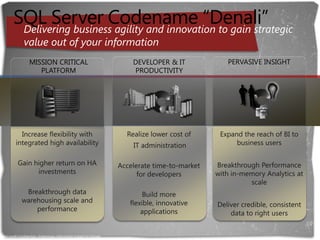
SQL Server Codename “Denali”Delivering business agility and innovation to gain strategic value out of your informationPERVASIVE INSIGHTMISSION CRITICAL PLATFORMDEVELOPER & IT PRODUCTIVITYIncrease flexibility with integrated high availabilityGain higher return on HA investmentsBreakthrough data warehousing scale and performanceRealize lower cost of                   IT administrationAccelerate time-to-market for developersBuild more flexible, innovative applicationsExpand the reach of BI to business usersBreakthrough Performance with in-memory Analytics at scaleDeliver credible, consistent data to right usersMicrosoft Confidential—Preliminary Information Subject to Change
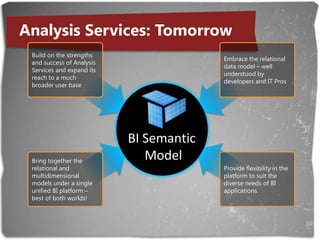
Analysis Services: TomorrowBuild on the strengths and success of Analysis Services and expand its reach to a much broader user baseEmbrace the relational data model – well understood by developers and IT ProsAnalysis Services VisionBI Semantic ModelBring together the relational and multidimensional models under a single unified BI platform – best of both worlds!Provide flexibility in the platform to suit the diverse needs of BI applications
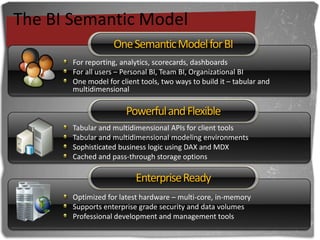
The BI Semantic ModelOne Semantic Model for BIPowerful and FlexibleEnterprise ReadyFor reporting, analytics, scorecards, dashboardsFor all users – Personal BI, Team BI, Organizational BIOne model for client tools, two ways to build it – tabular and multidimensionalTabular and multidimensional APIs for client toolsTabular and multidimensional modeling environmentsSophisticated business logic using DAX and MDXCached and pass-through storage optionsOptimized for latest hardware – multi-core, in-memorySupports enterprise grade security and data volumesProfessional development and management tools
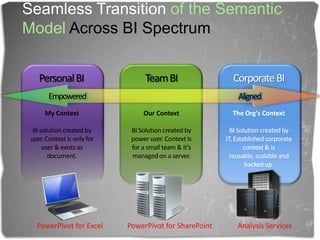
SeamlessTransitionof the Semantic Model Across BI SpectrumTeam BIPersonal BI Corporate BIEmpoweredAlignedOur ContextBI Solution created by power user. Context is for a small team & it’s managed on a server.The Org’s ContextBI Solution created by IT, Established corporate context & is reusable, scalable and backed up.My ContextBI solution created by user. Context is only for user & exists as document.PowerPivot for ExcelPowerPivot for SharePointAnalysis Services
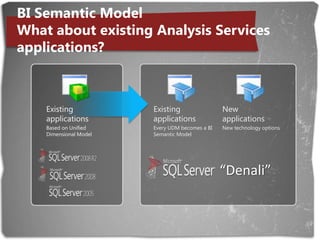
BI Semantic ModelWhat about existing Analysis Services applications?New applicationsNew technology optionsExisting applicationsBased on Unified Dimensional ModelExisting applicationsEvery UDM becomes a BI Semantic ModelExisting applicationsBased on Unified Dimensional Model“Denali”
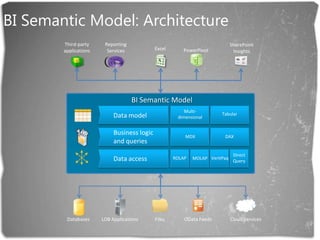
BI Semantic Model: ArchitectureThird-partyapplicationsReportingServicesSharePointInsightsExcel PowerPivotBI Semantic ModelMulti-dimensionalData model TabularBusiness logic and queriesMDXDAXDirectQueryData accessROLAPVertiPaqMOLAPDatabasesLOB ApplicationsFilesOData FeedsCloud Services
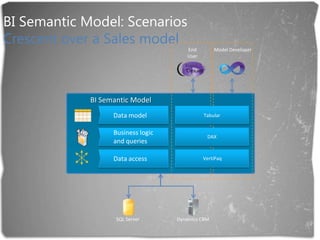
BI Semantic Model: ScenariosCrescent over a Sales modelEndUserModel DeveloperBI Semantic ModelData model TabularBusiness logic and queriesDAXData accessVertiPaqSQL ServerDynamics CRM
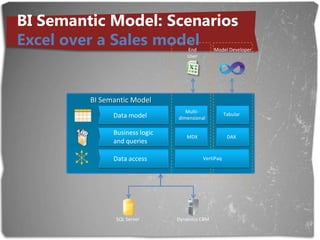
BI Semantic Model: ScenariosExcel over a Sales modelEndUserModel DeveloperBI Semantic ModelMulti-dimensionalData model TabularBusiness logic and queriesMDXDAXData accessVertiPaqSQL ServerDynamics CRM
BI Semantic Model: ScenariosExcel over a Finance modelEndUserModel DeveloperBI Semantic ModelData model Multi-dimensionalBusiness logic and queriesMDXData accessMOLAPOracleSAP
BI Semantic Model: ScenariosCrescent over a Finance modelEndUserModel DeveloperBI Semantic ModelMulti-dimensionalData model TabularBusiness logic and queriesDAXMDXData accessMOLAPOracleSAP
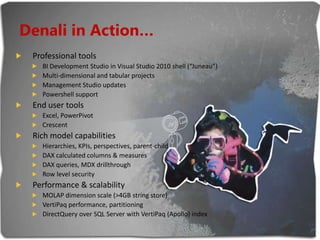
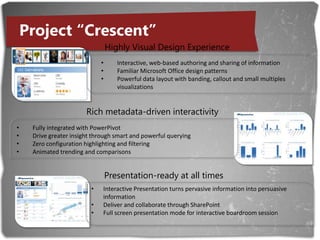
Denali in Action…Professional toolsBI Development Studio in Visual Studio 2010 shell (“Juneau”)Multi-dimensional and tabular projectsManagement Studio updatesPowershell supportEnd user toolsExcel, PowerPivotCrescentRich model capabilitiesHierarchies, KPIs, perspectives, parent-childDAX calculated columns & measuresDAX queries, MDX drillthroughRow level securityPerformance & scalabilityMOLAP dimension scale (>4GB string store)VertiPaq performance, partitioningDirectQuery over SQL Server with VertiPaq (Apollo) index
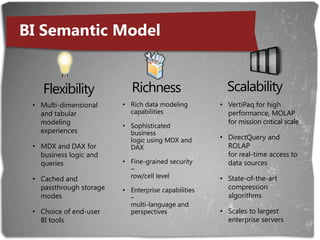
BI Semantic ModelScalabilityRichnessFlexibilityVertiPaq for high performance, MOLAP for mission critical scaleDirectQuery and ROLAP for real-time access to data sourcesState-of-the-art compression algorithmsScales to largest enterprise serversMulti-dimensional and tabular modeling experiencesMDX and DAX for business logic and queriesCached and passthrough storage modesChoice of end-user BI toolsRich data modeling capabilitiesSophisticated business logic using MDX and DAXFine-grained security – row/cell levelEnterprise capabilities – multi-language and perspectives
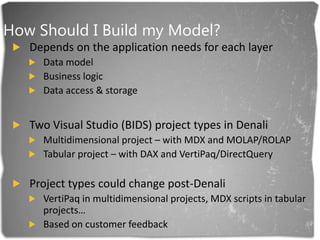
How Should I Build my Model?Depends on the application needs for each layerData modelBusiness logicData access & storageTwo Visual Studio (BIDS) project types in DenaliMultidimensional project – with MDX and MOLAP/ROLAPTabular project – with DAX and VertiPaq/DirectQueryProject types could change post-DenaliVertiPaqin multidimensional projects, MDX scripts in tabular projects…Based on customer feedback
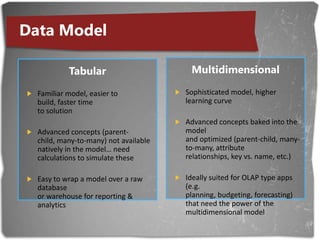
Data ModelMultidimensionalSophisticated model, higher learning curveAdvanced concepts baked into the model and optimized (parent-child, many-to-many, attribute relationships, key vs. name, etc.)Ideally suited for OLAP type apps (e.g. planning, budgeting, forecasting) that need the power of the multidimensional modelTabularFamiliar model, easier to build, faster time to solutionAdvanced concepts (parent-child, many-to-many) not available natively in the model… need calculations to simulate theseEasy to wrap a model over a raw database or warehouse for reporting & analytics
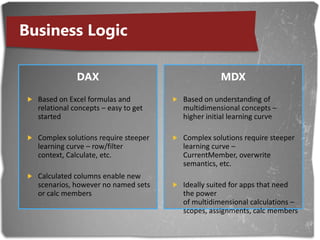
Business LogicDAXBased on Excel formulas and relational concepts – easy to get startedComplex solutions require steeper learning curve – row/filter context, Calculate, etc.Calculated columns enable new scenarios, however no named sets or calc membersMDXBased on understanding of multidimensional concepts – higher initial learning curveComplex solutions require steeper learning curve – CurrentMember, overwrite semantics, etc.Ideally suited for apps that need the power of multidimensional calculations – scopes, assignments, calc members
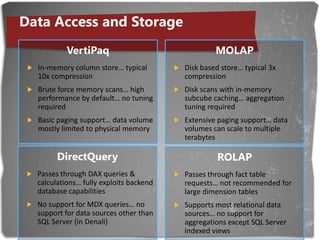
Data Access and StorageVertiPaqIn-memory column store… typical 10x compressionBrute force memory scans… high performance by default… no tuning requiredBasic paging support… data volume mostly limited to physical memoryMOLAPDisk based store… typical 3x compressionDisk scans with in-memory subcube caching… aggregation tuning requiredExtensive paging support… data volumes can scale to multiple terabytesDirectQueryPasses through DAX queries & calculations… fully exploits backend database capabilitiesNo support for MDX queries… no support for data sources other than SQL Server (in Denali)ROLAPPasses through fact table requests… not recommended for large dimension tablesSupports most relational data sources… no support for aggregations except SQL Server indexed views
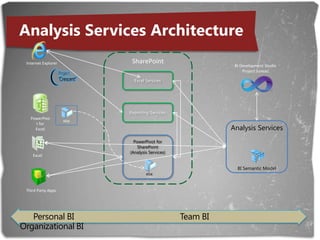
Analysis Services ArchitectureSharePointInternet ExplorerBI Development StudioProject JuneauExcel ServicesReporting ServicesxlsxPowerPivot for ExcelAnalysis ServicesBI Semantic ModelPowerPivot for SharePoint(Analysis Services)ExcelxlsxThird Party AppsPersonal BI                                     	Team BI                                             Organizational BI
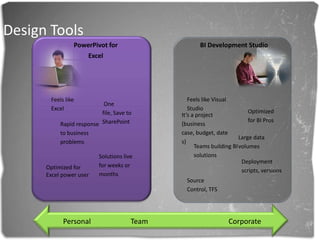
Design ToolsPowerPivot for ExcelBI Development StudioFeels like Visual StudioFeels like Excel  One file, Save to SharePointOptimized for BI ProsIt’s a project (business case, budget, dates)Rapid response to business problemsLarge data volumesTeams building BI solutionsSolutions live for weeks or monthsDeployment scripts, versionsOptimized for Excel power userSource Control, TFSPersonal 	    Team		   	   Corporate
What’s new in SSRS and SSIS
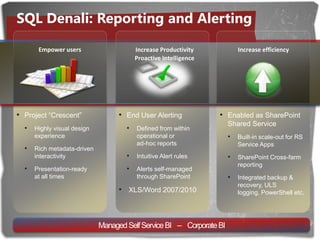
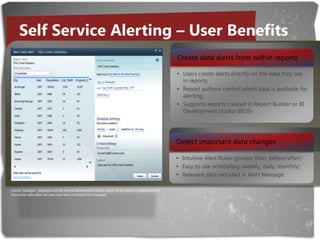
SQL Denali: Reporting and AlertingIncrease Productivity Proactive IntelligenceIncrease efficiencyEmpower usersEnd User Alerting
Defined from within operational or ad-hoc reports
Intuitive Alert rules
Alerts self-managed through SharePoint
XLS/Word 2007/2010
Enabled as SharePoint Shared Service

Extreme SSAS- SQL 2011

  • 1.
    SSAS “Denali”Itay Braun| CTO | Twingoitay@twingo.co.il
  • 2.
    What’s new inSSAS “Denali”What’s new in SSRS and SSIS “Denali”
  • 3.
    Analysis Services: TodayBroadadoption “Customers in the Magic Quadrant survey report that their Microsoft average deployment sizes are now larger than any other vendor in the survey in terms of users.”“Use of OLAP functionality by Microsoft customers is more than double that for the rest of the survey respondents.”Source: Gartner Magic Quadrant for BI Platforms, 2011Large ecosystem "Wide availability of skills is among the top reasons customers select Microsoft over competing vendors.”Source: Gartner Magic Quadrant for BI Platforms, 2011Highest rated infrastructure and development tools“Microsoft customers rate its BI platform infrastructure and development tools among the highest compared to other vendors, and a higher percentage of customers use them extensively.” Source: Gartner Magic Quadrant for BI Platforms, 2011
  • 4.
    SQL Server Codename“Denali”Delivering business agility and innovation to gain strategic value out of your informationPERVASIVE INSIGHTMISSION CRITICAL PLATFORMDEVELOPER & IT PRODUCTIVITYIncrease flexibility with integrated high availabilityGain higher return on HA investmentsBreakthrough data warehousing scale and performanceRealize lower cost of IT administrationAccelerate time-to-market for developersBuild more flexible, innovative applicationsExpand the reach of BI to business usersBreakthrough Performance with in-memory Analytics at scaleDeliver credible, consistent data to right usersMicrosoft Confidential—Preliminary Information Subject to Change
  • 5.
    Analysis Services: TomorrowBuildon the strengths and success of Analysis Services and expand its reach to a much broader user baseEmbrace the relational data model – well understood by developers and IT ProsAnalysis Services VisionBI Semantic ModelBring together the relational and multidimensional models under a single unified BI platform – best of both worlds!Provide flexibility in the platform to suit the diverse needs of BI applications
  • 6.
    The BI SemanticModelOne Semantic Model for BIPowerful and FlexibleEnterprise ReadyFor reporting, analytics, scorecards, dashboardsFor all users – Personal BI, Team BI, Organizational BIOne model for client tools, two ways to build it – tabular and multidimensionalTabular and multidimensional APIs for client toolsTabular and multidimensional modeling environmentsSophisticated business logic using DAX and MDXCached and pass-through storage optionsOptimized for latest hardware – multi-core, in-memorySupports enterprise grade security and data volumesProfessional development and management tools
  • 7.
    SeamlessTransitionof the SemanticModel Across BI SpectrumTeam BIPersonal BI Corporate BIEmpoweredAlignedOur ContextBI Solution created by power user. Context is for a small team & it’s managed on a server.The Org’s ContextBI Solution created by IT, Established corporate context & is reusable, scalable and backed up.My ContextBI solution created by user. Context is only for user & exists as document.PowerPivot for ExcelPowerPivot for SharePointAnalysis Services
  • 8.
    BI Semantic ModelWhatabout existing Analysis Services applications?New applicationsNew technology optionsExisting applicationsBased on Unified Dimensional ModelExisting applicationsEvery UDM becomes a BI Semantic ModelExisting applicationsBased on Unified Dimensional Model“Denali”
  • 9.
    BI Semantic Model:ArchitectureThird-partyapplicationsReportingServicesSharePointInsightsExcel PowerPivotBI Semantic ModelMulti-dimensionalData model TabularBusiness logic and queriesMDXDAXDirectQueryData accessROLAPVertiPaqMOLAPDatabasesLOB ApplicationsFilesOData FeedsCloud Services
  • 10.
    BI Semantic Model:ScenariosCrescent over a Sales modelEndUserModel DeveloperBI Semantic ModelData model TabularBusiness logic and queriesDAXData accessVertiPaqSQL ServerDynamics CRM
  • 11.
    BI Semantic Model:ScenariosExcel over a Sales modelEndUserModel DeveloperBI Semantic ModelMulti-dimensionalData model TabularBusiness logic and queriesMDXDAXData accessVertiPaqSQL ServerDynamics CRM
  • 12.
    BI Semantic Model:ScenariosExcel over a Finance modelEndUserModel DeveloperBI Semantic ModelData model Multi-dimensionalBusiness logic and queriesMDXData accessMOLAPOracleSAP
  • 13.
    BI Semantic Model:ScenariosCrescent over a Finance modelEndUserModel DeveloperBI Semantic ModelMulti-dimensionalData model TabularBusiness logic and queriesDAXMDXData accessMOLAPOracleSAP
  • 14.
    Denali in Action…ProfessionaltoolsBI Development Studio in Visual Studio 2010 shell (“Juneau”)Multi-dimensional and tabular projectsManagement Studio updatesPowershell supportEnd user toolsExcel, PowerPivotCrescentRich model capabilitiesHierarchies, KPIs, perspectives, parent-childDAX calculated columns & measuresDAX queries, MDX drillthroughRow level securityPerformance & scalabilityMOLAP dimension scale (>4GB string store)VertiPaq performance, partitioningDirectQuery over SQL Server with VertiPaq (Apollo) index
  • 15.
    BI Semantic ModelScalabilityRichnessFlexibilityVertiPaqfor high performance, MOLAP for mission critical scaleDirectQuery and ROLAP for real-time access to data sourcesState-of-the-art compression algorithmsScales to largest enterprise serversMulti-dimensional and tabular modeling experiencesMDX and DAX for business logic and queriesCached and passthrough storage modesChoice of end-user BI toolsRich data modeling capabilitiesSophisticated business logic using MDX and DAXFine-grained security – row/cell levelEnterprise capabilities – multi-language and perspectives
  • 16.
    How Should IBuild my Model?Depends on the application needs for each layerData modelBusiness logicData access & storageTwo Visual Studio (BIDS) project types in DenaliMultidimensional project – with MDX and MOLAP/ROLAPTabular project – with DAX and VertiPaq/DirectQueryProject types could change post-DenaliVertiPaqin multidimensional projects, MDX scripts in tabular projects…Based on customer feedback
  • 17.
    Data ModelMultidimensionalSophisticated model,higher learning curveAdvanced concepts baked into the model and optimized (parent-child, many-to-many, attribute relationships, key vs. name, etc.)Ideally suited for OLAP type apps (e.g. planning, budgeting, forecasting) that need the power of the multidimensional modelTabularFamiliar model, easier to build, faster time to solutionAdvanced concepts (parent-child, many-to-many) not available natively in the model… need calculations to simulate theseEasy to wrap a model over a raw database or warehouse for reporting & analytics
  • 18.
    Business LogicDAXBased onExcel formulas and relational concepts – easy to get startedComplex solutions require steeper learning curve – row/filter context, Calculate, etc.Calculated columns enable new scenarios, however no named sets or calc membersMDXBased on understanding of multidimensional concepts – higher initial learning curveComplex solutions require steeper learning curve – CurrentMember, overwrite semantics, etc.Ideally suited for apps that need the power of multidimensional calculations – scopes, assignments, calc members
  • 19.
    Data Access andStorageVertiPaqIn-memory column store… typical 10x compressionBrute force memory scans… high performance by default… no tuning requiredBasic paging support… data volume mostly limited to physical memoryMOLAPDisk based store… typical 3x compressionDisk scans with in-memory subcube caching… aggregation tuning requiredExtensive paging support… data volumes can scale to multiple terabytesDirectQueryPasses through DAX queries & calculations… fully exploits backend database capabilitiesNo support for MDX queries… no support for data sources other than SQL Server (in Denali)ROLAPPasses through fact table requests… not recommended for large dimension tablesSupports most relational data sources… no support for aggregations except SQL Server indexed views
  • 20.
    Analysis Services ArchitectureSharePointInternetExplorerBI Development StudioProject JuneauExcel ServicesReporting ServicesxlsxPowerPivot for ExcelAnalysis ServicesBI Semantic ModelPowerPivot for SharePoint(Analysis Services)ExcelxlsxThird Party AppsPersonal BI Team BI Organizational BI
  • 21.
    Design ToolsPowerPivot forExcelBI Development StudioFeels like Visual StudioFeels like Excel One file, Save to SharePointOptimized for BI ProsIt’s a project (business case, budget, dates)Rapid response to business problemsLarge data volumesTeams building BI solutionsSolutions live for weeks or monthsDeployment scripts, versionsOptimized for Excel power userSource Control, TFSPersonal Team Corporate
  • 22.
    What’s new inSSRS and SSIS
  • 23.
    SQL Denali: Reportingand AlertingIncrease Productivity Proactive IntelligenceIncrease efficiencyEmpower usersEnd User Alerting
  • 24.
    Defined from withinoperational or ad-hoc reports
  • 25.
  • 26.
  • 27.
  • 28.
    Enabled as SharePointShared Service