Metro Atlanta Chamber
                              Oct. 18, 2012
Microsoft Self Service
Business Intelligence
What’s The Problem
 Every smart business owner I know says that
  reporting and data driven insight into their
  business operations are critical, but they have
  lots of data and no useable information.


                                                    |   2
What’s “An” Answer
 Self-Service Business Intelligence
   how you can acquire this new capability
   how you can empower the people in your business to use it.

 Access multiple data sources in your business
 Bring them all together for analysis
 Provide insight leading to action


                                                                 |   3
Real World Examples
 Professional Services Firm
    Time & Billing
    Real cost vs Reported cost
    Improved forecasting

 Multi-location “franchise-like” entity
    Corporate financial system
    Local management & control systems
    Need for uniform oversight

 Contoso


                                           |   4
An Answer for Contoso
 Profit % by Category
 Sales by Channel
 Year over Year Comparisons


                               |   5
Some Examples for Contoso
 Tutorial Save 9
 Tutorial Save 11


                            |   6
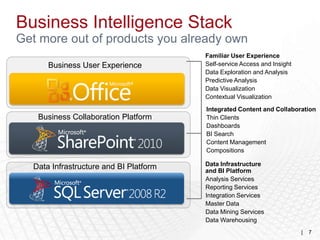
Business Intelligence Stack
Get more out of products you already own
                                        Familiar User Experience
      Business User Experience          Self-service Access and Insight
                                        Data Exploration and Analysis
                                        Predictive Analysis
                                        Data Visualization
                                        Contextual Visualization

                                        Integrated Content and Collaboration
   Business Collaboration Platform      Thin Clients
                                        Dashboards
                                        BI Search
                                        Content Management
                                        Compositions

  Data Infrastructure and BI Platform   Data Infrastructure
                                        and BI Platform
                                        Analysis Services
                                        Reporting Services
                                        Integration Services
                                        Master Data
                                        Data Mining Services
                                        Data Warehousing
                                                                          |   7
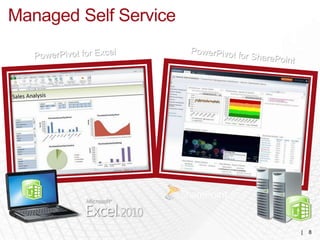
Managed Self Service


                       |   8
Self-Service
     Business Intelligence
Get more out of products you already own
             Business User Experience


      Familiar User Experience
      Self-service Access and Insight
      Data Exploration and Analysis
      Predictive Analysis
      Data Visualization
      Contextual Visualization

                                           |   9
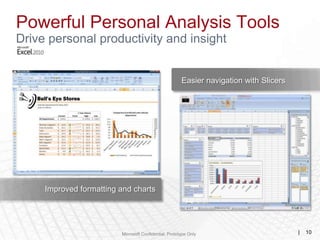
Powerful Personal Analysis Tools
Drive personal productivity and insight


                                                       Easier navigation with Slicers


     Improved formatting and charts


                         Microsoft Confidential, Prototype Only                         |   10
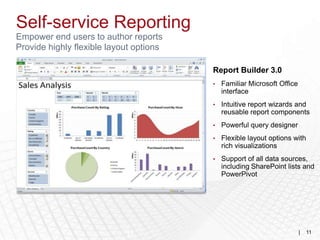
Self-service Reporting
Empower end users to author reports
Provide highly flexible layout options

                                         Report Builder 3.0
                                         •   Familiar Microsoft Office
                                             interface
                                         •   Intuitive report wizards and
                                             reusable report components
                                         •   Powerful query designer
                                         •   Flexible layout options with
                                             rich visualizations
                                         •   Support of all data sources,
                                             including SharePoint lists and
                                             PowerPivot


                            11                                           |   11
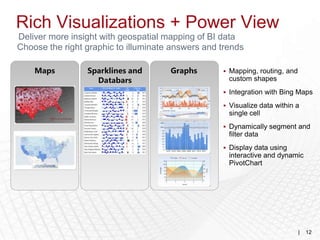
Rich Visualizations + Power View
Deliver more insight with geospatial mapping of BI data
Choose the right graphic to illuminate answers and trends

    Maps         Sparklines and       Graphs        Mapping, routing, and
                   Databars                          custom shapes
                                                    Integration with Bing Maps

                                                    Visualize data within a
                                                     single cell
                                                    Dynamically segment and
                                                     filter data
                                                    Display data using
                                                     interactive and dynamic
                                                     PivotChart


                           12                                                |   12
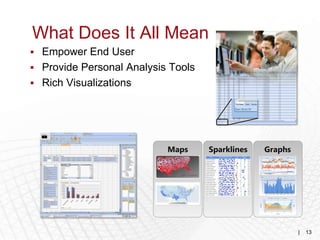
What Does It All Mean
 Empower End User
 Provide Personal Analysis Tools
 Rich Visualizations


                           Maps     Sparklines   Graphs


                                                          |   13
A Desktop Tool
    SQL Server Power Pivot for Excel

    A free add-in for Excel 2010 – operates inside an Excel workbook.
    Looks like Excel – uses Excel pivot table interface - but is not Excel.
    Puts a database inside of Excel.
    Adds a new language for writing “Excel” formulas.
    Can handle millions of rows and multiple data sources concurrently.
    Results are shown in pivot tables - pivot charts – dashboards.
    Size of the workbook is limited by workstation memory.
    Performs like Microsoft SQL Server based high end analytical tools.
    Designed for the “power user” – there is a significant learning curve.
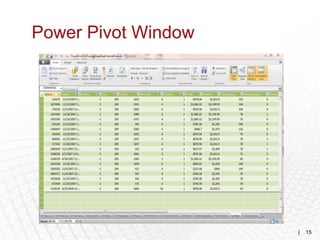
Power Pivot Window


                     |   15
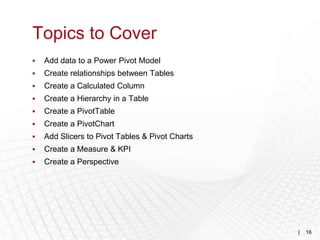
Topics to Cover
   Add data to a Power Pivot Model
   Create relationships between Tables
   Create a Calculated Column
   Create a Hierarchy in a Table
   Create a PivotTable
   Create a PivotChart
   Add Slicers to Pivot Tables & Pivot Charts
   Create a Measure & KPI
   Create a Perspective


                                                 |   16
Demonstration
       Begin building a solution for Contoso
This would involve loading the model with the tables
             needed for final production
                  15 – 20 minutes


                                                  |    17
Questions & Next Session
 Discuss “Topics to Cover”
 More Insight to Contoso Examples


                                     |   18
Metro Atlanta Chamber
                              Oct. 18, 2012
Microsoft Self Service
Business Intelligence
RoseBud Technologies
Family owned business since 1995
Serve clients in Atlanta and Southeast
Microsoft Partner since 2005
Microsoft GM Partner of the Year – East Region


                                                 |   20

Self-service B.I.

  • 1.
    Metro Atlanta Chamber Oct. 18, 2012 Microsoft Self Service Business Intelligence
  • 2.
    What’s The Problem Every smart business owner I know says that reporting and data driven insight into their business operations are critical, but they have lots of data and no useable information. | 2
  • 3.
    What’s “An” Answer Self-Service Business Intelligence  how you can acquire this new capability  how you can empower the people in your business to use it.  Access multiple data sources in your business  Bring them all together for analysis  Provide insight leading to action | 3
  • 4.
    Real World Examples Professional Services Firm  Time & Billing  Real cost vs Reported cost  Improved forecasting  Multi-location “franchise-like” entity  Corporate financial system  Local management & control systems  Need for uniform oversight  Contoso | 4
  • 5.
    An Answer forContoso  Profit % by Category  Sales by Channel  Year over Year Comparisons | 5
  • 6.
    Some Examples forContoso  Tutorial Save 9  Tutorial Save 11 | 6
  • 7.
    Business Intelligence Stack Getmore out of products you already own Familiar User Experience Business User Experience Self-service Access and Insight Data Exploration and Analysis Predictive Analysis Data Visualization Contextual Visualization Integrated Content and Collaboration Business Collaboration Platform Thin Clients Dashboards BI Search Content Management Compositions Data Infrastructure and BI Platform Data Infrastructure and BI Platform Analysis Services Reporting Services Integration Services Master Data Data Mining Services Data Warehousing | 7
  • 8.
  • 9.
    Self-Service Business Intelligence Get more out of products you already own Business User Experience Familiar User Experience Self-service Access and Insight Data Exploration and Analysis Predictive Analysis Data Visualization Contextual Visualization | 9
  • 10.
    Powerful Personal AnalysisTools Drive personal productivity and insight Easier navigation with Slicers Improved formatting and charts Microsoft Confidential, Prototype Only | 10
  • 11.
    Self-service Reporting Empower endusers to author reports Provide highly flexible layout options Report Builder 3.0 • Familiar Microsoft Office interface • Intuitive report wizards and reusable report components • Powerful query designer • Flexible layout options with rich visualizations • Support of all data sources, including SharePoint lists and PowerPivot 11 | 11
  • 12.
    Rich Visualizations +Power View Deliver more insight with geospatial mapping of BI data Choose the right graphic to illuminate answers and trends Maps Sparklines and Graphs  Mapping, routing, and Databars custom shapes  Integration with Bing Maps  Visualize data within a single cell  Dynamically segment and filter data  Display data using interactive and dynamic PivotChart 12 | 12
  • 13.
    What Does ItAll Mean  Empower End User  Provide Personal Analysis Tools  Rich Visualizations Maps Sparklines Graphs | 13
  • 14.
    A Desktop Tool SQL Server Power Pivot for Excel  A free add-in for Excel 2010 – operates inside an Excel workbook.  Looks like Excel – uses Excel pivot table interface - but is not Excel.  Puts a database inside of Excel.  Adds a new language for writing “Excel” formulas.  Can handle millions of rows and multiple data sources concurrently.  Results are shown in pivot tables - pivot charts – dashboards.  Size of the workbook is limited by workstation memory.  Performs like Microsoft SQL Server based high end analytical tools.  Designed for the “power user” – there is a significant learning curve.
  • 15.
  • 16.
    Topics to Cover  Add data to a Power Pivot Model  Create relationships between Tables  Create a Calculated Column  Create a Hierarchy in a Table  Create a PivotTable  Create a PivotChart  Add Slicers to Pivot Tables & Pivot Charts  Create a Measure & KPI  Create a Perspective | 16
  • 17.
    Demonstration Begin building a solution for Contoso This would involve loading the model with the tables needed for final production 15 – 20 minutes | 17
  • 18.
    Questions & NextSession  Discuss “Topics to Cover”  More Insight to Contoso Examples | 18
  • 19.
    Metro Atlanta Chamber Oct. 18, 2012 Microsoft Self Service Business Intelligence
  • 20.
    RoseBud Technologies Family ownedbusiness since 1995 Serve clients in Atlanta and Southeast Microsoft Partner since 2005 Microsoft GM Partner of the Year – East Region | 20

Editor's Notes

  • #12 Point of slide: ToCreate, analyze, and share the information you need to make agile decisions quickly and with confidence. Create reports to share with colleagues seamlessly, make rich digital dashboards across a variety of topics easily, and analyze information to identify business opportunities and respond to market drivers—all with one-click access to the information you need using only a browser. New self-service capabilities enable the users to find and create the information they need and empower IT to centrally manage the system. Report Builder 3.0. Accelerates report creation, collaboration, and consistency by enabling users to create and share reusable report elements in a Shared Component Library. Shared components make it quick and easy to assemble comprehensive business reports in a professional-looking format.PowerPivot for Excel 2010. Users can quickly transform huge quantities of data into meaningful information using familiar Excel software. Excel provides users with flexible layout options, allows them to create pivots, graphs, and add custom headers. It also allows users to share their workbooks using SharePoint.