

www.crgroup.com
6 Antares Drive, Phase 1, Suite 200, Ottawa, ON K2E 8A9 Canada   Tel: 613.232.4295 Fax: 613.232.7276
Agenda

Introductions
About CRG
Seminar Objectives
The What and Why of BI
Microsoft Business Intelligence
Product Demonstration
CRG Implementation Approach
Q&A and Next Steps


                                  2
CRG Overview

Founded in 1989
We are global company with offices in Canada, South
Africa, India and the United States
Thousands of companies use CRG solutions
Partnered with industry leaders:


                                                      3
CRG Solutions and Services
  Management Consulting
  Business Intelligence, Performance Management, Shared Services,
  Activity-based Costing/Management, Planning and Budgeting,
  Shareholder Value Creation
  Business Management Solutions
  Microsoft Dynamics™ GP, Microsoft Dynamics ™ CRM, Microsoft®
  Business Solutions Small Business Financials
  Business Performance Products
  Microsoft Dynamics GP Add-on Products, EmPerform, FlexABM,
  Enterprise Scorecard, Cost Allocator, Shared Services Manager
  (SSM), eSurvey
All our solutions are designed to fulfill our mission:
  Driving Better Business Management and Performance.
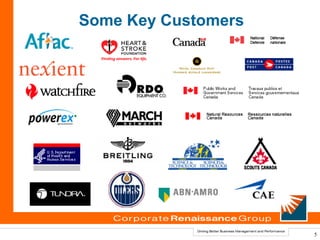
Some Key Customers


                     5
Seminar Objectives

Provide you with a general understanding of Business
Intelligence (BI).
Share with you the Microsoft BI strategy and solution.
Describe our capabilities and experience in
implementing BI solutions.
Answer your questions and help you with your BI
journey.


                                                         6
What is Business Intelligence?
Business Intelligence (BI) is about getting the right
information, to the right decision makers, at the right
time.
BI is an enterprise-wide platform that supports reporting,
analysis and decision making.
BI leads to:
   fact-based decision making
   “single version of the truth”
BI includes reporting and analytics.


                                                             7
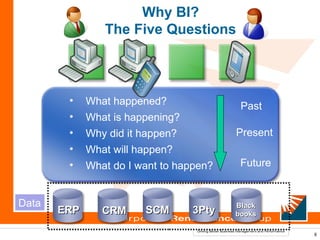
Why BI?
                The Five Questions


        •    What happened?               Past
        •    What is happening?
        •    Why did it happen?          Present
        •    What will happen?
        •    What do I want to happen?    Future


Data                                     Black
       ERP      CRM     SCM       3Pty   books

                                                   8
Common Pain Points...
Data everywhere, information no where
Different users have different needs
   Excel versus PDF
   Pull versus push
   On demand – on schedule
   Your format – my format
Takes too long – wasted resources/efforts
Security
Technical “mumbo jumbo” … Why I just can’t get it to
you when you want it.


                                                       9
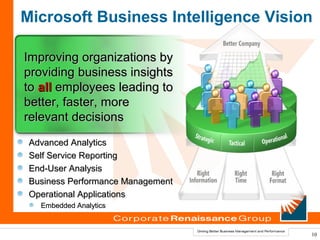
Microsoft Business Intelligence Vision

Improving organizations by
providing business insights
to all employees leading to
better, faster, more
relevant decisions
 Advanced Analytics
 Self Service Reporting
 End-User Analysis
 Business Performance Management
 Operational Applications
   Embedded Analytics


                                     10
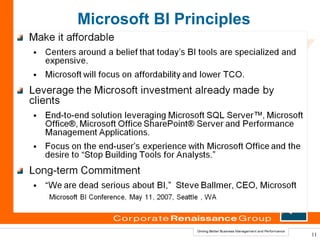
Microsoft BI Principles


                          11
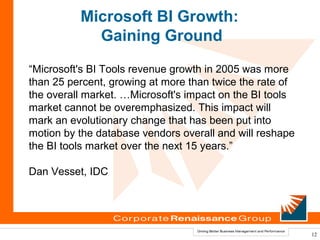
Microsoft BI Growth:
            Gaining Ground
“Microsoft's BI Tools revenue growth in 2005 was more
than 25 percent, growing at more than twice the rate of
the overall market. …Microsoft's impact on the BI tools
market cannot be overemphasized. This impact will
mark an evolutionary change that has been put into
motion by the database vendors overall and will reshape
the BI tools market over the next 15 years.”

Dan Vesset, IDC


                                                          12
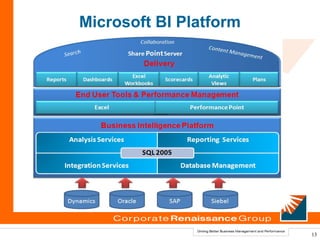
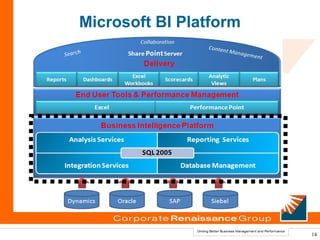
Microsoft BI Platform


                        13
Microsoft BI Platform


                        14
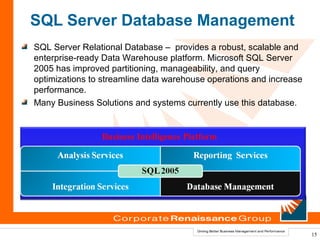
SQL Server Database Management
SQL Server Relational Database – provides a robust, scalable and
enterprise-ready Data Warehouse platform. Microsoft SQL Server
2005 has improved partitioning, manageability, and query
optimizations to streamline data warehouse operations and increase
performance.
Many Business Solutions and systems currently use this database.


                Business Intelligence Platform


                                                                     15
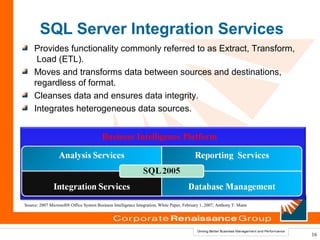
SQL Server Integration Services
     Provides functionality commonly referred to as Extract, Transform,
      Load (ETL).
     Moves and transforms data between sources and destinations,
     regardless of format.
     Cleanses data and ensures data integrity.
     Integrates heterogeneous data sources.


                                         Business Intelligence Platform


Source: 2007 Microsoft® Office System Business Intelligence Integration, White Paper, February 1, 2007, Anthony T. Mann


                                                                                                                          16
SQL Server Analysis Services
Allows for Online Analytical Processing (OLAP), commonly
referred to as “cubes”.
 Includes advanced analytical features such as complete data
mining and key performance indicator frameworks.
Enables organizations to accommodate multiple analytic needs
within one solution.


               Business Intelligence Platform


                                                               17
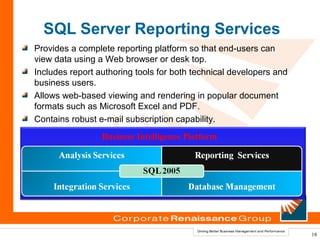
SQL Server Reporting Services
Provides a complete reporting platform so that end-users can
view data using a Web browser or desk top.
Includes report authoring tools for both technical developers and
business users.
Allows web-based viewing and rendering in popular document
formats such as Microsoft Excel and PDF.
Contains robust e-mail subscription capability.
                 Business Intelligence Platform


                                                                    18
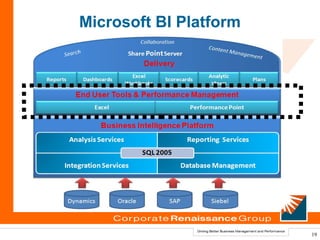
Microsoft BI Platform


                        19
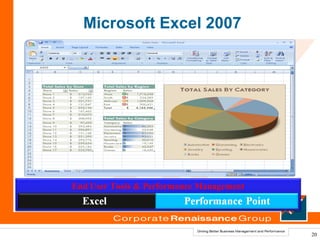
Microsoft Excel 2007


End User Tools & Performance Management


                                          20
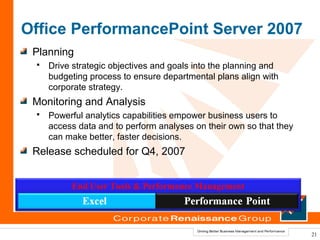
Office PerformancePoint Server 2007
 Planning
    Drive strategic objectives and goals into the planning and
     budgeting process to ensure departmental plans align with
     corporate strategy.
 Monitoring and Analysis
    Powerful analytics capabilities empower business users to
     access data and to perform analyses on their own so that they
     can make better, faster decisions.
 Release scheduled for Q4, 2007


          End User Tools & Performance Management


                                                                     21
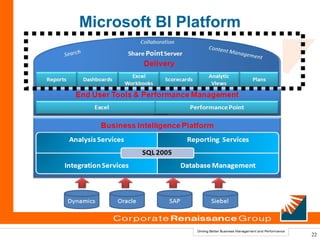
Microsoft BI Platform


                        22
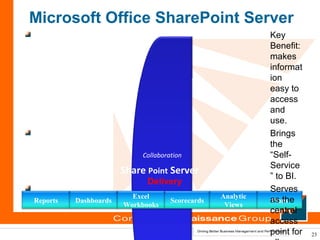
Microsoft Office SharePoint Server
                                                                     Key
                                                                     Benefit:
                                                                     makes
                                                                     informat
                                                                     ion
                                                                     easy to
                                                                     access
                                                                     and
                                                                     use.
                                                                     Brings
                                                                     the
                                 Collaboration                       “Self-
                                                       Conten
                                                             t Mana Service
      Search                Share Point Server                     gemen
                                                                         t
                                                                     ” to BI.
                                  Delivery
                                                                     Serves
                              Excel                    Analytic
Reports        Dashboards                 Scorecards                 as the
                                                                      Plans
                            Workbooks                   Views
                                                                     central
                                                                     access
                                                                     point for   23
What We Like About the Microsoft
                 BI Platform?
We believe that Microsoft offers superior value for the
 following reasons:
  It’s affordable and leverages existing investments.
      In many cases the organization already own the
       Microsoft SQL Server and Microsoft Office licenses.
  It’s modular–organizations can deploy it all at once or
  one piece at a time.
    For instance, one can start with Reporting Services
      and cubes and then integrate everything with
      SharePoint.
  Microsoft is focused on the end-user experience and
  making BI easy to use.


                                                             24
Product Demonstration & Roadmap
 Reporting services
 (design–build–deploy)
 Excel 2007 (familiar world)
 ProClarity - Analytics
 PerformancePoint Server (Q4 2007)
 (plan–monitor–analyze)
 SharePoint Server
CRG Offers
Knowledge
Experience
Vision


                          26
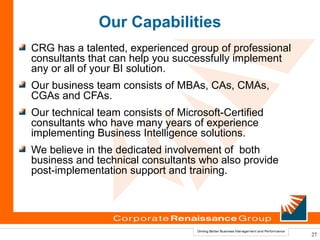
Our Capabilities
CRG has a talented, experienced group of professional
consultants that can help you successfully implement
any or all of your BI solution.
Our business team consists of MBAs, CAs, CMAs,
CGAs and CFAs.
Our technical team consists of Microsoft-Certified
consultants who have many years of experience
implementing Business Intelligence solutions.
We believe in the dedicated involvement of both
business and technical consultants who also provide
post-implementation support and training.


                                                        27
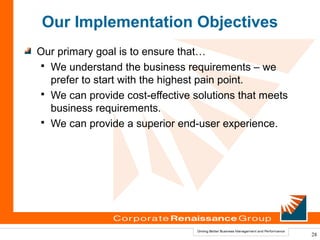
Our Implementation Objectives
Our primary goal is to ensure that…
 We understand the business requirements – we
  prefer to start with the highest pain point.
 We can provide cost-effective solutions that meets
  business requirements.
 We can provide a superior end-user experience.


                                                       28
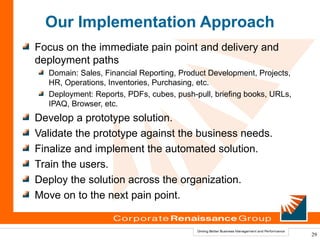
Our Implementation Approach
Focus on the immediate pain point and delivery and
deployment paths
  Domain: Sales, Financial Reporting, Product Development, Projects,
  HR, Operations, Inventories, Purchasing, etc.
  Deployment: Reports, PDFs, cubes, push-pull, briefing books, URLs,
  IPAQ, Browser, etc.
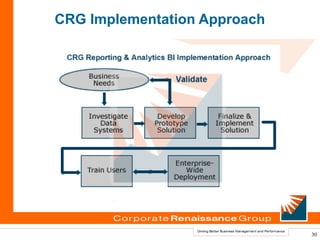
Develop a prototype solution.
Validate the prototype against the business needs.
Finalize and implement the automated solution.
Train the users.
Deploy the solution across the organization.
Move on to the next pain point.


                                                                       29
CRG Implementation Approach


                              30
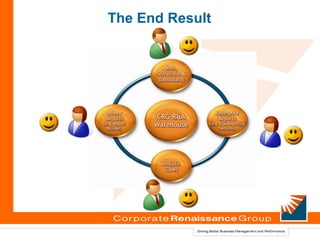
The End Result
Q&A and Next Steps
For more information, please contact us at:
www.crgroup.com | 613.232.4295


  Doug Hum, Director, Marketing and Business Development
  dhum@crgroup.com | 613.232.4295 ext. 286
  Vijay Jog
    vjog@crgroup.com | 613.232.4295 ext. 228
  John Smith
    jsmith@crgroup.com | 613.232.4295 ext. 239
  May Abouseido
    may@crgroup.com | 613.232.4295 ext. 226
  Kobana Abukari
kabuari@crgroup.com | 613.232.4295 ext. 227


                                                           32
Corporate Renaissance Group
© 2007 Corporate Renaissance Group. All rights reserved.

Portions © Microsoft Corporation. Microsoft Dynamics GP, Microsoft Dynamics CRM, Microsoft, Microsoft
     Business Solutions Small Business Financials, Excel, Microsoft Office, ProClarity Analytics,
     PerformancePoint Server 2007, Internet Explorer, SharePoint Server 2007, Business Scorecard Manager,
     SQL Server 2005, are either registered trademarks or trademarks of Microsoft Corporation, in the United
     States and/or other countries. The names of actual company and products mentioned may be the
     trademark of their respective owner.


                                                                                                               33

Microsoft business intelligence

  • 1.
    www.crgroup.com 6 Antares Drive,Phase 1, Suite 200, Ottawa, ON K2E 8A9 Canada Tel: 613.232.4295 Fax: 613.232.7276
  • 2.
    Agenda Introductions About CRG Seminar Objectives TheWhat and Why of BI Microsoft Business Intelligence Product Demonstration CRG Implementation Approach Q&A and Next Steps 2
  • 3.
    CRG Overview Founded in1989 We are global company with offices in Canada, South Africa, India and the United States Thousands of companies use CRG solutions Partnered with industry leaders: 3
  • 4.
    CRG Solutions andServices Management Consulting Business Intelligence, Performance Management, Shared Services, Activity-based Costing/Management, Planning and Budgeting, Shareholder Value Creation Business Management Solutions Microsoft Dynamics™ GP, Microsoft Dynamics ™ CRM, Microsoft® Business Solutions Small Business Financials Business Performance Products Microsoft Dynamics GP Add-on Products, EmPerform, FlexABM, Enterprise Scorecard, Cost Allocator, Shared Services Manager (SSM), eSurvey All our solutions are designed to fulfill our mission: Driving Better Business Management and Performance.
  • 5.
  • 6.
    Seminar Objectives Provide youwith a general understanding of Business Intelligence (BI). Share with you the Microsoft BI strategy and solution. Describe our capabilities and experience in implementing BI solutions. Answer your questions and help you with your BI journey. 6
  • 7.
    What is BusinessIntelligence? Business Intelligence (BI) is about getting the right information, to the right decision makers, at the right time. BI is an enterprise-wide platform that supports reporting, analysis and decision making. BI leads to: fact-based decision making “single version of the truth” BI includes reporting and analytics. 7
  • 8.
    Why BI? The Five Questions • What happened? Past • What is happening? • Why did it happen? Present • What will happen? • What do I want to happen? Future Data Black ERP CRM SCM 3Pty books 8
  • 9.
    Common Pain Points... Dataeverywhere, information no where Different users have different needs Excel versus PDF Pull versus push On demand – on schedule Your format – my format Takes too long – wasted resources/efforts Security Technical “mumbo jumbo” … Why I just can’t get it to you when you want it. 9
  • 10.
    Microsoft Business IntelligenceVision Improving organizations by providing business insights to all employees leading to better, faster, more relevant decisions Advanced Analytics Self Service Reporting End-User Analysis Business Performance Management Operational Applications Embedded Analytics 10
  • 11.
  • 12.
    Microsoft BI Growth: Gaining Ground “Microsoft's BI Tools revenue growth in 2005 was more than 25 percent, growing at more than twice the rate of the overall market. …Microsoft's impact on the BI tools market cannot be overemphasized. This impact will mark an evolutionary change that has been put into motion by the database vendors overall and will reshape the BI tools market over the next 15 years.” Dan Vesset, IDC 12
  • 13.
  • 14.
  • 15.
    SQL Server DatabaseManagement SQL Server Relational Database – provides a robust, scalable and enterprise-ready Data Warehouse platform. Microsoft SQL Server 2005 has improved partitioning, manageability, and query optimizations to streamline data warehouse operations and increase performance. Many Business Solutions and systems currently use this database. Business Intelligence Platform 15
  • 16.
    SQL Server IntegrationServices Provides functionality commonly referred to as Extract, Transform, Load (ETL). Moves and transforms data between sources and destinations, regardless of format. Cleanses data and ensures data integrity. Integrates heterogeneous data sources. Business Intelligence Platform Source: 2007 Microsoft® Office System Business Intelligence Integration, White Paper, February 1, 2007, Anthony T. Mann 16
  • 17.
    SQL Server AnalysisServices Allows for Online Analytical Processing (OLAP), commonly referred to as “cubes”. Includes advanced analytical features such as complete data mining and key performance indicator frameworks. Enables organizations to accommodate multiple analytic needs within one solution. Business Intelligence Platform 17
  • 18.
    SQL Server ReportingServices Provides a complete reporting platform so that end-users can view data using a Web browser or desk top. Includes report authoring tools for both technical developers and business users. Allows web-based viewing and rendering in popular document formats such as Microsoft Excel and PDF. Contains robust e-mail subscription capability. Business Intelligence Platform 18
  • 19.
  • 20.
    Microsoft Excel 2007 EndUser Tools & Performance Management 20
  • 21.
    Office PerformancePoint Server2007 Planning  Drive strategic objectives and goals into the planning and budgeting process to ensure departmental plans align with corporate strategy. Monitoring and Analysis  Powerful analytics capabilities empower business users to access data and to perform analyses on their own so that they can make better, faster decisions. Release scheduled for Q4, 2007 End User Tools & Performance Management 21
  • 22.
  • 23.
    Microsoft Office SharePointServer Key Benefit: makes informat ion easy to access and use. Brings the Collaboration “Self- Conten t Mana Service Search Share Point Server gemen t ” to BI. Delivery Serves Excel Analytic Reports Dashboards Scorecards as the Plans Workbooks Views central access point for 23
  • 24.
    What We LikeAbout the Microsoft BI Platform? We believe that Microsoft offers superior value for the following reasons: It’s affordable and leverages existing investments.  In many cases the organization already own the Microsoft SQL Server and Microsoft Office licenses. It’s modular–organizations can deploy it all at once or one piece at a time.  For instance, one can start with Reporting Services and cubes and then integrate everything with SharePoint. Microsoft is focused on the end-user experience and making BI easy to use. 24
  • 25.
    Product Demonstration &Roadmap Reporting services (design–build–deploy) Excel 2007 (familiar world) ProClarity - Analytics PerformancePoint Server (Q4 2007) (plan–monitor–analyze) SharePoint Server
  • 26.
  • 27.
    Our Capabilities CRG hasa talented, experienced group of professional consultants that can help you successfully implement any or all of your BI solution. Our business team consists of MBAs, CAs, CMAs, CGAs and CFAs. Our technical team consists of Microsoft-Certified consultants who have many years of experience implementing Business Intelligence solutions. We believe in the dedicated involvement of both business and technical consultants who also provide post-implementation support and training. 27
  • 28.
    Our Implementation Objectives Ourprimary goal is to ensure that…  We understand the business requirements – we prefer to start with the highest pain point.  We can provide cost-effective solutions that meets business requirements.  We can provide a superior end-user experience. 28
  • 29.
    Our Implementation Approach Focuson the immediate pain point and delivery and deployment paths Domain: Sales, Financial Reporting, Product Development, Projects, HR, Operations, Inventories, Purchasing, etc. Deployment: Reports, PDFs, cubes, push-pull, briefing books, URLs, IPAQ, Browser, etc. Develop a prototype solution. Validate the prototype against the business needs. Finalize and implement the automated solution. Train the users. Deploy the solution across the organization. Move on to the next pain point. 29
  • 30.
  • 31.
  • 32.
    Q&A and NextSteps For more information, please contact us at: www.crgroup.com | 613.232.4295 Doug Hum, Director, Marketing and Business Development dhum@crgroup.com | 613.232.4295 ext. 286 Vijay Jog vjog@crgroup.com | 613.232.4295 ext. 228 John Smith jsmith@crgroup.com | 613.232.4295 ext. 239 May Abouseido may@crgroup.com | 613.232.4295 ext. 226 Kobana Abukari kabuari@crgroup.com | 613.232.4295 ext. 227 32
  • 33.
    Corporate Renaissance Group ©2007 Corporate Renaissance Group. All rights reserved. Portions © Microsoft Corporation. Microsoft Dynamics GP, Microsoft Dynamics CRM, Microsoft, Microsoft Business Solutions Small Business Financials, Excel, Microsoft Office, ProClarity Analytics, PerformancePoint Server 2007, Internet Explorer, SharePoint Server 2007, Business Scorecard Manager, SQL Server 2005, are either registered trademarks or trademarks of Microsoft Corporation, in the United States and/or other countries. The names of actual company and products mentioned may be the trademark of their respective owner. 33