Unit 2: jQuery
Lesson 5: Identifying Events
October 7, 2013
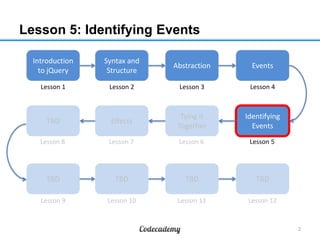
Lesson 5: Identifying Events
Introduction
to jQuery

Syntax and
Structure

Abstraction

Events

Lesson 1

Lesson 2

Lesson 3

Lesson 4

TBD

Effects

Tying It
Together

Identifying
Events

Lesson 8

Lesson 7

Lesson 6

Lesson 5

TBD

TBD

TBD

TBD

Lesson 9

Lesson 10

Lesson 11

Lesson 12

2
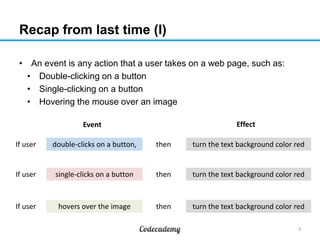
Recap from last time (I)
• An event is any action that a user takes on a web page, such as:
• Double-clicking on a button
• Single-clicking on a button
• Hovering the mouse over an image
Effect

Event
If user

double-clicks on a button,

then

turn the text background color red

If user

single-clicks on a button

then

turn the text background color red

If user

hovers over the image

then

turn the text background color red
3
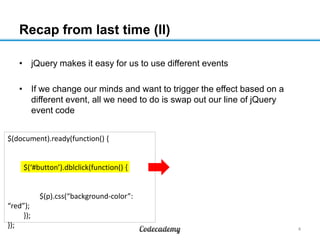
Recap from last time (II)
• jQuery makes it easy for us to use different events
• If we change our minds and want to trigger the effect based on a
different event, all we need to do is swap out our line of jQuery
event code
$(document).ready(function() {

$(‘#button’).dblclick(function() {

$(p).css(“background-color”:
“red”);
});
});

4
Recap from last time (III)
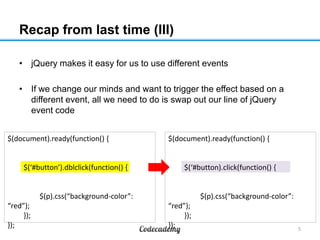
• jQuery makes it easy for us to use different events
• If we change our minds and want to trigger the effect based on a
different event, all we need to do is swap out our line of jQuery
event code
$(document).ready(function() {

$(‘#button’).dblclick(function() {

$(document).ready(function() {

$(‘#button).click(function() {

$(p).css(“background-color”:
“red”);
});
});

$(p).css(“background-color”:
“red”);
});
});

5
Events are triggered more often than you think
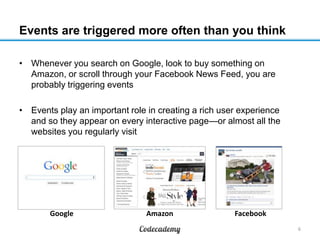
• Whenever you search on Google, look to buy something on
Amazon, or scroll through your Facebook News Feed, you are
probably triggering events
• Events play an important role in creating a rich user experience
and so they appear on every interactive page—or almost all the
websites you regularly visit

Google

Amazon

Facebook
6
Example: Google search (I)
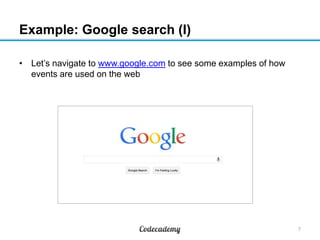
• Let’s navigate to www.google.com to see some examples of how
events are used on the web

7
Example: Google search (II)
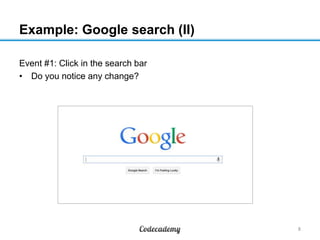
Event #1: Click in the search bar
• Do you notice any change?

8
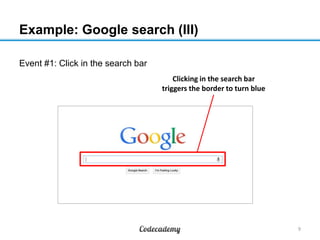
Example: Google search (III)
Event #1: Click in the search bar
Clicking in the search bar
triggers the border to turn blue

9
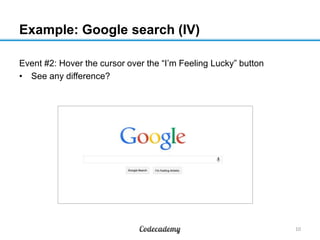
Example: Google search (IV)
Event #2: Hover the cursor over the “I’m Feeling Lucky” button
• See any difference?

10
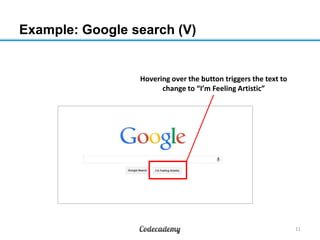
Example: Google search (V)

Hovering over the button triggers the text to
change to “I’m Feeling Artistic”

11
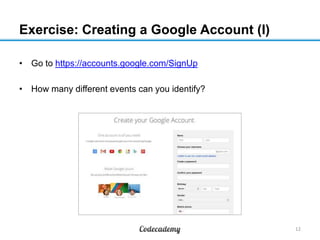
Exercise: Creating a Google Account (I)
• Go to https://accounts.google.com/SignUp
• How many different events can you identify?

12
Exercise: Creating a Google Account (II)
1
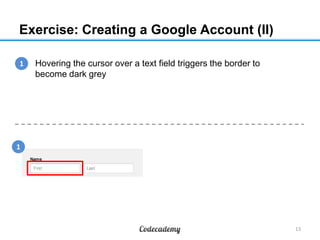
1. Hovering the cursor over a text field triggers the border to
become dark grey

1

13
Exercise: Creating a Google Account (III)
1
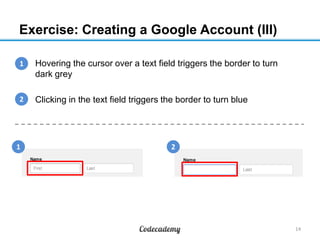
1. Hovering the cursor over a text field triggers the border to turn
dark grey
2
2. Clicking in the text field triggers the border to turn blue

1

2

14
Exercise: Creating a Google Account (IV)
3
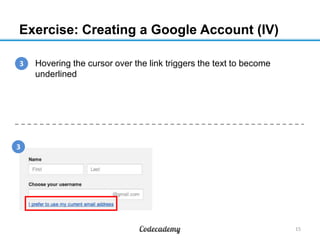
1. Hovering the cursor over the link triggers the text to become
underlined

3

15
Exercise: Creating a Google Account (V)
3
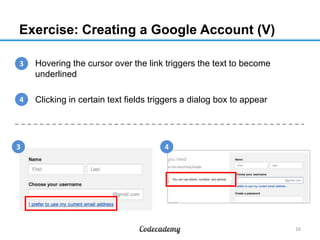
1. Hovering the cursor over the link triggers the text to become
underlined
4
2. Clicking in certain text fields triggers a dialog box to appear

3

4

16
Exercise: Creating a Google Account (VI)
5
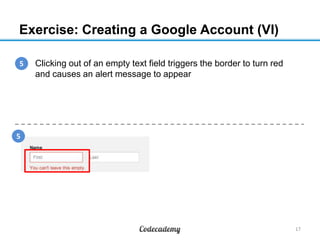
1. Clicking out of an empty text field triggers the border to turn red
and causes an alert message to appear

5

17
Exercise: Creating a Google Account (VII)
5
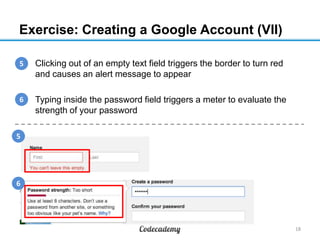
1. Clicking out of an empty text field triggers the border to turn red
and causes an alert message to appear
6
2. Typing inside the password field triggers a meter to evaluate the
strength of your password
5

6

18
Exercise: Creating a Google Account (VIII)
•

There are many other events you might have found, such as:
•

Hovering the cursor over a selection in the dropdown menu
triggers the selection’s background to turn grey

•

Hovering the cursor over the flag icon triggers the flag’s
background to turn grey

19
Exercise: Creating a Google Account (IX)
•

There are many other events you might have found, such as:
•

Hovering the cursor over a selection in the dropdown menu
triggers the selection’s background to turn grey

•

Hovering the cursor over the flag icon triggers the flag’s
background to turn grey

Websites use events to make tasks as basic as
filling out a form become as seamless as possible
20
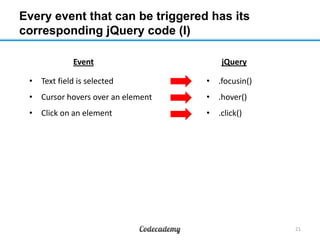
Every event that can be triggered has its
corresponding jQuery code (I)
Event

jQuery

• Text field is selected

• .focusin()

• Cursor hovers over an element

• .hover()

• Click on an element

• .click()

21
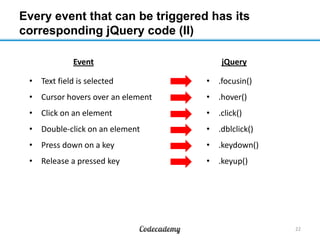
Every event that can be triggered has its
corresponding jQuery code (II)
Event

jQuery

• Text field is selected

• .focusin()

• Cursor hovers over an element

• .hover()

• Click on an element

• .click()

• Double-click on an element

• .dblclick()

• Press down on a key

• .keydown()

• Release a pressed key

• .keyup()

22
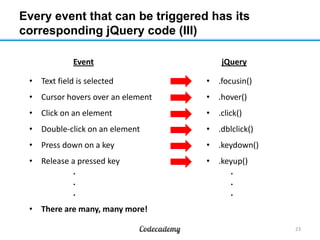
Every event that can be triggered has its
corresponding jQuery code (III)
Event

jQuery

• Text field is selected

• .focusin()

• Cursor hovers over an element

• .hover()

• Click on an element

• .click()

• Double-click on an element

• .dblclick()

• Press down on a key

• .keydown()

• Release a pressed key
.
.
.

• .keyup()
.
.
.

• There are many, many more!
23
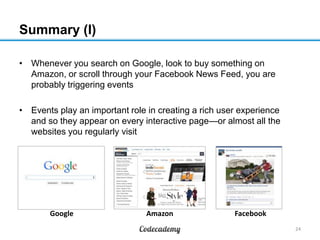
Summary (I)
• Whenever you search on Google, look to buy something on
Amazon, or scroll through your Facebook News Feed, you are
probably triggering events
• Events play an important role in creating a rich user experience
and so they appear on every interactive page—or almost all the
websites you regularly visit

Google

Amazon

Facebook
24
Summary (II)
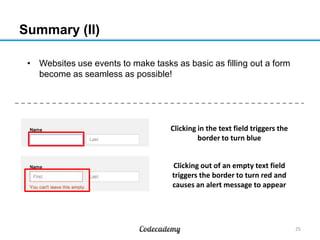
• Websites use events to make tasks as basic as filling out a form
become as seamless as possible!

Clicking in the text field triggers the
border to turn blue
Clicking out of an empty text field
triggers the border to turn red and
causes an alert message to appear

25
What to do on your own
1. Go to URL to complete the Codecademy course online

2. Do the practice set on the material learned

1. Take the follow-up quiz to test your understanding

26

Lesson 205 07 oct13-1500-ay

  • 1.
    Unit 2: jQuery Lesson5: Identifying Events October 7, 2013
  • 2.
    Lesson 5: IdentifyingEvents Introduction to jQuery Syntax and Structure Abstraction Events Lesson 1 Lesson 2 Lesson 3 Lesson 4 TBD Effects Tying It Together Identifying Events Lesson 8 Lesson 7 Lesson 6 Lesson 5 TBD TBD TBD TBD Lesson 9 Lesson 10 Lesson 11 Lesson 12 2
  • 3.
    Recap from lasttime (I) • An event is any action that a user takes on a web page, such as: • Double-clicking on a button • Single-clicking on a button • Hovering the mouse over an image Effect Event If user double-clicks on a button, then turn the text background color red If user single-clicks on a button then turn the text background color red If user hovers over the image then turn the text background color red 3
  • 4.
    Recap from lasttime (II) • jQuery makes it easy for us to use different events • If we change our minds and want to trigger the effect based on a different event, all we need to do is swap out our line of jQuery event code $(document).ready(function() { $(‘#button’).dblclick(function() { $(p).css(“background-color”: “red”); }); }); 4
  • 5.
    Recap from lasttime (III) • jQuery makes it easy for us to use different events • If we change our minds and want to trigger the effect based on a different event, all we need to do is swap out our line of jQuery event code $(document).ready(function() { $(‘#button’).dblclick(function() { $(document).ready(function() { $(‘#button).click(function() { $(p).css(“background-color”: “red”); }); }); $(p).css(“background-color”: “red”); }); }); 5
  • 6.
    Events are triggeredmore often than you think • Whenever you search on Google, look to buy something on Amazon, or scroll through your Facebook News Feed, you are probably triggering events • Events play an important role in creating a rich user experience and so they appear on every interactive page—or almost all the websites you regularly visit Google Amazon Facebook 6
  • 7.
    Example: Google search(I) • Let’s navigate to www.google.com to see some examples of how events are used on the web 7
  • 8.
    Example: Google search(II) Event #1: Click in the search bar • Do you notice any change? 8
  • 9.
    Example: Google search(III) Event #1: Click in the search bar Clicking in the search bar triggers the border to turn blue 9
  • 10.
    Example: Google search(IV) Event #2: Hover the cursor over the “I’m Feeling Lucky” button • See any difference? 10
  • 11.
    Example: Google search(V) Hovering over the button triggers the text to change to “I’m Feeling Artistic” 11
  • 12.
    Exercise: Creating aGoogle Account (I) • Go to https://accounts.google.com/SignUp • How many different events can you identify? 12
  • 13.
    Exercise: Creating aGoogle Account (II) 1 1. Hovering the cursor over a text field triggers the border to become dark grey 1 13
  • 14.
    Exercise: Creating aGoogle Account (III) 1 1. Hovering the cursor over a text field triggers the border to turn dark grey 2 2. Clicking in the text field triggers the border to turn blue 1 2 14
  • 15.
    Exercise: Creating aGoogle Account (IV) 3 1. Hovering the cursor over the link triggers the text to become underlined 3 15
  • 16.
    Exercise: Creating aGoogle Account (V) 3 1. Hovering the cursor over the link triggers the text to become underlined 4 2. Clicking in certain text fields triggers a dialog box to appear 3 4 16
  • 17.
    Exercise: Creating aGoogle Account (VI) 5 1. Clicking out of an empty text field triggers the border to turn red and causes an alert message to appear 5 17
  • 18.
    Exercise: Creating aGoogle Account (VII) 5 1. Clicking out of an empty text field triggers the border to turn red and causes an alert message to appear 6 2. Typing inside the password field triggers a meter to evaluate the strength of your password 5 6 18
  • 19.
    Exercise: Creating aGoogle Account (VIII) • There are many other events you might have found, such as: • Hovering the cursor over a selection in the dropdown menu triggers the selection’s background to turn grey • Hovering the cursor over the flag icon triggers the flag’s background to turn grey 19
  • 20.
    Exercise: Creating aGoogle Account (IX) • There are many other events you might have found, such as: • Hovering the cursor over a selection in the dropdown menu triggers the selection’s background to turn grey • Hovering the cursor over the flag icon triggers the flag’s background to turn grey Websites use events to make tasks as basic as filling out a form become as seamless as possible 20
  • 21.
    Every event thatcan be triggered has its corresponding jQuery code (I) Event jQuery • Text field is selected • .focusin() • Cursor hovers over an element • .hover() • Click on an element • .click() 21
  • 22.
    Every event thatcan be triggered has its corresponding jQuery code (II) Event jQuery • Text field is selected • .focusin() • Cursor hovers over an element • .hover() • Click on an element • .click() • Double-click on an element • .dblclick() • Press down on a key • .keydown() • Release a pressed key • .keyup() 22
  • 23.
    Every event thatcan be triggered has its corresponding jQuery code (III) Event jQuery • Text field is selected • .focusin() • Cursor hovers over an element • .hover() • Click on an element • .click() • Double-click on an element • .dblclick() • Press down on a key • .keydown() • Release a pressed key . . . • .keyup() . . . • There are many, many more! 23
  • 24.
    Summary (I) • Wheneveryou search on Google, look to buy something on Amazon, or scroll through your Facebook News Feed, you are probably triggering events • Events play an important role in creating a rich user experience and so they appear on every interactive page—or almost all the websites you regularly visit Google Amazon Facebook 24
  • 25.
    Summary (II) • Websitesuse events to make tasks as basic as filling out a form become as seamless as possible! Clicking in the text field triggers the border to turn blue Clicking out of an empty text field triggers the border to turn red and causes an alert message to appear 25
  • 26.
    What to doon your own 1. Go to URL to complete the Codecademy course online 2. Do the practice set on the material learned 1. Take the follow-up quiz to test your understanding 26