Lecture-2: Introduction
Dr. Nagwa Mohamed
Contents
 What is Virtual Reality?
 What is Augmented Reality?
 History
 Applications of Virtual Reality
 Advantages and Disadvantages
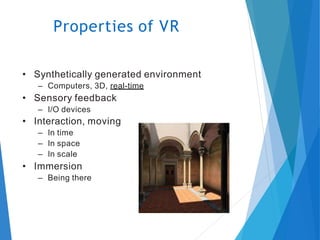
• Synthetically generated environment
– Computers, 3D, real-time
• Sensory feedback
– I/O devices
• Interaction, moving
– In time
– In space
– In scale
• Immersion
– Being there
Properties of VR
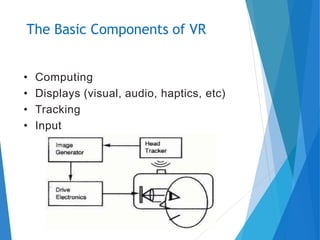
• Computing
• Displays (visual, audio, haptics, etc)
• Tracking
• Input
The Basic Components of VR
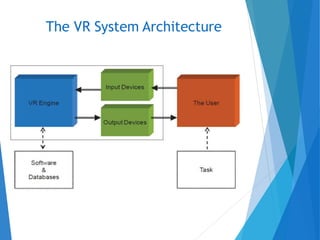
The VR System Architecture
• The ways to transfer information from the user to the computer
• Mouse, keyboard
• Trackball, joystick, mouse, ...
• Position tracking
• Orientation tracking
• Datagloves
• Exoskeleton (external hardware on hands etc.)
• Data suit
• Motion capture (tracking of body)
• Eye tracking
• Videoanalysis
• Brainwaves (EEG), EMG, EOG
• …
VR Input Devices
• Transfering data from the computer to the senses of the user
• Fooling of ALL(?) senses?
– Displays
• Monitors, projectors, HMDs, etc.
– Localized audio
• Loudspeakers, headphones
– Tactile & haptic
• Force feedback
– Smell, balance, etc.
VR Output Devices
• Real time, >25 frames/s
– So the environment is smooth
• Latency < 50 ms
– Processing power
– Input devices
• Big data size
– Enough memory & hard disk space
• 3D speed, as much polygon/s as possible
– PC: new and powerful graphics cards
– If not enough power in GPU, fps drops or details drop
• CPU processing power for other calculations & simulations
• Fast networking
• VR may be expensive, or low-cost…
Requirements for the System
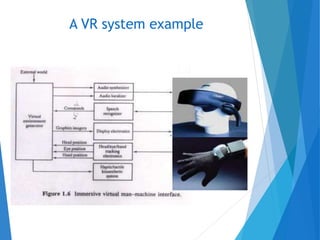
A VR system example
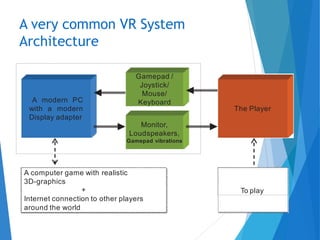
A modern PC
with a modern
Display adapter
Gamepad /
Joystick/
Mouse/
Keyboard
Monitor,
Loudspeakers,
Gamepad vibrations
The Player
A computer game with realistic
3D-graphics
+
Internet connection to other players
around the world
To play
A very common VR System
Architecture
• A lot to develop and apply
• Realism
• The goal: perfect illusion
• Real time, < 20 ms
• Tracking accuracy and latency
• Tracking range
• Full field of view, resolution
• Audio channel and resolution
• Proprietary hardware
• Faster graphics
• Parallel computing
VR research areas

lecture1.pptx

  • 1.
  • 2.
    Contents  What isVirtual Reality?  What is Augmented Reality?  History  Applications of Virtual Reality  Advantages and Disadvantages
  • 3.
    • Synthetically generatedenvironment – Computers, 3D, real-time • Sensory feedback – I/O devices • Interaction, moving – In time – In space – In scale • Immersion – Being there Properties of VR
  • 4.
    • Computing • Displays(visual, audio, haptics, etc) • Tracking • Input The Basic Components of VR
  • 5.
    The VR SystemArchitecture
  • 6.
    • The waysto transfer information from the user to the computer • Mouse, keyboard • Trackball, joystick, mouse, ... • Position tracking • Orientation tracking • Datagloves • Exoskeleton (external hardware on hands etc.) • Data suit • Motion capture (tracking of body) • Eye tracking • Videoanalysis • Brainwaves (EEG), EMG, EOG • … VR Input Devices
  • 7.
    • Transfering datafrom the computer to the senses of the user • Fooling of ALL(?) senses? – Displays • Monitors, projectors, HMDs, etc. – Localized audio • Loudspeakers, headphones – Tactile & haptic • Force feedback – Smell, balance, etc. VR Output Devices
  • 8.
    • Real time,>25 frames/s – So the environment is smooth • Latency < 50 ms – Processing power – Input devices • Big data size – Enough memory & hard disk space • 3D speed, as much polygon/s as possible – PC: new and powerful graphics cards – If not enough power in GPU, fps drops or details drop • CPU processing power for other calculations & simulations • Fast networking • VR may be expensive, or low-cost… Requirements for the System
  • 9.
    A VR systemexample
  • 10.
    A modern PC witha modern Display adapter Gamepad / Joystick/ Mouse/ Keyboard Monitor, Loudspeakers, Gamepad vibrations The Player A computer game with realistic 3D-graphics + Internet connection to other players around the world To play A very common VR System Architecture
  • 11.
    • A lotto develop and apply • Realism • The goal: perfect illusion • Real time, < 20 ms • Tracking accuracy and latency • Tracking range • Full field of view, resolution • Audio channel and resolution • Proprietary hardware • Faster graphics • Parallel computing VR research areas