AKSHAY BALU
S7, EC -1
ROLL NO : 10
Virtual Reality In a Nutshell . . .!!
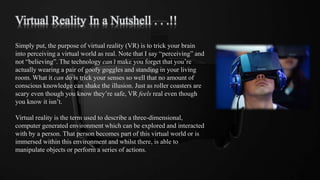
Simply put, the purpose of virtual reality (VR) is to trick your brain
into perceiving a virtual world as real. Note that I say “perceiving” and
not “believing”. The technology can’t make you forget that you’re
actually wearing a pair of goofy goggles and standing in your living
room. What it can do is trick your senses so well that no amount of
conscious knowledge can shake the illusion. Just as roller coasters are
scary even though you know they’re safe, VR feels real even though
you know it isn’t.
Virtual reality is the term used to describe a three-dimensional,
computer generated environment which can be explored and interacted
with by a person. That person becomes part of this virtual world or is
immersed within this environment and whilst there, is able to
manipulate objects or perform a series of actions.
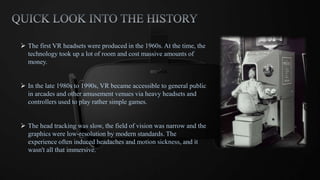
 The first VR headsets were produced in the 1960s. At the time, the
technology took up a lot of room and cost massive amounts of
money.
 In the late 1980s to 1990s, VR became accessible to general public
in arcades and other amusement venues via heavy headsets and
controllers used to play rather simple games.
 The head tracking was slow, the field of vision was narrow and the
graphics were low-resolution by modern standards. The
experience often induced headaches and motion sickness, and it
wasn't all that immersive.
Different types of VR systems:
 Desktop Virtual Reality: This is the simplest of the lot. It works on the principle of a
viewer viewing a virtual world through one or more computer screens. The user can interact
with the environment but is not completely immersed in it.
 Video Mapping Virtual Reality: In this method cameras are used to project an image of
the user into the computer program creating a 2D computer character. The user is fully
immersed in the environment but finds it difficult to interact with its surroundings.
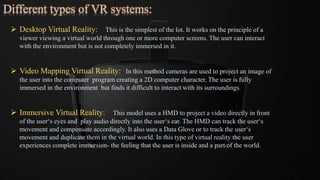
 Immersive Virtual Reality: This model uses a HMD to project a video directly in front
of the user‘s eyes and play audio directly into the user‘s ear. The HMD can track the user‘s
movement and compensate accordingly. It also uses a Data Glove or to track the user‘s
movement and duplicate them in the virtual world. In this type of virtual reality the user
experiences complete immersion- the feeling that the user is inside and a part of the world.
Basic requirements of a VR system:
 One or more powerful computers: Computers are the means through which a virtual environment can
be stimulated. Today‘s computers are so powerful that a PC can run the software required to create a
virtual environment. (advanced and sophisticated virtual environment.)
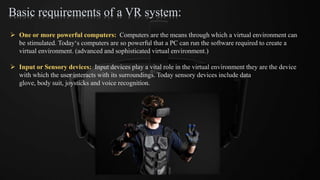
 Input or Sensory devices: Input devices play a vital role in the virtual environment they are the device
with which the user interacts with its surroundings. Today sensory devices include data
glove, body suit, joysticks and voice recognition.
 Tracking System: Tracking systems are closely related to the display techniques if display
techniques are the eyes then the tracking system is the mind in a virtual
environment. Tracking systems track the movement of the body and send
the right image to the display units so that the experience of telepresence
is maximized.
 Virtual Reality Software: The HMD, the tracking systems and the computers all need to
interact with each other to give the user the complete virtual
environment. Also the computer needs an interface to create a
world which can interact with the user. This need can be fulfilled
by various virtual realities enabling software. This software is the
connecting link between the hardware and also allows the user to
interface with the virtual reality system.
Some of the popular virtual reality software available today are:
panaroma2 flash, tourweaver, panoweaver, world of warcraft etc.
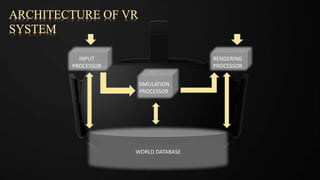
WORLD DATABASE
INPUT
PROCESSOR
RENDERING
PROCESSOR
SIMULATION
PROCESSOR
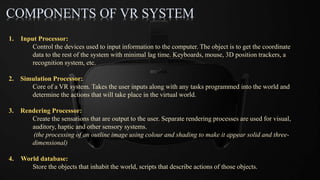
COMPONENTS OF VR SYSTEM
1. Input Processor:
Control the devices used to input information to the computer. The object is to get the coordinate
data to the rest of the system with minimal lag time. Keyboards, mouse, 3D position trackers, a
recognition system, etc.
2. Simulation Processor:
Core of a VR system. Takes the user inputs along with any tasks programmed into the world and
determine the actions that will take place in the virtual world.
3. Rendering Processor:
Create the sensations that are output to the user. Separate rendering processes are used for visual,
auditory, haptic and other sensory systems.
(the processing of an outline image using colour and shading to make it appear solid and three-
dimensional)
4. World database:
Store the objects that inhabit the world, scripts that describe actions of those objects.
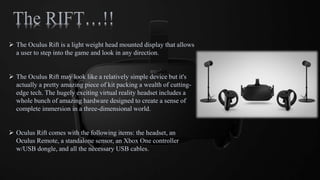
 The Oculus Rift is a light weight head mounted display that allows
a user to step into the game and look in any direction.
 The Oculus Rift may look like a relatively simple device but it's
actually a pretty amazing piece of kit packing a wealth of cutting-
edge tech. The hugely exciting virtual reality headset includes a
whole bunch of amazing hardware designed to create a sense of
complete immersion in a three-dimensional world.
 Oculus Rift comes with the following items: the headset, an
Oculus Remote, a standalone sensor, an Xbox One controller
w/USB dongle, and all the necessary USB cables.
BASICS…
 VR headsets like Oculus Rift and PlayStation VR are often referred to as HMDs and all that means
is that they are head mounted displays. Even with no audio or hand tracking, holding up Google
Cardboard to place your smartphone's display in front of your face can be enough to get you half-
immersed in a virtual world.
 The goal of the hardware is to create what appears to be a life size, 3D virtual environment without
the boundaries we usually associate with TV or computer screens. So whichever way you look, the
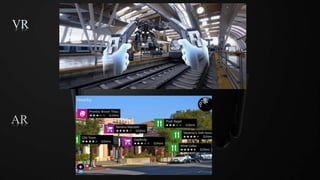
screen mounted to your face follows you. This is unlike AR which overlays graphics onto your
view of the real world.
 Video is sent from the console or computer to the headset via a HDMI cable in the case of headsets
such as HTC's Vive and the Rift. For Google Cardboard, Google's upcoming Daydream headsets
and the Samsung Gear VR, it's already on the smartphone slotted into the headset.
VR
AR
HOW DOES IT WORK...??
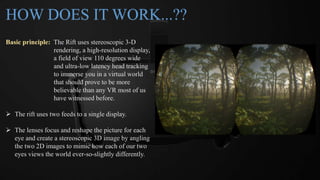
Basic principle: The Rift uses stereoscopic 3-D
rendering, a high-resolution display,
a field of view 110 degrees wide
and ultra-low latency head tracking
to immerse you in a virtual world
that should prove to be more
believable than any VR most of us
have witnessed before.
 The rift uses two feeds to a single display.
 The lenses focus and reshape the picture for each
eye and create a stereoscopic 3D image by angling
the two 2D images to mimic how each of our two
eyes views the world ever-so-slightly differently.
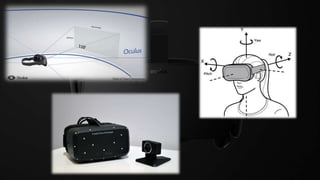
 The rift provides with 100 or 110 degree field of view which is wide enough to do the trick.
 For the resulting picture to be at all convincing, a minimum frame rate of around 60 frames per
second is needed to avoid stuttering or users feeling sick. The current crop of VR headsets go
way beyond this - Oculus is capable of 90fps, for instance, Sony's PlayStation VR manages
120fps.
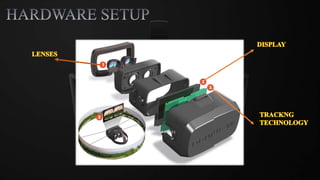
 Head tracking system: Consists of gyroscope (angular velocity), accelerometer (accelerations,
including gravitational) and a magnetometer (magnetic fields).
Designers also added external infrared sensors and a camera to increase positional accuracy
and monitoring.
Features of Rift…
 The Oculus Rift headset uses an OLED panel for each eye, each having a resolution
of 1080×1200.
 These panels have a refresh rate of 90 Hz and globally refresh, rather than scanning
out in lines.
 They also use low persistence, meaning that they only display an image for 2
milliseconds of each frame.
 This combination of the high refresh rate, global refresh and low persistence means
that the user experiences none of the motion blurring or judder that is experienced on
a regular monitor.
Interesting facts..
 The Rift only has about twenty milliseconds to change the image on screen without the brain
noticing the delay.
 So VR requires a fast renderer, and that’s why it needs such a beefy PC. The Rift happens to run at
90 FPS, which is faster than most high-end PC games.
 At this speed, each frame takes 11 milliseconds to render, leaving 9 milliseconds to handle
everything else. The OLED screens can switch pixels in about 1 millisecond, leaving 8
milliseconds to measure the head’s position and get all of the data back and forth across the cable.
 As it turns out, no current sensor in existence is fast enough and accurate enough for VR. The fast
ones are too inaccurate and the accurate ones are too slow. So the Rift actually uses two sensors:
one fast and one accurate. (Accelerometer & Camera)
 Together, they provide high-accuracy, low-latency tracking.
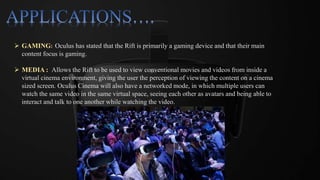
 GAMING: Oculus has stated that the Rift is primarily a gaming device and that their main
content focus is gaming.
 MEDIA : Allows the Rift to be used to view conventional movies and videos from inside a
virtual cinema environment, giving the user the perception of viewing the content on a cinema
sized screen. Oculus Cinema will also have a networked mode, in which multiple users can
watch the same video in the same virtual space, seeing each other as avatars and being able to
interact and talk to one another while watching the video.
 SOCIAL: Oculus believes that social applications will be the most popular virtual
reality experiences in the long term. A number of social applications
for the Rift are in development.
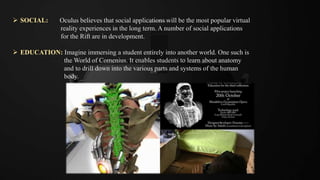
 EDUCATION: Imagine immersing a student entirely into another world. One such is
the World of Comenius. It enables students to learn about anatomy
and to drill down into the various parts and systems of the human
body.
 DEEP THERAPY: VR is one of the primary treatments for post-traumatic stress disorder. It has also been
used to treat phobias, depression and anxiety related issues.
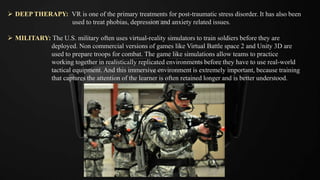
 MILITARY: The U.S. military often uses virtual-reality simulators to train soldiers before they are
deployed. Non commercial versions of games like Virtual Battle space 2 and Unity 3D are
used to prepare troops for combat. The game like simulations allow teams to practice
working together in realistically replicated environments before they have to use real-world
tactical equipment. And this immersive environment is extremely important, because training
that captures the attention of the learner is often retained longer and is better understood.
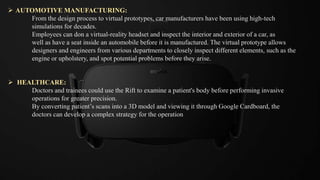
 AUTOMOTIVE MANUFACTURING:
From the design process to virtual prototypes, car manufacturers have been using high-tech
simulations for decades.
Employees can don a virtual-reality headset and inspect the interior and exterior of a car, as
well as have a seat inside an automobile before it is manufactured. The virtual prototype allows
designers and engineers from various departments to closely inspect different elements, such as the
engine or upholstery, and spot potential problems before they arise.
 HEALTHCARE:
Doctors and trainees could use the Rift to examine a patient's body before performing invasive
operations for greater precision.
By converting patient’s scans into a 3D model and viewing it through Google Cardboard, the
doctors can develop a complex strategy for the operation
SIDE EFFECTS..
Many effects are believed to be temporary and leave no lasting damage…
 An HMD helmet, a glove, or a slow computer can cause some to experience seasickness and
vomiting.
 Others are unable to focus adequately once they return to the real world. This depends upon
how long the user has been exposed to the immersion. But latest rift’s does not cause any of
these.
REFERNCE..
 https://en.wikipedia.org/wiki/Oculus_Rift
 http://www.wareable.com/oculus-rift/how-oculus-rift-works
 https://www.scribd.com/doc/242295486/Oculus-Vr-a-Virtual-Reality-Seminar-Report
 http://www.makeuseof.com/tag/oculus-rift-works-need-one/
 http://electronics.howstuffworks.com/oculus-rift.htm
 http://www.popsci.com/oculus-rift-how-it-works
 http://www.wareable.com/vr/how-does-vr-work-explained
 http://www.livescience.com/53392-virtual-reality-tech-uses-beyond-gaming.html
 https://www.theguardian.com/technology/2016/mar/19/long-term-effects-of-virtual-reality-use-
need-more-research-say-scientists
OCULUS VIRTUAL REALITY TECHNOLOGY

OCULUS VIRTUAL REALITY TECHNOLOGY

  • 1.
    AKSHAY BALU S7, EC-1 ROLL NO : 10
  • 2.
    Virtual Reality Ina Nutshell . . .!! Simply put, the purpose of virtual reality (VR) is to trick your brain into perceiving a virtual world as real. Note that I say “perceiving” and not “believing”. The technology can’t make you forget that you’re actually wearing a pair of goofy goggles and standing in your living room. What it can do is trick your senses so well that no amount of conscious knowledge can shake the illusion. Just as roller coasters are scary even though you know they’re safe, VR feels real even though you know it isn’t. Virtual reality is the term used to describe a three-dimensional, computer generated environment which can be explored and interacted with by a person. That person becomes part of this virtual world or is immersed within this environment and whilst there, is able to manipulate objects or perform a series of actions.
  • 3.
     The firstVR headsets were produced in the 1960s. At the time, the technology took up a lot of room and cost massive amounts of money.  In the late 1980s to 1990s, VR became accessible to general public in arcades and other amusement venues via heavy headsets and controllers used to play rather simple games.  The head tracking was slow, the field of vision was narrow and the graphics were low-resolution by modern standards. The experience often induced headaches and motion sickness, and it wasn't all that immersive.
  • 4.
    Different types ofVR systems:  Desktop Virtual Reality: This is the simplest of the lot. It works on the principle of a viewer viewing a virtual world through one or more computer screens. The user can interact with the environment but is not completely immersed in it.  Video Mapping Virtual Reality: In this method cameras are used to project an image of the user into the computer program creating a 2D computer character. The user is fully immersed in the environment but finds it difficult to interact with its surroundings.  Immersive Virtual Reality: This model uses a HMD to project a video directly in front of the user‘s eyes and play audio directly into the user‘s ear. The HMD can track the user‘s movement and compensate accordingly. It also uses a Data Glove or to track the user‘s movement and duplicate them in the virtual world. In this type of virtual reality the user experiences complete immersion- the feeling that the user is inside and a part of the world.
  • 5.
    Basic requirements ofa VR system:  One or more powerful computers: Computers are the means through which a virtual environment can be stimulated. Today‘s computers are so powerful that a PC can run the software required to create a virtual environment. (advanced and sophisticated virtual environment.)  Input or Sensory devices: Input devices play a vital role in the virtual environment they are the device with which the user interacts with its surroundings. Today sensory devices include data glove, body suit, joysticks and voice recognition.
  • 6.
     Tracking System:Tracking systems are closely related to the display techniques if display techniques are the eyes then the tracking system is the mind in a virtual environment. Tracking systems track the movement of the body and send the right image to the display units so that the experience of telepresence is maximized.  Virtual Reality Software: The HMD, the tracking systems and the computers all need to interact with each other to give the user the complete virtual environment. Also the computer needs an interface to create a world which can interact with the user. This need can be fulfilled by various virtual realities enabling software. This software is the connecting link between the hardware and also allows the user to interface with the virtual reality system. Some of the popular virtual reality software available today are: panaroma2 flash, tourweaver, panoweaver, world of warcraft etc.
  • 7.
  • 8.
    COMPONENTS OF VRSYSTEM 1. Input Processor: Control the devices used to input information to the computer. The object is to get the coordinate data to the rest of the system with minimal lag time. Keyboards, mouse, 3D position trackers, a recognition system, etc. 2. Simulation Processor: Core of a VR system. Takes the user inputs along with any tasks programmed into the world and determine the actions that will take place in the virtual world. 3. Rendering Processor: Create the sensations that are output to the user. Separate rendering processes are used for visual, auditory, haptic and other sensory systems. (the processing of an outline image using colour and shading to make it appear solid and three- dimensional) 4. World database: Store the objects that inhabit the world, scripts that describe actions of those objects.
  • 9.
     The OculusRift is a light weight head mounted display that allows a user to step into the game and look in any direction.  The Oculus Rift may look like a relatively simple device but it's actually a pretty amazing piece of kit packing a wealth of cutting- edge tech. The hugely exciting virtual reality headset includes a whole bunch of amazing hardware designed to create a sense of complete immersion in a three-dimensional world.  Oculus Rift comes with the following items: the headset, an Oculus Remote, a standalone sensor, an Xbox One controller w/USB dongle, and all the necessary USB cables.
  • 10.
    BASICS…  VR headsetslike Oculus Rift and PlayStation VR are often referred to as HMDs and all that means is that they are head mounted displays. Even with no audio or hand tracking, holding up Google Cardboard to place your smartphone's display in front of your face can be enough to get you half- immersed in a virtual world.  The goal of the hardware is to create what appears to be a life size, 3D virtual environment without the boundaries we usually associate with TV or computer screens. So whichever way you look, the screen mounted to your face follows you. This is unlike AR which overlays graphics onto your view of the real world.  Video is sent from the console or computer to the headset via a HDMI cable in the case of headsets such as HTC's Vive and the Rift. For Google Cardboard, Google's upcoming Daydream headsets and the Samsung Gear VR, it's already on the smartphone slotted into the headset.
  • 11.
  • 13.
    HOW DOES ITWORK...?? Basic principle: The Rift uses stereoscopic 3-D rendering, a high-resolution display, a field of view 110 degrees wide and ultra-low latency head tracking to immerse you in a virtual world that should prove to be more believable than any VR most of us have witnessed before.  The rift uses two feeds to a single display.  The lenses focus and reshape the picture for each eye and create a stereoscopic 3D image by angling the two 2D images to mimic how each of our two eyes views the world ever-so-slightly differently.
  • 14.
     The riftprovides with 100 or 110 degree field of view which is wide enough to do the trick.  For the resulting picture to be at all convincing, a minimum frame rate of around 60 frames per second is needed to avoid stuttering or users feeling sick. The current crop of VR headsets go way beyond this - Oculus is capable of 90fps, for instance, Sony's PlayStation VR manages 120fps.  Head tracking system: Consists of gyroscope (angular velocity), accelerometer (accelerations, including gravitational) and a magnetometer (magnetic fields). Designers also added external infrared sensors and a camera to increase positional accuracy and monitoring.
  • 16.
    Features of Rift… The Oculus Rift headset uses an OLED panel for each eye, each having a resolution of 1080×1200.  These panels have a refresh rate of 90 Hz and globally refresh, rather than scanning out in lines.  They also use low persistence, meaning that they only display an image for 2 milliseconds of each frame.  This combination of the high refresh rate, global refresh and low persistence means that the user experiences none of the motion blurring or judder that is experienced on a regular monitor.
  • 17.
    Interesting facts..  TheRift only has about twenty milliseconds to change the image on screen without the brain noticing the delay.  So VR requires a fast renderer, and that’s why it needs such a beefy PC. The Rift happens to run at 90 FPS, which is faster than most high-end PC games.  At this speed, each frame takes 11 milliseconds to render, leaving 9 milliseconds to handle everything else. The OLED screens can switch pixels in about 1 millisecond, leaving 8 milliseconds to measure the head’s position and get all of the data back and forth across the cable.  As it turns out, no current sensor in existence is fast enough and accurate enough for VR. The fast ones are too inaccurate and the accurate ones are too slow. So the Rift actually uses two sensors: one fast and one accurate. (Accelerometer & Camera)  Together, they provide high-accuracy, low-latency tracking.
  • 18.
     GAMING: Oculushas stated that the Rift is primarily a gaming device and that their main content focus is gaming.  MEDIA : Allows the Rift to be used to view conventional movies and videos from inside a virtual cinema environment, giving the user the perception of viewing the content on a cinema sized screen. Oculus Cinema will also have a networked mode, in which multiple users can watch the same video in the same virtual space, seeing each other as avatars and being able to interact and talk to one another while watching the video.
  • 19.
     SOCIAL: Oculusbelieves that social applications will be the most popular virtual reality experiences in the long term. A number of social applications for the Rift are in development.  EDUCATION: Imagine immersing a student entirely into another world. One such is the World of Comenius. It enables students to learn about anatomy and to drill down into the various parts and systems of the human body.
  • 20.
     DEEP THERAPY:VR is one of the primary treatments for post-traumatic stress disorder. It has also been used to treat phobias, depression and anxiety related issues.  MILITARY: The U.S. military often uses virtual-reality simulators to train soldiers before they are deployed. Non commercial versions of games like Virtual Battle space 2 and Unity 3D are used to prepare troops for combat. The game like simulations allow teams to practice working together in realistically replicated environments before they have to use real-world tactical equipment. And this immersive environment is extremely important, because training that captures the attention of the learner is often retained longer and is better understood.
  • 21.
     AUTOMOTIVE MANUFACTURING: Fromthe design process to virtual prototypes, car manufacturers have been using high-tech simulations for decades. Employees can don a virtual-reality headset and inspect the interior and exterior of a car, as well as have a seat inside an automobile before it is manufactured. The virtual prototype allows designers and engineers from various departments to closely inspect different elements, such as the engine or upholstery, and spot potential problems before they arise.  HEALTHCARE: Doctors and trainees could use the Rift to examine a patient's body before performing invasive operations for greater precision. By converting patient’s scans into a 3D model and viewing it through Google Cardboard, the doctors can develop a complex strategy for the operation
  • 22.
    SIDE EFFECTS.. Many effectsare believed to be temporary and leave no lasting damage…  An HMD helmet, a glove, or a slow computer can cause some to experience seasickness and vomiting.  Others are unable to focus adequately once they return to the real world. This depends upon how long the user has been exposed to the immersion. But latest rift’s does not cause any of these.
  • 23.
    REFERNCE..  https://en.wikipedia.org/wiki/Oculus_Rift  http://www.wareable.com/oculus-rift/how-oculus-rift-works https://www.scribd.com/doc/242295486/Oculus-Vr-a-Virtual-Reality-Seminar-Report  http://www.makeuseof.com/tag/oculus-rift-works-need-one/  http://electronics.howstuffworks.com/oculus-rift.htm  http://www.popsci.com/oculus-rift-how-it-works  http://www.wareable.com/vr/how-does-vr-work-explained  http://www.livescience.com/53392-virtual-reality-tech-uses-beyond-gaming.html  https://www.theguardian.com/technology/2016/mar/19/long-term-effects-of-virtual-reality-use- need-more-research-say-scientists