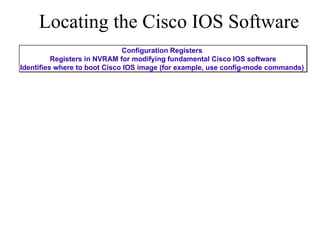
![Locating the Cisco IOS Software Configuration Registers Registers in NVRAM for modifying fundamental Cisco IOS software Identifies where to boot Cisco IOS image (for example, use config-mode commands) Router# configure terminal Router(config)# boot system flash IOS_filename Router(config)# boot system tftp IOS_filename tftp_address Router(config)# boot system rom [Ctrl-Z] Router# copy running-config startup-config](https://image.slidesharecdn.com/lecture20presentation-100917010007-phpapp02/85/Lecture-20-presentation-3-320.jpg)
![Locating the Cisco IOS Software Configuration Registers Registers in NVRAM for modifying fundamental Cisco IOS software Identifies where to boot Cisco IOS image (for example, use config-mode commands) Router# configure terminal Router(config)# boot system flash IOS_filename Router(config)# boot system tftp IOS_filename tftp_address Router(config)# boot system rom [Ctrl-Z] Router# copy running-config startup-config Boot system commands not found In NVRAM](https://image.slidesharecdn.com/lecture20presentation-100917010007-phpapp02/85/Lecture-20-presentation-4-320.jpg)
![Locating the Cisco IOS Software Configuration Registers Registers in NVRAM for modifying fundamental Cisco IOS software Identifies where to boot Cisco IOS image (for example, use config-mode commands) Router# configure terminal Router(config)# boot system flash IOS_filename Router(config)# boot system tftp IOS_filename tftp_address Router(config)# boot system rom [Ctrl-Z] Router# copy running-config startup-config Boot system commands not found In NVRAM Get default Cisco IOS software from Flash](https://image.slidesharecdn.com/lecture20presentation-100917010007-phpapp02/85/Lecture-20-presentation-5-320.jpg)
![Locating the Cisco IOS Software Configuration Registers Registers in NVRAM for modifying fundamental Cisco IOS software Identifies where to boot Cisco IOS image (for example, use config-mode commands) Router# configure terminal Router(config)# boot system flash IOS_filename Router(config)# boot system tftp IOS_filename tftp_address Router(config)# boot system rom [Ctrl-Z] Router# copy running-config startup-config Boot system commands not found In NVRAM Get default Cisco IOS software from Flash Flash memory empty](https://image.slidesharecdn.com/lecture20presentation-100917010007-phpapp02/85/Lecture-20-presentation-6-320.jpg)
![Locating the Cisco IOS Software Configuration Registers Registers in NVRAM for modifying fundamental Cisco IOS software Identifies where to boot Cisco IOS image (for example, use config-mode commands) Router# configure terminal Router(config)# boot system flash IOS_filename Router(config)# boot system tftp IOS_filename tftp_address Router(config)# boot system rom [Ctrl-Z] Router# copy running-config startup-config Boot system commands not found In NVRAM Get default Cisco IOS software from Flash Flash memory empty Get default Cisco IOS software from TFTP server](https://image.slidesharecdn.com/lecture20presentation-100917010007-phpapp02/85/Lecture-20-presentation-7-320.jpg)
![Locating the Cisco IOS Software ROM monitor Configuration Registers Registers in NVRAM for modifying fundamental Cisco IOS software Identifies where to boot Cisco IOS image (for example, use config-mode commands) Router# configure terminal Router(config)# boot system flash IOS_filename Router(config)# boot system tftp IOS_filename tftp_address Router(config)# boot system rom [Ctrl-Z] Router# copy running-config startup-config Boot system commands not found In NVRAM Get default Cisco IOS software from Flash Flash memory empty Get default Cisco IOS software from TFTP server](https://image.slidesharecdn.com/lecture20presentation-100917010007-phpapp02/85/Lecture-20-presentation-8-320.jpg)
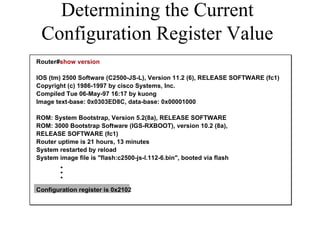
![Configuration Register bits 3, 2, 1, and 0 set boot option Configuration Register Values Router#configure terminal Router(config)# config-register 0x2102 [Ctrl-Z] Router#reload](https://image.slidesharecdn.com/lecture20presentation-100917010007-phpapp02/85/Lecture-20-presentation-10-320.jpg)
![Configuration Register bits 3, 2, 1, and 0 set boot option Configuration Register Values Configuration-Register Value 0x0 Meaning Use ROM monitor mode (Manually boot using the b command) Router#configure terminal Router(config)# config-register 0x2102 [Ctrl-Z] Router#reload](https://image.slidesharecdn.com/lecture20presentation-100917010007-phpapp02/85/Lecture-20-presentation-11-320.jpg)
![Configuration Register bits 3, 2, 1, and 0 set boot option Configuration Register Values Configuration-Register Value 0x0 0x1 Meaning Use ROM monitor mode (Manually boot using the b command) Automatically boot from ROM (Provides IOS subset) Router#configure terminal Router(config)# config-register 0x2102 [Ctrl-Z] Router#reload](https://image.slidesharecdn.com/lecture20presentation-100917010007-phpapp02/85/Lecture-20-presentation-12-320.jpg)
![Configuration Register bits 3, 2, 1, and 0 set boot option Check Configuration Register setting with show version Configuration Register Values Configuration-Register Value 0x0 0x2 to 0xF 0x1 Meaning Use ROM monitor mode (Manually boot using the b command) Examine NVRAM for boot system commands (0x2 default if router has Flash) Automatically boot from ROM (Provides IOS subset) Router#configure terminal Router(config)# config-register 0x2102 [Ctrl-Z] Router#reload](https://image.slidesharecdn.com/lecture20presentation-100917010007-phpapp02/85/Lecture-20-presentation-13-320.jpg)
![Boot System Options in Software Router#configure terminal Router(config)# boot system flash c2500-js-l [Ctrl-Z] Router#copy running-config startup-config Flash](https://image.slidesharecdn.com/lecture20presentation-100917010007-phpapp02/85/Lecture-20-presentation-14-320.jpg)
![Boot System Options in Software Router#configure terminal Router(config)# boot system flash c2500-js-l [Ctrl-Z] Router#copy running-config startup-config Flash Network Router#configure terminal Router(config)# boot system tftp test.exe 172.16.13.111 [Ctrl-Z] Router#copy running-config startup-config](https://image.slidesharecdn.com/lecture20presentation-100917010007-phpapp02/85/Lecture-20-presentation-15-320.jpg)
![Boot System Options in Software Router#configure terminal Router(config)# boot system flash c2500-js-l [Ctrl-Z] Router#copy running-config startup-config Flash Network Router#configure terminal Router(config)# boot system tftp test.exe 172.16.13.111 [Ctrl-Z] Router#copy running-config startup-config ROM Router#configure terminal Router(config)# boot system rom [Ctrl-Z] Router#copy running-config startup-config](https://image.slidesharecdn.com/lecture20presentation-100917010007-phpapp02/85/Lecture-20-presentation-16-320.jpg)

The document discusses Cisco IOS software configuration registers, which are used to identify where a Cisco router boots its IOS image from. It explains that the configuration register value determines the boot option, such as booting from flash memory, a TFTP server, or ROM monitor mode. It also shows commands for configuring the boot system and checking the current configuration register value.


![Aix5[1].3+hacmp+oracle9 i+weblogic8.1安装实施报告](https://cdn.slidesharecdn.com/ss_thumbnails/aix51-3hacmporacle9iweblogic8-1-110524233723-phpapp01-thumbnail.jpg?width=640&height=640&fit=bounds)


