Short introduction
Adam Król
REACT NATIVE
React Native? What is it?
Setup (simple way)
Install EXPO
$ npm install $ npm install ­­g expog expo­­clicli
Init new project
$ expo init MyProject$ expo init MyProject
$ cd MyProject$ cd MyProject
$ npm start$ npm start
Install EXPO client on IOS or Android
device
Setup (native code)
Install Node and Watchman
$ brew install node watchman$ brew install node watchman
Install React Native CLI
$ npm install ­g react­native­cli$ npm install ­g react­native­cli
Install XCODE or JDK and Android
Studio
Init new project
$ react­native init MyProject$ react­native init MyProject
Run application
$ react­native run­ios$ react­native run­ios
$ react­native run­android$ react­native run­android
How does it work?
importimport React React,,  {{ Component  Component }}  fromfrom  'react''react';;  
importimport  {{ View View,, Text Text,, TextInput TextInput,, Image Image,, StyleSheet  StyleSheet }}  fromfrom  'react­native''react­native';;  
  
classclass  BasicExampleBasicExample  extendsextends  ComponentComponent  {{  
    constructorconstructor((propsprops))  {{  
        supersuper((propsprops));;  
        thisthis..state state ==  {{texttext::  ''''}};;  
        thisthis..handleTextChange handleTextChange ==  thisthis..handleTextChangehandleTextChange..bindbind((thisthis));;  
    }}  
  
    handleTextChangehandleTextChange((texttext))  {{  
        thisthis..setStatesetState(({{texttext}}));;  
    }}  
  
    renderrender(())  {{  
        returnreturn  ((  
            <<ViewView>>  
                <<TextText  stylestyle=={{stylesstyles..texttext}}>>  
                       
                </</TextText>>  
                <<ImageImage  
                    sourcesource=={{'https://www.fillmurray.com/193/165''https://www.fillmurray.com/193/165'}}  
                    stylestyle=={{stylesstyles..imageimage}}  
                />/>  
                <<TextInputTextInput  
                    stylestyle=={{stylesstyles..inputinput}}  
                    placeholderplaceholder==""TypeType  sthsth  coolcool  here"here"  
                    onChangeTextonChangeText=={{thisthis..handleTextChangehandleTextChange}}  
                />/>  
                <<TextText  stylestyle=={{stylesstyles..texttext}}>>  
                    {{thisthis..statestate..texttext}}  
                </</TextText>>  
            </</ViewView>>  
        ))  
    }}  
}}  
exportexport  defaultdefault BasicExample BasicExample  
constconst styles  styles == StyleSheet StyleSheet..createcreate(({{  
  text  text::  {{  
    fontSize    fontSize::  3030,,  
    alignSelf    alignSelf::  'center''center',,  
    color    color::  '#aaa''#aaa',,  
    marginRight    marginRight::  2525,,  
    }},,  
  image  image::  {{  
    width    width::  193193,,  
    height    height::  165165,,  
    }},,  
  input  input::  {{  
    height    height::  4040,,  
    padding    padding::  1010,,  
    }}  
}}))  
Step by step
  1. import React, { Component } from 'react';
  2. import { View, Text, Image, StyleSheet } from 
'react­native';
  3. 
  4. class BasicExample extends Component {
  5.   constructor(props) {
  6.     super(props);
  7.     this.state = { text: '' };
  8.     this.handleTextChange = 
this.handleTextChange.bind(this);
  9.   }
 10. 
 11.   handleTextChange(text) {
Basic components
View
ScrollView
StyleSheet
Text
Image
TextInput
User Interface
Button
Picker
Slider
Switch
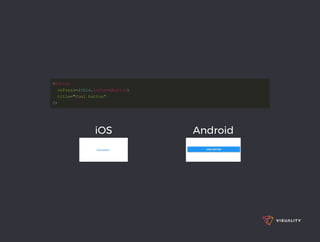
<<ButtonButton  
    onPressonPress=={{thisthis..onPressButtononPressButton}}  
    titletitle==""CoolCool  button"button"  
/>/>  
iOS Android
List Views
FlatList
SectionList
importimport React React,,  {{ Component  Component }}  fromfrom  'react''react';;  
importimport  {{ FlatList FlatList,, Text Text,, View  View }}  fromfrom  'react­native''react­native';;  
exportexport  defaultdefault  classclass  FlatListBasicsFlatListBasics  extendsextends  ComponentComponent  {{  
    renderrender(())  {{  
        returnreturn  ((  
            <<ViewView>>  
                <<FlatListFlatList  
                    datadata=={{[[  
                        {{keykey::  'Phineas''Phineas'}},,  
                        {{keykey::  'Ferb''Ferb'}},,  
                        {{keykey::  'Candance''Candance'}},,  
                        {{keykey::  'Perry''Perry'}},,  
                        {{keykey::  'dr Doofenshmirtz''dr Doofenshmirtz'}},,  
                        {{keykey::  'Isabella''Isabella'}},,  
                        {{keykey::  'Baljeet''Baljeet'}},,  
                        {{keykey::  'Buford''Buford'}},,  
                    ]]}}  
                    renderItemrenderItem=={{(({{itemitem}}))  ==>>  <<TextText>>{{itemitem..keykey}}</</TextText>>}}  
                />/>  
            </</ViewView>>  
        ));;  
    }}  
}}  
iOS Components and APIs
ActionSheetIOS
AlertIOS
DatePickerIOS
ImagePickerIOS
NavigatorIOS
ProgressViewIOS
PushNotificationIOS
SegmentedControlIOS
TabBarIOS
Android Components and APIs
BackHandler
DatePickerAndroid
DrawerLayoutAndroid
PermissionsAndroid
ProgressBarAndroid
TimePickerAndroid
ToastAndroid
ToolbarAndroid
ViewPagerAndroid
Others
ActivityIndicator
Alert
Animated
CameraRoll
Clipboard
Dimensions
KeyboardAvoidingView
Linking
Modal
PixelRatio
RefreshControl
StatusBar
WebView
Platform specific code
React Native provides two ways to easily
organize your code and separate it by
platform:
Using the Platform module.
Using platform-specific file extensions.
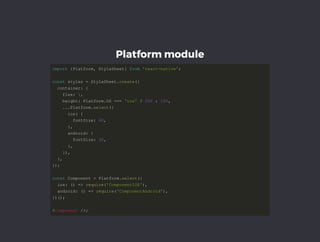
Platform module
importimport  {{PlatformPlatform,, StyleSheet StyleSheet}}  fromfrom  'react­native''react­native';;  
constconst styles  styles == StyleSheet StyleSheet..createcreate(({{  
  container  container::  {{  
    flex    flex::  11,,  
    height    height:: Platform Platform..OS OS ======  'ios''ios'  ??  200200  ::  100100,,  
        ......PlatformPlatform..selectselect(({{  
      ios      ios::  {{  
        fontSize        fontSize::  4040,,  
            }},,  
      android      android::  {{  
        fontSize        fontSize::  3030,,  
            }},,  
        }})),,  
    }},,  
}}));;  
constconst Component  Component == Platform Platform..selectselect(({{  
  ios  ios::  (())  ==>>  requirerequire(('ComponentIOS''ComponentIOS')),,  
  android  android::  (())  ==>>  requirerequire(('ComponentAndroid''ComponentAndroid')),,  
}}))(());;  
<<ComponentComponent  />/>;;  
Platform-specific extensions
HeaderHeader..iosios..jsjs  
HeaderHeader..androidandroid..jsjs  
importimport Header  Header fromfrom  './Header''./Header';;  
How cool is that?
Who's using React Native?
Thank you!

React Native - Short introduction