MEDICAL IMAGE COMPUTING (CAP 5937)
LECTURE 3: Pre-Processing Medical Images (I)
Dr. Ulas Bagci
HEC 221, Center for Research in Computer
Vision (CRCV), University of Central Florida
(UCF), Orlando, FL 32814.
bagci@ucf.edu or bagci@crcv.ucf.edu
1SPRING 2017
Outline
• CAVA: Computer Aided Visualization and Analysis
• CAD: Computer Aided Diagnosis
• Definitions and Terminologies
• Coordinate Systems
• Pre-Processing Images
– Volume of Interest
– Region of Interest
– Intensity of Interest
– Image Enhancement
• Filtering
• Smoothing
2
CAVA: ComputerAided Visualization and Analysis
• Definition:
– The science of underlying computerized methods
of image processing, analysis, and visualizations
to facilitate new therapeutic strategies, basic
clinical research, education, and training.
3
CAD: ComputerAided Diagnosis
• Definition:
– The science of underlying computerized methods
of image processing, analysis for the diagnosis of
diseases via images.
4
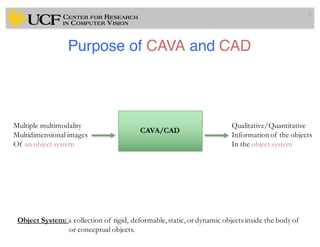
Purpose of CAVA and CAD
5
CAVA/CAD
Multiple multimodality
Multidimensional images
Of an object system
Qualitative/Quantitative
Information of the objects
In the object system
Object System: a collection of rigid, deformable,static, or dynamic objects inside the body of
or conceptual objects.
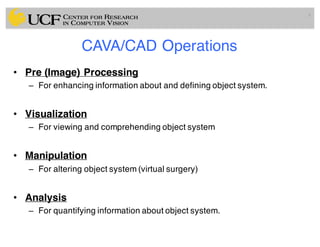
CAVA/CAD Operations
• Pre (Image) Processing
– For enhancing information about and defining object system.
• Visualization
– For viewing and comprehending object system
• Manipulation
– For altering object system (virtual surgery)
• Analysis
– For quantifying information about object system.
6
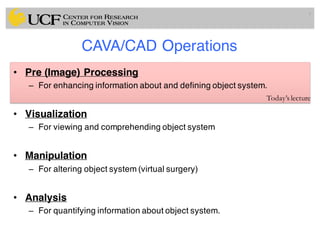
CAVA/CAD Operations
• Pre (Image) Processing
– For enhancing information about and defining object system.
• Visualization
– For viewing and comprehending object system
• Manipulation
– For altering object system (virtual surgery)
• Analysis
– For quantifying information about object system.
7
Today’s lecture
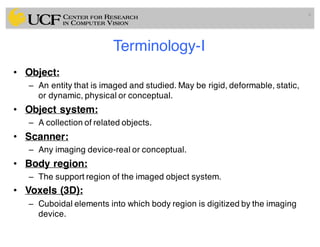
Terminology-I
• Object:
– An entity that is imaged and studied. May be rigid, deformable, static,
or dynamic, physical or conceptual.
• Object system:
– A collection of related objects.
• Scanner:
– Any imaging device-real or conceptual.
• Body region:
– The support region of the imaged object system.
• Voxels (3D):
– Cuboidal elements into which body region is digitized by the imaging
device.
8
Terminology-II
• Scene:
– Multidimensional (2D, 3D, 4D, …) image of the body regions; S=(C,f)
• Scene Domain:
– Rectangular array of voxels on which scene is defined; C
• Scene Intensity:
– Values assigned to voxels; f(c)
• Binary Scene:
– A scene with intensities 0 and 1 only.
• Structure:
– Geometric representation of an object in the object system derived
from scenes.
9
Terminology-III
• Structure System:
– A collection of structures representing the objects in an object system
• Rendition:
– A 2D image depicting a structure system
• Body Coordinate System:
– A coordinate system associated with the imaged body region
• Scanner Coordinate System:
– A coordinate system affixed to the scanner
• Scene Coordinate System:
– A coordinate system affixed to the scene
• Structure Coordinate System:
– A coordinate system determined for structures
• Display Coordinate System:
– A coordinate system associated with the display device
10
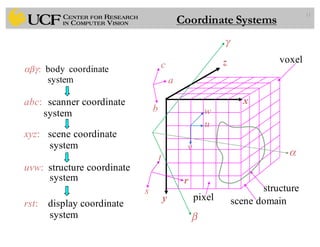
11
abc: scanner coordinate
system
xyz: scene coordinate
system
uvw: structure coordinate
system
rst: display coordinate
system
αβγ: body coordinate
system
s structure
voxel
y scene domain
z
x
w
u
v
r
a
b
t
c
pixel
α
β
γ
Coordinate Systems
Image Pre-Processing
• Volume of Interest (VOI):
– Purpose: to reduce data for speeding up CAVA operations.
12
Image Pre-Processing
• Volume of Interest (VOI):
– Purpose: to reduce data for speeding up CAVA operations.
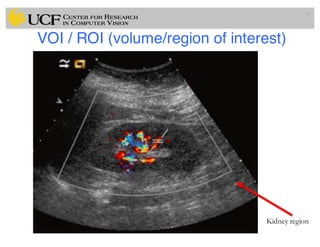
• Region of Interest (ROI):
– To specify a subset of the scene domain.
13
Image Pre-Processing
• Volume of Interest (VOI):
– Purpose: to reduce data for speeding up CAVA operations.
• Region of Interest (ROI):
– To specify a subset of the scene domain.
• Intensity of Interest (IOI):
– To specify a subset of the scene intensities.
14
Image Pre-Processing
• Volume of Interest (VOI):
– Purpose: to reduce data for speeding up CAVA operations.
• Region of Interest (ROI):
– To specify a subset of the scene domain.
• Intensity of Interest (IOI):
– To specify a subset of the scene intensities.
Storage requirement can be reduced by a factor of 2-10
15
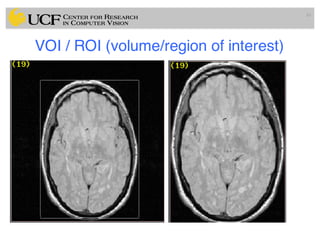
VOI / ROI (volume/region of interest)
16
VOI / ROI (volume/region of interest)
17
Kidney region
Image Filtering
Scene à Scene
S=(C,f) à SF=(C,fF)
18
Purpose: To suppress unwanted (non-object) info.
To enhance wanted (object) information.
Enhancive: For enhancing edges, regions.
For intensity scale standardization.
For correcting background variation.
Suppressive: Mainly for suppressing random noise.
Medical Image Enhancement
• Medical images are often deteriorated by noise due to various
sources of interference
– affect measurement process in imaging and data acquisition systems
19
Medical Image Enhancement
• Medical images are often deteriorated by noise due to various
sources of interference
– affect measurement process in imaging and data acquisition systems
• Improvement in appearance and visual quality of the images
may assist in interpretation of medical images
– may affect diagnostic decision too!
20
Medical Image Enhancement
• Medical images are often deteriorated by noise due to various
sources of interference
– affect measurement process in imaging and data acquisition systems
• Improvement in appearance and visual quality of the images
may assist in interpretation of medical images
– may affect diagnostic decision too!
• Some enhancement algorithms are developed for deriving
images that are meant for use by a subsequent algorithm for
computer processing!
– Edge detection, object segmentation, etc.
21
Inappropriate use of Enhancement Methods
• Enhancement methods themselves may
increase noise while improving contrast!
• They may eliminate small details and
edge sharpness while removing noise
• They may produce artifacts in general.
22
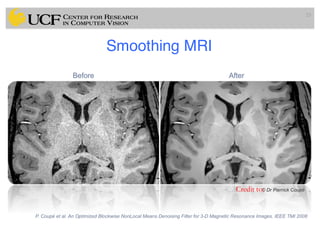
Smoothing MRI
23
Credit to:
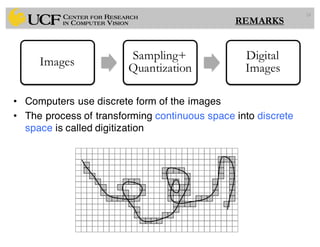
• Computers use discrete form of the images
• The process of transforming continuous space into discrete
space is called digitization
24
Images
Sampling+
Quantization
Digital
Images
REMARKS
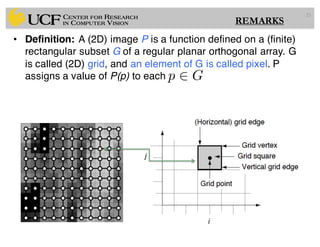
• Definition: A (2D) image P is a function defined on a (finite)
rectangular subset G of a regular planar orthogonal array. G
is called (2D) grid, and an element of G is called pixel. P
assigns a value of P(p) to each
25
p 2 G
REMARKS
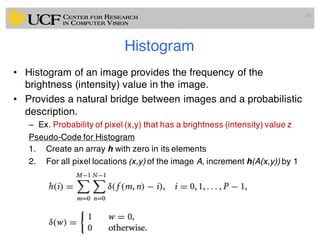
Histogram
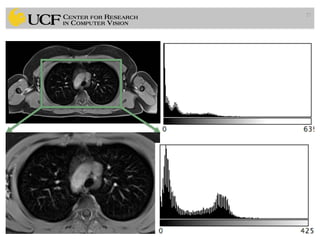
• Histogram of an image provides the frequency of the
brightness (intensity) value in the image.
• Provides a natural bridge between images and a probabilistic
description.
– Ex. Probability of pixel (x,y) that has a brightness (intensity) value z
Pseudo-Code for Histogram
1. Create an array h with zero in its elements
2. For all pixel locations (x,y) of the image A, increment h(A(x,y)) by 1
26
27
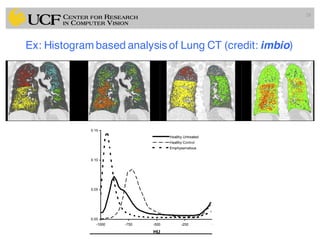
Ex: Histogram based analysis of Lung CT (credit: imbio)
28
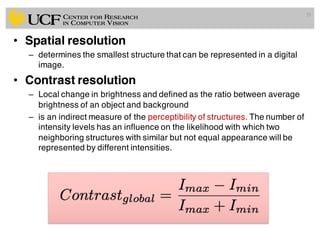
• Spatial resolution
– determines the smallest structure that can be represented in a digital
image.
• Contrast resolution
– Local change in brightness and defined as the ratio between average
brightness of an object and background
– is an indirect measure of the perceptibility of structures. The number of
intensity levels has an influence on the likelihood with which two
neighboring structures with similar but not equal appearance will be
represented by different intensities.
29
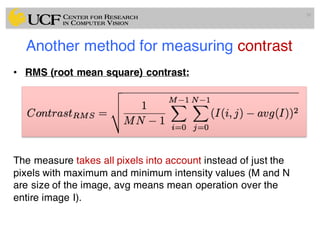
Another method for measuring contrast
• RMS (root mean square) contrast:
The measure takes all pixels into account instead of just the
pixels with maximum and minimum intensity values (M and N
are size of the image, avg means mean operation over the
entire image I).
30
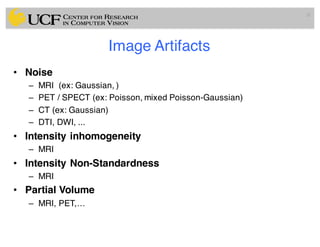
Image Artifacts
• Noise
– MRI (ex: Gaussian, )
– PET / SPECT (ex: Poisson, mixed Poisson-Gaussian)
– CT (ex: Gaussian)
– DTI, DWI, ...
• Intensity inhomogeneity
– MRI
• Intensity Non-Standardness
– MRI
• Partial Volume
– MRI, PET,…
31
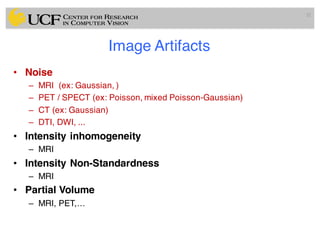
Image Artifacts
• Noise
– MRI (ex: Gaussian, )
– PET / SPECT (ex: Poisson, mixed Poisson-Gaussian)
– CT (ex: Gaussian)
– DTI, DWI, ...
• Intensity inhomogeneity
– MRI
• Intensity Non-Standardness
– MRI
• Partial Volume
– MRI, PET,…
32
Noise
Noise is corrupting the image information, and it is unwanted.
• Signal independent noise
– g = f + n
• Gaussian
• Signal dependent noise
– g = f*n
• Poisson
• Often, medical images are considered to have Gaussian
noise, however PET/SPECT images have mixed
Poisson/Gaussian, and MRI have Rician type noise.
33
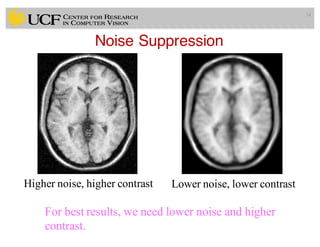
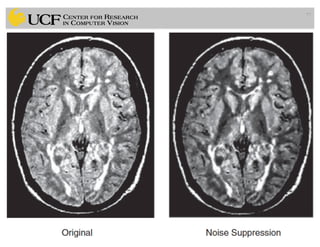
Noise Suppression
34
Higher noise, higher contrast Lower noise, lower contrast
For best results, we need lower noise and higher
contrast.
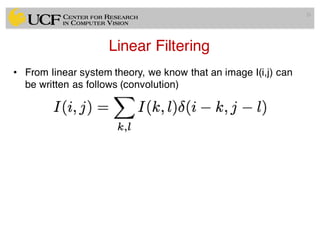
Linear Filtering
• From linear system theory, we know that an image I(i,j) can
be written as follows (convolution)
35
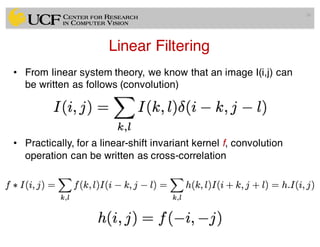
Linear Filtering
• From linear system theory, we know that an image I(i,j) can
be written as follows (convolution)
• Practically, for a linear-shift invariant kernel f, convolution
operation can be written as cross-correlation
36
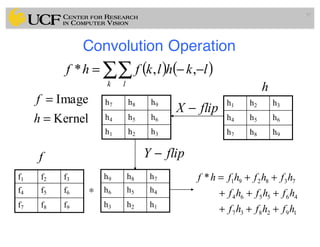
Convolution Operation
37
( ) ( )∑∑ −−=
k l
lkhlkfhf ,,*
Kernel
Image
=
=
h
f h7 h8 h9
h4 h5 h6
h1 h2 h3
h9 h8 h7
h6 h5 h4
h3 h2 h1
h1 h2 h3
h4 h5 h6
h7 h8 h9
h
flipX −
flipY −
f1 f2 f3
f4 f5 f6
f7 f8 f9
∗
192837
465564
738291*
hfhfhf
hfhfhf
hfhfhfhf
+++
+++
++=
f
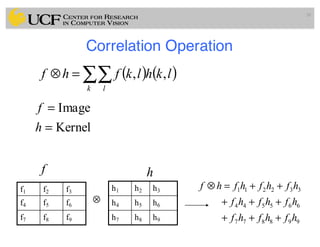
Correlation Operation
38
( ) ( )∑∑=⊗
k l
lkhlkfhf ,,
Kernel
Image
=
=
h
f
h1 h2 h3
h4 h5 h6
h7 h8 h9
h
f1 f2 f3
f4 f5 f6
f7 f8 f9
⊗
998877
665544
332211
hfhfhf
hfhfhf
hfhfhfhf
+++
+++
++=⊗
f
Correlation and Convolution
• Convolution is a filtering operation, expresses
the amount of overlap of one function as it is
shifted over another function
• Correlation compares the similarity of two sets
of data (relatedness of the signals!)
39
Noise suppression: Image Filtering
• Enhance or restore data by removing noise without
significantly blurring the structures in the images.
40
Noise suppression: Image Filtering
• Enhance or restore data by removing noise without
significantly blurring the structures in the images.
• Literature is vast! We will cover only a few of them.
41
Noise suppression: Image Filtering
• Enhance or restore data by removing noise without
significantly blurring the structures in the images.
• Literature is vast! We will cover only a few of them.
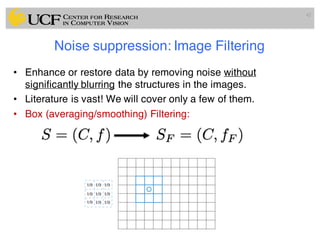
• Box (averaging/smoothing) Filtering:
42
Noise suppression: Image Filtering
• Enhance or restore data by removing noise without
significantly blurring the structures in the images.
• Literature is vast! We will cover only a few of them.
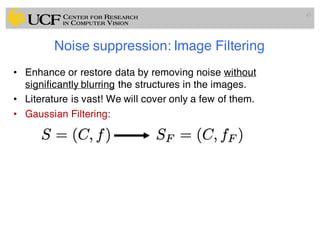
• Gaussian Filtering:
43
Noise suppression: Image Filtering
• Enhance or restore data by removing noise without
significantly blurring the structures in the images.
• Literature is vast! We will cover only a few of them.
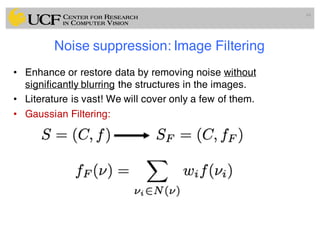
• Gaussian Filtering:
44
Noise suppression: Image Filtering
• Gaussian Filtering:
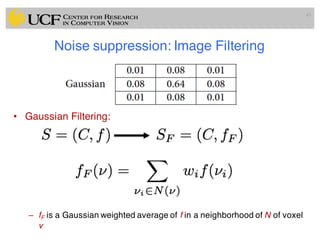
– fF is a Gaussian weighted average of f in a neighborhood of N of voxel
v
45
Remark: Why Gaussian Assumption?
• Most common natural model
• Smooth function, it has infinite number of derivatives
• It is Symmetric
• Fourier Transform of Gaussian is Gaussian.
• Convolution of a Gaussian with itself is a Gaussian.
• Gaussian is separable; 2D convolution can be performed by
two 1-D convolutions
• There are cells in eye that perform Gaussian filtering.
46
Noise suppression: Image Filtering
• Enhance or restore data by removing noise without
significantly blurring the structures in the images.
• Literature is vast! We will cover only a few of them.
• Median Filtering:
– fF is median intensity in a neighborhood of voxel v.
47
Median Filtering (Details)
48
[8 8 8 8 8 8 8 8 255]
median
Filtering Operation (Spatial Domain)
49
111
111
111
],[g ⋅⋅
Example: Box Filtering
(smoothing)
What does it do?
• Replaces each pixel with an
average of its neighborhood
• Achieve smoothing effect
(remove sharp features)
0 0 0 0 0 0 0 0 0 0
0 0 0 0 0 0 0 0 0 0
0 0 0 90 90 90 90 90 0 0
0 0 0 90 90 90 90 90 0 0
0 0 0 90 90 90 90 90 0 0
0 0 0 90 0 90 90 90 0 0
0 0 0 90 90 90 90 90 0 0
0 0 0 0 0 0 0 0 0 0
0 0 90 0 0 0 0 0 0 0
0 0 0 0 0 0 0 0 0 0
0
0 0 0 0 0 0 0 0 0 0
0 0 0 0 0 0 0 0 0 0
0 0 0 90 90 90 90 90 0 0
0 0 0 90 90 90 90 90 0 0
0 0 0 90 90 90 90 90 0 0
0 0 0 90 0 90 90 90 0 0
0 0 0 90 90 90 90 90 0 0
0 0 0 0 0 0 0 0 0 0
0 0 90 0 0 0 0 0 0 0
0 0 0 0 0 0 0 0 0 0
Credit: S. Seitz
],[],[],[
,
lnkmflkgnmh
lk
++= ∑
[.,.]h[.,.]f
111
111
111
],[g ⋅⋅
Filtering Operation (Spatial Domain)
0 0 0 0 0 0 0 0 0 0
0 0 0 0 0 0 0 0 0 0
0 0 0 90 90 90 90 90 0 0
0 0 0 90 90 90 90 90 0 0
0 0 0 90 90 90 90 90 0 0
0 0 0 90 0 90 90 90 0 0
0 0 0 90 90 90 90 90 0 0
0 0 0 0 0 0 0 0 0 0
0 0 90 0 0 0 0 0 0 0
0 0 0 0 0 0 0 0 0 0
0 10
0 0 0 0 0 0 0 0 0 0
0 0 0 0 0 0 0 0 0 0
0 0 0 90 90 90 90 90 0 0
0 0 0 90 90 90 90 90 0 0
0 0 0 90 90 90 90 90 0 0
0 0 0 90 0 90 90 90 0 0
0 0 0 90 90 90 90 90 0 0
0 0 0 0 0 0 0 0 0 0
0 0 90 0 0 0 0 0 0 0
0 0 0 0 0 0 0 0 0 0
[.,.]h[.,.]f
111
111
111
],[g ⋅⋅
Credit: S. Seitz
],[],[],[
,
lnkmflkgnmh
lk
++= ∑
Filtering Operation (Spatial Domain)
0 0 0 0 0 0 0 0 0 0
0 0 0 0 0 0 0 0 0 0
0 0 0 90 90 90 90 90 0 0
0 0 0 90 90 90 90 90 0 0
0 0 0 90 90 90 90 90 0 0
0 0 0 90 0 90 90 90 0 0
0 0 0 90 90 90 90 90 0 0
0 0 0 0 0 0 0 0 0 0
0 0 90 0 0 0 0 0 0 0
0 0 0 0 0 0 0 0 0 0
0 10 20
0 0 0 0 0 0 0 0 0 0
0 0 0 0 0 0 0 0 0 0
0 0 0 90 90 90 90 90 0 0
0 0 0 90 90 90 90 90 0 0
0 0 0 90 90 90 90 90 0 0
0 0 0 90 0 90 90 90 0 0
0 0 0 90 90 90 90 90 0 0
0 0 0 0 0 0 0 0 0 0
0 0 90 0 0 0 0 0 0 0
0 0 0 0 0 0 0 0 0 0
[.,.]h[.,.]f
111
111
111
],[g ⋅⋅
Credit: S. Seitz
],[],[],[
,
lnkmflkgnmh
lk
++= ∑
Filtering Operation (Spatial Domain)
0 0 0 0 0 0 0 0 0 0
0 0 0 0 0 0 0 0 0 0
0 0 0 90 90 90 90 90 0 0
0 0 0 90 90 90 90 90 0 0
0 0 0 90 90 90 90 90 0 0
0 0 0 90 0 90 90 90 0 0
0 0 0 90 90 90 90 90 0 0
0 0 0 0 0 0 0 0 0 0
0 0 90 0 0 0 0 0 0 0
0 0 0 0 0 0 0 0 0 0
0 10 20 30
0 0 0 0 0 0 0 0 0 0
0 0 0 0 0 0 0 0 0 0
0 0 0 90 90 90 90 90 0 0
0 0 0 90 90 90 90 90 0 0
0 0 0 90 90 90 90 90 0 0
0 0 0 90 0 90 90 90 0 0
0 0 0 90 90 90 90 90 0 0
0 0 0 0 0 0 0 0 0 0
0 0 90 0 0 0 0 0 0 0
0 0 0 0 0 0 0 0 0 0
[.,.]h[.,.]f
111
111
111
],[g ⋅⋅
Credit: S. Seitz
],[],[],[
,
lnkmflkgnmh
lk
++= ∑
Filtering Operation (Spatial Domain)
0 10 20 30 30
0 0 0 0 0 0 0 0 0 0
0 0 0 0 0 0 0 0 0 0
0 0 0 90 90 90 90 90 0 0
0 0 0 90 90 90 90 90 0 0
0 0 0 90 90 90 90 90 0 0
0 0 0 90 0 90 90 90 0 0
0 0 0 90 90 90 90 90 0 0
0 0 0 0 0 0 0 0 0 0
0 0 90 0 0 0 0 0 0 0
0 0 0 0 0 0 0 0 0 0
[.,.]h[.,.]f
111
111
111
],[g ⋅⋅
Credit: S. Seitz
],[],[],[
,
lnkmflkgnmh
lk
++= ∑
Filtering Operation (Spatial Domain)
0 10 20 30 30
0 0 0 0 0 0 0 0 0 0
0 0 0 0 0 0 0 0 0 0
0 0 0 90 90 90 90 90 0 0
0 0 0 90 90 90 90 90 0 0
0 0 0 90 90 90 90 90 0 0
0 0 0 90 0 90 90 90 0 0
0 0 0 90 90 90 90 90 0 0
0 0 0 0 0 0 0 0 0 0
0 0 90 0 0 0 0 0 0 0
0 0 0 0 0 0 0 0 0 0
[.,.]h[.,.]f
111
111
111
],[g ⋅⋅
Credit: S. Seitz
?
],[],[],[
,
lnkmflkgnmh
lk
++= ∑
Filtering Operation (Spatial Domain)
0 10 20 30 30
50
0 0 0 0 0 0 0 0 0 0
0 0 0 0 0 0 0 0 0 0
0 0 0 90 90 90 90 90 0 0
0 0 0 90 90 90 90 90 0 0
0 0 0 90 90 90 90 90 0 0
0 0 0 90 0 90 90 90 0 0
0 0 0 90 90 90 90 90 0 0
0 0 0 0 0 0 0 0 0 0
0 0 90 0 0 0 0 0 0 0
0 0 0 0 0 0 0 0 0 0
[.,.]h[.,.]f
111
111
111
],[g ⋅⋅
Credit: S. Seitz
?
],[],[],[
,
lnkmflkgnmh
lk
++= ∑
Filtering Operation (Spatial Domain)
0 0 0 0 0 0 0 0 0 0
0 0 0 0 0 0 0 0 0 0
0 0 0 90 90 90 90 90 0 0
0 0 0 90 90 90 90 90 0 0
0 0 0 90 90 90 90 90 0 0
0 0 0 90 0 90 90 90 0 0
0 0 0 90 90 90 90 90 0 0
0 0 0 0 0 0 0 0 0 0
0 0 90 0 0 0 0 0 0 0
0 0 0 0 0 0 0 0 0 0
0 10 20 30 30 30 20 10
0 20 40 60 60 60 40 20
0 30 60 90 90 90 60 30
0 30 50 80 80 90 60 30
0 30 50 80 80 90 60 30
0 20 30 50 50 60 40 20
10 20 30 30 30 30 20 10
10 10 10 0 0 0 0 0
[.,.]h[.,.]f
111
111
111
],[g ⋅⋅
Credit: S. Seitz
],[],[],[
,
lnkmflkgnmh
lk
++= ∑
Filtering Operation (Spatial Domain)
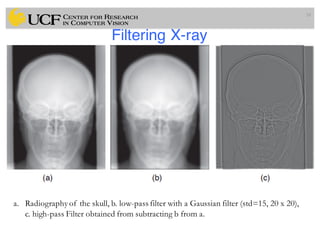
Filtering X-ray
58
a. Radiography of the skull, b. low-pass filter with a Gaussian filter (std=15, 20 x 20),
c. high-pass Filter obtained from subtracting b from a.
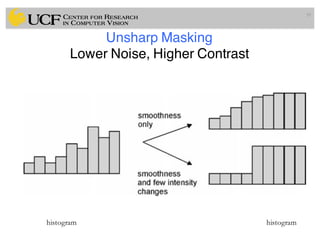
Unsharp Masking
Lower Noise, Higher Contrast
59
histogram histogram
Unsharp Masking
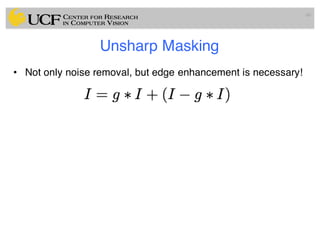
• Not only noise removal, but edge enhancement is necessary!
60
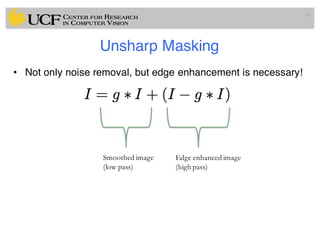
Unsharp Masking
• Not only noise removal, but edge enhancement is necessary!
61
Smoothed image
(low pass)
Edge enhanced image
(high pass)
Unsharp Masking
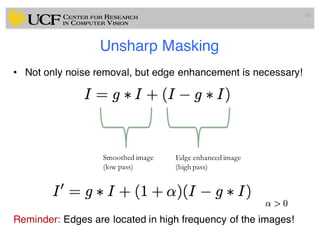
• Not only noise removal, but edge enhancement is necessary!
Reminder: Edges are located in high frequency of the images!
62
Smoothed image
(low pass)
Edge enhanced image
(high pass)
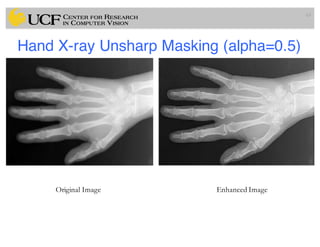
Hand X-ray Unsharp Masking (alpha=0.5)
63
Original Image Enhanced Image
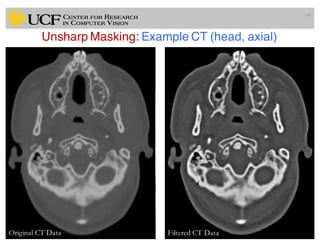
Unsharp Masking: Example CT (head, axial)
64
Original CT Data Filtered CT Data
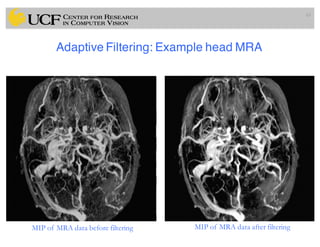
Adaptive Filtering: Example head MRA
65
MIP of MRA data before filtering MIP of MRA data after filtering
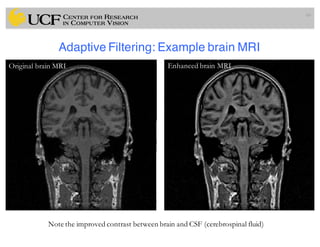
Adaptive Filtering: Example brain MRI
66
Original brain MRI Enhanced brain MRI
Note the improved contrast between brain and CSF (cerebrospinal fluid)
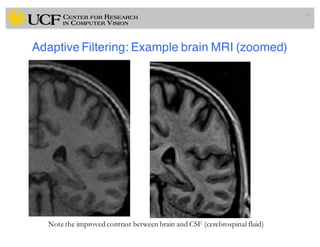
Adaptive Filtering: Example brain MRI (zoomed)
67
Enhanced brain MRI
Note the improved contrast between brain and CSF (cerebrospinal fluid)
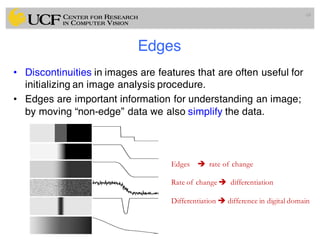
Edges
• Discontinuities in images are features that are often useful for
initializing an image analysis procedure.
• Edges are important information for understanding an image;
by moving “non-edge” data we also simplify the data.
68
Edges è rate of change
Rate of change è differentiation
Differentiation è difference in digital domain
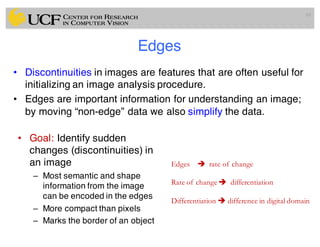
Edges
• Discontinuities in images are features that are often useful for
initializing an image analysis procedure.
• Edges are important information for understanding an image;
by moving “non-edge” data we also simplify the data.
69
Edges è rate of change
Rate of change è differentiation
Differentiation è difference in digital domain
• Goal: Identify sudden
changes (discontinuities) in
an image
– Most semantic and shape
information from the image
can be encoded in the edges
– More compact than pixels
– Marks the border of an object
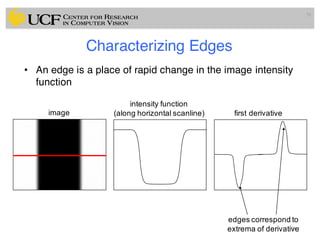
Characterizing Edges
70
• An edge is a place of rapid change in the image intensity
function
70
image
intensity function
(along horizontal scanline) first derivative
edges correspond to
extrema of derivative
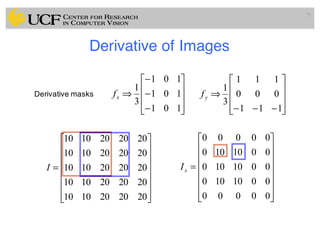
Derivative of Images
71
⎥
⎥
⎥
⎦
⎤
⎢
⎢
⎢
⎣
⎡
−
−
−
⇒
101
101
101
3
1
xfDerivative masks
⎥
⎥
⎥
⎦
⎤
⎢
⎢
⎢
⎣
⎡
−−−
⇒
111
000
111
3
1
yf
⎥
⎥
⎥
⎥
⎥
⎥
⎦
⎤
⎢
⎢
⎢
⎢
⎢
⎢
⎣
⎡
=
2020201010
2020201010
2020201010
2020201010
2020201010
I
⎥
⎥
⎥
⎥
⎥
⎥
⎦
⎤
⎢
⎢
⎢
⎢
⎢
⎢
⎣
⎡
=
00000
0010100
0010100
0010100
00000
xI
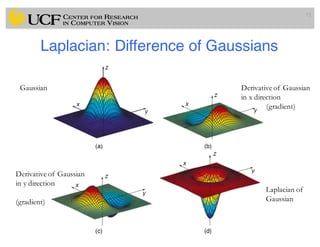
Laplacian: Difference of Gaussians
72
Gaussian Derivative of Gaussian
in x direction
(gradient)
Derivative of Gaussian
in y direction
(gradient)
Laplacian of
Gaussian
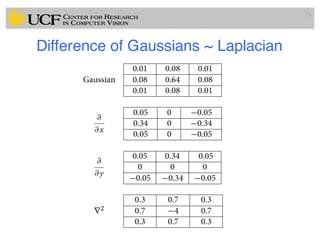
Difference of Gaussians ~ Laplacian
73
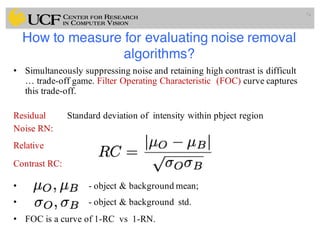
How to measure for evaluating noise removal
algorithms?
• Simultaneously suppressing noise and retaining high contrast is difficult
… trade-off game. Filter Operating Characteristic (FOC) curve captures
this trade-off.
Residual Standard deviation of intensity within pbject region
Noise RN:
Relative
Contrast RC:
• - object & background mean;
• - object & background std.
• FOC is a curve of 1-RC vs 1-RN.
74
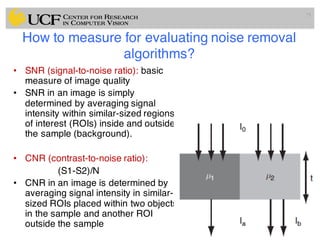
How to measure for evaluating noise removal
algorithms?
• SNR (signal-to-noise ratio): basic
measure of image quality
• SNR in an image is simply
determined by averaging signal
intensity within similar-sized regions
of interest (ROIs) inside and outside
the sample (background).
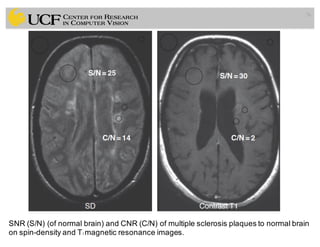
• CNR (contrast-to-noise ratio):
(S1-S2)/N
• CNR in an image is determined by
averaging signal intensity in similar-
sized ROIs placed within two objects
in the sample and another ROI
outside the sample
75
76
SNR (S/N) (of normal brain) and CNR (C/N) of multiple sclerosis plaques to normal brain
on spin-density and T1 magnetic resonance images.
77
Summary
• CAVA: computer aided visualizationand analysis
• CAD: computer aided diagnosis
• Coordinate Systems
• Pre-Processing Images
– Gaussian Smoothing, Median Filtering, Unsharp Masking
– Edge Enhancement
– Evaluation for image quality metric (contrast and noise)
78
References and Slide Credits
• Jayaram K. Udupa, MIPG of University of Pennsylvania, PA.
• P. Suetens, Fundamentals of Medical Imaging, Cambridge
Univ. Press.
• N. Bryan, Intro. to the science of medical imaging, Cambridge
Univ. Press.
• CAP 5415 Computer Vision (Fall 2016) Lecture Presentations
• Next Lecture (Preprocessing of Medical Images II)
– Diffusion based Smoothing in Medical Scans
– Intensity inhomogeneity Correction in MRI
– Intensity Standardization in MRI
– Noise Removal in PET/SPECT Images
79

Lec3: Pre-Processing Medical Images

  • 1.
    MEDICAL IMAGE COMPUTING(CAP 5937) LECTURE 3: Pre-Processing Medical Images (I) Dr. Ulas Bagci HEC 221, Center for Research in Computer Vision (CRCV), University of Central Florida (UCF), Orlando, FL 32814. bagci@ucf.edu or bagci@crcv.ucf.edu 1SPRING 2017
  • 2.
    Outline • CAVA: ComputerAided Visualization and Analysis • CAD: Computer Aided Diagnosis • Definitions and Terminologies • Coordinate Systems • Pre-Processing Images – Volume of Interest – Region of Interest – Intensity of Interest – Image Enhancement • Filtering • Smoothing 2
  • 3.
    CAVA: ComputerAided Visualizationand Analysis • Definition: – The science of underlying computerized methods of image processing, analysis, and visualizations to facilitate new therapeutic strategies, basic clinical research, education, and training. 3
  • 4.
    CAD: ComputerAided Diagnosis •Definition: – The science of underlying computerized methods of image processing, analysis for the diagnosis of diseases via images. 4
  • 5.
    Purpose of CAVAand CAD 5 CAVA/CAD Multiple multimodality Multidimensional images Of an object system Qualitative/Quantitative Information of the objects In the object system Object System: a collection of rigid, deformable,static, or dynamic objects inside the body of or conceptual objects.
  • 6.
    CAVA/CAD Operations • Pre(Image) Processing – For enhancing information about and defining object system. • Visualization – For viewing and comprehending object system • Manipulation – For altering object system (virtual surgery) • Analysis – For quantifying information about object system. 6
  • 7.
    CAVA/CAD Operations • Pre(Image) Processing – For enhancing information about and defining object system. • Visualization – For viewing and comprehending object system • Manipulation – For altering object system (virtual surgery) • Analysis – For quantifying information about object system. 7 Today’s lecture
  • 8.
    Terminology-I • Object: – Anentity that is imaged and studied. May be rigid, deformable, static, or dynamic, physical or conceptual. • Object system: – A collection of related objects. • Scanner: – Any imaging device-real or conceptual. • Body region: – The support region of the imaged object system. • Voxels (3D): – Cuboidal elements into which body region is digitized by the imaging device. 8
  • 9.
    Terminology-II • Scene: – Multidimensional(2D, 3D, 4D, …) image of the body regions; S=(C,f) • Scene Domain: – Rectangular array of voxels on which scene is defined; C • Scene Intensity: – Values assigned to voxels; f(c) • Binary Scene: – A scene with intensities 0 and 1 only. • Structure: – Geometric representation of an object in the object system derived from scenes. 9
  • 10.
    Terminology-III • Structure System: –A collection of structures representing the objects in an object system • Rendition: – A 2D image depicting a structure system • Body Coordinate System: – A coordinate system associated with the imaged body region • Scanner Coordinate System: – A coordinate system affixed to the scanner • Scene Coordinate System: – A coordinate system affixed to the scene • Structure Coordinate System: – A coordinate system determined for structures • Display Coordinate System: – A coordinate system associated with the display device 10
  • 11.
    11 abc: scanner coordinate system xyz:scene coordinate system uvw: structure coordinate system rst: display coordinate system αβγ: body coordinate system s structure voxel y scene domain z x w u v r a b t c pixel α β γ Coordinate Systems
  • 12.
    Image Pre-Processing • Volumeof Interest (VOI): – Purpose: to reduce data for speeding up CAVA operations. 12
  • 13.
    Image Pre-Processing • Volumeof Interest (VOI): – Purpose: to reduce data for speeding up CAVA operations. • Region of Interest (ROI): – To specify a subset of the scene domain. 13
  • 14.
    Image Pre-Processing • Volumeof Interest (VOI): – Purpose: to reduce data for speeding up CAVA operations. • Region of Interest (ROI): – To specify a subset of the scene domain. • Intensity of Interest (IOI): – To specify a subset of the scene intensities. 14
  • 15.
    Image Pre-Processing • Volumeof Interest (VOI): – Purpose: to reduce data for speeding up CAVA operations. • Region of Interest (ROI): – To specify a subset of the scene domain. • Intensity of Interest (IOI): – To specify a subset of the scene intensities. Storage requirement can be reduced by a factor of 2-10 15
  • 16.
    VOI / ROI(volume/region of interest) 16
  • 17.
    VOI / ROI(volume/region of interest) 17 Kidney region
  • 18.
    Image Filtering Scene àScene S=(C,f) à SF=(C,fF) 18 Purpose: To suppress unwanted (non-object) info. To enhance wanted (object) information. Enhancive: For enhancing edges, regions. For intensity scale standardization. For correcting background variation. Suppressive: Mainly for suppressing random noise.
  • 19.
    Medical Image Enhancement •Medical images are often deteriorated by noise due to various sources of interference – affect measurement process in imaging and data acquisition systems 19
  • 20.
    Medical Image Enhancement •Medical images are often deteriorated by noise due to various sources of interference – affect measurement process in imaging and data acquisition systems • Improvement in appearance and visual quality of the images may assist in interpretation of medical images – may affect diagnostic decision too! 20
  • 21.
    Medical Image Enhancement •Medical images are often deteriorated by noise due to various sources of interference – affect measurement process in imaging and data acquisition systems • Improvement in appearance and visual quality of the images may assist in interpretation of medical images – may affect diagnostic decision too! • Some enhancement algorithms are developed for deriving images that are meant for use by a subsequent algorithm for computer processing! – Edge detection, object segmentation, etc. 21
  • 22.
    Inappropriate use ofEnhancement Methods • Enhancement methods themselves may increase noise while improving contrast! • They may eliminate small details and edge sharpness while removing noise • They may produce artifacts in general. 22
  • 23.
  • 24.
    • Computers usediscrete form of the images • The process of transforming continuous space into discrete space is called digitization 24 Images Sampling+ Quantization Digital Images REMARKS
  • 25.
    • Definition: A(2D) image P is a function defined on a (finite) rectangular subset G of a regular planar orthogonal array. G is called (2D) grid, and an element of G is called pixel. P assigns a value of P(p) to each 25 p 2 G REMARKS
  • 26.
    Histogram • Histogram ofan image provides the frequency of the brightness (intensity) value in the image. • Provides a natural bridge between images and a probabilistic description. – Ex. Probability of pixel (x,y) that has a brightness (intensity) value z Pseudo-Code for Histogram 1. Create an array h with zero in its elements 2. For all pixel locations (x,y) of the image A, increment h(A(x,y)) by 1 26
  • 27.
  • 28.
    Ex: Histogram basedanalysis of Lung CT (credit: imbio) 28
  • 29.
    • Spatial resolution –determines the smallest structure that can be represented in a digital image. • Contrast resolution – Local change in brightness and defined as the ratio between average brightness of an object and background – is an indirect measure of the perceptibility of structures. The number of intensity levels has an influence on the likelihood with which two neighboring structures with similar but not equal appearance will be represented by different intensities. 29
  • 30.
    Another method formeasuring contrast • RMS (root mean square) contrast: The measure takes all pixels into account instead of just the pixels with maximum and minimum intensity values (M and N are size of the image, avg means mean operation over the entire image I). 30
  • 31.
    Image Artifacts • Noise –MRI (ex: Gaussian, ) – PET / SPECT (ex: Poisson, mixed Poisson-Gaussian) – CT (ex: Gaussian) – DTI, DWI, ... • Intensity inhomogeneity – MRI • Intensity Non-Standardness – MRI • Partial Volume – MRI, PET,… 31
  • 32.
    Image Artifacts • Noise –MRI (ex: Gaussian, ) – PET / SPECT (ex: Poisson, mixed Poisson-Gaussian) – CT (ex: Gaussian) – DTI, DWI, ... • Intensity inhomogeneity – MRI • Intensity Non-Standardness – MRI • Partial Volume – MRI, PET,… 32
  • 33.
    Noise Noise is corruptingthe image information, and it is unwanted. • Signal independent noise – g = f + n • Gaussian • Signal dependent noise – g = f*n • Poisson • Often, medical images are considered to have Gaussian noise, however PET/SPECT images have mixed Poisson/Gaussian, and MRI have Rician type noise. 33
  • 34.
    Noise Suppression 34 Higher noise,higher contrast Lower noise, lower contrast For best results, we need lower noise and higher contrast.
  • 35.
    Linear Filtering • Fromlinear system theory, we know that an image I(i,j) can be written as follows (convolution) 35
  • 36.
    Linear Filtering • Fromlinear system theory, we know that an image I(i,j) can be written as follows (convolution) • Practically, for a linear-shift invariant kernel f, convolution operation can be written as cross-correlation 36
  • 37.
    Convolution Operation 37 ( )( )∑∑ −−= k l lkhlkfhf ,,* Kernel Image = = h f h7 h8 h9 h4 h5 h6 h1 h2 h3 h9 h8 h7 h6 h5 h4 h3 h2 h1 h1 h2 h3 h4 h5 h6 h7 h8 h9 h flipX − flipY − f1 f2 f3 f4 f5 f6 f7 f8 f9 ∗ 192837 465564 738291* hfhfhf hfhfhf hfhfhfhf +++ +++ ++= f
  • 38.
    Correlation Operation 38 ( )( )∑∑=⊗ k l lkhlkfhf ,, Kernel Image = = h f h1 h2 h3 h4 h5 h6 h7 h8 h9 h f1 f2 f3 f4 f5 f6 f7 f8 f9 ⊗ 998877 665544 332211 hfhfhf hfhfhf hfhfhfhf +++ +++ ++=⊗ f
  • 39.
    Correlation and Convolution •Convolution is a filtering operation, expresses the amount of overlap of one function as it is shifted over another function • Correlation compares the similarity of two sets of data (relatedness of the signals!) 39
  • 40.
    Noise suppression: ImageFiltering • Enhance or restore data by removing noise without significantly blurring the structures in the images. 40
  • 41.
    Noise suppression: ImageFiltering • Enhance or restore data by removing noise without significantly blurring the structures in the images. • Literature is vast! We will cover only a few of them. 41
  • 42.
    Noise suppression: ImageFiltering • Enhance or restore data by removing noise without significantly blurring the structures in the images. • Literature is vast! We will cover only a few of them. • Box (averaging/smoothing) Filtering: 42
  • 43.
    Noise suppression: ImageFiltering • Enhance or restore data by removing noise without significantly blurring the structures in the images. • Literature is vast! We will cover only a few of them. • Gaussian Filtering: 43
  • 44.
    Noise suppression: ImageFiltering • Enhance or restore data by removing noise without significantly blurring the structures in the images. • Literature is vast! We will cover only a few of them. • Gaussian Filtering: 44
  • 45.
    Noise suppression: ImageFiltering • Gaussian Filtering: – fF is a Gaussian weighted average of f in a neighborhood of N of voxel v 45
  • 46.
    Remark: Why GaussianAssumption? • Most common natural model • Smooth function, it has infinite number of derivatives • It is Symmetric • Fourier Transform of Gaussian is Gaussian. • Convolution of a Gaussian with itself is a Gaussian. • Gaussian is separable; 2D convolution can be performed by two 1-D convolutions • There are cells in eye that perform Gaussian filtering. 46
  • 47.
    Noise suppression: ImageFiltering • Enhance or restore data by removing noise without significantly blurring the structures in the images. • Literature is vast! We will cover only a few of them. • Median Filtering: – fF is median intensity in a neighborhood of voxel v. 47
  • 48.
    Median Filtering (Details) 48 [88 8 8 8 8 8 8 255] median
  • 49.
    Filtering Operation (SpatialDomain) 49 111 111 111 ],[g ⋅⋅ Example: Box Filtering (smoothing) What does it do? • Replaces each pixel with an average of its neighborhood • Achieve smoothing effect (remove sharp features)
  • 50.
    0 0 00 0 0 0 0 0 0 0 0 0 0 0 0 0 0 0 0 0 0 0 90 90 90 90 90 0 0 0 0 0 90 90 90 90 90 0 0 0 0 0 90 90 90 90 90 0 0 0 0 0 90 0 90 90 90 0 0 0 0 0 90 90 90 90 90 0 0 0 0 0 0 0 0 0 0 0 0 0 0 90 0 0 0 0 0 0 0 0 0 0 0 0 0 0 0 0 0 0 0 0 0 0 0 0 0 0 0 0 0 0 0 0 0 0 0 0 0 0 0 0 0 90 90 90 90 90 0 0 0 0 0 90 90 90 90 90 0 0 0 0 0 90 90 90 90 90 0 0 0 0 0 90 0 90 90 90 0 0 0 0 0 90 90 90 90 90 0 0 0 0 0 0 0 0 0 0 0 0 0 0 90 0 0 0 0 0 0 0 0 0 0 0 0 0 0 0 0 0 Credit: S. Seitz ],[],[],[ , lnkmflkgnmh lk ++= ∑ [.,.]h[.,.]f 111 111 111 ],[g ⋅⋅ Filtering Operation (Spatial Domain)
  • 51.
    0 0 00 0 0 0 0 0 0 0 0 0 0 0 0 0 0 0 0 0 0 0 90 90 90 90 90 0 0 0 0 0 90 90 90 90 90 0 0 0 0 0 90 90 90 90 90 0 0 0 0 0 90 0 90 90 90 0 0 0 0 0 90 90 90 90 90 0 0 0 0 0 0 0 0 0 0 0 0 0 0 90 0 0 0 0 0 0 0 0 0 0 0 0 0 0 0 0 0 0 10 0 0 0 0 0 0 0 0 0 0 0 0 0 0 0 0 0 0 0 0 0 0 0 90 90 90 90 90 0 0 0 0 0 90 90 90 90 90 0 0 0 0 0 90 90 90 90 90 0 0 0 0 0 90 0 90 90 90 0 0 0 0 0 90 90 90 90 90 0 0 0 0 0 0 0 0 0 0 0 0 0 0 90 0 0 0 0 0 0 0 0 0 0 0 0 0 0 0 0 0 [.,.]h[.,.]f 111 111 111 ],[g ⋅⋅ Credit: S. Seitz ],[],[],[ , lnkmflkgnmh lk ++= ∑ Filtering Operation (Spatial Domain)
  • 52.
    0 0 00 0 0 0 0 0 0 0 0 0 0 0 0 0 0 0 0 0 0 0 90 90 90 90 90 0 0 0 0 0 90 90 90 90 90 0 0 0 0 0 90 90 90 90 90 0 0 0 0 0 90 0 90 90 90 0 0 0 0 0 90 90 90 90 90 0 0 0 0 0 0 0 0 0 0 0 0 0 0 90 0 0 0 0 0 0 0 0 0 0 0 0 0 0 0 0 0 0 10 20 0 0 0 0 0 0 0 0 0 0 0 0 0 0 0 0 0 0 0 0 0 0 0 90 90 90 90 90 0 0 0 0 0 90 90 90 90 90 0 0 0 0 0 90 90 90 90 90 0 0 0 0 0 90 0 90 90 90 0 0 0 0 0 90 90 90 90 90 0 0 0 0 0 0 0 0 0 0 0 0 0 0 90 0 0 0 0 0 0 0 0 0 0 0 0 0 0 0 0 0 [.,.]h[.,.]f 111 111 111 ],[g ⋅⋅ Credit: S. Seitz ],[],[],[ , lnkmflkgnmh lk ++= ∑ Filtering Operation (Spatial Domain)
  • 53.
    0 0 00 0 0 0 0 0 0 0 0 0 0 0 0 0 0 0 0 0 0 0 90 90 90 90 90 0 0 0 0 0 90 90 90 90 90 0 0 0 0 0 90 90 90 90 90 0 0 0 0 0 90 0 90 90 90 0 0 0 0 0 90 90 90 90 90 0 0 0 0 0 0 0 0 0 0 0 0 0 0 90 0 0 0 0 0 0 0 0 0 0 0 0 0 0 0 0 0 0 10 20 30 0 0 0 0 0 0 0 0 0 0 0 0 0 0 0 0 0 0 0 0 0 0 0 90 90 90 90 90 0 0 0 0 0 90 90 90 90 90 0 0 0 0 0 90 90 90 90 90 0 0 0 0 0 90 0 90 90 90 0 0 0 0 0 90 90 90 90 90 0 0 0 0 0 0 0 0 0 0 0 0 0 0 90 0 0 0 0 0 0 0 0 0 0 0 0 0 0 0 0 0 [.,.]h[.,.]f 111 111 111 ],[g ⋅⋅ Credit: S. Seitz ],[],[],[ , lnkmflkgnmh lk ++= ∑ Filtering Operation (Spatial Domain)
  • 54.
    0 10 2030 30 0 0 0 0 0 0 0 0 0 0 0 0 0 0 0 0 0 0 0 0 0 0 0 90 90 90 90 90 0 0 0 0 0 90 90 90 90 90 0 0 0 0 0 90 90 90 90 90 0 0 0 0 0 90 0 90 90 90 0 0 0 0 0 90 90 90 90 90 0 0 0 0 0 0 0 0 0 0 0 0 0 0 90 0 0 0 0 0 0 0 0 0 0 0 0 0 0 0 0 0 [.,.]h[.,.]f 111 111 111 ],[g ⋅⋅ Credit: S. Seitz ],[],[],[ , lnkmflkgnmh lk ++= ∑ Filtering Operation (Spatial Domain)
  • 55.
    0 10 2030 30 0 0 0 0 0 0 0 0 0 0 0 0 0 0 0 0 0 0 0 0 0 0 0 90 90 90 90 90 0 0 0 0 0 90 90 90 90 90 0 0 0 0 0 90 90 90 90 90 0 0 0 0 0 90 0 90 90 90 0 0 0 0 0 90 90 90 90 90 0 0 0 0 0 0 0 0 0 0 0 0 0 0 90 0 0 0 0 0 0 0 0 0 0 0 0 0 0 0 0 0 [.,.]h[.,.]f 111 111 111 ],[g ⋅⋅ Credit: S. Seitz ? ],[],[],[ , lnkmflkgnmh lk ++= ∑ Filtering Operation (Spatial Domain)
  • 56.
    0 10 2030 30 50 0 0 0 0 0 0 0 0 0 0 0 0 0 0 0 0 0 0 0 0 0 0 0 90 90 90 90 90 0 0 0 0 0 90 90 90 90 90 0 0 0 0 0 90 90 90 90 90 0 0 0 0 0 90 0 90 90 90 0 0 0 0 0 90 90 90 90 90 0 0 0 0 0 0 0 0 0 0 0 0 0 0 90 0 0 0 0 0 0 0 0 0 0 0 0 0 0 0 0 0 [.,.]h[.,.]f 111 111 111 ],[g ⋅⋅ Credit: S. Seitz ? ],[],[],[ , lnkmflkgnmh lk ++= ∑ Filtering Operation (Spatial Domain)
  • 57.
    0 0 00 0 0 0 0 0 0 0 0 0 0 0 0 0 0 0 0 0 0 0 90 90 90 90 90 0 0 0 0 0 90 90 90 90 90 0 0 0 0 0 90 90 90 90 90 0 0 0 0 0 90 0 90 90 90 0 0 0 0 0 90 90 90 90 90 0 0 0 0 0 0 0 0 0 0 0 0 0 0 90 0 0 0 0 0 0 0 0 0 0 0 0 0 0 0 0 0 0 10 20 30 30 30 20 10 0 20 40 60 60 60 40 20 0 30 60 90 90 90 60 30 0 30 50 80 80 90 60 30 0 30 50 80 80 90 60 30 0 20 30 50 50 60 40 20 10 20 30 30 30 30 20 10 10 10 10 0 0 0 0 0 [.,.]h[.,.]f 111 111 111 ],[g ⋅⋅ Credit: S. Seitz ],[],[],[ , lnkmflkgnmh lk ++= ∑ Filtering Operation (Spatial Domain)
  • 58.
    Filtering X-ray 58 a. Radiographyof the skull, b. low-pass filter with a Gaussian filter (std=15, 20 x 20), c. high-pass Filter obtained from subtracting b from a.
  • 59.
    Unsharp Masking Lower Noise,Higher Contrast 59 histogram histogram
  • 60.
    Unsharp Masking • Notonly noise removal, but edge enhancement is necessary! 60
  • 61.
    Unsharp Masking • Notonly noise removal, but edge enhancement is necessary! 61 Smoothed image (low pass) Edge enhanced image (high pass)
  • 62.
    Unsharp Masking • Notonly noise removal, but edge enhancement is necessary! Reminder: Edges are located in high frequency of the images! 62 Smoothed image (low pass) Edge enhanced image (high pass)
  • 63.
    Hand X-ray UnsharpMasking (alpha=0.5) 63 Original Image Enhanced Image
  • 64.
    Unsharp Masking: ExampleCT (head, axial) 64 Original CT Data Filtered CT Data
  • 65.
    Adaptive Filtering: Examplehead MRA 65 MIP of MRA data before filtering MIP of MRA data after filtering
  • 66.
    Adaptive Filtering: Examplebrain MRI 66 Original brain MRI Enhanced brain MRI Note the improved contrast between brain and CSF (cerebrospinal fluid)
  • 67.
    Adaptive Filtering: Examplebrain MRI (zoomed) 67 Enhanced brain MRI Note the improved contrast between brain and CSF (cerebrospinal fluid)
  • 68.
    Edges • Discontinuities inimages are features that are often useful for initializing an image analysis procedure. • Edges are important information for understanding an image; by moving “non-edge” data we also simplify the data. 68 Edges è rate of change Rate of change è differentiation Differentiation è difference in digital domain
  • 69.
    Edges • Discontinuities inimages are features that are often useful for initializing an image analysis procedure. • Edges are important information for understanding an image; by moving “non-edge” data we also simplify the data. 69 Edges è rate of change Rate of change è differentiation Differentiation è difference in digital domain • Goal: Identify sudden changes (discontinuities) in an image – Most semantic and shape information from the image can be encoded in the edges – More compact than pixels – Marks the border of an object
  • 70.
    Characterizing Edges 70 • Anedge is a place of rapid change in the image intensity function 70 image intensity function (along horizontal scanline) first derivative edges correspond to extrema of derivative
  • 71.
    Derivative of Images 71 ⎥ ⎥ ⎥ ⎦ ⎤ ⎢ ⎢ ⎢ ⎣ ⎡ − − − ⇒ 101 101 101 3 1 xfDerivativemasks ⎥ ⎥ ⎥ ⎦ ⎤ ⎢ ⎢ ⎢ ⎣ ⎡ −−− ⇒ 111 000 111 3 1 yf ⎥ ⎥ ⎥ ⎥ ⎥ ⎥ ⎦ ⎤ ⎢ ⎢ ⎢ ⎢ ⎢ ⎢ ⎣ ⎡ = 2020201010 2020201010 2020201010 2020201010 2020201010 I ⎥ ⎥ ⎥ ⎥ ⎥ ⎥ ⎦ ⎤ ⎢ ⎢ ⎢ ⎢ ⎢ ⎢ ⎣ ⎡ = 00000 0010100 0010100 0010100 00000 xI
  • 72.
    Laplacian: Difference ofGaussians 72 Gaussian Derivative of Gaussian in x direction (gradient) Derivative of Gaussian in y direction (gradient) Laplacian of Gaussian
  • 73.
  • 74.
    How to measurefor evaluating noise removal algorithms? • Simultaneously suppressing noise and retaining high contrast is difficult … trade-off game. Filter Operating Characteristic (FOC) curve captures this trade-off. Residual Standard deviation of intensity within pbject region Noise RN: Relative Contrast RC: • - object & background mean; • - object & background std. • FOC is a curve of 1-RC vs 1-RN. 74
  • 75.
    How to measurefor evaluating noise removal algorithms? • SNR (signal-to-noise ratio): basic measure of image quality • SNR in an image is simply determined by averaging signal intensity within similar-sized regions of interest (ROIs) inside and outside the sample (background). • CNR (contrast-to-noise ratio): (S1-S2)/N • CNR in an image is determined by averaging signal intensity in similar- sized ROIs placed within two objects in the sample and another ROI outside the sample 75
  • 76.
    76 SNR (S/N) (ofnormal brain) and CNR (C/N) of multiple sclerosis plaques to normal brain on spin-density and T1 magnetic resonance images.
  • 77.
  • 78.
    Summary • CAVA: computeraided visualizationand analysis • CAD: computer aided diagnosis • Coordinate Systems • Pre-Processing Images – Gaussian Smoothing, Median Filtering, Unsharp Masking – Edge Enhancement – Evaluation for image quality metric (contrast and noise) 78
  • 79.
    References and SlideCredits • Jayaram K. Udupa, MIPG of University of Pennsylvania, PA. • P. Suetens, Fundamentals of Medical Imaging, Cambridge Univ. Press. • N. Bryan, Intro. to the science of medical imaging, Cambridge Univ. Press. • CAP 5415 Computer Vision (Fall 2016) Lecture Presentations • Next Lecture (Preprocessing of Medical Images II) – Diffusion based Smoothing in Medical Scans – Intensity inhomogeneity Correction in MRI – Intensity Standardization in MRI – Noise Removal in PET/SPECT Images 79