IA-32 Architecture COAL Computer Organization and Assembly Language
Next ... Intel Microprocessors IA-32 Registers Instruction Execution Cycle IA-32 Memory Management
Intel Microprocessors Intel introduced the 8086 microprocessor in 1979 8086, 8087, 8088, and 80186 processors 16-bit processors with 16-bit registers 16-bit data bus and 20-bit address bus Physical address space = 2 20  bytes = 1 MB 8087  Floating-Point co-processor Uses  segmentation  and  real-address mode  to address memory Each segment can address 2 16  bytes = 64 KB 8088 is a less expensive version of 8086 Uses an 8-bit data bus 80186 is a faster version of 8086
Intel 80286 and 80386 Processors 80286 was introduced in 1982 24-bit address bus    2 24  bytes = 16 MB address space Introduced  protected mode Segmentation in protected mode is different from the real mode 80386 was introduced in 1985 First  32-bit processor  with 32-bit general-purpose registers First processor to define the IA-32 architecture 32-bit data bus and 32-bit address bus 2 32  bytes    4 GB address space Introduced  paging ,  virtual memory , and the  flat memory model Segmentation can be turned off
Intel 80486 and Pentium Processors 80486 was introduced 1989 Improved version of Intel 80386 On-chip  Floating-Point unit  (DX versions) On-chip unified  Instruction/Data Cache  (8 KB) Uses  Pipelining : can execute up to 1 instruction per clock cycle Pentium (80586) was introduced in 1993 Wider 64-bit data bus, but address bus is still 32 bits Two execution pipelines: U-pipe and V-pipe Superscalar  performance: can execute 2 instructions per clock cycle Separate 8 KB instruction and 8 KB data caches MMX instructions  (later models) for multimedia applications
Intel P6 Processor Family P6 Processor Family: Pentium Pro, Pentium II and III Pentium Pro was introduced in 1995 Three-way superscalar : can execute 3 instructions per clock cycle second Die of L2 Memory Cache 36-bit address bus    up to 64 GB of physical address space Introduced dynamic execution Out-of-order  and  speculative  execution Integrates a 256 KB second level  L2 cache  on-chip Pentium II (Pentium Pro + P5)  was introduced in 1997 Added  MMX instructions  (already introduced on Pentium MMX) Pentium III was introduced in 1999 Added  SSE instructions  and eight new 128-bit XMM registers  Streaming SIMD Extensions (SSE)---70 new instructions working on single precision Floating Point Data Increase performance when same instruction is to be applied on multiple data objects (Graphics processing)
Pentium 4 and Xeon Family Pentium 4 is a seventh-generation x86 architecture Introduced in 2000, running at 2GHz (crossing 1GHz barrier) New micro-architecture design called Intel  Netburst Very deep instruction pipeline, scaling to very high frequencies Introduced the  SSE2 instruction set  (extension to SSE) Tuned for multimedia and operating on the separate 128-bit XMM registers In 2002, Pentium 4 version running at 3.06GHz, the first PC processor to break the 3GHz barrier Intel introduced Hyper-Threading technology Allowed 2 programs to run simultaneously, sharing resources Xeon is Intel's name for its server-class microprocessors Xeon chips generally have more cache Support larger multiprocessor configurations
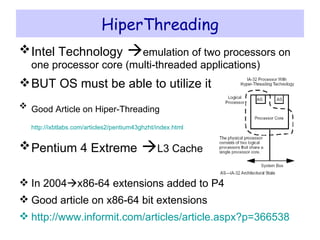
HiperThreading Intel Technology    emulation of two processors on one processor core (multi-threaded applications) BUT OS must be able to utilize it Good Article on Hiper-Threading   http://ixbtlabs.com/articles2/pentium43ghzht/index.html   Pentium 4 Extreme    L3 Cache In 2004  x86-64 extensions added to P4 Good article on x86-64 bit extensions http:// www.informit.com/articles/article.aspx?p =366538
Pentium-M and EM64T Pentium M ( Mobile ) was introduced in 2003 Designed for  low-power  laptop computers Modified version of Pentium III, optimized for power efficiency Large second-level cache (2 MB on later models) Runs at lower clock than Pentium 4, but with better performance Extended Memory 64-bit Technology (EM64T) Introduced in 2004 64-bit superset of the IA-32 processor architecture 64-bit general-purpose registers and integer support Number of general-purpose registers increased from 8 to 16 64-bit pointers and flat virtual address space Large physical address space: up to 2 40  = 1 Terabytes
Core Processors Intel Dual Core processor   2005 Two processors in single chip Core 2  new processor family  2006 Dual core version   Quad core version (two dual-core Die in single package) Core i Series    2008 Single Die Quad Core Chips with HT (Appearing 8 cores to OS) Integrated memory controllers Core i Series 2nd Generation  2011 Six core + HT (Supporting 12 execution threads) From 386, Intel developed Mobile versions as well
IA-16 vs. IA-32 vs. IA-64 (IA-32e) 286   16-bit internal architecture 386  32-bit (Intel Calls IA-32 till 1985) Windows XP and NT are true 32-bit OS Now 64-bit architecture in form of Intel Itanium
Processor Evolvements Facets Increasing the transistor count and density 1993, P5 Family-Pentium (3.1millions transistors) In 1993, P6 Family started with Pentium Pro (5 millions), L2 Cache on second Die In 1997, Pentium II processor (7 millions) 1998 ,Pentium II Celeron and Xeon In 1999, Pentium II with Streaming SIMD Extensions (SSE) = Pentium III SSE= 70 new instructions--SIMD instructions can greatly increase performance when exactly the same operations are to be performed on multiple data objects  Increasing the clock cycling speeds In 2001, Pentium 4 version running at 2GHz (Crossing 1GHz barrier) In 2002, Pentium 4 version running at 3.06GHz, the first PC breaking 3GHz barrier, and the first to feature Intel’s Hyper-Threading (HT) Technology, which turns the processor into a virtual dual-processor configuration    This encouraged programmers to write multithreaded applications, which would prepare them for when true multicore processors would be released a few years later.
Processor Evolvements Facets Increasing the number of cores in a single chip In 2005, Intel released their first  dual-core  processors (integrating two processors into a single chip) In 2006, Intel released a new processor family called the  Core 2- --same architecture as Mobile Processors  ( released in a dual-core version first, followed by a quad-core version (combining two dual-core die in a single package)) In 2008, Intel released the  Core i  Series processors, which are  single-die  quad-core chips with HT (appearing as eight cores to the OS) + integrated memory controller In 2011, Intel released the  second generation of Core i-series  processors, including four-core and six-core processors with HT Technology, supporting up to 12 execution threads Increasing the size of internal registers (bits)
Integrated Memory Controller The  memory controller  is a digital circuit which manages the flow of data going to and from the  main memory . It can be a separate chip or integrated into another chip, such as on the  die  of a  microprocessor . This is also called a Memory Chip Controller (MCC) Computers using  Intel  microprocessors have traditionally had a memory controller implemented on their motherboard's  northbridge , but many modern  microprocessors , more recently  Intel 's  Core i7  have an integrated memory controller (IMC) on the microprocessor in order to reduce  memory latency . While this has the potential to increase the system's performance, it locks the microprocessor to a specific type (or types) of memory, forcing a redesign in order to support newer memory technologies. When the memory controller is not on-die, the same CPU may be installed on a new motherboard, with an updated  northbridge .
16-bit    64-bit Architectural Evolution 16-bit Internal Architecture of 286    32-bit Internal architecture of 386 (Intel calls it IA-32 (Intel Architecture, 32-bit). Windows 95 – Partial 32-bit OS in 10 years Windows XP –Fully 32-bit OS + Drivers (Evolved from Windows 95 (Partial 32-bit) in 6 years) Windows NT (Full 32-bit OS also came after 10 years) Near 32-bit to 64-bit Architectural Jump Intel and Microsoft almost completely shifted In 2001, Intel had introduced the IA-64 (Intel Architecture, 64-bit) in the form of the Itanium and Itanium 2 processors, but this standard was something completely new and not an extension of the existing 32-bit technology    not backward compatible AMD seized this opportunity to develop 64-bit extensions to IA-32, which it calls AMD64 (originally known as x86-64). Intel eventually released its own set of 64-bit extensions, which it calls EM64T or IA-32e mode    32-bit OS can run on 64-Bit architectural CPUs Windows Vista x64 in 2007 --< truly utilizing 64-bit architecture but lack of 64-bit drivers for all components Windows 7 x64 in 2009, most device manufacturers were providing both 32-bit and 64-bit drivers for virtually all new devices
Processor Specifications Speed (How fast CPU is?) Width Internal Registers Usually 32-bits so we say 32-bit CPUs 386 through the Pentium 4 all 32-bits Processors since the Intel Core 2 series are considered 64-bit processors because their internal registers are 64 bits wide. Data (I/O) Bus   called Front Side Bus (FSB), Processor Side Bus (PSB) or CPU Bus Bus between CPU and main chipset component (Memory Controller Hub, North Bridge) usually 64-bit for Modern CPUs Address Bus 36-bits for Pentium 4
Data I/O Bus Speed at which data can be moved in/out of processor Bandwidth=amount of data being sent Bandwidth can be increased by increasing  Either cycling times Or No of bits being sent Or both 64-bits highway Difficult to expand more as too hard to synchronize all 64-bits so increase peed even less lines Separate buses   another idea Separate buses for data in/out of memory, chipsets, and graphics card slot
Address Bus Carries addressing info Width of address bus   max amount of RAM, a chip can address 8088 and 8086  have 20-bit ->1MB address locations 386, 486, Pentium   32-bit Pentium with PAE (physical address extension—supported by server OS only)    36-bit
Internal Registers How much info , processor can operate at a time (register size) and How it moves data internally within the chip (Internal Data Bus) Register size   also specifies types of instructions (software) a chip can run 32-bit processor can run 32-bit instructions that are processing 32-bit chunks of data BUT Processor with 16-bit registers can not run 32-bit instructions Processors from the 386 to the Pentium 4 use 32-bit internal registers and can run essentially the same 32-bit OSs and software.  The Core 2 and newer processors have both 32-bit and 64-bit internal registers, which can run existing 32-bit OSs and applications as well as newer 64-bit versions.
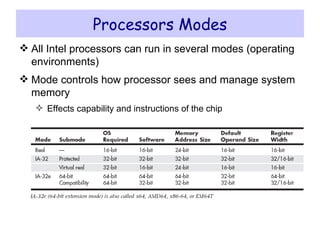
Processors Modes All Intel processors can run in several modes (operating environments) Mode controls how processor sees and manage system memory Effects capability and instructions of the chip
Real Mode 8086 mode because based on 8088 and 8086 CPUs Execution of 16-bit instructions with 16-bit Internal register with 1MB memory addressable (all DOS and up-to Windows 1.x to 3.x Software) Later 286 CPU can run same software but faster 16-bit instruction mode of 8086 and 286    called Real Mode Software of this type usually single tasking (one program at a time) and no built-in protection of application or OS code
IA-32 Mode (32-bit) 386 was first 32-bit CPU Can run entirely new 32-bit instruction set To take full advantage 32-bit OS and 32-bit applications (called protected mode---software running are protected from another software's) Errant program can or damage other program’s memory area or OS Crashed program can be terminated while system continues working Intel knew that newly 32-bit OS and Applications would take time to emerge so Intel made  Backward compatible mode  in 386    possible to run 16-bit OS and applications So 386 running DOS works like Turbo/Fast 8088 accessing 1MB memory Windows XP was fist true 32-bit OS
IA-32 Virtual Real Mode Backward compatibility mode of 32-bit environments like windows Virtual real mode 16-bit environment running inside 32-bit protected mode (DOS prompt inside windows is creation of virtual real mode session) Protected mode enable multitasking    several real mode sessions running (each software running on virtual PC) virtual real window fully emulates an 8088 environment, so  that aside from speed, the software runs as if it were on an original real mode–only PC.  Each virtual machine gets its own 1MB address space, an image of the real hardware basic input/output system (BIOS) routines, and emulation of all other registers and features found in real mode. Note: all Intel processors power up in real mode and 32-bit OS loading converts it to protected mode
IA-32e 64-bit Extension Mode(X64, X86-64,EM64T) Processors with 64-bit extension technology can run in  real (8086) mode,  IA-32 mode, or  IA-32 mode enables the processor to run in protected mode and virtual real mode IA-32e mode IA-32e mode allows the processor to run in 64-bit mode  and  compatibility mode can run both 64-bit and 32-bit applications  simultaneously 64-bit mode    Enables a 64-bit OS to run 64-bit applications compatibility mode    Enables a 64-bit OS to run most existing 32-bit software
New features in 64-bit mode 64-bit linear memory addressing Physical memory support beyond 4GB (limited by the specific processor) Eight new general-purpose registers (GPRs) Eight new registers for streaming SIMD extensions (MMX, SSE, SSE2, and SSE3) 64-bit-wide GPRs and instruction pointers
Compatibility Mode IE-32e compatibility mode enables 32-bit and 16-bit applications to run under a 64-bit OS But legacy 16-bit programs that run in virtual real mode (that is, DOS programs) are not supported and will not run,
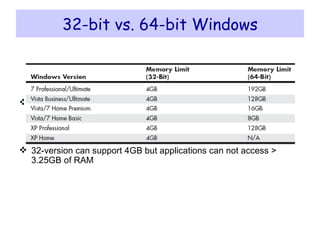
32-bit vs. 64-bit Windows Memory support is different 32-bit version    4GB with max 2GB for 32bit process 64-bit version    4GB for each 32-bit process and 8GB for each 64-bit process 32-version can support 4GB but applications can not access > 3.25GB of RAM
64-bit windows problems Does not support virtual real mode applications 32-bit processes can not load 64-bit DLLs (drivers) and vice versa so both types of drivers be installed
CISC and RISC CISC – Complex Instruction Set Computer Large and complex instruction set Variable width instructions Requires microcode interpreter Each instruction is decoded into a sequence of micro-operations Example: Intel x86 family RISC – Reduced Instruction Set Computer Small and simple instruction set All instructions have the same width Simpler instruction formats and addressing modes Decoded and executed directly by hardware Examples: ARM, MIPS, PowerPC, SPARC, etc.
Next ... Intel Microprocessors IA-32 Registers Instruction Execution Cycle IA-32 Memory Management
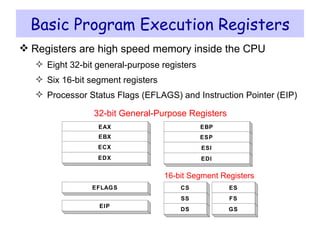
Basic Program Execution Registers Registers are high speed memory inside the CPU Eight 32-bit general-purpose registers Six 16-bit segment registers Processor Status Flags (EFLAGS) and Instruction Pointer (EIP) CS SS DS ES EIP EFLAGS 16-bit Segment Registers EAX EBX ECX EDX 32-bit General-Purpose Registers FS GS EBP ESP ESI EDI
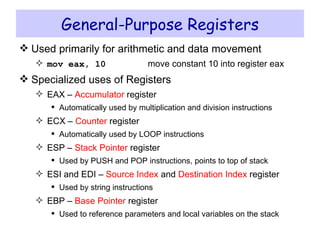
General-Purpose Registers Used primarily for arithmetic and data movement mov eax, 10 move constant 10 into register eax Specialized uses of Registers EAX –  Accumulator  register Automatically used by multiplication and division instructions ECX –  Counter  register Automatically used by LOOP instructions ESP –  Stack Pointer  register Used by PUSH and POP instructions, points to top of stack ESI and EDI –  Source Index  and  Destination Index  register Used by string instructions EBP –  Base Pointer  register Used to reference parameters and local variables on the stack
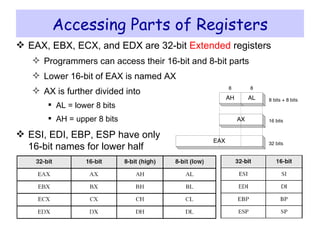
Accessing Parts of Registers EAX, EBX, ECX, and EDX are 32-bit  Extended  registers Programmers can access their 16-bit and 8-bit parts Lower 16-bit of EAX is named AX AX is further divided into  AL = lower 8 bits AH = upper 8 bits ESI, EDI, EBP, ESP have only 16-bit names for lower half
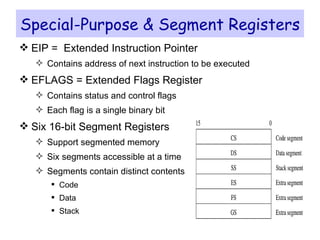
Special-Purpose & Segment Registers EIP =  Extended Instruction Pointer Contains address of next instruction to be executed EFLAGS = Extended Flags Register Contains status and control flags Each flag is a single binary bit Six 16-bit Segment Registers Support segmented memory Six segments accessible at a time Segments contain distinct contents Code Data Stack
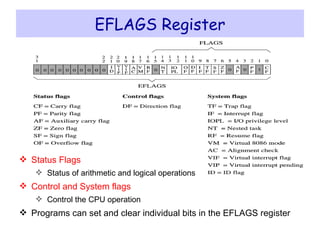
EFLAGS Register Status Flags Status of arithmetic and logical operations Control and System flags Control the CPU operation Programs can set and clear individual bits in the EFLAGS register
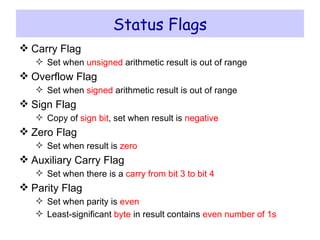
Status Flags Carry Flag Set when  unsigned  arithmetic result is out of range Overflow Flag Set when  signed  arithmetic result is out of range Sign Flag Copy of  sign bit , set when result is  negative Zero Flag Set when result is  zero Auxiliary Carry Flag Set when there is a  carry from bit 3 to bit 4 Parity Flag Set when parity is  even Least-significant  byte  in result contains  even number of 1s
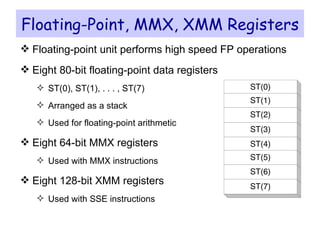
Floating-Point, MMX, XMM Registers Floating-point unit performs high speed FP operations Eight 80-bit floating-point data registers ST(0), ST(1), . . . , ST(7) Arranged as a stack Used for floating-point arithmetic Eight 64-bit MMX registers Used with MMX instructions Eight 128-bit XMM registers Used with SSE instructions
Next ... Intel Microprocessors IA-32 Registers Instruction Execution Cycle IA-32 Memory Management
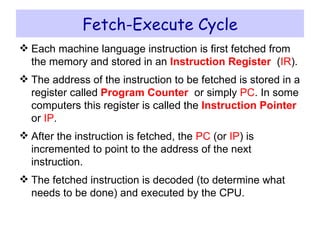
Fetch-Execute Cycle Each machine language instruction is first fetched from the memory and stored in an  Instruction Register   ( IR ).  The address of the instruction to be fetched is stored in a register called  Program Counter   or simply  PC . In some computers this register is called the  Instruction Pointer   or  IP .  After the instruction is fetched, the  PC  (or  IP ) is incremented to point to the address of the next instruction.  The fetched instruction is decoded (to determine what needs to be done) and executed by the CPU.
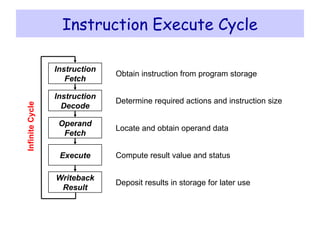
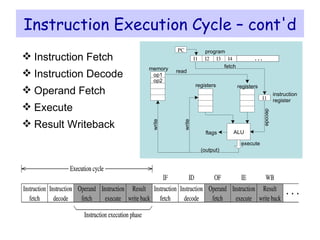
Instruction Execute Cycle Obtain instruction from program storage Determine required actions and instruction size Locate and obtain operand data Compute result value and status Deposit results in storage for later use Instruction Decode Instruction Fetch Operand Fetch Execute Writeback Result Infinite Cycle
Instruction Execution Cycle – cont'd Instruction Fetch Instruction Decode Operand Fetch Execute  Result Writeback I2 I3 I4 PC program I1 instruction register op1 op2 memory fetch ALU registers write decode execute read write (output) registers flags . . . I1
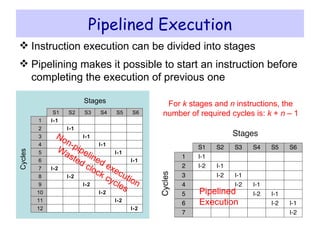
Pipelined Execution Instruction execution can be divided into stages Pipelining makes it possible to start an instruction before completing the execution of previous one Non-pipelined execution Wasted clock cycles Pipelined Execution For  k  stages and  n  instructions, the number of required cycles is:  k  +  n  – 1 S1 S2 S3 S4 S5 1 Cycles Stages S6 2 3 4 5 6 7 8 9 10 11 12 I-1 I-2 I-1 I-2 I-1 I-2 I-1 I-2 I-1 I-2 I-1 I-2
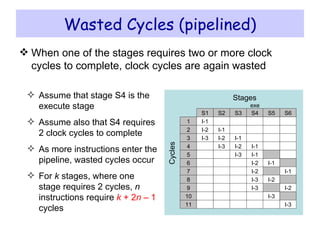
Wasted Cycles (pipelined) When one of the stages requires two or more clock cycles to complete, clock cycles are again wasted Assume that stage S4 is the execute stage Assume also that S4 requires 2 clock cycles to complete As more instructions enter the pipeline, wasted cycles occur For  k  stages, where one stage requires 2 cycles,  n  instructions require  k  + 2 n  – 1  cycles S1 S2 S3 S4 S5 1 Cycles Stages S6 2 3 4 5 6 7 I-1 I-2 I-3 I-1 I-2 I-3 I-1 I-2 I-3 I-1 I-2 I-1 I-1 8 9 I-3 I-2 I-2 exe 10 11 I-3 I-3 I-1 I-2 I-3
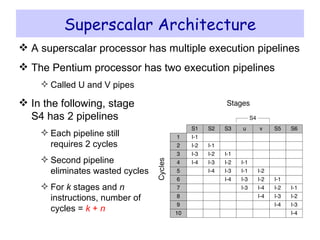
Superscalar Architecture A superscalar processor has multiple execution pipelines The Pentium processor has two execution pipelines Called U and V pipes In the following, stage S4 has 2 pipelines Each pipeline still  requires 2 cycles  Second pipeline  eliminates wasted cycles For  k  stages and  n instructions, number of cycles =  k  +  n
Next ... Intel Microprocessors IA-32 Registers Instruction Execution Cycle IA-32 Memory Management
Modes of Operation Real-Address mode (original mode provided by 8086) Only 1 MB of memory can be addressed, from 0 to FFFFF (hex) Programs can access any part of main memory MS-DOS runs in real-address mode Protected mode (introduced with the 80386 processor) Each program can address a maximum of 4 GB of memory The operating system assigns memory to each running program Programs are prevented from accessing each other’s memory Native mode used by Windows NT, 2000, XP, and Linux Virtual 8086 mode Processor runs in protected mode, and creates a virtual 8086 machine with 1 MB of address space for each running program
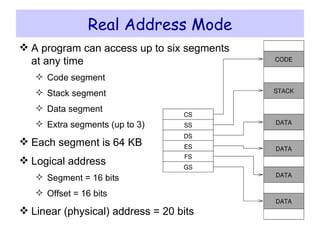
Real Address Mode A program can access up to six segments at any time Code segment Stack segment Data segment Extra segments (up to 3) Each segment is 64 KB Logical address Segment = 16 bits Offset = 16 bits Linear (physical) address = 20 bits
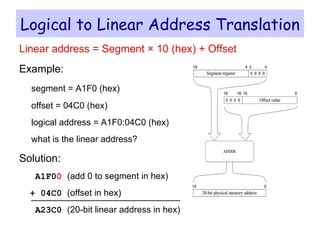
Logical to Linear Address Translation Linear address = Segment × 10 (hex) + Offset Example: segment = A1F0 (hex) offset = 04C0 (hex) logical address = A1F0:04C0 (hex) what is the linear address? Solution: A1F0 0   (add 0 to segment in hex) + 04C0  (offset in hex) A23C0  (20-bit linear address in hex)
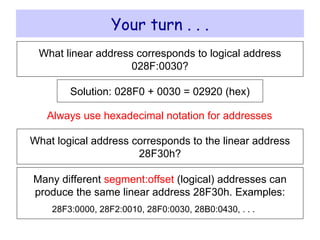
Your turn . . . What linear address corresponds to logical address 028F:0030? Solution: 028F0 + 0030 =  02920 (hex) Always use hexadecimal notation for addresses What logical address corresponds to the linear address 28F30h? Many different  segment:offset  (logical) addresses can produce the same linear address 28F30h. Examples: 28F3:0000, 28F2:0010, 28F0:0030, 28B0:0430, . . .
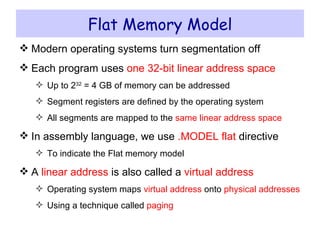
Flat Memory Model Modern operating systems turn segmentation off Each program uses  one   32-bit linear address space Up to 2 32  = 4 GB of memory can be addressed Segment registers are defined by the operating system All segments are mapped to the  same linear address space In assembly language, we use  .MODEL flat  directive To indicate the Flat memory model A  linear address  is also called a  virtual address Operating system maps  virtual address  onto  physical addresses Using a technique called  paging
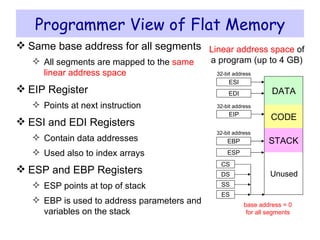
Programmer View of Flat Memory Same base address for all segments All segments are mapped to the  same linear address space EIP Register Points at next instruction ESI and EDI Registers Contain data addresses Used also to index arrays ESP and EBP Registers ESP points at top of stack EBP is used to address parameters and variables on the stack 32-bit address 32-bit address 32-bit address Unused STACK DATA CODE EIP ESI EDI EBP ESP Linear address space  of a program (up to 4 GB) CS DS SS ES base address = 0 for all segments
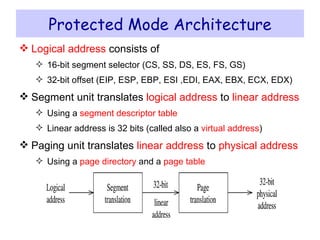
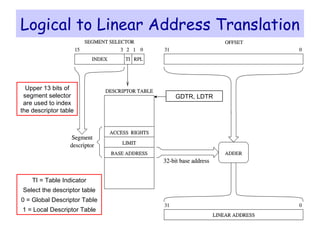
Protected Mode Architecture Logical address  consists of 16-bit segment selector (CS, SS, DS, ES, FS, GS) 32-bit offset (EIP, ESP, EBP, ESI ,EDI, EAX, EBX, ECX, EDX) Segment unit translates  logical address  to  linear address Using a  segment descriptor table Linear address is 32 bits (called also a  virtual address ) Paging unit translates  linear address  to  physical address Using a  page directory  and a  page table
Logical to Linear Address Translation Upper 13 bits of segment selector are used to index the descriptor table TI = Table Indicator Select the descriptor table 0 = Global Descriptor Table 1 = Local Descriptor Table GDTR, LDTR
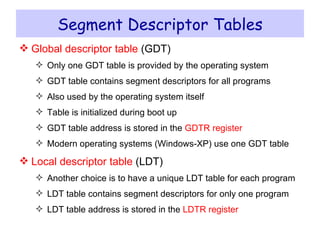
Segment Descriptor Tables Global descriptor table  (GDT) Only one GDT table is provided by the operating system GDT table contains segment descriptors for all programs Also used by the operating system itself Table is initialized during boot up GDT table address is stored in the  GDTR register Modern operating systems (Windows-XP) use one GDT table Local descriptor table  (LDT) Another choice is to have a unique LDT table for each program LDT table contains segment descriptors for only one program LDT table address is stored in the  LDTR register
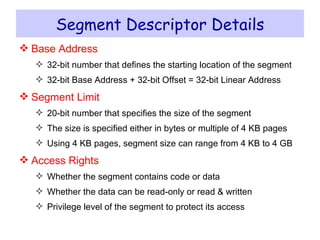
Segment Descriptor Details Base Address 32-bit number that defines the starting location of the segment 32-bit Base Address + 32-bit Offset = 32-bit Linear Address Segment Limit 20-bit number that specifies the size of the segment The size is specified either in bytes or multiple of 4 KB pages Using 4 KB pages, segment size can range from 4 KB to 4 GB Access Rights Whether the segment contains code or data Whether the data can be read-only or read & written Privilege level of the segment to protect its access
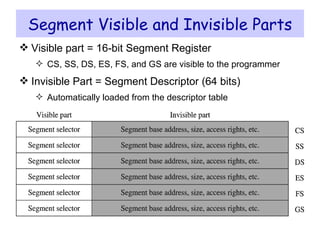
Segment Visible and Invisible Parts Visible part = 16-bit Segment Register CS, SS, DS, ES, FS, and GS are visible to the programmer Invisible Part = Segment Descriptor (64 bits) Automatically loaded from the descriptor table
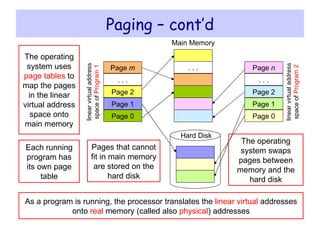
Paging Paging divides the linear address space into … Fixed-sized blocks called  pages , Intel IA-32 uses 4 KB pages Operating system allocates main memory for pages Pages can be spread all over main memory Pages in main memory can belong to different programs If main memory is full then pages are stored on the hard disk OS has a  Virtual Memory Manager  (VMM) Uses  page tables  to map the pages of each running program Manages the loading and unloading of pages As a program is running, CPU does address translation Page fault : issued by CPU when page is not in memory
Paging – cont’d linear virtual address space of  Program 1 Hard Disk Main Memory Pages that cannot fit in main memory are stored on the hard disk Each running program has its own page table The operating system uses  page tables  to map the pages in the linear virtual address space onto main memory As a program is running, the processor translates the  linear   virtual  addresses onto  real  memory (called also  physical ) addresses The operating system swaps pages between memory and the hard disk linear virtual address space of  Program 2 Page 0 Page 1 Page 2 . . . Page  n Page 0 Page 1 Page 2 . . . Page  m . . .

Lec 03 ia32 architecture

  • 1.
    IA-32 Architecture COALComputer Organization and Assembly Language
  • 2.
    Next ... IntelMicroprocessors IA-32 Registers Instruction Execution Cycle IA-32 Memory Management
  • 3.
    Intel Microprocessors Intelintroduced the 8086 microprocessor in 1979 8086, 8087, 8088, and 80186 processors 16-bit processors with 16-bit registers 16-bit data bus and 20-bit address bus Physical address space = 2 20 bytes = 1 MB 8087 Floating-Point co-processor Uses segmentation and real-address mode to address memory Each segment can address 2 16 bytes = 64 KB 8088 is a less expensive version of 8086 Uses an 8-bit data bus 80186 is a faster version of 8086
  • 4.
    Intel 80286 and80386 Processors 80286 was introduced in 1982 24-bit address bus  2 24 bytes = 16 MB address space Introduced protected mode Segmentation in protected mode is different from the real mode 80386 was introduced in 1985 First 32-bit processor with 32-bit general-purpose registers First processor to define the IA-32 architecture 32-bit data bus and 32-bit address bus 2 32 bytes  4 GB address space Introduced paging , virtual memory , and the flat memory model Segmentation can be turned off
  • 5.
    Intel 80486 andPentium Processors 80486 was introduced 1989 Improved version of Intel 80386 On-chip Floating-Point unit (DX versions) On-chip unified Instruction/Data Cache (8 KB) Uses Pipelining : can execute up to 1 instruction per clock cycle Pentium (80586) was introduced in 1993 Wider 64-bit data bus, but address bus is still 32 bits Two execution pipelines: U-pipe and V-pipe Superscalar performance: can execute 2 instructions per clock cycle Separate 8 KB instruction and 8 KB data caches MMX instructions (later models) for multimedia applications
  • 6.
    Intel P6 ProcessorFamily P6 Processor Family: Pentium Pro, Pentium II and III Pentium Pro was introduced in 1995 Three-way superscalar : can execute 3 instructions per clock cycle second Die of L2 Memory Cache 36-bit address bus  up to 64 GB of physical address space Introduced dynamic execution Out-of-order and speculative execution Integrates a 256 KB second level L2 cache on-chip Pentium II (Pentium Pro + P5) was introduced in 1997 Added MMX instructions (already introduced on Pentium MMX) Pentium III was introduced in 1999 Added SSE instructions and eight new 128-bit XMM registers Streaming SIMD Extensions (SSE)---70 new instructions working on single precision Floating Point Data Increase performance when same instruction is to be applied on multiple data objects (Graphics processing)
  • 7.
    Pentium 4 andXeon Family Pentium 4 is a seventh-generation x86 architecture Introduced in 2000, running at 2GHz (crossing 1GHz barrier) New micro-architecture design called Intel Netburst Very deep instruction pipeline, scaling to very high frequencies Introduced the SSE2 instruction set (extension to SSE) Tuned for multimedia and operating on the separate 128-bit XMM registers In 2002, Pentium 4 version running at 3.06GHz, the first PC processor to break the 3GHz barrier Intel introduced Hyper-Threading technology Allowed 2 programs to run simultaneously, sharing resources Xeon is Intel's name for its server-class microprocessors Xeon chips generally have more cache Support larger multiprocessor configurations
  • 8.
    HiperThreading Intel Technology  emulation of two processors on one processor core (multi-threaded applications) BUT OS must be able to utilize it Good Article on Hiper-Threading http://ixbtlabs.com/articles2/pentium43ghzht/index.html Pentium 4 Extreme  L3 Cache In 2004  x86-64 extensions added to P4 Good article on x86-64 bit extensions http:// www.informit.com/articles/article.aspx?p =366538
  • 9.
    Pentium-M and EM64TPentium M ( Mobile ) was introduced in 2003 Designed for low-power laptop computers Modified version of Pentium III, optimized for power efficiency Large second-level cache (2 MB on later models) Runs at lower clock than Pentium 4, but with better performance Extended Memory 64-bit Technology (EM64T) Introduced in 2004 64-bit superset of the IA-32 processor architecture 64-bit general-purpose registers and integer support Number of general-purpose registers increased from 8 to 16 64-bit pointers and flat virtual address space Large physical address space: up to 2 40 = 1 Terabytes
  • 10.
    Core Processors IntelDual Core processor  2005 Two processors in single chip Core 2  new processor family  2006 Dual core version  Quad core version (two dual-core Die in single package) Core i Series  2008 Single Die Quad Core Chips with HT (Appearing 8 cores to OS) Integrated memory controllers Core i Series 2nd Generation  2011 Six core + HT (Supporting 12 execution threads) From 386, Intel developed Mobile versions as well
  • 11.
    IA-16 vs. IA-32vs. IA-64 (IA-32e) 286  16-bit internal architecture 386  32-bit (Intel Calls IA-32 till 1985) Windows XP and NT are true 32-bit OS Now 64-bit architecture in form of Intel Itanium
  • 12.
    Processor Evolvements FacetsIncreasing the transistor count and density 1993, P5 Family-Pentium (3.1millions transistors) In 1993, P6 Family started with Pentium Pro (5 millions), L2 Cache on second Die In 1997, Pentium II processor (7 millions) 1998 ,Pentium II Celeron and Xeon In 1999, Pentium II with Streaming SIMD Extensions (SSE) = Pentium III SSE= 70 new instructions--SIMD instructions can greatly increase performance when exactly the same operations are to be performed on multiple data objects Increasing the clock cycling speeds In 2001, Pentium 4 version running at 2GHz (Crossing 1GHz barrier) In 2002, Pentium 4 version running at 3.06GHz, the first PC breaking 3GHz barrier, and the first to feature Intel’s Hyper-Threading (HT) Technology, which turns the processor into a virtual dual-processor configuration  This encouraged programmers to write multithreaded applications, which would prepare them for when true multicore processors would be released a few years later.
  • 13.
    Processor Evolvements FacetsIncreasing the number of cores in a single chip In 2005, Intel released their first dual-core processors (integrating two processors into a single chip) In 2006, Intel released a new processor family called the Core 2- --same architecture as Mobile Processors ( released in a dual-core version first, followed by a quad-core version (combining two dual-core die in a single package)) In 2008, Intel released the Core i Series processors, which are single-die quad-core chips with HT (appearing as eight cores to the OS) + integrated memory controller In 2011, Intel released the second generation of Core i-series processors, including four-core and six-core processors with HT Technology, supporting up to 12 execution threads Increasing the size of internal registers (bits)
  • 14.
    Integrated Memory ControllerThe  memory controller  is a digital circuit which manages the flow of data going to and from the  main memory . It can be a separate chip or integrated into another chip, such as on the  die  of a  microprocessor . This is also called a Memory Chip Controller (MCC) Computers using  Intel  microprocessors have traditionally had a memory controller implemented on their motherboard's  northbridge , but many modern  microprocessors , more recently  Intel 's  Core i7  have an integrated memory controller (IMC) on the microprocessor in order to reduce  memory latency . While this has the potential to increase the system's performance, it locks the microprocessor to a specific type (or types) of memory, forcing a redesign in order to support newer memory technologies. When the memory controller is not on-die, the same CPU may be installed on a new motherboard, with an updated  northbridge .
  • 15.
    16-bit  64-bit Architectural Evolution 16-bit Internal Architecture of 286  32-bit Internal architecture of 386 (Intel calls it IA-32 (Intel Architecture, 32-bit). Windows 95 – Partial 32-bit OS in 10 years Windows XP –Fully 32-bit OS + Drivers (Evolved from Windows 95 (Partial 32-bit) in 6 years) Windows NT (Full 32-bit OS also came after 10 years) Near 32-bit to 64-bit Architectural Jump Intel and Microsoft almost completely shifted In 2001, Intel had introduced the IA-64 (Intel Architecture, 64-bit) in the form of the Itanium and Itanium 2 processors, but this standard was something completely new and not an extension of the existing 32-bit technology  not backward compatible AMD seized this opportunity to develop 64-bit extensions to IA-32, which it calls AMD64 (originally known as x86-64). Intel eventually released its own set of 64-bit extensions, which it calls EM64T or IA-32e mode  32-bit OS can run on 64-Bit architectural CPUs Windows Vista x64 in 2007 --< truly utilizing 64-bit architecture but lack of 64-bit drivers for all components Windows 7 x64 in 2009, most device manufacturers were providing both 32-bit and 64-bit drivers for virtually all new devices
  • 16.
    Processor Specifications Speed(How fast CPU is?) Width Internal Registers Usually 32-bits so we say 32-bit CPUs 386 through the Pentium 4 all 32-bits Processors since the Intel Core 2 series are considered 64-bit processors because their internal registers are 64 bits wide. Data (I/O) Bus  called Front Side Bus (FSB), Processor Side Bus (PSB) or CPU Bus Bus between CPU and main chipset component (Memory Controller Hub, North Bridge) usually 64-bit for Modern CPUs Address Bus 36-bits for Pentium 4
  • 17.
    Data I/O BusSpeed at which data can be moved in/out of processor Bandwidth=amount of data being sent Bandwidth can be increased by increasing Either cycling times Or No of bits being sent Or both 64-bits highway Difficult to expand more as too hard to synchronize all 64-bits so increase peed even less lines Separate buses  another idea Separate buses for data in/out of memory, chipsets, and graphics card slot
  • 18.
    Address Bus Carriesaddressing info Width of address bus  max amount of RAM, a chip can address 8088 and 8086 have 20-bit ->1MB address locations 386, 486, Pentium  32-bit Pentium with PAE (physical address extension—supported by server OS only)  36-bit
  • 19.
    Internal Registers Howmuch info , processor can operate at a time (register size) and How it moves data internally within the chip (Internal Data Bus) Register size  also specifies types of instructions (software) a chip can run 32-bit processor can run 32-bit instructions that are processing 32-bit chunks of data BUT Processor with 16-bit registers can not run 32-bit instructions Processors from the 386 to the Pentium 4 use 32-bit internal registers and can run essentially the same 32-bit OSs and software. The Core 2 and newer processors have both 32-bit and 64-bit internal registers, which can run existing 32-bit OSs and applications as well as newer 64-bit versions.
  • 20.
    Processors Modes AllIntel processors can run in several modes (operating environments) Mode controls how processor sees and manage system memory Effects capability and instructions of the chip
  • 21.
    Real Mode 8086mode because based on 8088 and 8086 CPUs Execution of 16-bit instructions with 16-bit Internal register with 1MB memory addressable (all DOS and up-to Windows 1.x to 3.x Software) Later 286 CPU can run same software but faster 16-bit instruction mode of 8086 and 286  called Real Mode Software of this type usually single tasking (one program at a time) and no built-in protection of application or OS code
  • 22.
    IA-32 Mode (32-bit)386 was first 32-bit CPU Can run entirely new 32-bit instruction set To take full advantage 32-bit OS and 32-bit applications (called protected mode---software running are protected from another software's) Errant program can or damage other program’s memory area or OS Crashed program can be terminated while system continues working Intel knew that newly 32-bit OS and Applications would take time to emerge so Intel made Backward compatible mode in 386  possible to run 16-bit OS and applications So 386 running DOS works like Turbo/Fast 8088 accessing 1MB memory Windows XP was fist true 32-bit OS
  • 23.
    IA-32 Virtual RealMode Backward compatibility mode of 32-bit environments like windows Virtual real mode 16-bit environment running inside 32-bit protected mode (DOS prompt inside windows is creation of virtual real mode session) Protected mode enable multitasking  several real mode sessions running (each software running on virtual PC) virtual real window fully emulates an 8088 environment, so that aside from speed, the software runs as if it were on an original real mode–only PC. Each virtual machine gets its own 1MB address space, an image of the real hardware basic input/output system (BIOS) routines, and emulation of all other registers and features found in real mode. Note: all Intel processors power up in real mode and 32-bit OS loading converts it to protected mode
  • 24.
    IA-32e 64-bit ExtensionMode(X64, X86-64,EM64T) Processors with 64-bit extension technology can run in real (8086) mode, IA-32 mode, or IA-32 mode enables the processor to run in protected mode and virtual real mode IA-32e mode IA-32e mode allows the processor to run in 64-bit mode and compatibility mode can run both 64-bit and 32-bit applications simultaneously 64-bit mode  Enables a 64-bit OS to run 64-bit applications compatibility mode  Enables a 64-bit OS to run most existing 32-bit software
  • 25.
    New features in64-bit mode 64-bit linear memory addressing Physical memory support beyond 4GB (limited by the specific processor) Eight new general-purpose registers (GPRs) Eight new registers for streaming SIMD extensions (MMX, SSE, SSE2, and SSE3) 64-bit-wide GPRs and instruction pointers
  • 26.
    Compatibility Mode IE-32ecompatibility mode enables 32-bit and 16-bit applications to run under a 64-bit OS But legacy 16-bit programs that run in virtual real mode (that is, DOS programs) are not supported and will not run,
  • 27.
    32-bit vs. 64-bitWindows Memory support is different 32-bit version  4GB with max 2GB for 32bit process 64-bit version  4GB for each 32-bit process and 8GB for each 64-bit process 32-version can support 4GB but applications can not access > 3.25GB of RAM
  • 28.
    64-bit windows problemsDoes not support virtual real mode applications 32-bit processes can not load 64-bit DLLs (drivers) and vice versa so both types of drivers be installed
  • 29.
    CISC and RISCCISC – Complex Instruction Set Computer Large and complex instruction set Variable width instructions Requires microcode interpreter Each instruction is decoded into a sequence of micro-operations Example: Intel x86 family RISC – Reduced Instruction Set Computer Small and simple instruction set All instructions have the same width Simpler instruction formats and addressing modes Decoded and executed directly by hardware Examples: ARM, MIPS, PowerPC, SPARC, etc.
  • 30.
    Next ... IntelMicroprocessors IA-32 Registers Instruction Execution Cycle IA-32 Memory Management
  • 31.
    Basic Program ExecutionRegisters Registers are high speed memory inside the CPU Eight 32-bit general-purpose registers Six 16-bit segment registers Processor Status Flags (EFLAGS) and Instruction Pointer (EIP) CS SS DS ES EIP EFLAGS 16-bit Segment Registers EAX EBX ECX EDX 32-bit General-Purpose Registers FS GS EBP ESP ESI EDI
  • 32.
    General-Purpose Registers Usedprimarily for arithmetic and data movement mov eax, 10 move constant 10 into register eax Specialized uses of Registers EAX – Accumulator register Automatically used by multiplication and division instructions ECX – Counter register Automatically used by LOOP instructions ESP – Stack Pointer register Used by PUSH and POP instructions, points to top of stack ESI and EDI – Source Index and Destination Index register Used by string instructions EBP – Base Pointer register Used to reference parameters and local variables on the stack
  • 33.
    Accessing Parts ofRegisters EAX, EBX, ECX, and EDX are 32-bit Extended registers Programmers can access their 16-bit and 8-bit parts Lower 16-bit of EAX is named AX AX is further divided into AL = lower 8 bits AH = upper 8 bits ESI, EDI, EBP, ESP have only 16-bit names for lower half
  • 34.
    Special-Purpose & SegmentRegisters EIP = Extended Instruction Pointer Contains address of next instruction to be executed EFLAGS = Extended Flags Register Contains status and control flags Each flag is a single binary bit Six 16-bit Segment Registers Support segmented memory Six segments accessible at a time Segments contain distinct contents Code Data Stack
  • 35.
    EFLAGS Register StatusFlags Status of arithmetic and logical operations Control and System flags Control the CPU operation Programs can set and clear individual bits in the EFLAGS register
  • 36.
    Status Flags CarryFlag Set when unsigned arithmetic result is out of range Overflow Flag Set when signed arithmetic result is out of range Sign Flag Copy of sign bit , set when result is negative Zero Flag Set when result is zero Auxiliary Carry Flag Set when there is a carry from bit 3 to bit 4 Parity Flag Set when parity is even Least-significant byte in result contains even number of 1s
  • 37.
    Floating-Point, MMX, XMMRegisters Floating-point unit performs high speed FP operations Eight 80-bit floating-point data registers ST(0), ST(1), . . . , ST(7) Arranged as a stack Used for floating-point arithmetic Eight 64-bit MMX registers Used with MMX instructions Eight 128-bit XMM registers Used with SSE instructions
  • 38.
    Next ... IntelMicroprocessors IA-32 Registers Instruction Execution Cycle IA-32 Memory Management
  • 39.
    Fetch-Execute Cycle Eachmachine language instruction is first fetched from the memory and stored in an Instruction Register ( IR ). The address of the instruction to be fetched is stored in a register called Program Counter or simply PC . In some computers this register is called the Instruction Pointer or IP . After the instruction is fetched, the PC (or IP ) is incremented to point to the address of the next instruction. The fetched instruction is decoded (to determine what needs to be done) and executed by the CPU.
  • 40.
    Instruction Execute CycleObtain instruction from program storage Determine required actions and instruction size Locate and obtain operand data Compute result value and status Deposit results in storage for later use Instruction Decode Instruction Fetch Operand Fetch Execute Writeback Result Infinite Cycle
  • 41.
    Instruction Execution Cycle– cont'd Instruction Fetch Instruction Decode Operand Fetch Execute Result Writeback I2 I3 I4 PC program I1 instruction register op1 op2 memory fetch ALU registers write decode execute read write (output) registers flags . . . I1
  • 42.
    Pipelined Execution Instructionexecution can be divided into stages Pipelining makes it possible to start an instruction before completing the execution of previous one Non-pipelined execution Wasted clock cycles Pipelined Execution For k stages and n instructions, the number of required cycles is: k + n – 1 S1 S2 S3 S4 S5 1 Cycles Stages S6 2 3 4 5 6 7 8 9 10 11 12 I-1 I-2 I-1 I-2 I-1 I-2 I-1 I-2 I-1 I-2 I-1 I-2
  • 43.
    Wasted Cycles (pipelined)When one of the stages requires two or more clock cycles to complete, clock cycles are again wasted Assume that stage S4 is the execute stage Assume also that S4 requires 2 clock cycles to complete As more instructions enter the pipeline, wasted cycles occur For k stages, where one stage requires 2 cycles, n instructions require k + 2 n – 1 cycles S1 S2 S3 S4 S5 1 Cycles Stages S6 2 3 4 5 6 7 I-1 I-2 I-3 I-1 I-2 I-3 I-1 I-2 I-3 I-1 I-2 I-1 I-1 8 9 I-3 I-2 I-2 exe 10 11 I-3 I-3 I-1 I-2 I-3
  • 44.
    Superscalar Architecture Asuperscalar processor has multiple execution pipelines The Pentium processor has two execution pipelines Called U and V pipes In the following, stage S4 has 2 pipelines Each pipeline still requires 2 cycles Second pipeline eliminates wasted cycles For k stages and n instructions, number of cycles = k + n
  • 45.
    Next ... IntelMicroprocessors IA-32 Registers Instruction Execution Cycle IA-32 Memory Management
  • 46.
    Modes of OperationReal-Address mode (original mode provided by 8086) Only 1 MB of memory can be addressed, from 0 to FFFFF (hex) Programs can access any part of main memory MS-DOS runs in real-address mode Protected mode (introduced with the 80386 processor) Each program can address a maximum of 4 GB of memory The operating system assigns memory to each running program Programs are prevented from accessing each other’s memory Native mode used by Windows NT, 2000, XP, and Linux Virtual 8086 mode Processor runs in protected mode, and creates a virtual 8086 machine with 1 MB of address space for each running program
  • 47.
    Real Address ModeA program can access up to six segments at any time Code segment Stack segment Data segment Extra segments (up to 3) Each segment is 64 KB Logical address Segment = 16 bits Offset = 16 bits Linear (physical) address = 20 bits
  • 48.
    Logical to LinearAddress Translation Linear address = Segment × 10 (hex) + Offset Example: segment = A1F0 (hex) offset = 04C0 (hex) logical address = A1F0:04C0 (hex) what is the linear address? Solution: A1F0 0 (add 0 to segment in hex) + 04C0 (offset in hex) A23C0 (20-bit linear address in hex)
  • 49.
    Your turn .. . What linear address corresponds to logical address 028F:0030? Solution: 028F0 + 0030 = 02920 (hex) Always use hexadecimal notation for addresses What logical address corresponds to the linear address 28F30h? Many different segment:offset (logical) addresses can produce the same linear address 28F30h. Examples: 28F3:0000, 28F2:0010, 28F0:0030, 28B0:0430, . . .
  • 50.
    Flat Memory ModelModern operating systems turn segmentation off Each program uses one 32-bit linear address space Up to 2 32 = 4 GB of memory can be addressed Segment registers are defined by the operating system All segments are mapped to the same linear address space In assembly language, we use .MODEL flat directive To indicate the Flat memory model A linear address is also called a virtual address Operating system maps virtual address onto physical addresses Using a technique called paging
  • 51.
    Programmer View ofFlat Memory Same base address for all segments All segments are mapped to the same linear address space EIP Register Points at next instruction ESI and EDI Registers Contain data addresses Used also to index arrays ESP and EBP Registers ESP points at top of stack EBP is used to address parameters and variables on the stack 32-bit address 32-bit address 32-bit address Unused STACK DATA CODE EIP ESI EDI EBP ESP Linear address space of a program (up to 4 GB) CS DS SS ES base address = 0 for all segments
  • 52.
    Protected Mode ArchitectureLogical address consists of 16-bit segment selector (CS, SS, DS, ES, FS, GS) 32-bit offset (EIP, ESP, EBP, ESI ,EDI, EAX, EBX, ECX, EDX) Segment unit translates logical address to linear address Using a segment descriptor table Linear address is 32 bits (called also a virtual address ) Paging unit translates linear address to physical address Using a page directory and a page table
  • 53.
    Logical to LinearAddress Translation Upper 13 bits of segment selector are used to index the descriptor table TI = Table Indicator Select the descriptor table 0 = Global Descriptor Table 1 = Local Descriptor Table GDTR, LDTR
  • 54.
    Segment Descriptor TablesGlobal descriptor table (GDT) Only one GDT table is provided by the operating system GDT table contains segment descriptors for all programs Also used by the operating system itself Table is initialized during boot up GDT table address is stored in the GDTR register Modern operating systems (Windows-XP) use one GDT table Local descriptor table (LDT) Another choice is to have a unique LDT table for each program LDT table contains segment descriptors for only one program LDT table address is stored in the LDTR register
  • 55.
    Segment Descriptor DetailsBase Address 32-bit number that defines the starting location of the segment 32-bit Base Address + 32-bit Offset = 32-bit Linear Address Segment Limit 20-bit number that specifies the size of the segment The size is specified either in bytes or multiple of 4 KB pages Using 4 KB pages, segment size can range from 4 KB to 4 GB Access Rights Whether the segment contains code or data Whether the data can be read-only or read & written Privilege level of the segment to protect its access
  • 56.
    Segment Visible andInvisible Parts Visible part = 16-bit Segment Register CS, SS, DS, ES, FS, and GS are visible to the programmer Invisible Part = Segment Descriptor (64 bits) Automatically loaded from the descriptor table
  • 57.
    Paging Paging dividesthe linear address space into … Fixed-sized blocks called pages , Intel IA-32 uses 4 KB pages Operating system allocates main memory for pages Pages can be spread all over main memory Pages in main memory can belong to different programs If main memory is full then pages are stored on the hard disk OS has a Virtual Memory Manager (VMM) Uses page tables to map the pages of each running program Manages the loading and unloading of pages As a program is running, CPU does address translation Page fault : issued by CPU when page is not in memory
  • 58.
    Paging – cont’dlinear virtual address space of Program 1 Hard Disk Main Memory Pages that cannot fit in main memory are stored on the hard disk Each running program has its own page table The operating system uses page tables to map the pages in the linear virtual address space onto main memory As a program is running, the processor translates the linear virtual addresses onto real memory (called also physical ) addresses The operating system swaps pages between memory and the hard disk linear virtual address space of Program 2 Page 0 Page 1 Page 2 . . . Page n Page 0 Page 1 Page 2 . . . Page m . . .