EXPLORING THE WORLD
OF WEB DEVELOPMENT
WITH REACT
Google Developer Student Clubs
With Aakanksha Rai
GDG LNCTS - AIML Lead
Tech Winter Break – Web Development Workshop
• Introduction to Full Stack Development
• Roadmap for MERN Stack Development
• Trending Web Frameworks in 2024
• What is React
• Why React
• Understanding some major topics of React
• Setting up your development environment
• React Project building
• Q/A Session
Agenda
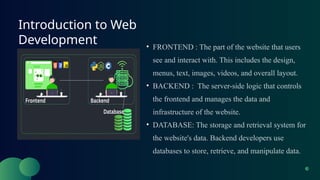
Introduction to Web
Development • FRONTEND : The part of the website that users
see and interact with. This includes the design,
menus, text, images, videos, and overall layout.
• BACKEND : The server-side logic that controls
the frontend and manages the data and
infrastructure of the website.
• DATABASE: The storage and retrieval system for
the website's data. Backend developers use
databases to store, retrieve, and manipulate data.
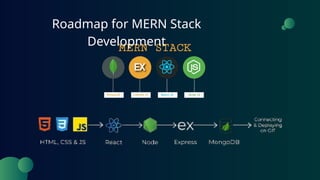
Roadmap for MERN Stack
Development
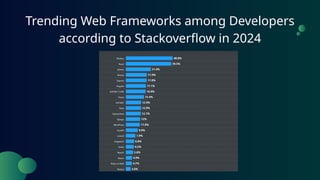
Trending Web Frameworks among Developers
according to Stackoverflow in 2024
What is React
• React is a JavaScript library for building user interfaces (UI), primarily for single-
page applications (SPAs).
• Developed by Meta (formerly Facebook), React helps developers create interactive
and dynamic web applications by enabling the creation of reusable UI components.
• UI is broken down into reusable components, making development efficient and
maintainable
• React uses JSX, a syntax extension allowing developers to write HTML-like code
within JavaScript.
• React uses a virtual representation of the DOM to optimize updates, improving
performance.
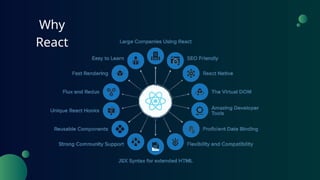
Why
React
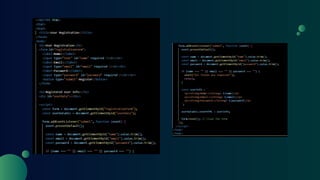
• JSX = JavaScript Extension Syntax
• It let’s us write HTML directly inside JS.
• “Babel” converts code written by us in JSX to JavaScript to be displayed on browser.
• Writing markup in JSX:
1. Return a ssingle root element
2. Close all the tags
3. camelCase most of the things
• We can use curly braces {} in JSX to open a window to JavaScript.
• Example:
What is
JSX
React
Component
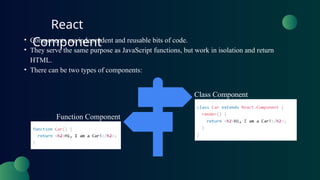
• Components are independent and reusable bits of code.
• They serve the same purpose as JavaScript functions, but work in isolation and return
HTML.
• There can be two types of components:
Class Component
Function Component
React
Props
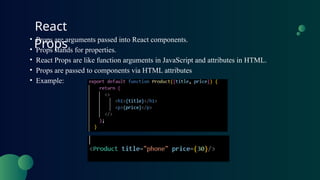
• Props are arguments passed into React components.
• Props stands for properties.
• React Props are like function arguments in JavaScript and attributes in HTML.
• Props are passed to components via HTML attributes
• Example:
What is a
Hook
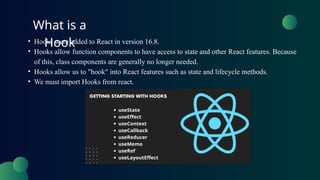
• Hooks were added to React in version 16.8.
• Hooks allow function components to have access to state and other React features. Because
of this, class components are generally no longer needed.
• Hooks allow us to "hook" into React features such as state and lifecycle methods.
• We must import Hooks from react.
• Make sure you have the latest version of Node installed. If not head over to
https://nodejs.org/en/download to download the LTS (Long Term Support) version of Node.
• Make sure you have the latest version of VSCode installed. If not, head over to
https://code.visualstudio.com/download to download the version for your platform.
• Open a Terminal or command prompt and navigate to the directory where you want to create your
React project
• Create a Vite app by running the following command in your Terminal or Command Prompt:
npm create vite@latest my-react-app --template react
• The first time, you won't have Vite installed. Type y to proceed. Then you'll be asked to select a
framework. Use your down arrow to select React.
• You'll be asked to select a variant, select Javascript.
• Then wait for the installation to finish, this will take a few minutes.
Setting Up Your Development
Environment
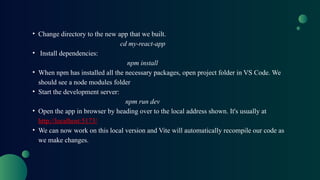
• Change directory to the new app that we built.
cd my-react-app
• Install dependencies:
npm install
• When npm has installed all the necessary packages, open project folder in VS Code. We
should see a node modules folder
• Start the development server:
npm run dev
• Open the app in browser by heading over to the local address shown. It's usually at
http://localhost:5173/
• We can now work on this local version and Vite will automatically recompile our code as
we make changes.
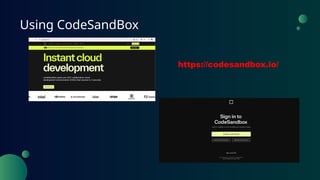
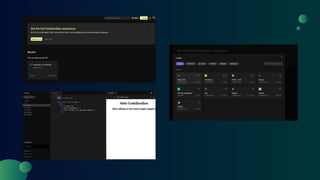
Using CodeSandBox
https://codesandbox.io/
NOW IT’S TIME FOR US TO
START WITH OUR REACT PROJECT
~WeatherNow~
Thank You For
Attention
See You Next Time
https://www.linkedin.com/in/aakanksha-rai-
454912249/
https://codesandbox.io
https://openweathermap.org/current
https://openweathermap.org/current#geocoding

GDG Workshop on React (By Aakanksha Rai)

  • 1.
    EXPLORING THE WORLD OFWEB DEVELOPMENT WITH REACT Google Developer Student Clubs With Aakanksha Rai GDG LNCTS - AIML Lead Tech Winter Break – Web Development Workshop
  • 2.
    • Introduction toFull Stack Development • Roadmap for MERN Stack Development • Trending Web Frameworks in 2024 • What is React • Why React • Understanding some major topics of React • Setting up your development environment • React Project building • Q/A Session Agenda
  • 3.
    Introduction to Web Development• FRONTEND : The part of the website that users see and interact with. This includes the design, menus, text, images, videos, and overall layout. • BACKEND : The server-side logic that controls the frontend and manages the data and infrastructure of the website. • DATABASE: The storage and retrieval system for the website's data. Backend developers use databases to store, retrieve, and manipulate data.
  • 4.
    Roadmap for MERNStack Development
  • 5.
    Trending Web Frameworksamong Developers according to Stackoverflow in 2024
  • 6.
    What is React •React is a JavaScript library for building user interfaces (UI), primarily for single- page applications (SPAs). • Developed by Meta (formerly Facebook), React helps developers create interactive and dynamic web applications by enabling the creation of reusable UI components. • UI is broken down into reusable components, making development efficient and maintainable • React uses JSX, a syntax extension allowing developers to write HTML-like code within JavaScript. • React uses a virtual representation of the DOM to optimize updates, improving performance.
  • 7.
  • 9.
    • JSX =JavaScript Extension Syntax • It let’s us write HTML directly inside JS. • “Babel” converts code written by us in JSX to JavaScript to be displayed on browser. • Writing markup in JSX: 1. Return a ssingle root element 2. Close all the tags 3. camelCase most of the things • We can use curly braces {} in JSX to open a window to JavaScript. • Example: What is JSX
  • 10.
    React Component • Components areindependent and reusable bits of code. • They serve the same purpose as JavaScript functions, but work in isolation and return HTML. • There can be two types of components: Class Component Function Component
  • 11.
    React Props • Props arearguments passed into React components. • Props stands for properties. • React Props are like function arguments in JavaScript and attributes in HTML. • Props are passed to components via HTML attributes • Example:
  • 12.
    What is a Hook •Hooks were added to React in version 16.8. • Hooks allow function components to have access to state and other React features. Because of this, class components are generally no longer needed. • Hooks allow us to "hook" into React features such as state and lifecycle methods. • We must import Hooks from react.
  • 13.
    • Make sureyou have the latest version of Node installed. If not head over to https://nodejs.org/en/download to download the LTS (Long Term Support) version of Node. • Make sure you have the latest version of VSCode installed. If not, head over to https://code.visualstudio.com/download to download the version for your platform. • Open a Terminal or command prompt and navigate to the directory where you want to create your React project • Create a Vite app by running the following command in your Terminal or Command Prompt: npm create vite@latest my-react-app --template react • The first time, you won't have Vite installed. Type y to proceed. Then you'll be asked to select a framework. Use your down arrow to select React. • You'll be asked to select a variant, select Javascript. • Then wait for the installation to finish, this will take a few minutes. Setting Up Your Development Environment
  • 14.
    • Change directoryto the new app that we built. cd my-react-app • Install dependencies: npm install • When npm has installed all the necessary packages, open project folder in VS Code. We should see a node modules folder • Start the development server: npm run dev • Open the app in browser by heading over to the local address shown. It's usually at http://localhost:5173/ • We can now work on this local version and Vite will automatically recompile our code as we make changes.
  • 15.
  • 17.
    NOW IT’S TIMEFOR US TO START WITH OUR REACT PROJECT ~WeatherNow~
  • 18.
    Thank You For Attention SeeYou Next Time https://www.linkedin.com/in/aakanksha-rai- 454912249/
  • 19.