Essentials of IBM Rational DOORS Next Generation V4.01
Basic Concepts and terminology 1© Copyright IBM Corporation 2013
Course materials may not be reproduced in whole or in part without the prior written permission of IBM.
© Copyright IBM Corporation 2013
Basic concepts and terminology for the Requirements
Management application
Contents
Module overview -2
Requirements Management Project -3
Key RM application concepts -4
Artifact formats and editors -5
Anatomy of an artifact -6
Every artifact is of a particular artifact type -7
Before you begin -9
Managing requirements projects -10
Review -11
Module summary -12
Essentials of IBM Rational DOORS Next Generation V4.01
Basic Concepts and terminology 2© Copyright IBM Corporation 2013
Course materials may not be reproduced in whole or in part without the prior written permission of IBM.
2 © Copyright IBM Corporation 2013
Module overview
After you complete this module, you should be able to
do these tasks :
 Explain the difference between Jazz™ Team Server and the
Requirements Management (RM) application
 Describe the basic concepts and terminology in the RM
application
 Identify tasks that the team must do before starting a
requirements management project with IBM® Rational®
DOORS Next Generation or IBM® Rational® Requirements
Composer
Essentials of IBM Rational DOORS Next Generation V4.01
Basic Concepts and terminology 3© Copyright IBM Corporation 2013
Course materials may not be reproduced in whole or in part without the prior written permission of IBM.
3 © Copyright IBM Corporation 2013
Jazz Team Server
Requirements Management (RM) project
RM project
QM project
RM project
DM project
Jazz
Team
Server
friend
Tool
with OSLC
support
Tool
with OSLC
support
CM project
Project
Administration at
the Jazz level
Administration at
the project level
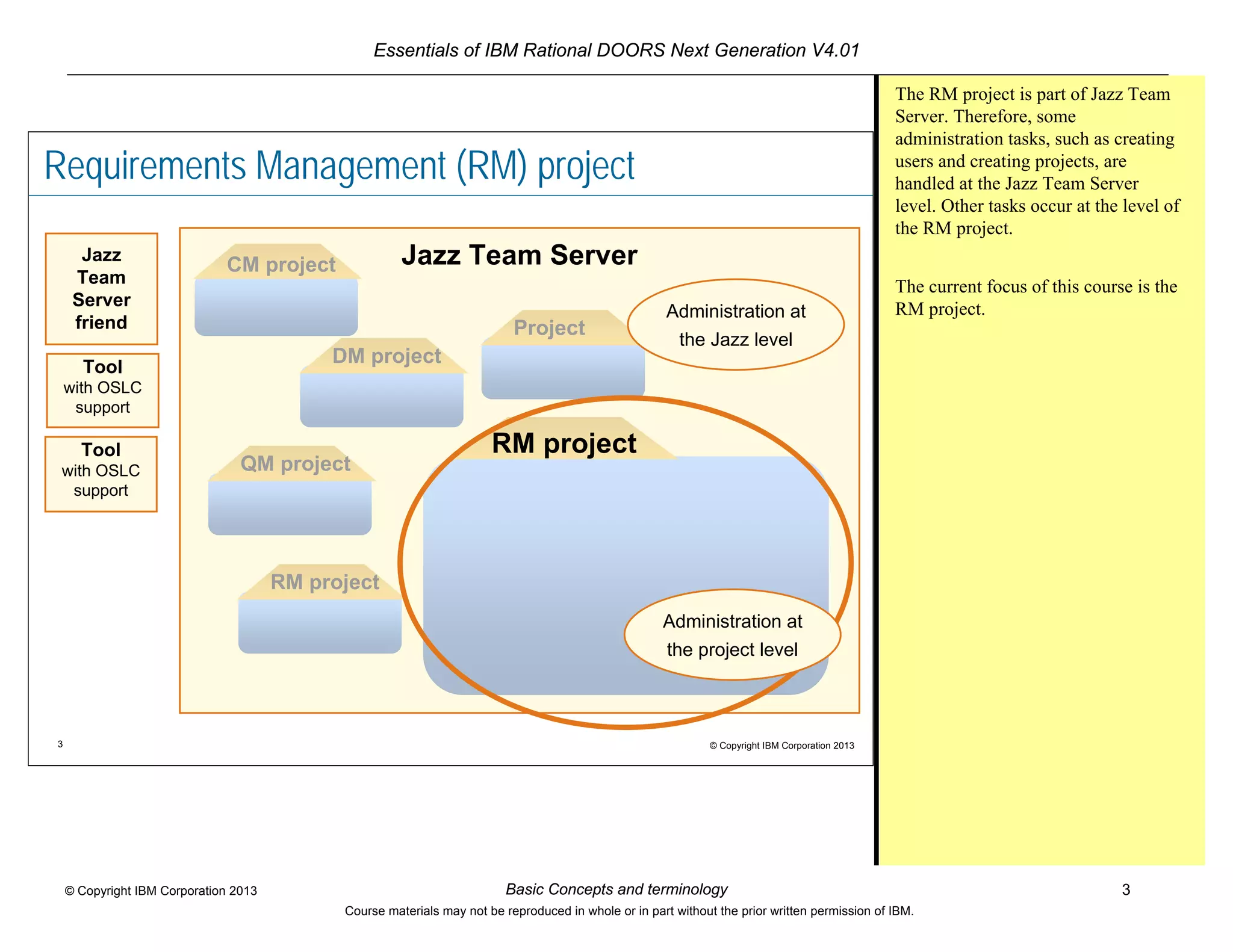
The RM project is part of Jazz Team
Server. Therefore, some
administration tasks, such as creating
users and creating projects, are
handled at the Jazz Team Server
level. Other tasks occur at the level of
the RM project.
The current focus of this course is the
RM project.
Essentials of IBM Rational DOORS Next Generation V4.01
Basic Concepts and terminology 4© Copyright IBM Corporation 2013
Course materials may not be reproduced in whole or in part without the prior written permission of IBM.
4 © Copyright IBM Corporation 2013
Key RM application concepts
Artifacts
Folder structure
RM project
Attributes Created on, Modified by, Priority,
Clarity, Status, Verification method, …
Links
Tags
Comments
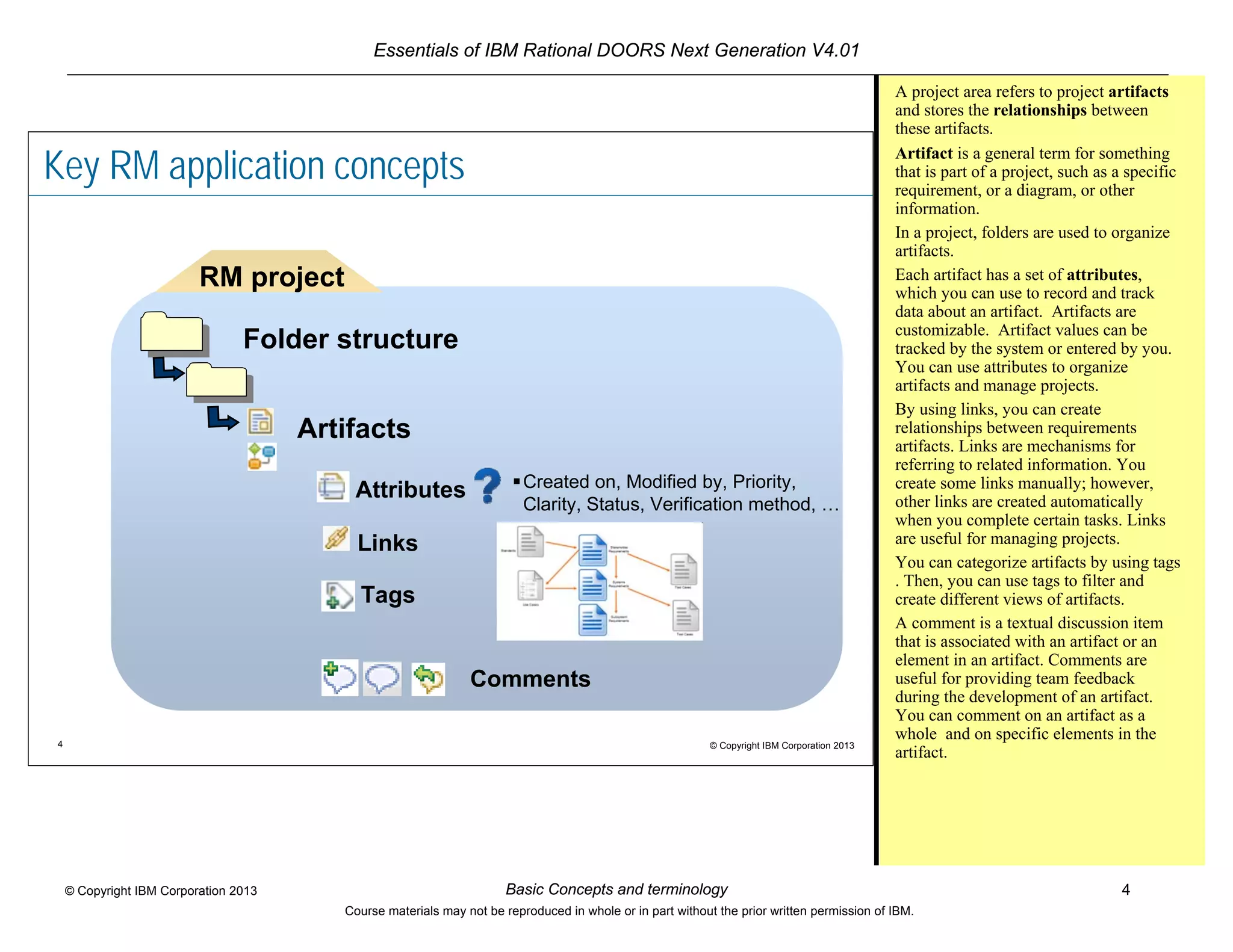
A project area refers to project artifacts
and stores the relationships between
these artifacts.
Artifact is a general term for something
that is part of a project, such as a specific
requirement, or a diagram, or other
information.
In a project, folders are used to organize
artifacts.
Each artifact has a set of attributes,
which you can use to record and track
data about an artifact. Artifacts are
customizable. Artifact values can be
tracked by the system or entered by you.
You can use attributes to organize
artifacts and manage projects.
By using links, you can create
relationships between requirements
artifacts. Links are mechanisms for
referring to related information. You
create some links manually; however,
other links are created automatically
when you complete certain tasks. Links
are useful for managing projects.
You can categorize artifacts by using tags
. Then, you can use tags to filter and
create different views of artifacts.
A comment is a textual discussion item
that is associated with an artifact or an
element in an artifact. Comments are
useful for providing team feedback
during the development of an artifact.
You can comment on an artifact as a
whole and on specific elements in the
artifact.
Essentials of IBM Rational DOORS Next Generation V4.01
Basic Concepts and terminology 5© Copyright IBM Corporation 2013
Course materials may not be reproduced in whole or in part without the prior written permission of IBM.
5 © Copyright IBM Corporation 2013
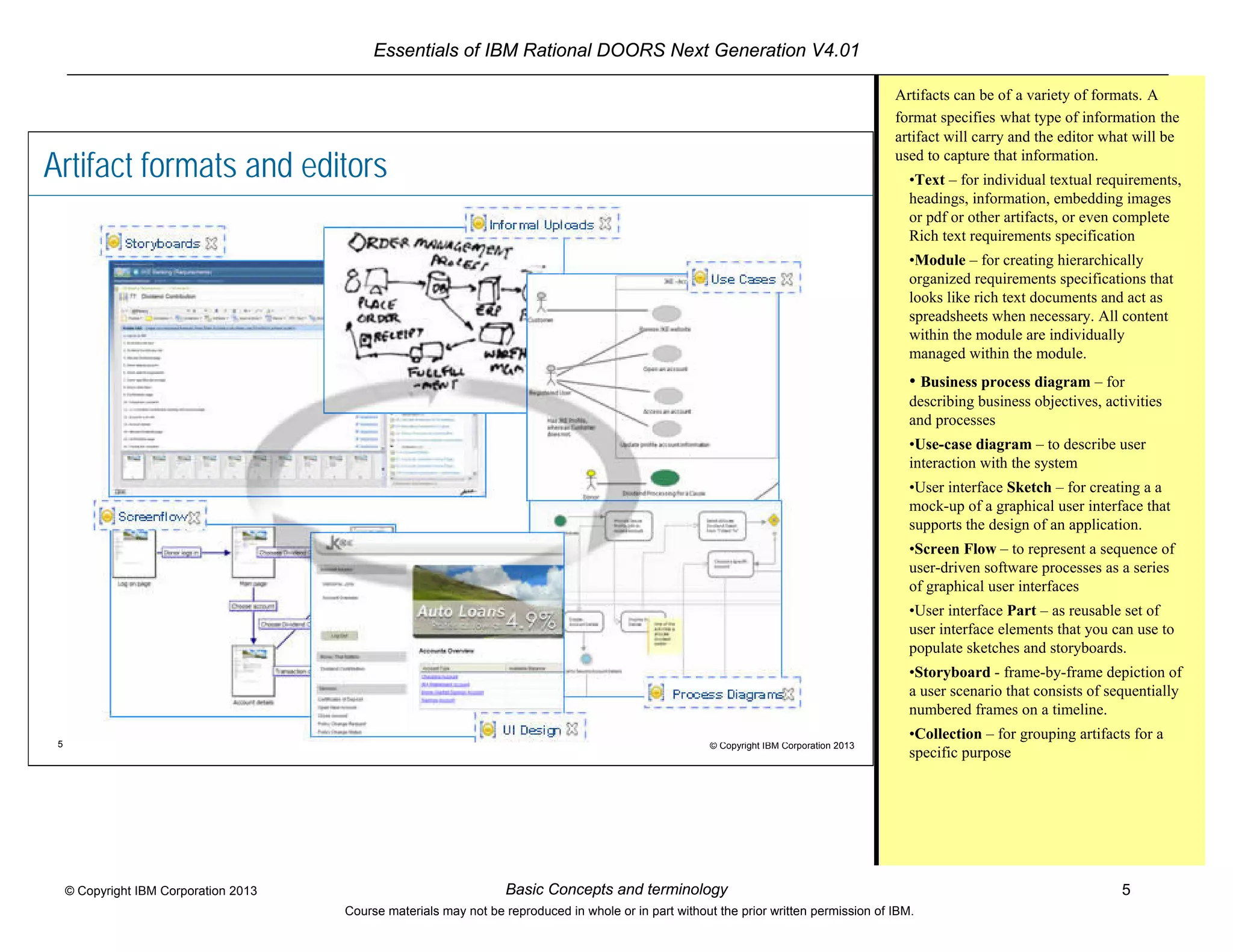
Artifact formats and editors
Artifacts can be of a variety of formats. A
format specifies what type of information the
artifact will carry and the editor what will be
used to capture that information.
•Text – for individual textual requirements,
headings, information, embedding images
or pdf or other artifacts, or even complete
Rich text requirements specification
•Module – for creating hierarchically
organized requirements specifications that
looks like rich text documents and act as
spreadsheets when necessary. All content
within the module are individually
managed within the module.
• Business process diagram – for
describing business objectives, activities
and processes
•Use-case diagram – to describe user
interaction with the system
•User interface Sketch – for creating a a
mock-up of a graphical user interface that
supports the design of an application.
•Screen Flow – to represent a sequence of
user-driven software processes as a series
of graphical user interfaces
•User interface Part – as reusable set of
user interface elements that you can use to
populate sketches and storyboards.
•Storyboard - frame-by-frame depiction of
a user scenario that consists of sequentially
numbered frames on a timeline.
•Collection – for grouping artifacts for a
specific purpose
Essentials of IBM Rational DOORS Next Generation V4.01
Basic Concepts and terminology 6© Copyright IBM Corporation 2013
Course materials may not be reproduced in whole or in part without the prior written permission of IBM.
6 © Copyright IBM Corporation 2013
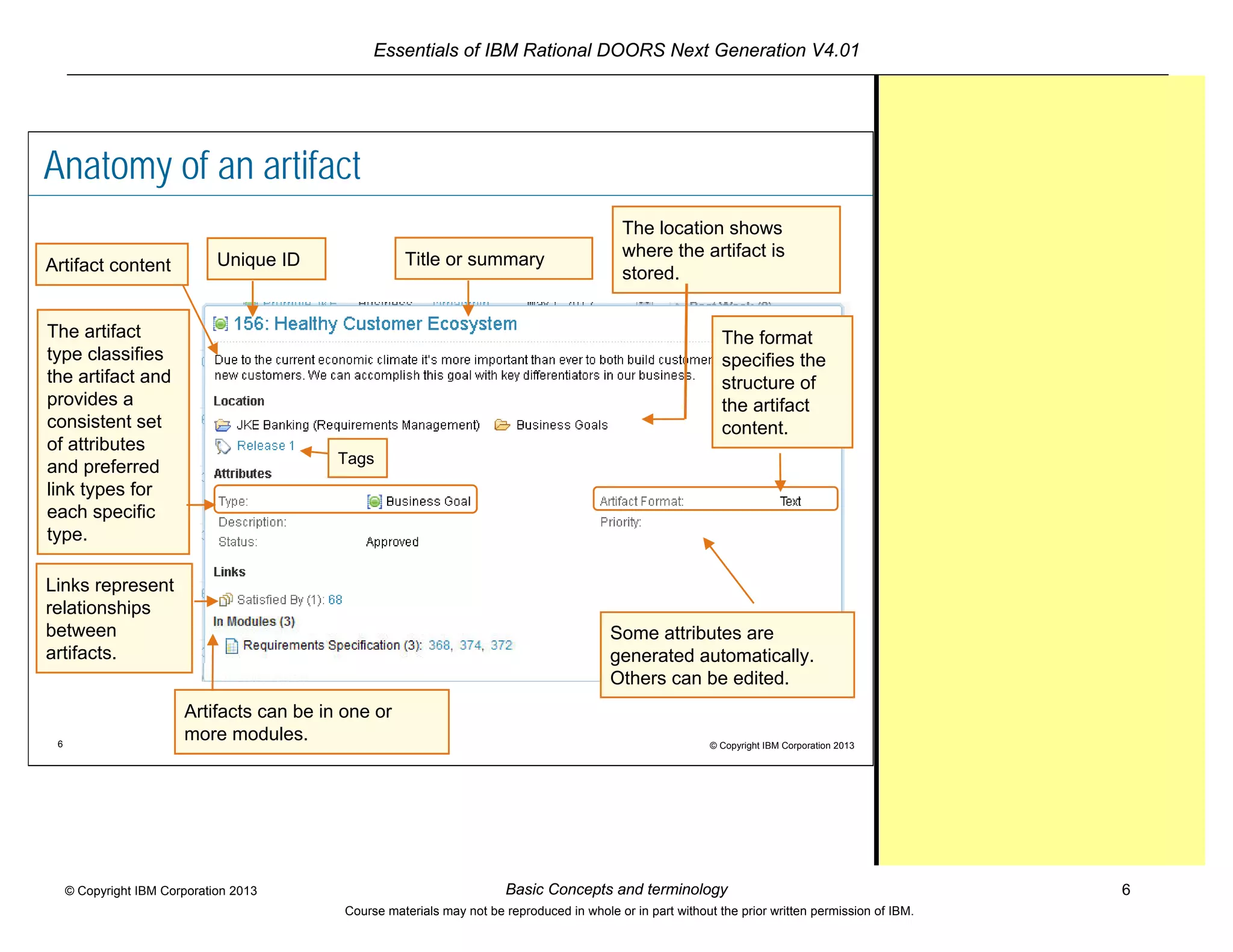
Anatomy of an artifact
The location shows
where the artifact is
stored.
The format
specifies the
structure of
the artifact
content.
The artifact
type classifies
the artifact and
provides a
consistent set
of attributes
and preferred
link types for
each specific
type.
Some attributes are
generated automatically.
Others can be edited.
Links represent
relationships
between
artifacts.
Unique ID
Tags
Artifact content Title or summary
Artifacts can be in one or
more modules.
Essentials of IBM Rational DOORS Next Generation V4.01
Basic Concepts and terminology 7© Copyright IBM Corporation 2013
Course materials may not be reproduced in whole or in part without the prior written permission of IBM.
7 © Copyright IBM Corporation 2013
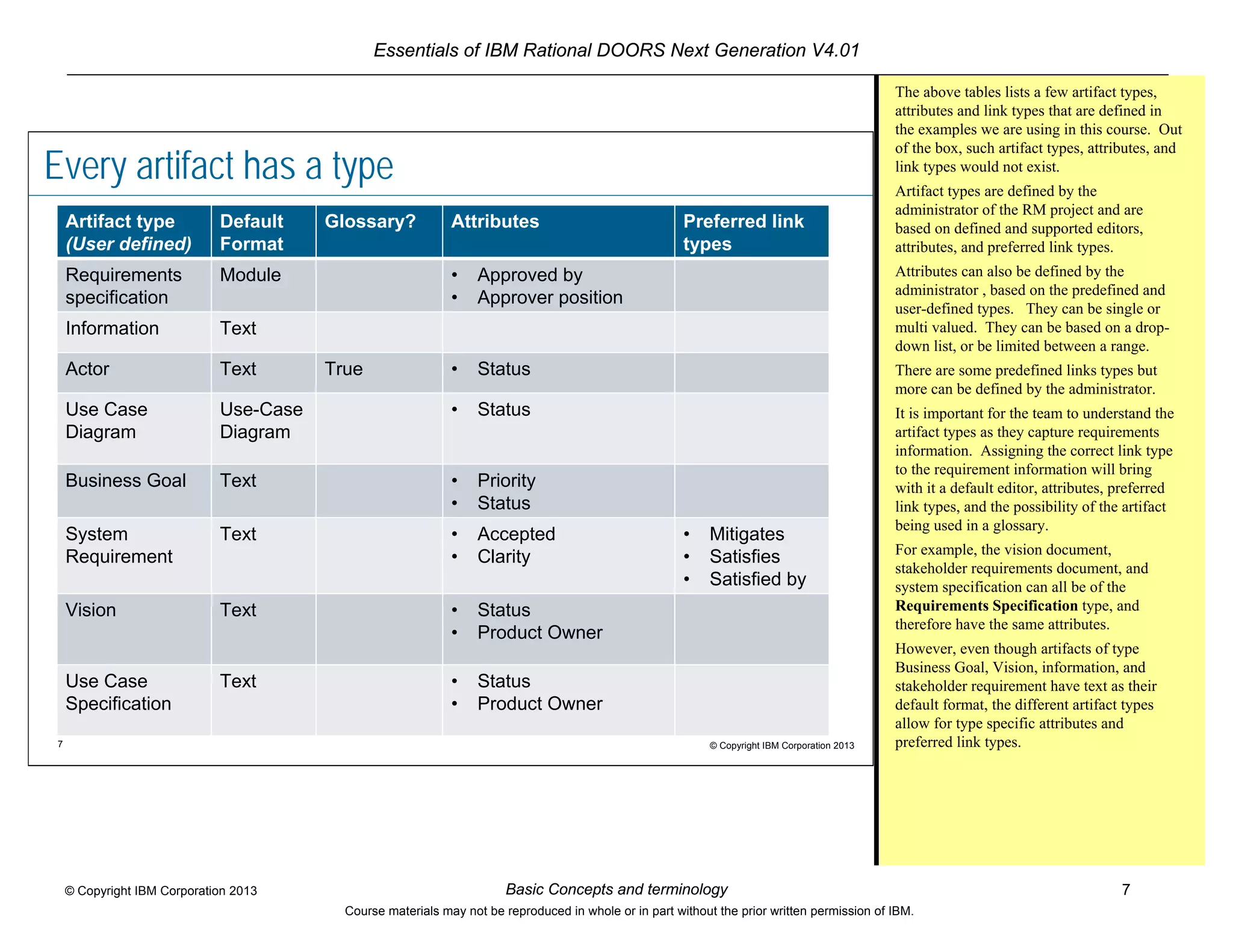
Every artifact has a type
Artifact type
(User defined)
Default
Format
Glossary? Attributes Preferred link
types
Requirements
specification
Module • Approved by
• Approver position
Information Text
Actor Text True • Status
Use Case
Diagram
Use-Case
Diagram
• Status
Business Goal Text • Priority
• Status
System
Requirement
Text • Accepted
• Clarity
• Mitigates
• Satisfies
• Satisfied by
Vision Text • Status
• Product Owner
Use Case
Specification
Text • Status
• Product Owner
The above tables lists a few artifact types,
attributes and link types that are defined in
the examples we are using in this course. Out
of the box, such artifact types, attributes, and
link types would not exist.
Artifact types are defined by the
administrator of the RM project and are
based on defined and supported editors,
attributes, and preferred link types.
Attributes can also be defined by the
administrator , based on the predefined and
user-defined types. They can be single or
multi valued. They can be based on a drop-
down list, or be limited between a range.
There are some predefined links types but
more can be defined by the administrator.
It is important for the team to understand the
artifact types as they capture requirements
information. Assigning the correct link type
to the requirement information will bring
with it a default editor, attributes, preferred
link types, and the possibility of the artifact
being used in a glossary.
For example, the vision document,
stakeholder requirements document, and
system specification can all be of the
Requirements Specification type, and
therefore have the same attributes.
However, even though artifacts of type
Business Goal, Vision, information, and
stakeholder requirement have text as their
default format, the different artifact types
allow for type specific attributes and
preferred link types.
Essentials of IBM Rational DOORS Next Generation V4.01
Basic Concepts and terminology 8© Copyright IBM Corporation 2013
Course materials may not be reproduced in whole or in part without the prior written permission of IBM.
8 © Copyright IBM Corporation 2013
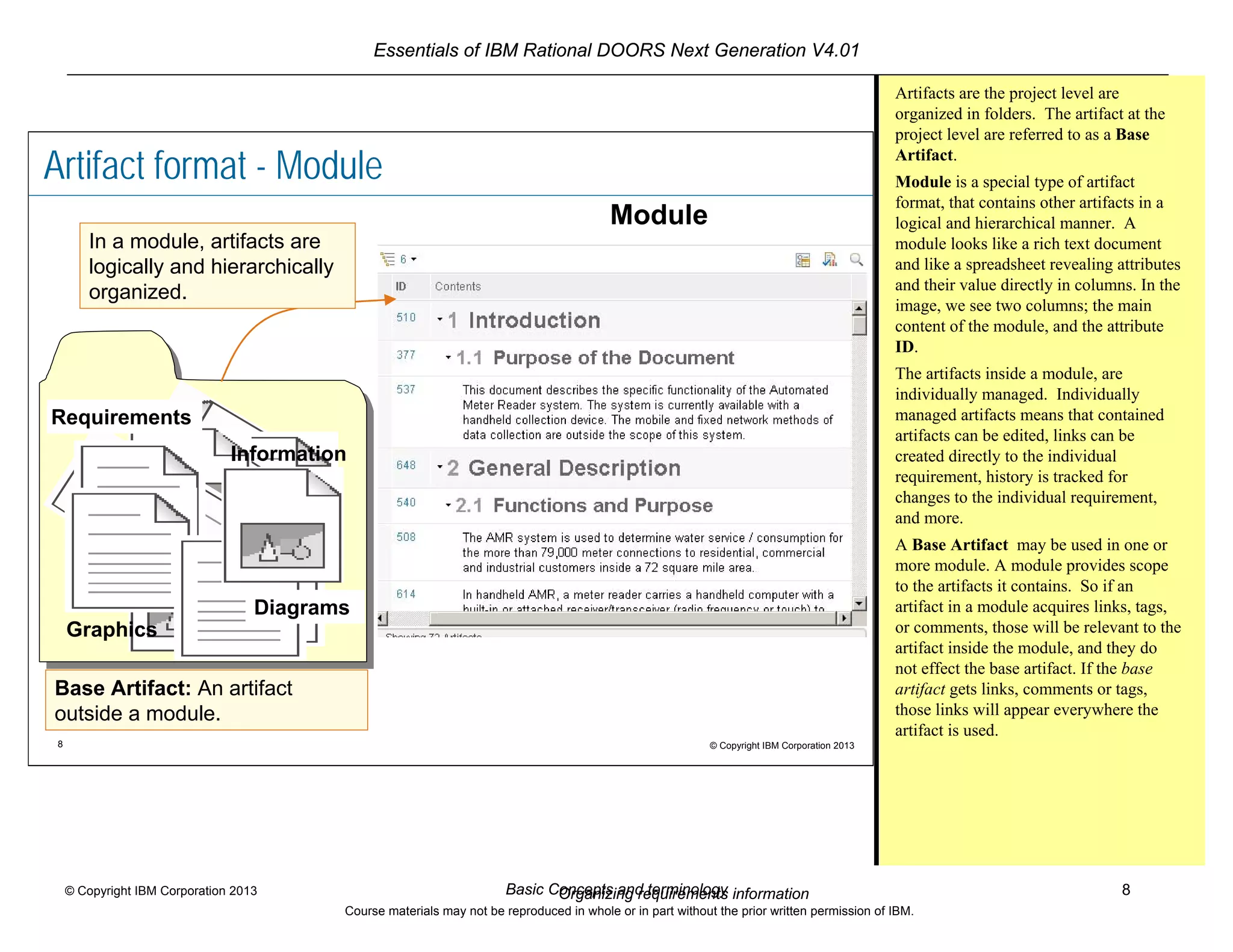
Artifact format - Module
Requirements
Information
Graphics
Diagrams
Module
In a module, artifacts are
logically and hierarchically
organized.
Base Artifact: An artifact
outside a module.
Artifacts are the project level are
organized in folders. The artifact at the
project level are referred to as a Base
Artifact.
Module is a special type of artifact
format, that contains other artifacts in a
logical and hierarchical manner. A
module looks like a rich text document
and like a spreadsheet revealing attributes
and their value directly in columns. In the
image, we see two columns; the main
content of the module, and the attribute
ID.
The artifacts inside a module, are
individually managed. Individually
managed artifacts means that contained
artifacts can be edited, links can be
created directly to the individual
requirement, history is tracked for
changes to the individual requirement,
and more.
A Base Artifact may be used in one or
more module. A module provides scope
to the artifacts it contains. So if an
artifact in a module acquires links, tags,
or comments, those will be relevant to the
artifact inside the module, and they do
not effect the base artifact. If the base
artifact gets links, comments or tags,
those links will appear everywhere the
artifact is used.
Organizing requirements information
Essentials of IBM Rational DOORS Next Generation V4.01
Basic Concepts and terminology 9© Copyright IBM Corporation 2013
Course materials may not be reproduced in whole or in part without the prior written permission of IBM.
9 © Copyright IBM Corporation 2013
Before you begin
The team must make a few decisions:
 What kind of information will be collected?
– Determine artifact types, attribute types, attributes…
 How will this information be related?
– Determine link types
The administrator must complete these tasks:
 (Jazz administrator) Create users
 (Jazz administrator) Assign licenses
 Assign access*1
 Assign users to projects
 Create link types, artifact types,
and attributes
Artifact types classify requirements
information. You capture
requirements information in artifacts.
When you create an artifact, you
make it of a particular artifact type.
This in turn automatically assigns it a
default editor, a defined set of
attributes and preferred link types.
Available Artifact types, their default
format, attributes, and preferred links,
are defined during the project
configuration. Project administrators
can create custom artifact types,
attributes, data types, and link types.
*1
Within a project area, a user who is
designated as Administrator has read-
write access for that project area, and
does not require any Jazz
administration privileges. For more
information refer to the information
center, topic: “Understanding
licenses, permissions, and access
control”
Essentials of IBM Rational DOORS Next Generation V4.01
Basic Concepts and terminology 10© Copyright IBM Corporation 2013
Course materials may not be reproduced in whole or in part without the prior written permission of IBM.
10 © Copyright IBM Corporation 2013
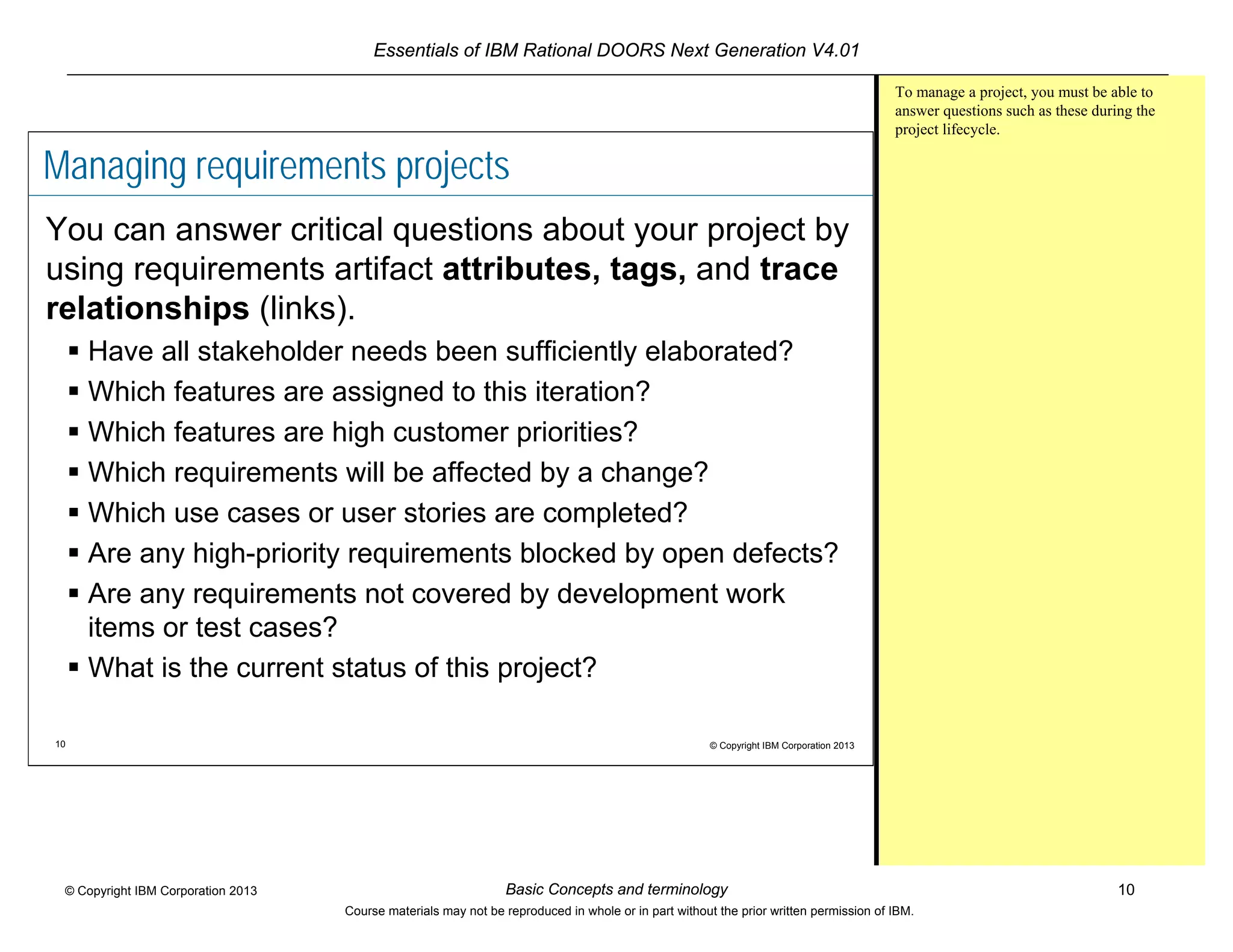
Managing requirements projects
You can answer critical questions about your project by
using requirements artifact attributes, tags, and trace
relationships (links).
 Have all stakeholder needs been sufficiently elaborated?
 Which features are assigned to this iteration?
 Which features are high customer priorities?
 Which requirements will be affected by a change?
 Which use cases or user stories are completed?
 Are any high-priority requirements blocked by open defects?
 Are any requirements not covered by development work
items or test cases?
 What is the current status of this project?
To manage a project, you must be able to
answer questions such as these during the
project lifecycle.
Essentials of IBM Rational DOORS Next Generation V4.01
Basic Concepts and terminology 11© Copyright IBM Corporation 2013
Course materials may not be reproduced in whole or in part without the prior written permission of IBM.
11 © Copyright IBM Corporation 2013
Review
 What kind of information is
stored in a requirements
management project?
 What are artifact attributes
used for?
 What are links?
 What is a base artifact?
 What is a module?
 What are some activities that
a team has to consider prior to
working with the requirements
management application?
Essentials of IBM Rational DOORS Next Generation V4.01
Basic Concepts and terminology 12© Copyright IBM Corporation 2013
Course materials may not be reproduced in whole or in part without the prior written permission of IBM.
12 © Copyright IBM Corporation 2013
Module summary
In this module, you learned basic terminology and
concepts that are used in the Requirements
Management application.

Basic concepts and terminology for the Requirements Management application

  • 1.
    Essentials of IBMRational DOORS Next Generation V4.01 Basic Concepts and terminology 1© Copyright IBM Corporation 2013 Course materials may not be reproduced in whole or in part without the prior written permission of IBM. © Copyright IBM Corporation 2013 Basic concepts and terminology for the Requirements Management application Contents Module overview -2 Requirements Management Project -3 Key RM application concepts -4 Artifact formats and editors -5 Anatomy of an artifact -6 Every artifact is of a particular artifact type -7 Before you begin -9 Managing requirements projects -10 Review -11 Module summary -12
  • 2.
    Essentials of IBMRational DOORS Next Generation V4.01 Basic Concepts and terminology 2© Copyright IBM Corporation 2013 Course materials may not be reproduced in whole or in part without the prior written permission of IBM. 2 © Copyright IBM Corporation 2013 Module overview After you complete this module, you should be able to do these tasks :  Explain the difference between Jazz™ Team Server and the Requirements Management (RM) application  Describe the basic concepts and terminology in the RM application  Identify tasks that the team must do before starting a requirements management project with IBM® Rational® DOORS Next Generation or IBM® Rational® Requirements Composer
  • 3.
    Essentials of IBMRational DOORS Next Generation V4.01 Basic Concepts and terminology 3© Copyright IBM Corporation 2013 Course materials may not be reproduced in whole or in part without the prior written permission of IBM. 3 © Copyright IBM Corporation 2013 Jazz Team Server Requirements Management (RM) project RM project QM project RM project DM project Jazz Team Server friend Tool with OSLC support Tool with OSLC support CM project Project Administration at the Jazz level Administration at the project level The RM project is part of Jazz Team Server. Therefore, some administration tasks, such as creating users and creating projects, are handled at the Jazz Team Server level. Other tasks occur at the level of the RM project. The current focus of this course is the RM project.
  • 4.
    Essentials of IBMRational DOORS Next Generation V4.01 Basic Concepts and terminology 4© Copyright IBM Corporation 2013 Course materials may not be reproduced in whole or in part without the prior written permission of IBM. 4 © Copyright IBM Corporation 2013 Key RM application concepts Artifacts Folder structure RM project Attributes Created on, Modified by, Priority, Clarity, Status, Verification method, … Links Tags Comments A project area refers to project artifacts and stores the relationships between these artifacts. Artifact is a general term for something that is part of a project, such as a specific requirement, or a diagram, or other information. In a project, folders are used to organize artifacts. Each artifact has a set of attributes, which you can use to record and track data about an artifact. Artifacts are customizable. Artifact values can be tracked by the system or entered by you. You can use attributes to organize artifacts and manage projects. By using links, you can create relationships between requirements artifacts. Links are mechanisms for referring to related information. You create some links manually; however, other links are created automatically when you complete certain tasks. Links are useful for managing projects. You can categorize artifacts by using tags . Then, you can use tags to filter and create different views of artifacts. A comment is a textual discussion item that is associated with an artifact or an element in an artifact. Comments are useful for providing team feedback during the development of an artifact. You can comment on an artifact as a whole and on specific elements in the artifact.
  • 5.
    Essentials of IBMRational DOORS Next Generation V4.01 Basic Concepts and terminology 5© Copyright IBM Corporation 2013 Course materials may not be reproduced in whole or in part without the prior written permission of IBM. 5 © Copyright IBM Corporation 2013 Artifact formats and editors Artifacts can be of a variety of formats. A format specifies what type of information the artifact will carry and the editor what will be used to capture that information. •Text – for individual textual requirements, headings, information, embedding images or pdf or other artifacts, or even complete Rich text requirements specification •Module – for creating hierarchically organized requirements specifications that looks like rich text documents and act as spreadsheets when necessary. All content within the module are individually managed within the module. • Business process diagram – for describing business objectives, activities and processes •Use-case diagram – to describe user interaction with the system •User interface Sketch – for creating a a mock-up of a graphical user interface that supports the design of an application. •Screen Flow – to represent a sequence of user-driven software processes as a series of graphical user interfaces •User interface Part – as reusable set of user interface elements that you can use to populate sketches and storyboards. •Storyboard - frame-by-frame depiction of a user scenario that consists of sequentially numbered frames on a timeline. •Collection – for grouping artifacts for a specific purpose
  • 6.
    Essentials of IBMRational DOORS Next Generation V4.01 Basic Concepts and terminology 6© Copyright IBM Corporation 2013 Course materials may not be reproduced in whole or in part without the prior written permission of IBM. 6 © Copyright IBM Corporation 2013 Anatomy of an artifact The location shows where the artifact is stored. The format specifies the structure of the artifact content. The artifact type classifies the artifact and provides a consistent set of attributes and preferred link types for each specific type. Some attributes are generated automatically. Others can be edited. Links represent relationships between artifacts. Unique ID Tags Artifact content Title or summary Artifacts can be in one or more modules.
  • 7.
    Essentials of IBMRational DOORS Next Generation V4.01 Basic Concepts and terminology 7© Copyright IBM Corporation 2013 Course materials may not be reproduced in whole or in part without the prior written permission of IBM. 7 © Copyright IBM Corporation 2013 Every artifact has a type Artifact type (User defined) Default Format Glossary? Attributes Preferred link types Requirements specification Module • Approved by • Approver position Information Text Actor Text True • Status Use Case Diagram Use-Case Diagram • Status Business Goal Text • Priority • Status System Requirement Text • Accepted • Clarity • Mitigates • Satisfies • Satisfied by Vision Text • Status • Product Owner Use Case Specification Text • Status • Product Owner The above tables lists a few artifact types, attributes and link types that are defined in the examples we are using in this course. Out of the box, such artifact types, attributes, and link types would not exist. Artifact types are defined by the administrator of the RM project and are based on defined and supported editors, attributes, and preferred link types. Attributes can also be defined by the administrator , based on the predefined and user-defined types. They can be single or multi valued. They can be based on a drop- down list, or be limited between a range. There are some predefined links types but more can be defined by the administrator. It is important for the team to understand the artifact types as they capture requirements information. Assigning the correct link type to the requirement information will bring with it a default editor, attributes, preferred link types, and the possibility of the artifact being used in a glossary. For example, the vision document, stakeholder requirements document, and system specification can all be of the Requirements Specification type, and therefore have the same attributes. However, even though artifacts of type Business Goal, Vision, information, and stakeholder requirement have text as their default format, the different artifact types allow for type specific attributes and preferred link types.
  • 8.
    Essentials of IBMRational DOORS Next Generation V4.01 Basic Concepts and terminology 8© Copyright IBM Corporation 2013 Course materials may not be reproduced in whole or in part without the prior written permission of IBM. 8 © Copyright IBM Corporation 2013 Artifact format - Module Requirements Information Graphics Diagrams Module In a module, artifacts are logically and hierarchically organized. Base Artifact: An artifact outside a module. Artifacts are the project level are organized in folders. The artifact at the project level are referred to as a Base Artifact. Module is a special type of artifact format, that contains other artifacts in a logical and hierarchical manner. A module looks like a rich text document and like a spreadsheet revealing attributes and their value directly in columns. In the image, we see two columns; the main content of the module, and the attribute ID. The artifacts inside a module, are individually managed. Individually managed artifacts means that contained artifacts can be edited, links can be created directly to the individual requirement, history is tracked for changes to the individual requirement, and more. A Base Artifact may be used in one or more module. A module provides scope to the artifacts it contains. So if an artifact in a module acquires links, tags, or comments, those will be relevant to the artifact inside the module, and they do not effect the base artifact. If the base artifact gets links, comments or tags, those links will appear everywhere the artifact is used. Organizing requirements information
  • 9.
    Essentials of IBMRational DOORS Next Generation V4.01 Basic Concepts and terminology 9© Copyright IBM Corporation 2013 Course materials may not be reproduced in whole or in part without the prior written permission of IBM. 9 © Copyright IBM Corporation 2013 Before you begin The team must make a few decisions:  What kind of information will be collected? – Determine artifact types, attribute types, attributes…  How will this information be related? – Determine link types The administrator must complete these tasks:  (Jazz administrator) Create users  (Jazz administrator) Assign licenses  Assign access*1  Assign users to projects  Create link types, artifact types, and attributes Artifact types classify requirements information. You capture requirements information in artifacts. When you create an artifact, you make it of a particular artifact type. This in turn automatically assigns it a default editor, a defined set of attributes and preferred link types. Available Artifact types, their default format, attributes, and preferred links, are defined during the project configuration. Project administrators can create custom artifact types, attributes, data types, and link types. *1 Within a project area, a user who is designated as Administrator has read- write access for that project area, and does not require any Jazz administration privileges. For more information refer to the information center, topic: “Understanding licenses, permissions, and access control”
  • 10.
    Essentials of IBMRational DOORS Next Generation V4.01 Basic Concepts and terminology 10© Copyright IBM Corporation 2013 Course materials may not be reproduced in whole or in part without the prior written permission of IBM. 10 © Copyright IBM Corporation 2013 Managing requirements projects You can answer critical questions about your project by using requirements artifact attributes, tags, and trace relationships (links).  Have all stakeholder needs been sufficiently elaborated?  Which features are assigned to this iteration?  Which features are high customer priorities?  Which requirements will be affected by a change?  Which use cases or user stories are completed?  Are any high-priority requirements blocked by open defects?  Are any requirements not covered by development work items or test cases?  What is the current status of this project? To manage a project, you must be able to answer questions such as these during the project lifecycle.
  • 11.
    Essentials of IBMRational DOORS Next Generation V4.01 Basic Concepts and terminology 11© Copyright IBM Corporation 2013 Course materials may not be reproduced in whole or in part without the prior written permission of IBM. 11 © Copyright IBM Corporation 2013 Review  What kind of information is stored in a requirements management project?  What are artifact attributes used for?  What are links?  What is a base artifact?  What is a module?  What are some activities that a team has to consider prior to working with the requirements management application?
  • 12.
    Essentials of IBMRational DOORS Next Generation V4.01 Basic Concepts and terminology 12© Copyright IBM Corporation 2013 Course materials may not be reproduced in whole or in part without the prior written permission of IBM. 12 © Copyright IBM Corporation 2013 Module summary In this module, you learned basic terminology and concepts that are used in the Requirements Management application.