Essentials of IBM® Rational® DOORS Next Generation V4.01
Managing requirements by using baselines 1© Copyright IBM Corporation 2013
Course materials may not be reproduced in whole or in part without the prior written permission of IBM.
© Copyright IBM Corporation 2013
Managing requirements by using baselines
Contents
Module overview -2
Project baselines -3
Creating a project baseline -4
An artifact in a baseline -5
Lab : Create a project baseline -6
Review -7
Module summary -8
Essentials of IBM® Rational® DOORS Next Generation V4.01
Managing requirements by using baselines 2© Copyright IBM Corporation 2013
Course materials may not be reproduced in whole or in part without the prior written permission of IBM.
2 © Copyright IBM Corporation 2013
Module overview
After you complete this module, you should be able to
use baselines to manage requirements during the
project lifecycle.
Essentials of IBM® Rational® DOORS Next Generation V4.01
Managing requirements by using baselines 3© Copyright IBM Corporation 2013
Course materials may not be reproduced in whole or in part without the prior written permission of IBM.
3 © Copyright IBM Corporation 2013
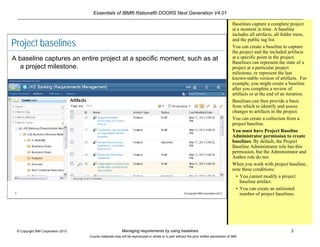
Project baselines
A baseline captures an entire project at a specific moment, such as at
a project milestone.
Baselines capture a complete project
at a moment in time. A baseline
includes all artifacts, all folder trees,
and the public tag list.
You can create a baseline to capture
the project and the included artifacts
at a specific point in the project.
Baselines can represent the state of a
project at a particular project
milestone, or represent the last
known-stable version of artifacts. For
example, you might create a baseline
after you complete a review of
artifacts or at the end of an iteration.
Baselines can then provide a basis
from which to identify and assess
changes to artifacts in the project.
You can create a collection from a
project baseline.
You must have Project Baseline
Administrator permission to create
baselines. By default, the Project
Baseline Administrator role has this
permission, but the Administrator and
Author role do not.
When you work with project baseline,
note these conditions:
• You cannot modify a project
baseline artifact.
• You can create an unlimited
number of project baselines.
Essentials of IBM® Rational® DOORS Next Generation V4.01
Managing requirements by using baselines 4© Copyright IBM Corporation 2013
Course materials may not be reproduced in whole or in part without the prior written permission of IBM.
4 © Copyright IBM Corporation 2013
Creating a project baseline
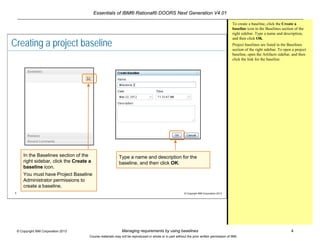
In the Baselines section of the
right sidebar, click the Create a
baseline icon.
You must have Project Baseline
Administrator permissions to
create a baseline.
Type a name and description for the
baseline, and then click OK.
To create a baseline, click the Create a
baseline icon in the Baselines section of the
right sidebar. Type a name and description,
and then click OK.
Project baselines are listed in the Baselines
section of the right sidebar. To open a project
baseline, open the Artifacts sidebar, and then
click the link for the baseline.
Essentials of IBM® Rational® DOORS Next Generation V4.01
Managing requirements by using baselines 5© Copyright IBM Corporation 2013
Course materials may not be reproduced in whole or in part without the prior written permission of IBM.
5 © Copyright IBM Corporation 2013
An artifact in a baseline
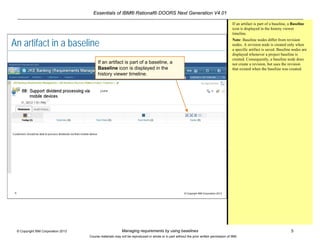
If an artifact is part of a baseline, a
Baseline icon is displayed in the
history viewer timeline.
If an artifact is part of a baseline, a Baseline
icon is displayed in the history viewer
timeline.
Note: Baseline nodes differ from revision
nodes. A revision node is created only when
a specific artifact is saved. Baseline nodes are
displayed whenever a project baseline is
created. Consequently, a baseline node does
not create a revision, but uses the revision
that existed when the baseline was created.
Essentials of IBM® Rational® DOORS Next Generation V4.01
Managing requirements by using baselines 6© Copyright IBM Corporation 2013
Course materials may not be reproduced in whole or in part without the prior written permission of IBM.
6 © Copyright IBM Corporation 2013
Lab: Creating a project baseline
After you finish this lab, you
should be able to create a
project baseline.
Essentials of IBM® Rational® DOORS Next Generation V4.01
Managing requirements by using baselines 7© Copyright IBM Corporation 2013
Course materials may not be reproduced in whole or in part without the prior written permission of IBM.
7 © Copyright IBM Corporation 2013
Review
 What are a few benefits of a
baseline?
Essentials of IBM® Rational® DOORS Next Generation V4.01
Managing requirements by using baselines 8© Copyright IBM Corporation 2013
Course materials may not be reproduced in whole or in part without the prior written permission of IBM.
8 © Copyright IBM Corporation 2013
Module summary
In this module, you learned how to use baselines to
manage requirements during the project lifecycle.

Managing requirements by using baselines

  • 1.
    Essentials of IBM®Rational® DOORS Next Generation V4.01 Managing requirements by using baselines 1© Copyright IBM Corporation 2013 Course materials may not be reproduced in whole or in part without the prior written permission of IBM. © Copyright IBM Corporation 2013 Managing requirements by using baselines Contents Module overview -2 Project baselines -3 Creating a project baseline -4 An artifact in a baseline -5 Lab : Create a project baseline -6 Review -7 Module summary -8
  • 2.
    Essentials of IBM®Rational® DOORS Next Generation V4.01 Managing requirements by using baselines 2© Copyright IBM Corporation 2013 Course materials may not be reproduced in whole or in part without the prior written permission of IBM. 2 © Copyright IBM Corporation 2013 Module overview After you complete this module, you should be able to use baselines to manage requirements during the project lifecycle.
  • 3.
    Essentials of IBM®Rational® DOORS Next Generation V4.01 Managing requirements by using baselines 3© Copyright IBM Corporation 2013 Course materials may not be reproduced in whole or in part without the prior written permission of IBM. 3 © Copyright IBM Corporation 2013 Project baselines A baseline captures an entire project at a specific moment, such as at a project milestone. Baselines capture a complete project at a moment in time. A baseline includes all artifacts, all folder trees, and the public tag list. You can create a baseline to capture the project and the included artifacts at a specific point in the project. Baselines can represent the state of a project at a particular project milestone, or represent the last known-stable version of artifacts. For example, you might create a baseline after you complete a review of artifacts or at the end of an iteration. Baselines can then provide a basis from which to identify and assess changes to artifacts in the project. You can create a collection from a project baseline. You must have Project Baseline Administrator permission to create baselines. By default, the Project Baseline Administrator role has this permission, but the Administrator and Author role do not. When you work with project baseline, note these conditions: • You cannot modify a project baseline artifact. • You can create an unlimited number of project baselines.
  • 4.
    Essentials of IBM®Rational® DOORS Next Generation V4.01 Managing requirements by using baselines 4© Copyright IBM Corporation 2013 Course materials may not be reproduced in whole or in part without the prior written permission of IBM. 4 © Copyright IBM Corporation 2013 Creating a project baseline In the Baselines section of the right sidebar, click the Create a baseline icon. You must have Project Baseline Administrator permissions to create a baseline. Type a name and description for the baseline, and then click OK. To create a baseline, click the Create a baseline icon in the Baselines section of the right sidebar. Type a name and description, and then click OK. Project baselines are listed in the Baselines section of the right sidebar. To open a project baseline, open the Artifacts sidebar, and then click the link for the baseline.
  • 5.
    Essentials of IBM®Rational® DOORS Next Generation V4.01 Managing requirements by using baselines 5© Copyright IBM Corporation 2013 Course materials may not be reproduced in whole or in part without the prior written permission of IBM. 5 © Copyright IBM Corporation 2013 An artifact in a baseline If an artifact is part of a baseline, a Baseline icon is displayed in the history viewer timeline. If an artifact is part of a baseline, a Baseline icon is displayed in the history viewer timeline. Note: Baseline nodes differ from revision nodes. A revision node is created only when a specific artifact is saved. Baseline nodes are displayed whenever a project baseline is created. Consequently, a baseline node does not create a revision, but uses the revision that existed when the baseline was created.
  • 6.
    Essentials of IBM®Rational® DOORS Next Generation V4.01 Managing requirements by using baselines 6© Copyright IBM Corporation 2013 Course materials may not be reproduced in whole or in part without the prior written permission of IBM. 6 © Copyright IBM Corporation 2013 Lab: Creating a project baseline After you finish this lab, you should be able to create a project baseline.
  • 7.
    Essentials of IBM®Rational® DOORS Next Generation V4.01 Managing requirements by using baselines 7© Copyright IBM Corporation 2013 Course materials may not be reproduced in whole or in part without the prior written permission of IBM. 7 © Copyright IBM Corporation 2013 Review  What are a few benefits of a baseline?
  • 8.
    Essentials of IBM®Rational® DOORS Next Generation V4.01 Managing requirements by using baselines 8© Copyright IBM Corporation 2013 Course materials may not be reproduced in whole or in part without the prior written permission of IBM. 8 © Copyright IBM Corporation 2013 Module summary In this module, you learned how to use baselines to manage requirements during the project lifecycle.