© 2015 IBM Corporation
DevOps
Steer at the Team Level
- Agile Planning and Tracking
Jean-Louis (JL) Marechaux
Worldwide Enablement & Performance
jl.marechaux@ca.ibm.com
@JLmarechaux
Introduction
• Targeted Audience
• Scrum Masters , Agile Team Members
• Focus on Planning and Tracking
• Expected Background and Experience
• Agile methodologies and Scrum
• IBM® Rational® Team Concert
• Workshop Expectations
• What you want to learn today
1
Intended Audience
 This DevOps - Steer at the Team Level workshop is
for teams who use IBM® Rational Team Concert™ to
conduct planning and tracking activities throughout
agile projects.
2
Prerequisites
• To get the most from this workshop, you must have
basic knowledge of:
• The Scrum Framework
• Rational Team Concert
• For the labs (hands-on exercises), you need Rational
Team Concert v5.0.1 or higher
• The provided virtual machine includes a Jazz Team
Server preconfigured for the workshop
3
Workshop Objectives
• After you complete this workshop, you will be able to
complete these tasks:
• Conduct agile planning and tracking activities using Rational Team
Concert:
– Create Product Backlogs
– Plan Releases
– Plan Sprints
– Hold Daily Scrums
– Monitor Sprint Progress (*)
– Conduct Sprint Reviews (*)
– Conduct Sprint Retrospectives (*)
(*) Material provided / Not covered during lab 2848 by lack of time
4
Workshop Agenda
Module Description
Module 1: Overview of Agile Planning &
Tracking Capabilities
Review core Scrum principles. Review key
capabilities for planning and tracking with IBM®
Rational Team Concert (RTC).
Module 2: Create Product Backlog
Explore activities related to a Product Backlog
management. Use Rational Team Concert to
create and populate a Product Backlog.
Module 3: Release Planning
Explore activities related to Release Planning.
Use Rational Team Concert to plan a release
Module 4: Sprint Planning
Explore activities related to Sprint Planning. Use
Rational Team Concert to plan a sprint.
Module 5: Sprint Execution
Examine Sprint activities in an Agile project. Use
Rational Team Concert to conduct collaborative
activities during a Sprint (Daily Scrum, Sprint
Progress).
5
Overview of Agile
Planning & Tracking
Capabilities
Module 1
Objectives
• Review core Scrum principles
• Explore typical activities for DevOps –
Collaborative Steering during an agile project.
• Agile planning and tracking at the team level
• Identify IBM® Rational Team Concert main
capabilities to support agile planning and activity
tracking.
Note that basic knowledge of the Scrum framework is important
to understand this module.
7
Brief Introduction to Scrum (<15 minutes)
• Scrum.org leads the evolution and maturity of Scrum
• Key aspects of the Scrum framework:
• Roles
• Events
• Artifacts
• Scrum is used for managing product development
(This section is optional if everyone is proficient with Scrum)
8
The Scrum Framework In One Picture
9
Accelerate
software delivery –
for faster time to value
Balance speed, cost,
quality and risk –
for increased capacity
to innovate
Reduce time to
customer feedback –
for improved customer
experience
Our DevOps POV is resonating with clients and they are delivering
measurable business outcomes with DevOps
Continuous
Customer Feedback
& Optimization
Collaborative
Development
Continuous Release
and Deployment
Continuous
Monitoring
Continuous
Business Planning
Continuous
Testing
Operate Develop/
Test
Deploy
Steer
DevOps
Continuous
Feedback
IBM DevOps Point of View
Enterprise capability for continuous software delivery that enables organizations to seize
market opportunities and reduce time to customer feedback
10
Incremental Software Development
Approach for Agile Teams
11
Plan SprintPlan Sprint
Monitor Sprint
Progress
Hold Daily Scrum
Code, Test, Deliver
Manage
Product Backlog
Plan Release
Conduct
Sprint Review
Conduct
Sprint Retrospective
1
2
7
8
3
4
5
6
DevOps Steer: Planning and Tracking Throughout
an Agile Project
12
Manage Product Backlog Over Time
• Rank high priority stories (ordered list of features)
• Refine backlog (new or refined work items over time)
Agile Quick Planner
13
Plan the Release
• Identify release objectives and dates
• Select stories for the release
• Refine release backlog over time
14
Agile Quick Planner
Plan the Sprint
• Select stories for the Sprint
• Agree on a Sprint goal
• Decompose stories into tasks
15
Agile Quick Planner
Code, Test, Deliver
• Collaborative work to create a Product Increment.
 Code, test, refactor
 Build and deliver changes
 Update tasks and stories
Project Dashboards
16
Agile Quick Planner
Hold Daily Scrum
• Synchronization meeting
• Share progress with the team
• Capture impediments and risks
Kanban Board (or Taskboard)
17
Monitor Sprint Progress
• Review overall progress against goals
• Review work items needing attention
• Review and update impediments and risks
Project Dashboards & Plans
18
Conduct Sprint Review
Project Dashboards
19
Kanban Board
(or Taskboard)
• Summarize work completed during the Sprint
• Demonstrate the completed work
• Discuss progress relative to plans
Conduct Sprint Retrospective
• Discuss what worked well
• Discuss what didn't work well, and how we can improve
• Create tasks for future improvements
20
Agile Quick Planner
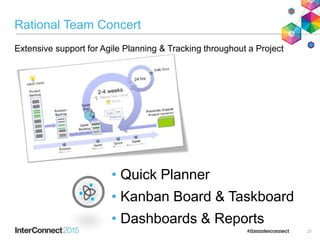
Rational Team Concert
21
• Quick Planner
• Kanban Board & Taskboard
• Dashboards & Reports
Extensive support for Agile Planning & Tracking throughout a Project
Summary
 Rational Team Concert facilitates the adoption of the IBM DevOps
approach:
– Steer: Continuous Planning
– Develop & Test: Collaborative development
 Rational Team Concert supports Agile practitioners throughout projects
– Backlog Management, Release and Sprint Planning, Daily
Scrums, Reviews and Retrospectives.
 Rational Team Concert provides tools for Agile practitioners:
– Quick Planner
– Kaban Board & Taskboard
– Project and team Dashboards
– Reports
22
Create Product
Backlog
Module 2
Objectives
1. Explore how IBM® Rational Team Concert supports the
creation of a Product Backlog.
2. Acquire hands-on IBM® Rational Team Concert
experience to conduct Agile activities:
• Communicate Product Vision
• Populate Product Backlog (Quick Planner)
24
Incremental Software Development Approach
for Agile Teams
We are here
25
Product Backlog for Agile projects
• Share and explain Product Vision
• Make the Product Vision available to the team
• Create Product Backlog
• Single source of requirements for any changes to be
made to the product
• Living artifact (never complete)
• Add items to Product Backlog
• New epics / stories (features, technical debt,
enhancements…)
26
Exercise: Create the Product Backlog
• Goals:
• Share initial Product Vision and
• Create the initial Product Backlog
Share Product
Vision
Add Product
Vision to the
Product
Backlog plan
Import backlog
items
Add new items
to Product
Backlog
Populate
Product Backlog
(15 min.)
Done
Already done for you in the VM image to
shorten the workshop 27
Done
Done
Summary
• The Product Backlog :
–Contains items to describe changes needed to the product
–Is an ordered list
–Is the single source of requirements for the team
• Rational Team Concert provides a collaborative
environment to work with:
– Product Vision
– Product Backlog
– Epics and Stories
• The RTC Quick Planner facilitates backlog management
28
Release Planning
Module 3
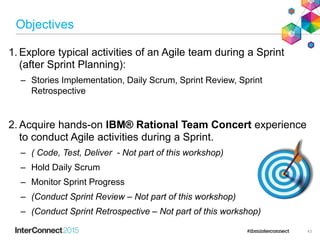
Objectives
1. Explore how IBM® Rational Team Concert supports
Release Planning.
2. Acquire hands-on IBM® Rational Team Concert
experience to conduct Agile activities:
• Refine Product Backlog
• Plan the Release
30
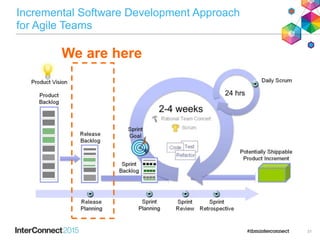
Incremental Software Development Approach
for Agile Teams
We are here
31
Release Planning for Agile Projects
• Refine Product Backlog: Ongoing activity
• Refine epics / stories
• Reorder the Product Backlog (ranking)
 The Product Backlog is ready for the upcoming
Release
• Document and share Release details
• Objectives for the Release
• Create Release Backlog
• Select items from the ordered Product Backlog
32
Exercise: Release Planning
• Goal: Agree on the release content, resulting in the Release Backlog
Plan the
Release
Share
Release
details
Select Stories
Review Product
Vision
Perform coarse business
prioritization
Refine Product Backlog
(ongoing)
Provide details and
estimates for stories
Reorder Product
Backlog items
(30 min.)
33
Summary
• At the end of the Release Planning:
• The team has a common understanding of the
release objectives
• Item for the upcoming release are identified
• The team is ready to start Sprint Planning
• Rational Team Concert provides a collaborative
environment to work on:
– Priorities or ranking in the Product Backlog
– Details and estimates for Stories
– Release Backlog / Release Plans
– Epics and Stories
34
Sprint Planning
Module 4
Objectives
1. Explore how the IBM® Rational Team Concert supports:
• Release Backlog management
• Sprint planning
2. Acquire hands-on IBM® Rational Team Concert
experience to plan a Sprint using the Quick Planner.
36
Incremental Software Development Approach
for Agile Teams
We are here
37
Release Backlog and Agile Activities
 Refine Release Backlog: Ongoing activity
– Refined epics / stories (features, enhancements…)
– Details for epics / stories (decomposition, details,
estimates)
– New order (ranking)
The Release Backlog is ready for the upcoming Sprint
38
Sprint Planning: Define the Work for the Team
 Sprint Planning
– Collaborative planning: Work needed to create the next
product increment
 Topic 1: What will be delivered: Sprint Goal
 Topic 2: How the work will be done to create the increment
 Stories selected for the Sprint Backlog
 Sprint stories decomposed into tasks
The Sprint Backlog is ready for the upcoming Sprint
39
Exercise: Plan Sprint
Select stories and
define Sprint goal
Decompose Stories
into tasks
Plan the Sprint
Review team
workload
 Goals:
 Ensure Release Backlog is ready for Sprint Planning
 Select stories for the Sprint.
Review Release Backlog
information
Refine Release Backlog
(ongoing)
Update Release Backlog
ordering
Refine Stories
Verify team velocity
(45 min.)
40
Summary
•At the end of Sprint Planning:
–Sprint goal is defined
–Stories for the upcoming Sprint are selected
–Stories are decomposed into tasks to facilitate
collaborative work and estimation
Rational Team Concert provides a collaborative
environment to support:
• Backlog Refinement
• Sprint Planning
41
Execute Sprint
Module 5
Objectives
1. Explore typical activities of an Agile team during a Sprint
(after Sprint Planning):
– Stories Implementation, Daily Scrum, Sprint Review, Sprint
Retrospective
2. Acquire hands-on IBM® Rational Team Concert experience
to conduct Agile activities during a Sprint.
– ( Code, Test, Deliver - Not part of this workshop)
– Hold Daily Scrum
– Monitor Sprint Progress
– (Conduct Sprint Review – Not part of this workshop)
– (Conduct Sprint Retrospective – Not part of this workshop)
43
We are here
Incremental Software Development Approach
for Agile Teams
Code, Test, Refactor
44
Implementation of User Stories:
Create the Product Increment
 Code, Test, Deliver
–Keep a focus on the Sprint Goal
–Build a Product Increment
 Update stories and tasks as work progresses
–Status, time remaining
45
Discussion: Implement Stories using
Rational Team Concert
Find and review
assigned work
Code, Test, Refactor
Build and deliver changes
Complete tasks associated to
User Stories
Update tasks and stories
Review “Definition of Done”
 Goal: Complete development of Stories for the Sprint.
46
Group Discussion
Incremental Software Development Approach
for Agile Teams
We are here
Hold Daily Scrum
47
Daily Scrum: Synchronize Team Activities
Inspect and adapt meeting for the Development Team
–Synchronize development team activities
Development Team members:
–What have you accomplished since the last Daily Scrum?
–What will I accomplish before the next Daily Scrum?
–What is impeding our work?
Inspect progress toward the Sprint Goal
Identify any impediments or risks
48
Exercise: Hold Daily Scrum
Prepare for
Daily Scrum
Update stories
and tasks
Review progress on
stories
Synchronize teamwork
Hold Daily
Scrum
Identify risks and
impediments
 Goal: Ensure the team is making progress and that there are
no blockers.
Review Sprint plan
(30 min.)
49
Incremental Software Development Approach
for Agile Teams
We are here
Monitor Sprint Progress
50
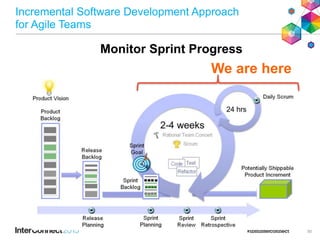
Monitor Sprint Progress in Agile Projects
 Ongoing activity during a Sprint
 Inspect and Adapt
–Inspects progress toward Sprint goals
–Takes corrective action as appropriate
 Project information
– Remaining work
– Builds health
– Work item status
– Risks and Impediments
51
Exercise: Monitor Sprint Progress
Monitor Sprint Progress
Review overall progress
Review risks and impediments
 Goal: Ensure that work is progressing as planned toward the
Sprint Goal, and if not, take corrective action.
Review remaining work
Review work items needing
attention
Review stories in progress
(30 min.)
52
Incremental Software Development Approach
for Agile Teams
We are here
Sprint Review
53
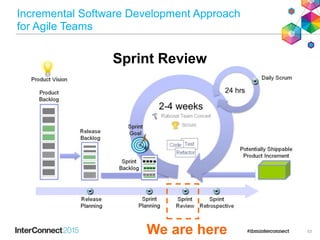
Sprint Review: Inspect the Product Increment
 Inspection and adaptation event
– Focus on the product
 Explain progress toward the Sprint and Release
goals
– What has been done / What has been postponed
 Demonstrate the product increment to get feedback
 Capture new business needs
54
Exercise: Conduct Sprint Review
 Goal: Demonstrate stories implemented in the Sprint and
adapt the Release Backlog, as needed.
Demonstrate the new product increment
Get feedback from stakeholder
Conduct Sprint Review
Discuss progress
Summarize work completed
(30 min.)
55
Incremental Software Development Approach
for Agile Teams
We are here
Sprint Retrospective
56
Sprint Retrospective: Identify Potential Improvements
 Inspection and adaptation event
– Focus on the team
 Examine how the Scrum Team worked during
last Sprint
– People / Relationships / Process / Tools
 Plan improvements
 Revisit the “Definition of Done” to improve quality
57
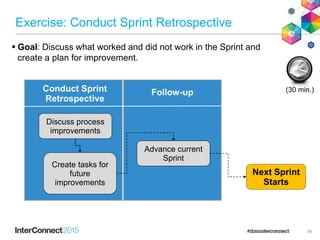
Exercise: Conduct Sprint Retrospective
 Goal: Discuss what worked and did not work in the Sprint and
create a plan for improvement.
Discuss process
improvements
Create tasks for
future
improvements
Conduct Sprint
Retrospective
Next Sprint
Starts
Advance current
Sprint
Follow-up (30 min.)
58
Sprint Execution Summary
• At the end of the Sprint:
– Product increment is developed
– Review and retrospective are done
 Rational Team Concert provides a collaborative
environment to support:
– Agile Development (Code, Test, Build, and Deliver)
– Daily Scrum & Progress Monitoring
– Sprint Review and Sprint Retrospective
59
Workshop Summary
Incremental Software Development Approach
for Agile Teams
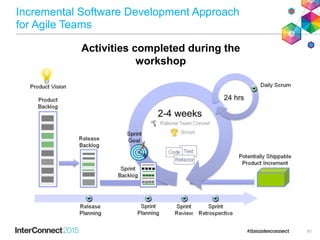
Activities completed during the
workshop
61
Workshop Summary
• Rational Team Concert supports the delivery of Agile
projects:
• Create and configure an Agile project
• Manage Product Backlogs
• Plan Releases
• Plan Sprints
• Hold Daily Scrums
• Monitor Sprint Progress
• Conduct Sprint Reviews
• Conduct Sprint Retrospectives
• Rational Team Concert provides a collaborative
environment for agile teams.
– Helps teams manage key Scrum artifacts throughout Agile project
– Fosters transparency, inspection, and adaptation
62
Further Information
• Agile page on jazz.net: https://jazz.net/agile/
• Rational Team Concert: https://jazz.net/products/rational-team-concert/
• Rational Learning Circles: http://www.ibm.com/developerworks/training/learning-circle/
• RTC Learning Circle: http://bit.ly/RTCLearnO
• Agile Learning Circle: http://bit.ly/AgileLearnO
 DevOps Community on developerWorks
– http://bit.ly/dwDevOps
– A community and developer-supported website that includes webcasts, workshops, wikis, developer blogs,
discussion forums, product downloads, documentation, and more
 IBM® developerWorks® Rational area
– http://www.ibm.com/developerworks/rational
– for white papers, demos, documentation, technical articles, and more
 Social Networking
– http://www.facebook.com/jazzdotnet
– http://www.facebook.com/IBMRational
– http://twitter.com/jazzdotnet
– http://twitter.com/ibmrational
 Additional Training: http://www-01.ibm.com/software/rational/services/training/
63
www.ibm.com/software
Notices and Disclaimers
Copyright © 2015 by International Business Machines Corporation (IBM). No part of this document may be reproduced or
transmitted in any form without written permission from IBM.
U.S. Government Users Restricted Rights - Use, duplication or disclosure restricted by GSA ADP Schedule Contract with
IBM.
Information in these presentations (including information relating to products that have not yet been announced by IBM) has been
reviewed for accuracy as of the date of initial publication and could include unintentional technical or typographical errors. IBM
shall have no responsibility to update this information. THIS DOCUMENT IS DISTRIBUTED "AS IS" WITHOUT ANY WARRANTY,
EITHER EXPRESS OR IMPLIED. IN NO EVENT SHALL IBM BE LIABLE FOR ANY DAMAGE ARISING FROM THE USE OF
THIS INFORMATION, INCLUDING BUT NOT LIMITED TO, LOSS OF DATA, BUSINESS INTERRUPTION, LOSS OF PROFIT
OR LOSS OF OPPORTUNITY. IBM products and services are warranted according to the terms and conditions of the
agreements under which they are provided.
Any statements regarding IBM's future direction, intent or product plans are subject to change or withdrawal without
notice.
Performance data contained herein was generally obtained in a controlled, isolated environments. Customer examples are
presented as illustrations of how those customers have used IBM products and the results they may have achieved. Actual
performance, cost, savings or other results in other operating environments may vary.
References in this document to IBM products, programs, or services does not imply that IBM intends to make such products,
programs or services available in all countries in which IBM operates or does business.
Workshops, sessions and associated materials may have been prepared by independent session speakers, and do not
necessarily reflect the views of IBM. All materials and discussions are provided for informational purposes only, and are neither
intended to, nor shall constitute legal or other guidance or advice to any individual participant or their specific situation.
It is the customer’s responsibility to insure its own compliance with legal requirements and to obtain advice of competent legal
counsel as to the identification and interpretation of any relevant laws and regulatory requirements that may affect the customer’s
business and any actions the customer may need to take to comply with such laws. IBM does not provide legal advice or
represent or warrant that its services or products will ensure that the customer is in compliance with any law.
65
Notices and Disclaimers (con’t)
Information concerning non-IBM products was obtained from the suppliers of those products, their published
announcements or other publicly available sources. IBM has not tested those products in connection with this
publication and cannot confirm the accuracy of performance, compatibility or any other claims related to non-IBM
products. Questions on the capabilities of non-IBM products should be addressed to the suppliers of those products.
IBM does not warrant the quality of any third-party products, or the ability of any such third-party products to
interoperate with IBM’s products. IBM EXPRESSLY DISCLAIMS ALL WARRANTIES, EXPRESSED OR IMPLIED,
INCLUDING BUT NOT LIMITED TO, THE IMPLIED WARRANTIES OF MERCHANTABILITY AND FITNESS FOR A
PARTICULAR PURPOSE.
The provision of the information contained herein is not intended to, and does not, grant any right or license under any
IBM patents, copyrights, trademarks or other intellectual property right.
• IBM, the IBM logo, ibm.com, Bluemix, Blueworks Live, CICS, Clearcase, DOORS®, Enterprise Document
Management System™, Global Business Services ®, Global Technology Services ®, Information on Demand,
ILOG, Maximo®, MQIntegrator®, MQSeries®, Netcool®, OMEGAMON, OpenPower, PureAnalytics™,
PureApplication®, pureCluster™, PureCoverage®, PureData®, PureExperience®, PureFlex®, pureQuery®,
pureScale®, PureSystems®, QRadar®, Rational®, Rhapsody®, SoDA, SPSS, StoredIQ, Tivoli®, Trusteer®,
urban{code}®, Watson, WebSphere®, Worklight®, X-Force® and System z® Z/OS, are trademarks of
International Business Machines Corporation, registered in many jurisdictions worldwide. Other product and
service names might be trademarks of IBM or other companies. A current list of IBM trademarks is available on
the Web at "Copyright and trademark information" at: www.ibm.com/legal/copytrade.shtml.
66
Thank You
Your Feedback is
Important!
Access the InterConnect 2015
Conference CONNECT Attendee
Portal to complete your session
surveys from your smartphone,
laptop or conference kiosk.

Steer at the Team Level with Rational Team Concert

  • 1.
    © 2015 IBMCorporation DevOps Steer at the Team Level - Agile Planning and Tracking Jean-Louis (JL) Marechaux Worldwide Enablement & Performance jl.marechaux@ca.ibm.com @JLmarechaux
  • 2.
    Introduction • Targeted Audience •Scrum Masters , Agile Team Members • Focus on Planning and Tracking • Expected Background and Experience • Agile methodologies and Scrum • IBM® Rational® Team Concert • Workshop Expectations • What you want to learn today 1
  • 3.
    Intended Audience  ThisDevOps - Steer at the Team Level workshop is for teams who use IBM® Rational Team Concert™ to conduct planning and tracking activities throughout agile projects. 2
  • 4.
    Prerequisites • To getthe most from this workshop, you must have basic knowledge of: • The Scrum Framework • Rational Team Concert • For the labs (hands-on exercises), you need Rational Team Concert v5.0.1 or higher • The provided virtual machine includes a Jazz Team Server preconfigured for the workshop 3
  • 5.
    Workshop Objectives • Afteryou complete this workshop, you will be able to complete these tasks: • Conduct agile planning and tracking activities using Rational Team Concert: – Create Product Backlogs – Plan Releases – Plan Sprints – Hold Daily Scrums – Monitor Sprint Progress (*) – Conduct Sprint Reviews (*) – Conduct Sprint Retrospectives (*) (*) Material provided / Not covered during lab 2848 by lack of time 4
  • 6.
    Workshop Agenda Module Description Module1: Overview of Agile Planning & Tracking Capabilities Review core Scrum principles. Review key capabilities for planning and tracking with IBM® Rational Team Concert (RTC). Module 2: Create Product Backlog Explore activities related to a Product Backlog management. Use Rational Team Concert to create and populate a Product Backlog. Module 3: Release Planning Explore activities related to Release Planning. Use Rational Team Concert to plan a release Module 4: Sprint Planning Explore activities related to Sprint Planning. Use Rational Team Concert to plan a sprint. Module 5: Sprint Execution Examine Sprint activities in an Agile project. Use Rational Team Concert to conduct collaborative activities during a Sprint (Daily Scrum, Sprint Progress). 5
  • 7.
    Overview of Agile Planning& Tracking Capabilities Module 1
  • 8.
    Objectives • Review coreScrum principles • Explore typical activities for DevOps – Collaborative Steering during an agile project. • Agile planning and tracking at the team level • Identify IBM® Rational Team Concert main capabilities to support agile planning and activity tracking. Note that basic knowledge of the Scrum framework is important to understand this module. 7
  • 9.
    Brief Introduction toScrum (<15 minutes) • Scrum.org leads the evolution and maturity of Scrum • Key aspects of the Scrum framework: • Roles • Events • Artifacts • Scrum is used for managing product development (This section is optional if everyone is proficient with Scrum) 8
  • 10.
    The Scrum FrameworkIn One Picture 9
  • 11.
    Accelerate software delivery – forfaster time to value Balance speed, cost, quality and risk – for increased capacity to innovate Reduce time to customer feedback – for improved customer experience Our DevOps POV is resonating with clients and they are delivering measurable business outcomes with DevOps Continuous Customer Feedback & Optimization Collaborative Development Continuous Release and Deployment Continuous Monitoring Continuous Business Planning Continuous Testing Operate Develop/ Test Deploy Steer DevOps Continuous Feedback IBM DevOps Point of View Enterprise capability for continuous software delivery that enables organizations to seize market opportunities and reduce time to customer feedback 10
  • 12.
  • 13.
    Plan SprintPlan Sprint MonitorSprint Progress Hold Daily Scrum Code, Test, Deliver Manage Product Backlog Plan Release Conduct Sprint Review Conduct Sprint Retrospective 1 2 7 8 3 4 5 6 DevOps Steer: Planning and Tracking Throughout an Agile Project 12
  • 14.
    Manage Product BacklogOver Time • Rank high priority stories (ordered list of features) • Refine backlog (new or refined work items over time) Agile Quick Planner 13
  • 15.
    Plan the Release •Identify release objectives and dates • Select stories for the release • Refine release backlog over time 14 Agile Quick Planner
  • 16.
    Plan the Sprint •Select stories for the Sprint • Agree on a Sprint goal • Decompose stories into tasks 15 Agile Quick Planner
  • 17.
    Code, Test, Deliver •Collaborative work to create a Product Increment.  Code, test, refactor  Build and deliver changes  Update tasks and stories Project Dashboards 16 Agile Quick Planner
  • 18.
    Hold Daily Scrum •Synchronization meeting • Share progress with the team • Capture impediments and risks Kanban Board (or Taskboard) 17
  • 19.
    Monitor Sprint Progress •Review overall progress against goals • Review work items needing attention • Review and update impediments and risks Project Dashboards & Plans 18
  • 20.
    Conduct Sprint Review ProjectDashboards 19 Kanban Board (or Taskboard) • Summarize work completed during the Sprint • Demonstrate the completed work • Discuss progress relative to plans
  • 21.
    Conduct Sprint Retrospective •Discuss what worked well • Discuss what didn't work well, and how we can improve • Create tasks for future improvements 20 Agile Quick Planner
  • 22.
    Rational Team Concert 21 •Quick Planner • Kanban Board & Taskboard • Dashboards & Reports Extensive support for Agile Planning & Tracking throughout a Project
  • 23.
    Summary  Rational TeamConcert facilitates the adoption of the IBM DevOps approach: – Steer: Continuous Planning – Develop & Test: Collaborative development  Rational Team Concert supports Agile practitioners throughout projects – Backlog Management, Release and Sprint Planning, Daily Scrums, Reviews and Retrospectives.  Rational Team Concert provides tools for Agile practitioners: – Quick Planner – Kaban Board & Taskboard – Project and team Dashboards – Reports 22
  • 24.
  • 25.
    Objectives 1. Explore howIBM® Rational Team Concert supports the creation of a Product Backlog. 2. Acquire hands-on IBM® Rational Team Concert experience to conduct Agile activities: • Communicate Product Vision • Populate Product Backlog (Quick Planner) 24
  • 26.
    Incremental Software DevelopmentApproach for Agile Teams We are here 25
  • 27.
    Product Backlog forAgile projects • Share and explain Product Vision • Make the Product Vision available to the team • Create Product Backlog • Single source of requirements for any changes to be made to the product • Living artifact (never complete) • Add items to Product Backlog • New epics / stories (features, technical debt, enhancements…) 26
  • 28.
    Exercise: Create theProduct Backlog • Goals: • Share initial Product Vision and • Create the initial Product Backlog Share Product Vision Add Product Vision to the Product Backlog plan Import backlog items Add new items to Product Backlog Populate Product Backlog (15 min.) Done Already done for you in the VM image to shorten the workshop 27 Done Done
  • 29.
    Summary • The ProductBacklog : –Contains items to describe changes needed to the product –Is an ordered list –Is the single source of requirements for the team • Rational Team Concert provides a collaborative environment to work with: – Product Vision – Product Backlog – Epics and Stories • The RTC Quick Planner facilitates backlog management 28
  • 30.
  • 31.
    Objectives 1. Explore howIBM® Rational Team Concert supports Release Planning. 2. Acquire hands-on IBM® Rational Team Concert experience to conduct Agile activities: • Refine Product Backlog • Plan the Release 30
  • 32.
    Incremental Software DevelopmentApproach for Agile Teams We are here 31
  • 33.
    Release Planning forAgile Projects • Refine Product Backlog: Ongoing activity • Refine epics / stories • Reorder the Product Backlog (ranking)  The Product Backlog is ready for the upcoming Release • Document and share Release details • Objectives for the Release • Create Release Backlog • Select items from the ordered Product Backlog 32
  • 34.
    Exercise: Release Planning •Goal: Agree on the release content, resulting in the Release Backlog Plan the Release Share Release details Select Stories Review Product Vision Perform coarse business prioritization Refine Product Backlog (ongoing) Provide details and estimates for stories Reorder Product Backlog items (30 min.) 33
  • 35.
    Summary • At theend of the Release Planning: • The team has a common understanding of the release objectives • Item for the upcoming release are identified • The team is ready to start Sprint Planning • Rational Team Concert provides a collaborative environment to work on: – Priorities or ranking in the Product Backlog – Details and estimates for Stories – Release Backlog / Release Plans – Epics and Stories 34
  • 36.
  • 37.
    Objectives 1. Explore howthe IBM® Rational Team Concert supports: • Release Backlog management • Sprint planning 2. Acquire hands-on IBM® Rational Team Concert experience to plan a Sprint using the Quick Planner. 36
  • 38.
    Incremental Software DevelopmentApproach for Agile Teams We are here 37
  • 39.
    Release Backlog andAgile Activities  Refine Release Backlog: Ongoing activity – Refined epics / stories (features, enhancements…) – Details for epics / stories (decomposition, details, estimates) – New order (ranking) The Release Backlog is ready for the upcoming Sprint 38
  • 40.
    Sprint Planning: Definethe Work for the Team  Sprint Planning – Collaborative planning: Work needed to create the next product increment  Topic 1: What will be delivered: Sprint Goal  Topic 2: How the work will be done to create the increment  Stories selected for the Sprint Backlog  Sprint stories decomposed into tasks The Sprint Backlog is ready for the upcoming Sprint 39
  • 41.
    Exercise: Plan Sprint Selectstories and define Sprint goal Decompose Stories into tasks Plan the Sprint Review team workload  Goals:  Ensure Release Backlog is ready for Sprint Planning  Select stories for the Sprint. Review Release Backlog information Refine Release Backlog (ongoing) Update Release Backlog ordering Refine Stories Verify team velocity (45 min.) 40
  • 42.
    Summary •At the endof Sprint Planning: –Sprint goal is defined –Stories for the upcoming Sprint are selected –Stories are decomposed into tasks to facilitate collaborative work and estimation Rational Team Concert provides a collaborative environment to support: • Backlog Refinement • Sprint Planning 41
  • 43.
  • 44.
    Objectives 1. Explore typicalactivities of an Agile team during a Sprint (after Sprint Planning): – Stories Implementation, Daily Scrum, Sprint Review, Sprint Retrospective 2. Acquire hands-on IBM® Rational Team Concert experience to conduct Agile activities during a Sprint. – ( Code, Test, Deliver - Not part of this workshop) – Hold Daily Scrum – Monitor Sprint Progress – (Conduct Sprint Review – Not part of this workshop) – (Conduct Sprint Retrospective – Not part of this workshop) 43
  • 45.
    We are here IncrementalSoftware Development Approach for Agile Teams Code, Test, Refactor 44
  • 46.
    Implementation of UserStories: Create the Product Increment  Code, Test, Deliver –Keep a focus on the Sprint Goal –Build a Product Increment  Update stories and tasks as work progresses –Status, time remaining 45
  • 47.
    Discussion: Implement Storiesusing Rational Team Concert Find and review assigned work Code, Test, Refactor Build and deliver changes Complete tasks associated to User Stories Update tasks and stories Review “Definition of Done”  Goal: Complete development of Stories for the Sprint. 46 Group Discussion
  • 48.
    Incremental Software DevelopmentApproach for Agile Teams We are here Hold Daily Scrum 47
  • 49.
    Daily Scrum: SynchronizeTeam Activities Inspect and adapt meeting for the Development Team –Synchronize development team activities Development Team members: –What have you accomplished since the last Daily Scrum? –What will I accomplish before the next Daily Scrum? –What is impeding our work? Inspect progress toward the Sprint Goal Identify any impediments or risks 48
  • 50.
    Exercise: Hold DailyScrum Prepare for Daily Scrum Update stories and tasks Review progress on stories Synchronize teamwork Hold Daily Scrum Identify risks and impediments  Goal: Ensure the team is making progress and that there are no blockers. Review Sprint plan (30 min.) 49
  • 51.
    Incremental Software DevelopmentApproach for Agile Teams We are here Monitor Sprint Progress 50
  • 52.
    Monitor Sprint Progressin Agile Projects  Ongoing activity during a Sprint  Inspect and Adapt –Inspects progress toward Sprint goals –Takes corrective action as appropriate  Project information – Remaining work – Builds health – Work item status – Risks and Impediments 51
  • 53.
    Exercise: Monitor SprintProgress Monitor Sprint Progress Review overall progress Review risks and impediments  Goal: Ensure that work is progressing as planned toward the Sprint Goal, and if not, take corrective action. Review remaining work Review work items needing attention Review stories in progress (30 min.) 52
  • 54.
    Incremental Software DevelopmentApproach for Agile Teams We are here Sprint Review 53
  • 55.
    Sprint Review: Inspectthe Product Increment  Inspection and adaptation event – Focus on the product  Explain progress toward the Sprint and Release goals – What has been done / What has been postponed  Demonstrate the product increment to get feedback  Capture new business needs 54
  • 56.
    Exercise: Conduct SprintReview  Goal: Demonstrate stories implemented in the Sprint and adapt the Release Backlog, as needed. Demonstrate the new product increment Get feedback from stakeholder Conduct Sprint Review Discuss progress Summarize work completed (30 min.) 55
  • 57.
    Incremental Software DevelopmentApproach for Agile Teams We are here Sprint Retrospective 56
  • 58.
    Sprint Retrospective: IdentifyPotential Improvements  Inspection and adaptation event – Focus on the team  Examine how the Scrum Team worked during last Sprint – People / Relationships / Process / Tools  Plan improvements  Revisit the “Definition of Done” to improve quality 57
  • 59.
    Exercise: Conduct SprintRetrospective  Goal: Discuss what worked and did not work in the Sprint and create a plan for improvement. Discuss process improvements Create tasks for future improvements Conduct Sprint Retrospective Next Sprint Starts Advance current Sprint Follow-up (30 min.) 58
  • 60.
    Sprint Execution Summary •At the end of the Sprint: – Product increment is developed – Review and retrospective are done  Rational Team Concert provides a collaborative environment to support: – Agile Development (Code, Test, Build, and Deliver) – Daily Scrum & Progress Monitoring – Sprint Review and Sprint Retrospective 59
  • 61.
  • 62.
    Incremental Software DevelopmentApproach for Agile Teams Activities completed during the workshop 61
  • 63.
    Workshop Summary • RationalTeam Concert supports the delivery of Agile projects: • Create and configure an Agile project • Manage Product Backlogs • Plan Releases • Plan Sprints • Hold Daily Scrums • Monitor Sprint Progress • Conduct Sprint Reviews • Conduct Sprint Retrospectives • Rational Team Concert provides a collaborative environment for agile teams. – Helps teams manage key Scrum artifacts throughout Agile project – Fosters transparency, inspection, and adaptation 62
  • 64.
    Further Information • Agilepage on jazz.net: https://jazz.net/agile/ • Rational Team Concert: https://jazz.net/products/rational-team-concert/ • Rational Learning Circles: http://www.ibm.com/developerworks/training/learning-circle/ • RTC Learning Circle: http://bit.ly/RTCLearnO • Agile Learning Circle: http://bit.ly/AgileLearnO  DevOps Community on developerWorks – http://bit.ly/dwDevOps – A community and developer-supported website that includes webcasts, workshops, wikis, developer blogs, discussion forums, product downloads, documentation, and more  IBM® developerWorks® Rational area – http://www.ibm.com/developerworks/rational – for white papers, demos, documentation, technical articles, and more  Social Networking – http://www.facebook.com/jazzdotnet – http://www.facebook.com/IBMRational – http://twitter.com/jazzdotnet – http://twitter.com/ibmrational  Additional Training: http://www-01.ibm.com/software/rational/services/training/ 63
  • 65.
  • 66.
    Notices and Disclaimers Copyright© 2015 by International Business Machines Corporation (IBM). No part of this document may be reproduced or transmitted in any form without written permission from IBM. U.S. Government Users Restricted Rights - Use, duplication or disclosure restricted by GSA ADP Schedule Contract with IBM. Information in these presentations (including information relating to products that have not yet been announced by IBM) has been reviewed for accuracy as of the date of initial publication and could include unintentional technical or typographical errors. IBM shall have no responsibility to update this information. THIS DOCUMENT IS DISTRIBUTED "AS IS" WITHOUT ANY WARRANTY, EITHER EXPRESS OR IMPLIED. IN NO EVENT SHALL IBM BE LIABLE FOR ANY DAMAGE ARISING FROM THE USE OF THIS INFORMATION, INCLUDING BUT NOT LIMITED TO, LOSS OF DATA, BUSINESS INTERRUPTION, LOSS OF PROFIT OR LOSS OF OPPORTUNITY. IBM products and services are warranted according to the terms and conditions of the agreements under which they are provided. Any statements regarding IBM's future direction, intent or product plans are subject to change or withdrawal without notice. Performance data contained herein was generally obtained in a controlled, isolated environments. Customer examples are presented as illustrations of how those customers have used IBM products and the results they may have achieved. Actual performance, cost, savings or other results in other operating environments may vary. References in this document to IBM products, programs, or services does not imply that IBM intends to make such products, programs or services available in all countries in which IBM operates or does business. Workshops, sessions and associated materials may have been prepared by independent session speakers, and do not necessarily reflect the views of IBM. All materials and discussions are provided for informational purposes only, and are neither intended to, nor shall constitute legal or other guidance or advice to any individual participant or their specific situation. It is the customer’s responsibility to insure its own compliance with legal requirements and to obtain advice of competent legal counsel as to the identification and interpretation of any relevant laws and regulatory requirements that may affect the customer’s business and any actions the customer may need to take to comply with such laws. IBM does not provide legal advice or represent or warrant that its services or products will ensure that the customer is in compliance with any law. 65
  • 67.
    Notices and Disclaimers(con’t) Information concerning non-IBM products was obtained from the suppliers of those products, their published announcements or other publicly available sources. IBM has not tested those products in connection with this publication and cannot confirm the accuracy of performance, compatibility or any other claims related to non-IBM products. Questions on the capabilities of non-IBM products should be addressed to the suppliers of those products. IBM does not warrant the quality of any third-party products, or the ability of any such third-party products to interoperate with IBM’s products. IBM EXPRESSLY DISCLAIMS ALL WARRANTIES, EXPRESSED OR IMPLIED, INCLUDING BUT NOT LIMITED TO, THE IMPLIED WARRANTIES OF MERCHANTABILITY AND FITNESS FOR A PARTICULAR PURPOSE. The provision of the information contained herein is not intended to, and does not, grant any right or license under any IBM patents, copyrights, trademarks or other intellectual property right. • IBM, the IBM logo, ibm.com, Bluemix, Blueworks Live, CICS, Clearcase, DOORS®, Enterprise Document Management System™, Global Business Services ®, Global Technology Services ®, Information on Demand, ILOG, Maximo®, MQIntegrator®, MQSeries®, Netcool®, OMEGAMON, OpenPower, PureAnalytics™, PureApplication®, pureCluster™, PureCoverage®, PureData®, PureExperience®, PureFlex®, pureQuery®, pureScale®, PureSystems®, QRadar®, Rational®, Rhapsody®, SoDA, SPSS, StoredIQ, Tivoli®, Trusteer®, urban{code}®, Watson, WebSphere®, Worklight®, X-Force® and System z® Z/OS, are trademarks of International Business Machines Corporation, registered in many jurisdictions worldwide. Other product and service names might be trademarks of IBM or other companies. A current list of IBM trademarks is available on the Web at "Copyright and trademark information" at: www.ibm.com/legal/copytrade.shtml. 66
  • 68.
    Thank You Your Feedbackis Important! Access the InterConnect 2015 Conference CONNECT Attendee Portal to complete your session surveys from your smartphone, laptop or conference kiosk.