®

IBM Software Group

Parallel Development using RTC

Umang Shah (ushah@us.ibm.com)
Open Group Master Certified IT Specialist
IBM Rational Software

© 2009 IBM Corporation
2

IBM Rational software

Agenda

 Jazz Source Control
 Parallel Development
 Streams
 Flow Targets
 Example of Project Configuration
 Security – Access Control at Stream Level
IBM Rational software

Jazz source control: Key elements and capabilities

 Elements
 Change sets
 Streams
 Components

 Capabilities
 Task-based development
 Refactoring (move and rename)
 Parallel development
 Lifecycle tool integrations
 Process integration
 Dashboard contribution
 Event notification
IBM Rational software

Change sets
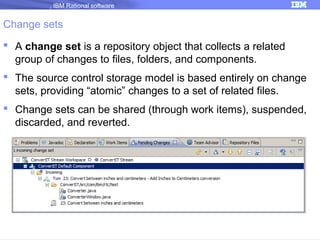
 A change set is a repository object that collects a related
group of changes to files, folders, and components.
 The source control storage model is based entirely on change
sets, providing “atomic” changes to a set of related files.
 Change sets can be shared (through work items), suspended,
discarded, and reverted.
IBM Rational software

Change sets
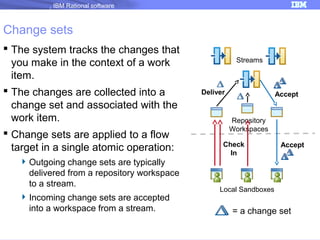
 The system tracks the changes that
you make in the context of a work
item.
 The changes are collected into a
change set and associated with the
work item.
 Change sets are applied to a flow
target in a single atomic operation:
 Outgoing change sets are typically
delivered from a repository workspace
to a stream.
 Incoming change sets are accepted
into a workspace from a stream.

Streams

Deliver

Accept

Repository
Workspaces
Check
In

Accept

Local Sandboxes

= a change set
IBM Rational software

Creating and managing change sets
Streams

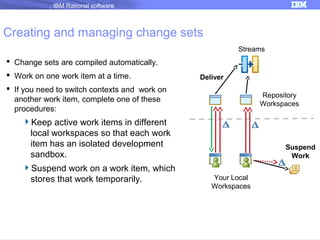
 Change sets are compiled automatically.
 Work on one work item at a time.

Deliver

 If you need to switch contexts and work on
another work item, complete one of these
procedures:

Keep active work items in different
local workspaces so that each work
item has an isolated development
sandbox.
Suspend work on a work item, which
stores that work temporarily.

Repository
Workspaces

Suspend
Work
Your Local
Workspaces
IBM Rational software

Typical Journey For A Change set
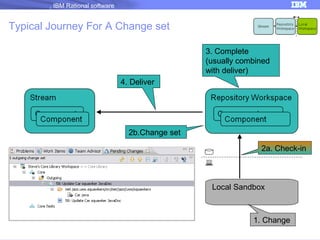
3. Complete
(usually combined
with deliver)
4. Deliver

2b.Change set
2a. Check-in

Local Sandbox

1. Change
Module 4 Performin 7
IBM Rational software

Streams
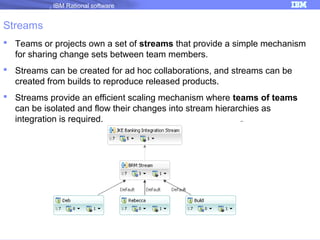
 Teams or projects own a set of streams that provide a simple mechanism
for sharing change sets between team members.
 Streams can be created for ad hoc collaborations, and streams can be
created from builds to reproduce released products.
 Streams provide an efficient scaling mechanism where teams of teams
can be isolated and flow their changes into stream hierarchies as
integration is required.
IBM Rational software

Components
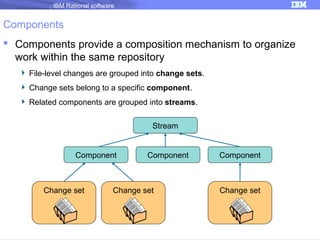
 Components provide a composition mechanism to organize
work within the same repository
 File-level changes are grouped into change sets.
 Change sets belong to a specific component.
 Related components are grouped into streams.
Stream

Component

Change set

Component

Change set

Component

Change set
IBM Rational software

Parallel development
 Repository workspaces
 Provide constant isolation and stored in Jazz repository.
 The workspace contains private copies of files and folders that a developer is
working with.

 Suspend and resume functions
 Provide task-level isolation for personal work.

 Streams
 Provide isolation at various levels including team, feature, integration, release,
and maintenance as desired

 Locks
 Provide selective isolation. By locking files in the stream, users can avoid
merging.

 Timelines
 Provide process isolation.
IBM Rational software

Using workspaces in a team environment


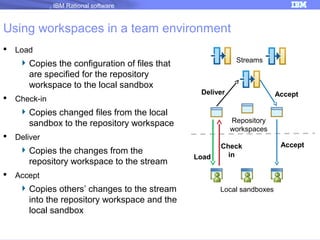
Load

 Copies the configuration of files that
are specified for the repository
workspace to the local sandbox


Check-in

Streams

Deliver

 Copies changed files from the local
sandbox to the repository workspace




Repository
workspaces

Deliver

 Copies the changes from the
repository workspace to the stream

Accept

Load

Check
in

Accept

 Copies others’ changes to the stream
into the repository workspace and the
local sandbox

Local sandboxes

Accept
IBM Rational software

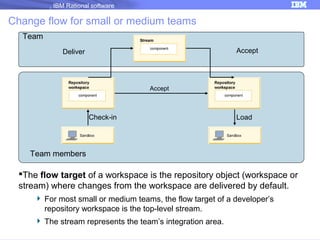
Change flow for small or medium teams
Team
Accept

Deliver

Accept

Check-in

Load

Team members

The flow target of a workspace is the repository object (workspace or
stream) where changes from the workspace are delivered by default.
 For most small or medium teams, the flow target of a developer’s
repository workspace is the top-level stream.
 The stream represents the team’s integration area.
IBM Rational software

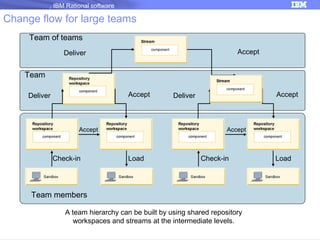
Change flow for large teams
Team of teams
Accept

Deliver

Team
Accept

Deliver

Accept

Check-in

Accept

Deliver

Accept

Load

Check-in

Team members
A team hierarchy can be built by using shared repository
workspaces and streams at the intermediate levels.

Load
IBM Rational software

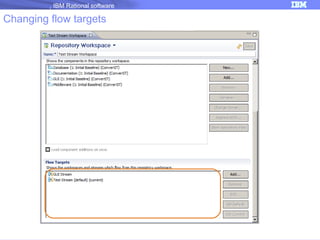
Changing flow targets
IBM Rational software

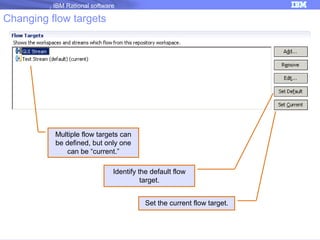
Changing flow targets

Multiple flow targets can
be defined, but only one
can be “current.”
Identify the default flow
target.
Set the current flow target.
IBM Rational software

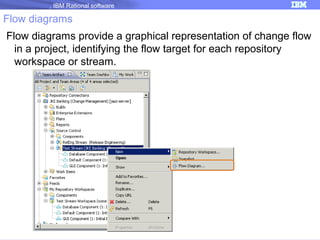
Flow diagrams
Flow diagrams provide a graphical representation of change flow
in a project, identifying the flow target for each repository
workspace or stream.
IBM Rational software

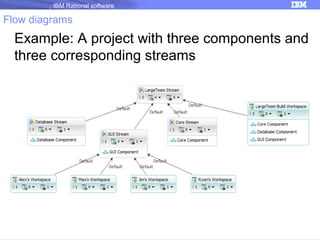
Flow diagrams

Example: A project with three components and
three corresponding streams
IBM Rational software

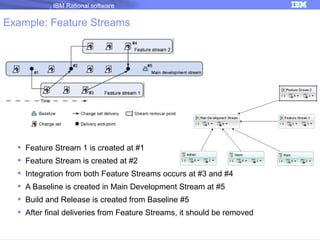
Example: Feature Streams

 Feature Stream 1 is created at #1
 Feature Stream is created at #2
 Integration from both Feature Streams occurs at #3 and #4
 A Baseline is created in Main Development Stream at #5
 Build and Release is created from Baseline #5
 After final deliveries from Feature Streams, it should be removed

18
IBM Rational software

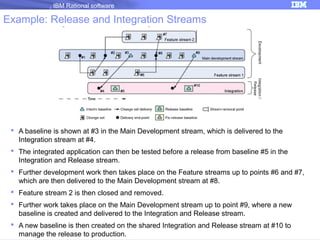
Example: Release and Integration Streams

 A baseline is shown at #3 in the Main Development stream, which is delivered to the
Integration stream at #4.
 The integrated application can then be tested before a release from baseline #5 in the
Integration and Release stream.
 Further development work then takes place on the Feature streams up to points #6 and #7,
which are then delivered to the Main Development stream at #8.
 Feature stream 2 is then closed and removed.
 Further work takes place on the Main Development stream up to point #9, where a new
baseline is created and delivered to the Integration and Release stream.
 A new baseline is then created on the shared Integration and Release stream at #10 to
manage the release to production.

19
IBM Rational software

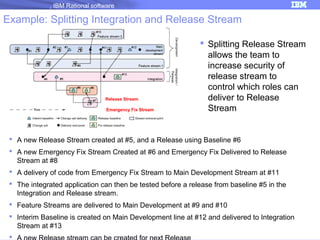
Example: Splitting Integration and Release Stream

Release Stream
Emergency Fix Stream

 Splitting Release Stream
allows the team to
increase security of
release stream to
control which roles can
deliver to Release
Stream

 A new Release Stream created at #5, and a Release using Baseline #6
 A new Emergency Fix Stream Created at #6 and Emergency Fix Delivered to Release
Stream at #8
 A delivery of code from Emergency Fix Stream to Main Development Stream at #11
 The integrated application can then be tested before a release from baseline #5 in the
Integration and Release stream.
 Feature Streams are delivered to Main Development at #9 and #10
 Interim Baseline is created on Main Development line at #12 and delivered to Integration
Stream at #13


20
IBM Rational software

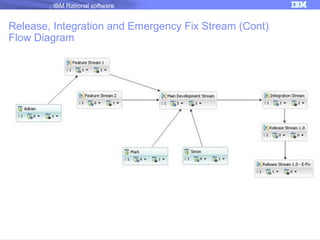
Release, Integration and Emergency Fix Stream (Cont)
Flow Diagram

21
IBM Rational software

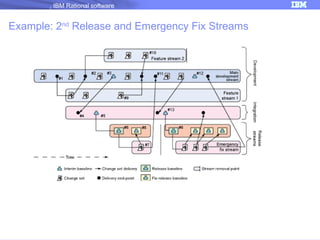
Example: 2nd Release and Emergency Fix Streams

22
IBM Rational software

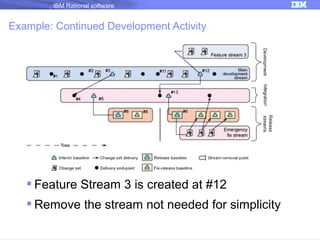
Example: Continued Development Activity

 Feature Stream 3 is created at #12
 Remove the stream not needed for simplicity

23
IBM Rational software

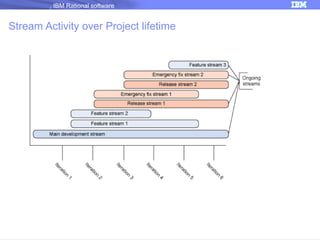
Stream Activity over Project lifetime

24
IBM Rational software

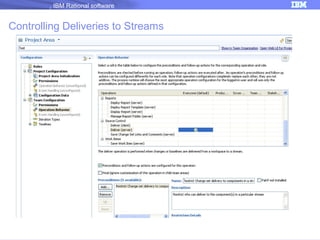
Controlling Deliveries to Streams

25
IBM Rational software

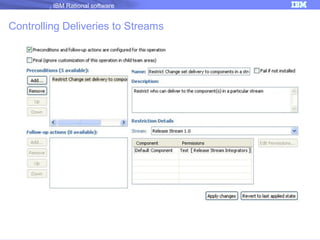
Controlling Deliveries to Streams

26
IBM Rational software

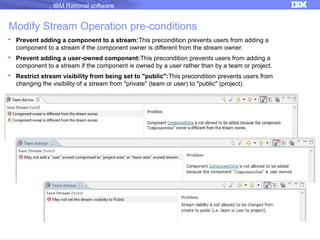
Modify Stream Operation pre-conditions
 Prevent adding a component to a stream:This precondition prevents users from adding a
component to a stream if the component owner is different from the stream owner.
 Prevent adding a user-owned component:This precondition prevents users from adding a
component to a stream if the component is owned by a user rather than by a team or project.
 Restrict stream visibility from being set to "public":This precondition prevents users from
changing the visibility of a stream from "private" (team or user) to "public" (project).

27

9.16.2013 Enlightenment Series - Managing parallel development with RTC: A strategy for software integration and release

  • 1.
    ® IBM Software Group ParallelDevelopment using RTC Umang Shah (ushah@us.ibm.com) Open Group Master Certified IT Specialist IBM Rational Software © 2009 IBM Corporation
  • 2.
    2 IBM Rational software Agenda Jazz Source Control  Parallel Development  Streams  Flow Targets  Example of Project Configuration  Security – Access Control at Stream Level
  • 3.
    IBM Rational software Jazzsource control: Key elements and capabilities  Elements  Change sets  Streams  Components  Capabilities  Task-based development  Refactoring (move and rename)  Parallel development  Lifecycle tool integrations  Process integration  Dashboard contribution  Event notification
  • 4.
    IBM Rational software Changesets  A change set is a repository object that collects a related group of changes to files, folders, and components.  The source control storage model is based entirely on change sets, providing “atomic” changes to a set of related files.  Change sets can be shared (through work items), suspended, discarded, and reverted.
  • 5.
    IBM Rational software Changesets  The system tracks the changes that you make in the context of a work item.  The changes are collected into a change set and associated with the work item.  Change sets are applied to a flow target in a single atomic operation:  Outgoing change sets are typically delivered from a repository workspace to a stream.  Incoming change sets are accepted into a workspace from a stream. Streams Deliver Accept Repository Workspaces Check In Accept Local Sandboxes = a change set
  • 6.
    IBM Rational software Creatingand managing change sets Streams  Change sets are compiled automatically.  Work on one work item at a time. Deliver  If you need to switch contexts and work on another work item, complete one of these procedures: Keep active work items in different local workspaces so that each work item has an isolated development sandbox. Suspend work on a work item, which stores that work temporarily. Repository Workspaces Suspend Work Your Local Workspaces
  • 7.
    IBM Rational software TypicalJourney For A Change set 3. Complete (usually combined with deliver) 4. Deliver 2b.Change set 2a. Check-in Local Sandbox 1. Change Module 4 Performin 7
  • 8.
    IBM Rational software Streams Teams or projects own a set of streams that provide a simple mechanism for sharing change sets between team members.  Streams can be created for ad hoc collaborations, and streams can be created from builds to reproduce released products.  Streams provide an efficient scaling mechanism where teams of teams can be isolated and flow their changes into stream hierarchies as integration is required.
  • 9.
    IBM Rational software Components Components provide a composition mechanism to organize work within the same repository  File-level changes are grouped into change sets.  Change sets belong to a specific component.  Related components are grouped into streams. Stream Component Change set Component Change set Component Change set
  • 10.
    IBM Rational software Paralleldevelopment  Repository workspaces  Provide constant isolation and stored in Jazz repository.  The workspace contains private copies of files and folders that a developer is working with.  Suspend and resume functions  Provide task-level isolation for personal work.  Streams  Provide isolation at various levels including team, feature, integration, release, and maintenance as desired  Locks  Provide selective isolation. By locking files in the stream, users can avoid merging.  Timelines  Provide process isolation.
  • 11.
    IBM Rational software Usingworkspaces in a team environment  Load  Copies the configuration of files that are specified for the repository workspace to the local sandbox  Check-in Streams Deliver  Copies changed files from the local sandbox to the repository workspace   Repository workspaces Deliver  Copies the changes from the repository workspace to the stream Accept Load Check in Accept  Copies others’ changes to the stream into the repository workspace and the local sandbox Local sandboxes Accept
  • 12.
    IBM Rational software Changeflow for small or medium teams Team Accept Deliver Accept Check-in Load Team members The flow target of a workspace is the repository object (workspace or stream) where changes from the workspace are delivered by default.  For most small or medium teams, the flow target of a developer’s repository workspace is the top-level stream.  The stream represents the team’s integration area.
  • 13.
    IBM Rational software Changeflow for large teams Team of teams Accept Deliver Team Accept Deliver Accept Check-in Accept Deliver Accept Load Check-in Team members A team hierarchy can be built by using shared repository workspaces and streams at the intermediate levels. Load
  • 14.
  • 15.
    IBM Rational software Changingflow targets Multiple flow targets can be defined, but only one can be “current.” Identify the default flow target. Set the current flow target.
  • 16.
    IBM Rational software Flowdiagrams Flow diagrams provide a graphical representation of change flow in a project, identifying the flow target for each repository workspace or stream.
  • 17.
    IBM Rational software Flowdiagrams Example: A project with three components and three corresponding streams
  • 18.
    IBM Rational software Example:Feature Streams  Feature Stream 1 is created at #1  Feature Stream is created at #2  Integration from both Feature Streams occurs at #3 and #4  A Baseline is created in Main Development Stream at #5  Build and Release is created from Baseline #5  After final deliveries from Feature Streams, it should be removed 18
  • 19.
    IBM Rational software Example:Release and Integration Streams  A baseline is shown at #3 in the Main Development stream, which is delivered to the Integration stream at #4.  The integrated application can then be tested before a release from baseline #5 in the Integration and Release stream.  Further development work then takes place on the Feature streams up to points #6 and #7, which are then delivered to the Main Development stream at #8.  Feature stream 2 is then closed and removed.  Further work takes place on the Main Development stream up to point #9, where a new baseline is created and delivered to the Integration and Release stream.  A new baseline is then created on the shared Integration and Release stream at #10 to manage the release to production. 19
  • 20.
    IBM Rational software Example:Splitting Integration and Release Stream Release Stream Emergency Fix Stream  Splitting Release Stream allows the team to increase security of release stream to control which roles can deliver to Release Stream  A new Release Stream created at #5, and a Release using Baseline #6  A new Emergency Fix Stream Created at #6 and Emergency Fix Delivered to Release Stream at #8  A delivery of code from Emergency Fix Stream to Main Development Stream at #11  The integrated application can then be tested before a release from baseline #5 in the Integration and Release stream.  Feature Streams are delivered to Main Development at #9 and #10  Interim Baseline is created on Main Development line at #12 and delivered to Integration Stream at #13  20
  • 21.
    IBM Rational software Release,Integration and Emergency Fix Stream (Cont) Flow Diagram 21
  • 22.
    IBM Rational software Example:2nd Release and Emergency Fix Streams 22
  • 23.
    IBM Rational software Example:Continued Development Activity  Feature Stream 3 is created at #12  Remove the stream not needed for simplicity 23
  • 24.
    IBM Rational software StreamActivity over Project lifetime 24
  • 25.
    IBM Rational software ControllingDeliveries to Streams 25
  • 26.
    IBM Rational software ControllingDeliveries to Streams 26
  • 27.
    IBM Rational software ModifyStream Operation pre-conditions  Prevent adding a component to a stream:This precondition prevents users from adding a component to a stream if the component owner is different from the stream owner.  Prevent adding a user-owned component:This precondition prevents users from adding a component to a stream if the component is owned by a user rather than by a team or project.  Restrict stream visibility from being set to "public":This precondition prevents users from changing the visibility of a stream from "private" (team or user) to "public" (project). 27