Layout Manager
Layout Managers
• The Layout Managers are used to arrange components in a particular
manner.
• Layout Manager is an interface that is implemented by all the classes
of layout managers.
Cont…
• There are following classes that represents the layout managers:
• BorderLayout
• FlowLayout
• GridLayout
• CardLayout
• GridBagLayout
Cont…
• BoxLayout
• GroupLayout
• ScrollPaneLayout
• SpringLayout etc.
Java BorderLayout
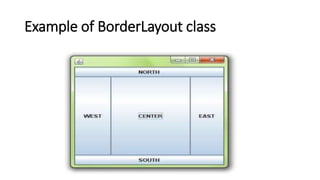
• The BorderLayout is used to arrange the components in five regions:
north, south, east, west and center.
• Each region (area) may contain one component only.
• It is the default layout of frame or window.
Cont…
• The BorderLayout provides five constants for each region:
• public static final String NORTH = “North”;
• public static final String SOUTH = “South”;
• public static final String EAST = “East”;
• public static final String WEST = “West”;
• public static final String CENTER = “Center”;
"North"
Constructors of BorderLayout class
• BorderLayout(): creates a border layout but with no gaps between the
components.
• BorderLayout(int hgap, int vgap): creates a border layout with the
given horizontal and vertical gaps between the components.
Example of BorderLayout class
import java.awt.*;
class Border1
{
public static void main(String a[])
{
Frame f = new Frame();
Button b1=new Button("NORTH");
Button b2=new Button("SOUTH");
Button b3=new Button("EAST");
Button b4=new Button("WEST");
Button b5=new Button("CENTER");
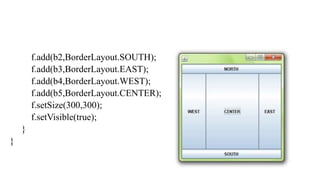
f.add(b1,BorderLayout.NORTH);
f.add(b2,BorderLayout.SOUTH);
f.add(b3,BorderLayout.EAST);
f.add(b4,BorderLayout.WEST);
f.add(b5,BorderLayout.CENTER);
f.setSize(300,300);
f.setVisible(true);
}
}
Java GridLayout
• The GridLayout is used to arrange the components in rectangular grid.
• One component is displayed in each rectangle.
Constructors of GridLayout class
• GridLayout(): creates a grid layout with one column per component
in a row.
• GridLayout(int rows, int columns): creates a grid layout with the
given rows and columns but no gaps between the components.
Cont…
• GridLayout(int rows, int columns, int hgap, int vgap): creates a
grid layout with the given rows and columns along with given
horizontal and vertical gaps.
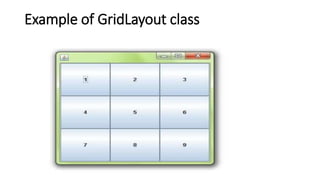
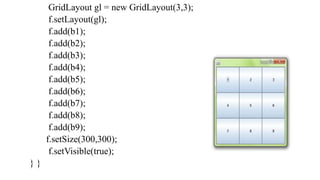
Example of GridLayout class
import java.awt.*;
class MyGridLayout
{
public static void main(String a[])
{
Frame f=new Frame();
Button b1=new Button("1");
Button b2=new Button("2");
Button b3=new Button("3");
Button b4=new Button("4");
Button b5=new Button("5");
Button b6=new Button("6");
Button b7=new Button("7");
Button b8=new Button("8");
Button b9=new Button("9");
GridLayout gl = new GridLayout(3,3);
f.setLayout(gl);
f.add(b1);
f.add(b2);
f.add(b3);
f.add(b4);
f.add(b5);
f.add(b6);
f.add(b7);
f.add(b8);
f.add(b9);
f.setSize(300,300);
f.setVisible(true);
} }

LayoutManager_Lec1.pptx

  • 1.
  • 2.
    Layout Managers • TheLayout Managers are used to arrange components in a particular manner. • Layout Manager is an interface that is implemented by all the classes of layout managers.
  • 3.
    Cont… • There arefollowing classes that represents the layout managers: • BorderLayout • FlowLayout • GridLayout • CardLayout • GridBagLayout
  • 4.
    Cont… • BoxLayout • GroupLayout •ScrollPaneLayout • SpringLayout etc.
  • 5.
    Java BorderLayout • TheBorderLayout is used to arrange the components in five regions: north, south, east, west and center. • Each region (area) may contain one component only. • It is the default layout of frame or window.
  • 6.
    Cont… • The BorderLayoutprovides five constants for each region: • public static final String NORTH = “North”; • public static final String SOUTH = “South”; • public static final String EAST = “East”; • public static final String WEST = “West”; • public static final String CENTER = “Center”; "North"
  • 7.
    Constructors of BorderLayoutclass • BorderLayout(): creates a border layout but with no gaps between the components. • BorderLayout(int hgap, int vgap): creates a border layout with the given horizontal and vertical gaps between the components.
  • 8.
  • 9.
    import java.awt.*; class Border1 { publicstatic void main(String a[]) { Frame f = new Frame(); Button b1=new Button("NORTH"); Button b2=new Button("SOUTH"); Button b3=new Button("EAST"); Button b4=new Button("WEST"); Button b5=new Button("CENTER"); f.add(b1,BorderLayout.NORTH);
  • 10.
  • 11.
    Java GridLayout • TheGridLayout is used to arrange the components in rectangular grid. • One component is displayed in each rectangle.
  • 12.
    Constructors of GridLayoutclass • GridLayout(): creates a grid layout with one column per component in a row. • GridLayout(int rows, int columns): creates a grid layout with the given rows and columns but no gaps between the components.
  • 13.
    Cont… • GridLayout(int rows,int columns, int hgap, int vgap): creates a grid layout with the given rows and columns along with given horizontal and vertical gaps.
  • 14.
  • 15.
    import java.awt.*; class MyGridLayout { publicstatic void main(String a[]) { Frame f=new Frame(); Button b1=new Button("1"); Button b2=new Button("2"); Button b3=new Button("3"); Button b4=new Button("4"); Button b5=new Button("5"); Button b6=new Button("6"); Button b7=new Button("7"); Button b8=new Button("8"); Button b9=new Button("9");
  • 16.
    GridLayout gl =new GridLayout(3,3); f.setLayout(gl); f.add(b1); f.add(b2); f.add(b3); f.add(b4); f.add(b5); f.add(b6); f.add(b7); f.add(b8); f.add(b9); f.setSize(300,300); f.setVisible(true); } }