Class Presentations on Introduction to Cloud Computing
BCAE0203:Introduction to Cloud Computing
INTRODUCTION TO CLOUD COMPUTING
Cloud Computing - Overview
Introduction
• The ACM Computing Curricula 2005 defined "computing" as
"In a general way, we can define computing to mean any goal-oriented
activity requiring, benefiting from, or creating computers.
2
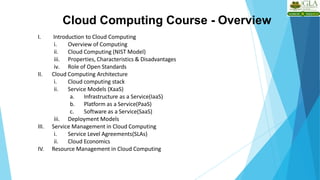
Cloud Computing Course - Overview
I. Introduction to Cloud Computing
i. Overview of Computing
ii. Cloud Computing (NIST Model)
iii. Properties, Characteristics & Disadvantages
iv. Role of Open Standards
II. Cloud Computing Architecture
i. Cloud computing stack
ii. Service Models (XaaS)
a. Infrastructure as a Service(IaaS)
b. Platform as a Service(PaaS)
c. Software as a Service(SaaS)
iii. Deployment Models
III. Service Management in Cloud Computing
i. Service Level Agreements(SLAs)
ii. Cloud Economics
IV. Resource Management in Cloud Computing
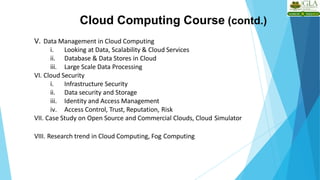
Cloud Computing Course (contd.)
V. Data Management in Cloud Computing
i. Looking at Data, Scalability & Cloud Services
ii. Database & Data Stores in Cloud
iii. Large Scale Data Processing
VI. Cloud Security
i. Infrastructure Security
ii. Data security and Storage
iii. Identity and Access Management
iv. Access Control, Trust, Reputation, Risk
VII. Case Study on Open Source and Commercial Clouds, Cloud Simulator
VIII. Research trend in Cloud Computing, Fog Computing
Trends in Computing
6
• Distributed Computing
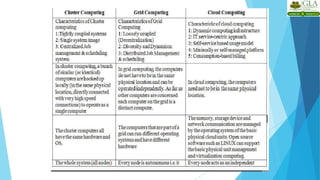
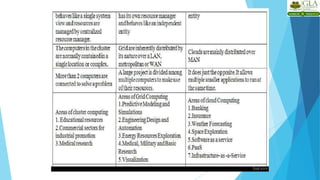
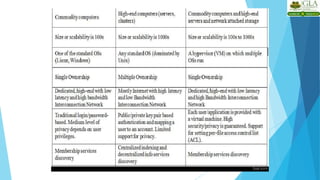
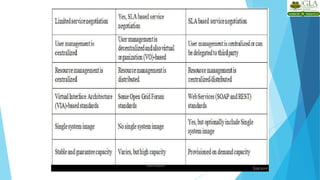
• Grid Computing
• Cluster Computing
• Utility Computing
• Cloud Computing
Distributed Computing
7
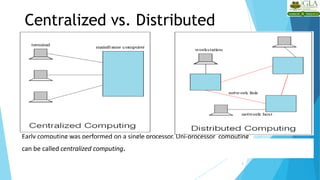
Centralized vs. Distributed
Computing
8
Early computing was performed on a single processor. Uni-processor computing
can be called centralized computing.
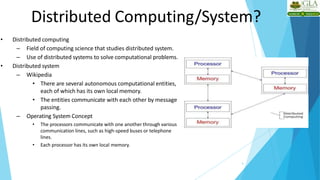
Distributed Computing/System?
9
• Distributed computing
– Field of computing science that studies distributed system.
– Use of distributed systems to solve computational problems.
• Distributed system
– Wikipedia
• There are several autonomous computational entities,
each of which has its own local memory.
• The entities communicate with each other by message
passing.
– Operating System Concept
• The processors communicate with one another through various
communication lines, such as high-speed buses or telephone
lines.
• Each processor has its own local memory.
Example Distributed Systems
10
• Internet
• ATM (bank) machines
• Intranets/Workgroups
• Computing landscape will soon consist of ubiquitous
network-connected devices
Computers in a Distributed System
11
• Workstations: Computers used by end-users to perform
computing
• Server Systems: Computers which provide resources and
services
• Personal Assistance Devices: Handheld computers connected to
the system via a wireless communication link.
Common properties of Distributed Computing
12
– Fault tolerance
• When one or some nodes fails, the whole system can still work fine except performance.
• Need to check the status of each node
– Each node play partial role
• Each computer has only a limited, incomplete view of the system.
• Each computer may know only one part of the input.
– Resource sharing
• Each user can share the computing power and storage resource in the system with other
users
– Load Sharing
• Dispatching several tasks to each nodes can help share loading to the whole system.
– Easy to expand
• We expect to use few time when adding nodes. Hope to spend no time if possible.
– Performance
• Parallel computing can be considered a subset of distributed computing
Why Distributed Computing?
13
• Nature of application
• Performance
– Computing intensive
• The task could consume a lot of time on computing. For example,
Computation of Pi value using Monte Carlo simulation
– Data intensive
• The task that deals with a large amount or large size of files. For example,
Facebook, LHC(Large Hadron Collider) experimental data processing.
• Robustness
– No SPOF (Single Point Of Failure)
– Other nodes can execute the same task executed on failed
node.
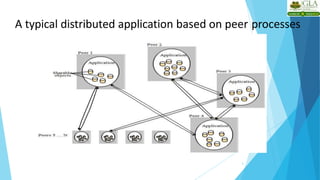
Distributed applications
3
• Applications that consist of a set of processes that are distributed across a
network of machines and work together as an ensemble to solve a
common problem
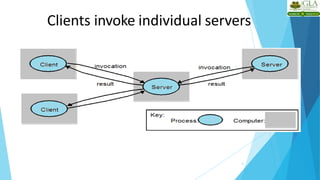
• In the past, mostly “client-server”
• Resource management centralized at the server
• “Peer to Peer” computing represents a movement towards more “truly”
distributed applications
Clients invoke individual servers
4
A typical distributed application based on peer processes
5
Grid Computing
6
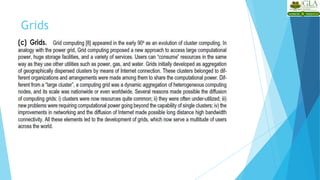
Grid Computing?
7
• Pcwebopedia.com
– A form of networking. unlike conventional networks that focus on communication
among devices, grid computing harnesses unused processing cycles of all computers in
a network for solving problems too intensive for any stand-alone machine.
• IBM
– Grid computing enables the virtualization of distributed computing and data resources
such as processing, network bandwidth and storage capacity to create a single system
image, granting users and applications seamless access to vast IT capabilities. Just as
an Internet user views a unified instance of content via the Web, a grid useressentially
sees a single, large virtual computer.
• Sun Microsystems
– Grid Computing is a computing infrastructure that provides dependable,
consistent, pervasive and inexpensive access to computational capabilities
Grid Computing
9
1. Share more than information: Data, computing power, applications in
dynamic environment, multi-institutional, virtual organizations
2. Efficient use of resources at many institutes. People from many institutions
working to solve a common problem (virtual organisation).
3. Join local communities.
4. Interactions with the underneath layers must be transparent and seamless
to the user.
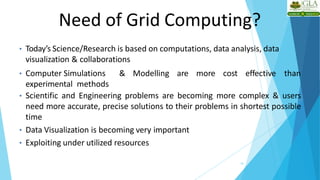
Need of Grid Computing?
10
• Today’s Science/Research is based on computations, data analysis, data
visualization & collaborations
• Computer Simulations & Modelling are more cost effective than
experimental methods
• Scientific and Engineering problems are becoming more complex & users
need more accurate, precise solutions to their problems in shortest possible
time
• Data Visualization is becoming very important
• Exploiting under utilized resources
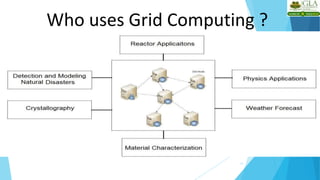
Who uses Grid Computing ?
11
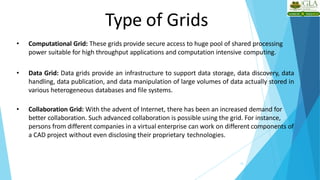
Type of Grids
12
• Computational Grid: These grids provide secure access to huge pool of shared processing
power suitable for high throughput applications and computation intensive computing.
• Data Grid: Data grids provide an infrastructure to support data storage, data discovery, data
handling, data publication, and data manipulation of large volumes of data actually stored in
various heterogeneous databases and file systems.
• Collaboration Grid: With the advent of Internet, there has been an increased demand for
better collaboration. Such advanced collaboration is possible using the grid. For instance,
persons from different companies in a virtual enterprise can work on different components of
a CAD project without even disclosing their proprietary technologies.
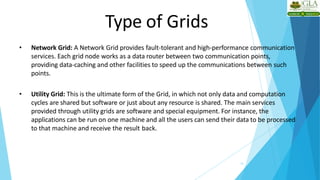
Type of Grids
13
• Network Grid: A Network Grid provides fault-tolerant and high-performance communication
services. Each grid node works as a data router between two communication points,
providing data-caching and other facilities to speed up the communications between such
points.
• Utility Grid: This is the ultimate form of the Grid, in which not only data and computation
cycles are shared but software or just about any resource is shared. The main services
provided through utility grids are software and special equipment. For instance, the
applications can be run on one machine and all the users can send their data to be processed
to that machine and receive the result back.
Cluster Computing
15
What is Cluster Computing?
16
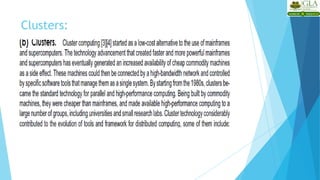
• A cluster is a type of parallel or distributed computer
system, which consists of a collection of inter-connected
stand-alone computers working together as a single
integrated computing resource .
• Key components of a cluster include multiple standalone
computers (PCs, Workstations, or SMPs), operating systems,
high-performance interconnects, middleware, parallel
programming environments, and applications.
Cluster Computing?
17
• Clusters are usually deployed to improve speed and/or reliability
over that provided by a single computer, while typically being much
more cost effective than single computer the of comparable speed
or reliability
• In a typical cluster:
– Network: Faster, closer connection than a typical
network (LAN)
– Low latency communication protocols
– Loosely coupled than SMP
Types of Cluster
18
• High Availability or Failover Clusters
• Load Balancing Cluster
• Parallel/Distributed Processing Clusters
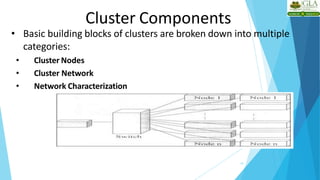
Cluster Components
19
• Basic building blocks of clusters are broken down into multiple
categories:
• Cluster Nodes
• Cluster Network
• Network Characterization
Key Operational Benefits of
Clustering
20
• System availability: offer inherent high system availability due to
the redundancy of hardware, operating systems, and applications.
• Hardware fault tolerance: redundancy for most system
components including both hardware and software.
• OS and application reliability: run multiple copies of the OS and
applications, and through this redundancy
• Scalability: Add servers to the cluster or by adding more clusters to
the network as the need arises or CPU to SMP.
• High performance: (running cluster enabled programs)
Utility Computing
21
“Utility” Computing ?
22
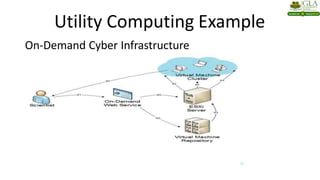
• Utility Computing is purely a concept which cloud computing practicallyimplements.
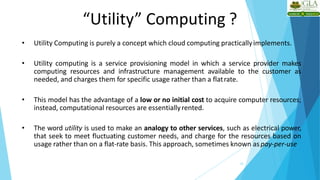
• Utility computing is a service provisioning model in which a service provider makes
computing resources and infrastructure management available to the customer as
needed, and charges them for specific usage rather than a flatrate.
• This model has the advantage of a low or no initial cost to acquire computer resources;
instead, computational resources are essentiallyrented.
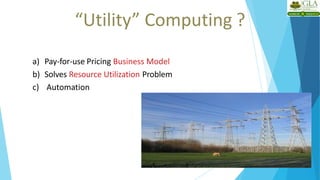
• The word utility is used to make an analogy to other services, such as electrical power,
that seek to meet fluctuating customer needs, and charge for the resources based on
usage rather than on a flat-rate basis. This approach, sometimes known as pay-per-use
“Utility” Computing ?
23
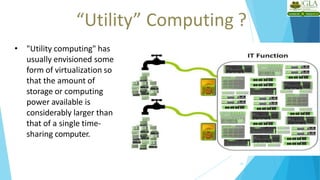
• "Utility computing" has
usually envisioned some
form of virtualization so
that the amount of
storage or computing
power available is
considerably larger than
that of a single time-
sharing computer.
“Utility” Computing ?
24
a) Pay-for-use Pricing Business Model
b) Solves Resource Utilization Problem
c) Automation
Utility Computing Example
On-Demand Cyber Infrastructure
25
Cloud Computing
29
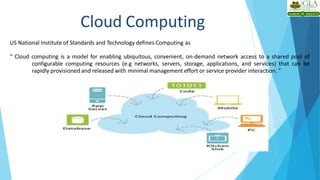
US National Institute of Standards and Technology defines Computing as
“ Cloud computing is a model for enabling ubiquitous, convenient, on-demand network access to a shared pool of
configurable computing resources (e.g networks, servers, storage, applications, and services) that can be
rapidly provisioned and released with minimal management effort or service provider interaction. ”
Cloud Computing
4
• On-demand self-service
• A consumer can unilaterally provision computing capabilities, such as server time and network storage, as
needed automatically without requiring human interaction with each service provider.
• Broad network access
• Capabilities are available over the network and accessed through standard mechanisms that promote use by
heterogeneous thin or thick client platforms (e.g., mobile phones, tablets, laptops, and workstations).
• Resource pooling
• The provider’s computing resources are pooled to serve multiple consumers using a multi-tenant model,
with different physical and virtual resources dynamically assigned and reassigned according to consumer
demand.
Cloud Characteristics
•
Cloud Characteristics
• Measured Service
– Cloud systems automatically control and optimize resource use by leveraging a metering
capability at some level of abstraction appropriate to the type of service (e.g., storage,
processing, bandwidth, and active user accounts). Resource usage can be
– monitored, controlled, and reported, providing transparency for both the provider and
consumer of the utilized service.
• Rapid elasticity
– Capabilities can be elastically provisioned and released, in some cases automatically, to
scale rapidly outward and inward commensurate with demand. Tothe consumer, the
capabilities available for provisioning often appear to be unlimited and can be
appropriated in any quantity at any time.
5
Cloud Services Models
7

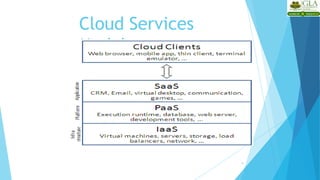
• Software as a Service (SaaS)
The capability provided to the consumer is to use the provider’s applications running on a cloud infrastructure. The applications
are accessible from various client devices through either a thin client interface, such as a web browser (e.g., web-based email), or
a program interface.
 The consumer does not manage or control the underlying cloud infrastructure including network, servers, operating systems,
storage, or even individual application capabilities, with the possible exception of limited user-specific application configuration
settings.
 e.g: Google SpreadSheet
• Cloud Infrastructure as a Service (IaaS)



The capability provided to provision processing, storage, networks, and other fundamental computing resources
Consumer can deploy and run arbitrarysoftware
e.g: Amazon Web Services and Flexi scale.
Cloud Services Models
8
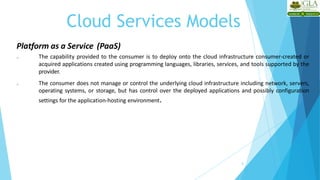
Platform as a Service (PaaS)
 The capability provided to the consumer is to deploy onto the cloud infrastructure consumer-created or
acquired applications created using programming languages, libraries, services, and tools supported by the
provider.
 The consumer does not manage or control the underlying cloud infrastructure including network, servers,
operating systems, or storage, but has control over the deployed applications and possibly configuration
settings for the application-hosting environment.
Cloud Services
Models
9
Types of Cloud (Deployment Models)
10
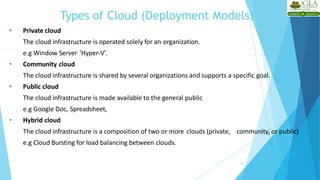
• Private cloud
The cloud infrastructure is operated solely for an organization.
e.g Window Server 'Hyper-V'.
• Community cloud
The cloud infrastructure is shared by several organizations and supports a specific goal.
• Public cloud
The cloud infrastructure is made available to the general public
e.g Google Doc, Spreadsheet,
• Hybrid cloud
The cloud infrastructure is a composition of two or more clouds (private, community, or public)
e.g Cloud Bursting for load balancing between clouds.
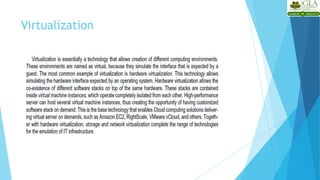
Cloud and Virtualization
11
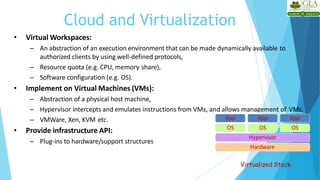
• Virtual Workspaces:
– An abstraction of an execution environment that can be made dynamically available to
authorized clients by using well-defined protocols,
– Resource quota (e.g. CPU, memory share),
– Software configuration (e.g. OS).
• Implement on Virtual Machines (VMs):
– Abstraction of a physical host machine,
– Hypervisor intercepts and emulates instructions from VMs, and allows management of VMs,
– VMWare, Xen, KVM etc.
• Provide infrastructure API:
– Plug-ins to hardware/support structures
Hardware
Hypervisor
App App App
OS OS OS
Virtualized Stack
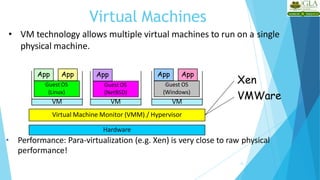
Virtual Machines
12
• VM technology allows multiple virtual machines to run on a single
physical machine.
Hardware
Virtual Machine Monitor (VMM) / Hypervisor
Guest OS
(NetBSD)
VM VM
App App
Guest OS
(Windows)
VM
App App
Guest OS
(Linux)
App
Xen
VMWare
• Performance: Para-virtualization (e.g. Xen) is very close to raw physical
performance!
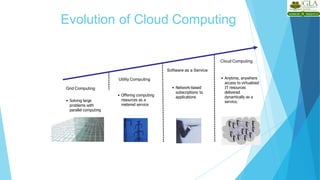
Evolution of Cloud Computing
Utility Computing
Cloud Computing
Software as a Service
Grid Computing
• Solving large
problems with
parallel computing
• Network-based
subscriptions to
applications
• Offering computing
resources as a
metered service
• Anytime, anywhere
access to virtualized
IT resources
delivered
dynamically as a
service.
Historical developments
History of cloud Computing
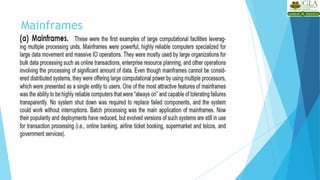
 The idea of renting computing services by leveraging large distributed
computing facilities has been around for long time. It dates back to the days
of the mainframes in the early 1950s. From there on, technology has
evolved and been refined. This process has created a series of favorable
conditions for the realization of cloud computing
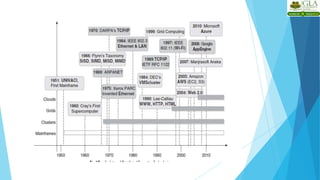
 Figure provides an overview of the evolution of the distributed computing
technologies that have influenced cloud computing. In tracking the historical
evolution, we briefly review five core technologies that played an important
role in the realization of cloud computing. These technologies are distributed
systems, virtualization, Web 2.0, service orientation, and utility computing
 Distributed system: the fact that it is composed of multiple independent
components and that these components are perceived as a single entity by
users .This is particularly true in the case of cloud computing, in which
clouds hide the complex architecture they rely on and provide a single
interface to users .The primary purpose of distributed systems is to share
resources and utilize them better.
 This is true in the case of cloud computing, where this concept is taken to the extreme
and resources (infrastructure ,run time environments and services) are rented to users.
In fact , one of the driving factors of cloud computing has been the availability of the
large computing facilities of IT giants (Amazon, Google)that found that offering their
com putting capabilities as a service provided opportunities to better utilize their
infrastructure. Distributed systems often exhibit other properties such as
heterogeneity, openness, scalability, transparency, concurrency, continuous availability,
and independent failures. To some extent these also characterize clouds, especially in
the context of scalability, concurrency, and continuous availability
Mainframes
Clusters:
Grids
Virtualization
Web 2.0
Service Oriented Computing
Utility Oriented Computing
Business Drivers for Cloud
Business growth
• Business growth is one of the top benefits organisations realise as a result of cloud adoption,
with 52% of enterprises reporting increased growth since going cloud (2015 Cloud Enterprise
Report).
2. Efficiency
• Efficiency is an extremely common cloud driver, with 71% of organisations worldwide
ranking it a top area they hope to approve through cloud technology (2015 Cloud Enterprise
Report).
3. Experience
• Next among the business drivers is improving the quality of the customer experience, which
45% of enterprises worldwide rank as a top cloud driver (although that number jumps to 61%
looking at only organisations in the UK and Australia).
4. Assurance
• Finally, there is assurance, which is the idea that data will be more secure in the cloud
Ripal Ranpara
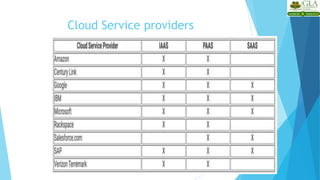
Cloud Service providers
Cloud service providers Properties
Scalability & Elasticity
 What is scalability ?
 A desirable property of a system, a network, or a process, which indicates its
ability to either handle growing amounts of work in a graceful manner or to be
readily enlarged.
 What is elasticity ?
 The ability to apply a quantifiable methodology that allows for the basis of an
adaptive introspection with in a real time infrastructure.
 But how to achieve these properties ?
 Dynamic provisioning
 Multi-tenant design
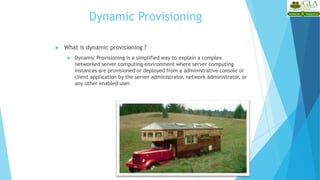
Dynamic Provisioning
 What is dynamic provisioning ?
 Dynamic Provisioning is a simplified way to explain a complex
networked server computing environment where server computing
instances are provisioned or deployed from a administrative console or
client application by the server administrator, network administrator, or
any other enabled user.
Dynamic Provisioning
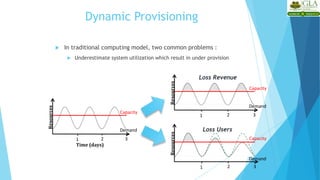
 In traditional computing model, two common problems :
 Underestimate system utilization which result in under provision
Resources
Demand
Capacity
1 2 3
Resources
Demand
Capacity
1 2 3
Resources
Demand
Capacity
Time (days)
1 2 3
Loss Users
Loss Revenue
Dynamic Provisioning
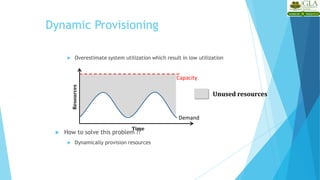
 Overestimate system utilization which result in low utilization
 How to solve this problem ??
 Dynamically provision resources
Unused resources
Demand
Capacity
Time
Resources
Dynamic Provisioning
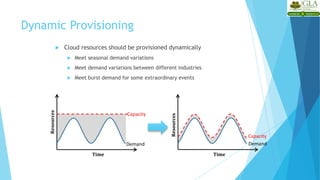
 Cloud resources should be provisioned dynamically
 Meet seasonal demand variations
 Meet demand variations between different industries
 Meet burst demand for some extraordinary events
Demand
Capacity
Time
Resources
Demand
Capacity
Time
Resources
Multi-tenant Design
 What is multi-tenant design ?
 Multi-tenant refers to a principle in software architecture where a single
instance of the software runs on a server, serving multiple client organizations.
 With a multi-tenant architecture, a software application is designed to
virtually partition its data and configuration thus each client organization
works with a customized virtual application instance.
Availability & Reliability
 What is availability ?
 The degree to which a system, subsystem, or equipment is in a specified
operable and committable state at the start of a mission, when the mission is
called for at an unknown time.
 Cloud system usually require high availability
 Ex. “Five Nines” system would statistically provide 99.999% availability
 What is reliability ?
 The ability of a system or component to perform its required functions under
stated conditions for a specified period of time.
 But how to achieve these properties ?
 Fault tolerance system
 Require system resilience
 Reliable system security
Manageability & Interoperability
 What is manageability ?
 Enterprise-wide administration of cloud computing systems. Systems
manageability is strongly influenced by network management initiatives in
telecommunications.
 What is interoperability ?
 Interoperability is a property of a product or system, whose interfaces are
completely understood, to work with other products or systems, present or
future, without any restricted access or implementation.
 But how to achieve these properties ?
 System control automation
 System state monitoring
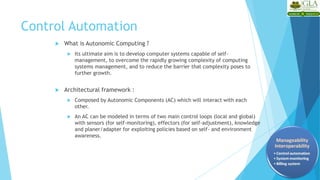
Control Automation
 What is Autonomic Computing ?
 Its ultimate aim is to develop computer systems capable of self-
management, to overcome the rapidly growing complexity of computing
systems management, and to reduce the barrier that complexity poses to
further growth.
 Architectural framework :
 Composed by Autonomic Components (AC) which will interact with each
other.
 An AC can be modeled in terms of two main control loops (local and global)
with sensors (for self-monitoring), effectors (for self-adjustment), knowledge
and planer/adapter for exploiting policies based on self- and environment
awareness.
Control Automation
 Four functional areas :
 Self-Configuration
 Automatic configuration of components.
 Self-Healing
 Automatic discovery, and correction of faults.
 Self-Optimization
 Automatic monitoring and control of resources to ensure the optimal functioning with
respect to the defined requirements.
 Self-Protection
 Proactive identification and protection from arbitrary attacks.
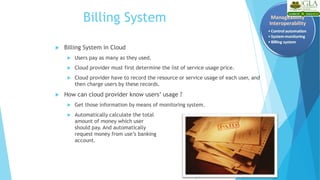
Billing System
 Billing System in Cloud
 Users pay as many as they used.
 Cloud provider must first determine the list of service usage price.
 Cloud provider have to record the resource or service usage of each user, and
then charge users by these records.
 How can cloud provider know users’ usage ?
 Get those information by means of monitoring system.
 Automatically calculate the total
amount of money which user
should pay. And automatically
request money from use’s banking
account.
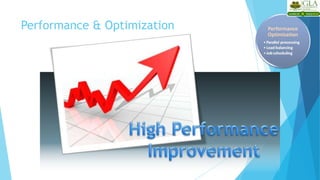
Performance & Optimization
 Performance guarantees ??
 As the great computing power in cloud, application performance should be
guaranteed.
 Cloud providers make use of powerful infrastructure or other underlining resources
to build up a highly performed and highly optimized environment, and then deliver
the complete services to cloud users.
 But how to achieve this property ?
 Parallel computing
 Load balancing
 Job scheduling
Accessibility & Portability
 What is accessibility ?
 Accessibility is a general term used to describe the degree to which a product,
device, service, or environment is accessible by as many people as possible.
 What is service portability ?
 Service portability is the ability to access services using any devices,
anywhere, continuously with mobility support and dynamic adaptation to
resource variations.
 But how to achieve these properties ?
 Uniform access
 Thin client
 Pros and Cons of Cloud Computing &
Benefits of Cloud Computing
Advantages of Cloud Computing
16
• Lower computer costs:
– No need of a high-powered and high-priced computer to run cloud computing's
web-based applications.
– Since applications run in the cloud, not on the desktop PC, your desktop PC does not
need the processing power or hard disk space demanded by traditional desktop
software.
– When you are using web-based applications, your PC can be less expensive, with a
smaller hard disk, less memory, more efficient processor...
– In fact, your PC in this scenario does not even need a CD or DVD drive, as no
software programs have to be loaded and no document files need to be saved.
Advantages of Cloud Computing
17
• Improved performance:
– With few large programs hogging your computer's memory, you will see better
performance from your PC.
– Computers in a cloud computing system boot and run faster because they have fewer
programs and processes loaded into memory.
• Reduced software costs:
– Instead of purchasing expensive software applications, you can get most of what you
need for free.
• most cloud computing applications today, such as the Google Docs suite.
– better than paying for similar commercial software
• which alone may be justification for switching to cloud applications.
Advantages of Cloud Computing
18
• Instant software updates
– Another advantage to cloud computing is that you are no longer faced with choosing
between obsolete software and high upgrade costs.
– When the application is web-based, updates happen automatically available the next time
you log into the cloud.
– When you access a web-based application, you get the latest version without needing to pay
for or download an upgrade.
• Improved document format compatibility.
– You do not have to worry about the documents you create on your machine being
compatible with other users' applications or OS.
– There are less format incompatibilities when everyone is sharing documents and
applications in the cloud.
Advantages of Cloud Computing
19
• Unlimited storage capacity
– Cloud computing offers virtually limitless storage.
– Your computer's current 1 Tera Bytes hard drive is small compared to the hundreds of Peta
Bytes available in the cloud.
• Increased data reliability
– Unlike desktop computing, in which if a hard disk crashes and destroy all your valuable
data, a computer crashing in the cloud should not affect the storage of your data.
• if your personal computer crashes, all your data is still out there in the cloud, still accessible
– In a world where few individual desktop PC users back up their data on a regular basis,
cloud computing is a data-safe computing platform. For e.g. Dropbox, Skydrive
Advantages of Cloud Computing
20
• Universal information access
– That is not a problem with cloud computing, because you do not take your
documents with you.
– Instead, they stay in the cloud, and you can access them whenever you have a
computer and an Internet connection
– Documents are instantly available from wherever you are.
• Latest version availability
– When you edit a document at home, that edited version is what you see when
you access the document at work.
– The cloud always hosts the latest version of your documents as long as you are
connected, you are not in danger of having an outdated version.
Advantages of Cloud Computing
21
• Easier group collaboration
– Sharing documents leads directly to better collaboration.
– Many users do this as it is an important advantages of cloud computing
multiple users can collaborate easily on documents and projects
• Device independence
– You are no longer tethered to a single computer or network.
– Changes to computers, applications and documents follow you through the
cloud.
– Move to a portable device, and your applications and documents are still
available.
Disadvantages of Cloud Computing
22
• Requires a constant internet connection
– Cloud computing is impossible if you cannot connect to the Internet.
– Since you use the Internet to connect to both your applications and documents, if you do not
have an Internet connection you cannot access anything, even your own documents.
– A dead Internet connection means no work and in areas where Internet connections are few or
inherently unreliable, this could be a deal-breaker.
• Does not work well with low-speed connections
– Similarly, a low-speed Internet connection, such as that found with dial-up services, makes
cloud computing painful at best and often impossible.
– Web-based applications require a lot of bandwidth to download, as do large documents.
Disadvantages of Cloud Computing
23
• Features might be limited
– This situation is bound to change, but today many web-based applicationssimply
are not as full-featured as their desktop-basedapplications.
• For example, you can do a lot more with Microsoft PowerPoint than with Google
Presentation's web-based offering
• Can be slow
– Even with a fast connection, web-based applications can sometimes be slower than
accessing a similar software program on your desktop PC.
– Everything about the program, from the interface to the current document, hasto
be sent back and forth from your computer to the computers in the cloud.
– If the cloud servers happen to be backed up at that moment, or if the Internet is
having a slow day, you would not get the instantaneous access you might expect
from desktop applications.
Disadvantages of Cloud Computing
24
• Stored data might not be secured
– With cloud computing, all your data is stored on the cloud.
• The questions is How secure is the cloud?
– Can unauthorized users gain access to your confidential data ?
• Stored data can be lost!
– Theoretically, data stored in the cloud is safe, replicated across multiple machines.
– But on the off chance that your data goes missing, you have no physical or local backup.
• Put simply, relying on the cloud puts you at risk if the cloud lets youdown.
Disadvantages of Cloud Computing
25
• HPC Systems
– Not clear that you can run compute-intensive HPC applications that use MPI/OpenMP!
– Scheduling is important with this type of application
• as you want all the VM to be co-located to minimize communication latency!
• General Concerns
– Each cloud systems uses different protocols and different APIs
• may not be possible to run applications between cloud based systems
– Amazon has created its own DB system (not SQL 92), and workflow system (many
popular workflow systems out there)
• so your normal applications will have to be adapted to execute on these platforms.
High performance
system
Role of Open Standards
 Commercial cloud service providers charge CPU time and bandwidth.
 For large organizations, it’s more cost effective to purchase the hardware
and create own cloud.
 Researchers and academia need open standards.
 More secure and flexible.
 No vendor lock in.
Open Source Clouds
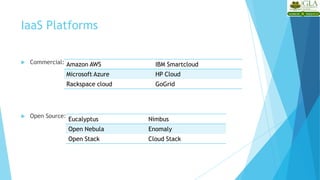
 Commercial:
 Open Source:
IaaS Platforms
Amazon AWS IBM Smartcloud
Microsoft Azure HP Cloud
Rackspace cloud GoGrid
Eucalyptus Nimbus
Open Nebula Enomaly
Open Stack Cloud Stack
 Open source architecture for implementing cloud
functionality at the IaaS level.
 Can be installed and deployed without
modification to the existing infrastructure (From
laptops to data centers)
 Linux based, highly modular and compatible with Amazon AWS (uses AWS
APIs).
Eucalyptus
Architectural Overview
1 - Instances
2 - Networking
3 - Compute nodes
4 - Storage
5 - User interface
6 - Overall cloud platform
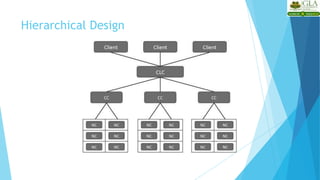
Hierarchical Design
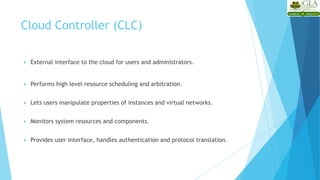
 External interface to the cloud for users and administrators.
 Performs high level resource scheduling and arbitration.
 Lets users manipulate properties of instances and virtual networks.
 Monitors system resources and components.
 Provides user interface, handles authentication and protocol translation.
Cloud Controller (CLC)
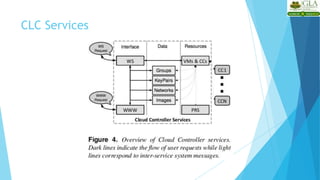
CLC Services
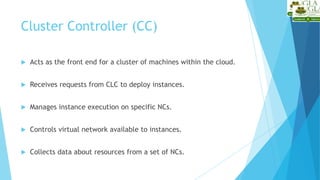
 Acts as the front end for a cluster of machines within the cloud.
 Receives requests from CLC to deploy instances.
 Manages instance execution on specific NCs.
 Controls virtual network available to instances.
 Collects data about resources from a set of NCs.
Cluster Controller (CC)
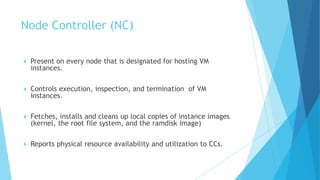
 Present on every node that is designated for hosting VM
instances.
 Controls execution, inspection, and termination of VM
instances.
 Fetches, installs and cleans up local copies of instance images
(kernel, the root file system, and the ramdisk image)
 Reports physical resource availability and utilization to CCs.
Node Controller (NC)
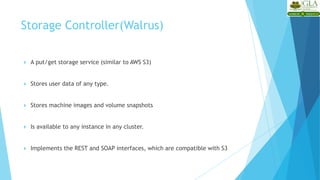
 A put/get storage service (similar to AWS S3)
 Stores user data of any type.
 Stores machine images and volume snapshots
 Is available to any instance in any cluster.
 Implements the REST and SOAP interfaces, which are compatible with S3
Storage Controller(Walrus)
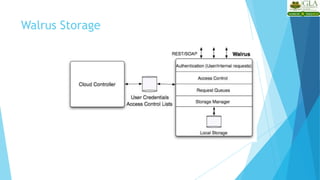
Walrus Storage
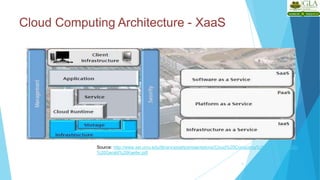
Cloud Computing Architecture - XaaS
4
Source: http://www.sei.cmu.edu/library/assets/presentations/Cloud%20Computing%20Architecture%20-
%20Gerald%20Kaefer.pdf
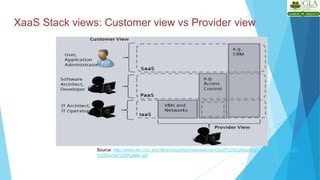
XaaS Stack views: Customer view vs Provider view
5
Source: http://www.sei.cmu.edu/library/assets/presentations/Cloud%20Computing%20Architecture%20-
%20Gerald%20Kaefer.pdf
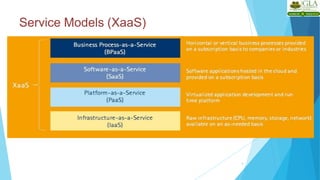
Service Models (XaaS)
8
 Combination of Service-Oriented Infrastructure (SOI) and cloud
computing realizes to XaaS.
 X as a Service (XaaS) is a generalization for cloud-related services
 XaaS stands for "anything as a service" or "everything as a service“
 XaaS refers to an increasing number of services that are delivered
over the Internet rather than provided locally or on-site
 XaaS is the essence of cloud computing.
Service Models (XaaS)
9
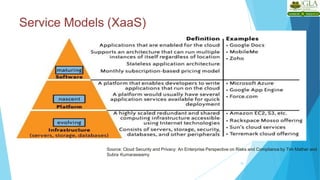
Service Models (XaaS)
10
Source: Cloud Security and Privacy: An Enterprise Perspective on Risks and Compliance by Tim Mather and
Subra Kumaraswamy
Service Models (XaaS)
11
 Most common examples of XaaS are
 Software as a Service (SaaS)
 Platform as a Service (PaaS)
 Infrastructure as a Service (IaaS)
 Other examples of XaaS include
 Business Process as a Service (BPaaS)
 Storage as a service (another SaaS)
 Security as a service (SECaaS)
 Database as a service (DaaS)
 Monitoring/management as a service (MaaS)
 Communications, content and computing as a service (CaaS)
 Identity as a service (IDaaS)
 Backup as a service (BaaS)
 Desktop as a service (DaaS)
Requirements of CSP (Cloud Service
Provider)
• Increase productivity
• Increase end user satisfaction
• Increase innovation
• Increase agility
12
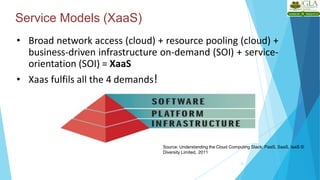
Service Models (XaaS)
13
• Broad network access (cloud) + resource pooling (cloud) +
business-driven infrastructure on-demand (SOI) + service-
orientation (SOI) = XaaS
• Xaas fulfils all the 4 demands!
Source: Understanding the Cloud Computing Stack: PaaS, SaaS, IaaS ©
Diversity Limited, 2011
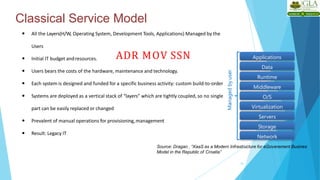
Classical Service Model
14
Storage
Servers
Network
O/S
Middleware
Virtualization
Data
Applications
Runtime
Managed
by
user
 All the Layers(H/W, Operating System, Development Tools, Applications) Managed by the
Users
 Initial IT budget andresources.
 Users bears the costs of the hardware, maintenance and technology.
 Each system is designed and funded for a specific business activity: custom build-to-order
 Systems are deployed as a vertical stack of “layers” which are tightly coupled, so no single
part can be easily replaced or changed
 Prevalent of manual operations for provisioning,management
 Result: Legacy IT
Source: Dragan , “XaaS as a Modern Infrastructure for eGoverement Busines
Model in the Republic of Croatia”
ADR MOV SSN
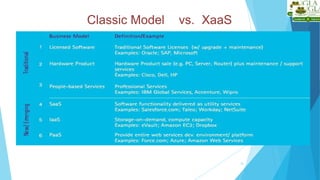
Classic Model vs. XaaS
16
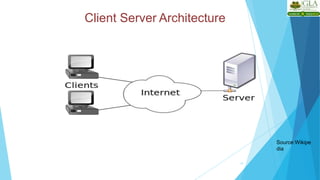
Client Server Architecture
17
Source:Wikipe
dia
Client server architecture
3
• Consists of one or more load balanced servers
servicing requests sent by the clients
• Clients and servers exchange message in
request-response fashion
• Client is often a thin client or a machine with
low computational capabilities
• Server could be a load balanced cluster or a
stand alone machine.
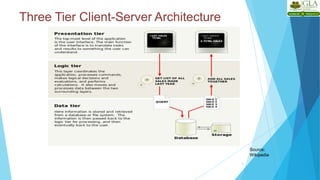
Three Tier Client-Server Architecture
4
Source:
Wikipedia
Client Server model vs. Cloud model
5
Client server model Cloud computing model
• Simple service model where
server services client
requests
• May/may not be load
balanced
• Scalable to some extent in a
cluster environment.
• No concept of virtualization
• Variety of complex service
models, such as, IaaS, PaaS,
SaaS can be provided
• Load balanced
• Theoretically infinitely
scalable
• Virtualization is the core
concept
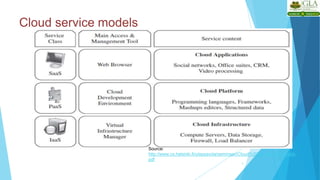
Cloud service models
7
Source:
http://www.cs.helsinki.fi/u/epsavola/seminaari/Cloud%20Service%20Models.
pdf
Simplified description of cloud service models
8
 SaaS applications are designed for end users and are
delivered over the web
 PaaS is the set of tools and services designed to make
coding and deploying applications quickly and efficiently
 IaaS is the hardware and software that powers it all –
servers, storage, network, operating systems
Source: http://broadcast.rackspace.com/hosting_knowledge/whitepapers/Understanding-
the-Cloud-Computing-Stack.pdf
Transportation Analogy
9
• By itself, infrastructure isn’t useful – it just sits there waiting
for someone to make it productive in solving a particular
problem. Imagine the Interstate transportation system in
the U.S. Even with all these roads built, they wouldn’t be
useful without cars and trucks to transport people and
goods. In this analogy, the roads are the infrastructure and
the cars and trucks are the platform that sits on top of the
infrastructure and transports the people and goods. These
goods and people might be considered the software and
information in the technical realm
Source: http://broadcast.rackspace.com/hosting_knowledge/whitepapers/Understanding-the-Cloud-
Computing-Stack.pdf
Software as a Service
10
• SaaS is defined as software that is deployed over the internet.
With SaaS, a provider licenses an application to customers
either as a service on demand, through a subscription, in a
“pay-as-you-go” model, or (increasingly) at no charge when
there is opportunity to generate revenue from streams other
than the user, such as from advertisement or user list sales.
Source: http://broadcast.rackspace.com/hosting_knowledge/whitepapers/Understanding-the-Cloud-
Computing-Stack.pdf
SaaS characteristics
11
• Web access to commercial software
• Software is managed from central location
• Software is delivered in a ‘one to many’ model
• Users not required to handle software upgrades and patches
• Application Programming Interfaces (API) allow for integration
between different pieces of software.
Source: http://broadcast.rackspace.com/hosting_knowledge/whitepapers/Understanding-the-Cloud-
Computing-Stack.pdf
Applications where SaaS is used
12
• Applications where there is significant interplay between
organization and outside world. E.g. email newsletter campaign
software
• Applications that have need for web or mobile access. E.g. mobile
sales management software
• Software that is only to be used for a short term need.
• Software where demand spikes significantly. E.g. Tax/Billing
softwares.
• E.g. of SaaS: Sales Force Customer Relationship Management (CRM)
software
Source: http://broadcast.rackspace.com/hosting_knowledge/whitepapers/Understanding-
the-Cloud-Computing-Stack.pdf
Put an
end
Applications where SaaS may not be the best
option
13
• Applications where extremely fast processing of
real time data is needed
• Applications where legislation or other regulation
does not permit data being hosted externally
• Applications where an existing on-premise solution
fulfills all of the organization’s needs
Source: http://broadcast.rackspace.com/hosting_knowledge/whitepapers/Understanding-
the-Cloud-Computing-Stack.pdf
Platform as a Service
14
• Platform as a Service (PaaS) brings the benefits that
SaaS bought for applications, but over to the software
development world. PaaS can be defined as a
computing platform that allows the creation of web
applications quickly and easily and without the
complexity of buying and maintaining the software and
infrastructure underneath it.
• PaaS is analogous to SaaS except that, rather than being
software delivered over the web, it is a platform for the
creation of software, delivered over the web.
Source: http://broadcast.rackspace.com/hosting_knowledge/whitepapers/Understanding-
the-Cloud-Computing-Stack.pdf
Characteristics of PaaS
15
 Services to develop, test, deploy, host and maintain applications in the same
integrated development environment. All the varying services needed to fulfill the
application development process.
 Web based user interface creation tools help to create, modify, test and deploy
different UI scenarios.
 Multi-tenant architecture where multiple concurrent users utilize the same
development application.
 Built in scalability of deployed software including load balancing and failover.
 Integration with web services and databases via common standards.
 Support for development team collaboration – some PaaS solutions include
project planning and communication tools.
 Tools to handle billing and subscription management
Source: http://broadcast.rackspace.com/hosting_knowledge/whitepapers/Understanding-
the-Cloud-Computing-Stack.pdf
Scenarios where PaaS is used
16
 PaaS is especially useful in any situation where multiple developers
will be working on a development project or where other external
parties need to interact with the development process
 PaaS is useful where developers wish to automate testing and
deployment services.
 The popularity of agile software development, a group of software
development methodologies based on iterative and incremental
development, will also increase the uptake of PaaS as it eases the
difficulties around rapid development and iteration of software.
 PaaS Examples: Microsoft Azure, Google App Engine
Source: http://broadcast.rackspace.com/hosting_knowledge/whitepapers/Understanding-
the-Cloud-Computing-Stack.pdf
Scenarios where PaaS is not ideal
17
• Where the application needs to be highly portable in terms
of where it is hosted.
• Where proprietary languages or approaches would impact
on the development process
• Where a proprietary language would hinder later moves to
another provider – concerns are raised about vendor lock
in
• Where application performance requires customization of
the underlying hardware and software
Source: http://broadcast.rackspace.com/hosting_knowledge/whitepapers/Understanding-
the-Cloud-Computing-Stack.pdf
Infrastructure as a Service
• Infrastructure as a Service (IaaS) is a way of
delivering Cloud Computing infrastructure –
servers, storage, network and operating systems
– as an on-demand service.
• Rather than purchasing servers, software,
datacenter space or network equipment, clients
instead buy those resources as a fully outsourced
service on demand.
Source: http://broadcast.rackspace.com/hosting_knowledge/whitepapers/Understanding-
the-Cloud-Computing-Stack.pdf
18
Characteristics of IaaS
• Resources are distributed as a service
• Allows for dynamic scaling
• Has a variable cost, utility pricing model
• Generally includes multiple users on a single
piece of hardware
19
Source: http://broadcast.rackspace.com/hosting_knowledge/whitepapers/Understanding-the-Cloud-
Computing-Stack.pdf
Scenarios where IaaS makes sense
20
 Where demand is very volatile – any time there are significant spikes
and troughs in terms of demand on the infrastructure
 For new organizations without the capital to invest in hardware
 Where the organization is growing rapidly and scaling hardware
would be problematic
 Where there is pressure on the organization to limit capital
expenditure and to move to operating expenditure
 For specific line of business, trial or temporary infrastructural needs
Source: http://broadcast.rackspace.com/hosting_knowledge/whitepapers/Understanding-
the-Cloud-Computing-Stack.pdf
Scenarios where IaaS may not be the best
• Where regulatory compliance makes the offshoring or outsourcing of
data storage and processing difficult
• Where the highest levels of performance are required, and on-
premise or dedicated hosted infrastructure has the capacity to meet
the organization’s needs
 Source:
http://broadcast.rackspace.com/hosting_knowledge/whitepa
pers/Understanding-the-Cloud-Computing-Stack.pdf
21
option
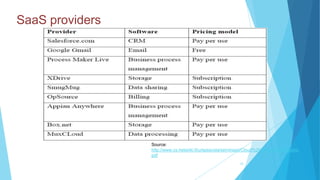
SaaS providers
22
Source:
http://www.cs.helsinki.fi/u/epsavola/seminaari/Cloud%20Service%20Models.
pdf
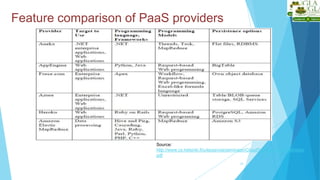
Feature comparison of PaaS providers
23
Source:
http://www.cs.helsinki.fi/u/epsavola/seminaari/Cloud%20Service%20Models.
pdf
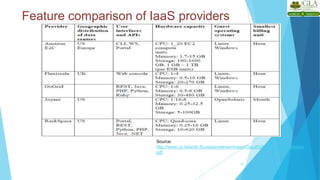
Feature comparison of IaaS providers
24
Source:
http://www.cs.helsinki.fi/u/epsavola/seminaari/Cloud%20Service%20Models.
pdf
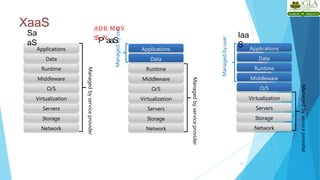
XaaS
25
Managed
by
service
provider
Storage
Servers
Network
O/S
Middleware
Virtualization
Data
Applications
Runtime
Managed
by
user
Managed
by
user
Managed
by
service
provider
Storage
Servers
Network
O/S
Middleware
Virtualization
Applications
Runtime
Data
Managed
by
service
provider
Storage
Servers
Network
O/S
Middleware
Virtualization
Applications
Runtime
Data
Sa
aS
Iaa
S
ADR MOV
SSPNaaS
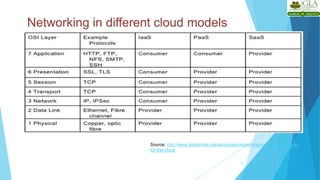
Role of Networking in cloud computing
26
• In cloud computing, network resources can be
provisioned dynamically.
• Some of the networking concepts that form the core
of cloud computing are Virtual Local Area Networks,
Virtual Private Networks and the different protocol
layers.
• Examples of tools that help in setting up different
network topologies and facilitate various network
configurations are OpenSSH, OpenVPN etc.
Source: http://www.slideshare.net/alexamies/networking-concepts-and-tools-
for-the-cloud
Networking in different cloud models
27
Source: http://www.slideshare.net/alexamies/networking-concepts-and-tools-
for-the-cloud
Any
Questions ?
Mrs. Ruchi Agrawal
Assistant Professor
Email: Ruchi.agrawal@gla.ac.in

1..pptxcloud commuting cloud commuting cloud commuting

  • 1.
    Class Presentations onIntroduction to Cloud Computing BCAE0203:Introduction to Cloud Computing
  • 2.
    INTRODUCTION TO CLOUDCOMPUTING Cloud Computing - Overview
  • 3.
    Introduction • The ACMComputing Curricula 2005 defined "computing" as "In a general way, we can define computing to mean any goal-oriented activity requiring, benefiting from, or creating computers. 2
  • 4.
    Cloud Computing Course- Overview I. Introduction to Cloud Computing i. Overview of Computing ii. Cloud Computing (NIST Model) iii. Properties, Characteristics & Disadvantages iv. Role of Open Standards II. Cloud Computing Architecture i. Cloud computing stack ii. Service Models (XaaS) a. Infrastructure as a Service(IaaS) b. Platform as a Service(PaaS) c. Software as a Service(SaaS) iii. Deployment Models III. Service Management in Cloud Computing i. Service Level Agreements(SLAs) ii. Cloud Economics IV. Resource Management in Cloud Computing
  • 5.
    Cloud Computing Course(contd.) V. Data Management in Cloud Computing i. Looking at Data, Scalability & Cloud Services ii. Database & Data Stores in Cloud iii. Large Scale Data Processing VI. Cloud Security i. Infrastructure Security ii. Data security and Storage iii. Identity and Access Management iv. Access Control, Trust, Reputation, Risk VII. Case Study on Open Source and Commercial Clouds, Cloud Simulator VIII. Research trend in Cloud Computing, Fog Computing
  • 6.
    Trends in Computing 6 •Distributed Computing • Grid Computing • Cluster Computing • Utility Computing • Cloud Computing
  • 7.
  • 8.
    Centralized vs. Distributed Computing 8 Earlycomputing was performed on a single processor. Uni-processor computing can be called centralized computing.
  • 9.
    Distributed Computing/System? 9 • Distributedcomputing – Field of computing science that studies distributed system. – Use of distributed systems to solve computational problems. • Distributed system – Wikipedia • There are several autonomous computational entities, each of which has its own local memory. • The entities communicate with each other by message passing. – Operating System Concept • The processors communicate with one another through various communication lines, such as high-speed buses or telephone lines. • Each processor has its own local memory.
  • 10.
    Example Distributed Systems 10 •Internet • ATM (bank) machines • Intranets/Workgroups • Computing landscape will soon consist of ubiquitous network-connected devices
  • 11.
    Computers in aDistributed System 11 • Workstations: Computers used by end-users to perform computing • Server Systems: Computers which provide resources and services • Personal Assistance Devices: Handheld computers connected to the system via a wireless communication link.
  • 12.
    Common properties ofDistributed Computing 12 – Fault tolerance • When one or some nodes fails, the whole system can still work fine except performance. • Need to check the status of each node – Each node play partial role • Each computer has only a limited, incomplete view of the system. • Each computer may know only one part of the input. – Resource sharing • Each user can share the computing power and storage resource in the system with other users – Load Sharing • Dispatching several tasks to each nodes can help share loading to the whole system. – Easy to expand • We expect to use few time when adding nodes. Hope to spend no time if possible. – Performance • Parallel computing can be considered a subset of distributed computing
  • 13.
    Why Distributed Computing? 13 •Nature of application • Performance – Computing intensive • The task could consume a lot of time on computing. For example, Computation of Pi value using Monte Carlo simulation – Data intensive • The task that deals with a large amount or large size of files. For example, Facebook, LHC(Large Hadron Collider) experimental data processing. • Robustness – No SPOF (Single Point Of Failure) – Other nodes can execute the same task executed on failed node.
  • 14.
    Distributed applications 3 • Applicationsthat consist of a set of processes that are distributed across a network of machines and work together as an ensemble to solve a common problem • In the past, mostly “client-server” • Resource management centralized at the server • “Peer to Peer” computing represents a movement towards more “truly” distributed applications
  • 15.
  • 16.
    A typical distributedapplication based on peer processes 5
  • 17.
  • 18.
    Grid Computing? 7 • Pcwebopedia.com –A form of networking. unlike conventional networks that focus on communication among devices, grid computing harnesses unused processing cycles of all computers in a network for solving problems too intensive for any stand-alone machine. • IBM – Grid computing enables the virtualization of distributed computing and data resources such as processing, network bandwidth and storage capacity to create a single system image, granting users and applications seamless access to vast IT capabilities. Just as an Internet user views a unified instance of content via the Web, a grid useressentially sees a single, large virtual computer. • Sun Microsystems – Grid Computing is a computing infrastructure that provides dependable, consistent, pervasive and inexpensive access to computational capabilities
  • 19.
    Grid Computing 9 1. Sharemore than information: Data, computing power, applications in dynamic environment, multi-institutional, virtual organizations 2. Efficient use of resources at many institutes. People from many institutions working to solve a common problem (virtual organisation). 3. Join local communities. 4. Interactions with the underneath layers must be transparent and seamless to the user.
  • 20.
    Need of GridComputing? 10 • Today’s Science/Research is based on computations, data analysis, data visualization & collaborations • Computer Simulations & Modelling are more cost effective than experimental methods • Scientific and Engineering problems are becoming more complex & users need more accurate, precise solutions to their problems in shortest possible time • Data Visualization is becoming very important • Exploiting under utilized resources
  • 21.
    Who uses GridComputing ? 11
  • 22.
    Type of Grids 12 •Computational Grid: These grids provide secure access to huge pool of shared processing power suitable for high throughput applications and computation intensive computing. • Data Grid: Data grids provide an infrastructure to support data storage, data discovery, data handling, data publication, and data manipulation of large volumes of data actually stored in various heterogeneous databases and file systems. • Collaboration Grid: With the advent of Internet, there has been an increased demand for better collaboration. Such advanced collaboration is possible using the grid. For instance, persons from different companies in a virtual enterprise can work on different components of a CAD project without even disclosing their proprietary technologies.
  • 23.
    Type of Grids 13 •Network Grid: A Network Grid provides fault-tolerant and high-performance communication services. Each grid node works as a data router between two communication points, providing data-caching and other facilities to speed up the communications between such points. • Utility Grid: This is the ultimate form of the Grid, in which not only data and computation cycles are shared but software or just about any resource is shared. The main services provided through utility grids are software and special equipment. For instance, the applications can be run on one machine and all the users can send their data to be processed to that machine and receive the result back.
  • 24.
  • 25.
    What is ClusterComputing? 16 • A cluster is a type of parallel or distributed computer system, which consists of a collection of inter-connected stand-alone computers working together as a single integrated computing resource . • Key components of a cluster include multiple standalone computers (PCs, Workstations, or SMPs), operating systems, high-performance interconnects, middleware, parallel programming environments, and applications.
  • 26.
    Cluster Computing? 17 • Clustersare usually deployed to improve speed and/or reliability over that provided by a single computer, while typically being much more cost effective than single computer the of comparable speed or reliability • In a typical cluster: – Network: Faster, closer connection than a typical network (LAN) – Low latency communication protocols – Loosely coupled than SMP
  • 27.
    Types of Cluster 18 •High Availability or Failover Clusters • Load Balancing Cluster • Parallel/Distributed Processing Clusters
  • 28.
    Cluster Components 19 • Basicbuilding blocks of clusters are broken down into multiple categories: • Cluster Nodes • Cluster Network • Network Characterization
  • 29.
    Key Operational Benefitsof Clustering 20 • System availability: offer inherent high system availability due to the redundancy of hardware, operating systems, and applications. • Hardware fault tolerance: redundancy for most system components including both hardware and software. • OS and application reliability: run multiple copies of the OS and applications, and through this redundancy • Scalability: Add servers to the cluster or by adding more clusters to the network as the need arises or CPU to SMP. • High performance: (running cluster enabled programs)
  • 30.
  • 31.
    “Utility” Computing ? 22 •Utility Computing is purely a concept which cloud computing practicallyimplements. • Utility computing is a service provisioning model in which a service provider makes computing resources and infrastructure management available to the customer as needed, and charges them for specific usage rather than a flatrate. • This model has the advantage of a low or no initial cost to acquire computer resources; instead, computational resources are essentiallyrented. • The word utility is used to make an analogy to other services, such as electrical power, that seek to meet fluctuating customer needs, and charge for the resources based on usage rather than on a flat-rate basis. This approach, sometimes known as pay-per-use
  • 32.
    “Utility” Computing ? 23 •"Utility computing" has usually envisioned some form of virtualization so that the amount of storage or computing power available is considerably larger than that of a single time- sharing computer.
  • 33.
    “Utility” Computing ? 24 a)Pay-for-use Pricing Business Model b) Solves Resource Utilization Problem c) Automation
  • 34.
    Utility Computing Example On-DemandCyber Infrastructure 25
  • 35.
  • 36.
    US National Instituteof Standards and Technology defines Computing as “ Cloud computing is a model for enabling ubiquitous, convenient, on-demand network access to a shared pool of configurable computing resources (e.g networks, servers, storage, applications, and services) that can be rapidly provisioned and released with minimal management effort or service provider interaction. ” Cloud Computing
  • 37.
    4 • On-demand self-service •A consumer can unilaterally provision computing capabilities, such as server time and network storage, as needed automatically without requiring human interaction with each service provider. • Broad network access • Capabilities are available over the network and accessed through standard mechanisms that promote use by heterogeneous thin or thick client platforms (e.g., mobile phones, tablets, laptops, and workstations). • Resource pooling • The provider’s computing resources are pooled to serve multiple consumers using a multi-tenant model, with different physical and virtual resources dynamically assigned and reassigned according to consumer demand. Cloud Characteristics •
  • 38.
    Cloud Characteristics • MeasuredService – Cloud systems automatically control and optimize resource use by leveraging a metering capability at some level of abstraction appropriate to the type of service (e.g., storage, processing, bandwidth, and active user accounts). Resource usage can be – monitored, controlled, and reported, providing transparency for both the provider and consumer of the utilized service. • Rapid elasticity – Capabilities can be elastically provisioned and released, in some cases automatically, to scale rapidly outward and inward commensurate with demand. Tothe consumer, the capabilities available for provisioning often appear to be unlimited and can be appropriated in any quantity at any time. 5
  • 39.
    Cloud Services Models 7  •Software as a Service (SaaS) The capability provided to the consumer is to use the provider’s applications running on a cloud infrastructure. The applications are accessible from various client devices through either a thin client interface, such as a web browser (e.g., web-based email), or a program interface.  The consumer does not manage or control the underlying cloud infrastructure including network, servers, operating systems, storage, or even individual application capabilities, with the possible exception of limited user-specific application configuration settings.  e.g: Google SpreadSheet • Cloud Infrastructure as a Service (IaaS)    The capability provided to provision processing, storage, networks, and other fundamental computing resources Consumer can deploy and run arbitrarysoftware e.g: Amazon Web Services and Flexi scale.
  • 40.
    Cloud Services Models 8 Platformas a Service (PaaS)  The capability provided to the consumer is to deploy onto the cloud infrastructure consumer-created or acquired applications created using programming languages, libraries, services, and tools supported by the provider.  The consumer does not manage or control the underlying cloud infrastructure including network, servers, operating systems, or storage, but has control over the deployed applications and possibly configuration settings for the application-hosting environment.
  • 41.
  • 42.
    Types of Cloud(Deployment Models) 10 • Private cloud The cloud infrastructure is operated solely for an organization. e.g Window Server 'Hyper-V'. • Community cloud The cloud infrastructure is shared by several organizations and supports a specific goal. • Public cloud The cloud infrastructure is made available to the general public e.g Google Doc, Spreadsheet, • Hybrid cloud The cloud infrastructure is a composition of two or more clouds (private, community, or public) e.g Cloud Bursting for load balancing between clouds.
  • 43.
    Cloud and Virtualization 11 •Virtual Workspaces: – An abstraction of an execution environment that can be made dynamically available to authorized clients by using well-defined protocols, – Resource quota (e.g. CPU, memory share), – Software configuration (e.g. OS). • Implement on Virtual Machines (VMs): – Abstraction of a physical host machine, – Hypervisor intercepts and emulates instructions from VMs, and allows management of VMs, – VMWare, Xen, KVM etc. • Provide infrastructure API: – Plug-ins to hardware/support structures Hardware Hypervisor App App App OS OS OS Virtualized Stack
  • 44.
    Virtual Machines 12 • VMtechnology allows multiple virtual machines to run on a single physical machine. Hardware Virtual Machine Monitor (VMM) / Hypervisor Guest OS (NetBSD) VM VM App App Guest OS (Windows) VM App App Guest OS (Linux) App Xen VMWare • Performance: Para-virtualization (e.g. Xen) is very close to raw physical performance!
  • 45.
    Evolution of CloudComputing Utility Computing Cloud Computing Software as a Service Grid Computing • Solving large problems with parallel computing • Network-based subscriptions to applications • Offering computing resources as a metered service • Anytime, anywhere access to virtualized IT resources delivered dynamically as a service.
  • 46.
  • 47.
    History of cloudComputing  The idea of renting computing services by leveraging large distributed computing facilities has been around for long time. It dates back to the days of the mainframes in the early 1950s. From there on, technology has evolved and been refined. This process has created a series of favorable conditions for the realization of cloud computing
  • 48.
     Figure providesan overview of the evolution of the distributed computing technologies that have influenced cloud computing. In tracking the historical evolution, we briefly review five core technologies that played an important role in the realization of cloud computing. These technologies are distributed systems, virtualization, Web 2.0, service orientation, and utility computing
  • 50.
     Distributed system:the fact that it is composed of multiple independent components and that these components are perceived as a single entity by users .This is particularly true in the case of cloud computing, in which clouds hide the complex architecture they rely on and provide a single interface to users .The primary purpose of distributed systems is to share resources and utilize them better.
  • 51.
     This istrue in the case of cloud computing, where this concept is taken to the extreme and resources (infrastructure ,run time environments and services) are rented to users. In fact , one of the driving factors of cloud computing has been the availability of the large computing facilities of IT giants (Amazon, Google)that found that offering their com putting capabilities as a service provided opportunities to better utilize their infrastructure. Distributed systems often exhibit other properties such as heterogeneity, openness, scalability, transparency, concurrency, continuous availability, and independent failures. To some extent these also characterize clouds, especially in the context of scalability, concurrency, and continuous availability
  • 52.
  • 53.
  • 54.
  • 55.
  • 56.
  • 57.
  • 58.
  • 59.
    Business Drivers forCloud Business growth • Business growth is one of the top benefits organisations realise as a result of cloud adoption, with 52% of enterprises reporting increased growth since going cloud (2015 Cloud Enterprise Report). 2. Efficiency • Efficiency is an extremely common cloud driver, with 71% of organisations worldwide ranking it a top area they hope to approve through cloud technology (2015 Cloud Enterprise Report). 3. Experience • Next among the business drivers is improving the quality of the customer experience, which 45% of enterprises worldwide rank as a top cloud driver (although that number jumps to 61% looking at only organisations in the UK and Australia). 4. Assurance • Finally, there is assurance, which is the idea that data will be more secure in the cloud
  • 63.
  • 64.
  • 65.
  • 66.
    Scalability & Elasticity What is scalability ?  A desirable property of a system, a network, or a process, which indicates its ability to either handle growing amounts of work in a graceful manner or to be readily enlarged.  What is elasticity ?  The ability to apply a quantifiable methodology that allows for the basis of an adaptive introspection with in a real time infrastructure.  But how to achieve these properties ?  Dynamic provisioning  Multi-tenant design
  • 67.
    Dynamic Provisioning  Whatis dynamic provisioning ?  Dynamic Provisioning is a simplified way to explain a complex networked server computing environment where server computing instances are provisioned or deployed from a administrative console or client application by the server administrator, network administrator, or any other enabled user.
  • 68.
    Dynamic Provisioning  Intraditional computing model, two common problems :  Underestimate system utilization which result in under provision Resources Demand Capacity 1 2 3 Resources Demand Capacity 1 2 3 Resources Demand Capacity Time (days) 1 2 3 Loss Users Loss Revenue
  • 69.
    Dynamic Provisioning  Overestimatesystem utilization which result in low utilization  How to solve this problem ??  Dynamically provision resources Unused resources Demand Capacity Time Resources
  • 70.
    Dynamic Provisioning  Cloudresources should be provisioned dynamically  Meet seasonal demand variations  Meet demand variations between different industries  Meet burst demand for some extraordinary events Demand Capacity Time Resources Demand Capacity Time Resources
  • 71.
    Multi-tenant Design  Whatis multi-tenant design ?  Multi-tenant refers to a principle in software architecture where a single instance of the software runs on a server, serving multiple client organizations.  With a multi-tenant architecture, a software application is designed to virtually partition its data and configuration thus each client organization works with a customized virtual application instance.
  • 72.
  • 73.
    Availability & Reliability What is availability ?  The degree to which a system, subsystem, or equipment is in a specified operable and committable state at the start of a mission, when the mission is called for at an unknown time.  Cloud system usually require high availability  Ex. “Five Nines” system would statistically provide 99.999% availability  What is reliability ?  The ability of a system or component to perform its required functions under stated conditions for a specified period of time.  But how to achieve these properties ?  Fault tolerance system  Require system resilience  Reliable system security
  • 74.
  • 75.
    Manageability & Interoperability What is manageability ?  Enterprise-wide administration of cloud computing systems. Systems manageability is strongly influenced by network management initiatives in telecommunications.  What is interoperability ?  Interoperability is a property of a product or system, whose interfaces are completely understood, to work with other products or systems, present or future, without any restricted access or implementation.  But how to achieve these properties ?  System control automation  System state monitoring
  • 76.
    Control Automation  Whatis Autonomic Computing ?  Its ultimate aim is to develop computer systems capable of self- management, to overcome the rapidly growing complexity of computing systems management, and to reduce the barrier that complexity poses to further growth.  Architectural framework :  Composed by Autonomic Components (AC) which will interact with each other.  An AC can be modeled in terms of two main control loops (local and global) with sensors (for self-monitoring), effectors (for self-adjustment), knowledge and planer/adapter for exploiting policies based on self- and environment awareness.
  • 77.
    Control Automation  Fourfunctional areas :  Self-Configuration  Automatic configuration of components.  Self-Healing  Automatic discovery, and correction of faults.  Self-Optimization  Automatic monitoring and control of resources to ensure the optimal functioning with respect to the defined requirements.  Self-Protection  Proactive identification and protection from arbitrary attacks.
  • 78.
    Billing System  BillingSystem in Cloud  Users pay as many as they used.  Cloud provider must first determine the list of service usage price.  Cloud provider have to record the resource or service usage of each user, and then charge users by these records.  How can cloud provider know users’ usage ?  Get those information by means of monitoring system.  Automatically calculate the total amount of money which user should pay. And automatically request money from use’s banking account.
  • 79.
  • 80.
    Performance & Optimization Performance guarantees ??  As the great computing power in cloud, application performance should be guaranteed.  Cloud providers make use of powerful infrastructure or other underlining resources to build up a highly performed and highly optimized environment, and then deliver the complete services to cloud users.  But how to achieve this property ?  Parallel computing  Load balancing  Job scheduling
  • 81.
  • 82.
    Accessibility & Portability What is accessibility ?  Accessibility is a general term used to describe the degree to which a product, device, service, or environment is accessible by as many people as possible.  What is service portability ?  Service portability is the ability to access services using any devices, anywhere, continuously with mobility support and dynamic adaptation to resource variations.  But how to achieve these properties ?  Uniform access  Thin client
  • 83.
     Pros andCons of Cloud Computing & Benefits of Cloud Computing
  • 84.
    Advantages of CloudComputing 16 • Lower computer costs: – No need of a high-powered and high-priced computer to run cloud computing's web-based applications. – Since applications run in the cloud, not on the desktop PC, your desktop PC does not need the processing power or hard disk space demanded by traditional desktop software. – When you are using web-based applications, your PC can be less expensive, with a smaller hard disk, less memory, more efficient processor... – In fact, your PC in this scenario does not even need a CD or DVD drive, as no software programs have to be loaded and no document files need to be saved.
  • 85.
    Advantages of CloudComputing 17 • Improved performance: – With few large programs hogging your computer's memory, you will see better performance from your PC. – Computers in a cloud computing system boot and run faster because they have fewer programs and processes loaded into memory. • Reduced software costs: – Instead of purchasing expensive software applications, you can get most of what you need for free. • most cloud computing applications today, such as the Google Docs suite. – better than paying for similar commercial software • which alone may be justification for switching to cloud applications.
  • 86.
    Advantages of CloudComputing 18 • Instant software updates – Another advantage to cloud computing is that you are no longer faced with choosing between obsolete software and high upgrade costs. – When the application is web-based, updates happen automatically available the next time you log into the cloud. – When you access a web-based application, you get the latest version without needing to pay for or download an upgrade. • Improved document format compatibility. – You do not have to worry about the documents you create on your machine being compatible with other users' applications or OS. – There are less format incompatibilities when everyone is sharing documents and applications in the cloud.
  • 87.
    Advantages of CloudComputing 19 • Unlimited storage capacity – Cloud computing offers virtually limitless storage. – Your computer's current 1 Tera Bytes hard drive is small compared to the hundreds of Peta Bytes available in the cloud. • Increased data reliability – Unlike desktop computing, in which if a hard disk crashes and destroy all your valuable data, a computer crashing in the cloud should not affect the storage of your data. • if your personal computer crashes, all your data is still out there in the cloud, still accessible – In a world where few individual desktop PC users back up their data on a regular basis, cloud computing is a data-safe computing platform. For e.g. Dropbox, Skydrive
  • 88.
    Advantages of CloudComputing 20 • Universal information access – That is not a problem with cloud computing, because you do not take your documents with you. – Instead, they stay in the cloud, and you can access them whenever you have a computer and an Internet connection – Documents are instantly available from wherever you are. • Latest version availability – When you edit a document at home, that edited version is what you see when you access the document at work. – The cloud always hosts the latest version of your documents as long as you are connected, you are not in danger of having an outdated version.
  • 89.
    Advantages of CloudComputing 21 • Easier group collaboration – Sharing documents leads directly to better collaboration. – Many users do this as it is an important advantages of cloud computing multiple users can collaborate easily on documents and projects • Device independence – You are no longer tethered to a single computer or network. – Changes to computers, applications and documents follow you through the cloud. – Move to a portable device, and your applications and documents are still available.
  • 90.
    Disadvantages of CloudComputing 22 • Requires a constant internet connection – Cloud computing is impossible if you cannot connect to the Internet. – Since you use the Internet to connect to both your applications and documents, if you do not have an Internet connection you cannot access anything, even your own documents. – A dead Internet connection means no work and in areas where Internet connections are few or inherently unreliable, this could be a deal-breaker. • Does not work well with low-speed connections – Similarly, a low-speed Internet connection, such as that found with dial-up services, makes cloud computing painful at best and often impossible. – Web-based applications require a lot of bandwidth to download, as do large documents.
  • 91.
    Disadvantages of CloudComputing 23 • Features might be limited – This situation is bound to change, but today many web-based applicationssimply are not as full-featured as their desktop-basedapplications. • For example, you can do a lot more with Microsoft PowerPoint than with Google Presentation's web-based offering • Can be slow – Even with a fast connection, web-based applications can sometimes be slower than accessing a similar software program on your desktop PC. – Everything about the program, from the interface to the current document, hasto be sent back and forth from your computer to the computers in the cloud. – If the cloud servers happen to be backed up at that moment, or if the Internet is having a slow day, you would not get the instantaneous access you might expect from desktop applications.
  • 92.
    Disadvantages of CloudComputing 24 • Stored data might not be secured – With cloud computing, all your data is stored on the cloud. • The questions is How secure is the cloud? – Can unauthorized users gain access to your confidential data ? • Stored data can be lost! – Theoretically, data stored in the cloud is safe, replicated across multiple machines. – But on the off chance that your data goes missing, you have no physical or local backup. • Put simply, relying on the cloud puts you at risk if the cloud lets youdown.
  • 93.
    Disadvantages of CloudComputing 25 • HPC Systems – Not clear that you can run compute-intensive HPC applications that use MPI/OpenMP! – Scheduling is important with this type of application • as you want all the VM to be co-located to minimize communication latency! • General Concerns – Each cloud systems uses different protocols and different APIs • may not be possible to run applications between cloud based systems – Amazon has created its own DB system (not SQL 92), and workflow system (many popular workflow systems out there) • so your normal applications will have to be adapted to execute on these platforms. High performance system
  • 94.
    Role of OpenStandards
  • 95.
     Commercial cloudservice providers charge CPU time and bandwidth.  For large organizations, it’s more cost effective to purchase the hardware and create own cloud.  Researchers and academia need open standards.  More secure and flexible.  No vendor lock in. Open Source Clouds
  • 96.
     Commercial:  OpenSource: IaaS Platforms Amazon AWS IBM Smartcloud Microsoft Azure HP Cloud Rackspace cloud GoGrid Eucalyptus Nimbus Open Nebula Enomaly Open Stack Cloud Stack
  • 97.
     Open sourcearchitecture for implementing cloud functionality at the IaaS level.  Can be installed and deployed without modification to the existing infrastructure (From laptops to data centers)  Linux based, highly modular and compatible with Amazon AWS (uses AWS APIs). Eucalyptus
  • 98.
    Architectural Overview 1 -Instances 2 - Networking 3 - Compute nodes 4 - Storage 5 - User interface 6 - Overall cloud platform
  • 99.
  • 100.
     External interfaceto the cloud for users and administrators.  Performs high level resource scheduling and arbitration.  Lets users manipulate properties of instances and virtual networks.  Monitors system resources and components.  Provides user interface, handles authentication and protocol translation. Cloud Controller (CLC)
  • 101.
  • 102.
     Acts asthe front end for a cluster of machines within the cloud.  Receives requests from CLC to deploy instances.  Manages instance execution on specific NCs.  Controls virtual network available to instances.  Collects data about resources from a set of NCs. Cluster Controller (CC)
  • 103.
     Present onevery node that is designated for hosting VM instances.  Controls execution, inspection, and termination of VM instances.  Fetches, installs and cleans up local copies of instance images (kernel, the root file system, and the ramdisk image)  Reports physical resource availability and utilization to CCs. Node Controller (NC)
  • 104.
     A put/getstorage service (similar to AWS S3)  Stores user data of any type.  Stores machine images and volume snapshots  Is available to any instance in any cluster.  Implements the REST and SOAP interfaces, which are compatible with S3 Storage Controller(Walrus)
  • 105.
  • 106.
    Cloud Computing Architecture- XaaS 4 Source: http://www.sei.cmu.edu/library/assets/presentations/Cloud%20Computing%20Architecture%20- %20Gerald%20Kaefer.pdf
  • 107.
    XaaS Stack views:Customer view vs Provider view 5 Source: http://www.sei.cmu.edu/library/assets/presentations/Cloud%20Computing%20Architecture%20- %20Gerald%20Kaefer.pdf
  • 108.
    Service Models (XaaS) 8 Combination of Service-Oriented Infrastructure (SOI) and cloud computing realizes to XaaS.  X as a Service (XaaS) is a generalization for cloud-related services  XaaS stands for "anything as a service" or "everything as a service“  XaaS refers to an increasing number of services that are delivered over the Internet rather than provided locally or on-site  XaaS is the essence of cloud computing.
  • 109.
  • 110.
    Service Models (XaaS) 10 Source:Cloud Security and Privacy: An Enterprise Perspective on Risks and Compliance by Tim Mather and Subra Kumaraswamy
  • 111.
    Service Models (XaaS) 11 Most common examples of XaaS are  Software as a Service (SaaS)  Platform as a Service (PaaS)  Infrastructure as a Service (IaaS)  Other examples of XaaS include  Business Process as a Service (BPaaS)  Storage as a service (another SaaS)  Security as a service (SECaaS)  Database as a service (DaaS)  Monitoring/management as a service (MaaS)  Communications, content and computing as a service (CaaS)  Identity as a service (IDaaS)  Backup as a service (BaaS)  Desktop as a service (DaaS)
  • 112.
    Requirements of CSP(Cloud Service Provider) • Increase productivity • Increase end user satisfaction • Increase innovation • Increase agility 12
  • 113.
    Service Models (XaaS) 13 •Broad network access (cloud) + resource pooling (cloud) + business-driven infrastructure on-demand (SOI) + service- orientation (SOI) = XaaS • Xaas fulfils all the 4 demands! Source: Understanding the Cloud Computing Stack: PaaS, SaaS, IaaS © Diversity Limited, 2011
  • 114.
    Classical Service Model 14 Storage Servers Network O/S Middleware Virtualization Data Applications Runtime Managed by user All the Layers(H/W, Operating System, Development Tools, Applications) Managed by the Users  Initial IT budget andresources.  Users bears the costs of the hardware, maintenance and technology.  Each system is designed and funded for a specific business activity: custom build-to-order  Systems are deployed as a vertical stack of “layers” which are tightly coupled, so no single part can be easily replaced or changed  Prevalent of manual operations for provisioning,management  Result: Legacy IT Source: Dragan , “XaaS as a Modern Infrastructure for eGoverement Busines Model in the Republic of Croatia” ADR MOV SSN
  • 115.
  • 116.
  • 117.
    Client server architecture 3 •Consists of one or more load balanced servers servicing requests sent by the clients • Clients and servers exchange message in request-response fashion • Client is often a thin client or a machine with low computational capabilities • Server could be a load balanced cluster or a stand alone machine.
  • 118.
    Three Tier Client-ServerArchitecture 4 Source: Wikipedia
  • 119.
    Client Server modelvs. Cloud model 5 Client server model Cloud computing model • Simple service model where server services client requests • May/may not be load balanced • Scalable to some extent in a cluster environment. • No concept of virtualization • Variety of complex service models, such as, IaaS, PaaS, SaaS can be provided • Load balanced • Theoretically infinitely scalable • Virtualization is the core concept
  • 120.
  • 121.
    Simplified description ofcloud service models 8  SaaS applications are designed for end users and are delivered over the web  PaaS is the set of tools and services designed to make coding and deploying applications quickly and efficiently  IaaS is the hardware and software that powers it all – servers, storage, network, operating systems Source: http://broadcast.rackspace.com/hosting_knowledge/whitepapers/Understanding- the-Cloud-Computing-Stack.pdf
  • 122.
    Transportation Analogy 9 • Byitself, infrastructure isn’t useful – it just sits there waiting for someone to make it productive in solving a particular problem. Imagine the Interstate transportation system in the U.S. Even with all these roads built, they wouldn’t be useful without cars and trucks to transport people and goods. In this analogy, the roads are the infrastructure and the cars and trucks are the platform that sits on top of the infrastructure and transports the people and goods. These goods and people might be considered the software and information in the technical realm Source: http://broadcast.rackspace.com/hosting_knowledge/whitepapers/Understanding-the-Cloud- Computing-Stack.pdf
  • 123.
    Software as aService 10 • SaaS is defined as software that is deployed over the internet. With SaaS, a provider licenses an application to customers either as a service on demand, through a subscription, in a “pay-as-you-go” model, or (increasingly) at no charge when there is opportunity to generate revenue from streams other than the user, such as from advertisement or user list sales. Source: http://broadcast.rackspace.com/hosting_knowledge/whitepapers/Understanding-the-Cloud- Computing-Stack.pdf
  • 124.
    SaaS characteristics 11 • Webaccess to commercial software • Software is managed from central location • Software is delivered in a ‘one to many’ model • Users not required to handle software upgrades and patches • Application Programming Interfaces (API) allow for integration between different pieces of software. Source: http://broadcast.rackspace.com/hosting_knowledge/whitepapers/Understanding-the-Cloud- Computing-Stack.pdf
  • 125.
    Applications where SaaSis used 12 • Applications where there is significant interplay between organization and outside world. E.g. email newsletter campaign software • Applications that have need for web or mobile access. E.g. mobile sales management software • Software that is only to be used for a short term need. • Software where demand spikes significantly. E.g. Tax/Billing softwares. • E.g. of SaaS: Sales Force Customer Relationship Management (CRM) software Source: http://broadcast.rackspace.com/hosting_knowledge/whitepapers/Understanding- the-Cloud-Computing-Stack.pdf Put an end
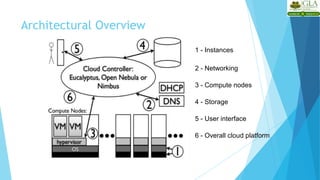
  • 126.
    Applications where SaaSmay not be the best option 13 • Applications where extremely fast processing of real time data is needed • Applications where legislation or other regulation does not permit data being hosted externally • Applications where an existing on-premise solution fulfills all of the organization’s needs Source: http://broadcast.rackspace.com/hosting_knowledge/whitepapers/Understanding- the-Cloud-Computing-Stack.pdf
  • 127.
    Platform as aService 14 • Platform as a Service (PaaS) brings the benefits that SaaS bought for applications, but over to the software development world. PaaS can be defined as a computing platform that allows the creation of web applications quickly and easily and without the complexity of buying and maintaining the software and infrastructure underneath it. • PaaS is analogous to SaaS except that, rather than being software delivered over the web, it is a platform for the creation of software, delivered over the web. Source: http://broadcast.rackspace.com/hosting_knowledge/whitepapers/Understanding- the-Cloud-Computing-Stack.pdf
  • 128.
    Characteristics of PaaS 15 Services to develop, test, deploy, host and maintain applications in the same integrated development environment. All the varying services needed to fulfill the application development process.  Web based user interface creation tools help to create, modify, test and deploy different UI scenarios.  Multi-tenant architecture where multiple concurrent users utilize the same development application.  Built in scalability of deployed software including load balancing and failover.  Integration with web services and databases via common standards.  Support for development team collaboration – some PaaS solutions include project planning and communication tools.  Tools to handle billing and subscription management Source: http://broadcast.rackspace.com/hosting_knowledge/whitepapers/Understanding- the-Cloud-Computing-Stack.pdf
  • 129.
    Scenarios where PaaSis used 16  PaaS is especially useful in any situation where multiple developers will be working on a development project or where other external parties need to interact with the development process  PaaS is useful where developers wish to automate testing and deployment services.  The popularity of agile software development, a group of software development methodologies based on iterative and incremental development, will also increase the uptake of PaaS as it eases the difficulties around rapid development and iteration of software.  PaaS Examples: Microsoft Azure, Google App Engine Source: http://broadcast.rackspace.com/hosting_knowledge/whitepapers/Understanding- the-Cloud-Computing-Stack.pdf
  • 130.
    Scenarios where PaaSis not ideal 17 • Where the application needs to be highly portable in terms of where it is hosted. • Where proprietary languages or approaches would impact on the development process • Where a proprietary language would hinder later moves to another provider – concerns are raised about vendor lock in • Where application performance requires customization of the underlying hardware and software Source: http://broadcast.rackspace.com/hosting_knowledge/whitepapers/Understanding- the-Cloud-Computing-Stack.pdf
  • 131.
    Infrastructure as aService • Infrastructure as a Service (IaaS) is a way of delivering Cloud Computing infrastructure – servers, storage, network and operating systems – as an on-demand service. • Rather than purchasing servers, software, datacenter space or network equipment, clients instead buy those resources as a fully outsourced service on demand. Source: http://broadcast.rackspace.com/hosting_knowledge/whitepapers/Understanding- the-Cloud-Computing-Stack.pdf 18
  • 132.
    Characteristics of IaaS •Resources are distributed as a service • Allows for dynamic scaling • Has a variable cost, utility pricing model • Generally includes multiple users on a single piece of hardware 19 Source: http://broadcast.rackspace.com/hosting_knowledge/whitepapers/Understanding-the-Cloud- Computing-Stack.pdf
  • 133.
    Scenarios where IaaSmakes sense 20  Where demand is very volatile – any time there are significant spikes and troughs in terms of demand on the infrastructure  For new organizations without the capital to invest in hardware  Where the organization is growing rapidly and scaling hardware would be problematic  Where there is pressure on the organization to limit capital expenditure and to move to operating expenditure  For specific line of business, trial or temporary infrastructural needs Source: http://broadcast.rackspace.com/hosting_knowledge/whitepapers/Understanding- the-Cloud-Computing-Stack.pdf
  • 134.
    Scenarios where IaaSmay not be the best • Where regulatory compliance makes the offshoring or outsourcing of data storage and processing difficult • Where the highest levels of performance are required, and on- premise or dedicated hosted infrastructure has the capacity to meet the organization’s needs  Source: http://broadcast.rackspace.com/hosting_knowledge/whitepa pers/Understanding-the-Cloud-Computing-Stack.pdf 21 option
  • 135.
  • 136.
    Feature comparison ofPaaS providers 23 Source: http://www.cs.helsinki.fi/u/epsavola/seminaari/Cloud%20Service%20Models. pdf
  • 137.
    Feature comparison ofIaaS providers 24 Source: http://www.cs.helsinki.fi/u/epsavola/seminaari/Cloud%20Service%20Models. pdf
  • 138.
  • 139.
    Role of Networkingin cloud computing 26 • In cloud computing, network resources can be provisioned dynamically. • Some of the networking concepts that form the core of cloud computing are Virtual Local Area Networks, Virtual Private Networks and the different protocol layers. • Examples of tools that help in setting up different network topologies and facilitate various network configurations are OpenSSH, OpenVPN etc. Source: http://www.slideshare.net/alexamies/networking-concepts-and-tools- for-the-cloud
  • 140.
    Networking in differentcloud models 27 Source: http://www.slideshare.net/alexamies/networking-concepts-and-tools- for-the-cloud
  • 141.
    Any Questions ? Mrs. RuchiAgrawal Assistant Professor Email: Ruchi.agrawal@gla.ac.in