Collection
Collection
• A group of individual object as a single entity is called collection.
Collection Framework
• It defines several classes and interfaces , which can be used to
represent a group of objects as a single entity.
Hierarchy of Collection Framework
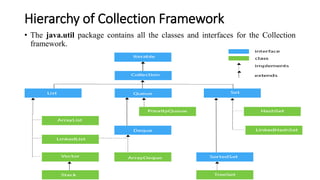
• The java.util package contains all the classes and interfaces for the Collection
framework.
Collection Interface
• If we want to represent a group of individual object as a single entity
then should go for collection.
Methods of Collection Interface
1. boolean add(Object o): It is used to insert an element (object) in
the collection.
2. boolean addAll(Collection c): It is used to insert the specified
collection elements (objects) in the collection.
3. boolean remove(Object o): It is used to delete an element (object)
from the collection.
Cont…
4. boolean removeAll(Collection c): It is used to delete all the
elements (objects) of the specified collection from the collection.
5. boolean retainAll(Collection c): It is used to delete all the elements
(objects) of collection except those present in collection c.
6. void clear(): It removes all elements (objects) from the collection.
Cont…
7. int size(): It returns the total number of elements (objects) in the
collection.
8. Iterator iterator(): It returns reference of an Iterator interface.
List Interface
• List is the child interface of Collection interface.
• If we want to represent a group of individual object where duplicate
objects are allowed and insertion order is preserved then we should go
for List.
• Insertion order will be preserved by mean of index.
Cont…
• We can differentiate duplicate object by using index. Hence index
place a very important role in List.
• We can also store the null elements in the list.
Methods of List Interface
1. void add(int index, Object o): It is used to insert the specified
element at the specified position (index) in a list.
2. boolean addAll(int index, Collection c): It is used to append all the
elements in the specified collection, starting at the specified position
(index) of the list.
3. Object remove(int index): It is used to remove the element present
at the specified position (index) in the list.
Cont…
4. Object get(int index): It is used to get the element from the
particular index of the list.
5. boolean set(int index, Object new): It is used to replace the
specified element in the list, present at the specified position and
return the element previously at the specified position
6. int indexOf(Object o): It is used to return the index in this list of
the first occurrence of the specified element, or -1 if the List does
not contain this element.
Cont…
7. int lastIndexOf(Object o): It is used to return the index in this list
of the last occurrence of the specified element, or -1 if the list does
not contain this element.
Iterator Interface (Universal cursor)
• Iterator interface can be used to get object one by one from the
collection.
• We can use Iterator interface for any collection so it is called universal
cursor.
Methods of Iterator Interface
1. public boolean hasNext(): It returns true if the iterator has more
elements otherwise it returns false.
2. public Object next(): It returns the next element in the iteration and
moves the cursor pointer to the next element.
3. public void remove(): It removes the element.
ArrayList class
• ArrayList implements the List interface so we can use all the methods
of the List interface here.
• It uses a dynamic array for storing the elements. It is like an array, but
there is no size limit.
• The underlying data structure for a ArrayList is resizable array
(dynamic array) or growable array.
Cont…
• Insertion order is preserved.
• Duplicate objects are allowed.
• Heterogeneous objects are allowed.
• null insertion is possible.
Cont…
• ArrayList allows random access because the array works on an index
basis.
• In ArrayList, manipulation is a little bit slower than the LinkedList in
Java because a lot of shifting needs to occur if any element is removed
from the array list.
Constructor of ArrayList class
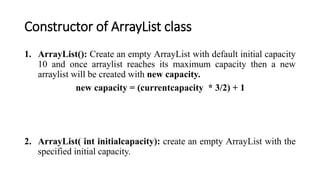
1. ArrayList(): Create an empty ArrayList with default initial capacity
10 and once arraylist reaches its maximum capacity then a new
arraylist will be created with new capacity.
new capacity = (currentcapacity * 3/2) + 1
2. ArrayList( int initialcapacity): create an empty ArrayList with the
specified initial capacity.
Example of ArrayList (Storing heterogeneous
elements)
• Example-1 : Write a program to store heterogeneous elements
(objects) in an ArrayList then print arrayList.
import java.util.*;
class ArrayList1
{
public static void main(String a[])
{
ArrayList al = new ArrayList();
al.add(1);
al.add(2.2);
al.add("Ram");
al.add('D');
System.out.println(al);
}
}
Output:
[1, 2.2, Ram, D]
Example of ArrayList (Storing homogeneous
elements)
• Example-2 : Write a program to store only homogeneous elements
(objects) in an ArrayList then print arrayList.
import java.util.*;
class ArrayList2
{
public static void main(String a[])
{
ArrayList<Integer> al = new ArrayList<Integer>();
al.add(1);
al.add(2);
al.add(3);
al.add(4);
System.out.println(al);
}
}
Output:
[1, 2, 3, 4]
Example-3
• Write a program to store elements (objects) in an ArrayList then print
the element of arrayList by using Iterator interface.
import java.util.*;
class ArrayList3
{
public static void main(String a[])
{
ArrayList al = new ArrayList();
al.add(1);
al.add(2.2);
al.add("Ram");
al.add('D');
Iterator it = al.iterator();
while(it.hasNext())
{
System.out.println(it.next());
}
}
}
Output:
1
2.2
Ram
D
LinkedList class
• The underlying data structure for a LinkedList is doubly linked list.
• Insertion order is preserved.
• Duplicate objects are allowed.
• Heterogeneous objects are allowed.
• null insertion is possible.
Cont…
• LinkedList is best choice if our frequent operation is insertion or
deletion in the middle.
• LinkedList is worst choice if our frequent operation is retrival.
Constructor of LinkedList class
1. LinkedList(): Create an empty LinkedList.
Methods of LinkedList class
1. void addFirst(Object o): It is used to insert the specified element
(object) at the beginning of list.
2. void addLast(Object o): It is used to add the specified element
(object) to the end of list.
3. Object removeFirst(): It is used to remove and return the first
element (object) from list.
Cont…
4. Object removeLast(): It is used to remove and return the last
element (object) from list.
5. Object getFirst(): It is used to return the first element (object) from
list.
6. Object getLast(): It is used to returns the last element (object) from
list.
Example
• Example-1 : Write a program to store elements (objects) in an
LinkedList then print LinkedList.
import java.util.*;
class LinkedListExample
{
public static void main(String a[])
{
LinkedList l = new LinkedList();
l.add(1);
l.add(2.2);
l.add("Ram");
l.add('D');
System.out.println(l);
}
}
Output:
[1, 2.2, Ram, D]
Set Interface
• Set is the child interface of Collection interface.
• If we want to represent a group of individual object where duplicate
objects are not allowed and insertion order is not preserved then we
should go for Set.
• Set interface does not contain any method so we have to use only
methods of collection interface.
HashSet class
• The underlying data structure for HashSet is Hash table.
• Duplicate objects are not allowed.
• Insertion order is not preserved and all objects are inserted according
to their hash code.
• Heterogeneous objects are allowed.
Cont…
• null insertion is possible only once because duplicates are not allowed.
• HashSet is the best approach for search operations.
Constructor of HashSet class
1. HashSet(): Create an empty HashSet with default initial capacity 16
and fill ration .75.
2. HashSet(int initialcapacity): create an empty HashSet with the
specified initial capacity and fill ration .75.
3. .
Example
• Example-1 : Write a program to store elements (objects) in an
HashSet then print HashSet.
import java.util.*;
class HashSetExample
{
public static void main(String a[])
{
HashSet hs = new HashSet();
hs.add(1);
hs.add(2.2);
hs.add("Ram");
hs.add('D');
System.out.println(hs);
}
}
LinkedHashSet class
• LinkedHashSet is the child class of HashSet.
• It is exactly same as HashSet except the following difference.
• The underlying data structure for LinkedHashSet is a combination of
Hash table and LinkedList.
• Insertion order is preserved.
Example
• Example-1 : Write a program to store elements (objects) in an
LinkedHashSet then print LinkedHashSet.
import java.util.*;
class LinkedHashSetExample
{
public static void main(String a[])
{
LinkedHashSet lhs = new LinkedHashSet();
lhs.add(1);
lhs.add(2.2);
lhs.add("Ram");
lhs.add('D');
System.out.println(lhs);
}
}
Output:
[1, 2.2, Ram, D]
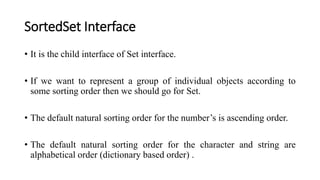
SortedSet Interface
• It is the child interface of Set interface.
• If we want to represent a group of individual objects according to
some sorting order then we should go for Set.
• The default natural sorting order for the number’s is ascending order.
• The default natural sorting order for the character and string are
alphabetical order (dictionary based order) .
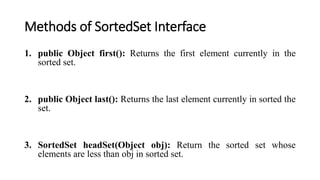
Methods of SortedSet Interface
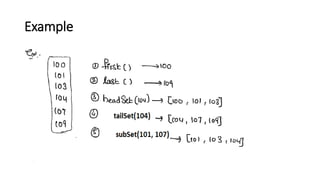
1. public Object first(): Returns the first element currently in the
sorted set.
2. public Object last(): Returns the last element currently in sorted the
set.
3. SortedSet headSet(Object obj): Return the sorted set whose
elements are less than obj in sorted set.
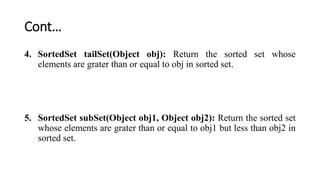
Cont…
4. SortedSet tailSet(Object obj): Return the sorted set whose
elements are grater than or equal to obj in sorted set.
5. SortedSet subSet(Object obj1, Object obj2): Return the sorted set
whose elements are grater than or equal to obj1 but less than obj2 in
sorted set.
Example

Collection Framework-1.pptx

  • 1.
  • 2.
    Collection • A groupof individual object as a single entity is called collection.
  • 3.
    Collection Framework • Itdefines several classes and interfaces , which can be used to represent a group of objects as a single entity.
  • 4.
    Hierarchy of CollectionFramework • The java.util package contains all the classes and interfaces for the Collection framework.
  • 5.
    Collection Interface • Ifwe want to represent a group of individual object as a single entity then should go for collection.
  • 6.
    Methods of CollectionInterface 1. boolean add(Object o): It is used to insert an element (object) in the collection. 2. boolean addAll(Collection c): It is used to insert the specified collection elements (objects) in the collection. 3. boolean remove(Object o): It is used to delete an element (object) from the collection.
  • 7.
    Cont… 4. boolean removeAll(Collectionc): It is used to delete all the elements (objects) of the specified collection from the collection. 5. boolean retainAll(Collection c): It is used to delete all the elements (objects) of collection except those present in collection c. 6. void clear(): It removes all elements (objects) from the collection.
  • 8.
    Cont… 7. int size():It returns the total number of elements (objects) in the collection. 8. Iterator iterator(): It returns reference of an Iterator interface.
  • 9.
    List Interface • Listis the child interface of Collection interface. • If we want to represent a group of individual object where duplicate objects are allowed and insertion order is preserved then we should go for List. • Insertion order will be preserved by mean of index.
  • 10.
    Cont… • We candifferentiate duplicate object by using index. Hence index place a very important role in List. • We can also store the null elements in the list.
  • 11.
    Methods of ListInterface 1. void add(int index, Object o): It is used to insert the specified element at the specified position (index) in a list. 2. boolean addAll(int index, Collection c): It is used to append all the elements in the specified collection, starting at the specified position (index) of the list. 3. Object remove(int index): It is used to remove the element present at the specified position (index) in the list.
  • 12.
    Cont… 4. Object get(intindex): It is used to get the element from the particular index of the list. 5. boolean set(int index, Object new): It is used to replace the specified element in the list, present at the specified position and return the element previously at the specified position 6. int indexOf(Object o): It is used to return the index in this list of the first occurrence of the specified element, or -1 if the List does not contain this element.
  • 13.
    Cont… 7. int lastIndexOf(Objecto): It is used to return the index in this list of the last occurrence of the specified element, or -1 if the list does not contain this element.
  • 14.
    Iterator Interface (Universalcursor) • Iterator interface can be used to get object one by one from the collection. • We can use Iterator interface for any collection so it is called universal cursor.
  • 15.
    Methods of IteratorInterface 1. public boolean hasNext(): It returns true if the iterator has more elements otherwise it returns false. 2. public Object next(): It returns the next element in the iteration and moves the cursor pointer to the next element. 3. public void remove(): It removes the element.
  • 16.
    ArrayList class • ArrayListimplements the List interface so we can use all the methods of the List interface here. • It uses a dynamic array for storing the elements. It is like an array, but there is no size limit. • The underlying data structure for a ArrayList is resizable array (dynamic array) or growable array.
  • 17.
    Cont… • Insertion orderis preserved. • Duplicate objects are allowed. • Heterogeneous objects are allowed. • null insertion is possible.
  • 18.
    Cont… • ArrayList allowsrandom access because the array works on an index basis. • In ArrayList, manipulation is a little bit slower than the LinkedList in Java because a lot of shifting needs to occur if any element is removed from the array list.
  • 19.
    Constructor of ArrayListclass 1. ArrayList(): Create an empty ArrayList with default initial capacity 10 and once arraylist reaches its maximum capacity then a new arraylist will be created with new capacity. new capacity = (currentcapacity * 3/2) + 1 2. ArrayList( int initialcapacity): create an empty ArrayList with the specified initial capacity.
  • 20.
    Example of ArrayList(Storing heterogeneous elements) • Example-1 : Write a program to store heterogeneous elements (objects) in an ArrayList then print arrayList.
  • 21.
    import java.util.*; class ArrayList1 { publicstatic void main(String a[]) { ArrayList al = new ArrayList(); al.add(1); al.add(2.2); al.add("Ram"); al.add('D'); System.out.println(al); } } Output: [1, 2.2, Ram, D]
  • 22.
    Example of ArrayList(Storing homogeneous elements) • Example-2 : Write a program to store only homogeneous elements (objects) in an ArrayList then print arrayList.
  • 23.
    import java.util.*; class ArrayList2 { publicstatic void main(String a[]) { ArrayList<Integer> al = new ArrayList<Integer>(); al.add(1); al.add(2); al.add(3); al.add(4); System.out.println(al); } } Output: [1, 2, 3, 4]
  • 24.
    Example-3 • Write aprogram to store elements (objects) in an ArrayList then print the element of arrayList by using Iterator interface.
  • 25.
    import java.util.*; class ArrayList3 { publicstatic void main(String a[]) { ArrayList al = new ArrayList(); al.add(1); al.add(2.2); al.add("Ram"); al.add('D'); Iterator it = al.iterator(); while(it.hasNext()) { System.out.println(it.next()); } } } Output: 1 2.2 Ram D
  • 26.
    LinkedList class • Theunderlying data structure for a LinkedList is doubly linked list. • Insertion order is preserved. • Duplicate objects are allowed. • Heterogeneous objects are allowed. • null insertion is possible.
  • 27.
    Cont… • LinkedList isbest choice if our frequent operation is insertion or deletion in the middle. • LinkedList is worst choice if our frequent operation is retrival.
  • 28.
    Constructor of LinkedListclass 1. LinkedList(): Create an empty LinkedList.
  • 29.
    Methods of LinkedListclass 1. void addFirst(Object o): It is used to insert the specified element (object) at the beginning of list. 2. void addLast(Object o): It is used to add the specified element (object) to the end of list. 3. Object removeFirst(): It is used to remove and return the first element (object) from list.
  • 30.
    Cont… 4. Object removeLast():It is used to remove and return the last element (object) from list. 5. Object getFirst(): It is used to return the first element (object) from list. 6. Object getLast(): It is used to returns the last element (object) from list.
  • 31.
    Example • Example-1 :Write a program to store elements (objects) in an LinkedList then print LinkedList.
  • 32.
    import java.util.*; class LinkedListExample { publicstatic void main(String a[]) { LinkedList l = new LinkedList(); l.add(1); l.add(2.2); l.add("Ram"); l.add('D'); System.out.println(l); } } Output: [1, 2.2, Ram, D]
  • 33.
    Set Interface • Setis the child interface of Collection interface. • If we want to represent a group of individual object where duplicate objects are not allowed and insertion order is not preserved then we should go for Set. • Set interface does not contain any method so we have to use only methods of collection interface.
  • 34.
    HashSet class • Theunderlying data structure for HashSet is Hash table. • Duplicate objects are not allowed. • Insertion order is not preserved and all objects are inserted according to their hash code. • Heterogeneous objects are allowed.
  • 35.
    Cont… • null insertionis possible only once because duplicates are not allowed. • HashSet is the best approach for search operations.
  • 36.
    Constructor of HashSetclass 1. HashSet(): Create an empty HashSet with default initial capacity 16 and fill ration .75. 2. HashSet(int initialcapacity): create an empty HashSet with the specified initial capacity and fill ration .75. 3. .
  • 37.
    Example • Example-1 :Write a program to store elements (objects) in an HashSet then print HashSet.
  • 38.
    import java.util.*; class HashSetExample { publicstatic void main(String a[]) { HashSet hs = new HashSet(); hs.add(1); hs.add(2.2); hs.add("Ram"); hs.add('D'); System.out.println(hs); } }
  • 39.
    LinkedHashSet class • LinkedHashSetis the child class of HashSet. • It is exactly same as HashSet except the following difference. • The underlying data structure for LinkedHashSet is a combination of Hash table and LinkedList. • Insertion order is preserved.
  • 40.
    Example • Example-1 :Write a program to store elements (objects) in an LinkedHashSet then print LinkedHashSet.
  • 41.
    import java.util.*; class LinkedHashSetExample { publicstatic void main(String a[]) { LinkedHashSet lhs = new LinkedHashSet(); lhs.add(1); lhs.add(2.2); lhs.add("Ram"); lhs.add('D'); System.out.println(lhs); } } Output: [1, 2.2, Ram, D]
  • 42.
    SortedSet Interface • Itis the child interface of Set interface. • If we want to represent a group of individual objects according to some sorting order then we should go for Set. • The default natural sorting order for the number’s is ascending order. • The default natural sorting order for the character and string are alphabetical order (dictionary based order) .
  • 43.
    Methods of SortedSetInterface 1. public Object first(): Returns the first element currently in the sorted set. 2. public Object last(): Returns the last element currently in sorted the set. 3. SortedSet headSet(Object obj): Return the sorted set whose elements are less than obj in sorted set.
  • 44.
    Cont… 4. SortedSet tailSet(Objectobj): Return the sorted set whose elements are grater than or equal to obj in sorted set. 5. SortedSet subSet(Object obj1, Object obj2): Return the sorted set whose elements are grater than or equal to obj1 but less than obj2 in sorted set.
  • 45.