Layout Managers
 Each container has a layout manager, which controls the
way the components are positioned in the container.
 The layout manager automatically handles the
calculation of absolute coordinates where each
component is to be placed or the dimensions of the
component.
 Whenever the dimensions of the container change (e.g.
user resizes the window), layout manager recalculates
the absolute coordinates of components for them to fit
the new container size.
 Different layout managers can be used interchangeably
and one inside the other.
Flow Layout
 The Flow Layout manager arranges the components
left-to-right, top-to-bottom in the order they were
inserted into the container.
 When the container is not wide enough to display all
the components, the remaining components are
placed in the next row, etc.
 Each row is centered.
Flow Layout Examples
Flow Layout Constructors
FlowLayout(align, hgap, vgap)
align – alignment used by the manager.
hgap – horizontal gaps between components.
vgap – vertical gaps between components.
FlowLayout(align)
align – alignment used by the manager. A default 5-
unit horizontal and vertical gap.
FlowLayout()
A centered alignment and a default 5-unit horizontal
and vertical gap.
Flow Layout Alignment
 The line alignment can be:
 FlowLayout.LEFT
 FlowLayout.CENTER
 FlowLayout.RIGHT
 FlowLayout.LEADING
 FlowLayout.TRAILING
Grid Layout
 The Grid Layout manager lays out all the
components in a rectangular grid.
 All the components have identical sizes, since the
manager automatically stretches or compresses
the components as to fill the entire space of the
container.
Grid Layout Examples
Grid Layout Constructors
GridLayout(r, c, hgap, vgap)
r – number of rows in the layout
c – number of columns in the layout
hgap – horizontal gaps between components
vgap – vertical gaps between components
GridLayout(r, c)
r – number of rows in the layout
c – number of columns in the layout
No vertical or horizontal gaps.
GridLayout()
A single row and no vertical or horizontal gaps.
Border Layout
 The Border Layout manager arranges components
into five regions: North, South, East, West, and
Center.
 Components in the North and South are set to their
natural heights and horizontally stretched to fill the
entire width of the container.
 Components in the East and West are set to their
natural widths and stretched vertically to fill the
entire height of the container.
 The Center component fills the space left in the
center of the container.
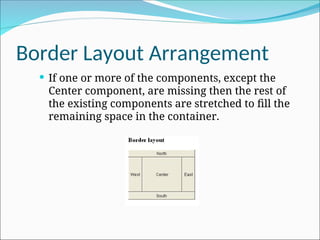
Border Layout Arrangement
 If one or more of the components, except the
Center component, are missing then the rest of
the existing components are stretched to fill the
remaining space in the container.
Border Layout Constructors
BorderLayout(hgap, vgap)
hgap – horizontal gaps between components
vgap – vertical gaps between components
BorderLayout()
No vertical or horizontal gaps.
CardLayout
 The CardLayout class represents several
different layouts.
 Each layout is on a separate card (Panel), stacked
one over another. At any given time, one card
can be brought to the top and displayed.
CardLayout( )
CardLayout(int horz, int vert)
CardLayout
 Create CardLayout object.
 Create a Panel object, which will act as deck.
 Set the layout of the deck to the CardLayout.
 Create individual components / cards(Panels) and
add them to the deck panel.
void add(Component panelObj, Object name);
 name is a string that specifies the name of the card
whose panel is specified by panelObj.
CardLayout
 methods defined by CardLayout:
void first(Container deck)
void last(Container deck)
void next(Container deck)
void previous(Container deck)
void show(Container deck, String cardName)

Java AWR LayoutManagers for B. Tech. 2nd Year.ppt

  • 2.
    Layout Managers  Eachcontainer has a layout manager, which controls the way the components are positioned in the container.  The layout manager automatically handles the calculation of absolute coordinates where each component is to be placed or the dimensions of the component.  Whenever the dimensions of the container change (e.g. user resizes the window), layout manager recalculates the absolute coordinates of components for them to fit the new container size.  Different layout managers can be used interchangeably and one inside the other.
  • 3.
    Flow Layout  TheFlow Layout manager arranges the components left-to-right, top-to-bottom in the order they were inserted into the container.  When the container is not wide enough to display all the components, the remaining components are placed in the next row, etc.  Each row is centered.
  • 4.
  • 5.
    Flow Layout Constructors FlowLayout(align,hgap, vgap) align – alignment used by the manager. hgap – horizontal gaps between components. vgap – vertical gaps between components. FlowLayout(align) align – alignment used by the manager. A default 5- unit horizontal and vertical gap. FlowLayout() A centered alignment and a default 5-unit horizontal and vertical gap.
  • 6.
    Flow Layout Alignment The line alignment can be:  FlowLayout.LEFT  FlowLayout.CENTER  FlowLayout.RIGHT  FlowLayout.LEADING  FlowLayout.TRAILING
  • 7.
    Grid Layout  TheGrid Layout manager lays out all the components in a rectangular grid.  All the components have identical sizes, since the manager automatically stretches or compresses the components as to fill the entire space of the container.
  • 8.
  • 9.
    Grid Layout Constructors GridLayout(r,c, hgap, vgap) r – number of rows in the layout c – number of columns in the layout hgap – horizontal gaps between components vgap – vertical gaps between components GridLayout(r, c) r – number of rows in the layout c – number of columns in the layout No vertical or horizontal gaps. GridLayout() A single row and no vertical or horizontal gaps.
  • 10.
    Border Layout  TheBorder Layout manager arranges components into five regions: North, South, East, West, and Center.  Components in the North and South are set to their natural heights and horizontally stretched to fill the entire width of the container.  Components in the East and West are set to their natural widths and stretched vertically to fill the entire height of the container.  The Center component fills the space left in the center of the container.
  • 11.
    Border Layout Arrangement If one or more of the components, except the Center component, are missing then the rest of the existing components are stretched to fill the remaining space in the container.
  • 12.
    Border Layout Constructors BorderLayout(hgap,vgap) hgap – horizontal gaps between components vgap – vertical gaps between components BorderLayout() No vertical or horizontal gaps.
  • 13.
    CardLayout  The CardLayoutclass represents several different layouts.  Each layout is on a separate card (Panel), stacked one over another. At any given time, one card can be brought to the top and displayed. CardLayout( ) CardLayout(int horz, int vert)
  • 14.
    CardLayout  Create CardLayoutobject.  Create a Panel object, which will act as deck.  Set the layout of the deck to the CardLayout.  Create individual components / cards(Panels) and add them to the deck panel. void add(Component panelObj, Object name);  name is a string that specifies the name of the card whose panel is specified by panelObj.
  • 15.
    CardLayout  methods definedby CardLayout: void first(Container deck) void last(Container deck) void next(Container deck) void previous(Container deck) void show(Container deck, String cardName)