Java LayoutManagers:
 The LayoutManagers are used to arrange
components in a particular manner.
 The Java LayoutManagers facilitates us to
control the positioning and size of the
components in GUI forms. LayoutManager is
an interface that is implemented by all the
classes of layout managers.
 There are the following classes that
represent the layout managers:
 java.awt.BorderLayout
 java.awt.FlowLayout
 java.awt.GridLayout
 java.awt.CardLayout
 java.awt.GridBagLayout
 javax.swing.BoxLayout
 javax.swing.GroupLayout
 javax.swing.ScrollPaneLayout
 javax.swing.SpringLayout etc.
java FlowLayout:
 The Java FlowLayout class is used to
arrange the components in a line, one after
another (in a flow). It is the default layout of
the applet or panel.
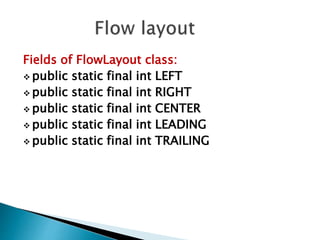
Fields of FlowLayout class:
 public static final int LEFT
 public static final int RIGHT
 public static final int CENTER
 public static final int LEADING
 public static final int TRAILING
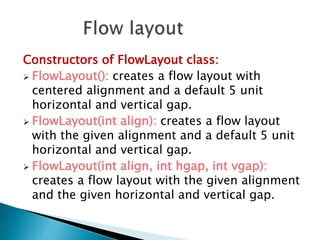
Constructors of FlowLayout class:
 FlowLayout(): creates a flow layout with
centered alignment and a default 5 unit
horizontal and vertical gap.
 FlowLayout(int align): creates a flow layout
with the given alignment and a default 5 unit
horizontal and vertical gap.
 FlowLayout(int align, int hgap, int vgap):
creates a flow layout with the given alignment
and the given horizontal and vertical gap.
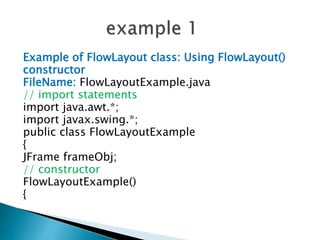
Example of FlowLayout class: Using FlowLayout()
constructor
FileName: FlowLayoutExample.java
// import statements
import java.awt.*;
import javax.swing.*;
public class FlowLayoutExample
{
JFrame frameObj;
// constructor
FlowLayoutExample()
{
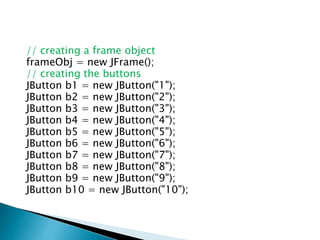
// creating a frame object
frameObj = new JFrame();
// creating the buttons
JButton b1 = new JButton("1");
JButton b2 = new JButton("2");
JButton b3 = new JButton("3");
JButton b4 = new JButton("4");
JButton b5 = new JButton("5");
JButton b6 = new JButton("6");
JButton b7 = new JButton("7");
JButton b8 = new JButton("8");
JButton b9 = new JButton("9");
JButton b10 = new JButton("10");
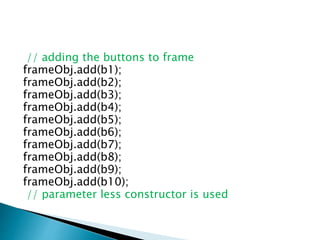
// adding the buttons to frame
frameObj.add(b1);
frameObj.add(b2);
frameObj.add(b3);
frameObj.add(b4);
frameObj.add(b5);
frameObj.add(b6);
frameObj.add(b7);
frameObj.add(b8);
frameObj.add(b9);
frameObj.add(b10);
// parameter less constructor is used
// therefore, alignment is center
// horizontal as well as the vertical gap is 5
units
frameObj.setLayout(new FlowLayout());
frameObj.setSize(300, 300);
frameObj.setVisible(true);
}
// main method
public static void main(String argvs[])
{
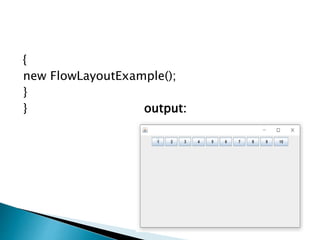
new FlowLayoutExample();
}
} output:
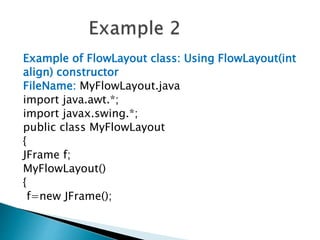
Example of FlowLayout class: Using FlowLayout(int
align) constructor
FileName: MyFlowLayout.java
import java.awt.*;
import javax.swing.*;
public class MyFlowLayout
{
JFrame f;
MyFlowLayout()
{
f=new JFrame();
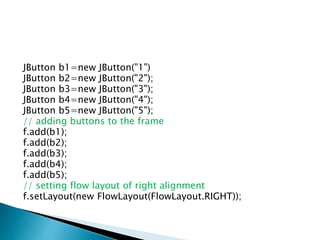
JButton b1=new JButton("1")
JButton b2=new JButton("2");
JButton b3=new JButton("3");
JButton b4=new JButton("4");
JButton b5=new JButton("5");
// adding buttons to the frame
f.add(b1);
f.add(b2);
f.add(b3);
f.add(b4);
f.add(b5);
// setting flow layout of right alignment
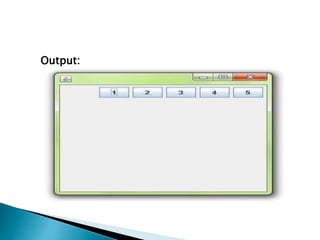
f.setLayout(new FlowLayout(FlowLayout.RIGHT));
f.setSize(300,300);
f.setVisible(true);
}
public static void main(String[] args)
{
new MyFlowLayout();
}
}
Output:
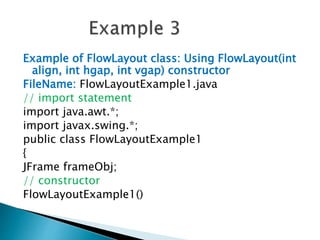
Example of FlowLayout class: Using FlowLayout(int
align, int hgap, int vgap) constructor
FileName: FlowLayoutExample1.java
// import statement
import java.awt.*;
import javax.swing.*;
public class FlowLayoutExample1
{
JFrame frameObj;
// constructor
FlowLayoutExample1()
{
// creating a frame object
frameObj = new JFrame();
// creating the buttons
JButton b1 = new JButton("1");
JButton b2 = new JButton("2");
JButton b3 = new JButton("3");
JButton b4 = new JButton("4");
JButton b5 = new JButton("5");
JButton b6 = new JButton("6");
JButton b7 = new JButton("7");
JButton b8 = new JButton("8");
JButton b9 = new JButton("9");
JButton b10 = new JButton("10");
// adding the buttons to frame
frameObj.add(b1);
frameObj.add(b2);
frameObj.add(b3);
frameObj.add(b4);
frameObj.add(b5);
frameObj.add(b6);
frameObj.add(b7);
frameObj.add(b8);
frameObj.add(b9);
frameObj.add(b10);
// parameterized constructor is used
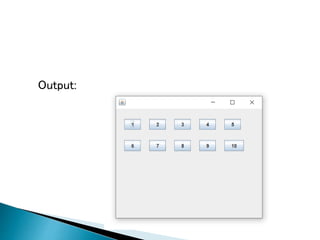
// where alignment is left
// horizontal gap is 20 units and vertical gap is 25 units.
frameObj.setLayout(new FlowLayout(FlowLayout.LEFT, 20, 2))
frameObj.setSize(300, 300);
frameObj.setVisible(true);
}
// main method
public static void main(String argvs[])
{
new FlowLayoutExample1();
}
}
Output:
Advanced Java programming

Advanced Java programming

  • 3.
    Java LayoutManagers:  TheLayoutManagers are used to arrange components in a particular manner.  The Java LayoutManagers facilitates us to control the positioning and size of the components in GUI forms. LayoutManager is an interface that is implemented by all the classes of layout managers.  There are the following classes that represent the layout managers:
  • 4.
     java.awt.BorderLayout  java.awt.FlowLayout java.awt.GridLayout  java.awt.CardLayout  java.awt.GridBagLayout  javax.swing.BoxLayout  javax.swing.GroupLayout  javax.swing.ScrollPaneLayout  javax.swing.SpringLayout etc.
  • 5.
    java FlowLayout:  TheJava FlowLayout class is used to arrange the components in a line, one after another (in a flow). It is the default layout of the applet or panel.
  • 6.
    Fields of FlowLayoutclass:  public static final int LEFT  public static final int RIGHT  public static final int CENTER  public static final int LEADING  public static final int TRAILING
  • 7.
    Constructors of FlowLayoutclass:  FlowLayout(): creates a flow layout with centered alignment and a default 5 unit horizontal and vertical gap.  FlowLayout(int align): creates a flow layout with the given alignment and a default 5 unit horizontal and vertical gap.  FlowLayout(int align, int hgap, int vgap): creates a flow layout with the given alignment and the given horizontal and vertical gap.
  • 8.
    Example of FlowLayoutclass: Using FlowLayout() constructor FileName: FlowLayoutExample.java // import statements import java.awt.*; import javax.swing.*; public class FlowLayoutExample { JFrame frameObj; // constructor FlowLayoutExample() {
  • 9.
    // creating aframe object frameObj = new JFrame(); // creating the buttons JButton b1 = new JButton("1"); JButton b2 = new JButton("2"); JButton b3 = new JButton("3"); JButton b4 = new JButton("4"); JButton b5 = new JButton("5"); JButton b6 = new JButton("6"); JButton b7 = new JButton("7"); JButton b8 = new JButton("8"); JButton b9 = new JButton("9"); JButton b10 = new JButton("10");
  • 10.
    // adding thebuttons to frame frameObj.add(b1); frameObj.add(b2); frameObj.add(b3); frameObj.add(b4); frameObj.add(b5); frameObj.add(b6); frameObj.add(b7); frameObj.add(b8); frameObj.add(b9); frameObj.add(b10); // parameter less constructor is used
  • 11.
    // therefore, alignmentis center // horizontal as well as the vertical gap is 5 units frameObj.setLayout(new FlowLayout()); frameObj.setSize(300, 300); frameObj.setVisible(true); } // main method public static void main(String argvs[])
  • 12.
  • 13.
    Example of FlowLayoutclass: Using FlowLayout(int align) constructor FileName: MyFlowLayout.java import java.awt.*; import javax.swing.*; public class MyFlowLayout { JFrame f; MyFlowLayout() { f=new JFrame();
  • 14.
    JButton b1=new JButton("1") JButtonb2=new JButton("2"); JButton b3=new JButton("3"); JButton b4=new JButton("4"); JButton b5=new JButton("5"); // adding buttons to the frame f.add(b1); f.add(b2); f.add(b3); f.add(b4); f.add(b5); // setting flow layout of right alignment f.setLayout(new FlowLayout(FlowLayout.RIGHT));
  • 15.
    f.setSize(300,300); f.setVisible(true); } public static voidmain(String[] args) { new MyFlowLayout(); } }
  • 16.
  • 17.
    Example of FlowLayoutclass: Using FlowLayout(int align, int hgap, int vgap) constructor FileName: FlowLayoutExample1.java // import statement import java.awt.*; import javax.swing.*; public class FlowLayoutExample1 { JFrame frameObj; // constructor FlowLayoutExample1()
  • 18.
    { // creating aframe object frameObj = new JFrame(); // creating the buttons JButton b1 = new JButton("1"); JButton b2 = new JButton("2"); JButton b3 = new JButton("3"); JButton b4 = new JButton("4"); JButton b5 = new JButton("5"); JButton b6 = new JButton("6"); JButton b7 = new JButton("7"); JButton b8 = new JButton("8"); JButton b9 = new JButton("9"); JButton b10 = new JButton("10");
  • 19.
    // adding thebuttons to frame frameObj.add(b1); frameObj.add(b2); frameObj.add(b3); frameObj.add(b4); frameObj.add(b5); frameObj.add(b6); frameObj.add(b7); frameObj.add(b8); frameObj.add(b9); frameObj.add(b10);
  • 20.
    // parameterized constructoris used // where alignment is left // horizontal gap is 20 units and vertical gap is 25 units. frameObj.setLayout(new FlowLayout(FlowLayout.LEFT, 20, 2)) frameObj.setSize(300, 300); frameObj.setVisible(true); } // main method public static void main(String argvs[]) { new FlowLayoutExample1(); } }
  • 21.