SQL DATABASE LANGUAGE
Lab1: Introduction to SQL + Select Query
WHAT IS SQL?
 SQL is a database computer language designed for
the retrieval and management of data in relational
database. SQL stands for Structured Query
Language.
 SQL is the standard language for Relation
Database System. All relational database
management systems (DBMS) like MySQL, MS
Access, Oracle, Sybase, Informix, postgres and
SQL Server use SQL as standard database
language.
WHAT IS SQL?
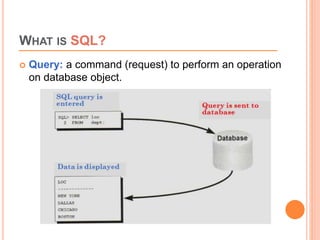
 Query: a command (request) to perform an operation
on database object.
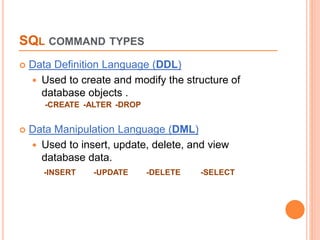
SQL COMMAND TYPES
 Data Definition Language (DDL)
 Used to create and modify the structure of
database objects .
-CREATE -ALTER -DROP
 Data Manipulation Language (DML)
 Used to insert, update, delete, and view
database data.
-INSERT -UPDATE -DELETE -SELECT
DATABASE OBJECTS
 An Oracle database consists of multiple user
accounts.
 Each user account owns database objects
 Tables
 Views
 Stored programs
 Etc.
WHAT IS SQL*PLUS
 SQL*PLUS is a client terminal software allowing
users to interact with Oracle server. It has a
command-line user interface, a Windows Graphical
User Interface (GUI) and the iSQL*Plus web-
based user interface.
 SQL*Plus has its own commands and environment,
and it provides access to the Oracle Database. It
enables you to enter and execute SQL, PL/SQL,
SQL*Plus and operating system commands to
perform different operations.
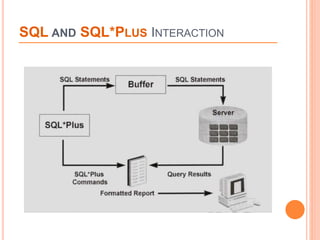
SQL AND SQL*PLUS INTERACTION
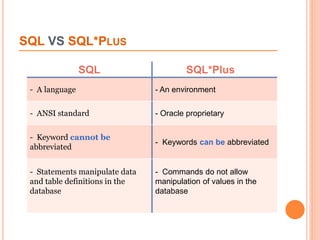
SQL VS SQL*PLUS
SQL
SQL SQL*Pluslu
- A language - An environment
- ANSI standard - Oracle proprietary
- Keyword cannot be
abbreviated
- Keywords can be abbreviated
- Statements manipulate data
and table definitions in the
database
- Commands do not allow
manipulation of values in the
database
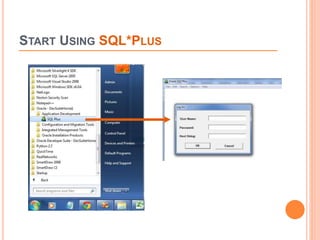
START USING SQL*PLUS
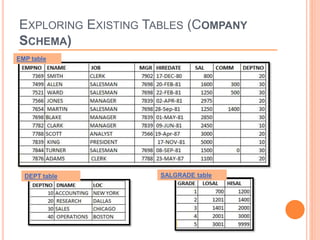
EXPLORING EXISTING TABLES (COMPANY
SCHEMA)
SALGRADE table
DEPT table
EMP table
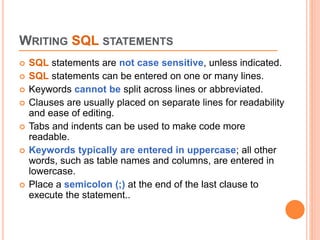
WRITING SQL STATEMENTS
 SQL statements are not case sensitive, unless indicated.
 SQL statements can be entered on one or many lines.
 Keywords cannot be split across lines or abbreviated.
 Clauses are usually placed on separate lines for readability
and ease of editing.
 Tabs and indents can be used to make code more
readable.
 Keywords typically are entered in uppercase; all other
words, such as table names and columns, are entered in
lowercase.
 Place a semicolon (;) at the end of the last clause to
execute the statement..
SELECT STATEMENT
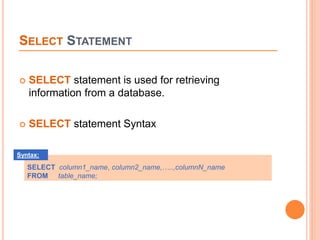
 SELECT statement is used for retrieving
information from a database.
 SELECT statement Syntax
SELECT column1_name, column2_name,…..,columnN_name
FROM table_name;
Syntax:
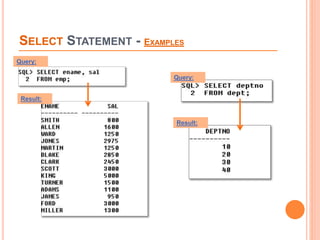
SELECT STATEMENT - EXAMPLES
Query:
Query:
Result:
Result:
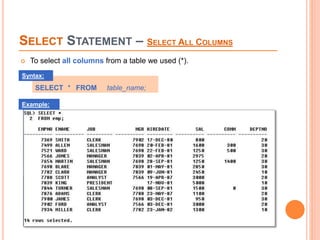
SELECT STATEMENT – SELECT ALL COLUMNS
 To select all columns from a table we used (*).
SELECT * FROM table_name;
Syntax:
Example:
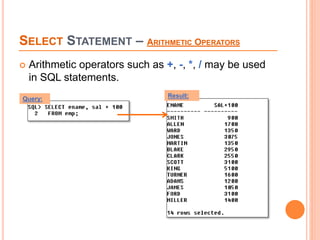
SELECT STATEMENT – ARITHMETIC OPERATORS
 Arithmetic operators such as +, -, *, / may be used
in SQL statements.
Query: Result:
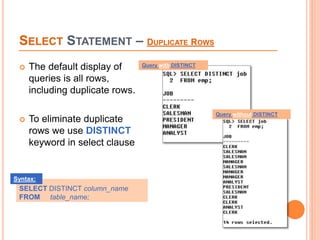
SELECT STATEMENT – DUPLICATE ROWS
 The default display of
queries is all rows,
including duplicate rows.
 To eliminate duplicate
rows we use DISTINCT
keyword in select clause
Query with DISTINCT
SELECT DISTINCT column_name
FROM table_name;
Syntax:
Query without DISTINCT
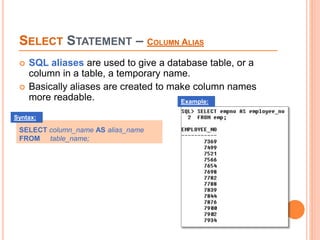
SELECT STATEMENT – COLUMN ALIAS
 SQL aliases are used to give a database table, or a
column in a table, a temporary name.
 Basically aliases are created to make column names
more readable.
SELECT column_name AS alias_name
FROM table_name;
Syntax:
Example:
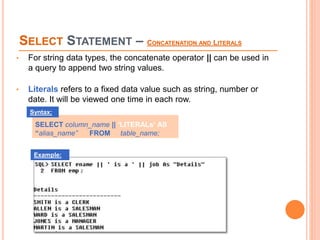
SELECT STATEMENT – CONCATENATION AND LITERALS
• For string data types, the concatenate operator || can be used in
a query to append two string values.
• Literals refers to a fixed data value such as string, number or
date. It will be viewed one time in each row.
SELECT column_name || ‘LITERALs‘ AS
“alias_name” FROM table_name;
Syntax:
Example:
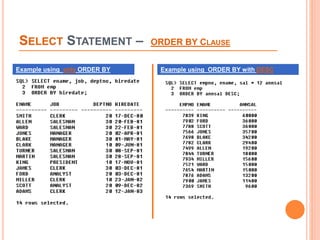
SELECT STATEMENT – ORDER BY CLAUSE
 The ORDER BY keyword is used to sort the result-set by one or more
columns.
 The ORDER BY keyword sorts the records in ascending order by
default. To sort the records in a descending order, you can use the
DESC keyword.
SELECT column_name,column_name
FROM table_name
ORDER BY column_name ASC|DESC;
Syntax:
SELECT STATEMENT – ORDER BY CLAUSE
Example using only ORDER BY Example using ORDER BY with DESC
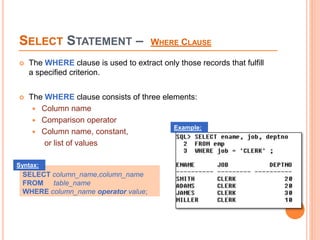
SELECT STATEMENT – WHERE CLAUSE
 The WHERE clause is used to extract only those records that fulfill
a specified criterion.
 The WHERE clause consists of three elements:
 Column name
 Comparison operator
 Column name, constant,
or list of values
SELECT column_name,column_name
FROM table_name
WHERE column_name operator value;
Syntax:
Example:
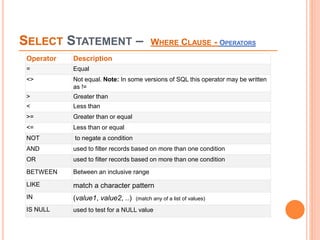
SELECT STATEMENT – WHERE CLAUSE - OPERATORS
Operator Description
= Equal
<> Not equal. Note: In some versions of SQL this operator may be written
as !=
> Greater than
< Less than
>= Greater than or equal
<= Less than or equal
NOT to negate a condition
AND used to filter records based on more than one condition
OR used to filter records based on more than one condition
BETWEEN Between an inclusive range
LIKE match a character pattern
IN (value1, value2, ..) (match any of a list of values)
IS NULL used to test for a NULL value
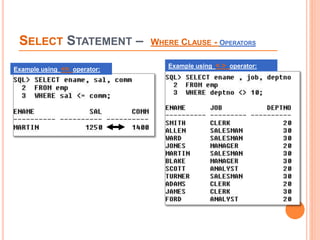
SELECT STATEMENT – WHERE CLAUSE - OPERATORS
Example using <= operator:
Example using < > operator:
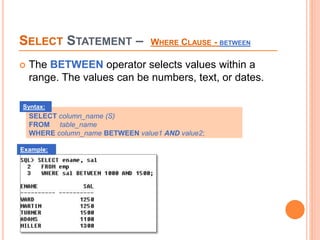
SELECT STATEMENT – WHERE CLAUSE - BETWEEN
 The BETWEEN operator selects values within a
range. The values can be numbers, text, or dates.
SELECT column_name (S)
FROM table_name
WHERE column_name BETWEEN value1 AND value2;
Syntax:
Example:
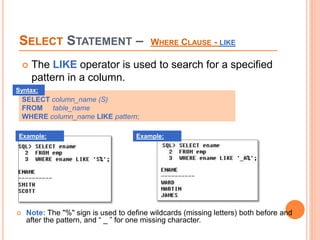
SELECT STATEMENT – WHERE CLAUSE - LIKE
 The LIKE operator is used to search for a specified
pattern in a column.
SELECT column_name (S)
FROM table_name
WHERE column_name LIKE pattern;
Syntax:
 Note: The "%" sign is used to define wildcards (missing letters) both before and
after the pattern, and “ _ ” for one missing character.
Example: Example:
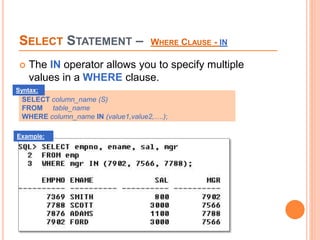
SELECT STATEMENT – WHERE CLAUSE - IN
 The IN operator allows you to specify multiple
values in a WHERE clause.
SELECT column_name (S)
FROM table_name
WHERE column_name IN (value1,value2,….);
Syntax:
Example:
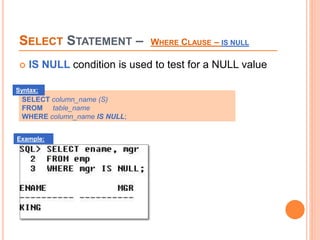
SELECT STATEMENT – WHERE CLAUSE – IS NULL
 IS NULL condition is used to test for a NULL value
SELECT column_name (S)
FROM table_name
WHERE column_name IS NULL;
Syntax:
Example:
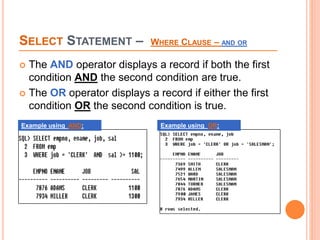
SELECT STATEMENT – WHERE CLAUSE – AND OR
 The AND operator displays a record if both the first
condition AND the second condition are true.
 The OR operator displays a record if either the first
condition OR the second condition is true.
Example using AND: Example using OR:
SUMMARY
The General SELECT statement follows this syntax:
SELECT [DISTINCT] {*| column [alias], … }
FROM table
[WHERE condition(s)]
[ORDER BY {column, expr, alias} [ASC | DESC]];
End of Lab1

Lab1 select statement

  • 1.
    SQL DATABASE LANGUAGE Lab1:Introduction to SQL + Select Query
  • 2.
    WHAT IS SQL? SQL is a database computer language designed for the retrieval and management of data in relational database. SQL stands for Structured Query Language.  SQL is the standard language for Relation Database System. All relational database management systems (DBMS) like MySQL, MS Access, Oracle, Sybase, Informix, postgres and SQL Server use SQL as standard database language.
  • 3.
    WHAT IS SQL? Query: a command (request) to perform an operation on database object.
  • 4.
    SQL COMMAND TYPES Data Definition Language (DDL)  Used to create and modify the structure of database objects . -CREATE -ALTER -DROP  Data Manipulation Language (DML)  Used to insert, update, delete, and view database data. -INSERT -UPDATE -DELETE -SELECT
  • 5.
    DATABASE OBJECTS  AnOracle database consists of multiple user accounts.  Each user account owns database objects  Tables  Views  Stored programs  Etc.
  • 6.
    WHAT IS SQL*PLUS SQL*PLUS is a client terminal software allowing users to interact with Oracle server. It has a command-line user interface, a Windows Graphical User Interface (GUI) and the iSQL*Plus web- based user interface.  SQL*Plus has its own commands and environment, and it provides access to the Oracle Database. It enables you to enter and execute SQL, PL/SQL, SQL*Plus and operating system commands to perform different operations.
  • 7.
    SQL AND SQL*PLUSINTERACTION
  • 8.
    SQL VS SQL*PLUS SQL SQLSQL*Pluslu - A language - An environment - ANSI standard - Oracle proprietary - Keyword cannot be abbreviated - Keywords can be abbreviated - Statements manipulate data and table definitions in the database - Commands do not allow manipulation of values in the database
  • 9.
  • 10.
    EXPLORING EXISTING TABLES(COMPANY SCHEMA) SALGRADE table DEPT table EMP table
  • 11.
    WRITING SQL STATEMENTS SQL statements are not case sensitive, unless indicated.  SQL statements can be entered on one or many lines.  Keywords cannot be split across lines or abbreviated.  Clauses are usually placed on separate lines for readability and ease of editing.  Tabs and indents can be used to make code more readable.  Keywords typically are entered in uppercase; all other words, such as table names and columns, are entered in lowercase.  Place a semicolon (;) at the end of the last clause to execute the statement..
  • 12.
    SELECT STATEMENT  SELECTstatement is used for retrieving information from a database.  SELECT statement Syntax SELECT column1_name, column2_name,…..,columnN_name FROM table_name; Syntax:
  • 13.
    SELECT STATEMENT -EXAMPLES Query: Query: Result: Result:
  • 14.
    SELECT STATEMENT –SELECT ALL COLUMNS  To select all columns from a table we used (*). SELECT * FROM table_name; Syntax: Example:
  • 15.
    SELECT STATEMENT –ARITHMETIC OPERATORS  Arithmetic operators such as +, -, *, / may be used in SQL statements. Query: Result:
  • 16.
    SELECT STATEMENT –DUPLICATE ROWS  The default display of queries is all rows, including duplicate rows.  To eliminate duplicate rows we use DISTINCT keyword in select clause Query with DISTINCT SELECT DISTINCT column_name FROM table_name; Syntax: Query without DISTINCT
  • 17.
    SELECT STATEMENT –COLUMN ALIAS  SQL aliases are used to give a database table, or a column in a table, a temporary name.  Basically aliases are created to make column names more readable. SELECT column_name AS alias_name FROM table_name; Syntax: Example:
  • 18.
    SELECT STATEMENT –CONCATENATION AND LITERALS • For string data types, the concatenate operator || can be used in a query to append two string values. • Literals refers to a fixed data value such as string, number or date. It will be viewed one time in each row. SELECT column_name || ‘LITERALs‘ AS “alias_name” FROM table_name; Syntax: Example:
  • 19.
    SELECT STATEMENT –ORDER BY CLAUSE  The ORDER BY keyword is used to sort the result-set by one or more columns.  The ORDER BY keyword sorts the records in ascending order by default. To sort the records in a descending order, you can use the DESC keyword. SELECT column_name,column_name FROM table_name ORDER BY column_name ASC|DESC; Syntax:
  • 20.
    SELECT STATEMENT –ORDER BY CLAUSE Example using only ORDER BY Example using ORDER BY with DESC
  • 21.
    SELECT STATEMENT –WHERE CLAUSE  The WHERE clause is used to extract only those records that fulfill a specified criterion.  The WHERE clause consists of three elements:  Column name  Comparison operator  Column name, constant, or list of values SELECT column_name,column_name FROM table_name WHERE column_name operator value; Syntax: Example:
  • 22.
    SELECT STATEMENT –WHERE CLAUSE - OPERATORS Operator Description = Equal <> Not equal. Note: In some versions of SQL this operator may be written as != > Greater than < Less than >= Greater than or equal <= Less than or equal NOT to negate a condition AND used to filter records based on more than one condition OR used to filter records based on more than one condition BETWEEN Between an inclusive range LIKE match a character pattern IN (value1, value2, ..) (match any of a list of values) IS NULL used to test for a NULL value
  • 23.
    SELECT STATEMENT –WHERE CLAUSE - OPERATORS Example using <= operator: Example using < > operator:
  • 24.
    SELECT STATEMENT –WHERE CLAUSE - BETWEEN  The BETWEEN operator selects values within a range. The values can be numbers, text, or dates. SELECT column_name (S) FROM table_name WHERE column_name BETWEEN value1 AND value2; Syntax: Example:
  • 25.
    SELECT STATEMENT –WHERE CLAUSE - LIKE  The LIKE operator is used to search for a specified pattern in a column. SELECT column_name (S) FROM table_name WHERE column_name LIKE pattern; Syntax:  Note: The "%" sign is used to define wildcards (missing letters) both before and after the pattern, and “ _ ” for one missing character. Example: Example:
  • 26.
    SELECT STATEMENT –WHERE CLAUSE - IN  The IN operator allows you to specify multiple values in a WHERE clause. SELECT column_name (S) FROM table_name WHERE column_name IN (value1,value2,….); Syntax: Example:
  • 27.
    SELECT STATEMENT –WHERE CLAUSE – IS NULL  IS NULL condition is used to test for a NULL value SELECT column_name (S) FROM table_name WHERE column_name IS NULL; Syntax: Example:
  • 28.
    SELECT STATEMENT –WHERE CLAUSE – AND OR  The AND operator displays a record if both the first condition AND the second condition are true.  The OR operator displays a record if either the first condition OR the second condition is true. Example using AND: Example using OR:
  • 29.
    SUMMARY The General SELECTstatement follows this syntax: SELECT [DISTINCT] {*| column [alias], … } FROM table [WHERE condition(s)] [ORDER BY {column, expr, alias} [ASC | DESC]];
  • 30.