PRACTICAL 03
TO BECOME FAMILIAR WITH DATA RETRIEVAL
COMMANDS
Oracle Database (Oracle DB)
• Oracle database (Oracle DB) is a relational database
management system (RDBMS) from the Oracle Corporation.
• Oracle DB is also known as Oracle RDBMS and, sometimes, just
Oracle.
• The system is built around a relational database framework in
which database objects may be directly accessed by users (or an
application front end) through structured query language (SQL).
• Oracle DB editions are broken down as follows:
• Enterprise Edition: Offers all features, including superior
performance and security, and is the most robust
• Standard Edition: Contains basic functionality for users that do not
require Enterprise Edition’s robust package
• Express Edition (XE): The lightweight, free and limited Windows
and Linux edition.
• Oracle Lite: For mobile devices
Structured Query Language (SQL)
• SQL is the ANSI standard language for relational databases. All
operations on the data in an Oracle database are performed using SQL
statements.
• SQL is a declarative language. SQL is nonprocedural and describes what
should be done. Users specify the result that they want (for example, the
names of employees), not how to derive it.
• SQL is used to query, insert, update and modify data.
• A query language, such as Structured Query Language (SQL), is used to
prepare the queries.
• SQL statements are used to perform tasks such as insert, update
data on a database, or retrieve/select data from a database.
• SQL statements are case insensitive. (Statements that do not
distinguish between uppercase and lowercase are said to be case-
insensitive.)
DATA RETRIEVAL/SELECT COMMANDS
• Data retrieval means obtaining or extracting data from the database management system.
• Select statements are used to retrieve data from SQL tables. OR The SELECT statement
is used to select data from tables.
• Syntax:
SELECT column1, column2, ...
FROM table_name;
 SELECT identifies what columns.
 FROM identifies which table.
EXAMPLE:
SELECT ename from emp;
SELECT COMMAND WITH AN ASTERISK (*)
• Use * with select statement to retrieve all the records stored in
the table.
• SYNTAX:
SELECT * from table_name;
• EXAMPLE:
SELECT * from emp;
• It returns all the columns of the emp table.
SELECT DISTINCT Statement
• The SELECT DISTINCT statement is used to return only distinct
(different) values.
• Inside a table, a column often contains many duplicate values; and
sometimes you only want to list the different (distinct) values.
• DISTINCT keyword is used to eliminate the duplicate values.
• DISTINCT suppresses duplicates.
WHERE CLAUSE
• WHERE clause can be used to limit the number of rows.
• It is used to extract only those records that fulfill a specified condition.
• If the given condition is satisfied, then only it returns a specific value from
the table.
SYNTAX:
SELECT column1, column2, columnN
FROM table_name
WHERE [condition]
EXAMPLE:
1. SELECT ename, job, salary from emp WHERE job='CLERK' ;
2. SELECT ename, job, salary from emp WHERE salary>20000 ;
3. SELECT * FROM Customers WHERE CustomerID=1;
Operators in SQL
• An operator is a reserved word or a character used in an SQL
statement's WHERE clause to perform operation(s), such as
comparisons and arithmetic operations.
• These Operators are used to specify conditions in an SQL statement.
• Operators used in SQL are:
– Arithmetic operators
– Comparison operators
– Logical operators
SQL Arithmetic Operators
• Assume 'variable a' holds 10 and 'variable b' holds 20, then
SQL Comparison Operators
• Assume 'variable a' holds 10 and 'variable b' holds 20, then
Continued..
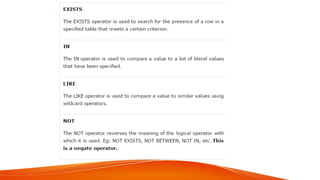
SQL Logical Operators
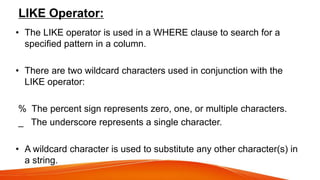
LIKE Operator:
• The LIKE operator is used in a WHERE clause to search for a
specified pattern in a column.
• There are two wildcard characters used in conjunction with the
LIKE operator:
% The percent sign represents zero, one, or multiple characters.
_ The underscore represents a single character.
• A wildcard character is used to substitute any other character(s) in
a string.
LIKE Syntax
EXAMPLE
SELECT * FROM Customers
WHERE CustomerName LIKE 'a%';
 Display all employee names in which the third letter of the name
is a.
• select ename
from emp
where ename like '__a%';
2 underscore represents 2 letters before a and % represents
multiple or zero characters after a.
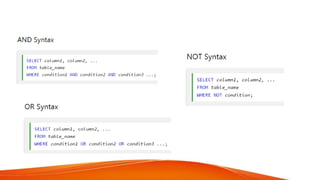
AND, OR and NOT Operators
• The WHERE clause can be combined with AND, OR, and NOT
operators.
• The AND and OR operators are used to filter records based on
more than one condition:
• The AND operator displays a record if all the conditions separated
by AND is TRUE.
• The OR operator displays a record if any of the conditions
separated by OR is TRUE.
• The NOT operator displays a record if the condition(s) is NOT
TRUE.
AND Example
SELECT * FROM emp
WHERE job='PROFESSORE' AND sal=20000;
OR Example
SELECT * FROM emp
WHERE job='PROFESSORE' OR job='CLERK' ;
NOT Example
SELECT * FROM emp
WHERE NOT job='CLERK';
IN Operator
• The IN operator allows you to specify multiple values in a
WHERE clause.
BETWEEN Operator
• The BETWEEN operator selects values within a given range. The
values can be numbers, text, or dates.
• The BETWEEN operator is inclusive: begin and end values are
included.
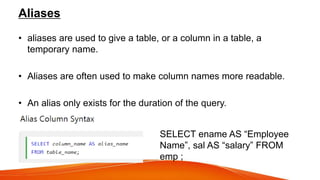
Aliases
• aliases are used to give a table, or a column in a table, a
temporary name.
• Aliases are often used to make column names more readable.
• An alias only exists for the duration of the query.
SELECT ename AS “Employee
Name”, sal AS “salary” FROM
emp ;
NULL Value
• A field with a NULL value is a
field with no value or unknown
or unassigned value.
• How to Test for NULL
Values?
• It is not possible to test for
NULL values with comparison
operators, such as =, <, or <>.
• We will have to use the IS
NULL and IS NOT NULL
Null value is not the same as zero
or a blank space.
EXAMPLE
– Display the employee name and job title of all the employees
who do not have a manager.
SELECT ename, job, mgr FROM emp
WHERE mgr IS NULL;
Display the employee name and job title of all the employees who
have a manager.
SELECT ename, job, mgr FROM emp
WHERE mgr IS NOT NULL;
Concatenation Operator
• Concatenates columns or character strings to other columns.
• It is represented by two vertical bars ||
• EXAMPLE:
– Display the employee name and job as a single output and name the
column “Employees”.
SELECT ename || job AS 'Employees' FROM emp;
CHARACTER STRINGS AND DATES
• Character strings and dates are enclosed in single quotation marks.
• Character values are case sensitive, and date values are format
sensitive.
• Default date format is: DD_MON_YYYY
• Eg:
– SELECT ename, job, salary FROM emp
WHERE job='CLERK' ;
• Keyword:
– it refers to an individual SQL element.
Eg: SELECT and FROM are Keywords.
• CLAUSE:
– A clause is a part of SQL statement. Clauses are usually placed
on separate lines.
Eg: 1. SELECT ename, job... is a clause.
2. where job = 'CLERK' ; is a where clause.
• SQL STATEMENT:
– It is a combination of two or more clauses.
– Eg: SELECT *
From emp; is a SQL statement.

Practical 03 (1).pptx

  • 1.
    PRACTICAL 03 TO BECOMEFAMILIAR WITH DATA RETRIEVAL COMMANDS
  • 2.
    Oracle Database (OracleDB) • Oracle database (Oracle DB) is a relational database management system (RDBMS) from the Oracle Corporation. • Oracle DB is also known as Oracle RDBMS and, sometimes, just Oracle. • The system is built around a relational database framework in which database objects may be directly accessed by users (or an application front end) through structured query language (SQL).
  • 3.
    • Oracle DBeditions are broken down as follows: • Enterprise Edition: Offers all features, including superior performance and security, and is the most robust • Standard Edition: Contains basic functionality for users that do not require Enterprise Edition’s robust package • Express Edition (XE): The lightweight, free and limited Windows and Linux edition. • Oracle Lite: For mobile devices
  • 4.
    Structured Query Language(SQL) • SQL is the ANSI standard language for relational databases. All operations on the data in an Oracle database are performed using SQL statements. • SQL is a declarative language. SQL is nonprocedural and describes what should be done. Users specify the result that they want (for example, the names of employees), not how to derive it. • SQL is used to query, insert, update and modify data. • A query language, such as Structured Query Language (SQL), is used to prepare the queries.
  • 5.
    • SQL statementsare used to perform tasks such as insert, update data on a database, or retrieve/select data from a database. • SQL statements are case insensitive. (Statements that do not distinguish between uppercase and lowercase are said to be case- insensitive.)
  • 6.
    DATA RETRIEVAL/SELECT COMMANDS •Data retrieval means obtaining or extracting data from the database management system. • Select statements are used to retrieve data from SQL tables. OR The SELECT statement is used to select data from tables. • Syntax: SELECT column1, column2, ... FROM table_name;  SELECT identifies what columns.  FROM identifies which table. EXAMPLE: SELECT ename from emp;
  • 7.
    SELECT COMMAND WITHAN ASTERISK (*) • Use * with select statement to retrieve all the records stored in the table. • SYNTAX: SELECT * from table_name; • EXAMPLE: SELECT * from emp; • It returns all the columns of the emp table.
  • 8.
    SELECT DISTINCT Statement •The SELECT DISTINCT statement is used to return only distinct (different) values. • Inside a table, a column often contains many duplicate values; and sometimes you only want to list the different (distinct) values. • DISTINCT keyword is used to eliminate the duplicate values. • DISTINCT suppresses duplicates.
  • 9.
    WHERE CLAUSE • WHEREclause can be used to limit the number of rows. • It is used to extract only those records that fulfill a specified condition. • If the given condition is satisfied, then only it returns a specific value from the table. SYNTAX: SELECT column1, column2, columnN FROM table_name WHERE [condition] EXAMPLE: 1. SELECT ename, job, salary from emp WHERE job='CLERK' ; 2. SELECT ename, job, salary from emp WHERE salary>20000 ; 3. SELECT * FROM Customers WHERE CustomerID=1;
  • 10.
    Operators in SQL •An operator is a reserved word or a character used in an SQL statement's WHERE clause to perform operation(s), such as comparisons and arithmetic operations. • These Operators are used to specify conditions in an SQL statement. • Operators used in SQL are: – Arithmetic operators – Comparison operators – Logical operators
  • 11.
    SQL Arithmetic Operators •Assume 'variable a' holds 10 and 'variable b' holds 20, then
  • 12.
    SQL Comparison Operators •Assume 'variable a' holds 10 and 'variable b' holds 20, then
  • 13.
  • 14.
  • 17.
    LIKE Operator: • TheLIKE operator is used in a WHERE clause to search for a specified pattern in a column. • There are two wildcard characters used in conjunction with the LIKE operator: % The percent sign represents zero, one, or multiple characters. _ The underscore represents a single character. • A wildcard character is used to substitute any other character(s) in a string.
  • 18.
  • 19.
    EXAMPLE SELECT * FROMCustomers WHERE CustomerName LIKE 'a%';  Display all employee names in which the third letter of the name is a. • select ename from emp where ename like '__a%'; 2 underscore represents 2 letters before a and % represents multiple or zero characters after a.
  • 20.
    AND, OR andNOT Operators • The WHERE clause can be combined with AND, OR, and NOT operators. • The AND and OR operators are used to filter records based on more than one condition: • The AND operator displays a record if all the conditions separated by AND is TRUE. • The OR operator displays a record if any of the conditions separated by OR is TRUE. • The NOT operator displays a record if the condition(s) is NOT TRUE.
  • 22.
    AND Example SELECT *FROM emp WHERE job='PROFESSORE' AND sal=20000; OR Example SELECT * FROM emp WHERE job='PROFESSORE' OR job='CLERK' ; NOT Example SELECT * FROM emp WHERE NOT job='CLERK';
  • 23.
    IN Operator • TheIN operator allows you to specify multiple values in a WHERE clause.
  • 24.
    BETWEEN Operator • TheBETWEEN operator selects values within a given range. The values can be numbers, text, or dates. • The BETWEEN operator is inclusive: begin and end values are included.
  • 25.
    Aliases • aliases areused to give a table, or a column in a table, a temporary name. • Aliases are often used to make column names more readable. • An alias only exists for the duration of the query. SELECT ename AS “Employee Name”, sal AS “salary” FROM emp ;
  • 26.
    NULL Value • Afield with a NULL value is a field with no value or unknown or unassigned value. • How to Test for NULL Values? • It is not possible to test for NULL values with comparison operators, such as =, <, or <>. • We will have to use the IS NULL and IS NOT NULL Null value is not the same as zero or a blank space.
  • 27.
    EXAMPLE – Display theemployee name and job title of all the employees who do not have a manager. SELECT ename, job, mgr FROM emp WHERE mgr IS NULL; Display the employee name and job title of all the employees who have a manager. SELECT ename, job, mgr FROM emp WHERE mgr IS NOT NULL;
  • 28.
    Concatenation Operator • Concatenatescolumns or character strings to other columns. • It is represented by two vertical bars || • EXAMPLE: – Display the employee name and job as a single output and name the column “Employees”. SELECT ename || job AS 'Employees' FROM emp;
  • 29.
    CHARACTER STRINGS ANDDATES • Character strings and dates are enclosed in single quotation marks. • Character values are case sensitive, and date values are format sensitive. • Default date format is: DD_MON_YYYY • Eg: – SELECT ename, job, salary FROM emp WHERE job='CLERK' ;
  • 30.
    • Keyword: – itrefers to an individual SQL element. Eg: SELECT and FROM are Keywords. • CLAUSE: – A clause is a part of SQL statement. Clauses are usually placed on separate lines. Eg: 1. SELECT ename, job... is a clause. 2. where job = 'CLERK' ; is a where clause. • SQL STATEMENT: – It is a combination of two or more clauses. – Eg: SELECT * From emp; is a SQL statement.

Editor's Notes

  • #3 Database objects: Tables, view and indexes.
  • #5 ANSI = American National Standards Institute You write a single SQL declaration and hand it to the DBMS. The DBMS then executes internal code, which is hidden from us. The DBMS returns a set, which is a group of data
  • #7 column1, column2, ... are the field names of the table
  • #9 SELECT DISTINCT sal from emp;
  • #25 inclusive: Limits are specified.