Computer Graphics
Lab
Muhammad Ali
RIPHAHUNIVERSITY
FAISALABAD
Lecture 01
Line Algorithms
07 November 2016
About Me
FAST National University
Lab 3 or Server Room
Office Hours – When ever I am available and Free
Some Rules
• – Never ever miss a class
– Never use mobile phones in the class
– Don’t come in the class after 20minutes
– Above all, whatever you do, please do not
disturb others
• All parties involved in any kind of cheating or
plagiarism in any exam (Lab Tasks, Quizzes,
Assignments) will get zero
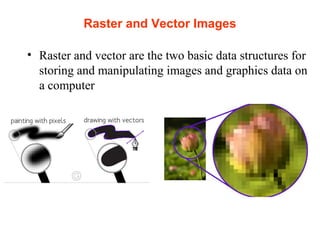
Raster and Vector Images
• Raster and vector are the two basic data structures for
storing and manipulating images and graphics data on
a computer
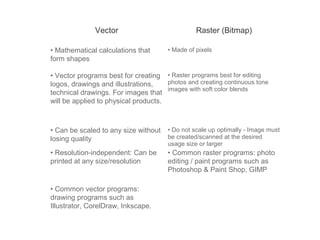
Vector Raster (Bitmap)
• Mathematical calculations that
form shapes
• Made of pixels
• Vector programs best for creating
logos, drawings and illustrations,
technical drawings. For images that
will be applied to physical products.
• Raster programs best for editing
photos and creating continuous tone
images with soft color blends
• Can be scaled to any size without
losing quality
• Do not scale up optimally - Image must
be created/scanned at the desired
usage size or larger
• Resolution-independent: Can be
printed at any size/resolution
• Common raster programs: photo
editing / paint programs such as
Photoshop & Paint Shop, GIMP
• Common vector programs:
drawing programs such as
Illustrator, CorelDraw, Inkscape.
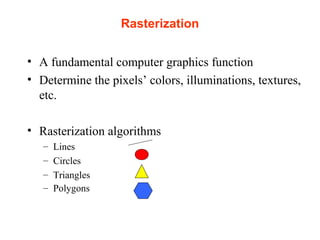
Rasterization
• A fundamental computer graphics function
• Determine the pixels’ colors, illuminations, textures,
etc.
• Rasterization algorithms
– Lines
– Circles
– Triangles
– Polygons
Rasterization Operations
• Drawing lines on the screen
• Manipulating pixel maps (pixmaps): copying,
scaling, rotating, etc
• Compositing images, defining and modifying
regions
• Drawing and filling polygons
Line drawing algorithm
• Programmer specifies (x,y) values of end pixels
• Need algorithm to figure out which intermediate
pixels are on line path
• Pixel (x,y) values constrained to integer values
• Actual computed intermediate line values may be
floats
• Rounding may be required. E.g. computed point
(10.48, 20.51) rounded to (10, 21)
• Rounded pixel value is off actual line path
(jaggy!!)
• Sloped lines end up having jaggies
• Vertical, horizontal lines, no jaggies
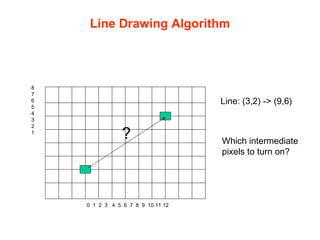
Line Drawing Algorithm
0 1 2 3 4 5 6 7 8 9 10 11 12
8
7
6
5
4
3
2
1
Line: (3,2) -> (9,6)
? Which intermediate
pixels to turn on?
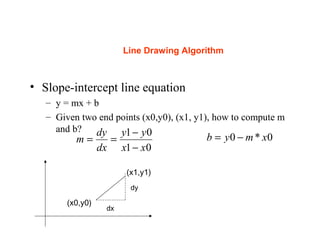
Line Drawing Algorithm
• Slope-intercept line equation
– y = mx + b
– Given two end points (x0,y0), (x1, y1), how to compute m
and b?
(x0,y0)
(x1,y1)
dx
dy
01
01
xx
yy
dx
dy
m
−
−
== 0*0 xmyb −=
Line Drawing Algorithm
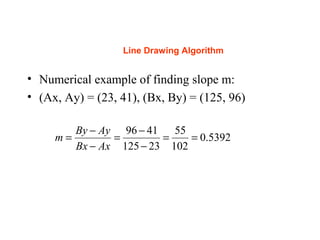
• Numerical example of finding slope m:
• (Ax, Ay) = (23, 41), (Bx, By) = (125, 96)
5392.0
102
55
23125
4196
==
−
−
=
−
−
=
AxBx
AyBy
m
Digital Differential Analyzer (DDA): Line Drawing
Algorithm
(x0,y0)
(x1,y1)
dx
dy
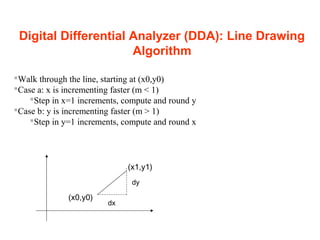
Walk through the line, starting at (x0,y0)
Case a: x is incrementing faster (m < 1)
Step in x=1 increments, compute and round y
Case b: y is incrementing faster (m > 1)
Step in y=1 increments, compute and round x
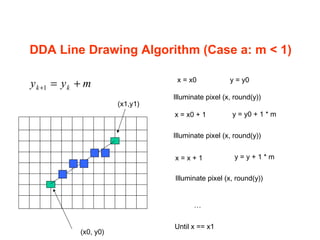
DDA Line Drawing Algorithm (Case a: m < 1)
(x0, y0)
x = x0 + 1 y = y0 + 1 * m
Illuminate pixel (x, round(y))
x = x + 1 y = y + 1 * m
Illuminate pixel (x, round(y))
…
Until x == x1
(x1,y1)
x = x0 y = y0
Illuminate pixel (x, round(y))
myy kk +=+1
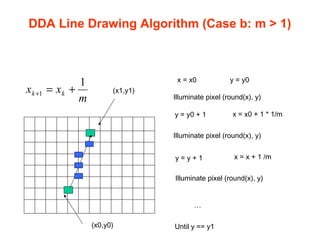
DDA Line Drawing Algorithm (Case b: m > 1)
y = y0 + 1 x = x0 + 1 * 1/m
Illuminate pixel (round(x), y)
y = y + 1 x = x + 1 /m
Illuminate pixel (round(x), y)
…
Until y == y1
x = x0 y = y0
Illuminate pixel (round(x), y)
(x1,y1)
(x0,y0)
m
xx kk
1
1 +=+
15
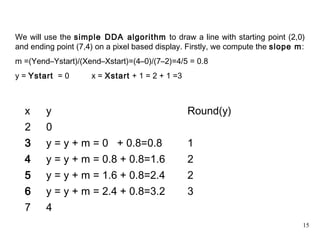
We will use the simple DDA algorithm to draw a line with starting point (2,0)
and ending point (7,4) on a pixel based display. Firstly, we compute the slope m:
m =(Yend–Ystart)/(Xend–Xstart)=(4–0)/(7–2)=4/5 = 0.8
y = Ystart = 0 x = Xstart + 1 = 2 + 1 =3
x y Round(y)
2 0
3 y = y + m = 0 + 0.8=0.8 1
4 y = y + m = 0.8 + 0.8=1.6 2
5 y = y + m = 1.6 + 0.8=2.4 2
6 y = y + m = 2.4 + 0.8=3.2 3
7 4
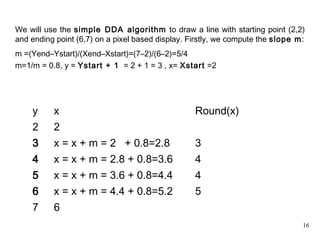
16
We will use the simple DDA algorithm to draw a line with starting point (2,2)
and ending point (6,7) on a pixel based display. Firstly, we compute the slope m:
m =(Yend–Ystart)/(Xend–Xstart)=(7–2)/(6–2)=5/4
m=1/m = 0.8, y = Ystart + 1 = 2 + 1 = 3 , x= Xstart =2
y x Round(x)
2 2
3 x = x + m = 2 + 0.8=2.8 3
4 x = x + m = 2.8 + 0.8=3.6 4
5 x = x + m = 3.6 + 0.8=4.4 4
6 x = x + m = 4.4 + 0.8=5.2 5
7 6
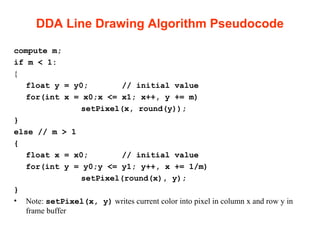
DDA Line Drawing Algorithm Pseudocode
compute m;
if m < 1:
{
float y = y0; // initial value
for(int x = x0;x <= x1; x++, y += m)
setPixel(x, round(y));
}
else // m > 1
{
float x = x0; // initial value
for(int y = y0;y <= y1; y++, x += 1/m)
setPixel(round(x), y);
}
• Note: setPixel(x, y) writes current color into pixel in column x and row y in
frame buffer
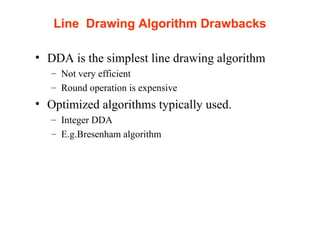
Line Drawing Algorithm Drawbacks
• DDA is the simplest line drawing algorithm
– Not very efficient
– Round operation is expensive
• Optimized algorithms typically used.
– Integer DDA
– E.g.Bresenham algorithm
Task for next lab
• Add Glut and OpenGL libraries in Visual Studio
• Link for Setting up OpenGL in Visual Studio
• http://in2gpu.com/2014/10/15/setting-up-opengl-
with-visual-studio/

Lab lecture 1 line_algo

  • 1.
  • 2.
    About Me FAST NationalUniversity Lab 3 or Server Room Office Hours – When ever I am available and Free
  • 3.
    Some Rules • –Never ever miss a class – Never use mobile phones in the class – Don’t come in the class after 20minutes – Above all, whatever you do, please do not disturb others • All parties involved in any kind of cheating or plagiarism in any exam (Lab Tasks, Quizzes, Assignments) will get zero
  • 4.
    Raster and VectorImages • Raster and vector are the two basic data structures for storing and manipulating images and graphics data on a computer
  • 5.
    Vector Raster (Bitmap) •Mathematical calculations that form shapes • Made of pixels • Vector programs best for creating logos, drawings and illustrations, technical drawings. For images that will be applied to physical products. • Raster programs best for editing photos and creating continuous tone images with soft color blends • Can be scaled to any size without losing quality • Do not scale up optimally - Image must be created/scanned at the desired usage size or larger • Resolution-independent: Can be printed at any size/resolution • Common raster programs: photo editing / paint programs such as Photoshop & Paint Shop, GIMP • Common vector programs: drawing programs such as Illustrator, CorelDraw, Inkscape.
  • 6.
    Rasterization • A fundamentalcomputer graphics function • Determine the pixels’ colors, illuminations, textures, etc. • Rasterization algorithms – Lines – Circles – Triangles – Polygons
  • 7.
    Rasterization Operations • Drawinglines on the screen • Manipulating pixel maps (pixmaps): copying, scaling, rotating, etc • Compositing images, defining and modifying regions • Drawing and filling polygons
  • 8.
    Line drawing algorithm •Programmer specifies (x,y) values of end pixels • Need algorithm to figure out which intermediate pixels are on line path • Pixel (x,y) values constrained to integer values • Actual computed intermediate line values may be floats • Rounding may be required. E.g. computed point (10.48, 20.51) rounded to (10, 21) • Rounded pixel value is off actual line path (jaggy!!) • Sloped lines end up having jaggies • Vertical, horizontal lines, no jaggies
  • 9.
    Line Drawing Algorithm 01 2 3 4 5 6 7 8 9 10 11 12 8 7 6 5 4 3 2 1 Line: (3,2) -> (9,6) ? Which intermediate pixels to turn on?
  • 10.
    Line Drawing Algorithm •Slope-intercept line equation – y = mx + b – Given two end points (x0,y0), (x1, y1), how to compute m and b? (x0,y0) (x1,y1) dx dy 01 01 xx yy dx dy m − − == 0*0 xmyb −=
  • 11.
    Line Drawing Algorithm •Numerical example of finding slope m: • (Ax, Ay) = (23, 41), (Bx, By) = (125, 96) 5392.0 102 55 23125 4196 == − − = − − = AxBx AyBy m
  • 12.
    Digital Differential Analyzer(DDA): Line Drawing Algorithm (x0,y0) (x1,y1) dx dy Walk through the line, starting at (x0,y0) Case a: x is incrementing faster (m < 1) Step in x=1 increments, compute and round y Case b: y is incrementing faster (m > 1) Step in y=1 increments, compute and round x
  • 13.
    DDA Line DrawingAlgorithm (Case a: m < 1) (x0, y0) x = x0 + 1 y = y0 + 1 * m Illuminate pixel (x, round(y)) x = x + 1 y = y + 1 * m Illuminate pixel (x, round(y)) … Until x == x1 (x1,y1) x = x0 y = y0 Illuminate pixel (x, round(y)) myy kk +=+1
  • 14.
    DDA Line DrawingAlgorithm (Case b: m > 1) y = y0 + 1 x = x0 + 1 * 1/m Illuminate pixel (round(x), y) y = y + 1 x = x + 1 /m Illuminate pixel (round(x), y) … Until y == y1 x = x0 y = y0 Illuminate pixel (round(x), y) (x1,y1) (x0,y0) m xx kk 1 1 +=+
  • 15.
    15 We will usethe simple DDA algorithm to draw a line with starting point (2,0) and ending point (7,4) on a pixel based display. Firstly, we compute the slope m: m =(Yend–Ystart)/(Xend–Xstart)=(4–0)/(7–2)=4/5 = 0.8 y = Ystart = 0 x = Xstart + 1 = 2 + 1 =3 x y Round(y) 2 0 3 y = y + m = 0 + 0.8=0.8 1 4 y = y + m = 0.8 + 0.8=1.6 2 5 y = y + m = 1.6 + 0.8=2.4 2 6 y = y + m = 2.4 + 0.8=3.2 3 7 4
  • 16.
    16 We will usethe simple DDA algorithm to draw a line with starting point (2,2) and ending point (6,7) on a pixel based display. Firstly, we compute the slope m: m =(Yend–Ystart)/(Xend–Xstart)=(7–2)/(6–2)=5/4 m=1/m = 0.8, y = Ystart + 1 = 2 + 1 = 3 , x= Xstart =2 y x Round(x) 2 2 3 x = x + m = 2 + 0.8=2.8 3 4 x = x + m = 2.8 + 0.8=3.6 4 5 x = x + m = 3.6 + 0.8=4.4 4 6 x = x + m = 4.4 + 0.8=5.2 5 7 6
  • 17.
    DDA Line DrawingAlgorithm Pseudocode compute m; if m < 1: { float y = y0; // initial value for(int x = x0;x <= x1; x++, y += m) setPixel(x, round(y)); } else // m > 1 { float x = x0; // initial value for(int y = y0;y <= y1; y++, x += 1/m) setPixel(round(x), y); } • Note: setPixel(x, y) writes current color into pixel in column x and row y in frame buffer
  • 18.
    Line Drawing AlgorithmDrawbacks • DDA is the simplest line drawing algorithm – Not very efficient – Round operation is expensive • Optimized algorithms typically used. – Integer DDA – E.g.Bresenham algorithm
  • 19.
    Task for nextlab • Add Glut and OpenGL libraries in Visual Studio • Link for Setting up OpenGL in Visual Studio • http://in2gpu.com/2014/10/15/setting-up-opengl- with-visual-studio/