

Facebook

Privacy settings v Privacy threats

       Karen Mc Cullagh
Prompted change in Privacy settings
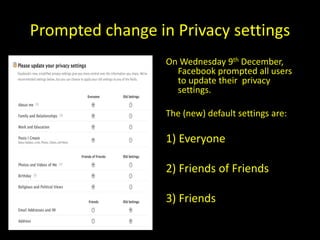
                  On Wednesday 9th December,
                    Facebook prompted all users
                    to update their privacy
                    settings.

                  The (new) default settings are:

                  1) Everyone

                  2) Friends of Friends

                  3) Friends
Everyone = Privacy threat!
“Everyone”
Anyone & Everyone with access to the
    Web will be able to view the following details:

-   About me
-   Family & relationships
-   Work & Education
-   Posts I create
Why has Facebook done this?
“share everything with everyone”

• Facebook says the freely-shared data "makes
  it easier for people to find and learn about
  you"
Why has Facebook really done this?
1) It's a ploy to drive up Facebook traffic by getting more
   of its pages catalogued by RSS (Really Simple Syndication) feeds and
   search engines (i.e. Making it faster and easier to search for
   such material)

2) The strategy is a crucial part of Facebook’s effort to
   supplant Google (GOOG) as the Web’s key data
   repository.

3) Facebook have ambitions to collect as much data as
   possible on their users, so that they can target
   advertising and marketing to their users, and sell it to
   other organisations.
Privacy threats
• Up until now, Facebook alone has maintained control over the vast
  majority of content uploaded to the site. Get rid of it on Facebook, and it
  was usually gone, at least from the prying eyes of a stranger. If you were
  about to apply for a new job and wanted to go through and clean up your
  update history, you could do that.

But with ‘Everyone’, that changes.

 Facebook’s privacy policy now states:
• If you delete “everyone” content that you posted on Facebook, we will
    remove it from your Facebook profile, but we have no control
   over its use outside of Facebook.
• In other words, if users do share with everyone and they change their
  mind, Facebook won’t be able to repair the
   damage.
Privacy threats
• The real trouble will start when Facebook starts sharing the
  ‘everyone’ status updates with search engines and other
  third parties.

• Bing (search engine owned by Microsoft) will have access
  to Facebook ‘Everyone’ status updates in early 2010.

• Google will only have access to Fan Pages at first, but they
  could decide to pay for access to the status updates too.

• Both of these sites cache data. (i.e. They store Web files for
  later re-use at a point more quickly accessed by the end
  user.)
Why you should care
You could get ‘dooced’
• Dooced – sacked because of the information you
  put on Facebook.

Example:
• The term dooced made its British English debut
  in January 2005, when Joe Gordon, a senior
  bookseller in the shop Waterstone's in Edinburgh,
  was sacked, allegedly having made offensive
  remarks about the company in his online satirical
  newsletter, Woolamaloo Gazette.
Future jobs
It is a known fact that Employers run Google and
   Facebook searches on applicants....they have
   the right to investigate whether you’re worth
   investing in....so don’t give them incriminating
   evidence to hold against you... being a student
   may excuse a lot of antics when you’re at
   Uni....but...
Your past could haunt you
...even 40 years later, as search engines store
   data indefinitely

http://www.alternet.org/drugreporter/50948/
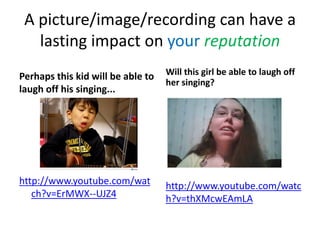
A picture/image/recording can have a
   lasting impact on your reputation
Perhaps this kid will be able to   Will this girl be able to laugh off
                                   her singing?
laugh off his singing...


http://www.youtube.com/wat         http://www.youtube.com/watc
   ch?v=ErMWX--UJZ4                h?v=thXMcwEAmLA
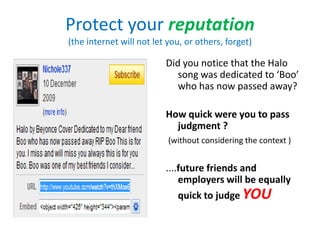
Protect your reputation
(the internet will not let you, or others, forget)

                          Did you notice that the Halo
                             song was dedicated to ‘Boo’
                             who has now passed away?

                          How quick were you to pass
                            judgment ?
                           (without considering the context )


                          ....future friends and
                              employers will be equally
                              quick to judge YOU
Employers do not (legally cannot)
           share your humour
•   Ms Leam-Taylor sent an email entitled ‘Deloitte First year analysts Christmas Awards,’ to
    her female colleagues asking them to vote on which men in the office they considered
    most attractive.

•   She listed 9 categories including, 'boy most likely to sleep his way to the top' and 'most
    attractive older member of staff'.

•   She also wrote “This probably massively violates HR equal opportunities policy, but never
    mind! It's all for fun and a bit of a laugh."

•   The email was only intended for a small group within her office, but was quickly forwarded
    outside the building and within hours was being read by millions of internet users as far
    away as New Zealand and Australia.

•   Her employers did not agree that it was a laughing matter and she was warned that she
    would be subject to a disciplinary hearing which could lead to her dismissal.

•   A source at the firm said: "She realised that her credibility both internally and externally
    had been damaged and so took the decision to hand in her resignation immediately."

•   Deloitte say the matter is not necessarily at an end as the company is keen to establish
    who was responsible for forwarding the message outside of the company.


              http://www.telegraph.co.uk/technology/news/6788853/Analyst-quits-over-embarrassing-email.html
Recommendations
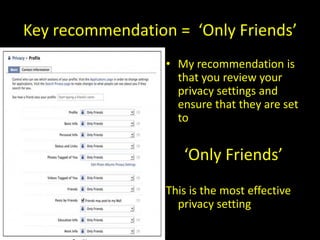
Key recommendation = ‘Only Friends’
                  • My recommendation is
                    that you review your
                    privacy settings and
                    ensure that they are set
                    to


                     ‘Only Friends’
                  This is the most effective
                    privacy setting
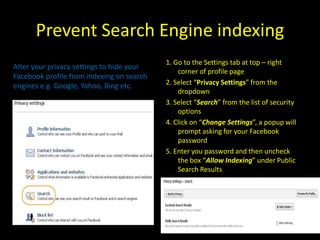
Prevent Search Engine indexing
                                           1. Go to the Settings tab at top – right
Alter your privacy settings to hide your
                                               corner of profile page
Facebook profile from indexing on search
engines e.g. Google, Yahoo, Bing etc.      2. Select “Privacy Settings” from the
                                               dropdown
                                           3. Select “Search” from the list of security
                                               options
                                           4. Click on “Change Settings”, a popup will
                                               prompt asking for your Facebook
                                               password
                                           5. Enter you password and then uncheck
                                               the box “Allow Indexing” under Public
                                               Search Results
More recommendations
Think carefully about who you allow to become your friend
• Once you have accepted someone as your friend they will be
  able to access any information about you (including
  photographs) that you have marked as viewable by your
  friends.
• You can remove friends at any time should you change your
  mind about someone.

Show "limited friends" a cut-down version of your profile
• You can choose to make people 'limited friends' who only
  have access to a cut-down version of your profile if you wish.
• This can be useful if you have associates/boss who you do not
  wish to give full friend status to, or feel uncomfortable sharing
  personal information with.
Even more recommendations
Exercise caution when posting and tagging photos
• Do not post and tag photos of others unless you
  know they would be happy for friends to see the
  photo as they will have no control over whether it
  remains on the site or not.

Note: sexted pics sent to your partner will be judged
 differently by your boss, colleagues etc.!
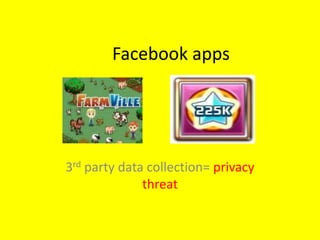
Facebook apps


3rd party data collection= privacy
              threat
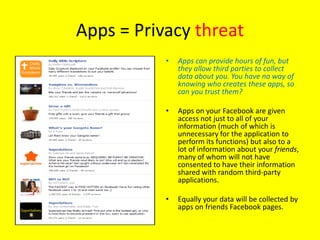
Apps = Privacy threat
           •   Apps can provide hours of fun, but
               they allow third parties to collect
               data about you. You have no way of
               knowing who creates these apps, so
               can you trust them?

           •   Apps on your Facebook are given
               access not just to all of your
               information (much of which is
               unnecessary for the application to
               perform its functions) but also to a
               lot of information about your friends,
               many of whom will not have
               consented to have their information
               shared with random third-party
               applications.

           •  Equally your data will be collected by
              apps on friends Facebook pages.
           Limit the number of apps you download
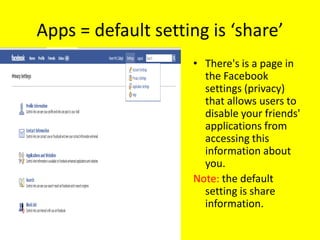
Apps = default setting is ‘share’
                    • There's is a page in
                      the Facebook
                      settings (privacy)
                      that allows users to
                      disable your friends'
                      applications from
                      accessing this
                      information about
                      you.
                    Note: the default
                      setting is share
                      information.
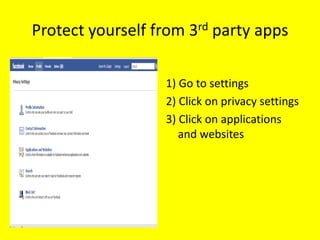
Protect yourself from 3rd party apps

                  1) Go to settings
                  2) Click on privacy settings
                  3) Click on applications
                     and websites
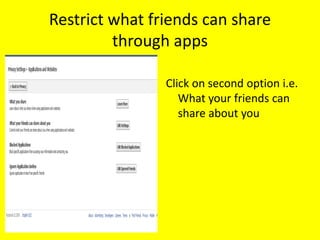
Restrict what friends can share
         through apps

                Click on second option i.e.
                   What your friends can
                   share about you
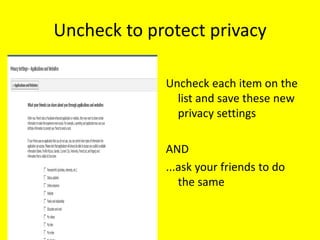
Uncheck to protect privacy

             Uncheck each item on the
               list and save these new
               privacy settings

             AND
             ...ask your friends to do
                the same
Finally
• Have a life, and keep your friends updated via
  Facebook - but ensure you don’t compromise
  your privacy while doing so!
Thanks
Thanks to the Cyberlaw Students and Staff at
  Salford Law School who commented on earlier
  versions of this presentation.

If you have any queries, please email me at:
           k.mccullagh@salford.ac.uk

Facebook Privacy.Final. Privacy settings on Facebook

  • 1.
    Facebook Privacy settings vPrivacy threats Karen Mc Cullagh
  • 2.
    Prompted change inPrivacy settings On Wednesday 9th December, Facebook prompted all users to update their privacy settings. The (new) default settings are: 1) Everyone 2) Friends of Friends 3) Friends
  • 3.
    Everyone = Privacythreat! “Everyone” Anyone & Everyone with access to the Web will be able to view the following details: - About me - Family & relationships - Work & Education - Posts I create
  • 4.
    Why has Facebookdone this? “share everything with everyone” • Facebook says the freely-shared data "makes it easier for people to find and learn about you"
  • 5.
    Why has Facebookreally done this? 1) It's a ploy to drive up Facebook traffic by getting more of its pages catalogued by RSS (Really Simple Syndication) feeds and search engines (i.e. Making it faster and easier to search for such material) 2) The strategy is a crucial part of Facebook’s effort to supplant Google (GOOG) as the Web’s key data repository. 3) Facebook have ambitions to collect as much data as possible on their users, so that they can target advertising and marketing to their users, and sell it to other organisations.
  • 6.
    Privacy threats • Upuntil now, Facebook alone has maintained control over the vast majority of content uploaded to the site. Get rid of it on Facebook, and it was usually gone, at least from the prying eyes of a stranger. If you were about to apply for a new job and wanted to go through and clean up your update history, you could do that. But with ‘Everyone’, that changes. Facebook’s privacy policy now states: • If you delete “everyone” content that you posted on Facebook, we will remove it from your Facebook profile, but we have no control over its use outside of Facebook. • In other words, if users do share with everyone and they change their mind, Facebook won’t be able to repair the damage.
  • 7.
    Privacy threats • Thereal trouble will start when Facebook starts sharing the ‘everyone’ status updates with search engines and other third parties. • Bing (search engine owned by Microsoft) will have access to Facebook ‘Everyone’ status updates in early 2010. • Google will only have access to Fan Pages at first, but they could decide to pay for access to the status updates too. • Both of these sites cache data. (i.e. They store Web files for later re-use at a point more quickly accessed by the end user.)
  • 8.
  • 9.
    You could get‘dooced’ • Dooced – sacked because of the information you put on Facebook. Example: • The term dooced made its British English debut in January 2005, when Joe Gordon, a senior bookseller in the shop Waterstone's in Edinburgh, was sacked, allegedly having made offensive remarks about the company in his online satirical newsletter, Woolamaloo Gazette.
  • 10.
    Future jobs It isa known fact that Employers run Google and Facebook searches on applicants....they have the right to investigate whether you’re worth investing in....so don’t give them incriminating evidence to hold against you... being a student may excuse a lot of antics when you’re at Uni....but...
  • 11.
    Your past couldhaunt you ...even 40 years later, as search engines store data indefinitely http://www.alternet.org/drugreporter/50948/
  • 12.
    A picture/image/recording canhave a lasting impact on your reputation Perhaps this kid will be able to Will this girl be able to laugh off her singing? laugh off his singing... http://www.youtube.com/wat http://www.youtube.com/watc ch?v=ErMWX--UJZ4 h?v=thXMcwEAmLA
  • 13.
    Protect your reputation (theinternet will not let you, or others, forget) Did you notice that the Halo song was dedicated to ‘Boo’ who has now passed away? How quick were you to pass judgment ? (without considering the context ) ....future friends and employers will be equally quick to judge YOU
  • 14.
    Employers do not(legally cannot) share your humour • Ms Leam-Taylor sent an email entitled ‘Deloitte First year analysts Christmas Awards,’ to her female colleagues asking them to vote on which men in the office they considered most attractive. • She listed 9 categories including, 'boy most likely to sleep his way to the top' and 'most attractive older member of staff'. • She also wrote “This probably massively violates HR equal opportunities policy, but never mind! It's all for fun and a bit of a laugh." • The email was only intended for a small group within her office, but was quickly forwarded outside the building and within hours was being read by millions of internet users as far away as New Zealand and Australia. • Her employers did not agree that it was a laughing matter and she was warned that she would be subject to a disciplinary hearing which could lead to her dismissal. • A source at the firm said: "She realised that her credibility both internally and externally had been damaged and so took the decision to hand in her resignation immediately." • Deloitte say the matter is not necessarily at an end as the company is keen to establish who was responsible for forwarding the message outside of the company. http://www.telegraph.co.uk/technology/news/6788853/Analyst-quits-over-embarrassing-email.html
  • 15.
  • 16.
    Key recommendation =‘Only Friends’ • My recommendation is that you review your privacy settings and ensure that they are set to ‘Only Friends’ This is the most effective privacy setting
  • 17.
    Prevent Search Engineindexing 1. Go to the Settings tab at top – right Alter your privacy settings to hide your corner of profile page Facebook profile from indexing on search engines e.g. Google, Yahoo, Bing etc. 2. Select “Privacy Settings” from the dropdown 3. Select “Search” from the list of security options 4. Click on “Change Settings”, a popup will prompt asking for your Facebook password 5. Enter you password and then uncheck the box “Allow Indexing” under Public Search Results
  • 18.
    More recommendations Think carefullyabout who you allow to become your friend • Once you have accepted someone as your friend they will be able to access any information about you (including photographs) that you have marked as viewable by your friends. • You can remove friends at any time should you change your mind about someone. Show "limited friends" a cut-down version of your profile • You can choose to make people 'limited friends' who only have access to a cut-down version of your profile if you wish. • This can be useful if you have associates/boss who you do not wish to give full friend status to, or feel uncomfortable sharing personal information with.
  • 19.
    Even more recommendations Exercisecaution when posting and tagging photos • Do not post and tag photos of others unless you know they would be happy for friends to see the photo as they will have no control over whether it remains on the site or not. Note: sexted pics sent to your partner will be judged differently by your boss, colleagues etc.!
  • 20.
    Facebook apps 3rd partydata collection= privacy threat
  • 21.
    Apps = Privacythreat • Apps can provide hours of fun, but they allow third parties to collect data about you. You have no way of knowing who creates these apps, so can you trust them? • Apps on your Facebook are given access not just to all of your information (much of which is unnecessary for the application to perform its functions) but also to a lot of information about your friends, many of whom will not have consented to have their information shared with random third-party applications. • Equally your data will be collected by apps on friends Facebook pages. Limit the number of apps you download
  • 22.
    Apps = defaultsetting is ‘share’ • There's is a page in the Facebook settings (privacy) that allows users to disable your friends' applications from accessing this information about you. Note: the default setting is share information.
  • 23.
    Protect yourself from3rd party apps 1) Go to settings 2) Click on privacy settings 3) Click on applications and websites
  • 24.
    Restrict what friendscan share through apps Click on second option i.e. What your friends can share about you
  • 25.
    Uncheck to protectprivacy Uncheck each item on the list and save these new privacy settings AND ...ask your friends to do the same
  • 26.
    Finally • Have alife, and keep your friends updated via Facebook - but ensure you don’t compromise your privacy while doing so!
  • 27.
    Thanks Thanks to theCyberlaw Students and Staff at Salford Law School who commented on earlier versions of this presentation. If you have any queries, please email me at: k.mccullagh@salford.ac.uk