SOCIAL MEDIA SNAPSHOT
SOCIAL MEDIA SNAPSHOT

 FACEBOOK PRIVACY SETTINGS
       AUGUST 2010
       AUGUST 2010
 UPDATED FOR FACEBOOK PLACES
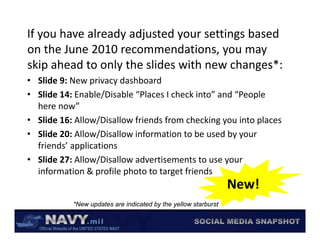
If you have already adjusted your settings based 
on the June 2010 recommendations, you may 
     h J     2010             d i
skip ahead to only the slides with new changes*:
• Slide 9: New privacy dashboard
• Slide 14: Enable/Disable “Places I check into” and “People 
  here now
  here now”
• Slide 16: Allow/Disallow friends from checking you into places
• Slide 20: Allow/Disallow information to be used by your 
  friends’ applications
• Slide 27: Allow/Disallow advertisements to use your 
  information & profile photo to target friends
  information & profile photo to target friends
                                                                New!
           *New updates are indicated by the yellow starburst
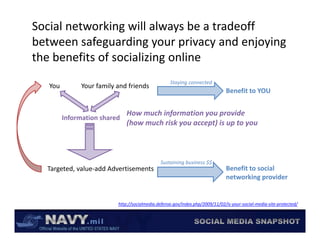
Social networking will always be a tradeoff 
between safeguarding your privacy and enjoying 
between safeguarding your privacy and enjoying
the benefits of socializing online
                                                   Staying connected
   You        Your family and friends
                                                                              Benefit to YOU


                              How much information you provide  
         Information shared
                              (how much risk you accept) is up to you


                                              Sustaining business $$
  Targeted, value add Advertisements
  Targeted, value‐add Advertisements                                          Benefit to social 
                                                                              Benefit to social
                                                                              networking provider


                          http://socialmedia.defense.gov/index.php/2009/11/02/is‐your‐social‐media‐site‐protected/
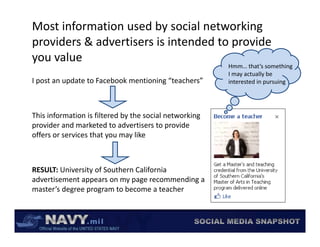
Most information used by social networking 
providers & advertisers is intended to provide 
providers & advertisers is intended to provide
you value
                                                         Hmm… that’s something 
                                                         I may actually be 
                                                              y       y
I post an update to Facebook mentioning “teachers”       interested in pursuing


This information is filtered by the social networking 
provider and marketed to advertisers to provide 
offers or services that you may like


RESULT: University of Southern California 
RESULT: University of Southern California
advertisement appears on my page recommending a 
master’s degree program to become a teacher
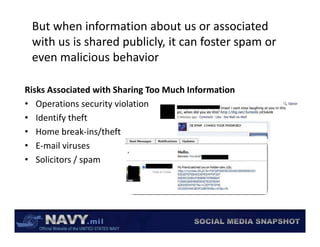
But when information about us or associated 
 with us is shared publicly, it can foster spam or 
 with us is shared publicly, it can foster spam or
 even malicious behavior

Risks Associated with Sharing Too Much Information
• Operations security violation
    p               y
• Identify theft
• Home break‐ins/theft
• E‐mail viruses
• Solicitors / spam
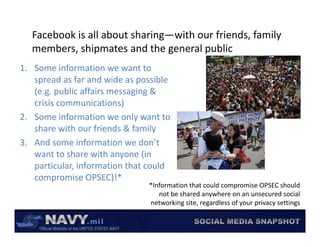
Facebook is all about sharing—with our friends, family 
   members, shipmates and the general public
        b     hi     t     d th       l bli
1. Some information we want to 
   spread as far and wide as possible 
          d f        d id          ibl
   (e.g. public affairs messaging & 
   crisis communications)
2. Some information we only want to 
   share with our friends & family
3. And some information we don’t 
      d          f             d ’
   want to share with anyone (in 
   p
   particular, information that could 
   compromise OPSEC)!*
                                *Information that could compromise OPSEC should 
                                   not be shared anywhere on an unsecured social 
                                networking site, regardless of your privacy settings
                                   t   ki    it       dl     f        i       tti
Even though you should assume that all 
 information you share on Facebook could 
 information you share on Facebook could
       be made public, there are some 
    precautions you can take to keep the 
           ti            t k t k     th
information you want to stay just between 
     friends from being shared publicly
We encourage Sailors, Navy personnel and their family 
members to use the following minimum recommended 
                             g
privacy settings on Facebook. It is your decision to share 
more or less information, just make it an informed decision!


A STEP‐BY‐STEP GUIDE TO YOUR 
A STEP BY STEP GUIDE TO YOUR
PRIVACY SETTINGS
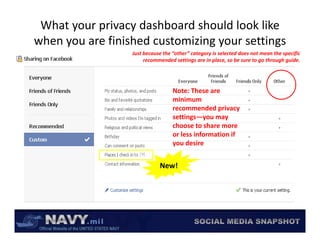
What your privacy dashboard should look like 
     y                          gy           g
when you are finished customizing your settings
                  Just because the “other” category is selected does not mean the specific 
                       recommended settings are in place, so be sure to go through guide.


                                   Note: These are 
                                   minimum 
                                   recommended privacy 
                                   recommended privacy
                                   settings—you may 
                                   choose to share more 
                                   or less information if 
                                   you desire


                             New!
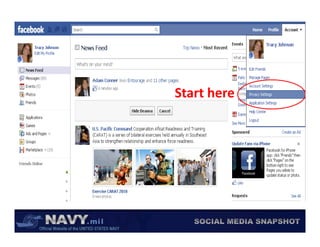
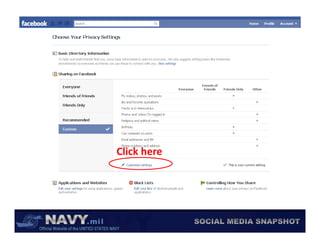
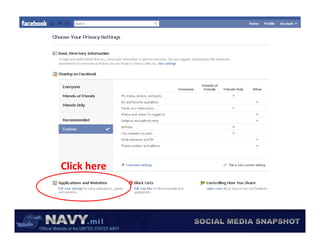
Start here
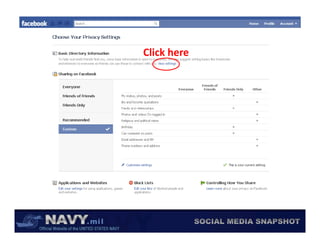
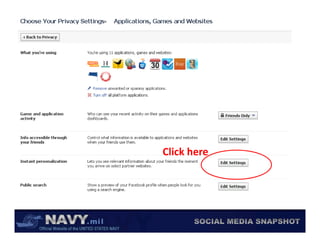
Click here
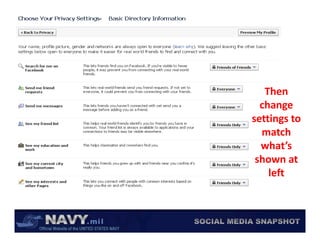
Then 
  change 
  change
settings to 
  match 
  what’s 
 shown at 
    left
    l ft
Click here
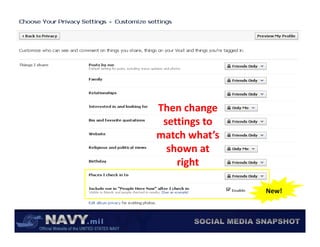
Then change 
Then change
 settings to 
match what’s 
  shown at 
    right

                New!
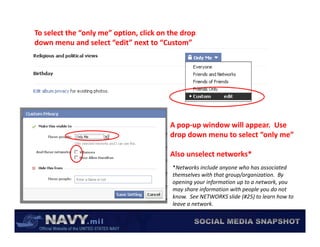
To select the “only me” option, click on the drop 
down menu and select “edit” next to “Custom”


                                         A pop‐up window will appear.  Use 
                                         drop down menu to select “only me”

                                         Also unselect networks*  
                                          *Networks include anyone who has associated 
                                                               y
                                          themselves with that group/organization.  By 
                                          opening your information up to a network, you 
                                          may share information with people you do not 
                                          know.  See NETWORKS slide (#25) to learn how to 
                                          leave a network.
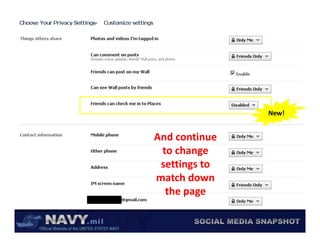
New!


And continue 
And continue
 to change 
 settings to 
match down 
  the page
Click here
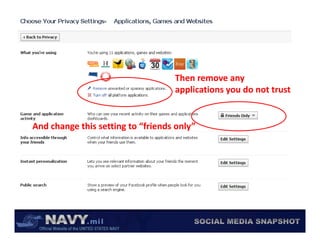
Then remove any 
                                   Then remove any
                                   applications you do not trust


And change this setting to “friends only”
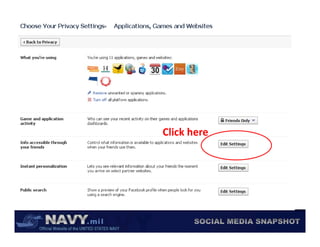
Click here
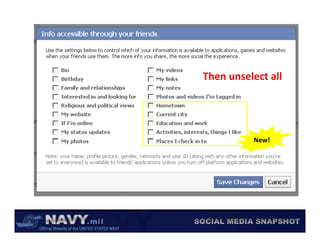
Then unselect all
Then unselect all


          New!
Click here
Then 
 Then
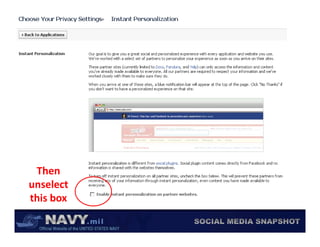
unselect 
this box
this box
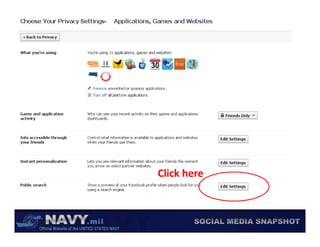
Click here
Cli k h
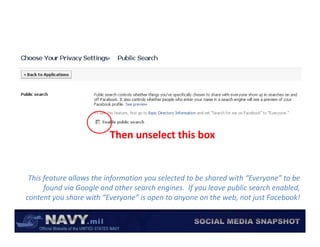
Then unselect this box


 This feature allows the information you selected to be shared with “Everyone” to be 
      found via Google and other search engines.  If you leave public search enabled, 
         y                    y        p        y                      j
content you share with “Everyone” is open to anyone on the web, not just Facebook!  
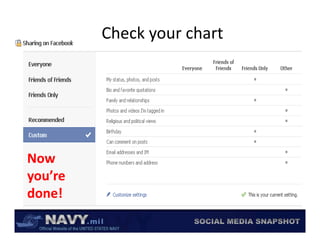
Check your chart


Now 
you’re 
done!
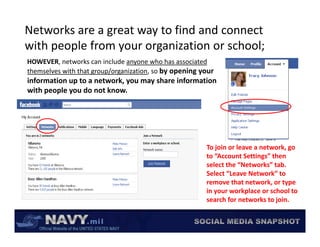
Networks are a great way to find and connect 
with people from your organization or school;
with people from your organization or school;
HOWEVER, networks can include anyone who has associated 
themselves with that group/organization, so by opening your 
information up to a network, you may share information 
with people you do not know.


                                                         To join or leave a network, go 
                                                         to “Account Settings” then 
                                                         select the “Networks” tab.  
                                                         Select “Leave Network” to 
                                                         remove that network, or type 
                                                         in your workplace or school to 
                                                         search for networks to join.
                                                         search for networks to join.
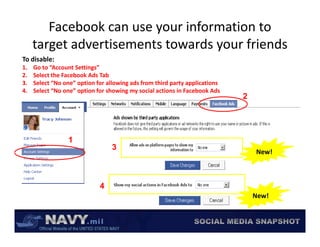
Facebook can use your information to 
     target advertisements towards your friends
     target advertisements towards your friends
To disable:
1.   Go to “Account Settings”
2.   Select the Facebook Ads Tab
     Select the Facebook Ads Tab
3.   Select “No one” option for allowing ads from third party applications
4.   Select “No one” option for showing my social actions in Facebook Ads
                                                                             2


                 1
                                  3
                                                                                 New!


                             4
                                                                                 New!
More on Privacy & OPSEC
              More on Privacy & OPSEC
• Navy snapshot on OPSEC & social media, 
  http://www.slideshare.net/USNavySocialMedia/opsec‐snapshot
• Navy snapshot on safe and effective use of social media
  Navy snapshot on safe and effective use of social media, 
  http://www.slideshare.net/USNavySocialMedia/us‐navy‐safe‐and‐effective‐use‐of‐social‐
  media
• Navy guide to Facebook privacy, http://www.slideshare.net/USNavySocialMedia/navy‐
  privacy‐facebook‐february‐2010‐newhomepage‐application‐settings
  privacy facebook february 2010 newhomepage application settings
• Facebook guide to Facebook privacy, http://www.facebook.com/#!/privacy/explanation.php
• Facebook and Privacy page on Facebook, http://www.facebook.com/fbprivacy
 Questions?  Contact CHINFO Emerging Media Integration (OI‐5)
 Questions? Contact CHINFO Emerging Media Integration (OI 5)
 CDR Scott McIlnay                               LT Lesley Lykins
 Director, Emerging Media Integration (OI‐54)    Deputy, Emerging Media Integration (OI‐54A)
 Department of the Navy, Office of Information   Department of the Navy, Office of Information
 Office:(703) 692‐4718                           Office:(703) 695‐6915
 Fax:(703) 692‐9046                              Fax:(703) 692‐9046
 Email: scott.mcilnay@navy.mil                   Email: lesley.lykins@navy.mil
 FB: /scott.mcilnay                              FB: /lesleylykins
                                                 Twitter: @lyfsgr8 
                                                 Twitter: @lyfsgr8

Recommended facebook privacy_settings

  • 1.
    SOCIAL MEDIA SNAPSHOT SOCIAL MEDIA SNAPSHOT FACEBOOK PRIVACY SETTINGS AUGUST 2010 AUGUST 2010 UPDATED FOR FACEBOOK PLACES
  • 2.
    If you have already adjusted your settings based  on the June 2010 recommendations, you may  h J 2010 d i skip ahead to only the slides with new changes*: • Slide 9: New privacy dashboard • Slide 14: Enable/Disable “Places I check into” and “People  here now here now” • Slide 16: Allow/Disallow friends from checking you into places • Slide 20: Allow/Disallow information to be used by your  friends’ applications • Slide 27: Allow/Disallow advertisements to use your  information & profile photo to target friends information & profile photo to target friends New! *New updates are indicated by the yellow starburst
  • 3.
    Social networking will always be a tradeoff  between safeguarding your privacy and enjoying  between safeguarding yourprivacy and enjoying the benefits of socializing online Staying connected You Your family and friends Benefit to YOU How much information you provide   Information shared (how much risk you accept) is up to you Sustaining business $$ Targeted, value add Advertisements Targeted, value‐add Advertisements Benefit to social  Benefit to social networking provider http://socialmedia.defense.gov/index.php/2009/11/02/is‐your‐social‐media‐site‐protected/
  • 4.
    Most information used by social networking  providers & advertisers is intended to provide  providers & advertisersis intended to provide you value Hmm… that’s something  I may actually be  y y I post an update to Facebook mentioning “teachers” interested in pursuing This information is filtered by the social networking  provider and marketed to advertisers to provide  offers or services that you may like RESULT: University of Southern California  RESULT: University of Southern California advertisement appears on my page recommending a  master’s degree program to become a teacher
  • 5.
    But when information about us or associated  with us is shared publicly, it can foster spam or  withus is shared publicly, it can foster spam or even malicious behavior Risks Associated with Sharing Too Much Information • Operations security violation p y • Identify theft • Home break‐ins/theft • E‐mail viruses • Solicitors / spam
  • 6.
    Facebook is all about sharing—with our friends, family  members, shipmates and the general public b hi t d th l bli 1. Some information we want to  spread as far and wide as possible  d f d id ibl (e.g. public affairs messaging &  crisis communications) 2. Some information we only want to  share with our friends & family 3. And some information we don’t  d f d ’ want to share with anyone (in  p particular, information that could  compromise OPSEC)!* *Information that could compromise OPSEC should  not be shared anywhere on an unsecured social  networking site, regardless of your privacy settings t ki it dl f i tti
  • 7.
    Even though you should assume that all  information you share on Facebook could  informationyou share on Facebook could be made public, there are some  precautions you can take to keep the  ti t k t k th information you want to stay just between  friends from being shared publicly
  • 8.
    We encourage Sailors, Navy personnel and their family  members to use the following minimum recommended  g privacy settings on Facebook. It is your decision to share  more or less information, just make it an informed decision! A STEP‐BY‐STEP GUIDE TO YOUR  A STEP BY STEP GUIDE TO YOUR PRIVACY SETTINGS
  • 9.
    What your privacy dashboard should look like  y gy g when you are finished customizing your settings Just because the “other” category is selected does not mean the specific  recommended settings are in place, so be sure to go through guide. Note: These are  minimum  recommended privacy  recommended privacy settings—you may  choose to share more  or less information if  you desire New!
  • 10.
  • 11.
  • 12.
    Then  change  change settings to  match  what’s  shown at  left l ft
  • 13.
  • 14.
  • 15.
    To select the “only me” option, click on the drop  down menu and select “edit” next to “Custom” A pop‐up window will appear.  Use  drop down menu to select “only me” Also unselect networks*   *Networks include anyone who has associated  y themselves with that group/organization.  By  opening your information up to a network, you  may share information with people you do not  know.  See NETWORKS slide (#25) to learn how to  leave a network.
  • 16.
    New! And continue  And continue to change  settings to  match down  the page
  • 17.
  • 18.
    Then remove any  Then remove any applications you do not trust And change this setting to “friends only”
  • 19.
  • 20.
  • 21.
  • 22.
  • 23.
  • 24.
    Then unselect this box This feature allows the information you selected to be shared with “Everyone” to be  found via Google and other search engines.  If you leave public search enabled,  y y p y j content you share with “Everyone” is open to anyone on the web, not just Facebook!  
  • 25.
  • 26.
    Networks are a great way to find and connect  with people from your organization or school; with people fromyour organization or school; HOWEVER, networks can include anyone who has associated  themselves with that group/organization, so by opening your  information up to a network, you may share information  with people you do not know. To join or leave a network, go  to “Account Settings” then  select the “Networks” tab.   Select “Leave Network” to  remove that network, or type  in your workplace or school to  search for networks to join. search for networks to join.
  • 27.
    Facebook can use your information to  target advertisements towards your friends target advertisements towards your friends To disable: 1. Go to “Account Settings” 2. Select the Facebook Ads Tab Select the Facebook Ads Tab 3. Select “No one” option for allowing ads from third party applications 4. Select “No one” option for showing my social actions in Facebook Ads 2 1 3 New! 4 New!
  • 28.
    More on Privacy & OPSEC More on Privacy & OPSEC • Navy snapshot on OPSEC & social media,  http://www.slideshare.net/USNavySocialMedia/opsec‐snapshot • Navy snapshot on safe and effective use of social media Navy snapshot on safe and effective use of social media,  http://www.slideshare.net/USNavySocialMedia/us‐navy‐safe‐and‐effective‐use‐of‐social‐ media • Navy guide to Facebook privacy, http://www.slideshare.net/USNavySocialMedia/navy‐ privacy‐facebook‐february‐2010‐newhomepage‐application‐settings privacy facebook february 2010 newhomepage application settings • Facebook guide to Facebook privacy, http://www.facebook.com/#!/privacy/explanation.php • Facebook and Privacy page on Facebook, http://www.facebook.com/fbprivacy Questions?  Contact CHINFO Emerging Media Integration (OI‐5) Questions? Contact CHINFO Emerging Media Integration (OI 5) CDR Scott McIlnay LT Lesley Lykins Director, Emerging Media Integration (OI‐54) Deputy, Emerging Media Integration (OI‐54A) Department of the Navy, Office of Information Department of the Navy, Office of Information Office:(703) 692‐4718 Office:(703) 695‐6915 Fax:(703) 692‐9046 Fax:(703) 692‐9046 Email: scott.mcilnay@navy.mil Email: lesley.lykins@navy.mil FB: /scott.mcilnay FB: /lesleylykins Twitter: @lyfsgr8  Twitter: @lyfsgr8