Interpersonal Communications


         Brenda A. Potter, CPC
What Is Communication?
 Communication is sending of information from
 one place to another
Components of Communication
 Sender
 Receiver
 Message
 Feedback
Communication Guidelines
 Listen to the other person
 Be attentive
 Don’t plan your response while patient is talking
 Speak clearly
 Speak loud enough for patient to hear (but not so
 loud that anyone else can overhear)
Communication Guidelines
 Pronounce words correctly
 Speak at an appropriate speed
 Watch the feeling your voice conveys
 Direct words to patient
 Clarify patient’s needs if necessary
 Don’t interrupt
Special Communication Considerations in
a Medical Office
 Remember, you are a representative of the
  practice!
 Ask an appropriate amount of questions to help
  patient
 Never, ever diagnose or give medical advice!!!!!
 Do not use complicated medical terms unless
  patient fully understands them
Nonverbal Communication
 Body language
 Sign or signal given by the body
 Very often given subconsciously
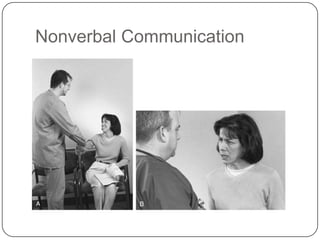
Nonverbal Communication
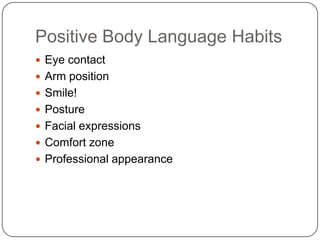
Positive Body Language Habits
 Eye contact
 Arm position
 Smile!
 Posture
 Facial expressions
 Comfort zone
 Professional appearance
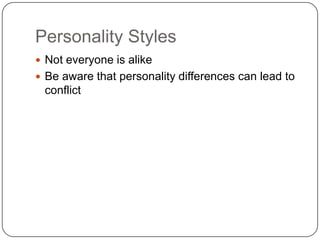
Personality Styles
 Not everyone is alike
 Be aware that personality differences can lead to
 conflict
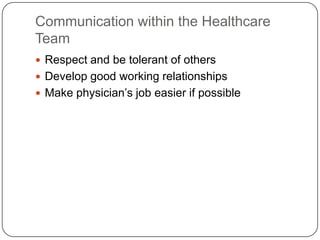
Communication within the Healthcare
Team
 Respect and be tolerant of others
 Develop good working relationships
 Make physician’s job easier if possible
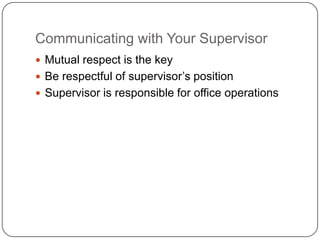
Communicating with Your Supervisor
 Mutual respect is the key
 Be respectful of supervisor’s position
 Supervisor is responsible for office operations
Telephone Communication
 Telephone is indispensable in the medical office
 Most business is done using the phone
Proper Telephone Technique
 Develop a telephone personality
 Answering the phone in a medical office is a great
 responsibility
Guidelines for the Telephone
 Use a thoughtful and caring tone of voice
 Watch volume
 Be careful with the words you choose
 Use an appropriate rate of speech
Incoming Calls
 Consider telephone location
 Maintain confidentiality
 Keep conversations brief
 Don’t ignore a ringing phone
 Answer in three rings or fewer
 Don’t give medical advice
 Don’t use office phone of personal business
Telephone Greeting
 Welcome
   Hello, good morning, and so on
 Identification of facility
 Identification of operator
   Your name
 Offer to help
 Example: Good afternoon, Parker Day Spa, This
  is Chris, How may I help you?
Telephone Protocol
 Guide for handling calls
 Protocol should be approved by practitioners
Telephone Protocol
 Find out:
   Reason for call (Priority #1)
   Name of caller
   Action to take (what the caller needs)
   Call confirmation
   Call close
Holding
 MUST ask if patient is able to hold
 Wait for patient’s response
 Never use “Please hold”
 Hold no longer than one minute
 Minimize holding if possible
 Two calls at same time – only one should hold,
 talk to other call
Transferring Calls
 Ask if you may transfer call
 Announce call
 Do not talk too loudly
 Do not breach confidentiality with speaker
Automated Messages
 If phone traffic is very heavy, a message may play
 giving the patient instructions
Calls After Hours
 Important to give patients information when office
 is closed
   Answering machines
   Voice mail
   Answering services
 Information should be given to caller about what
 to do when office is closed
Telephone Screening
 Obtain information to determine how to handle a
  call
 Reduce the number of calls to the physician;
  some calls can be handled elsewhere
 Practitioners need information, such as chart,
  before handling call
Identifying Emergencies over the Phone
 Be alert to common symptoms
 Do not diagnose a patient
 When in doubt, check it out!!! (Refer call to nurse
 or MD)
Physician out of Office
 Use “Dr. Sanchez is out of the office”
 Don’t mention physician is on vacation unless
 he/she approves
Complaint Calls
 Acknowledge problem
 Ask what you can do to help
 Don’t “pass the buck”
 Keep your cool
 Don’t make excuses
 Do what you can to prevent future problems
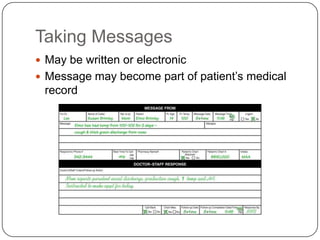
Taking Messages
 May be written or electronic
 Message may become part of patient’s medical
 record
Vital Components of a Message
 Date and time of call
 Caller’s name
 Patient’s name
 Chart number
 Provider name (or person called)
 Operator
 Message narrative
 Telephone number
Communications Equipment
 Telephones
 Switchboard
 Pager
 Cell phone
 Headsets
 Facsimile
Telephone Services
 Caller ID
 Three-way calling
 Call forwarding
 Conference call
Outgoing Calls
 Be mindful of long-distance charges
Directories
 Printed telephone directory
   Contains much community information
 Web directory
   May save money compared with directory services
 Personal directory
   Keeps frequently called numbers
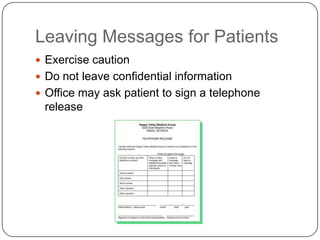
Leaving Messages for Patients
 Exercise caution
 Do not leave confidential information
 Office may ask patient to sign a telephone
 release
Written Communication
 Reference materials are a must
   Medical and English dictionaries
   Medical word books
   Pharmaceutical reference
   Style reference
Business Letters
 Letterhead usually used
 Copies of letters placed in patient’s chart
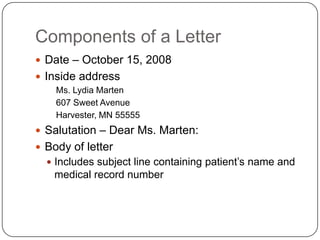
Components of a Letter
 Date – October 15, 2008
 Inside address
    Ms. Lydia Marten
    607 Sweet Avenue
    Harvester, MN 55555
 Salutation – Dear Ms. Marten:
 Body of letter
   Includes subject line containing patient’s name and
   medical record number
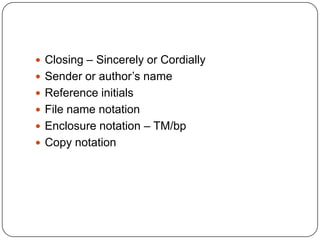
 Closing – Sincerely or Cordially
 Sender or author’s name
 Reference initials
 File name notation
 Enclosure notation – TM/bp
 Copy notation
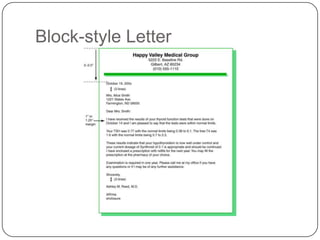
Block-style Letter
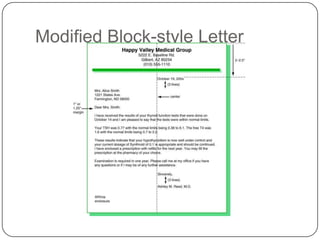
Modified Block-style Letter
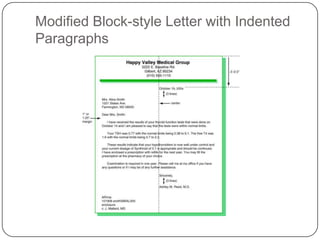
Modified Block-style Letter with Indented
Paragraphs
Envelopes
 #10 business envelopes used for business
  correspondence
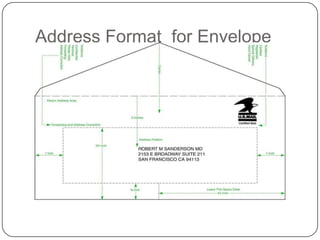
 U.S. Postal Service guidelines for addressing
  envelopes
   All caps, no punctuation
   Black ink on white or light-colored envelopes
   Easy-to-read font
   Left justify address
   One space between city and state, two spaces
   between state and ZIP
Address Format for Envelope
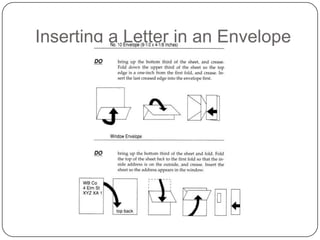
Inserting a Letter in an Envelope
Letter Portfolio
 Keep samples for examples
 Remove confidential information from samples
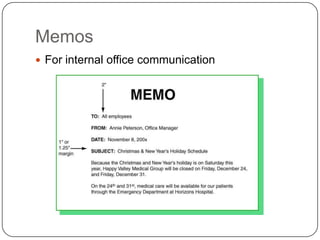
Memos
 For internal office communication
Components of a Memo
 Heading
   To
   From
   Date
   Subject
 Body
 Signature on bottom or next to “from” heading
 Reference
E-mail
 E-mail is a quick way to communicate
 It is not for confidential information
E-mail Etiquette
 Never type messages in capital letters
 Acceptable to use lowercase for casual
  conversation
 Be brief
 Emoticons can convey feeling 
 Avoid sensitive or serious subjects
U.S. Postal Delivery Services
 City delivery – Mail delivered directly to office
 Post office delivery – Mail delivered to box
  located in a postal station
Processing Incoming Mail
 Open every piece of mail unless marked confidential
 Confidential mail opened only by intended recipient
 Mail stamped with date received
 Envelope stapled to letter
 Patient’s medical record number written on
  correspondence
 Correspondence given to physician along with
  patient’s medical record
 Correspondence initialed and dated by physician to
  indicate it was reviewed
Processing Outgoing Mail
 First Class
   Letters, postcards
 Express Mail
   Overnight delivery, costly
 Priority Mail
   Fast service for packages up to 70 lbs.
 Certified with return receipt
   Provides proof of delivery
Processing Outgoing Mail
 Postage machine
   Saves time by weighing and stamping at office
 Presort mail
   Discounts for large amounts of mail to specific ZIP
   codes
 Private courier services
   Alternatives for packages or overnight delivery

K interpersonal communication

  • 1.
    Interpersonal Communications Brenda A. Potter, CPC
  • 2.
    What Is Communication? Communication is sending of information from one place to another
  • 3.
    Components of Communication Sender  Receiver  Message  Feedback
  • 4.
    Communication Guidelines  Listento the other person  Be attentive  Don’t plan your response while patient is talking  Speak clearly  Speak loud enough for patient to hear (but not so loud that anyone else can overhear)
  • 5.
    Communication Guidelines  Pronouncewords correctly  Speak at an appropriate speed  Watch the feeling your voice conveys  Direct words to patient  Clarify patient’s needs if necessary  Don’t interrupt
  • 6.
    Special Communication Considerationsin a Medical Office  Remember, you are a representative of the practice!  Ask an appropriate amount of questions to help patient  Never, ever diagnose or give medical advice!!!!!  Do not use complicated medical terms unless patient fully understands them
  • 7.
    Nonverbal Communication  Bodylanguage  Sign or signal given by the body  Very often given subconsciously
  • 8.
  • 9.
    Positive Body LanguageHabits  Eye contact  Arm position  Smile!  Posture  Facial expressions  Comfort zone  Professional appearance
  • 10.
    Personality Styles  Noteveryone is alike  Be aware that personality differences can lead to conflict
  • 11.
    Communication within theHealthcare Team  Respect and be tolerant of others  Develop good working relationships  Make physician’s job easier if possible
  • 12.
    Communicating with YourSupervisor  Mutual respect is the key  Be respectful of supervisor’s position  Supervisor is responsible for office operations
  • 13.
    Telephone Communication  Telephoneis indispensable in the medical office  Most business is done using the phone
  • 14.
    Proper Telephone Technique Develop a telephone personality  Answering the phone in a medical office is a great responsibility
  • 15.
    Guidelines for theTelephone  Use a thoughtful and caring tone of voice  Watch volume  Be careful with the words you choose  Use an appropriate rate of speech
  • 16.
    Incoming Calls  Considertelephone location  Maintain confidentiality  Keep conversations brief  Don’t ignore a ringing phone  Answer in three rings or fewer  Don’t give medical advice  Don’t use office phone of personal business
  • 17.
    Telephone Greeting  Welcome  Hello, good morning, and so on  Identification of facility  Identification of operator  Your name  Offer to help  Example: Good afternoon, Parker Day Spa, This is Chris, How may I help you?
  • 18.
    Telephone Protocol  Guidefor handling calls  Protocol should be approved by practitioners
  • 19.
    Telephone Protocol  Findout:  Reason for call (Priority #1)  Name of caller  Action to take (what the caller needs)  Call confirmation  Call close
  • 20.
    Holding  MUST askif patient is able to hold  Wait for patient’s response  Never use “Please hold”  Hold no longer than one minute  Minimize holding if possible  Two calls at same time – only one should hold, talk to other call
  • 21.
    Transferring Calls  Askif you may transfer call  Announce call  Do not talk too loudly  Do not breach confidentiality with speaker
  • 22.
    Automated Messages  Ifphone traffic is very heavy, a message may play giving the patient instructions
  • 23.
    Calls After Hours Important to give patients information when office is closed  Answering machines  Voice mail  Answering services  Information should be given to caller about what to do when office is closed
  • 24.
    Telephone Screening  Obtaininformation to determine how to handle a call  Reduce the number of calls to the physician; some calls can be handled elsewhere  Practitioners need information, such as chart, before handling call
  • 25.
    Identifying Emergencies overthe Phone  Be alert to common symptoms  Do not diagnose a patient  When in doubt, check it out!!! (Refer call to nurse or MD)
  • 26.
    Physician out ofOffice  Use “Dr. Sanchez is out of the office”  Don’t mention physician is on vacation unless he/she approves
  • 27.
    Complaint Calls  Acknowledgeproblem  Ask what you can do to help  Don’t “pass the buck”  Keep your cool  Don’t make excuses  Do what you can to prevent future problems
  • 28.
    Taking Messages  Maybe written or electronic  Message may become part of patient’s medical record
  • 29.
    Vital Components ofa Message  Date and time of call  Caller’s name  Patient’s name  Chart number  Provider name (or person called)  Operator  Message narrative  Telephone number
  • 30.
    Communications Equipment  Telephones Switchboard  Pager  Cell phone  Headsets  Facsimile
  • 31.
    Telephone Services  CallerID  Three-way calling  Call forwarding  Conference call
  • 32.
    Outgoing Calls  Bemindful of long-distance charges
  • 33.
    Directories  Printed telephonedirectory  Contains much community information  Web directory  May save money compared with directory services  Personal directory  Keeps frequently called numbers
  • 34.
    Leaving Messages forPatients  Exercise caution  Do not leave confidential information  Office may ask patient to sign a telephone release
  • 35.
    Written Communication  Referencematerials are a must  Medical and English dictionaries  Medical word books  Pharmaceutical reference  Style reference
  • 36.
    Business Letters  Letterheadusually used  Copies of letters placed in patient’s chart
  • 37.
    Components of aLetter  Date – October 15, 2008  Inside address Ms. Lydia Marten 607 Sweet Avenue Harvester, MN 55555  Salutation – Dear Ms. Marten:  Body of letter  Includes subject line containing patient’s name and medical record number
  • 38.
     Closing –Sincerely or Cordially  Sender or author’s name  Reference initials  File name notation  Enclosure notation – TM/bp  Copy notation
  • 39.
  • 40.
  • 41.
    Modified Block-style Letterwith Indented Paragraphs
  • 42.
    Envelopes  #10 businessenvelopes used for business correspondence  U.S. Postal Service guidelines for addressing envelopes  All caps, no punctuation  Black ink on white or light-colored envelopes  Easy-to-read font  Left justify address  One space between city and state, two spaces between state and ZIP
  • 43.
  • 44.
    Inserting a Letterin an Envelope
  • 45.
    Letter Portfolio  Keepsamples for examples  Remove confidential information from samples
  • 46.
    Memos  For internaloffice communication
  • 47.
    Components of aMemo  Heading  To  From  Date  Subject  Body  Signature on bottom or next to “from” heading  Reference
  • 48.
    E-mail  E-mail isa quick way to communicate  It is not for confidential information
  • 49.
    E-mail Etiquette  Nevertype messages in capital letters  Acceptable to use lowercase for casual conversation  Be brief  Emoticons can convey feeling   Avoid sensitive or serious subjects
  • 50.
    U.S. Postal DeliveryServices  City delivery – Mail delivered directly to office  Post office delivery – Mail delivered to box located in a postal station
  • 51.
    Processing Incoming Mail Open every piece of mail unless marked confidential  Confidential mail opened only by intended recipient  Mail stamped with date received  Envelope stapled to letter  Patient’s medical record number written on correspondence  Correspondence given to physician along with patient’s medical record  Correspondence initialed and dated by physician to indicate it was reviewed
  • 52.
    Processing Outgoing Mail First Class  Letters, postcards  Express Mail  Overnight delivery, costly  Priority Mail  Fast service for packages up to 70 lbs.  Certified with return receipt  Provides proof of delivery
  • 53.
    Processing Outgoing Mail Postage machine  Saves time by weighing and stamping at office  Presort mail  Discounts for large amounts of mail to specific ZIP codes  Private courier services  Alternatives for packages or overnight delivery