PRESENTED BY STEVE GARWOOD  < [email_address] >  LECTURER SCHOOL OF COMMUNICATION, INFORMATION AND LIBRARY STUDIES  RUTGERS UNIVERSITY Just Push Play: Screencasting for Your Library (Be there for your students no matter what time of day… Continued LIVE!!)
Recording Notes/Comments Was my recording “perfect”? did it really matter? text
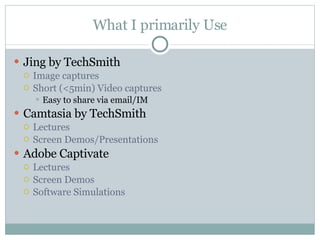
What I primarily Use Jing by TechSmith  Image captures Short (<5min) Video captures Easy to share via email/IM Camtasia by TechSmith  Lectures Screen Demos/Presentations Adobe Captivate Lectures Screen Demos Software Simulations
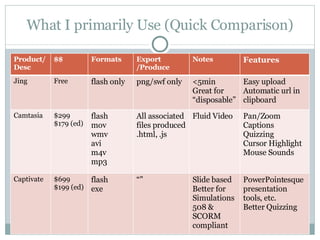
What I primarily Use (Quick Comparison) Product/Desc $$ Formats Export /Produce Notes Features Jing Free flash only png/swf only <5min Great for “disposable” Easy upload Automatic url in clipboard Camtasia $299 $179 (ed) flash mov wmv avi m4v mp3  All associated files produced .html, .js Fluid Video Pan/Zoom Captions Quizzing Cursor Highlight Mouse Sounds Captivate $699 $199 (ed) flash exe “” Slide based Better for Simulations 508 & SCORM compliant PowerPointesque presentation tools, etc. Better Quizzing
Library Applications
Library Applications – What it Replaces Lost opportunity students using library resources on THEIR time point of need assistance public who can’t make class/training times Staff overload same class/training again and again same question over and over again
Library Applications – What it Enhances Customer service Instruction  adds to text or screen capture based tutorials great for auditory/visual learners Customer and Staff training follow up/review/additional resources specialized training  school groups business audiences
Library Applications – What New Things… Personalize “ voice” and “personality” to your library Communicate  esp. to newer generations who “expect” video Demonstrate  Library able to effectively use technology
What you need to get  started
Advantages It’s easy to do the basics in each program Reuse and Repurpose content If you break things into small chunks you can “mash-up” your content to create new content Be timely (the world loves video) Who doesn’t know the term Viral Video? Vodcast Podcasting is cool…vodcasting is very cool
Getting Started - Hardware Windows based PC* 1.0 GHz processor minimum  1.0 GB RAM minimum adequate hard-disk space @60 MB for program installation 20-40 GB to store video files Microphone/Speakers headset recommended
Getting Started - Software To Create: screencasting Program Camtasia (recommended) Jing, Captivate and Snapz Pro X are alternatives (more in guide) cost @$199/$249 educational/govt To Watch: browser with Flash Player
Getting Started – Computer Skills Basic save a file (and find it again) upload a file adjusting volume settings resize/move window(s) plug cables into machine
Getting Started – Tips Let go…you’re not a trained broadcaster Water…
Disadvantages You have to learn something new It takes time to record, produce and upload You may have to change your approach Lectures should generally be “chunked” Attention spans are short and bandwidth is precious Break things apart to put them together in other ways Might have to re-do PPT slides so they scale “ 6x6” rule
Questions? What are your questions for me?

Just Push Play: Screencasting for Your Library

  • 1.
    PRESENTED BY STEVEGARWOOD < [email_address] > LECTURER SCHOOL OF COMMUNICATION, INFORMATION AND LIBRARY STUDIES RUTGERS UNIVERSITY Just Push Play: Screencasting for Your Library (Be there for your students no matter what time of day… Continued LIVE!!)
  • 2.
    Recording Notes/Comments Wasmy recording “perfect”? did it really matter? text
  • 3.
    What I primarilyUse Jing by TechSmith Image captures Short (<5min) Video captures Easy to share via email/IM Camtasia by TechSmith Lectures Screen Demos/Presentations Adobe Captivate Lectures Screen Demos Software Simulations
  • 4.
    What I primarilyUse (Quick Comparison) Product/Desc $$ Formats Export /Produce Notes Features Jing Free flash only png/swf only <5min Great for “disposable” Easy upload Automatic url in clipboard Camtasia $299 $179 (ed) flash mov wmv avi m4v mp3 All associated files produced .html, .js Fluid Video Pan/Zoom Captions Quizzing Cursor Highlight Mouse Sounds Captivate $699 $199 (ed) flash exe “” Slide based Better for Simulations 508 & SCORM compliant PowerPointesque presentation tools, etc. Better Quizzing
  • 5.
  • 6.
    Library Applications –What it Replaces Lost opportunity students using library resources on THEIR time point of need assistance public who can’t make class/training times Staff overload same class/training again and again same question over and over again
  • 7.
    Library Applications –What it Enhances Customer service Instruction adds to text or screen capture based tutorials great for auditory/visual learners Customer and Staff training follow up/review/additional resources specialized training school groups business audiences
  • 8.
    Library Applications –What New Things… Personalize “ voice” and “personality” to your library Communicate esp. to newer generations who “expect” video Demonstrate Library able to effectively use technology
  • 9.
    What you needto get started
  • 10.
    Advantages It’s easyto do the basics in each program Reuse and Repurpose content If you break things into small chunks you can “mash-up” your content to create new content Be timely (the world loves video) Who doesn’t know the term Viral Video? Vodcast Podcasting is cool…vodcasting is very cool
  • 11.
    Getting Started -Hardware Windows based PC* 1.0 GHz processor minimum 1.0 GB RAM minimum adequate hard-disk space @60 MB for program installation 20-40 GB to store video files Microphone/Speakers headset recommended
  • 12.
    Getting Started -Software To Create: screencasting Program Camtasia (recommended) Jing, Captivate and Snapz Pro X are alternatives (more in guide) cost @$199/$249 educational/govt To Watch: browser with Flash Player
  • 13.
    Getting Started –Computer Skills Basic save a file (and find it again) upload a file adjusting volume settings resize/move window(s) plug cables into machine
  • 14.
    Getting Started –Tips Let go…you’re not a trained broadcaster Water…
  • 15.
    Disadvantages You haveto learn something new It takes time to record, produce and upload You may have to change your approach Lectures should generally be “chunked” Attention spans are short and bandwidth is precious Break things apart to put them together in other ways Might have to re-do PPT slides so they scale “ 6x6” rule
  • 16.
    Questions? What areyour questions for me?