Synchronous CMC
CALL Feb 25 2013

Follow along: goo.gl/oHPIH
Why CMC?
ď‚— Not an either/or choice between
  speaking in person and CMC.
 What can CMC do…
    â—¦ In class?
    â—¦ Small group work outside of class?
Learner Participation
ď‚— More equal participation than in-class
  group work and less use of L1
  (Warschauer, 1996).
ď‚— Learners have time to prepare
ď‚— Encourages output
ď‚— Can be used in conjunction with
  tasks/projects.
Tools
ď‚— Chat programs (Instant Messenger,
  Google Talk, Microsoft Lync,
  Facebook Chat)
ď‚— Internet Relay Chat (chat rooms, very
  text-based)
ď‚— Video/audio conferencing (e.g.,
  Skype, TokBox)
ď‚— LMS classrooms (e.g., Blackboard
  Collaborate)
Activities
ď‚— Discussion topics (high interest topics)
ď‚— Work on a project/task (through
  discussion)
ď‚— Study groups
ď‚— Collaborate on a document (in
  application)
ď‚— Hold class
ď‚— Jigsaw activity (Pre-determined
  groups, students go from group to
  group)
Let’s try it out
ď‚—   Blackboard Collaborate (Guide here):

ď‚—   Login to Collaborate session via BBLearn (568 ->
    General Information)

ď‚—   You may need to install Collaborate/update Java.
    Asks for Admin authorization, just cancel (should
    still work)

ď‚—   Or join via mobile app (Blackboard Collaborate
    Mobile in iTunes or Google Play).

ď‚—   You will need the Blackboard Mobile app AND
    the Blackboard Collaborate app to use it.
Small group work
 With a partner…choose one of the
  following (preferably that you haven’t
  used before)
ď‚— Test out the application; figure out how
  to use it.
ď‚— Brainstorm ideas for using it in your
  own class.
ď‚— Share your findings in the appropriate
  Collaborate group.
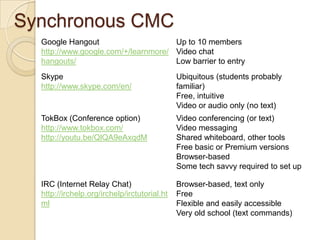
Synchronous CMC
  Google Hangout                     Up to 10 members
  http://www.google.com/+/learnmore/ Video chat
  hangouts/                          Low barrier to entry
  Skype                                       Ubiquitous (students probably
  http://www.skype.com/en/                    familiar)
                                              Free, intuitive
                                              Video or audio only (no text)
  TokBox (Conference option)                  Video conferencing (or text)
  http://www.tokbox.com/                      Video messaging
  http://youtu.be/QlQA9eAxqdM                 Shared whiteboard, other tools
                                              Free basic or Premium versions
                                              Browser-based
                                              Some tech savvy required to set up

  IRC (Internet Relay Chat)                   Browser-based, text only
  http://irchelp.org/irchelp/irctutorial.ht   Free
  ml                                          Flexible and easily accessible
                                              Very old school (text commands)

synchronous_cmc

  • 1.
    Synchronous CMC CALL Feb25 2013 Follow along: goo.gl/oHPIH
  • 2.
    Why CMC?  Notan either/or choice between speaking in person and CMC.  What can CMC do… ◦ In class? ◦ Small group work outside of class?
  • 3.
    Learner Participation ď‚— Moreequal participation than in-class group work and less use of L1 (Warschauer, 1996). ď‚— Learners have time to prepare ď‚— Encourages output ď‚— Can be used in conjunction with tasks/projects.
  • 4.
    Tools ď‚— Chat programs(Instant Messenger, Google Talk, Microsoft Lync, Facebook Chat) ď‚— Internet Relay Chat (chat rooms, very text-based) ď‚— Video/audio conferencing (e.g., Skype, TokBox) ď‚— LMS classrooms (e.g., Blackboard Collaborate)
  • 5.
    Activities ď‚— Discussion topics(high interest topics) ď‚— Work on a project/task (through discussion) ď‚— Study groups ď‚— Collaborate on a document (in application) ď‚— Hold class ď‚— Jigsaw activity (Pre-determined groups, students go from group to group)
  • 6.
    Let’s try itout  Blackboard Collaborate (Guide here):  Login to Collaborate session via BBLearn (568 -> General Information)  You may need to install Collaborate/update Java. Asks for Admin authorization, just cancel (should still work)  Or join via mobile app (Blackboard Collaborate Mobile in iTunes or Google Play).  You will need the Blackboard Mobile app AND the Blackboard Collaborate app to use it.
  • 7.
    Small group work With a partner…choose one of the following (preferably that you haven’t used before)  Test out the application; figure out how to use it.  Brainstorm ideas for using it in your own class.  Share your findings in the appropriate Collaborate group.
  • 8.
    Synchronous CMC Google Hangout Up to 10 members http://www.google.com/+/learnmore/ Video chat hangouts/ Low barrier to entry Skype Ubiquitous (students probably http://www.skype.com/en/ familiar) Free, intuitive Video or audio only (no text) TokBox (Conference option) Video conferencing (or text) http://www.tokbox.com/ Video messaging http://youtu.be/QlQA9eAxqdM Shared whiteboard, other tools Free basic or Premium versions Browser-based Some tech savvy required to set up IRC (Internet Relay Chat) Browser-based, text only http://irchelp.org/irchelp/irctutorial.ht Free ml Flexible and easily accessible Very old school (text commands)