JQuery
SCRIPTING LANGUAGES
JAVASCRIPT
Kumar Gaurav
k10gaurav@gmail.com
JQuery
 Powerful JavaScript library
 Simplify common JavaScript tasks
 Access parts of a page
 using CSS or XPath-like expressions
 Modify the appearance of a page
 Alter the content of a page
 Change the user’s interaction with a page
 Add animation to a page
 Provide AJAX support
 Abstract away browser quirks
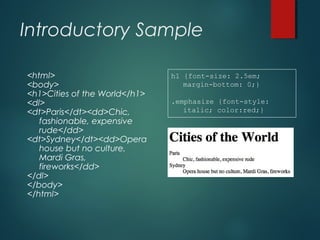
Introductory Sample
<html>
<body>
<h1>Cities of the World</h1>
<dl>
<dt>Paris</dt><dd>Chic,
fashionable, expensive
rude</dd>
<dt>Sydney</dt><dd>Opera
house but no culture,
Mardi Gras,
fireworks</dd>
</dl>
</body>
</html>
h1 {font-size: 2.5em;
margin-bottom: 0;}
.emphasize {font-style:
italic; color:red;}
Basic JQuery
 Selecting part of document is fundamental
operation
 A JQuery object is a wrapper for a selected
group of DOM nodes
 $() function is a factory method that creates
JQuery objects
 $(“dt”) is a JQuery object containing all the “dt”
elements in the document
Continue…
 .addClass() method changes the
DOM nodes by adding a ‘class’
attribute
 The ‘class’ attribute is a special CSS
construct that provides a visual
architecture independent of the element
structures
 $(“dt”).addClass(“emphasize”) will
change all occurrences of <dt> to
<dt class=“emphasize”>
 See also .removeClass()
Continue…
 To make this change, put it in a
function and call it when the
document has been loaded and the
DOM is created
function doEmph(){$(“dt”).addClass(“emphasize”)}
<body onLoad=“doEmph()”>
 We had to alter the HTML (bad)
 Structure and appearance should be
separated!
 Also, onLoad waits until all images etc
are loaded. Tedious.
Continue…
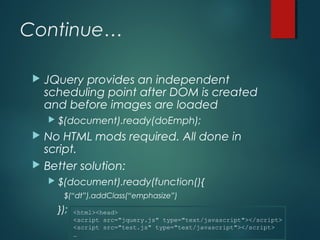
 JQuery provides an independent
scheduling point after DOM is created
and before images are loaded
 $(document).ready(doEmph);
 No HTML mods required. All done in
script.
 Better solution:
 $(document).ready(function(){
$(“dt”).addClass(“emphasize”)
}); <html><head>
<script src="jquery.js" type="text/javascript"></script>
<script src="test.js" type="text/javascript"></script>
…
JQuery Selectors
 CSS
 p element name
 #id identifier
 .class classname
 p.class element with class
 p a anchor as any descendant of p
 p > a anchor direct child of p
Continue…
 XPath
/html/body//divpaths
a[@href] anchor with an href attr
div[ol] div with an ol inside
//a[@ref='nofollow'] any anchor with a specific value
for the ref attribute
JQuery Filters
 p:first first paragraph
 li:last last list item
 a:nth(3) fourth link
 a:eq(3) fourth link
 p:even or p:odd every other paragraph
 a:gt(3) or a:lt(4) every link after the 4th or up to the fourth
 a:contains(‘click’) links that contain the word click
Example
 JQuery uses chaining as follows
$(‘a:contains("ECS")’).
parent().
addClass("emphasize")
JQuery Events
 bind(eventname, function) method
 ‘click’
 ‘change’
 ‘resize’
 ‘ready’
 ‘mouseover’ & ‘mouseout’
 ‘live’ or ‘delegate’ or ‘on’
 ‘load’
 Etc…
 $(“a[@href]”).bind(‘click’,function(){
$(this).addClass(‘red’);});
Other JQuery Effects
 .css(‘property’, ‘value’)
 .css({‘prop1’:‘value1’,
‘prop2’:’value2’…})
E.g. .css(‘color’, ‘red’)
 .fadeIn(speed) or fadeOut(speed)
 .hide(speed) or .show(speed)
 Where speed is ‘slow’, ‘normal’ or ‘fast’
 Etc…
More JQuery Changes
DOM
 .attr({‘name’, ‘value’})
 sets a new attribute (or many)
 $(‘<i>hello</i>’)
 Creates a new element
 $(‘<i>hello</i>’).insertAfter(‘div.chapter p’);
 Creates element and inserts it into the document
 .html() or .text() or .empty() will replace
matched elements with newly created
elements
jQuery Sources
 Latest version 2.1.x
 jQuery Website https://jquery.com/download/
 Google Developers
https://ajax.googleapis.com/ajax/libs/jquery/2.1.
3/jquery.min.js
Thank you!

jQuery Beginner

  • 1.
  • 2.
    JQuery  Powerful JavaScriptlibrary  Simplify common JavaScript tasks  Access parts of a page  using CSS or XPath-like expressions  Modify the appearance of a page  Alter the content of a page  Change the user’s interaction with a page  Add animation to a page  Provide AJAX support  Abstract away browser quirks
  • 3.
    Introductory Sample <html> <body> <h1>Cities ofthe World</h1> <dl> <dt>Paris</dt><dd>Chic, fashionable, expensive rude</dd> <dt>Sydney</dt><dd>Opera house but no culture, Mardi Gras, fireworks</dd> </dl> </body> </html> h1 {font-size: 2.5em; margin-bottom: 0;} .emphasize {font-style: italic; color:red;}
  • 4.
    Basic JQuery  Selectingpart of document is fundamental operation  A JQuery object is a wrapper for a selected group of DOM nodes  $() function is a factory method that creates JQuery objects  $(“dt”) is a JQuery object containing all the “dt” elements in the document
  • 5.
    Continue…  .addClass() methodchanges the DOM nodes by adding a ‘class’ attribute  The ‘class’ attribute is a special CSS construct that provides a visual architecture independent of the element structures  $(“dt”).addClass(“emphasize”) will change all occurrences of <dt> to <dt class=“emphasize”>  See also .removeClass()
  • 6.
    Continue…  To makethis change, put it in a function and call it when the document has been loaded and the DOM is created function doEmph(){$(“dt”).addClass(“emphasize”)} <body onLoad=“doEmph()”>  We had to alter the HTML (bad)  Structure and appearance should be separated!  Also, onLoad waits until all images etc are loaded. Tedious.
  • 7.
    Continue…  JQuery providesan independent scheduling point after DOM is created and before images are loaded  $(document).ready(doEmph);  No HTML mods required. All done in script.  Better solution:  $(document).ready(function(){ $(“dt”).addClass(“emphasize”) }); <html><head> <script src="jquery.js" type="text/javascript"></script> <script src="test.js" type="text/javascript"></script> …
  • 8.
    JQuery Selectors  CSS p element name  #id identifier  .class classname  p.class element with class  p a anchor as any descendant of p  p > a anchor direct child of p
  • 9.
    Continue…  XPath /html/body//divpaths a[@href] anchorwith an href attr div[ol] div with an ol inside //a[@ref='nofollow'] any anchor with a specific value for the ref attribute
  • 10.
    JQuery Filters  p:firstfirst paragraph  li:last last list item  a:nth(3) fourth link  a:eq(3) fourth link  p:even or p:odd every other paragraph  a:gt(3) or a:lt(4) every link after the 4th or up to the fourth  a:contains(‘click’) links that contain the word click
  • 11.
    Example  JQuery useschaining as follows $(‘a:contains("ECS")’). parent(). addClass("emphasize")
  • 12.
    JQuery Events  bind(eventname,function) method  ‘click’  ‘change’  ‘resize’  ‘ready’  ‘mouseover’ & ‘mouseout’  ‘live’ or ‘delegate’ or ‘on’  ‘load’  Etc…  $(“a[@href]”).bind(‘click’,function(){ $(this).addClass(‘red’);});
  • 13.
    Other JQuery Effects .css(‘property’, ‘value’)  .css({‘prop1’:‘value1’, ‘prop2’:’value2’…}) E.g. .css(‘color’, ‘red’)  .fadeIn(speed) or fadeOut(speed)  .hide(speed) or .show(speed)  Where speed is ‘slow’, ‘normal’ or ‘fast’  Etc…
  • 14.
    More JQuery Changes DOM .attr({‘name’, ‘value’})  sets a new attribute (or many)  $(‘<i>hello</i>’)  Creates a new element  $(‘<i>hello</i>’).insertAfter(‘div.chapter p’);  Creates element and inserts it into the document  .html() or .text() or .empty() will replace matched elements with newly created elements
  • 15.
    jQuery Sources  Latestversion 2.1.x  jQuery Website https://jquery.com/download/  Google Developers https://ajax.googleapis.com/ajax/libs/jquery/2.1. 3/jquery.min.js
  • 16.