jQuery
Should Already Know 
 HTML 
 CSS 
 JavaScript
jQuery? 
 jQuery is a lightweight, "write less, do more", JavaScript 
library. 
 The purpose of jQuery is to make it much easier to use 
JavaScript on your website. 
 jQuery takes a lot of common tasks that require many lines 
of JavaScript code to accomplish, and wraps them into 
methods that you can call with a single line of code. 
 jQuery also simplifies a lot of the complicated things from 
JavaScript, like AJAX calls and DOM manipulation. 
 The jQuery library contains the following features: 
 HTML/DOM manipulation 
 CSS manipulation 
 HTML event methods 
 Effects and an`imations 
 AJAX 
 Utilities
Why jQuery? 
 There are lots of other JavaScript frameworks 
out there, but jQuery seems to be the most 
popular, and also the most extendable. 
 Many of the biggest companies on the Web 
use jQuery, such as: 
 Google 
 Microsoft 
 IBM 
 Netflix 
Will jQuery work in all browsers?
Downloading jQuery 
There are two versions of jQuery available for 
downloading: 
 Production version - this is for your live website 
because it has been minified and compressed 
 Development version - this is for testing and 
development (uncompressed and readable 
code) 
 Both versions can be downloaded 
from jQuery.com. 
 The jQuery library is a single JavaScript file, 
and you reference it with the HTML <script> 
tag (notice that the <script> tag should be 
inside the <head> section):
jQuery to Your Web Pages 
 Download the jQuery library from 
jQuery.com 
<head> 
<script src="jquery-1.11.1.min.js"></script> 
</head> 
 Include jQuery from a CDN, like Google 
<head> 
<script 
src="http://ajax.googleapis.com/ajax/libs/jqu 
ery/1.11.1/jquery.min.js"></script> 
</head>
jQuery Syntax 
 The jQuery syntax is tailor made for selecting HTML 
elements and performing some action on the 
element(s). 
 Basic syntax is: $(selector).action() 
 A $ sign to define/access jQuery 
 A (selector) to "query (or find)" HTML elements 
 A jQuery action() to be performed on the 
element(s) 
 Examples: 
 $(this).hide() - hides the current element. 
 $("p").hide() - hides all <p> elements. 
 $(".test").hide() - hides all elements with class="test". 
 $("#test").hide() - hides the element with id="test".
Document Ready Event 
 You might have noticed that all jQuery 
methods are inside a document ready event: 
 $(document).ready(function(){ 
// jQuery methods go here... 
}); 
This is to prevent any jQuery code from running 
before the document is finished loading (is ready). 
Actions that can fail if methods are run before the 
document is fully loaded: 
 Trying to hide an element that is not created yet 
 Trying to get the size of an image that is not 
loaded yet
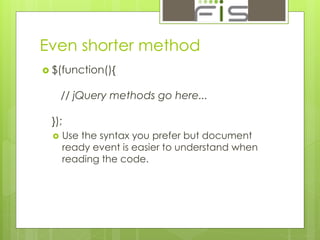
Even shorter method 
 $(function(){ 
// jQuery methods go here... 
}); 
 Use the syntax you prefer but document 
ready event is easier to understand when 
reading the code.
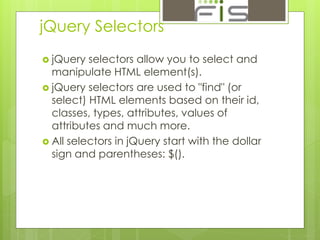
jQuery Selectors 
 jQuery selectors allow you to select and 
manipulate HTML element(s). 
 jQuery selectors are used to "find" (or 
select) HTML elements based on their id, 
classes, types, attributes, values of 
attributes and much more. 
 All selectors in jQuery start with the dollar 
sign and parentheses: $().
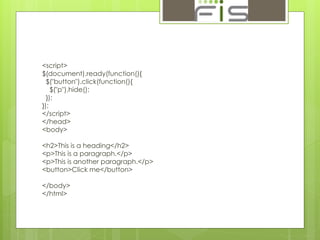
<script> 
$(document).ready(function(){ 
$("button").click(function(){ 
$("p").hide(); 
}); 
}); 
</script> 
</head> 
<body> 
<h2>This is a heading</h2> 
<p>This is a paragraph.</p> 
<p>This is another paragraph.</p> 
<button>Click me</button> 
</body> 
</html>
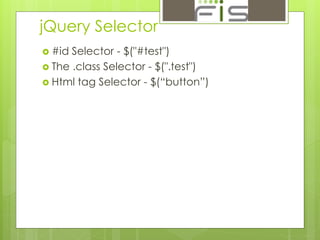
jQuery Selector 
 #id Selector - $("#test") 
 The .class Selector - $(".test") 
 Html tag Selector - $(“button”)
$("*") Selects all elements Try it 
$(this) Selects the current HTML element Try it 
$("p.intro") Selects all <p> elements with class="intro" Try it 
$("p:first") Selects the first <p> element Try it 
$("ul li:first") Selects the first <li> element of the first <ul> Try it 
$("ul li:first-child") Selects the first <li> element of every <ul> Try it 
$("[href]") Selects all elements with an href attribute Try it 
$("a[target='_blank']") Selects all <a> elements with a target attribute 
value equal to "_blank" 
Try it 
$("a[target!='_blank']") Selects all <a> elements with a target attribute 
value NOT equal to "_blank" 
Try it 
$(":button") Selects all <button> elements and <input> 
elements of type="button" 
Try it 
$("tr:even") Selects all even <tr> elements Try it 
$("tr:odd") Selects all odd <tr> elements Try it
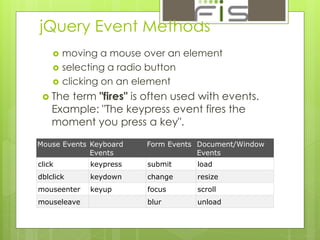
jQuery Event Methods 
 moving a mouse over an element 
 selecting a radio button 
 clicking on an element 
 The term "fires" is often used with events. 
Example: "The keypress event fires the 
moment you press a key". 
Mouse Events Keyboard 
Events 
Form Events Document/Window 
Events 
click keypress submit load 
dblclick keydown change resize 
mouseenter keyup focus scroll 
mouseleave blur unload
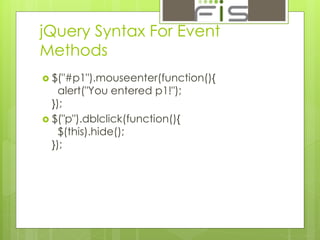
jQuery Syntax For Event 
Methods 
 $("#p1").mouseenter(function(){ 
alert("You entered p1!"); 
}); 
 $("p").dblclick(function(){ 
$(this).hide(); 
});
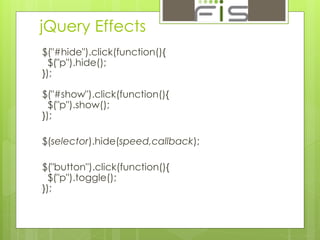
jQuery Effects 
$("#hide").click(function(){ 
$("p").hide(); 
}); 
$("#show").click(function(){ 
$("p").show(); 
}); 
$(selector).hide(speed,callback); 
$("button").click(function(){ 
$("p").toggle(); 
});
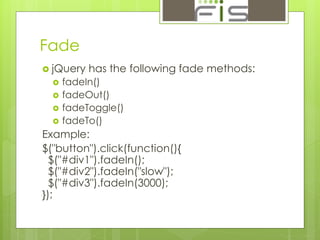
Fade 
 jQuery has the following fade methods: 
 fadeIn() 
 fadeOut() 
 fadeToggle() 
 fadeTo() 
Example: 
$("button").click(function(){ 
$("#div1").fadeIn(); 
$("#div2").fadeIn("slow"); 
$("#div3").fadeIn(3000); 
});
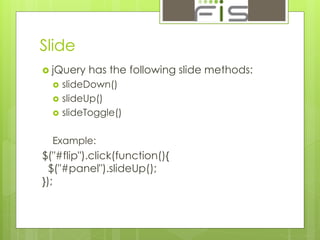
Slide 
 jQuery has the following slide methods: 
 slideDown() 
 slideUp() 
 slideToggle() 
Example: 
$("#flip").click(function(){ 
$("#panel").slideUp(); 
});
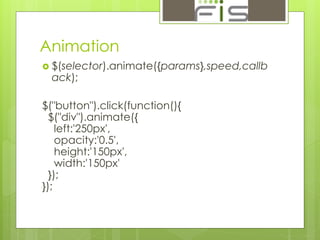
Animation 
 $(selector).animate({params},speed,callb 
ack); 
$("button").click(function(){ 
$("div").animate({ 
left:'250px', 
opacity:'0.5', 
height:'150px', 
width:'150px' 
}); 
});
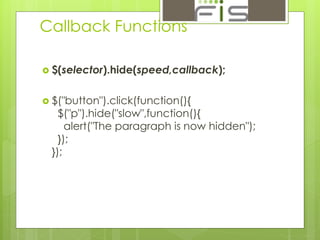
Callback Functions 
 $(selector).hide(speed,callback); 
 $("button").click(function(){ 
$("p").hide("slow",function(){ 
alert("The paragraph is now hidden"); 
}); 
});
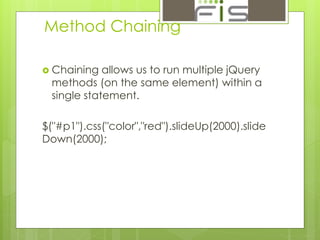
Method Chaining 
 Chaining allows us to run multiple jQuery 
methods (on the same element) within a 
single statement. 
$("#p1").css("color","red").slideUp(2000).slide 
Down(2000);
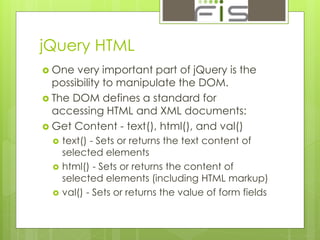
jQuery HTML 
 One very important part of jQuery is the 
possibility to manipulate the DOM. 
 The DOM defines a standard for 
accessing HTML and XML documents: 
 Get Content - text(), html(), and val() 
 text() - Sets or returns the text content of 
selected elements 
 html() - Sets or returns the content of 
selected elements (including HTML markup) 
 val() - Sets or returns the value of form fields
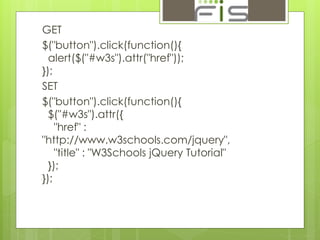
GET 
$("button").click(function(){ 
alert($("#w3s").attr("href")); 
}); 
SET 
$("button").click(function(){ 
$("#w3s").attr({ 
"href" : 
"http://www.w3schools.com/jquery", 
"title" : "W3Schools jQuery Tutorial" 
}); 
});
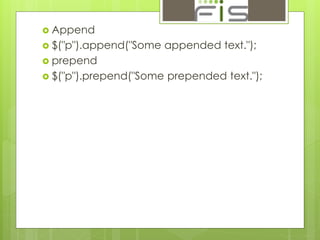
 Append 
 $("p").append("Some appended text."); 
 prepend 
 $("p").prepend("Some prepended text.");
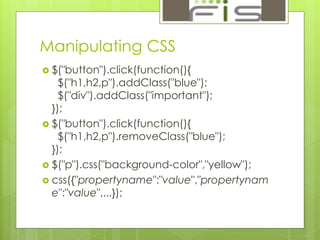
Manipulating CSS 
 $("button").click(function(){ 
$("h1,h2,p").addClass("blue"); 
$("div").addClass("important"); 
}); 
 $("button").click(function(){ 
$("h1,h2,p").removeClass("blue"); 
}); 
 $("p").css("background-color","yellow"); 
 css({"propertyname":"value","propertynam 
e":"value",...});
jQuery Traversing 
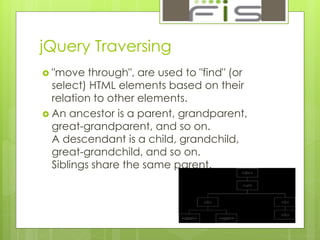
 "move through", are used to "find" (or 
select) HTML elements based on their 
relation to other elements. 
 An ancestor is a parent, grandparent, 
great-grandparent, and so on. 
A descendant is a child, grandchild, 
great-grandchild, and so on. 
Siblings share the same parent.
 Ancestors 
 parent() 
 parents() 
 parentsUntil() 
 Descendants 
 children() 
 find() 
$(document).ready(function(){ 
$("div").find("span"); 
});
Siblings 
 siblings() 
 next() 
 nextAll() 
 nextUntil() 
 prev() 
 prevAll() 
 prevUntil()
jQuery Ajax 
 AJAX is the art of exchanging data with a 
server, and updating parts of a web page 
- without reloading the whole page. 
With the jQuery AJAX methods, you can 
request text, HTML, XML, or JSON from a 
remote server using both HTTP Get and 
HTTP Post 
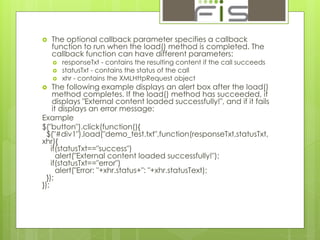
 $(selector).load(URL,data,callback);
 The optional callback parameter specifies a callback 
function to run when the load() method is completed. The 
callback function can have different parameters: 
 responseTxt - contains the resulting content if the call succeeds 
 statusTxt - contains the status of the call 
 xhr - contains the XMLHttpRequest object 
 The following example displays an alert box after the load() 
method completes. If the load() method has succeeded, it 
displays "External content loaded successfully!", and if it fails 
it displays an error message: 
Example 
$("button").click(function(){ 
$("#div1").load("demo_test.txt",function(responseTxt,statusTxt, 
xhr){ 
if(statusTxt=="success") 
alert("External content loaded successfully!"); 
if(statusTxt=="error") 
alert("Error: "+xhr.status+": "+xhr.statusText); 
}); 
});
get() and post() Methods 
 $.get(URL,callback); 
 $.post(URL,data,callback);
Example 
 http://jqueryui.com/
T han k Y o u

J query training

  • 1.
  • 2.
    Should Already Know  HTML  CSS  JavaScript
  • 3.
    jQuery?  jQueryis a lightweight, "write less, do more", JavaScript library.  The purpose of jQuery is to make it much easier to use JavaScript on your website.  jQuery takes a lot of common tasks that require many lines of JavaScript code to accomplish, and wraps them into methods that you can call with a single line of code.  jQuery also simplifies a lot of the complicated things from JavaScript, like AJAX calls and DOM manipulation.  The jQuery library contains the following features:  HTML/DOM manipulation  CSS manipulation  HTML event methods  Effects and an`imations  AJAX  Utilities
  • 4.
    Why jQuery? There are lots of other JavaScript frameworks out there, but jQuery seems to be the most popular, and also the most extendable.  Many of the biggest companies on the Web use jQuery, such as:  Google  Microsoft  IBM  Netflix Will jQuery work in all browsers?
  • 5.
    Downloading jQuery Thereare two versions of jQuery available for downloading:  Production version - this is for your live website because it has been minified and compressed  Development version - this is for testing and development (uncompressed and readable code)  Both versions can be downloaded from jQuery.com.  The jQuery library is a single JavaScript file, and you reference it with the HTML <script> tag (notice that the <script> tag should be inside the <head> section):
  • 6.
    jQuery to YourWeb Pages  Download the jQuery library from jQuery.com <head> <script src="jquery-1.11.1.min.js"></script> </head>  Include jQuery from a CDN, like Google <head> <script src="http://ajax.googleapis.com/ajax/libs/jqu ery/1.11.1/jquery.min.js"></script> </head>
  • 7.
    jQuery Syntax The jQuery syntax is tailor made for selecting HTML elements and performing some action on the element(s).  Basic syntax is: $(selector).action()  A $ sign to define/access jQuery  A (selector) to "query (or find)" HTML elements  A jQuery action() to be performed on the element(s)  Examples:  $(this).hide() - hides the current element.  $("p").hide() - hides all <p> elements.  $(".test").hide() - hides all elements with class="test".  $("#test").hide() - hides the element with id="test".
  • 8.
    Document Ready Event  You might have noticed that all jQuery methods are inside a document ready event:  $(document).ready(function(){ // jQuery methods go here... }); This is to prevent any jQuery code from running before the document is finished loading (is ready). Actions that can fail if methods are run before the document is fully loaded:  Trying to hide an element that is not created yet  Trying to get the size of an image that is not loaded yet
  • 9.
    Even shorter method  $(function(){ // jQuery methods go here... });  Use the syntax you prefer but document ready event is easier to understand when reading the code.
  • 10.
    jQuery Selectors jQuery selectors allow you to select and manipulate HTML element(s).  jQuery selectors are used to "find" (or select) HTML elements based on their id, classes, types, attributes, values of attributes and much more.  All selectors in jQuery start with the dollar sign and parentheses: $().
  • 11.
    <script> $(document).ready(function(){ $("button").click(function(){ $("p").hide(); }); }); </script> </head> <body> <h2>This is a heading</h2> <p>This is a paragraph.</p> <p>This is another paragraph.</p> <button>Click me</button> </body> </html>
  • 12.
    jQuery Selector #id Selector - $("#test")  The .class Selector - $(".test")  Html tag Selector - $(“button”)
  • 13.
    $("*") Selects allelements Try it $(this) Selects the current HTML element Try it $("p.intro") Selects all <p> elements with class="intro" Try it $("p:first") Selects the first <p> element Try it $("ul li:first") Selects the first <li> element of the first <ul> Try it $("ul li:first-child") Selects the first <li> element of every <ul> Try it $("[href]") Selects all elements with an href attribute Try it $("a[target='_blank']") Selects all <a> elements with a target attribute value equal to "_blank" Try it $("a[target!='_blank']") Selects all <a> elements with a target attribute value NOT equal to "_blank" Try it $(":button") Selects all <button> elements and <input> elements of type="button" Try it $("tr:even") Selects all even <tr> elements Try it $("tr:odd") Selects all odd <tr> elements Try it
  • 14.
    jQuery Event Methods  moving a mouse over an element  selecting a radio button  clicking on an element  The term "fires" is often used with events. Example: "The keypress event fires the moment you press a key". Mouse Events Keyboard Events Form Events Document/Window Events click keypress submit load dblclick keydown change resize mouseenter keyup focus scroll mouseleave blur unload
  • 15.
    jQuery Syntax ForEvent Methods  $("#p1").mouseenter(function(){ alert("You entered p1!"); });  $("p").dblclick(function(){ $(this).hide(); });
  • 16.
    jQuery Effects $("#hide").click(function(){ $("p").hide(); }); $("#show").click(function(){ $("p").show(); }); $(selector).hide(speed,callback); $("button").click(function(){ $("p").toggle(); });
  • 17.
    Fade  jQueryhas the following fade methods:  fadeIn()  fadeOut()  fadeToggle()  fadeTo() Example: $("button").click(function(){ $("#div1").fadeIn(); $("#div2").fadeIn("slow"); $("#div3").fadeIn(3000); });
  • 18.
    Slide  jQueryhas the following slide methods:  slideDown()  slideUp()  slideToggle() Example: $("#flip").click(function(){ $("#panel").slideUp(); });
  • 19.
    Animation  $(selector).animate({params},speed,callb ack); $("button").click(function(){ $("div").animate({ left:'250px', opacity:'0.5', height:'150px', width:'150px' }); });
  • 20.
    Callback Functions $(selector).hide(speed,callback);  $("button").click(function(){ $("p").hide("slow",function(){ alert("The paragraph is now hidden"); }); });
  • 21.
    Method Chaining Chaining allows us to run multiple jQuery methods (on the same element) within a single statement. $("#p1").css("color","red").slideUp(2000).slide Down(2000);
  • 22.
    jQuery HTML One very important part of jQuery is the possibility to manipulate the DOM.  The DOM defines a standard for accessing HTML and XML documents:  Get Content - text(), html(), and val()  text() - Sets or returns the text content of selected elements  html() - Sets or returns the content of selected elements (including HTML markup)  val() - Sets or returns the value of form fields
  • 23.
    GET $("button").click(function(){ alert($("#w3s").attr("href")); }); SET $("button").click(function(){ $("#w3s").attr({ "href" : "http://www.w3schools.com/jquery", "title" : "W3Schools jQuery Tutorial" }); });
  • 24.
     Append $("p").append("Some appended text.");  prepend  $("p").prepend("Some prepended text.");
  • 25.
    Manipulating CSS $("button").click(function(){ $("h1,h2,p").addClass("blue"); $("div").addClass("important"); });  $("button").click(function(){ $("h1,h2,p").removeClass("blue"); });  $("p").css("background-color","yellow");  css({"propertyname":"value","propertynam e":"value",...});
  • 26.
    jQuery Traversing "move through", are used to "find" (or select) HTML elements based on their relation to other elements.  An ancestor is a parent, grandparent, great-grandparent, and so on. A descendant is a child, grandchild, great-grandchild, and so on. Siblings share the same parent.
  • 27.
     Ancestors parent()  parents()  parentsUntil()  Descendants  children()  find() $(document).ready(function(){ $("div").find("span"); });
  • 28.
    Siblings  siblings()  next()  nextAll()  nextUntil()  prev()  prevAll()  prevUntil()
  • 29.
    jQuery Ajax AJAX is the art of exchanging data with a server, and updating parts of a web page - without reloading the whole page. With the jQuery AJAX methods, you can request text, HTML, XML, or JSON from a remote server using both HTTP Get and HTTP Post  $(selector).load(URL,data,callback);
  • 30.
     The optionalcallback parameter specifies a callback function to run when the load() method is completed. The callback function can have different parameters:  responseTxt - contains the resulting content if the call succeeds  statusTxt - contains the status of the call  xhr - contains the XMLHttpRequest object  The following example displays an alert box after the load() method completes. If the load() method has succeeded, it displays "External content loaded successfully!", and if it fails it displays an error message: Example $("button").click(function(){ $("#div1").load("demo_test.txt",function(responseTxt,statusTxt, xhr){ if(statusTxt=="success") alert("External content loaded successfully!"); if(statusTxt=="error") alert("Error: "+xhr.status+": "+xhr.statusText); }); });
  • 31.
    get() and post()Methods  $.get(URL,callback);  $.post(URL,data,callback);
  • 32.
  • 33.
    T han kY o u