
By,
Para Vaishnav
BASIC IDEA


 jQuery   is one type of JavaScript
  library.
 Simplify Web development
  process.
 Used widely.
USP OF JQUERY


JQUERY is an Open
Source
USP OF JQUERY
            JQUERY follows this


For e.g. $(“#deleted”).addClass(“red”).fadeOut(“slow”);
USP OF JQUERY


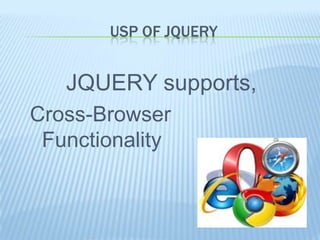
   JQUERY supports,
Cross-Browser
 Functionality
WHY USE JQUERY?
   Ease of use
         JQUERY is reusable
         -plug and play
         It is Compact
         -no need of writing long long javascript

   AJAX support
       $(“#comments”).load(“/get_comments.php”);


   Creates Effects and Animations
                                                    Next
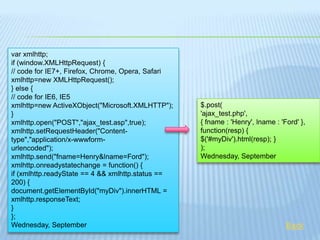
var xmlhttp;
if (window.XMLHttpRequest) {
// code for IE7+, Firefox, Chrome, Opera, Safari
xmlhttp=new XMLHttpRequest();
} else {
// code for IE6, IE5
xmlhttp=new ActiveXObject("Microsoft.XMLHTTP");    $.post(
}                                                  'ajax_test.php',
xmlhttp.open("POST","ajax_test.asp",true);         { fname : 'Henry', lname : 'Ford' },
xmlhttp.setRequestHeader("Content-                 function(resp) {
type","application/x-wwwform-                      $('#myDiv').html(resp); }
urlencoded");                                      );
xmlhttp.send("fname=Henry&lname=Ford");            Wednesday, September
xmlhttp.onreadystatechange = function() {
if (xmlhttp.readyState == 4 && xmlhttp.status ==
200) {
document.getElementById("myDiv").innerHTML =
xmlhttp.responseText;
}
};
Wednesday, September                                                            Back
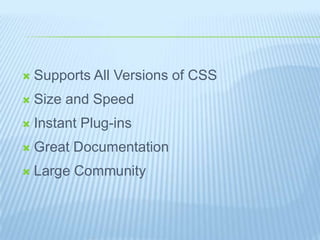
   Supports All Versions of CSS
   Size and Speed
   Instant Plug-ins
   Great Documentation
   Large Community
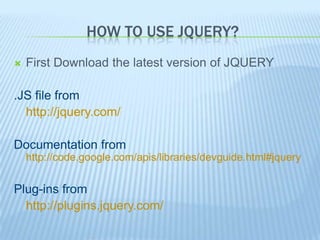
HOW TO USE JQUERY?
   First Download the latest version of JQUERY

.JS file from
  http://jquery.com/

Documentation from
    http://code.google.com/apis/libraries/devguide.html#jquery


Plug-ins from
  http://plugins.jquery.com/
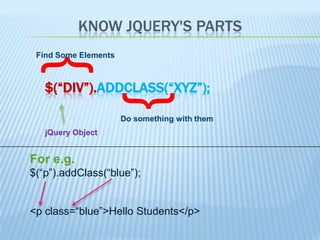
KNOW JQUERY'S PARTS
 Find Some Elements
  {
   $(“DIV”).ADDCLASS(“XYZ”);


   jQuery Object      }
                      Do something with them


For e.g.
$(“p”).addClass(“blue”);


<p class=“blue”>Hello Students</p>
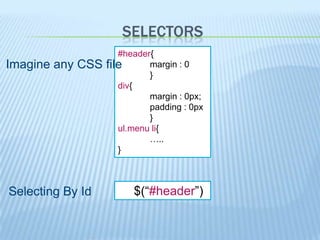
SELECTORS
                     #header{
Imagine any CSS   file      margin : 0
                            }
                     div{
                            margin : 0px;
                            padding : 0px
                            }
                     ul.menu li{
                            …..
                     }


Selecting By Id         $(“#header”)
FILTERS
        Basic Filters :
             :first, :last, :even, :odd, …...
        Content Filters:
             :empty , :contains(text), :has(selector), …..
        Attribute Filters:
             [attribute], [attribute=value], [attribute!=value], …..


For e.g.
$(“#students tr:even”).css(“background-color”, “#dde”)

It selects even elements and change BGcolor of that <td> (index starts from zero)
           Name                   Class                Roll No.           Comment
   Raju                             XII                    2            Good
   Masud                            IX                     1            Good
   Apu                              XII                    3
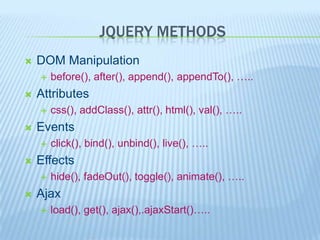
JQUERY METHODS
   DOM Manipulation
       before(), after(), append(), appendTo(), …..
   Attributes
       css(), addClass(), attr(), html(), val(), …..
   Events
       click(), bind(), unbind(), live(), …..
   Effects
       hide(), fadeOut(), toggle(), animate(), …..
   Ajax
       load(), get(), ajax(),.ajaxStart()…..
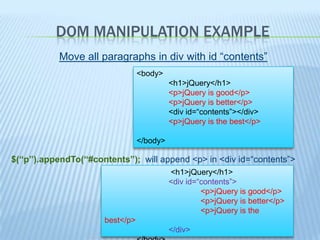
DOM MANIPULATION EXAMPLE
           Move all paragraphs in div with id “contents”
                                 <body>
                                           <h1>jQuery</h1>
                                           <p>jQuery is good</p>
                                           <p>jQuery is better</p>
                                           <div id=“contents”></div>
                                           <p>jQuery is the best</p>

                                 </body>

$(“p”).appendTo(“#contents”); will append <p> in <div id=“contents”>
                                           <h1>jQuery</h1>
                                           <div id=“contents”>
                                                    <p>jQuery is good</p>
                                                    <p>jQuery is better</p>
                                                    <p>jQuery is the
                      best</p>
                                           </div>
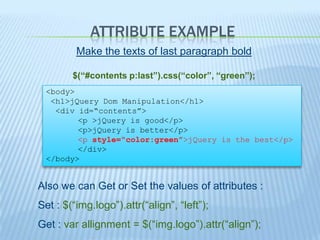
ATTRIBUTE EXAMPLE
         Make the texts of last paragraph bold

        $(“#contents p:last”).css(“color”, “green”);
 <body>
  <h1>jQuery Dom Manipulation</h1>
   <div id=“contents”>
        <p >jQuery is good</p>
        <p>jQuery is better</p>
        <p style=“color:green”>jQuery is the best</p>
        </div>
 </body>


Also we can Get or Set the values of attributes :
Set : $(“img.logo”).attr(“align”, “left”);
Get : var allignment = $(“img.logo”).attr(“align”);
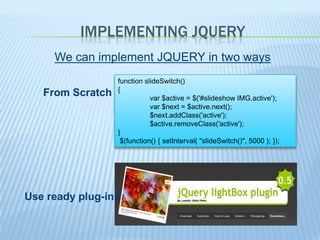
IMPLEMENTING JQUERY
     We can implement JQUERY in two ways
                  function slideSwitch()
                  {
   From Scratch              var $active = $('#slideshow IMG.active');
                             var $next = $active.next();
                             $next.addClass('active');
                             $active.removeClass('active');
                  }
                   $(function() { setInterval( "slideSwitch()", 5000 ); });


Use ready plug-ins
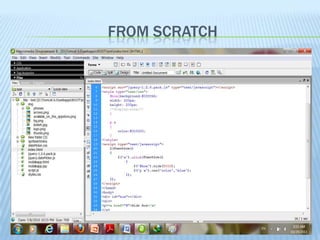
FROM SCRATCH
USING PLUG-INS
   Download the plug-in (any version)
   Unzip the downloaded file to a folder and put it whichever
    application you are using.
   Add the plug-in's JavaScript and CSS files inside the header
    section of your Web page:
       For e.g
            <script src="http://code.jquery.com/jquery-1.4.2.min.js"></script>
            <script src="star-rating/jquery.rating.js"></script>

   Change in styles and css according to your needs
   And you are ready to use your customized plug-ins .
SOURCE
   Links :-
   jquery.com
   http://blog.themeforest.net/
   http://code.google.com/apis/libraries/devguide.html#jquery
   http://en.wikipedia.org/wiki/JQuery#Etymology

   E-Books :-
   JQUERY NOVICE TO NINJA
        -earle castledine & craig sharkie
Thank
You

Jquery

  • 1.
  • 2.
    BASIC IDEA  jQuery is one type of JavaScript library.  Simplify Web development process.  Used widely.
  • 3.
    USP OF JQUERY JQUERYis an Open Source
  • 4.
    USP OF JQUERY JQUERY follows this For e.g. $(“#deleted”).addClass(“red”).fadeOut(“slow”);
  • 5.
    USP OF JQUERY JQUERY supports, Cross-Browser Functionality
  • 6.
    WHY USE JQUERY?  Ease of use JQUERY is reusable -plug and play It is Compact -no need of writing long long javascript  AJAX support  $(“#comments”).load(“/get_comments.php”);  Creates Effects and Animations Next
  • 7.
    var xmlhttp; if (window.XMLHttpRequest){ // code for IE7+, Firefox, Chrome, Opera, Safari xmlhttp=new XMLHttpRequest(); } else { // code for IE6, IE5 xmlhttp=new ActiveXObject("Microsoft.XMLHTTP"); $.post( } 'ajax_test.php', xmlhttp.open("POST","ajax_test.asp",true); { fname : 'Henry', lname : 'Ford' }, xmlhttp.setRequestHeader("Content- function(resp) { type","application/x-wwwform- $('#myDiv').html(resp); } urlencoded"); ); xmlhttp.send("fname=Henry&lname=Ford"); Wednesday, September xmlhttp.onreadystatechange = function() { if (xmlhttp.readyState == 4 && xmlhttp.status == 200) { document.getElementById("myDiv").innerHTML = xmlhttp.responseText; } }; Wednesday, September Back
  • 8.
    Supports All Versions of CSS  Size and Speed  Instant Plug-ins  Great Documentation  Large Community
  • 9.
    HOW TO USEJQUERY?  First Download the latest version of JQUERY .JS file from http://jquery.com/ Documentation from http://code.google.com/apis/libraries/devguide.html#jquery Plug-ins from http://plugins.jquery.com/
  • 10.
    KNOW JQUERY'S PARTS Find Some Elements { $(“DIV”).ADDCLASS(“XYZ”); jQuery Object } Do something with them For e.g. $(“p”).addClass(“blue”); <p class=“blue”>Hello Students</p>
  • 11.
    SELECTORS #header{ Imagine any CSS file margin : 0 } div{ margin : 0px; padding : 0px } ul.menu li{ ….. } Selecting By Id $(“#header”)
  • 12.
    FILTERS  Basic Filters :  :first, :last, :even, :odd, …...  Content Filters:  :empty , :contains(text), :has(selector), …..  Attribute Filters:  [attribute], [attribute=value], [attribute!=value], ….. For e.g. $(“#students tr:even”).css(“background-color”, “#dde”) It selects even elements and change BGcolor of that <td> (index starts from zero) Name Class Roll No. Comment Raju XII 2 Good Masud IX 1 Good Apu XII 3
  • 13.
    JQUERY METHODS  DOM Manipulation  before(), after(), append(), appendTo(), …..  Attributes  css(), addClass(), attr(), html(), val(), …..  Events  click(), bind(), unbind(), live(), …..  Effects  hide(), fadeOut(), toggle(), animate(), …..  Ajax  load(), get(), ajax(),.ajaxStart()…..
  • 14.
    DOM MANIPULATION EXAMPLE Move all paragraphs in div with id “contents” <body> <h1>jQuery</h1> <p>jQuery is good</p> <p>jQuery is better</p> <div id=“contents”></div> <p>jQuery is the best</p> </body> $(“p”).appendTo(“#contents”); will append <p> in <div id=“contents”> <h1>jQuery</h1> <div id=“contents”> <p>jQuery is good</p> <p>jQuery is better</p> <p>jQuery is the best</p> </div>
  • 15.
    ATTRIBUTE EXAMPLE Make the texts of last paragraph bold $(“#contents p:last”).css(“color”, “green”); <body> <h1>jQuery Dom Manipulation</h1> <div id=“contents”> <p >jQuery is good</p> <p>jQuery is better</p> <p style=“color:green”>jQuery is the best</p> </div> </body> Also we can Get or Set the values of attributes : Set : $(“img.logo”).attr(“align”, “left”); Get : var allignment = $(“img.logo”).attr(“align”);
  • 16.
    IMPLEMENTING JQUERY We can implement JQUERY in two ways function slideSwitch() { From Scratch var $active = $('#slideshow IMG.active'); var $next = $active.next(); $next.addClass('active'); $active.removeClass('active'); } $(function() { setInterval( "slideSwitch()", 5000 ); }); Use ready plug-ins
  • 17.
  • 18.
    USING PLUG-INS  Download the plug-in (any version)  Unzip the downloaded file to a folder and put it whichever application you are using.  Add the plug-in's JavaScript and CSS files inside the header section of your Web page:  For e.g <script src="http://code.jquery.com/jquery-1.4.2.min.js"></script> <script src="star-rating/jquery.rating.js"></script>  Change in styles and css according to your needs  And you are ready to use your customized plug-ins .
  • 19.
    SOURCE  Links :-  jquery.com  http://blog.themeforest.net/  http://code.google.com/apis/libraries/devguide.html#jquery  http://en.wikipedia.org/wiki/JQuery#Etymology  E-Books :-  JQUERY NOVICE TO NINJA -earle castledine & craig sharkie
  • 20.