JQuery 16/10/2008 04/12/2008
Agenda Client Side JavaScript Introduction to JQuery JQuery Selectors JQuery Filters JQuery Events Other JQuery Effects
What is JavaScript? An interpreted programming language with object oriented capabilities.  Not Java! Originally called LiveScript, changed to JavaScript as a marketing ploy by Sun and Netscape.  Not simple! Although it is loosely typed and can be used by web developers in a “cookbook” fashion, JavaScript is a fully featured programming language with  many  advanced features.
Client Side JavaScript When JavaScript is embedded in a web browser, it is referred to as Client Side JavaScript. Contains an extended set of functionality to interface with the web browser DOM (Document Object Model). Objects, such as  window  and  document , and functions, like event detection and handling, are included in Client Side JavaScript.
JQuery Powerful JavaScript library Simplify common JavaScript tasks Access parts of a page using CSS or XPath-like expressions Modify the appearance of a page Alter the content of a page Change the user’s interaction with a page Add animation to a page Provide AJAX support
What is available with jQuery? Cross browser support and detection AJAX functions CSS functions DOM manipulation DOM transversal Attribute manipulation Event detection and handling JavaScript animation Hundreds of plugins for pre-built user interfaces, advanced animations, form validation, etc Expandable functionality using custom plugins
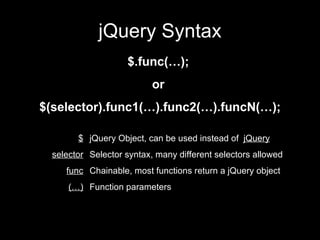
jQuery Syntax $.func(…);  or  $(selector).func1(…).func2(…).funcN(…); jQuery Object, can be used instead of  jQuery Selector syntax, many different selectors allowed Chainable, most functions return a jQuery object Function parameters $ selector func (…)
Basic JQuery A JQuery object is a wrapper for a selected group of DOM nodes Selecting part of document is fundamental operation $() function is a factory method that creates JQuery objects $(“dt”) is a JQuery object containing all the “dt” elements in the document
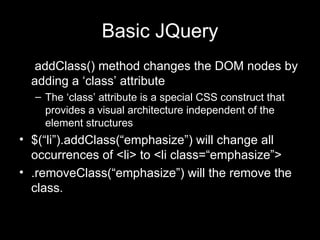
Basic JQuery . addClass() method changes the DOM nodes by adding a ‘class’ attribute The ‘class’ attribute is a special CSS construct that provides a visual architecture independent of the element structures $(“li”).addClass(“emphasize”) will change all occurrences of <li> to <li class=“emphasize”> .removeClass(“emphasize”) will the remove the class.
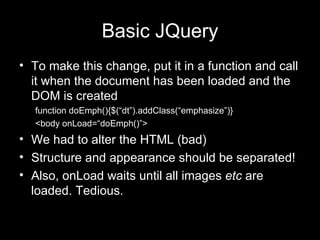
Basic JQuery To make this change, put it in a function and call it when the document has been loaded and the DOM is created function doEmph(){$(“dt”).addClass(“emphasize”)} <body onLoad=“doEmph()”> We had to alter the HTML (bad) Structure and appearance should be separated! Also, onLoad waits until all images  etc  are loaded. Tedious.
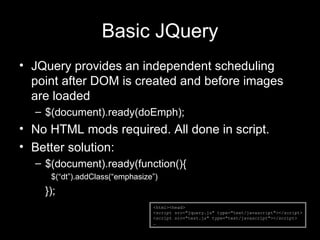
Basic JQuery JQuery provides an independent scheduling point after DOM is created and before images are loaded $(document).ready(doEmph); No HTML mods required. All done in script. Better solution: $(document).ready(function(){ $(“dt”).addClass(“emphasize”) }); <html><head> <script src=&quot;jquery.js&quot; type=&quot;text/javascript&quot;></script> <script src=&quot;test.js&quot; type=&quot;text/javascript&quot;></script> …
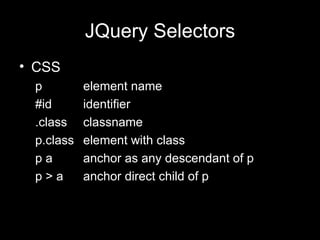
JQuery Selectors CSS p element name #id identifier .class classname p.class element with class p a anchor as any descendant of p p > a anchor direct child of p
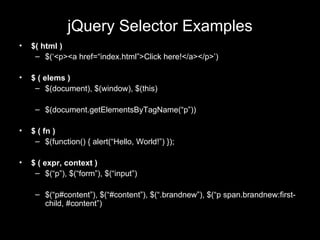
jQuery Selector Examples $( html ) $(‘<p><a href=“index.html”>Click here!</a></p>’) $ ( elems ) $(document), $(window), $(this) $(document.getElementsByTagName(“p”)) $ ( fn ) $(function() { alert(“Hello, World!”) }); $ ( expr, context ) $(“p”), $(“form”), $(“input”) $(“p#content”), $(“#content”), $(“.brandnew”), $(“p span.brandnew:first-child, #content”)
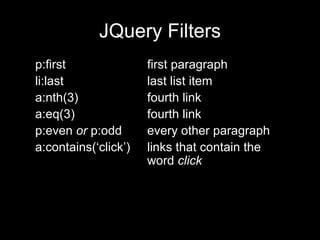
JQuery Filters p:first first paragraph li:last last list item a:nth(3) fourth link a:eq(3) fourth link p:even  or  p:odd every other paragraph a:contains(‘click’) links that contain the word  click
JQuery Events bind(eventname, function) method  ‘ click’ ‘ change’ ‘ resize’ $(“a[@href]”).bind(‘click’,function(){ $(this).addClass(‘red’);});
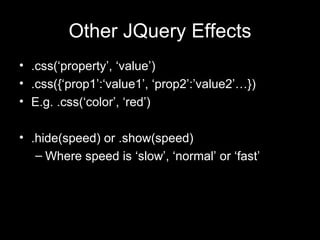
Other JQuery Effects .css(‘property’, ‘value’) .css({‘prop1’:‘value1’, ‘prop2’:’value2’…}) E.g. .css(‘color’, ‘red’) .hide(speed) or .show(speed) Where speed is ‘slow’, ‘normal’ or ‘fast’
Live Demo

J Query(04 12 2008) Foiaz

  • 1.
  • 2.
    Agenda Client SideJavaScript Introduction to JQuery JQuery Selectors JQuery Filters JQuery Events Other JQuery Effects
  • 3.
    What is JavaScript?An interpreted programming language with object oriented capabilities. Not Java! Originally called LiveScript, changed to JavaScript as a marketing ploy by Sun and Netscape. Not simple! Although it is loosely typed and can be used by web developers in a “cookbook” fashion, JavaScript is a fully featured programming language with many advanced features.
  • 4.
    Client Side JavaScriptWhen JavaScript is embedded in a web browser, it is referred to as Client Side JavaScript. Contains an extended set of functionality to interface with the web browser DOM (Document Object Model). Objects, such as window and document , and functions, like event detection and handling, are included in Client Side JavaScript.
  • 5.
    JQuery Powerful JavaScriptlibrary Simplify common JavaScript tasks Access parts of a page using CSS or XPath-like expressions Modify the appearance of a page Alter the content of a page Change the user’s interaction with a page Add animation to a page Provide AJAX support
  • 6.
    What is availablewith jQuery? Cross browser support and detection AJAX functions CSS functions DOM manipulation DOM transversal Attribute manipulation Event detection and handling JavaScript animation Hundreds of plugins for pre-built user interfaces, advanced animations, form validation, etc Expandable functionality using custom plugins
  • 7.
    jQuery Syntax $.func(…); or $(selector).func1(…).func2(…).funcN(…); jQuery Object, can be used instead of jQuery Selector syntax, many different selectors allowed Chainable, most functions return a jQuery object Function parameters $ selector func (…)
  • 8.
    Basic JQuery AJQuery object is a wrapper for a selected group of DOM nodes Selecting part of document is fundamental operation $() function is a factory method that creates JQuery objects $(“dt”) is a JQuery object containing all the “dt” elements in the document
  • 9.
    Basic JQuery .addClass() method changes the DOM nodes by adding a ‘class’ attribute The ‘class’ attribute is a special CSS construct that provides a visual architecture independent of the element structures $(“li”).addClass(“emphasize”) will change all occurrences of <li> to <li class=“emphasize”> .removeClass(“emphasize”) will the remove the class.
  • 10.
    Basic JQuery Tomake this change, put it in a function and call it when the document has been loaded and the DOM is created function doEmph(){$(“dt”).addClass(“emphasize”)} <body onLoad=“doEmph()”> We had to alter the HTML (bad) Structure and appearance should be separated! Also, onLoad waits until all images etc are loaded. Tedious.
  • 11.
    Basic JQuery JQueryprovides an independent scheduling point after DOM is created and before images are loaded $(document).ready(doEmph); No HTML mods required. All done in script. Better solution: $(document).ready(function(){ $(“dt”).addClass(“emphasize”) }); <html><head> <script src=&quot;jquery.js&quot; type=&quot;text/javascript&quot;></script> <script src=&quot;test.js&quot; type=&quot;text/javascript&quot;></script> …
  • 12.
    JQuery Selectors CSSp element name #id identifier .class classname p.class element with class p a anchor as any descendant of p p > a anchor direct child of p
  • 13.
    jQuery Selector Examples$( html ) $(‘<p><a href=“index.html”>Click here!</a></p>’) $ ( elems ) $(document), $(window), $(this) $(document.getElementsByTagName(“p”)) $ ( fn ) $(function() { alert(“Hello, World!”) }); $ ( expr, context ) $(“p”), $(“form”), $(“input”) $(“p#content”), $(“#content”), $(“.brandnew”), $(“p span.brandnew:first-child, #content”)
  • 14.
    JQuery Filters p:firstfirst paragraph li:last last list item a:nth(3) fourth link a:eq(3) fourth link p:even or p:odd every other paragraph a:contains(‘click’) links that contain the word click
  • 15.
    JQuery Events bind(eventname,function) method ‘ click’ ‘ change’ ‘ resize’ $(“a[@href]”).bind(‘click’,function(){ $(this).addClass(‘red’);});
  • 16.
    Other JQuery Effects.css(‘property’, ‘value’) .css({‘prop1’:‘value1’, ‘prop2’:’value2’…}) E.g. .css(‘color’, ‘red’) .hide(speed) or .show(speed) Where speed is ‘slow’, ‘normal’ or ‘fast’
  • 17.