JavaScript, jQuery & AJAX
What is JavaScript?
• An interpreted programming language with
  object oriented capabilities.
• Not Java!
  – Originally called LiveScript, changed to JavaScript as
    a marketing ploy by Sun and Netscape. Can also be
    referred to as ECMAScript.
• Not simple!
  – Although it is loosely typed and can be used by web
    developers in a “cookbook” fashion (think image
    rollovers), JavaScript is a fully featured programming
    language with many advanced features.
Client Side JavaScript
• When JavaScript is embedded in a web browser,
  it is referred to as Client Side JavaScript.
• Contains an extended set of functionality to
  interface with the web browser DOM (Document
  Object Model).
• Objects, such as window and document, and
  functions, like event detection and handling, are
  included in Client Side JavaScript.
What is jQuery?
• A framework for Client Side JavaScript.
• Frameworks provide useful alternatives for
  common programming tasks, creating
  functionality which may not be available or
  cumbersome to use within a language.
• An open source project, maintained by a
  group of developers, with a very active
  support base and thorough, well written
  documentation.
What jQuery is not…
• A substitute for knowing JavaScript
   – jQuery is extraordinarily useful, but you should still
     know how JavaScript works and how to use it
     correctly. This means more than Googling a tutorial
     and calling yourself an expert.
• A solve all
   – There is still plenty of functionality built into JavaScript
     that should be utilized! Don’t turn every project into a
     quest to ‘jQuery-ize’ the problem, use jQuery where it
     makes sense. Create solutions in environments
     where they belong.
What is available with jQuery?
• Cross browser            • JavaScript animation
  support and detection    • Hundreds of plugins
• AJAX functions             for pre-built user
• CSS functions              interfaces, advanced
                             animations, form
• DOM manipulation           validation, etc
• DOM transversal          • Expandable
• Attribute manipulation     functionality using
• Event detection and        custom plugins
  handling                 • Small foot print
jQuery Syntax
                     $.func(…);
                           or
$(selector).func1(…).func2(…).funcN(…);

        $ jQuery Object, can be used instead of jQuery
  selector Selector syntax, many different selectors allowed
     func Chainable, most functions return a jQuery object
      (…) Function parameters
The jQuery/$ Object
• Represented by both $ and jQuery
  – To use jQuery only, use jQuery.noConflict(),
    for other frameworks that use $
• By default, represents the jQuery object.
  When combined with a selector, can
  represent multiple DOM Elements, see
  next slide.
• Used with all jQuery functions.
jQuery Selectors
•   $( html )                         •   $( expr, context )
    Create DOM elements on-the-           This function accepts a string
    fly from the provided String of       containing a CSS or basic
    raw HTML.                             XPath selector which is then
                                          used to match a set of
                                          elements. Default context is
•   $( elems )                            document. Used most often for
    Wrap jQuery functionality             DOM transversal.
    around single or multiple DOM
    Elements.                         •   Selectors will return a jQuery
                                          object, which can contain one
                                          or more elements, or contain
•   $( fn )                               no elements at all.
    A shorthand for $
    (document).ready(), allowing
    you to bind a function to be
    executed when the DOM
    document has finished loading.
jQuery Selector Examples
•   $( html )
     – $(‘<p><a href=“index.html”>Click here!</a></p>’)


•   $ ( elems )
     – $(document), $(window), $(this)


     –    $(document.getElementsByTagName(“p”))


•   $ ( fn )
     –    $(function() { alert(“Hello, World!”) });


•   $ ( expr, context )
     –    $(“p”), $(“form”), $(“input”)


     –    $(“p#content”), $(“#content”), $(“.brandnew”), $(“p span.brandnew:first-child, #content”)


     –    $(“p/span”), $(“p/span[@class=brandnew]”), $(p/span:first), $(p:first/span:even)


     –    $(“input:checkbox[@checked]”), $(“div:visible p[a]”)
jQuery Functions
• Attached to the jQuery object or chained
  off of a selector statement.
• Most functions return the jQuery object
  they were originally passed, so you can
  perform many actions in a single line.
• The same function can perform an entirely
  different action based on the number and
  type of parameters.
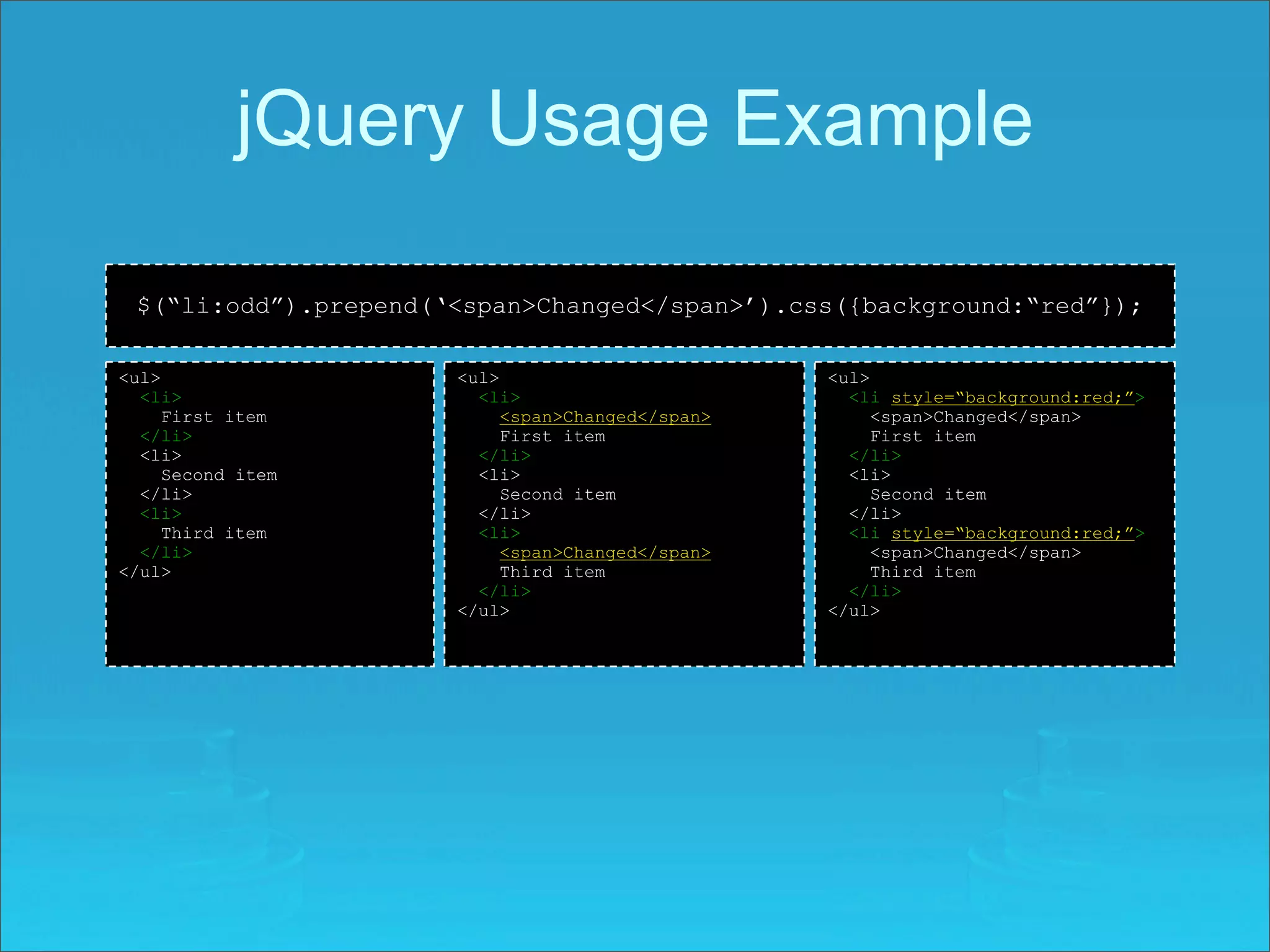
jQuery Usage Example

 $(“li:odd”).prepend(‘<span>Changed</span>’).css({background:“red”});

<ul>                  <ul>                        <ul>
  <li>                  <li>                        <li style=“background:red;”>
     First item            <span>Changed</span>        <span>Changed</span>
  </li>                    First item                  First item
  <li>                  </li>                       </li>
     Second item        <li>                        <li>
  </li>                    Second item                 Second item
  <li>                  </li>                       </li>
     Third item         <li>                        <li style=“background:red;”>
  </li>                    <span>Changed</span>        <span>Changed</span>
</ul>                      Third item                  Third item
                        </li>                       </li>
                      </ul>                       </ul>
jQuery Usage Example
   $(“div:hidden”).find(“.foo”).empty().text(“Changed”).end().show();

<div>                        <div>                        <div>
  <span class=“foo”>           <span class=“foo”>           <span class=“foo”>
    Some text                    Some text                    Some text
  </span>                      </span>                      </span>
</div>                       </div>                       </div>
<div style=“display:none”>   <div style=“display:none”>   <div style=“display:none”>
  <span>                       <span>                       <span>
    More text                    More text                    More text
  </span>                      </span>                      </span>
  <span class=“foo”>           <span class=“foo”>           <span class=“foo”>
    Goodbye cruel world.         Goodbye cruel world.       </span>
  </span>                      </span>                    </div>
</div>                       </div>


<div>                        <div>                        <div>
  <span class=“foo”>           <span class=“foo”>           <span class=“foo”>
    Some text                    Some text                    Some text
  </span>                      </span>                      </span>
</div>                       </div>                       </div>
<div style=“display:none”>   <div style=“display:none”>   <div style=“display:block”>
  <span>                       <span>                       <span>
    More text                    More text                    More text
  </span>                      </span>                      </span>
  <span class=“foo”>           <span class=“foo”>           <span class=“foo”>
    Changed                      Changed                      Changed
  </span>                      </span>                      </span>
</div>                       </div>                       </div>
jQuery Advanced Example
$(“span.none”).click(                                           <div>
   function(){                                                    <span class=“all”>Select All</span>
     $(this).siblings(“:checkbox”).removeAttr(“checked”);
   }                                                              <span class=“none”>Select None</span>
);                                                                <input name=“chk1” type=“checkbox”/>
                                                                  <input name=“chk2” type=“checkbox”/>
$(“span.all”).click(                                              <input name=“chk3” type=“checkbox”/>
   function(){
     $(this).siblings(“:checkbox”).attr(“checked”,“checked”);   </div>
   }                                                            <div>
);
                                                                  <span class=“all”>Select All</span>
                                                                  <span class=“none”>Select None</span>

                          or                                      <input name=“chk4” type=“checkbox”/>
                                                                  <input name=“chk5” type=“checkbox”/>
                                                                  <input name=“chk6” type=“checkbox”/>
$(“span”).click(                                                </div>
   function(){
     if($(this).text()==“Select All”))
     $(this).siblings(“:checkbox”).attr(“checked”,“checked”);
     else if ($(this).attr(“class”)==“none”)
     $(this).siblings(“:checkbox”).removeAttr(“checked”);
   }
);
jQuery & AJAX
• jQuery has a series of functions which
  provide a common interface for AJAX, no
  matter what browser you are using.
• Most of the upper level AJAX functions
  have a common layout:
  – $.func(url[,params][,callback]), [ ] optional
     • url: string representing server target
     • params: names and values to send to server
     • callback: function executed on successful
       communication.
jQuery AJAX Functions
•   $.func(url[,params][,callback])   •   $.ajax, $.ajaxSetup
     –   $.get                             –   async
     –   $.getJSON                         –   beforeSend
                                           –   complete
     –   $.getIfModified
                                           –   contentType
     –   $.getScript                       –   data
     –   $.post                            –   dataType
                                           –   error
•   $(selector), inject HTML               –   global
     – load                                –   ifModified
                                           –   processData
     – loadIfModified                      –   success
                                           –   timeout
•   $(selector), ajaxSetup alts            –   type
     –   ajaxComplete                      –   url
     –   ajaxError
     –   ajaxSend
     –   ajaxStart
     –   ajaxStop
     –   ajaxSuccess
jQuery AJAX Example
<html>                                                   <?php
                                                         $output = ‘’;
<head>
<title>AJAX Demo</title>                                 switch($_REQUEST[‘in’]) {
                                                           case ‘hello’:
<script type=“text/javascript” src=“jquery.js”>
                                                             $output = ‘Hello back.’;
</script>                                                    break;
                                                           case ‘foo’:
<script type=“text/javascript”>
                                                             $output = ‘Foo you, too.’;
var cnt = 0;                                                 break;
                                                           case ‘bar’:
$(function(){
                                                             $output = ‘Where Andy Capp can be found.’;
  $.ajaxSettings({                                           break;
                                                           case ‘foobar’:
      error:function(){alert(“Communication error!”);}
                                                             $output = ‘This is German, right?’;
  });                                                        break;
                                                           default:
  $(“:button”).click(function(){
                                                             $output = ‘Unrecognized string.’;
      var input = {in:$(“:textbox”).val(),count:cnt};    }
      $.getJSON(“ajax.php”,input,function(json){
                                                         $count = $_REQUEST[‘count’]+1;
        cnt = json.cnt;
                                                         echo json_encode(
        $(“.cnt”).text(cnt)
                                                            array(
        $(“.msg”).text(json.out);                             ‘out’ => $output,
                                                              ‘cnt’ => $count
      });
                                                            )
  });                                                    );
});
                                                         exit;
</script>                                                ?>
</head>
<body>
<p>
jQuery Resources
•   Project website
     – http://www.jquery.com
•   Learning Center
     – http://docs.jquery.com/Tutorials
     – http://www.learningjquery.com/
     – http://15daysofjquery.com/
•   Support
     – http://docs.jquery.com/Discussion
     – http://www.nabble.com/JQuery-f15494.html mailing list archive
     – irc.freenode.net irc room: #jquery
•   Documentation
     – http://docs.jquery.com/Main_Page
     – http://www.visualjquery.com
     – http://jquery.bassistance.de/api-browser/
•   jQuery Success Stories
     – http://docs.jquery.com/Sites_Using_jQuery

jquery

  • 1.
  • 2.
    What is JavaScript? •An interpreted programming language with object oriented capabilities. • Not Java! – Originally called LiveScript, changed to JavaScript as a marketing ploy by Sun and Netscape. Can also be referred to as ECMAScript. • Not simple! – Although it is loosely typed and can be used by web developers in a “cookbook” fashion (think image rollovers), JavaScript is a fully featured programming language with many advanced features.
  • 3.
    Client Side JavaScript •When JavaScript is embedded in a web browser, it is referred to as Client Side JavaScript. • Contains an extended set of functionality to interface with the web browser DOM (Document Object Model). • Objects, such as window and document, and functions, like event detection and handling, are included in Client Side JavaScript.
  • 4.
    What is jQuery? •A framework for Client Side JavaScript. • Frameworks provide useful alternatives for common programming tasks, creating functionality which may not be available or cumbersome to use within a language. • An open source project, maintained by a group of developers, with a very active support base and thorough, well written documentation.
  • 5.
    What jQuery isnot… • A substitute for knowing JavaScript – jQuery is extraordinarily useful, but you should still know how JavaScript works and how to use it correctly. This means more than Googling a tutorial and calling yourself an expert. • A solve all – There is still plenty of functionality built into JavaScript that should be utilized! Don’t turn every project into a quest to ‘jQuery-ize’ the problem, use jQuery where it makes sense. Create solutions in environments where they belong.
  • 6.
    What is availablewith jQuery? • Cross browser • JavaScript animation support and detection • Hundreds of plugins • AJAX functions for pre-built user • CSS functions interfaces, advanced animations, form • DOM manipulation validation, etc • DOM transversal • Expandable • Attribute manipulation functionality using • Event detection and custom plugins handling • Small foot print
  • 7.
    jQuery Syntax $.func(…); or $(selector).func1(…).func2(…).funcN(…); $ jQuery Object, can be used instead of jQuery selector Selector syntax, many different selectors allowed func Chainable, most functions return a jQuery object (…) Function parameters
  • 8.
    The jQuery/$ Object •Represented by both $ and jQuery – To use jQuery only, use jQuery.noConflict(), for other frameworks that use $ • By default, represents the jQuery object. When combined with a selector, can represent multiple DOM Elements, see next slide. • Used with all jQuery functions.
  • 9.
    jQuery Selectors • $( html ) • $( expr, context ) Create DOM elements on-the- This function accepts a string fly from the provided String of containing a CSS or basic raw HTML. XPath selector which is then used to match a set of elements. Default context is • $( elems ) document. Used most often for Wrap jQuery functionality DOM transversal. around single or multiple DOM Elements. • Selectors will return a jQuery object, which can contain one or more elements, or contain • $( fn ) no elements at all. A shorthand for $ (document).ready(), allowing you to bind a function to be executed when the DOM document has finished loading.
  • 10.
    jQuery Selector Examples • $( html ) – $(‘<p><a href=“index.html”>Click here!</a></p>’) • $ ( elems ) – $(document), $(window), $(this) – $(document.getElementsByTagName(“p”)) • $ ( fn ) – $(function() { alert(“Hello, World!”) }); • $ ( expr, context ) – $(“p”), $(“form”), $(“input”) – $(“p#content”), $(“#content”), $(“.brandnew”), $(“p span.brandnew:first-child, #content”) – $(“p/span”), $(“p/span[@class=brandnew]”), $(p/span:first), $(p:first/span:even) – $(“input:checkbox[@checked]”), $(“div:visible p[a]”)
  • 11.
    jQuery Functions • Attachedto the jQuery object or chained off of a selector statement. • Most functions return the jQuery object they were originally passed, so you can perform many actions in a single line. • The same function can perform an entirely different action based on the number and type of parameters.
  • 12.
    jQuery Usage Example $(“li:odd”).prepend(‘<span>Changed</span>’).css({background:“red”}); <ul> <ul> <ul> <li> <li> <li style=“background:red;”> First item <span>Changed</span> <span>Changed</span> </li> First item First item <li> </li> </li> Second item <li> <li> </li> Second item Second item <li> </li> </li> Third item <li> <li style=“background:red;”> </li> <span>Changed</span> <span>Changed</span> </ul> Third item Third item </li> </li> </ul> </ul>
  • 13.
    jQuery Usage Example $(“div:hidden”).find(“.foo”).empty().text(“Changed”).end().show(); <div> <div> <div> <span class=“foo”> <span class=“foo”> <span class=“foo”> Some text Some text Some text </span> </span> </span> </div> </div> </div> <div style=“display:none”> <div style=“display:none”> <div style=“display:none”> <span> <span> <span> More text More text More text </span> </span> </span> <span class=“foo”> <span class=“foo”> <span class=“foo”> Goodbye cruel world. Goodbye cruel world. </span> </span> </span> </div> </div> </div> <div> <div> <div> <span class=“foo”> <span class=“foo”> <span class=“foo”> Some text Some text Some text </span> </span> </span> </div> </div> </div> <div style=“display:none”> <div style=“display:none”> <div style=“display:block”> <span> <span> <span> More text More text More text </span> </span> </span> <span class=“foo”> <span class=“foo”> <span class=“foo”> Changed Changed Changed </span> </span> </span> </div> </div> </div>
  • 14.
    jQuery Advanced Example $(“span.none”).click( <div> function(){ <span class=“all”>Select All</span> $(this).siblings(“:checkbox”).removeAttr(“checked”); } <span class=“none”>Select None</span> ); <input name=“chk1” type=“checkbox”/> <input name=“chk2” type=“checkbox”/> $(“span.all”).click( <input name=“chk3” type=“checkbox”/> function(){ $(this).siblings(“:checkbox”).attr(“checked”,“checked”); </div> } <div> ); <span class=“all”>Select All</span> <span class=“none”>Select None</span> or <input name=“chk4” type=“checkbox”/> <input name=“chk5” type=“checkbox”/> <input name=“chk6” type=“checkbox”/> $(“span”).click( </div> function(){ if($(this).text()==“Select All”)) $(this).siblings(“:checkbox”).attr(“checked”,“checked”); else if ($(this).attr(“class”)==“none”) $(this).siblings(“:checkbox”).removeAttr(“checked”); } );
  • 15.
    jQuery & AJAX •jQuery has a series of functions which provide a common interface for AJAX, no matter what browser you are using. • Most of the upper level AJAX functions have a common layout: – $.func(url[,params][,callback]), [ ] optional • url: string representing server target • params: names and values to send to server • callback: function executed on successful communication.
  • 16.
    jQuery AJAX Functions • $.func(url[,params][,callback]) • $.ajax, $.ajaxSetup – $.get – async – $.getJSON – beforeSend – complete – $.getIfModified – contentType – $.getScript – data – $.post – dataType – error • $(selector), inject HTML – global – load – ifModified – processData – loadIfModified – success – timeout • $(selector), ajaxSetup alts – type – ajaxComplete – url – ajaxError – ajaxSend – ajaxStart – ajaxStop – ajaxSuccess
  • 17.
    jQuery AJAX Example <html> <?php $output = ‘’; <head> <title>AJAX Demo</title> switch($_REQUEST[‘in’]) { case ‘hello’: <script type=“text/javascript” src=“jquery.js”> $output = ‘Hello back.’; </script> break; case ‘foo’: <script type=“text/javascript”> $output = ‘Foo you, too.’; var cnt = 0; break; case ‘bar’: $(function(){ $output = ‘Where Andy Capp can be found.’; $.ajaxSettings({ break; case ‘foobar’: error:function(){alert(“Communication error!”);} $output = ‘This is German, right?’; }); break; default: $(“:button”).click(function(){ $output = ‘Unrecognized string.’; var input = {in:$(“:textbox”).val(),count:cnt}; } $.getJSON(“ajax.php”,input,function(json){ $count = $_REQUEST[‘count’]+1; cnt = json.cnt; echo json_encode( $(“.cnt”).text(cnt) array( $(“.msg”).text(json.out); ‘out’ => $output, ‘cnt’ => $count }); ) }); ); }); exit; </script> ?> </head> <body> <p>
  • 18.
    jQuery Resources • Project website – http://www.jquery.com • Learning Center – http://docs.jquery.com/Tutorials – http://www.learningjquery.com/ – http://15daysofjquery.com/ • Support – http://docs.jquery.com/Discussion – http://www.nabble.com/JQuery-f15494.html mailing list archive – irc.freenode.net irc room: #jquery • Documentation – http://docs.jquery.com/Main_Page – http://www.visualjquery.com – http://jquery.bassistance.de/api-browser/ • jQuery Success Stories – http://docs.jquery.com/Sites_Using_jQuery