
jQuery fundamentals
•   Introduction
                      •   Selector
Agenda                •   Interacting with the DOM
What we will learn!
                      •   Handling Events
                      •   Working with Ajax Features
                      •   Tools and documentation
How can I become an „English guy‟
•   Learn the language

•   Use the dictionary

•   Speak a lot

•   Drink a lot of (Yorkshire) tea with milk and beer off course
Introduction…
     , Nino Crudele


    … Stay relax
Why use jQuery
•   First of all what you need to know:
     Javascript
     Html
     Css

•   Why jQuery is so famous?
       JavaScript Library (single file)
       Cross-browser support
       Selector
       Handle events
       Animate
       Post and Get (Ajax calls)
       A lot of plugins available
What is DOM?
•   http://www.w3.org/TR/DOM-Level-2-Core/introduction.html
•   The Document Object Model (DOM) is an application programming interface
    (API) for valid HTML and well-formed XML documents. It defines the logical
    structure of documents and the way a document is accessed and manipulated.
    In the DOM specification, the term "document" is used in the broad sense -
    increasingly, XML is being used as a way of representing many different kinds of
    information that may be stored in diverse systems, and much of this would
    traditionally be seen as data rather than as documents. Nevertheless, XML
    presents this data as documents, and the DOM may be used to manage this
    data.
•   With the Document Object Model, programmers can build documents, navigate
    their structure, and add, modify, or delete elements and content. Anything found
    in an HTML or XML document can be accessed, changed, deleted, or added
    using the Document Object Model, with a few exceptions - in particular, the
    DOM interfaces for the XML internal and external subsets have not yet been
    specified.
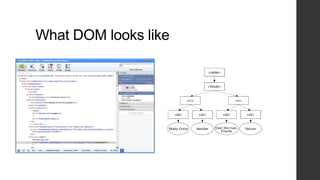
What DOM looks like
Learn the language
•   From Shawn Wildermuth - JavaScript for the C# Guy:
       http://wildermuth.com/2012/5/6/JavaScript_for_the_C_Guy_The_Global_Object
       http://wildermuth.com/2012/3/16/JavaScript_for_the_C_Guy_Scopes
       http://wildermuth.com/2012/3/10/JavaScript_for_the_C_Guy_Function_Overloads
       http://wildermuth.com/2012/5/28/JavaScript_for_the_C_Guy_The_confusion_about_this
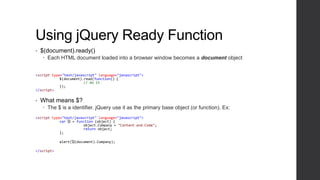
Using jQuery Ready Function
•   $(document).ready()
     Each HTML document loaded into a browser window becomes a document object


<script type="text/javascript" language="javascript">
            $(document).read(function() {
                        // do it
            });
</script>


•   What means $?
     The $ is a identifier. jQuery use it as the primary base object (or function). Ex:
<script type="text/javascript" language="javascript">
            var ᾩ = function (object) {
                        object.Company = "Content and Code";
                        return object;
            };

            alert(ᾩ(document).Company);

</script>
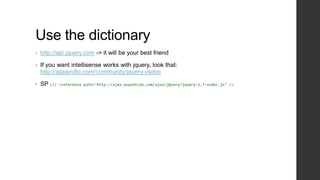
Use the dictionary
•   http://api.jquery.com -> it will be your best friend

•   If you want intellisense works with jquery, look that:
    http://appendto.com/community/jquery-vsdoc

•   SP ///   <reference path="http://ajax.aspnetcdn.com/ajax/jQuery/jquery-1.7-vsdoc.js" />
Demo - Referencing a jQuery Script
Speak a lot

              Selector
Selecting Nodes by: id, class name,
attribute name
•   Different ways to select a node:
     By id:
        $(“#myDiv”)
        $(“div[id]”)
     By class:
        $(“.myClass”)
     By attribute:
        $(„div[id]‟)
        $(„input[name~=“man”]‟)
Demo Selector
  $(“#myDiv”)
  $(“div[id]”)
  $(“.myClass”)
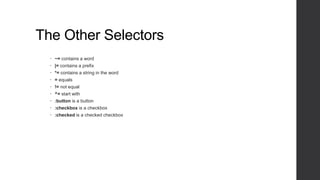
The Other Selectors
   ~= contains a word
   |= contains a prefix
   *= contains a string in the word
   = equals
   != not equal
   ^= start with
   :button is a button
   :checkbox is a checkbox
   :checked is a checked checkbox
Demo The Other Selector
Speak a lot
              Interacting
              with the DOM
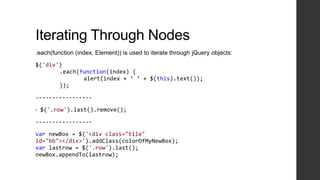
Iterating Through Nodes
.each(function (index, Element)) is used to iterate through jQuery objects:

$('div')
       .each(function(index) {
              alert(index + ‘ ‘ + $(this).text());
       });

-----------------

•   $('.row').last().remove();

-----------------

var newBox = $('<div class="tile"
id="bb"></div>').addClass(colorOfMyNewBox);
var lastrow = $('.row').last();
newBox.appendTo(lastrow);
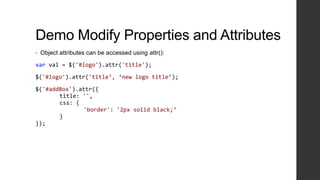
Demo Modify Properties and Attributes
•   Object attributes can be accessed using attr():

var val = $('#logo').attr('title');

$('#logo').attr('title‘, ‘new logo title’);

$('#addBox').attr({
       title: '',
       css: {
              'border': '2px solid black;‘
       }
});
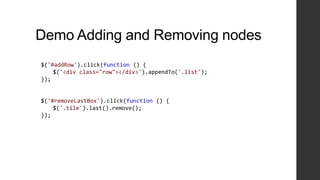
Demo Adding and Removing nodes
$('#addRow').click(function () {
    $('<div class="row"></div>').appendTo('.list');
});


$('#removeLastBox').click(function () {
    $('.tile').last().remove();
});
Speak a lot   Handling
              Events
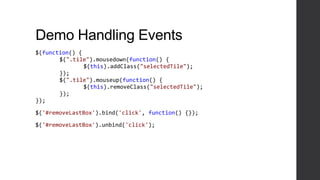
Demo Handling Events
$(function() {
       $(".tile").mousedown(function() {
               $(this).addClass("selectedTile");
       });
       $(".tile").mouseup(function() {
               $(this).removeClass("selectedTile");
       });
});

$('#removeLastBox').bind('click', function() {});

$('#removeLastBox').unbind('click');
Speak a lot   Ajax
              Features
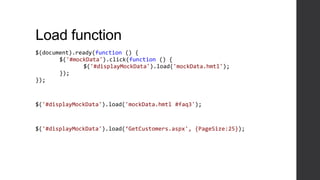
Load function
$(document).ready(function () {
       $('#mockData').click(function () {
              $('#displayMockData').load('mockData.hmtl');
       });
});


$('#displayMockData').load('mockData.hmtl #faq3');


$('#displayMockData').load(‘GetCustomers.aspx', {PageSize:25});
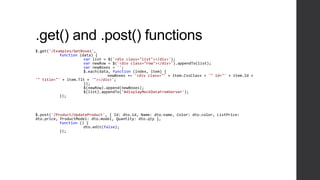
.get() and .post() functions
$.get('/Examples/GetBoxes',
           function (data) {
                      var list = $('<div class="list"></div>');
                      var newRow = $('<div class="row"></div>').appendTo(list);
                      var newBoxes = '';
                      $.each(data, function (index, item) {
                                 newBoxes += '<div class="' + item.CssClass + '" id="' + item.Id +
'" title="' + item.Tlt + '"></div>';
                      });
                      $(newRow).append(newBoxes);
                      $(list).appendTo('#displayMockDataFromServer');
           });


$.post('/Product/UpdateProduct', { Id: dto.id, Name: dto.name, Color: dto.color, ListPrice:
dto.price, ProductModel: dto.model, Quantity: dto.qty },
           function () {
                      dto.edit(false);
           });
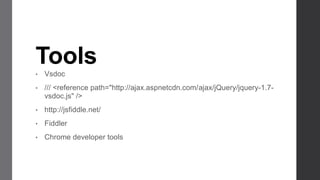
Tools
•   Vsdoc
•   /// <reference path="http://ajax.aspnetcdn.com/ajax/jQuery/jquery-1.7-
    vsdoc.js" />
•   http://jsfiddle.net/
•   Fiddler
•   Chrome developer tools
Drink a lot of (Yorkshire) tea with milk and
beer off course

What’s next to make my UI more
‘atractive’ (I mean Rich)
                                 •   http://knockoutjs.com/

                                 •   http://backbonejs.org/
                                     (https://touch.www.linkedin.com/)

                                 •   http://linqjs.codeplex.com/

                                 •   http://www.typescriptlang.org

                                 •   http://signalr.net/

Jquery fundamentals

  • 1.
  • 2.
    Introduction • Selector Agenda • Interacting with the DOM What we will learn! • Handling Events • Working with Ajax Features • Tools and documentation
  • 3.
    How can Ibecome an „English guy‟ • Learn the language • Use the dictionary • Speak a lot • Drink a lot of (Yorkshire) tea with milk and beer off course
  • 4.
    Introduction… , Nino Crudele … Stay relax
  • 5.
    Why use jQuery • First of all what you need to know:  Javascript  Html  Css • Why jQuery is so famous?  JavaScript Library (single file)  Cross-browser support  Selector  Handle events  Animate  Post and Get (Ajax calls)  A lot of plugins available
  • 6.
    What is DOM? • http://www.w3.org/TR/DOM-Level-2-Core/introduction.html • The Document Object Model (DOM) is an application programming interface (API) for valid HTML and well-formed XML documents. It defines the logical structure of documents and the way a document is accessed and manipulated. In the DOM specification, the term "document" is used in the broad sense - increasingly, XML is being used as a way of representing many different kinds of information that may be stored in diverse systems, and much of this would traditionally be seen as data rather than as documents. Nevertheless, XML presents this data as documents, and the DOM may be used to manage this data. • With the Document Object Model, programmers can build documents, navigate their structure, and add, modify, or delete elements and content. Anything found in an HTML or XML document can be accessed, changed, deleted, or added using the Document Object Model, with a few exceptions - in particular, the DOM interfaces for the XML internal and external subsets have not yet been specified.
  • 7.
  • 8.
    Learn the language • From Shawn Wildermuth - JavaScript for the C# Guy:  http://wildermuth.com/2012/5/6/JavaScript_for_the_C_Guy_The_Global_Object  http://wildermuth.com/2012/3/16/JavaScript_for_the_C_Guy_Scopes  http://wildermuth.com/2012/3/10/JavaScript_for_the_C_Guy_Function_Overloads  http://wildermuth.com/2012/5/28/JavaScript_for_the_C_Guy_The_confusion_about_this
  • 9.
    Using jQuery ReadyFunction • $(document).ready()  Each HTML document loaded into a browser window becomes a document object <script type="text/javascript" language="javascript"> $(document).read(function() { // do it }); </script> • What means $?  The $ is a identifier. jQuery use it as the primary base object (or function). Ex: <script type="text/javascript" language="javascript"> var ᾩ = function (object) { object.Company = "Content and Code"; return object; }; alert(ᾩ(document).Company); </script>
  • 10.
    Use the dictionary • http://api.jquery.com -> it will be your best friend • If you want intellisense works with jquery, look that: http://appendto.com/community/jquery-vsdoc • SP /// <reference path="http://ajax.aspnetcdn.com/ajax/jQuery/jquery-1.7-vsdoc.js" />
  • 11.
    Demo - Referencinga jQuery Script
  • 12.
    Speak a lot Selector
  • 13.
    Selecting Nodes by:id, class name, attribute name • Different ways to select a node:  By id:  $(“#myDiv”)  $(“div[id]”)  By class:  $(“.myClass”)  By attribute:  $(„div[id]‟)  $(„input[name~=“man”]‟)
  • 14.
    Demo Selector $(“#myDiv”)  $(“div[id]”)  $(“.myClass”)
  • 15.
    The Other Selectors  ~= contains a word  |= contains a prefix  *= contains a string in the word  = equals  != not equal  ^= start with  :button is a button  :checkbox is a checkbox  :checked is a checked checkbox
  • 16.
  • 17.
    Speak a lot Interacting with the DOM
  • 18.
    Iterating Through Nodes .each(function(index, Element)) is used to iterate through jQuery objects: $('div') .each(function(index) { alert(index + ‘ ‘ + $(this).text()); }); ----------------- • $('.row').last().remove(); ----------------- var newBox = $('<div class="tile" id="bb"></div>').addClass(colorOfMyNewBox); var lastrow = $('.row').last(); newBox.appendTo(lastrow);
  • 19.
    Demo Modify Propertiesand Attributes • Object attributes can be accessed using attr(): var val = $('#logo').attr('title'); $('#logo').attr('title‘, ‘new logo title’); $('#addBox').attr({ title: '', css: { 'border': '2px solid black;‘ } });
  • 20.
    Demo Adding andRemoving nodes $('#addRow').click(function () { $('<div class="row"></div>').appendTo('.list'); }); $('#removeLastBox').click(function () { $('.tile').last().remove(); });
  • 21.
    Speak a lot Handling Events
  • 22.
    Demo Handling Events $(function(){ $(".tile").mousedown(function() { $(this).addClass("selectedTile"); }); $(".tile").mouseup(function() { $(this).removeClass("selectedTile"); }); }); $('#removeLastBox').bind('click', function() {}); $('#removeLastBox').unbind('click');
  • 23.
    Speak a lot Ajax Features
  • 24.
    Load function $(document).ready(function (){ $('#mockData').click(function () { $('#displayMockData').load('mockData.hmtl'); }); }); $('#displayMockData').load('mockData.hmtl #faq3'); $('#displayMockData').load(‘GetCustomers.aspx', {PageSize:25});
  • 25.
    .get() and .post()functions $.get('/Examples/GetBoxes', function (data) { var list = $('<div class="list"></div>'); var newRow = $('<div class="row"></div>').appendTo(list); var newBoxes = ''; $.each(data, function (index, item) { newBoxes += '<div class="' + item.CssClass + '" id="' + item.Id + '" title="' + item.Tlt + '"></div>'; }); $(newRow).append(newBoxes); $(list).appendTo('#displayMockDataFromServer'); }); $.post('/Product/UpdateProduct', { Id: dto.id, Name: dto.name, Color: dto.color, ListPrice: dto.price, ProductModel: dto.model, Quantity: dto.qty }, function () { dto.edit(false); });
  • 26.
    Tools • Vsdoc • /// <reference path="http://ajax.aspnetcdn.com/ajax/jQuery/jquery-1.7- vsdoc.js" /> • http://jsfiddle.net/ • Fiddler • Chrome developer tools
  • 27.
    Drink a lotof (Yorkshire) tea with milk and beer off course What’s next to make my UI more ‘atractive’ (I mean Rich) • http://knockoutjs.com/ • http://backbonejs.org/ (https://touch.www.linkedin.com/) • http://linqjs.codeplex.com/ • http://www.typescriptlang.org • http://signalr.net/