Israr Ali
Getting Started with jQuery
When the DOM is Ready
$(document).ready(function() {
// all jQuery code goes here
});
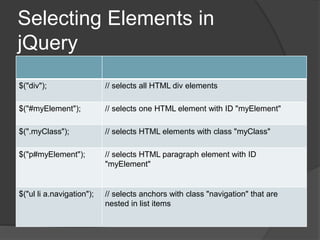
Selecting Elements in
jQuery
$("div"); // selects all HTML div elements
$("#myElement"); // selects one HTML element with ID "myElement"
$(".myClass"); // selects HTML elements with class "myClass"
$("p#myElement"); // selects HTML paragraph element with ID
"myElement"
$("ul li a.navigation"); // selects anchors with class "navigation" that are
nested in list items
CSS selectors
$("p > a"); // selects anchors that are direct children of paragraphs
$("input[type=text]"); // selects inputs that have specified type
$("a:first"); // selects the first anchor on the page
$("p:odd"); // selects all odd numbered paragraphs
$("li:first-child"); // selects each list item that's the first child in its list
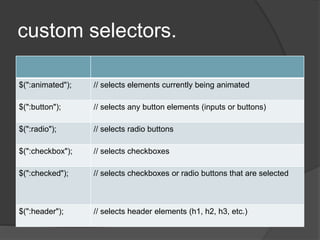
custom selectors.
$(":animated"); // selects elements currently being animated
$(":button"); // selects any button elements (inputs or buttons)
$(":radio"); // selects radio buttons
$(":checkbox"); // selects checkboxes
$(":checked"); // selects checkboxes or radio buttons that are selected
$(":header"); // selects header elements (h1, h2, h3, etc.)
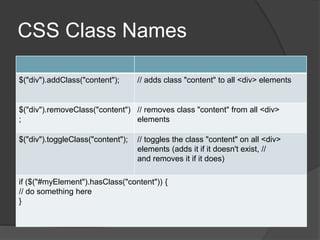
CSS Class Names
$("div").addClass("content"); // adds class "content" to all <div> elements
$("div").removeClass("content")
;
// removes class "content" from all <div>
elements
$("div").toggleClass("content"); // toggles the class "content" on all <div>
elements (adds it if it doesn't exist, //
and removes it if it does)
if ($("#myElement").hasClass("content")) {
// do something here
}
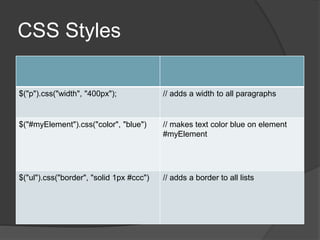
CSS Styles
$("p").css("width", "400px"); // adds a width to all paragraphs
$("#myElement").css("color", "blue") // makes text color blue on element
#myElement
$("ul").css("border", "solid 1px #ccc") // adds a border to all lists
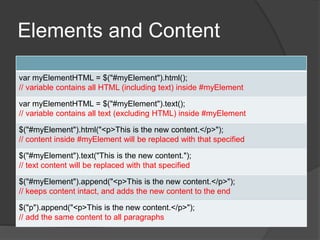
Elements and Content
var myElementHTML = $("#myElement").html();
// variable contains all HTML (including text) inside #myElement
var myElementHTML = $("#myElement").text();
// variable contains all text (excluding HTML) inside #myElement
$("#myElement").html("<p>This is the new content.</p>");
// content inside #myElement will be replaced with that specified
$("#myElement").text("This is the new content.");
// text content will be replaced with that specified
$("#myElement").append("<p>This is the new content.</p>");
// keeps content intact, and adds the new content to the end
$("p").append("<p>This is the new content.</p>");
// add the same content to all paragraphs
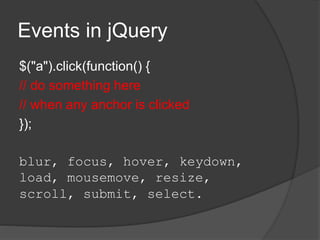
Events in jQuery
$("a").click(function() {
// do something here
// when any anchor is clicked
});
blur, focus, hover, keydown,
load, mousemove, resize,
scroll, submit, select.
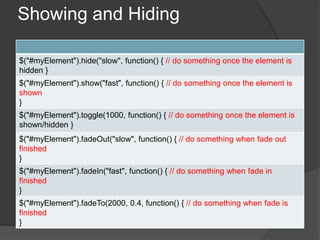
Showing and Hiding
$("#myElement").hide("slow", function() { // do something once the element is
hidden }
$("#myElement").show("fast", function() { // do something once the element is
shown
}
$("#myElement").toggle(1000, function() { // do something once the element is
shown/hidden }
$("#myElement").fadeOut("slow", function() { // do something when fade out
finished
}
$("#myElement").fadeIn("fast", function() { // do something when fade in
finished
}
$("#myElement").fadeTo(2000, 0.4, function() { // do something when fade is
finished
}
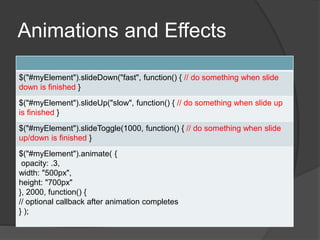
Animations and Effects
$("#myElement").slideDown("fast", function() { // do something when slide
down is finished }
$("#myElement").slideUp("slow", function() { // do something when slide up
is finished }
$("#myElement").slideToggle(1000, function() { // do something when slide
up/down is finished }
$("#myElement").animate( {
opacity: .3,
width: "500px",
height: "700px"
}, 2000, function() {
// optional callback after animation completes
} );

Jquery-overview

  • 1.
  • 2.
  • 3.
    When the DOMis Ready $(document).ready(function() { // all jQuery code goes here });
  • 4.
    Selecting Elements in jQuery $("div");// selects all HTML div elements $("#myElement"); // selects one HTML element with ID "myElement" $(".myClass"); // selects HTML elements with class "myClass" $("p#myElement"); // selects HTML paragraph element with ID "myElement" $("ul li a.navigation"); // selects anchors with class "navigation" that are nested in list items
  • 5.
    CSS selectors $("p >a"); // selects anchors that are direct children of paragraphs $("input[type=text]"); // selects inputs that have specified type $("a:first"); // selects the first anchor on the page $("p:odd"); // selects all odd numbered paragraphs $("li:first-child"); // selects each list item that's the first child in its list
  • 6.
    custom selectors. $(":animated"); //selects elements currently being animated $(":button"); // selects any button elements (inputs or buttons) $(":radio"); // selects radio buttons $(":checkbox"); // selects checkboxes $(":checked"); // selects checkboxes or radio buttons that are selected $(":header"); // selects header elements (h1, h2, h3, etc.)
  • 7.
    CSS Class Names $("div").addClass("content");// adds class "content" to all <div> elements $("div").removeClass("content") ; // removes class "content" from all <div> elements $("div").toggleClass("content"); // toggles the class "content" on all <div> elements (adds it if it doesn't exist, // and removes it if it does) if ($("#myElement").hasClass("content")) { // do something here }
  • 8.
    CSS Styles $("p").css("width", "400px");// adds a width to all paragraphs $("#myElement").css("color", "blue") // makes text color blue on element #myElement $("ul").css("border", "solid 1px #ccc") // adds a border to all lists
  • 9.
    Elements and Content varmyElementHTML = $("#myElement").html(); // variable contains all HTML (including text) inside #myElement var myElementHTML = $("#myElement").text(); // variable contains all text (excluding HTML) inside #myElement $("#myElement").html("<p>This is the new content.</p>"); // content inside #myElement will be replaced with that specified $("#myElement").text("This is the new content."); // text content will be replaced with that specified $("#myElement").append("<p>This is the new content.</p>"); // keeps content intact, and adds the new content to the end $("p").append("<p>This is the new content.</p>"); // add the same content to all paragraphs
  • 10.
    Events in jQuery $("a").click(function(){ // do something here // when any anchor is clicked }); blur, focus, hover, keydown, load, mousemove, resize, scroll, submit, select.
  • 11.
    Showing and Hiding $("#myElement").hide("slow",function() { // do something once the element is hidden } $("#myElement").show("fast", function() { // do something once the element is shown } $("#myElement").toggle(1000, function() { // do something once the element is shown/hidden } $("#myElement").fadeOut("slow", function() { // do something when fade out finished } $("#myElement").fadeIn("fast", function() { // do something when fade in finished } $("#myElement").fadeTo(2000, 0.4, function() { // do something when fade is finished }
  • 12.
    Animations and Effects $("#myElement").slideDown("fast",function() { // do something when slide down is finished } $("#myElement").slideUp("slow", function() { // do something when slide up is finished } $("#myElement").slideToggle(1000, function() { // do something when slide up/down is finished } $("#myElement").animate( { opacity: .3, width: "500px", height: "700px" }, 2000, function() { // optional callback after animation completes } );