Java и Linux
Особенности
Эксплуатации
Алексей Рагозин
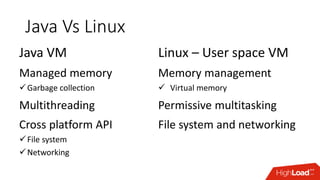
Java Vs Linux
Java VM
Managed memory
Garbage collection
Multithreading
Cross platform API
File system
Networking
Linux – User space VM
Memory management
 Virtual memory
Permissive multitasking
File system and networking
Memory
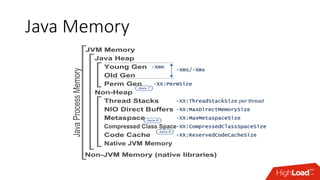
Java Memory
Java Heap
Young Gen
Old Gen
Perm Gen
Non-Heap
JVM Memory
Thread Stacks
NIO Direct Buffers
Metaspace
Compressed Class Space
Code Cache
Native JVM Memory
Non-JVM Memory (native libraries)
Java 7
Java 8
Java 8
-Xms/-Xmx
-Xmn
-XX:PermSize
-XX:MaxDirectMemorySize
-XX:ReservedCodeCacheSize
-XX:MaxMetaspaceSize
-XX:CompressedClassSpaceSize
JavaProcessMemory
-XX:ThreadStackSize per thread
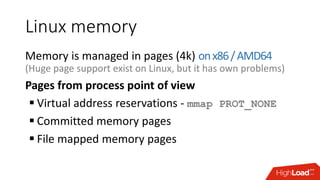
Linux memory
Memory is managed in pages (4k) onx86/AMD64
(Huge page support exist on Linux, but it has own problems)
Pages from process point of view
 Virtual address reservations - mmap PROT_NONE
 Committed memory pages
 File mapped memory pages
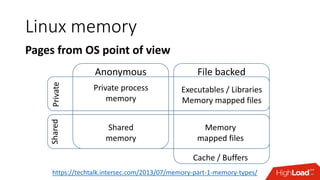
Linux memory
Pages from OS point of viewPrivateShared
Anonymous File backed
Shared
memory
Private process
memory
Executables / Libraries
Memory mapped files
Memory
mapped files
Cache / Buffers
https://techtalk.intersec.com/2013/07/memory-part-1-memory-types/
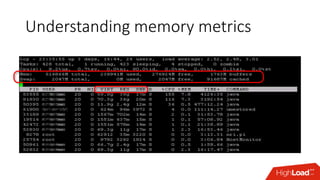
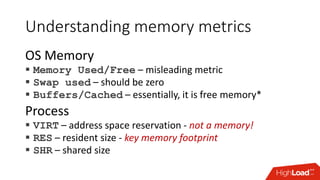
Understanding memory metrics
OS Memory
 Memory Used/Free – misleading metric
 Swap used – should be zero
 Buffers/Cached – essentially, it is free memory*
Process
 VIRT – address space reservation - not a memory!
 RES – resident size - key memory footprint
 SHR – shared size
Understanding memory metrics
 Buffers – pages used for non-file disk data
 Cached – pages mapped to file data
Non-dirty pages – are essentially free memory.
Such pages can be used immediately to fulfill
memory allocation request.
Dirty pages – writable file mapped pages which has
modifications not synchronized to disk.
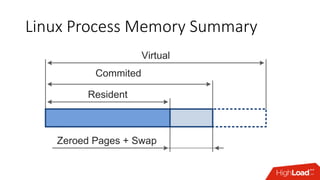
Linux Process Memory Summary
Resident
Commited
Virtual
Zeroed Pages + Swap
Java Memory Facts
Swapping intolerance
 GC does heap wide scans
 Any Java thread blocked by page fault can block Stop the World pause
Java never give up memory to OS
 Yes, G1 and serial collector can give memory back to OS
 In practice, JVM would still hold all memory it is allowed too
Out of Memory in Java
public void doWork() {
Object[] hugeArray = new Object[HUGE_SIZE];
for(int i = 0; i != hugeArray.length; ++i) {
hugeArray[i] = calc(i);
}
}
Out of Memory in Linux
public void doWork() {
Object[] hugeArray = new Object[HUGE_SIZE];
for(int i = 0; i != hugeArray.length; ++i) {
hugeArray[i] = calc(i);
}
}
JVM Out of Memory
JVM heap is full and –Xmx limit reached
 Start Full GC
 If reclaimed memory below threshold throw OutOfMemoryError
 OOM error is not recoverable, useful to shutdown gracefully
 -XX:OnOutOfMemoryError="kill -9 %p“
 OOM can be caught and discarded prolonging agony
JVM Out of Memory
JVM heap is full and at –Xmx limit
JVM heap is full but below –Xmx limit
 Heap is extended by requesting more memory from OS
 If OS rejects memory requests JVM would crash (no OOM error)
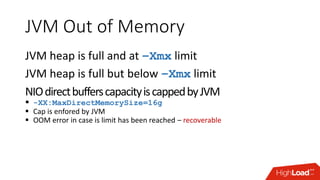
JVM Out of Memory
JVM heap is full and at –Xmx limit
JVM heap is full but below –Xmx limit
NIOdirectbufferscapacityiscappedbyJVM
 -XX:MaxDirectMemorySize=16g
 Cap is enfored by JVM
 OOM error in case is limit has been reached – recoverable
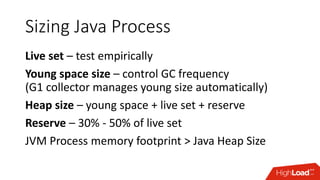
Sizing Java Process
Live set – test empirically
Young space size – control GC frequency
(G1 collector manages young size automatically)
Heap size – young space + live set + reserve
Reserve – 30% - 50% of live set
JVM Process memory footprint > Java Heap Size
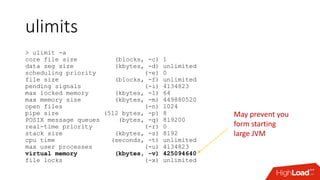
ulimits
> ulimit -a
core file size (blocks, -c) 1
data seg size (kbytes, -d) unlimited
scheduling priority (-e) 0
file size (blocks, -f) unlimited
pending signals (-i) 4134823
max locked memory (kbytes, -l) 64
max memory size (kbytes, -m) 449880520
open files (-n) 1024
pipe size (512 bytes, -p) 8
POSIX message queues (bytes, -q) 819200
real-time priority (-r) 0
stack size (kbytes, -s) 8192
cpu time (seconds, -t) unlimited
max user processes (-u) 4134823
virtual memory (kbytes, -v) 425094640
file locks (-x) unlimited
May prevent you
form starting
large JVM
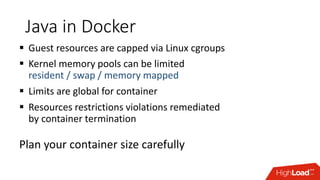
Java in Docker
 Guest resources are capped via Linux cgroups
 Kernel memory pools can be limited
resident / swap / memory mapped
 Limits are global for container
 Resources restrictions violations remediated
by container termination
Plan your container size carefully
Threads
Java Threads
Java threads are normal OS threads
 Each Java thread are mapped to Linux thread
 Java code shares stack with native code
 You can use many native Linux tools for diagnostic
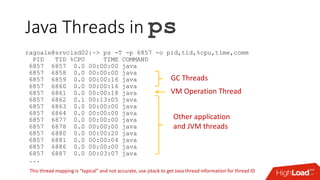
Java Threads in ps
ragoale@srvclsd02:~> ps -T -p 6857 -o pid,tid,%cpu,time,comm
PID TID %CPU TIME COMMAND
6857 6857 0.0 00:00:00 java
6857 6858 0.0 00:00:00 java
6857 6859 0.0 00:00:16 java
6857 6860 0.0 00:00:16 java
6857 6861 0.0 00:00:18 java
6857 6862 0.1 00:13:05 java
6857 6863 0.0 00:00:00 java
6857 6864 0.0 00:00:00 java
6857 6877 0.0 00:00:00 java
6857 6878 0.0 00:00:00 java
6857 6880 0.0 00:00:20 java
6857 6881 0.0 00:00:04 java
6857 6886 0.0 00:00:00 java
6857 6887 0.0 00:03:07 java
...
This thread mapping is “typical” and not accurate, use jstack to get Java thread information for thread ID
VM Operation Thread
GC Threads
Other application
and JVM threads
Java Thread in jstack
jstack (JDK tool)Full thread dump Java HotSpot(TM) 64-Bit Server VM (25.60-b23 mixed mode):
"Attach Listener" #65 daemon prio=9 os_prio=0 tid=0x0000000000cbc800 nid=0x1f0 waiting on condition [0x0000000000000000]
java.lang.Thread.State: RUNNABLE
"pool-1-thread-20" #64 prio=5 os_prio=0 tid=0x00000000009d5000 nid=0x1c04 waiting on condition [0x00007fa109e55000]
java.lang.Thread.State: WAITING (parking)
at sun.misc.Unsafe.park(Native Method)
- parking to wait for <0x00000000d3ab9e50> (a java.util.concurrent.locks.AbstractQueuedSynchronizer$ConditionObject)
at java.util.concurrent.locks.LockSupport.park(LockSupport.java:175)
at java.util.concurrent.locks.AbstractQueuedSynchronizer$ConditionObject.await(AbstractQueuedSynchronizer.java:2039)
at java.util.concurrent.ScheduledThreadPoolExecutor$DelayedWorkQueue.take(ScheduledThreadPoolExecutor.java:1088)
at java.util.concurrent.ScheduledThreadPoolExecutor$DelayedWorkQueue.take(ScheduledThreadPoolExecutor.java:809)
at java.util.concurrent.ThreadPoolExecutor.getTask(ThreadPoolExecutor.java:1067)
at java.util.concurrent.ThreadPoolExecutor.runWorker(ThreadPoolExecutor.java:1127)
at java.util.concurrent.ThreadPoolExecutor$Worker.run(ThreadPoolExecutor.java:617)
at java.lang.Thread.run(Thread.java:745)
"pool-1-thread-19" #63 prio=5 os_prio=0 tid=0x0000000000a1e800 nid=0x1bff waiting on condition [0x00007fa109f56000]
java.lang.Thread.State: WAITING (parking)
at sun.misc.Unsafe.park(Native Method)
- parking to wait for <0x00000000d3ab9e50> (a java.util.concurrent.locks.AbstractQueuedSynchronizer$ConditionObject)
at java.util.concurrent.locks.LockSupport.park(LockSupport.java:175)
at java.util.concurrent.locks.AbstractQueuedSynchronizer$ConditionObject.await(AbstractQueuedSynchronizer.java:2039)
...
Linux thread ID in hex
jstack forces STW pause in target JVM!
Thread CPU usage in JVM
sjk ttop command - https://github.com/aragozin/jvm-tools
2016-07-27T07:47:20.674-0400 Process summary
process cpu=8.11%
application cpu=2.17% (user=1.52% sys=0.65%)
other: cpu=5.95%
GC cpu=0.00% (young=0.00%, old=0.00%)
heap allocation rate 1842kb/s
safe point rate: 1.1 (events/s) avg. safe point pause: 0.43ms
safe point sync time: 0.01% processing time: 0.04% (wallclock time)
[003120] user= 1.12% sys= 0.24% alloc= 983kb/s - RMI TCP Connection(1)-172.17.168.11
[000039] user= 0.30% sys= 0.26% alloc= 701kb/s - DB feed - UserPermission.DBWatcher
[000053] user= 0.00% sys= 0.05% alloc= 50kb/s - Statistics
[000038] user= 0.00% sys= 0.05% alloc= 4584b/s – Reactor-0
[000049] user= 0.00% sys= 0.03% alloc= 38kb/s - DB feed - UserInfo.DBWatcher
[000036] user= 0.00% sys= 0.03% alloc= 0b/s - Abandoned connection cleanup thread
[003122] user= 0.00% sys= 0.03% alloc= 4915b/s - JMX server connection timeout 3122
[000040] user= 0.10% sys=-0.09% alloc= 8321b/s - DB feed - Report.DBWatcher
[000050] user= 0.00% sys= 0.01% alloc= 24kb/s - DB feed - Rule.DBWatcher
[000051] user= 0.00% sys= 0.01% alloc= 9034b/s - DB feed - EmailAccount.DBWatcher
[000044] user= 0.00% sys= 0.01% alloc= 4840b/s - DB feed - Analytics.DBWatcher
[000041] user= 0.00% sys= 0.01% alloc= 9999b/s - DB feed - Contact.DBWatcher
[000054] user= 0.00% sys= 0.01% alloc= 3481b/s – Statistics
[000001] user= 0.00% sys= 0.00% alloc= 0b/s - main
[000002] user= 0.00% sys= 0.00% alloc= 0b/s - Reference Handler
[000003] user= 0.00% sys= 0.00% alloc= 0b/s – Finalizer
Does not infer STW pauses on target process
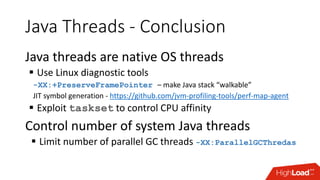
Java Threads - Conclusion
Java threads are native OS threads
 Use Linux diagnostic tools
-XX:+PreserveFramePointer – make Java stack “walkable”
JIT symbol generation - https://github.com/jvm-profiling-tools/perf-map-agent
 Exploit taskset to control CPU affinity
Control number of system Java threads
 Limit number of parallel GC threads -XX:ParallelGCThredas
Networking and IO
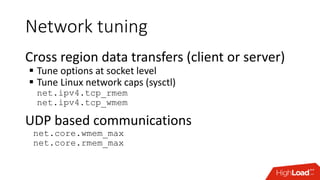
Network tuning
Cross region data transfers (client or server)
 Tune options at socket level
 Tune Linux network caps (sysctl)
net.ipv4.tcp_rmem
net.ipv4.tcp_wmem
UDP based communications
net.core.wmem_max
net.core.rmem_max
Leaking OS resources
Linux OS has number cap on file handles
if exceeded …
 Cannot open new files
 Cannot connect / accept socket connections
Leaking OS resources
Linux OS has number cap on file handles
Java Garbage collector closes handles automatically
 Files and sockets
 Eventually …
Leaking OS resources
Linux OS has number cap on file handles
Java Garbage collector closes handles automatically
 Files and sockets
 Eventually …
Best practices
 Always close your files and sockets explicitly
 You should explicitly close socket object after SocketException
Leaking OS resources
Resources which cannot be explicitly disposed
 File memory mappings
 NIO direct buffers
Diagnostics
 Java heap dump can be analyzed for objects pending finalization
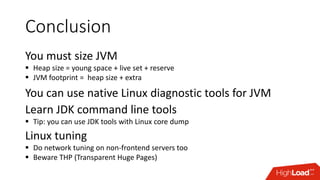
Conclusion
Conclusion
You must size JVM
 Heap size = young space + live set + reserve
 JVM footprint = heap size + extra
You can use native Linux diagnostic tools for JVM
Learn JDK command line tools
 Tip: you can use JDK tools with Linux core dump
Linux tuning
 Do network tuning on non-frontend servers too
 Beware THP (Transparent Huge Pages)
Links
Java Memory Tuning and Diagnostic
 http://blog.ragozin.info/2016/10/hotspot-jvm-garbage-collection-options.html
 https://docs.oracle.com/javase/8/docs/technotes/guides/troubleshoot/tooldescr007.html
 Using JDK tools with Linux core dumps
https://docs.oracle.com/javase/8/docs/technotes/guides/troubleshoot/bugreports004.html#CHDHDCJD
Linux Transparent Huge Pages reading
 https://www.perforce.com/blog/tales-field-taming-transparent-huge-pages-linux
 https://tobert.github.io/tldr/cassandra-java-huge-pages.html
 https://alexandrnikitin.github.io/blog/transparent-hugepages-measuring-the-performance-impact/
Profiling and performance monitoring
 https://github.com/jvm-profiling-tools/perf-map-agent
 https://github.com/aragozin/jvm-tools
THANK YOU
Alexey Ragozin
alexey.ragozin@gmail.com
https://blog.ragozin.info
https://github.com/aragozin

Java и Linux — особенности эксплуатации / Алексей Рагозин (Дойче Банк)

  • 1.
  • 2.
    Java Vs Linux JavaVM Managed memory Garbage collection Multithreading Cross platform API File system Networking Linux – User space VM Memory management  Virtual memory Permissive multitasking File system and networking
  • 3.
  • 4.
    Java Memory Java Heap YoungGen Old Gen Perm Gen Non-Heap JVM Memory Thread Stacks NIO Direct Buffers Metaspace Compressed Class Space Code Cache Native JVM Memory Non-JVM Memory (native libraries) Java 7 Java 8 Java 8 -Xms/-Xmx -Xmn -XX:PermSize -XX:MaxDirectMemorySize -XX:ReservedCodeCacheSize -XX:MaxMetaspaceSize -XX:CompressedClassSpaceSize JavaProcessMemory -XX:ThreadStackSize per thread
  • 5.
    Linux memory Memory ismanaged in pages (4k) onx86/AMD64 (Huge page support exist on Linux, but it has own problems) Pages from process point of view  Virtual address reservations - mmap PROT_NONE  Committed memory pages  File mapped memory pages
  • 6.
    Linux memory Pages fromOS point of viewPrivateShared Anonymous File backed Shared memory Private process memory Executables / Libraries Memory mapped files Memory mapped files Cache / Buffers https://techtalk.intersec.com/2013/07/memory-part-1-memory-types/
  • 7.
  • 8.
    Understanding memory metrics OSMemory  Memory Used/Free – misleading metric  Swap used – should be zero  Buffers/Cached – essentially, it is free memory* Process  VIRT – address space reservation - not a memory!  RES – resident size - key memory footprint  SHR – shared size
  • 9.
    Understanding memory metrics Buffers – pages used for non-file disk data  Cached – pages mapped to file data Non-dirty pages – are essentially free memory. Such pages can be used immediately to fulfill memory allocation request. Dirty pages – writable file mapped pages which has modifications not synchronized to disk.
  • 10.
    Linux Process MemorySummary Resident Commited Virtual Zeroed Pages + Swap
  • 11.
    Java Memory Facts Swappingintolerance  GC does heap wide scans  Any Java thread blocked by page fault can block Stop the World pause Java never give up memory to OS  Yes, G1 and serial collector can give memory back to OS  In practice, JVM would still hold all memory it is allowed too
  • 12.
    Out of Memoryin Java public void doWork() { Object[] hugeArray = new Object[HUGE_SIZE]; for(int i = 0; i != hugeArray.length; ++i) { hugeArray[i] = calc(i); } }
  • 13.
    Out of Memoryin Linux public void doWork() { Object[] hugeArray = new Object[HUGE_SIZE]; for(int i = 0; i != hugeArray.length; ++i) { hugeArray[i] = calc(i); } }
  • 14.
    JVM Out ofMemory JVM heap is full and –Xmx limit reached  Start Full GC  If reclaimed memory below threshold throw OutOfMemoryError  OOM error is not recoverable, useful to shutdown gracefully  -XX:OnOutOfMemoryError="kill -9 %p“  OOM can be caught and discarded prolonging agony
  • 15.
    JVM Out ofMemory JVM heap is full and at –Xmx limit JVM heap is full but below –Xmx limit  Heap is extended by requesting more memory from OS  If OS rejects memory requests JVM would crash (no OOM error)
  • 16.
    JVM Out ofMemory JVM heap is full and at –Xmx limit JVM heap is full but below –Xmx limit NIOdirectbufferscapacityiscappedbyJVM  -XX:MaxDirectMemorySize=16g  Cap is enfored by JVM  OOM error in case is limit has been reached – recoverable
  • 17.
    Sizing Java Process Liveset – test empirically Young space size – control GC frequency (G1 collector manages young size automatically) Heap size – young space + live set + reserve Reserve – 30% - 50% of live set JVM Process memory footprint > Java Heap Size
  • 18.
    ulimits > ulimit -a corefile size (blocks, -c) 1 data seg size (kbytes, -d) unlimited scheduling priority (-e) 0 file size (blocks, -f) unlimited pending signals (-i) 4134823 max locked memory (kbytes, -l) 64 max memory size (kbytes, -m) 449880520 open files (-n) 1024 pipe size (512 bytes, -p) 8 POSIX message queues (bytes, -q) 819200 real-time priority (-r) 0 stack size (kbytes, -s) 8192 cpu time (seconds, -t) unlimited max user processes (-u) 4134823 virtual memory (kbytes, -v) 425094640 file locks (-x) unlimited May prevent you form starting large JVM
  • 19.
    Java in Docker Guest resources are capped via Linux cgroups  Kernel memory pools can be limited resident / swap / memory mapped  Limits are global for container  Resources restrictions violations remediated by container termination Plan your container size carefully
  • 20.
  • 21.
    Java Threads Java threadsare normal OS threads  Each Java thread are mapped to Linux thread  Java code shares stack with native code  You can use many native Linux tools for diagnostic
  • 22.
    Java Threads inps ragoale@srvclsd02:~> ps -T -p 6857 -o pid,tid,%cpu,time,comm PID TID %CPU TIME COMMAND 6857 6857 0.0 00:00:00 java 6857 6858 0.0 00:00:00 java 6857 6859 0.0 00:00:16 java 6857 6860 0.0 00:00:16 java 6857 6861 0.0 00:00:18 java 6857 6862 0.1 00:13:05 java 6857 6863 0.0 00:00:00 java 6857 6864 0.0 00:00:00 java 6857 6877 0.0 00:00:00 java 6857 6878 0.0 00:00:00 java 6857 6880 0.0 00:00:20 java 6857 6881 0.0 00:00:04 java 6857 6886 0.0 00:00:00 java 6857 6887 0.0 00:03:07 java ... This thread mapping is “typical” and not accurate, use jstack to get Java thread information for thread ID VM Operation Thread GC Threads Other application and JVM threads
  • 23.
    Java Thread injstack jstack (JDK tool)Full thread dump Java HotSpot(TM) 64-Bit Server VM (25.60-b23 mixed mode): "Attach Listener" #65 daemon prio=9 os_prio=0 tid=0x0000000000cbc800 nid=0x1f0 waiting on condition [0x0000000000000000] java.lang.Thread.State: RUNNABLE "pool-1-thread-20" #64 prio=5 os_prio=0 tid=0x00000000009d5000 nid=0x1c04 waiting on condition [0x00007fa109e55000] java.lang.Thread.State: WAITING (parking) at sun.misc.Unsafe.park(Native Method) - parking to wait for <0x00000000d3ab9e50> (a java.util.concurrent.locks.AbstractQueuedSynchronizer$ConditionObject) at java.util.concurrent.locks.LockSupport.park(LockSupport.java:175) at java.util.concurrent.locks.AbstractQueuedSynchronizer$ConditionObject.await(AbstractQueuedSynchronizer.java:2039) at java.util.concurrent.ScheduledThreadPoolExecutor$DelayedWorkQueue.take(ScheduledThreadPoolExecutor.java:1088) at java.util.concurrent.ScheduledThreadPoolExecutor$DelayedWorkQueue.take(ScheduledThreadPoolExecutor.java:809) at java.util.concurrent.ThreadPoolExecutor.getTask(ThreadPoolExecutor.java:1067) at java.util.concurrent.ThreadPoolExecutor.runWorker(ThreadPoolExecutor.java:1127) at java.util.concurrent.ThreadPoolExecutor$Worker.run(ThreadPoolExecutor.java:617) at java.lang.Thread.run(Thread.java:745) "pool-1-thread-19" #63 prio=5 os_prio=0 tid=0x0000000000a1e800 nid=0x1bff waiting on condition [0x00007fa109f56000] java.lang.Thread.State: WAITING (parking) at sun.misc.Unsafe.park(Native Method) - parking to wait for <0x00000000d3ab9e50> (a java.util.concurrent.locks.AbstractQueuedSynchronizer$ConditionObject) at java.util.concurrent.locks.LockSupport.park(LockSupport.java:175) at java.util.concurrent.locks.AbstractQueuedSynchronizer$ConditionObject.await(AbstractQueuedSynchronizer.java:2039) ... Linux thread ID in hex jstack forces STW pause in target JVM!
  • 24.
    Thread CPU usagein JVM sjk ttop command - https://github.com/aragozin/jvm-tools 2016-07-27T07:47:20.674-0400 Process summary process cpu=8.11% application cpu=2.17% (user=1.52% sys=0.65%) other: cpu=5.95% GC cpu=0.00% (young=0.00%, old=0.00%) heap allocation rate 1842kb/s safe point rate: 1.1 (events/s) avg. safe point pause: 0.43ms safe point sync time: 0.01% processing time: 0.04% (wallclock time) [003120] user= 1.12% sys= 0.24% alloc= 983kb/s - RMI TCP Connection(1)-172.17.168.11 [000039] user= 0.30% sys= 0.26% alloc= 701kb/s - DB feed - UserPermission.DBWatcher [000053] user= 0.00% sys= 0.05% alloc= 50kb/s - Statistics [000038] user= 0.00% sys= 0.05% alloc= 4584b/s – Reactor-0 [000049] user= 0.00% sys= 0.03% alloc= 38kb/s - DB feed - UserInfo.DBWatcher [000036] user= 0.00% sys= 0.03% alloc= 0b/s - Abandoned connection cleanup thread [003122] user= 0.00% sys= 0.03% alloc= 4915b/s - JMX server connection timeout 3122 [000040] user= 0.10% sys=-0.09% alloc= 8321b/s - DB feed - Report.DBWatcher [000050] user= 0.00% sys= 0.01% alloc= 24kb/s - DB feed - Rule.DBWatcher [000051] user= 0.00% sys= 0.01% alloc= 9034b/s - DB feed - EmailAccount.DBWatcher [000044] user= 0.00% sys= 0.01% alloc= 4840b/s - DB feed - Analytics.DBWatcher [000041] user= 0.00% sys= 0.01% alloc= 9999b/s - DB feed - Contact.DBWatcher [000054] user= 0.00% sys= 0.01% alloc= 3481b/s – Statistics [000001] user= 0.00% sys= 0.00% alloc= 0b/s - main [000002] user= 0.00% sys= 0.00% alloc= 0b/s - Reference Handler [000003] user= 0.00% sys= 0.00% alloc= 0b/s – Finalizer Does not infer STW pauses on target process
  • 25.
    Java Threads -Conclusion Java threads are native OS threads  Use Linux diagnostic tools -XX:+PreserveFramePointer – make Java stack “walkable” JIT symbol generation - https://github.com/jvm-profiling-tools/perf-map-agent  Exploit taskset to control CPU affinity Control number of system Java threads  Limit number of parallel GC threads -XX:ParallelGCThredas
  • 26.
  • 27.
    Network tuning Cross regiondata transfers (client or server)  Tune options at socket level  Tune Linux network caps (sysctl) net.ipv4.tcp_rmem net.ipv4.tcp_wmem UDP based communications net.core.wmem_max net.core.rmem_max
  • 28.
    Leaking OS resources LinuxOS has number cap on file handles if exceeded …  Cannot open new files  Cannot connect / accept socket connections
  • 29.
    Leaking OS resources LinuxOS has number cap on file handles Java Garbage collector closes handles automatically  Files and sockets  Eventually …
  • 30.
    Leaking OS resources LinuxOS has number cap on file handles Java Garbage collector closes handles automatically  Files and sockets  Eventually … Best practices  Always close your files and sockets explicitly  You should explicitly close socket object after SocketException
  • 31.
    Leaking OS resources Resourceswhich cannot be explicitly disposed  File memory mappings  NIO direct buffers Diagnostics  Java heap dump can be analyzed for objects pending finalization
  • 32.
  • 33.
    Conclusion You must sizeJVM  Heap size = young space + live set + reserve  JVM footprint = heap size + extra You can use native Linux diagnostic tools for JVM Learn JDK command line tools  Tip: you can use JDK tools with Linux core dump Linux tuning  Do network tuning on non-frontend servers too  Beware THP (Transparent Huge Pages)
  • 34.
    Links Java Memory Tuningand Diagnostic  http://blog.ragozin.info/2016/10/hotspot-jvm-garbage-collection-options.html  https://docs.oracle.com/javase/8/docs/technotes/guides/troubleshoot/tooldescr007.html  Using JDK tools with Linux core dumps https://docs.oracle.com/javase/8/docs/technotes/guides/troubleshoot/bugreports004.html#CHDHDCJD Linux Transparent Huge Pages reading  https://www.perforce.com/blog/tales-field-taming-transparent-huge-pages-linux  https://tobert.github.io/tldr/cassandra-java-huge-pages.html  https://alexandrnikitin.github.io/blog/transparent-hugepages-measuring-the-performance-impact/ Profiling and performance monitoring  https://github.com/jvm-profiling-tools/perf-map-agent  https://github.com/aragozin/jvm-tools
  • 35.