Chapter 5
Conditionals and
Loops: Part 5
• Java Software Solutions
• Foundations of Program
Design
• 9th Edition
John Lewis
William Loftus
Outline
Boolean Expressions
The if Statement
Comparing Data
The while Statement
Iterators
The ArrayList Class
Key
Concept
A loop allows a program to
execute a statement
multiple times.
Repetition Statements
• Repetition statements allow us to execute a
statement multiple times
• Often they are referred to as loops
• Like conditional statements, they are controlled by
boolean expressions
• Java has three kinds of repetition statements:
while, do, and for loops
• The do and for loops are discussed in Chapter 6
The while
Statement
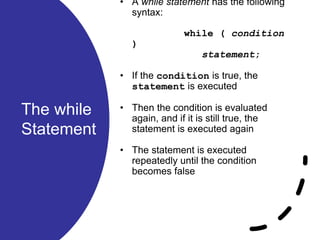
• A while statement has the following
syntax:
while ( condition
)
statement;
• If the condition is true, the
statement is executed
• Then the condition is evaluated
again, and if it is still true, the
statement is executed again
• The statement is executed
repeatedly until the condition
becomes false
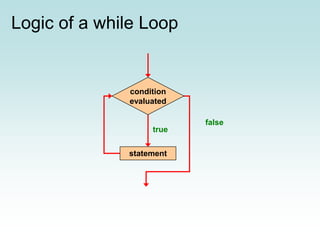
Logic of a while Loop
statement
true
false
condition
evaluated
The while
Statement
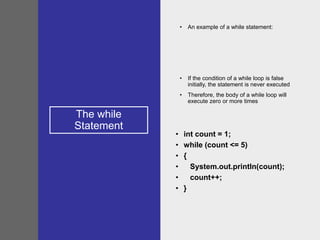
• An example of a while statement:
• If the condition of a while loop is false
initially, the statement is never executed
• Therefore, the body of a while loop will
execute zero or more times
• int count = 1;
• while (count <= 5)
• {
• System.out.println(count);
• count++;
• }
Sentinel
Values
• Let's look at some examples
of loop processing
• A loop can be used to
maintain a running sum
• A sentinel value is a special
input value that represents
the end of input
• See Average.java
//********************************************************************
// Average.java Author: Lewis/Loftus
//
// Demonstrates the use of a while loop, a sentinel value, and a
// running sum.
//********************************************************************
import java.text.DecimalFormat;
import java.util.Scanner;
public class Average
{
//-----------------------------------------------------------------
// Computes the average of a set of values entered by the user.
// The running sum is printed as the numbers are entered.
//-----------------------------------------------------------------
public static void main(String[] args)
{
int sum = 0, value, count = 0;
double average;
Scanner scan = new Scanner(System.in);
System.out.print("Enter an integer (0 to quit): ");
value = scan.nextInt();
continue
continue
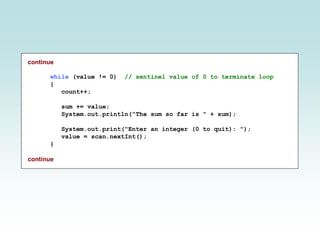
while (value != 0) // sentinel value of 0 to terminate loop
{
count++;
sum += value;
System.out.println("The sum so far is " + sum);
System.out.print("Enter an integer (0 to quit): ");
value = scan.nextInt();
}
continue
continue
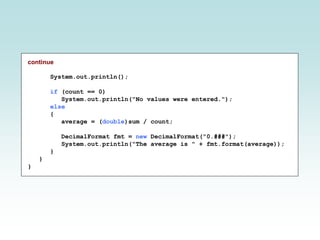
System.out.println();
if (count == 0)
System.out.println("No values were entered.");
else
{
average = (double)sum / count;
DecimalFormat fmt = new DecimalFormat("0.###");
System.out.println("The average is " + fmt.format(average));
}
}
}
continue
System.out.println();
if (count == 0)
System.out.println("No values were entered.");
else
{
average = (double)sum / count;
DecimalFormat fmt = new DecimalFormat ("0.###");
System.out.println("The average is " + fmt.format(average));
}
}
}
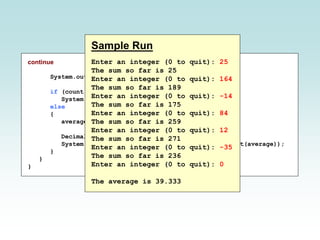
Sample Run
Enter an integer (0 to quit): 25
The sum so far is 25
Enter an integer (0 to quit): 164
The sum so far is 189
Enter an integer (0 to quit): -14
The sum so far is 175
Enter an integer (0 to quit): 84
The sum so far is 259
Enter an integer (0 to quit): 12
The sum so far is 271
Enter an integer (0 to quit): -35
The sum so far is 236
Enter an integer (0 to quit): 0
The average is 39.333
Input
Validation
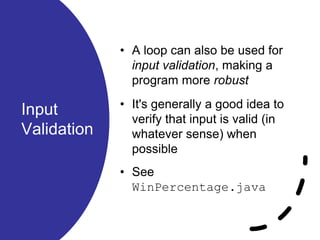
• A loop can also be used for
input validation, making a
program more robust
• It's generally a good idea to
verify that input is valid (in
whatever sense) when
possible
• See
WinPercentage.java
//********************************************************************
// WinPercentage.java Author: Lewis/Loftus
//
// Demonstrates the use of a while loop for input validation.
//********************************************************************
import java.text.NumberFormat;
import java.util.Scanner;
public class WinPercentage
{
//-----------------------------------------------------------------
// Computes the percentage of games won by a team.
//-----------------------------------------------------------------
public static void main(String[] args)
{
final int NUM_GAMES = 12;
int won;
double ratio;
Scanner scan = new Scanner(System.in);
System.out.print("Enter the number of games won (0 to "
+ NUM_GAMES + "): ");
won = scan.nextInt();
continue
continue
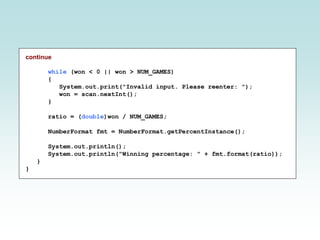
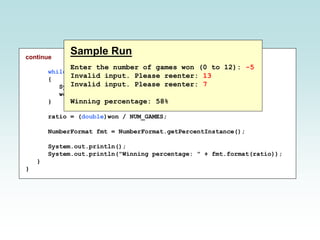
while (won < 0 || won > NUM_GAMES)
{
System.out.print("Invalid input. Please reenter: ");
won = scan.nextInt();
}
ratio = (double)won / NUM_GAMES;
NumberFormat fmt = NumberFormat.getPercentInstance();
System.out.println();
System.out.println("Winning percentage: " + fmt.format(ratio));
}
}
continue
while (won < 0 || won > NUM_GAMES)
{
System.out.print("Invalid input. Please reenter: ");
won = scan.nextInt();
}
ratio = (double)won / NUM_GAMES;
NumberFormat fmt = NumberFormat.getPercentInstance();
System.out.println();
System.out.println("Winning percentage: " + fmt.format(ratio));
}
}
Sample Run
Enter the number of games won (0 to 12): -5
Invalid input. Please reenter: 13
Invalid input. Please reenter: 7
Winning percentage: 58%
Infinite
Loops
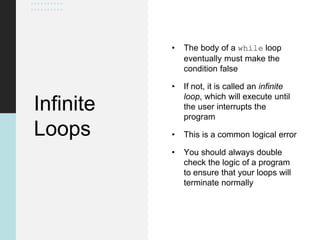
• The body of a while loop
eventually must make the
condition false
• If not, it is called an infinite
loop, which will execute until
the user interrupts the
program
• This is a common logical error
• You should always double
check the logic of a program
to ensure that your loops will
terminate normally
Infinite Loops
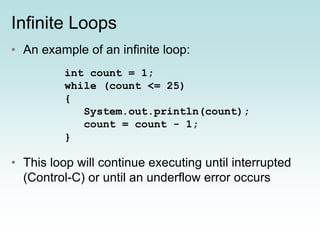
• An example of an infinite loop:
• This loop will continue executing until interrupted
(Control-C) or until an underflow error occurs
int count = 1;
while (count <= 25)
{
System.out.println(count);
count = count - 1;
}
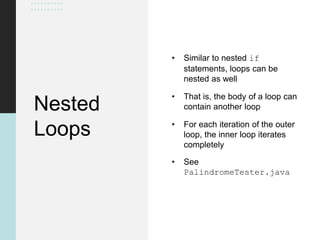
Nested
Loops
• Similar to nested if
statements, loops can be
nested as well
• That is, the body of a loop can
contain another loop
• For each iteration of the outer
loop, the inner loop iterates
completely
• See
PalindromeTester.java
//********************************************************************
// PalindromeTester.java Author: Lewis/Loftus
//
// Demonstrates the use of nested while loops.
//********************************************************************
import java.util.Scanner;
public class PalindromeTester
{
//-----------------------------------------------------------------
// Tests strings to see if they are palindromes.
//-----------------------------------------------------------------
public static void main(String[] args)
{
String str, another = "y";
int left, right;
Scanner scan = new Scanner(System.in);
while (another.equalsIgnoreCase("y")) // allows y or Y
{
System.out.println("Enter a potential palindrome:");
str = scan.nextLine();
left = 0;
right = str.length() - 1;
continue
continue
while (str.charAt(left) == str.charAt(right) && left < right)
{
left++;
right--;
}
System.out.println();
if (left < right)
System.out.println("That string is NOT a palindrome.");
else
System.out.println("That string IS a palindrome.");
System.out.println();
System.out.print("Test another palindrome (y/n)? ");
another = scan.nextLine();
}
}
}
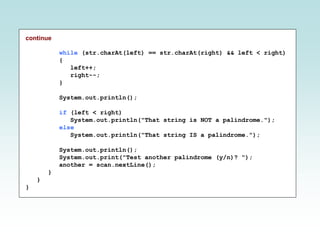
continue
while (str.charAt(left) == str.charAt(right) && left < right)
{
left++;
right--;
}
System.out.println();
if (left < right)
System.out.println("That string is NOT a palindrome.");
else
System.out.println("That string IS a palindrome.");
System.out.println();
System.out.print("Test another palindrome (y/n)? ");
another = scan.nextLine();
}
}
}
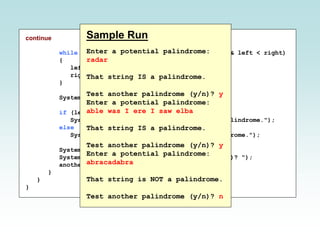
Sample Run
Enter a potential palindrome:
radar
That string IS a palindrome.
Test another palindrome (y/n)? y
Enter a potential palindrome:
able was I ere I saw elba
That string IS a palindrome.
Test another palindrome (y/n)? y
Enter a potential palindrome:
abracadabra
That string is NOT a palindrome.
Test another palindrome (y/n)? n

Java Chapter 05 - Conditions & Loops: part 5

  • 1.
    Chapter 5 Conditionals and Loops:Part 5 • Java Software Solutions • Foundations of Program Design • 9th Edition John Lewis William Loftus
  • 2.
    Outline Boolean Expressions The ifStatement Comparing Data The while Statement Iterators The ArrayList Class
  • 3.
    Key Concept A loop allowsa program to execute a statement multiple times.
  • 4.
    Repetition Statements • Repetitionstatements allow us to execute a statement multiple times • Often they are referred to as loops • Like conditional statements, they are controlled by boolean expressions • Java has three kinds of repetition statements: while, do, and for loops • The do and for loops are discussed in Chapter 6
  • 5.
    The while Statement • Awhile statement has the following syntax: while ( condition ) statement; • If the condition is true, the statement is executed • Then the condition is evaluated again, and if it is still true, the statement is executed again • The statement is executed repeatedly until the condition becomes false
  • 6.
    Logic of awhile Loop statement true false condition evaluated
  • 7.
    The while Statement • Anexample of a while statement: • If the condition of a while loop is false initially, the statement is never executed • Therefore, the body of a while loop will execute zero or more times • int count = 1; • while (count <= 5) • { • System.out.println(count); • count++; • }
  • 8.
    Sentinel Values • Let's lookat some examples of loop processing • A loop can be used to maintain a running sum • A sentinel value is a special input value that represents the end of input • See Average.java
  • 9.
    //******************************************************************** // Average.java Author:Lewis/Loftus // // Demonstrates the use of a while loop, a sentinel value, and a // running sum. //******************************************************************** import java.text.DecimalFormat; import java.util.Scanner; public class Average { //----------------------------------------------------------------- // Computes the average of a set of values entered by the user. // The running sum is printed as the numbers are entered. //----------------------------------------------------------------- public static void main(String[] args) { int sum = 0, value, count = 0; double average; Scanner scan = new Scanner(System.in); System.out.print("Enter an integer (0 to quit): "); value = scan.nextInt(); continue
  • 10.
    continue while (value !=0) // sentinel value of 0 to terminate loop { count++; sum += value; System.out.println("The sum so far is " + sum); System.out.print("Enter an integer (0 to quit): "); value = scan.nextInt(); } continue
  • 11.
    continue System.out.println(); if (count ==0) System.out.println("No values were entered."); else { average = (double)sum / count; DecimalFormat fmt = new DecimalFormat("0.###"); System.out.println("The average is " + fmt.format(average)); } } }
  • 12.
    continue System.out.println(); if (count ==0) System.out.println("No values were entered."); else { average = (double)sum / count; DecimalFormat fmt = new DecimalFormat ("0.###"); System.out.println("The average is " + fmt.format(average)); } } } Sample Run Enter an integer (0 to quit): 25 The sum so far is 25 Enter an integer (0 to quit): 164 The sum so far is 189 Enter an integer (0 to quit): -14 The sum so far is 175 Enter an integer (0 to quit): 84 The sum so far is 259 Enter an integer (0 to quit): 12 The sum so far is 271 Enter an integer (0 to quit): -35 The sum so far is 236 Enter an integer (0 to quit): 0 The average is 39.333
  • 13.
    Input Validation • A loopcan also be used for input validation, making a program more robust • It's generally a good idea to verify that input is valid (in whatever sense) when possible • See WinPercentage.java
  • 14.
    //******************************************************************** // WinPercentage.java Author:Lewis/Loftus // // Demonstrates the use of a while loop for input validation. //******************************************************************** import java.text.NumberFormat; import java.util.Scanner; public class WinPercentage { //----------------------------------------------------------------- // Computes the percentage of games won by a team. //----------------------------------------------------------------- public static void main(String[] args) { final int NUM_GAMES = 12; int won; double ratio; Scanner scan = new Scanner(System.in); System.out.print("Enter the number of games won (0 to " + NUM_GAMES + "): "); won = scan.nextInt(); continue
  • 15.
    continue while (won <0 || won > NUM_GAMES) { System.out.print("Invalid input. Please reenter: "); won = scan.nextInt(); } ratio = (double)won / NUM_GAMES; NumberFormat fmt = NumberFormat.getPercentInstance(); System.out.println(); System.out.println("Winning percentage: " + fmt.format(ratio)); } }
  • 16.
    continue while (won <0 || won > NUM_GAMES) { System.out.print("Invalid input. Please reenter: "); won = scan.nextInt(); } ratio = (double)won / NUM_GAMES; NumberFormat fmt = NumberFormat.getPercentInstance(); System.out.println(); System.out.println("Winning percentage: " + fmt.format(ratio)); } } Sample Run Enter the number of games won (0 to 12): -5 Invalid input. Please reenter: 13 Invalid input. Please reenter: 7 Winning percentage: 58%
  • 17.
    Infinite Loops • The bodyof a while loop eventually must make the condition false • If not, it is called an infinite loop, which will execute until the user interrupts the program • This is a common logical error • You should always double check the logic of a program to ensure that your loops will terminate normally
  • 18.
    Infinite Loops • Anexample of an infinite loop: • This loop will continue executing until interrupted (Control-C) or until an underflow error occurs int count = 1; while (count <= 25) { System.out.println(count); count = count - 1; }
  • 19.
    Nested Loops • Similar tonested if statements, loops can be nested as well • That is, the body of a loop can contain another loop • For each iteration of the outer loop, the inner loop iterates completely • See PalindromeTester.java
  • 20.
    //******************************************************************** // PalindromeTester.java Author:Lewis/Loftus // // Demonstrates the use of nested while loops. //******************************************************************** import java.util.Scanner; public class PalindromeTester { //----------------------------------------------------------------- // Tests strings to see if they are palindromes. //----------------------------------------------------------------- public static void main(String[] args) { String str, another = "y"; int left, right; Scanner scan = new Scanner(System.in); while (another.equalsIgnoreCase("y")) // allows y or Y { System.out.println("Enter a potential palindrome:"); str = scan.nextLine(); left = 0; right = str.length() - 1; continue
  • 21.
    continue while (str.charAt(left) ==str.charAt(right) && left < right) { left++; right--; } System.out.println(); if (left < right) System.out.println("That string is NOT a palindrome."); else System.out.println("That string IS a palindrome."); System.out.println(); System.out.print("Test another palindrome (y/n)? "); another = scan.nextLine(); } } }
  • 22.
    continue while (str.charAt(left) ==str.charAt(right) && left < right) { left++; right--; } System.out.println(); if (left < right) System.out.println("That string is NOT a palindrome."); else System.out.println("That string IS a palindrome."); System.out.println(); System.out.print("Test another palindrome (y/n)? "); another = scan.nextLine(); } } } Sample Run Enter a potential palindrome: radar That string IS a palindrome. Test another palindrome (y/n)? y Enter a potential palindrome: able was I ere I saw elba That string IS a palindrome. Test another palindrome (y/n)? y Enter a potential palindrome: abracadabra That string is NOT a palindrome. Test another palindrome (y/n)? n