Java™ Software Solutions: Foundations of
Program Design
Ninth Edition
Chapter 8
Arrays
Copyright © 2018 Pearson Education, Inc. All Rights Reserved
Arrays (1 of 7)
• Arrays are objects that help us organize large amounts of
information
• Chapter 8 focuses on:
– array declaration and use
– bounds checking and capacity
– arrays that store object references
– variable length parameter lists
– multidimensional arrays
Copyright © 2018 Pearson Education, Inc. All Rights Reserved
Outline (1 of 7)
• Declaring and Using Arrays
• Arrays of Objects
• Variable Length Parameter Lists
• Two-Dimensional Arrays
Copyright © 2018 Pearson Education, Inc. All Rights Reserved
Arrays (2 of 7)
• The ArrayList class, introduced in Chapter 5, is used to
organize a list of objects
• It is a class in the Java API
• An array is a programming language construct used to
organize a list of objects
• It has special syntax to access elements
• As its name implies, the ArrayList class uses an array
internally to manage the list of objects
Copyright © 2018 Pearson Education, Inc. All Rights Reserved
Arrays (3 of 7)
• An array is an ordered list of values:
Copyright © 2018 Pearson Education, Inc. All Rights Reserved
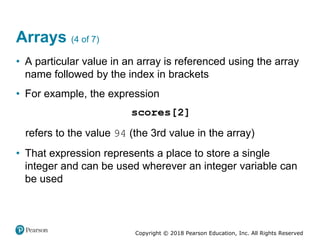
Arrays (4 of 7)
• A particular value in an array is referenced using the array
name followed by the index in brackets
• For example, the expression
refers to the value 94 (the 3rd value in the array)
• That expression represents a place to store a single
integer and can be used wherever an integer variable can
be used
Copyright © 2018 Pearson Education, Inc. All Rights Reserved
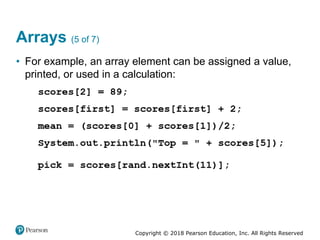
Arrays (5 of 7)
• For example, an array element can be assigned a value,
printed, or used in a calculation:
Copyright © 2018 Pearson Education, Inc. All Rights Reserved
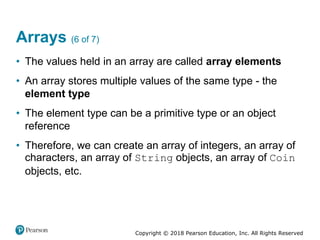
Arrays (6 of 7)
• The values held in an array are called array elements
• An array stores multiple values of the same type - the
element type
• The element type can be a primitive type or an object
reference
• Therefore, we can create an array of integers, an array of
characters, an array of String objects, an array of Coin
objects, etc.
Copyright © 2018 Pearson Education, Inc. All Rights Reserved
Arrays (7 of 7)
• In Java, the array itself is an object that must be
instantiated
• Another way to depict the scores array:
Copyright © 2018 Pearson Education, Inc. All Rights Reserved
Declaring Arrays (1 of 2)
• The scores array could be declared as follows:
• The type of the variable scores is int[] (an array of
integers)
• Note that the array type does not specify its size, but each
object of that type has a specific size
• The reference variable scores is set to a new array object
that can hold 10 integers
Copyright © 2018 Pearson Education, Inc. All Rights Reserved
Declaring Arrays (2 of 2)
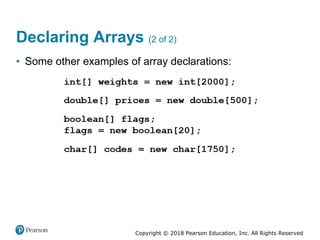
• Some other examples of array declarations:
Copyright © 2018 Pearson Education, Inc. All Rights Reserved
Using Arrays
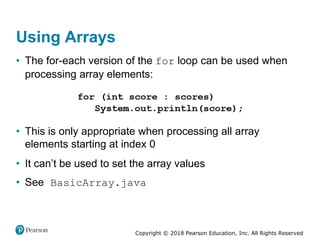
• The for-each version of the for loop can be used when
processing array elements:
• This is only appropriate when processing all array
elements starting at index 0
• It can’t be used to set the array values
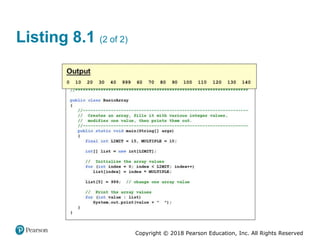
• See BasicArray.java
Copyright © 2018 Pearson Education, Inc. All Rights Reserved
Listing 8.1 (1 of 2)
Copyright © 2018 Pearson Education, Inc. All Rights Reserved
Listing 8.1 (2 of 2)
Copyright © 2018 Pearson Education, Inc. All Rights Reserved
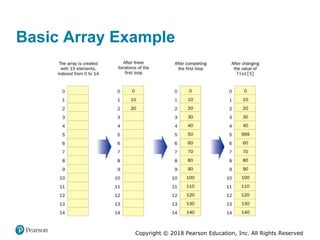
Basic Array Example
Copyright © 2018 Pearson Education, Inc. All Rights Reserved
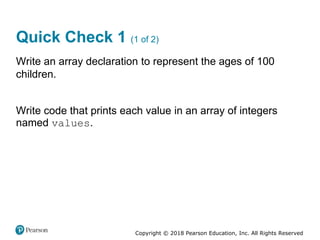
Quick Check 1 (1 of 2)
Write an array declaration to represent the ages of 100
children.
Write code that prints each value in an array of integers
named values.
Copyright © 2018 Pearson Education, Inc. All Rights Reserved
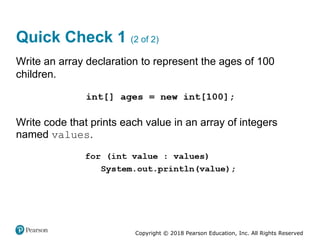
Quick Check 1 (2 of 2)
Write an array declaration to represent the ages of 100
children.
Write code that prints each value in an array of integers
named values.
Copyright © 2018 Pearson Education, Inc. All Rights Reserved
Bounds Checking (1 of 3)
• Once an array is created, it has a fixed size
• An index used in an array reference must specify a valid
element
• That is, the index value must be in range 0 to N−1
• The Java interpreter throws an
ArrayIndexOutOfBoundsException if an array index
is out of bounds
• This is called automatic bounds checking
Copyright © 2018 Pearson Education, Inc. All Rights Reserved
Bounds Checking (2 of 3)
• For example, if the array codes can hold 100 values, it
can be indexed from 0 to 99
• If the value of count is 100, then the following reference
will cause an exception to be thrown:
• It’s common to introduce off-by-one errors when using
arrays:
Copyright © 2018 Pearson Education, Inc. All Rights Reserved
Bounds Checking (3 of 3)
• Each array object has a public constant called length
that stores the size of the array
• It is referenced using the array name:
• Note that length holds the number of elements, not the
largest index
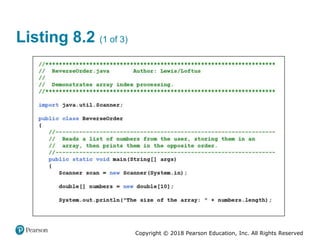
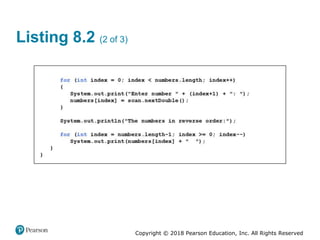
• See ReverseOrder.java
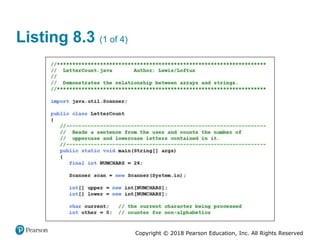
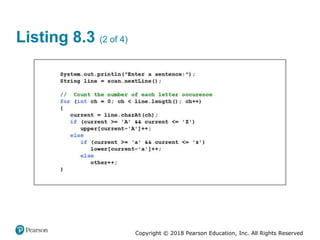
• See LetterCount.java
Copyright © 2018 Pearson Education, Inc. All Rights Reserved
Listing 8.2 (1 of 3)
Copyright © 2018 Pearson Education, Inc. All Rights Reserved
Listing 8.2 (2 of 3)
Copyright © 2018 Pearson Education, Inc. All Rights Reserved
Listing 8.2 (3 of 3)
Copyright © 2018 Pearson Education, Inc. All Rights Reserved
Listing 8.3 (1 of 4)
Copyright © 2018 Pearson Education, Inc. All Rights Reserved
Listing 8.3 (2 of 4)
Copyright © 2018 Pearson Education, Inc. All Rights Reserved
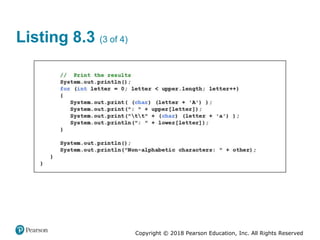
Listing 8.3 (3 of 4)
Copyright © 2018 Pearson Education, Inc. All Rights Reserved
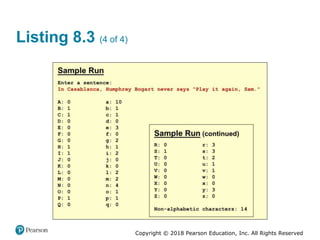
Listing 8.3 (4 of 4)
Copyright © 2018 Pearson Education, Inc. All Rights Reserved
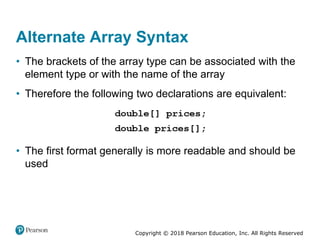
Alternate Array Syntax
• The brackets of the array type can be associated with the
element type or with the name of the array
• Therefore the following two declarations are equivalent:
• The first format generally is more readable and should be
used
Copyright © 2018 Pearson Education, Inc. All Rights Reserved
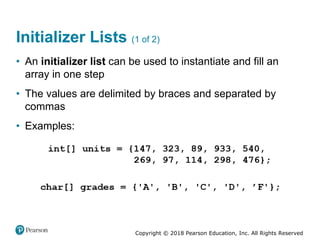
Initializer Lists (1 of 2)
• An initializer list can be used to instantiate and fill an
array in one step
• The values are delimited by braces and separated by
commas
• Examples:
Copyright © 2018 Pearson Education, Inc. All Rights Reserved
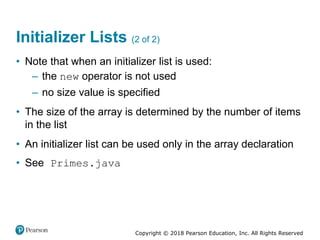
Initializer Lists (2 of 2)
• Note that when an initializer list is used:
– the new operator is not used
– no size value is specified
• The size of the array is determined by the number of items
in the list
• An initializer list can be used only in the array declaration
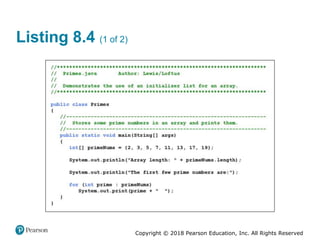
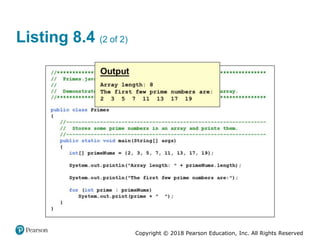
• See Primes.java
Copyright © 2018 Pearson Education, Inc. All Rights Reserved
Listing 8.4 (1 of 2)
Copyright © 2018 Pearson Education, Inc. All Rights Reserved
Listing 8.4 (2 of 2)
Copyright © 2018 Pearson Education, Inc. All Rights Reserved
Arrays as Parameters
• An entire array can be passed as a parameter to a method
• Like any other object, the reference to the array is passed,
making the formal and actual parameters aliases of each
other
• Therefore, changing an array element within the method
changes the original
• An individual array element can be passed to a method as
well, in which case the type of the formal parameter is the
same as the element type
Copyright © 2018 Pearson Education, Inc. All Rights Reserved
Outline (2 of 7)
• Declaring and Using Arrays
• Arrays of Objects
• Variable Length Parameter Lists
• Two-Dimensional Arrays
Copyright © 2018 Pearson Education, Inc. All Rights Reserved
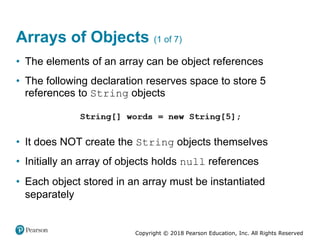
Arrays of Objects (1 of 7)
• The elements of an array can be object references
• The following declaration reserves space to store 5
references to String objects
• It does NOT create the String objects themselves
• Initially an array of objects holds null references
• Each object stored in an array must be instantiated
separately
Copyright © 2018 Pearson Education, Inc. All Rights Reserved
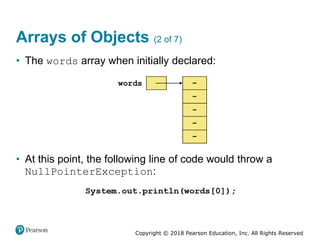
Arrays of Objects (2 of 7)
• The words array when initially declared:
• At this point, the following line of code would throw a
NullPointerException:
Copyright © 2018 Pearson Education, Inc. All Rights Reserved
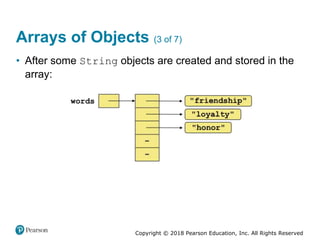
Arrays of Objects (3 of 7)
• After some String objects are created and stored in the
array:
Copyright © 2018 Pearson Education, Inc. All Rights Reserved
Arrays of Objects (4 of 7)
• Keep in mind that String objects can be created using
literals
• The following declaration creates an array object called
verbs and fills it with four String objects created using
string literals
Copyright © 2018 Pearson Education, Inc. All Rights Reserved
Arrays of Objects (5 of 7)
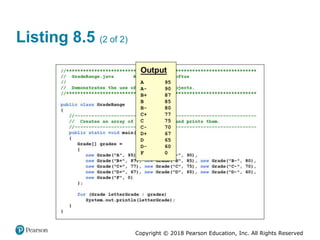
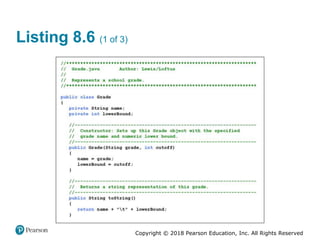
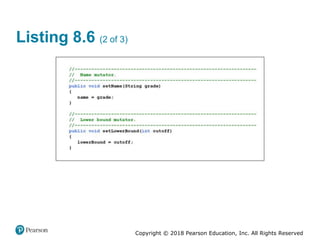
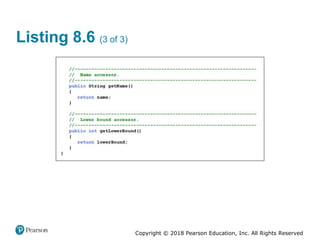
• The following example creates an array of Grade objects,
each with a string representation and a numeric lower
bound
• The letter grades include plus and minus designations, so
must be stored as strings instead of char
• See GradeRange.java
• See Grade.java
Copyright © 2018 Pearson Education, Inc. All Rights Reserved
Listing 8.5 (1 of 2)
Copyright © 2018 Pearson Education, Inc. All Rights Reserved
Listing 8.5 (2 of 2)
Copyright © 2018 Pearson Education, Inc. All Rights Reserved
Listing 8.6 (1 of 3)
Copyright © 2018 Pearson Education, Inc. All Rights Reserved
Listing 8.6 (2 of 3)
Copyright © 2018 Pearson Education, Inc. All Rights Reserved
Listing 8.6 (3 of 3)
Copyright © 2018 Pearson Education, Inc. All Rights Reserved
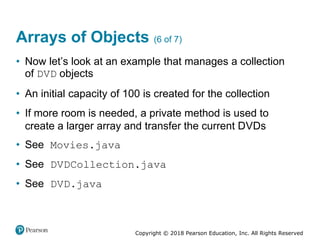
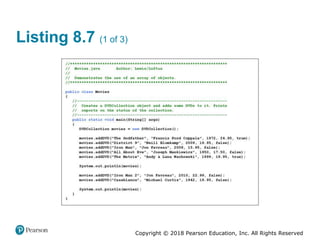
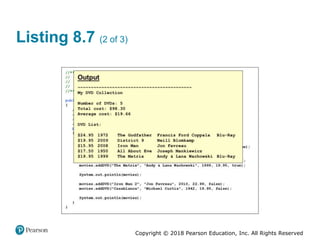
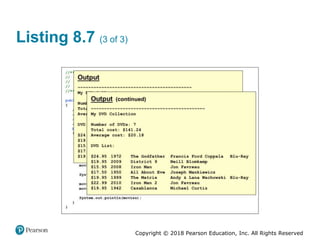
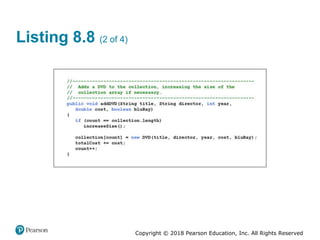
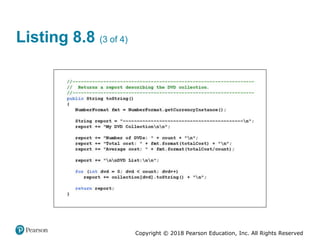
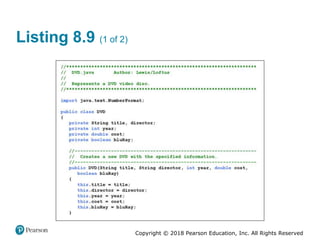
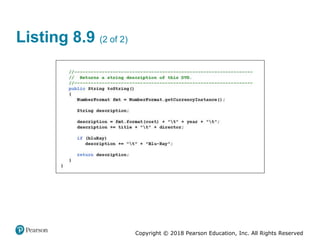
Arrays of Objects (6 of 7)
• Now let’s look at an example that manages a collection
of DVD objects
• An initial capacity of 100 is created for the collection
• If more room is needed, a private method is used to
create a larger array and transfer the current DVDs
• See Movies.java
• See DVDCollection.java
• See DVD.java
Copyright © 2018 Pearson Education, Inc. All Rights Reserved
Listing 8.7 (1 of 3)
Copyright © 2018 Pearson Education, Inc. All Rights Reserved
Listing 8.7 (2 of 3)
Copyright © 2018 Pearson Education, Inc. All Rights Reserved
Listing 8.7 (3 of 3)
Copyright © 2018 Pearson Education, Inc. All Rights Reserved
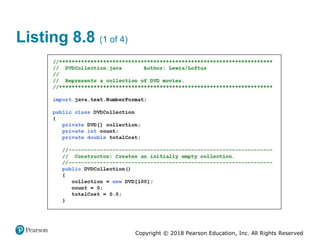
Listing 8.8 (1 of 4)
Copyright © 2018 Pearson Education, Inc. All Rights Reserved
Listing 8.8 (2 of 4)
Copyright © 2018 Pearson Education, Inc. All Rights Reserved
Listing 8.8 (3 of 4)
Copyright © 2018 Pearson Education, Inc. All Rights Reserved
Listing 8.8 (4 of 4)
Copyright © 2018 Pearson Education, Inc. All Rights Reserved
Listing 8.9 (1 of 2)
Copyright © 2018 Pearson Education, Inc. All Rights Reserved
Listing 8.9 (2 of 2)
Copyright © 2018 Pearson Education, Inc. All Rights Reserved
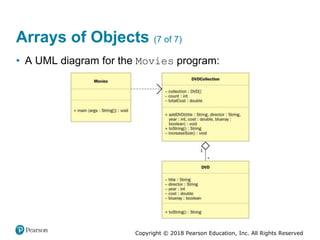
Arrays of Objects (7 of 7)
• A UML diagram for the Movies program:
Copyright © 2018 Pearson Education, Inc. All Rights Reserved
Command-Line Arguments
• The signature of the main method indicates that it takes
an array of String objects as a parameter
• These values come from command-line arguments that
are provided when the interpreter is invoked
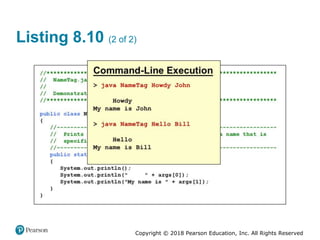
• For example, the following invocation of the interpreter
passes three String objects into the main method of the
StateEval program:
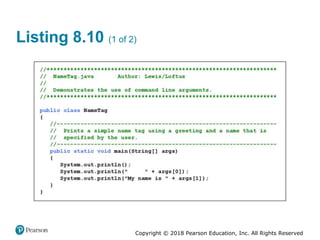
• See NameTag.java
Copyright © 2018 Pearson Education, Inc. All Rights Reserved
Listing 8.10 (1 of 2)
Copyright © 2018 Pearson Education, Inc. All Rights Reserved
Listing 8.10 (2 of 2)
Copyright © 2018 Pearson Education, Inc. All Rights Reserved
Outline (3 of 7)
• Declaring and Using Arrays
• Arrays of Objects
• Variable Length Parameter Lists
• Two-Dimensional Arrays
Copyright © 2018 Pearson Education, Inc. All Rights Reserved
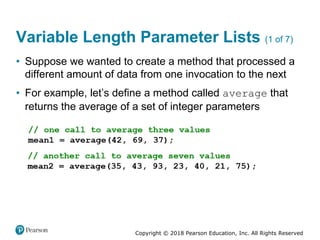
Variable Length Parameter Lists (1 of 7)
• Suppose we wanted to create a method that processed a
different amount of data from one invocation to the next
• For example, let’s define a method called average that
returns the average of a set of integer parameters
Copyright © 2018 Pearson Education, Inc. All Rights Reserved
Variable Length Parameter Lists (2 of 7)
• We could define overloaded versions of the average
method
– Downside: we’d need a separate version of the method
for each additional parameter
• We could define the method to accept an array of integers
– Downside: we’d have to create the array and store the
integers prior to calling the method each time
• Instead, Java provides a convenient way to create variable
length parameter lists
Copyright © 2018 Pearson Education, Inc. All Rights Reserved
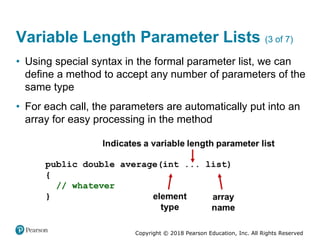
Variable Length Parameter Lists (3 of 7)
• Using special syntax in the formal parameter list, we can
define a method to accept any number of parameters of the
same type
• For each call, the parameters are automatically put into an
array for easy processing in the method
Copyright © 2018 Pearson Education, Inc. All Rights Reserved
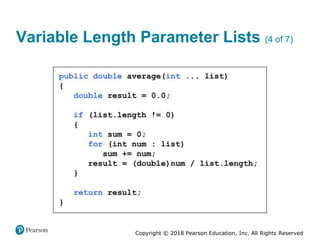
Variable Length Parameter Lists (4 of 7)
Copyright © 2018 Pearson Education, Inc. All Rights Reserved
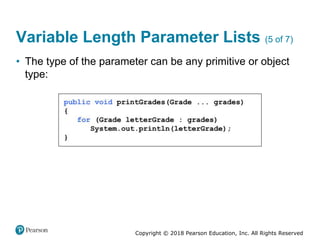
Variable Length Parameter Lists (5 of 7)
• The type of the parameter can be any primitive or object
type:
Copyright © 2018 Pearson Education, Inc. All Rights Reserved
Quick Check 2 (1 of 2)
Write method called distance that accepts a variable
number of integers (which each represent the distance of
one leg of a trip) and returns the total distance of the trip.
Copyright © 2018 Pearson Education, Inc. All Rights Reserved
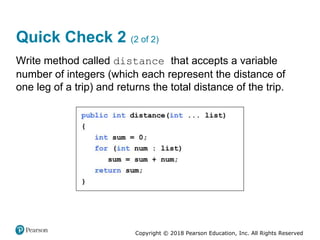
Quick Check 2 (2 of 2)
Write method called distance that accepts a variable
number of integers (which each represent the distance of
one leg of a trip) and returns the total distance of the trip.
Copyright © 2018 Pearson Education, Inc. All Rights Reserved
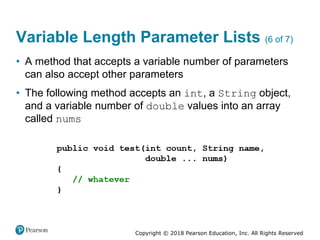
Variable Length Parameter Lists (6 of 7)
• A method that accepts a variable number of parameters
can also accept other parameters
• The following method accepts an int, a String object,
and a variable number of double values into an array
called nums
Copyright © 2018 Pearson Education, Inc. All Rights Reserved
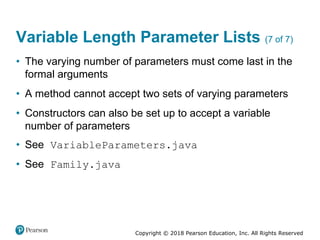
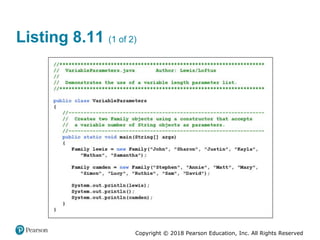
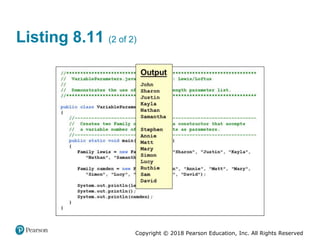
Variable Length Parameter Lists (7 of 7)
• The varying number of parameters must come last in the
formal arguments
• A method cannot accept two sets of varying parameters
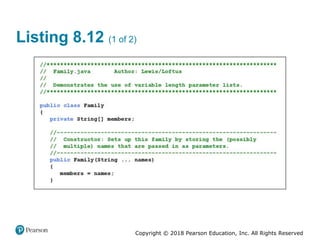
• Constructors can also be set up to accept a variable
number of parameters
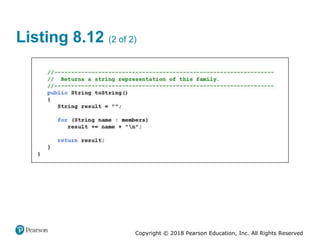
• See VariableParameters.java
• See Family.java
Copyright © 2018 Pearson Education, Inc. All Rights Reserved
Listing 8.11 (1 of 2)
Copyright © 2018 Pearson Education, Inc. All Rights Reserved
Listing 8.11 (2 of 2)
Copyright © 2018 Pearson Education, Inc. All Rights Reserved
Listing 8.12 (1 of 2)
Copyright © 2018 Pearson Education, Inc. All Rights Reserved
Listing 8.12 (2 of 2)
Copyright © 2018 Pearson Education, Inc. All Rights Reserved
Outline (4 of 7)
• Declaring and Using Arrays
• Arrays of Objects
• Variable Length Parameter Lists
• Two-Dimensional Arrays
Copyright © 2018 Pearson Education, Inc. All Rights Reserved
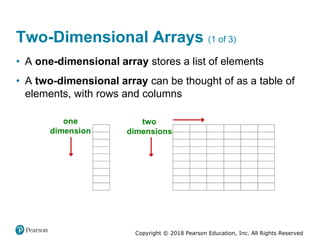
Two-Dimensional Arrays (1 of 3)
• A one-dimensional array stores a list of elements
• A two-dimensional array can be thought of as a table of
elements, with rows and columns
Copyright © 2018 Pearson Education, Inc. All Rights Reserved
Two-Dimensional Arrays (2 of 3)
• To be precise, in Java a two-dimensional array is an array
of arrays
• A two-dimensional array is declared by specifying the size
of each dimension separately:
• A array element is referenced using two index values:
• The array stored in one row can be specified using one
index
Copyright © 2018 Pearson Education, Inc. All Rights Reserved
Two-Dimensional Arrays (3 of 3)
Expression Type Description
table
Computer code reads,
i n t left bracket
right bracket left
bracket right bracket
2D array of integers, or
array of integer arrays
table[5]
Computer code reads,
i n t left bracket
right bracket
array of integers
table[5][12]
Computer code reads,
i n t Integer
int[][]
int[]
int
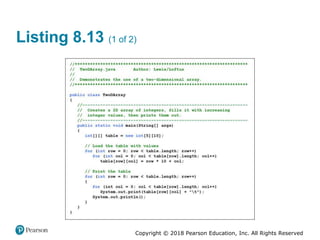
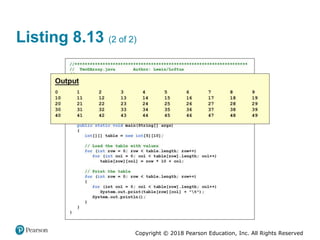
• See TwoDArray.java
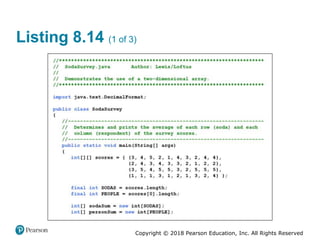
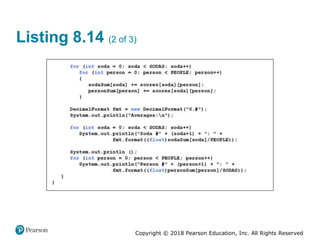
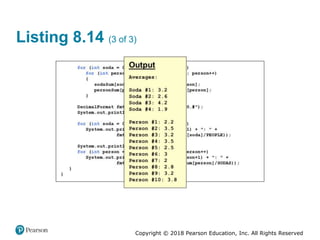
• See SodaSurvey.java
Copyright © 2018 Pearson Education, Inc. All Rights Reserved
Listing 8.13 (1 of 2)
Copyright © 2018 Pearson Education, Inc. All Rights Reserved
Listing 8.13 (2 of 2)
Copyright © 2018 Pearson Education, Inc. All Rights Reserved
Listing 8.14 (1 of 3)
Copyright © 2018 Pearson Education, Inc. All Rights Reserved
Listing 8.14 (2 of 3)
Copyright © 2018 Pearson Education, Inc. All Rights Reserved
Listing 8.14 (3 of 3)
Copyright © 2018 Pearson Education, Inc. All Rights Reserved
Multidimensional Arrays
• An array can have many dimensions - if it has more than
one dimension, it is called a multidimensional array
• Each dimension subdivides the previous one into the
specified number of elements
• Each dimension has its own length constant
• Because each dimension is an array of array references,
the arrays within one dimension can be of different lengths
– these are sometimes called ragged arrays
Copyright © 2018 Pearson Education, Inc. All Rights Reserved
Summary
• Chapter 8 has focused on:
– array declaration and use
– bounds checking and capacity
– arrays that store object references
– variable length parameter lists
– multidimensional arrays
Copyright © 2018 Pearson Education, Inc. All Rights Reserved
Copyright
This work is protected by United States copyright laws and is
provided solely for the use of instructors in teaching their
courses and assessing student learning. Dissemination or sale of
any part of this work (including on the World Wide Web) will
destroy the integrity of the work and is not permitted. The work
and materials from it should never be made available to students
except by instructors using the accompanying text in their
classes. All recipients of this work are expected to abide by these
restrictions and to honor the intended pedagogical purposes and
the needs of other instructors who rely on these materials.

Upstate CSCI 200 Java Chapter 8 - Arrays

  • 1.
    Java™ Software Solutions:Foundations of Program Design Ninth Edition Chapter 8 Arrays Copyright © 2018 Pearson Education, Inc. All Rights Reserved
  • 2.
    Copyright © 2018Pearson Education, Inc. All Rights Reserved Arrays (1 of 7) • Arrays are objects that help us organize large amounts of information • Chapter 8 focuses on: – array declaration and use – bounds checking and capacity – arrays that store object references – variable length parameter lists – multidimensional arrays
  • 3.
    Copyright © 2018Pearson Education, Inc. All Rights Reserved Outline (1 of 7) • Declaring and Using Arrays • Arrays of Objects • Variable Length Parameter Lists • Two-Dimensional Arrays
  • 4.
    Copyright © 2018Pearson Education, Inc. All Rights Reserved Arrays (2 of 7) • The ArrayList class, introduced in Chapter 5, is used to organize a list of objects • It is a class in the Java API • An array is a programming language construct used to organize a list of objects • It has special syntax to access elements • As its name implies, the ArrayList class uses an array internally to manage the list of objects
  • 5.
    Copyright © 2018Pearson Education, Inc. All Rights Reserved Arrays (3 of 7) • An array is an ordered list of values:
  • 6.
    Copyright © 2018Pearson Education, Inc. All Rights Reserved Arrays (4 of 7) • A particular value in an array is referenced using the array name followed by the index in brackets • For example, the expression refers to the value 94 (the 3rd value in the array) • That expression represents a place to store a single integer and can be used wherever an integer variable can be used
  • 7.
    Copyright © 2018Pearson Education, Inc. All Rights Reserved Arrays (5 of 7) • For example, an array element can be assigned a value, printed, or used in a calculation:
  • 8.
    Copyright © 2018Pearson Education, Inc. All Rights Reserved Arrays (6 of 7) • The values held in an array are called array elements • An array stores multiple values of the same type - the element type • The element type can be a primitive type or an object reference • Therefore, we can create an array of integers, an array of characters, an array of String objects, an array of Coin objects, etc.
  • 9.
    Copyright © 2018Pearson Education, Inc. All Rights Reserved Arrays (7 of 7) • In Java, the array itself is an object that must be instantiated • Another way to depict the scores array:
  • 10.
    Copyright © 2018Pearson Education, Inc. All Rights Reserved Declaring Arrays (1 of 2) • The scores array could be declared as follows: • The type of the variable scores is int[] (an array of integers) • Note that the array type does not specify its size, but each object of that type has a specific size • The reference variable scores is set to a new array object that can hold 10 integers
  • 11.
    Copyright © 2018Pearson Education, Inc. All Rights Reserved Declaring Arrays (2 of 2) • Some other examples of array declarations:
  • 12.
    Copyright © 2018Pearson Education, Inc. All Rights Reserved Using Arrays • The for-each version of the for loop can be used when processing array elements: • This is only appropriate when processing all array elements starting at index 0 • It can’t be used to set the array values • See BasicArray.java
  • 13.
    Copyright © 2018Pearson Education, Inc. All Rights Reserved Listing 8.1 (1 of 2)
  • 14.
    Copyright © 2018Pearson Education, Inc. All Rights Reserved Listing 8.1 (2 of 2)
  • 15.
    Copyright © 2018Pearson Education, Inc. All Rights Reserved Basic Array Example
  • 16.
    Copyright © 2018Pearson Education, Inc. All Rights Reserved Quick Check 1 (1 of 2) Write an array declaration to represent the ages of 100 children. Write code that prints each value in an array of integers named values.
  • 17.
    Copyright © 2018Pearson Education, Inc. All Rights Reserved Quick Check 1 (2 of 2) Write an array declaration to represent the ages of 100 children. Write code that prints each value in an array of integers named values.
  • 18.
    Copyright © 2018Pearson Education, Inc. All Rights Reserved Bounds Checking (1 of 3) • Once an array is created, it has a fixed size • An index used in an array reference must specify a valid element • That is, the index value must be in range 0 to N−1 • The Java interpreter throws an ArrayIndexOutOfBoundsException if an array index is out of bounds • This is called automatic bounds checking
  • 19.
    Copyright © 2018Pearson Education, Inc. All Rights Reserved Bounds Checking (2 of 3) • For example, if the array codes can hold 100 values, it can be indexed from 0 to 99 • If the value of count is 100, then the following reference will cause an exception to be thrown: • It’s common to introduce off-by-one errors when using arrays:
  • 20.
    Copyright © 2018Pearson Education, Inc. All Rights Reserved Bounds Checking (3 of 3) • Each array object has a public constant called length that stores the size of the array • It is referenced using the array name: • Note that length holds the number of elements, not the largest index • See ReverseOrder.java • See LetterCount.java
  • 21.
    Copyright © 2018Pearson Education, Inc. All Rights Reserved Listing 8.2 (1 of 3)
  • 22.
    Copyright © 2018Pearson Education, Inc. All Rights Reserved Listing 8.2 (2 of 3)
  • 23.
    Copyright © 2018Pearson Education, Inc. All Rights Reserved Listing 8.2 (3 of 3)
  • 24.
    Copyright © 2018Pearson Education, Inc. All Rights Reserved Listing 8.3 (1 of 4)
  • 25.
    Copyright © 2018Pearson Education, Inc. All Rights Reserved Listing 8.3 (2 of 4)
  • 26.
    Copyright © 2018Pearson Education, Inc. All Rights Reserved Listing 8.3 (3 of 4)
  • 27.
    Copyright © 2018Pearson Education, Inc. All Rights Reserved Listing 8.3 (4 of 4)
  • 28.
    Copyright © 2018Pearson Education, Inc. All Rights Reserved Alternate Array Syntax • The brackets of the array type can be associated with the element type or with the name of the array • Therefore the following two declarations are equivalent: • The first format generally is more readable and should be used
  • 29.
    Copyright © 2018Pearson Education, Inc. All Rights Reserved Initializer Lists (1 of 2) • An initializer list can be used to instantiate and fill an array in one step • The values are delimited by braces and separated by commas • Examples:
  • 30.
    Copyright © 2018Pearson Education, Inc. All Rights Reserved Initializer Lists (2 of 2) • Note that when an initializer list is used: – the new operator is not used – no size value is specified • The size of the array is determined by the number of items in the list • An initializer list can be used only in the array declaration • See Primes.java
  • 31.
    Copyright © 2018Pearson Education, Inc. All Rights Reserved Listing 8.4 (1 of 2)
  • 32.
    Copyright © 2018Pearson Education, Inc. All Rights Reserved Listing 8.4 (2 of 2)
  • 33.
    Copyright © 2018Pearson Education, Inc. All Rights Reserved Arrays as Parameters • An entire array can be passed as a parameter to a method • Like any other object, the reference to the array is passed, making the formal and actual parameters aliases of each other • Therefore, changing an array element within the method changes the original • An individual array element can be passed to a method as well, in which case the type of the formal parameter is the same as the element type
  • 34.
    Copyright © 2018Pearson Education, Inc. All Rights Reserved Outline (2 of 7) • Declaring and Using Arrays • Arrays of Objects • Variable Length Parameter Lists • Two-Dimensional Arrays
  • 35.
    Copyright © 2018Pearson Education, Inc. All Rights Reserved Arrays of Objects (1 of 7) • The elements of an array can be object references • The following declaration reserves space to store 5 references to String objects • It does NOT create the String objects themselves • Initially an array of objects holds null references • Each object stored in an array must be instantiated separately
  • 36.
    Copyright © 2018Pearson Education, Inc. All Rights Reserved Arrays of Objects (2 of 7) • The words array when initially declared: • At this point, the following line of code would throw a NullPointerException:
  • 37.
    Copyright © 2018Pearson Education, Inc. All Rights Reserved Arrays of Objects (3 of 7) • After some String objects are created and stored in the array:
  • 38.
    Copyright © 2018Pearson Education, Inc. All Rights Reserved Arrays of Objects (4 of 7) • Keep in mind that String objects can be created using literals • The following declaration creates an array object called verbs and fills it with four String objects created using string literals
  • 39.
    Copyright © 2018Pearson Education, Inc. All Rights Reserved Arrays of Objects (5 of 7) • The following example creates an array of Grade objects, each with a string representation and a numeric lower bound • The letter grades include plus and minus designations, so must be stored as strings instead of char • See GradeRange.java • See Grade.java
  • 40.
    Copyright © 2018Pearson Education, Inc. All Rights Reserved Listing 8.5 (1 of 2)
  • 41.
    Copyright © 2018Pearson Education, Inc. All Rights Reserved Listing 8.5 (2 of 2)
  • 42.
    Copyright © 2018Pearson Education, Inc. All Rights Reserved Listing 8.6 (1 of 3)
  • 43.
    Copyright © 2018Pearson Education, Inc. All Rights Reserved Listing 8.6 (2 of 3)
  • 44.
    Copyright © 2018Pearson Education, Inc. All Rights Reserved Listing 8.6 (3 of 3)
  • 45.
    Copyright © 2018Pearson Education, Inc. All Rights Reserved Arrays of Objects (6 of 7) • Now let’s look at an example that manages a collection of DVD objects • An initial capacity of 100 is created for the collection • If more room is needed, a private method is used to create a larger array and transfer the current DVDs • See Movies.java • See DVDCollection.java • See DVD.java
  • 46.
    Copyright © 2018Pearson Education, Inc. All Rights Reserved Listing 8.7 (1 of 3)
  • 47.
    Copyright © 2018Pearson Education, Inc. All Rights Reserved Listing 8.7 (2 of 3)
  • 48.
    Copyright © 2018Pearson Education, Inc. All Rights Reserved Listing 8.7 (3 of 3)
  • 49.
    Copyright © 2018Pearson Education, Inc. All Rights Reserved Listing 8.8 (1 of 4)
  • 50.
    Copyright © 2018Pearson Education, Inc. All Rights Reserved Listing 8.8 (2 of 4)
  • 51.
    Copyright © 2018Pearson Education, Inc. All Rights Reserved Listing 8.8 (3 of 4)
  • 52.
    Copyright © 2018Pearson Education, Inc. All Rights Reserved Listing 8.8 (4 of 4)
  • 53.
    Copyright © 2018Pearson Education, Inc. All Rights Reserved Listing 8.9 (1 of 2)
  • 54.
    Copyright © 2018Pearson Education, Inc. All Rights Reserved Listing 8.9 (2 of 2)
  • 55.
    Copyright © 2018Pearson Education, Inc. All Rights Reserved Arrays of Objects (7 of 7) • A UML diagram for the Movies program:
  • 56.
    Copyright © 2018Pearson Education, Inc. All Rights Reserved Command-Line Arguments • The signature of the main method indicates that it takes an array of String objects as a parameter • These values come from command-line arguments that are provided when the interpreter is invoked • For example, the following invocation of the interpreter passes three String objects into the main method of the StateEval program: • See NameTag.java
  • 57.
    Copyright © 2018Pearson Education, Inc. All Rights Reserved Listing 8.10 (1 of 2)
  • 58.
    Copyright © 2018Pearson Education, Inc. All Rights Reserved Listing 8.10 (2 of 2)
  • 59.
    Copyright © 2018Pearson Education, Inc. All Rights Reserved Outline (3 of 7) • Declaring and Using Arrays • Arrays of Objects • Variable Length Parameter Lists • Two-Dimensional Arrays
  • 60.
    Copyright © 2018Pearson Education, Inc. All Rights Reserved Variable Length Parameter Lists (1 of 7) • Suppose we wanted to create a method that processed a different amount of data from one invocation to the next • For example, let’s define a method called average that returns the average of a set of integer parameters
  • 61.
    Copyright © 2018Pearson Education, Inc. All Rights Reserved Variable Length Parameter Lists (2 of 7) • We could define overloaded versions of the average method – Downside: we’d need a separate version of the method for each additional parameter • We could define the method to accept an array of integers – Downside: we’d have to create the array and store the integers prior to calling the method each time • Instead, Java provides a convenient way to create variable length parameter lists
  • 62.
    Copyright © 2018Pearson Education, Inc. All Rights Reserved Variable Length Parameter Lists (3 of 7) • Using special syntax in the formal parameter list, we can define a method to accept any number of parameters of the same type • For each call, the parameters are automatically put into an array for easy processing in the method
  • 63.
    Copyright © 2018Pearson Education, Inc. All Rights Reserved Variable Length Parameter Lists (4 of 7)
  • 64.
    Copyright © 2018Pearson Education, Inc. All Rights Reserved Variable Length Parameter Lists (5 of 7) • The type of the parameter can be any primitive or object type:
  • 65.
    Copyright © 2018Pearson Education, Inc. All Rights Reserved Quick Check 2 (1 of 2) Write method called distance that accepts a variable number of integers (which each represent the distance of one leg of a trip) and returns the total distance of the trip.
  • 66.
    Copyright © 2018Pearson Education, Inc. All Rights Reserved Quick Check 2 (2 of 2) Write method called distance that accepts a variable number of integers (which each represent the distance of one leg of a trip) and returns the total distance of the trip.
  • 67.
    Copyright © 2018Pearson Education, Inc. All Rights Reserved Variable Length Parameter Lists (6 of 7) • A method that accepts a variable number of parameters can also accept other parameters • The following method accepts an int, a String object, and a variable number of double values into an array called nums
  • 68.
    Copyright © 2018Pearson Education, Inc. All Rights Reserved Variable Length Parameter Lists (7 of 7) • The varying number of parameters must come last in the formal arguments • A method cannot accept two sets of varying parameters • Constructors can also be set up to accept a variable number of parameters • See VariableParameters.java • See Family.java
  • 69.
    Copyright © 2018Pearson Education, Inc. All Rights Reserved Listing 8.11 (1 of 2)
  • 70.
    Copyright © 2018Pearson Education, Inc. All Rights Reserved Listing 8.11 (2 of 2)
  • 71.
    Copyright © 2018Pearson Education, Inc. All Rights Reserved Listing 8.12 (1 of 2)
  • 72.
    Copyright © 2018Pearson Education, Inc. All Rights Reserved Listing 8.12 (2 of 2)
  • 73.
    Copyright © 2018Pearson Education, Inc. All Rights Reserved Outline (4 of 7) • Declaring and Using Arrays • Arrays of Objects • Variable Length Parameter Lists • Two-Dimensional Arrays
  • 74.
    Copyright © 2018Pearson Education, Inc. All Rights Reserved Two-Dimensional Arrays (1 of 3) • A one-dimensional array stores a list of elements • A two-dimensional array can be thought of as a table of elements, with rows and columns
  • 75.
    Copyright © 2018Pearson Education, Inc. All Rights Reserved Two-Dimensional Arrays (2 of 3) • To be precise, in Java a two-dimensional array is an array of arrays • A two-dimensional array is declared by specifying the size of each dimension separately: • A array element is referenced using two index values: • The array stored in one row can be specified using one index
  • 76.
    Copyright © 2018Pearson Education, Inc. All Rights Reserved Two-Dimensional Arrays (3 of 3) Expression Type Description table Computer code reads, i n t left bracket right bracket left bracket right bracket 2D array of integers, or array of integer arrays table[5] Computer code reads, i n t left bracket right bracket array of integers table[5][12] Computer code reads, i n t Integer int[][] int[] int • See TwoDArray.java • See SodaSurvey.java
  • 77.
    Copyright © 2018Pearson Education, Inc. All Rights Reserved Listing 8.13 (1 of 2)
  • 78.
    Copyright © 2018Pearson Education, Inc. All Rights Reserved Listing 8.13 (2 of 2)
  • 79.
    Copyright © 2018Pearson Education, Inc. All Rights Reserved Listing 8.14 (1 of 3)
  • 80.
    Copyright © 2018Pearson Education, Inc. All Rights Reserved Listing 8.14 (2 of 3)
  • 81.
    Copyright © 2018Pearson Education, Inc. All Rights Reserved Listing 8.14 (3 of 3)
  • 82.
    Copyright © 2018Pearson Education, Inc. All Rights Reserved Multidimensional Arrays • An array can have many dimensions - if it has more than one dimension, it is called a multidimensional array • Each dimension subdivides the previous one into the specified number of elements • Each dimension has its own length constant • Because each dimension is an array of array references, the arrays within one dimension can be of different lengths – these are sometimes called ragged arrays
  • 83.
    Copyright © 2018Pearson Education, Inc. All Rights Reserved Summary • Chapter 8 has focused on: – array declaration and use – bounds checking and capacity – arrays that store object references – variable length parameter lists – multidimensional arrays
  • 84.
    Copyright © 2018Pearson Education, Inc. All Rights Reserved Copyright This work is protected by United States copyright laws and is provided solely for the use of instructors in teaching their courses and assessing student learning. Dissemination or sale of any part of this work (including on the World Wide Web) will destroy the integrity of the work and is not permitted. The work and materials from it should never be made available to students except by instructors using the accompanying text in their classes. All recipients of this work are expected to abide by these restrictions and to honor the intended pedagogical purposes and the needs of other instructors who rely on these materials.

Editor's Notes

  • #2 If this PowerPoint presentation contains mathematical equations, you may need to check that your computer has the following installed: 1) MathType Plugin 2) Math Player (free versions available) 3) NVDA Reader (free versions available)