Liang, Introduction toJava
Programming, Eighth Edition, (c)
2011 Pearson Education, Inc. All
1
Chapter 5
Loops
2.
Liang, Introduction toJava
Programming, Eighth Edition, (c)
2011 Pearson Education, Inc. All
2
Objectives
To write programs for executing statements repeatedly using a while loop (§5.2).
To develop a program for GuessNumber and SubtractionQuizLoop (§5.2.1).
To follow the loop design strategy to develop loops (§5.2.2).
To develop a program for SubtractionQuizLoop (§5.2.3).
To control a loop with a sentinel value (§5.2.3).
To obtain large input from a file using input redirection rather than typing from the
keyboard (§5.2.4).
To write loops using do-while statements (§5.3).
To write loops using for statements (§5.4).
To discover the similarities and differences of three types of loop statements (§5.5).
To write nested loops (§5.6).
To learn the techniques for minimizing numerical errors (§5.7).
To learn loops from a variety of examples (GCD, FutureTuition,
MonteCarloSimulation) (§5.8).
To implement program control with break and continue (§5.9).
(GUI) To control a loop with a confirmation dialog (§5.10).
3.
Liang, Introduction toJava Programming, Eighth Edition, (c) 2011 Pearson Education, Inc. All
rights reserved. 0132130807 3
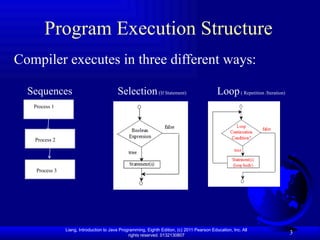
Program Execution Structure
Compiler executes in three different ways:
Sequences Selection(If Statement) Loop( Repetition /Iteration)
Process 1
Process 3
Process 2
4.
Liang, Introduction toJava Programming, Eighth Edition, (c) 2011 Pearson Education, Inc. All
rights reserved. 0132130807 4
Motivations
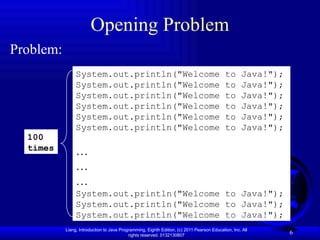
Suppose that you need to print a string
(e.g., "Welcome to Java!") a hundred times.
It would be tedious to have to write the following
statement a hundred times:
System.out.println("Welcome to Java!");
So, how do you solve this problem?
5.
Liang, Introduction toJava Programming, Eighth Edition, (c) 2011 Pearson Education, Inc. All
rights reserved. 0132130807
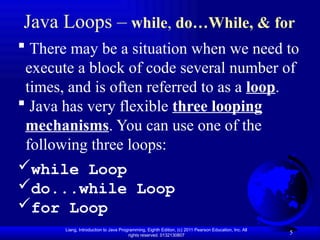
Java Loops – while, do…While, & for
5
There may be a situation when we need to
execute a block of code several number of
times, and is often referred to as a loop.
Java has very flexible three looping
mechanisms. You can use one of the
following three loops:
while Loop
do...while Loop
for Loop
6.
Liang, Introduction toJava Programming, Eighth Edition, (c) 2011 Pearson Education, Inc. All
rights reserved. 0132130807 6
Opening Problem
System.out.println("Welcome to Java!");
System.out.println("Welcome to Java!");
System.out.println("Welcome to Java!");
System.out.println("Welcome to Java!");
System.out.println("Welcome to Java!");
System.out.println("Welcome to Java!");
…
…
…
System.out.println("Welcome to Java!");
System.out.println("Welcome to Java!");
System.out.println("Welcome to Java!");
Problem:
100
times
7.
Liang, Introduction toJava Programming, Eighth Edition, (c) 2011 Pearson Education, Inc. All
rights reserved. 0132130807 7
while Loop
pseudocode syntax
while <condition>
<statement(s)>
Java syntax
while (<condition>)
{
<statement(s)>
}
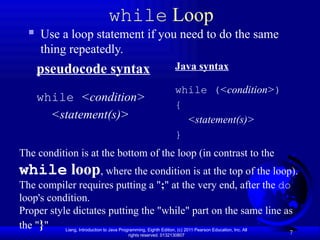
Use a loop statement if you need to do the same
thing repeatedly.
The condition is at the bottom of the loop (in contrast to the
while loop, where the condition is at the top of the loop).
The compiler requires putting a ";" at the very end, after the do
loop's condition.
Proper style dictates putting the "while" part on the same line as
the "}"
8.
Liang, Introduction toJava Programming, Eighth Edition, (c) 2011 Pearson Education, Inc. All
rights reserved. 0132130807 8
while Loop Flow Chart
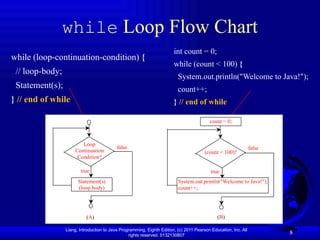
while (loop-continuation-condition) {
// loop-body;
Statement(s);
} // end of while
int count = 0;
while (count < 100) {
System.out.println("Welcome to Java!");
count++;
} // end of while
Loop
Continuation
Condition?
true
Statement(s)
(loop body)
false
(count < 100)?
true
System.out.println("Welcome to Java!");
count++;
false
(A) (B)
count = 0;
9.
Liang, Introduction toJava Programming, Eighth Edition, (c) 2011 Pearson Education, Inc. All
rights reserved. 0132130807 9
while Loop
int count = 0;
while (count < 100) {
System.out.println("Welcome to Java");
count++;
} // end of while
A while loop is a control structure that allows you to repeat a task
a certain number of times.
Using loop statement means tell the computer to print a string a
hundred times without coding:
public class Welcome {
public static void main (String [ ] args){
int count = 0;
while (count < 100) {
System.out.println("Welcome to Java");
count++;
} // end of while
} // end of main method
} // end of class
10.
Liang, Introduction toJava Programming, Eighth Edition, (c) 2011 Pearson Education, Inc. All
rights reserved. 0132130807 10
Here key point of the while loop is that the loop might not ever
run. When the expression is tested and the result is false, the loop
body will be skipped and the first statement after the while loop will
be executed. Syntax
while(Boolean_expression)
{ //Statements
}
Example:
public class Test1 {
public static void main(String args[]){
int x= 10;
while( x < 20 ){
System.out.print("value of x :" + x);
x++;
System.out.print("n");
} //end of while
} // end of main
} //end of class
11.
Liang, Introduction toJava Programming, Eighth Edition, (c) 2011 Pearson Education, Inc. All
rights reserved. 0132130807
while Loop
Write a main method that finds the sum of user-
entered integers where -99999 is a sentinel value.
public static void main(String[] args)
{
Scanner stdIn = new Scanner(System.in);
int sum = 0; // sum of user-entered values
int x; // a user-entered value
System.out.print("Enter an integer (-99999 to quit): ");
x = stdIn.nextInt();
while (x != -99999)
{
sum = sum + x;
System.out.print("Enter an integer (-99999 to quit): ");
x = stdIn.nextInt();
} // end of while
System.out.println("The sum is " + sum);
} // end main
12.
Liang, Introduction toJava Programming, Eighth Edition, (c) 2011 Pearson Education, Inc. All
rights reserved. 0132130807 12
import java.util.Scanner;
public class SentinelValue {
/** Main method */
public static void main(String[] args) {
// Create a Scanner
Scanner input = new Scanner(System.in);
// Read an initial data
System.out.print(
"Enter an int value (the program exits if the input is 0): ");
int data = input.nextInt();
// Keep reading data until the input is 0
int sum = 0;
while (data != 0) {
sum += data;
// Read the next data
System.out.print(
"Enter an int value (the program exits if the input is 0): ");
data = input.nextInt();
} //end of while
System.out.println("The sum is " + sum);
} //end of main
} //end of class
Run
Enter an int value (the program exits if the input is 0): 2
Enter an int value (the program exits if the input is 0): 3
Enter an int value (the program exits if the input is 0): 4
Enter an int value (the program exits if the input is 0): 0
The sum is 9
13.
Liang, Introduction toJava Programming, Eighth Edition, (c) 2011 Pearson Education, Inc. All
rights reserved. 0132130807 13
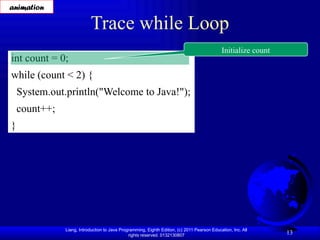
Trace while Loop
int count = 0;
while (count < 2) {
System.out.println("Welcome to Java!");
count++;
}
Initialize count
animation
14.
Liang, Introduction toJava Programming, Eighth Edition, (c) 2011 Pearson Education, Inc. All
rights reserved. 0132130807 14
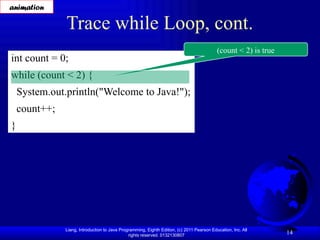
Trace while Loop, cont.
int count = 0;
while (count < 2) {
System.out.println("Welcome to Java!");
count++;
}
(count < 2) is true
animation
15.
Liang, Introduction toJava Programming, Eighth Edition, (c) 2011 Pearson Education, Inc. All
rights reserved. 0132130807 15
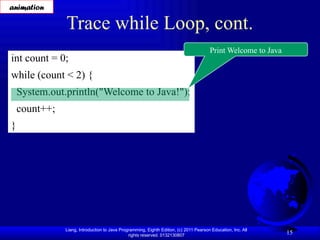
Trace while Loop, cont.
int count = 0;
while (count < 2) {
System.out.println("Welcome to Java!");
count++;
}
Print Welcome to Java
animation
16.
Liang, Introduction toJava Programming, Eighth Edition, (c) 2011 Pearson Education, Inc. All
rights reserved. 0132130807 16
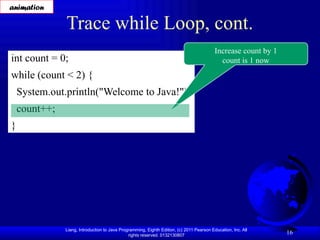
Trace while Loop, cont.
int count = 0;
while (count < 2) {
System.out.println("Welcome to Java!");
count++;
}
Increase count by 1
count is 1 now
animation
17.
Liang, Introduction toJava Programming, Eighth Edition, (c) 2011 Pearson Education, Inc. All
rights reserved. 0132130807 17
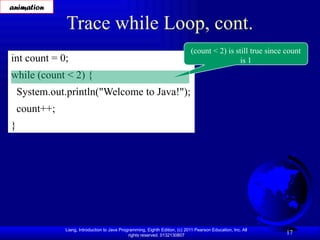
Trace while Loop, cont.
int count = 0;
while (count < 2) {
System.out.println("Welcome to Java!");
count++;
}
(count < 2) is still true since count
is 1
animation
18.
Liang, Introduction toJava Programming, Eighth Edition, (c) 2011 Pearson Education, Inc. All
rights reserved. 0132130807 18
Trace while Loop, cont.
int count = 0;
while (count < 2) {
System.out.println("Welcome to Java!");
count++;
}
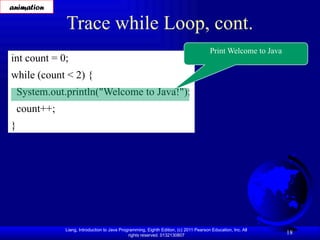
Print Welcome to Java
animation
19.
Liang, Introduction toJava Programming, Eighth Edition, (c) 2011 Pearson Education, Inc. All
rights reserved. 0132130807 19
Trace while Loop, cont.
int count = 0;
while (count < 2) {
System.out.println("Welcome to Java!");
count++;
}
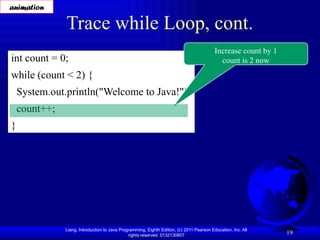
Increase count by 1
count is 2 now
animation
20.
Liang, Introduction toJava Programming, Eighth Edition, (c) 2011 Pearson Education, Inc. All
rights reserved. 0132130807 20
Trace while Loop, cont.
int count = 0;
while (count < 2) {
System.out.println("Welcome to Java!");
count++;
}
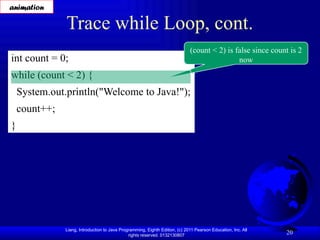
(count < 2) is false since count is 2
now
animation
21.
Liang, Introduction toJava Programming, Eighth Edition, (c) 2011 Pearson Education, Inc. All
rights reserved. 0132130807 21
Trace while Loop
int count = 0;
while (count < 2) {
System.out.println("Welcome to Java!");
count++;
}
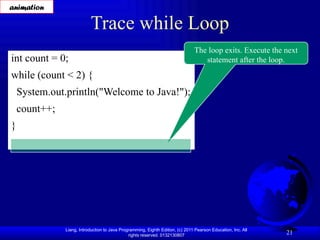
The loop exits. Execute the next
statement after the loop.
animation
22.
Liang, Introduction toJava Programming, Eighth Edition, (c) 2011 Pearson Education, Inc. All
rights reserved. 0132130807 22
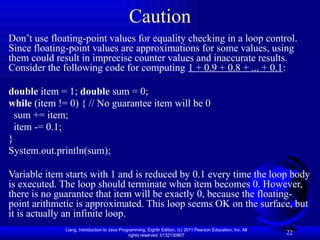
Caution
Don’t use floating-point values for equality checking in a loop control.
Since floating-point values are approximations for some values, using
them could result in imprecise counter values and inaccurate results.
Consider the following code for computing 1 + 0.9 + 0.8 + ... + 0.1:
double item = 1; double sum = 0;
while (item != 0) { // No guarantee item will be 0
sum += item;
item -= 0.1;
}
System.out.println(sum);
Variable item starts with 1 and is reduced by 0.1 every time the loop body
is executed. The loop should terminate when item becomes 0. However,
there is no guarantee that item will be exactly 0, because the floating-
point arithmetic is approximated. This loop seems OK on the surface, but
it is actually an infinite loop.
23.
Liang, Introduction toJava Programming, Eighth Edition, (c) 2011 Pearson Education, Inc. All
rights reserved. 0132130807 23
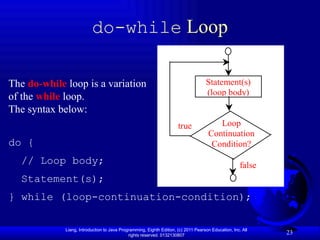
do-while Loop
do {
// Loop body;
Statement(s);
} while (loop-continuation-condition);
Loop
Continuation
Condition?
true
Statement(s)
(loop body)
false
The do-while loop is a variation
of the while loop.
The syntax below:
24.
Liang, Introduction toJava Programming, Eighth Edition, (c) 2011 Pearson Education, Inc. All
rights reserved. 0132130807 24
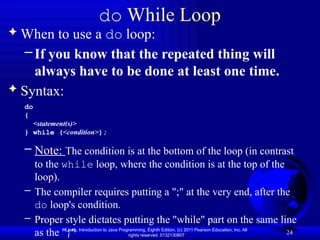
do While Loop
When to use a do loop:
– If you know that the repeated thing will
always have to be done at least one time.
Syntax:
do
{
<statement(s)>
} while (<condition>);
– Note: The condition is at the bottom of the loop (in contrast
to the while loop, where the condition is at the top of the
loop).
– The compiler requires putting a ";" at the very end, after the
do loop's condition.
– Proper style dictates putting the "while" part on the same line
as the "}"
25.
Liang, Introduction toJava Programming, Eighth Edition, (c) 2011 Pearson Education, Inc. All
rights reserved. 0132130807
The do...while Loop
25
If the Boolean expression is true, the flow of control jumps back
up to do, and the statements in the loop execute again.
This process repeats until the Boolean expression is false.
public class Test2 {
public static void main(String args[]){
int x= 10;
do {
System.out.print("value of x : " + x );
x++;
System.out.print("n");
} while( x < 20 );
} // end of main
} //end of class
26.
Liang, Introduction toJava Programming, Eighth Edition, (c) 2011 Pearson Education, Inc. All
rights reserved. 0132130807 26
do while Loop
// FloorSpace.java – Calculates total floor space in a house
import java.util.Scanner;
public class FloorSpace {
public static void main(String[] args)
{
Scanner stdIn = new Scanner(System.in);
double length, width; // room dimensions
double floorSpace = 0; // house's total floor space
String response; // user's y/n response
do
{
System.out.print("Enter the length: ");
length = stdIn.nextDouble();
System.out.print("Enter the width: ");
width = stdIn.nextDouble();
floorSpace += length * width;
System.out.print("Any more rooms? (y/n): ");
response = stdIn.next();
} while (response.equalsIgnoreCase("y"));
System.out.println("The total floor space is " + floorSpace);
} // end main
} // end class
27.
Liang, Introduction toJava Programming, Eighth Edition, (c) 2011 Pearson Education, Inc. All
rights reserved. 0132130807 27
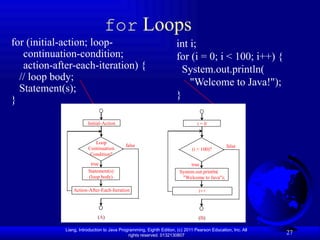
for Loops
for (initial-action; loop-
continuation-condition;
action-after-each-iteration) {
// loop body;
Statement(s);
}
int i;
for (i = 0; i < 100; i++) {
System.out.println(
"Welcome to Java!");
}
Loop
Continuation
Condition?
true
Statement(s)
(loop body)
false
(A)
Action-After-Each-Iteration
Initial-Action
(i < 100)?
true
System.out.println(
"Welcome to Java");
false
(B)
i++
i = 0
28.
Liang, Introduction toJava Programming, Eighth Edition, (c) 2011 Pearson Education, Inc. All
rights reserved. 0132130807 28
for Loop
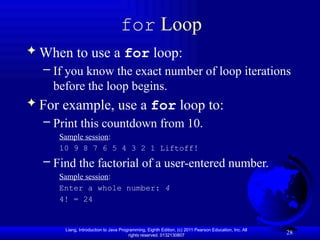
When to use a for loop:
– If you know the exact number of loop iterations
before the loop begins.
For example, use a for loop to:
– Print this countdown from 10.
Sample session:
10 9 8 7 6 5 4 3 2 1 Liftoff!
– Find the factorial of a user-entered number.
Sample session:
Enter a whole number: 4
4! = 24
29.
Liang, Introduction toJava Programming, Eighth Edition, (c) 2011 Pearson Education, Inc. All
rights reserved. 0132130807 29
for Loop
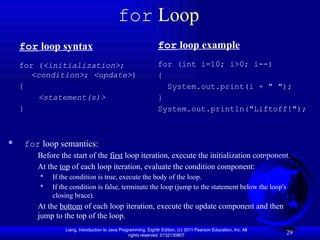
for loop syntax
for (<initialization>;
<condition>; <update>)
{
<statement(s)>
}
for loop example
for (int i=10; i>0; i--)
{
System.out.print(i + " ");
}
System.out.println("Liftoff!");
for loop semantics:
Before the start of the first loop iteration, execute the initialization component.
At the top of each loop iteration, evaluate the condition component:
If the condition is true, execute the body of the loop.
If the condition is false, terminate the loop (jump to the statement below the loop's
closing brace).
At the bottom of each loop iteration, execute the update component and then
jump to the top of the loop.
30.
Liang, Introduction toJava Programming, Eighth Edition, (c) 2011 Pearson Education, Inc. All
rights reserved. 0132130807 30
for Loop
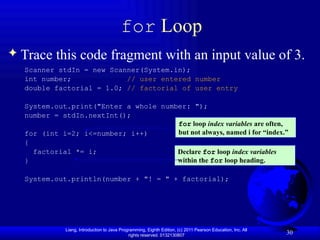
Trace this code fragment with an input value of 3.
Scanner stdIn = new Scanner(System.in);
int number; // user entered number
double factorial = 1.0; // factorial of user entry
System.out.print("Enter a whole number: ");
number = stdIn.nextInt();
for (int i=2; i<=number; i++)
{
factorial *= i;
}
System.out.println(number + "! = " + factorial);
for loop index variables are often,
but not always, named i for “index.”
Declare for loop index variables
within the for loop heading.
31.
Liang, Introduction toJava Programming, Eighth Edition, (c) 2011 Pearson Education, Inc. All
rights reserved. 0132130807 31
A for loop is a repetition control structure that allows you to
efficiently write a loop that needs to execute a specific number of
times.
A for loop is useful when you know how many times a task is to be
repeated.
public class Test3 {
public static void main(String args[]) {
for(int x = 10; x < 20; x = x+1){
System.out.print("value of x : " + x );
System.out.print("n");
} //end of for loop
} //end of main method
} // end of class
The for loop
32.
Liang, Introduction toJava Programming, Eighth Edition, (c) 2011 Pearson Education, Inc. All
rights reserved. 0132130807 32
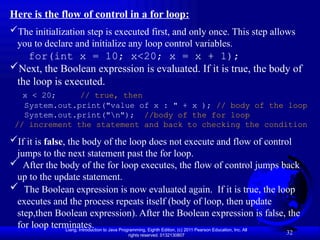
Here is the flow of control in a for loop:
The initialization step is executed first, and only once. This step allows
you to declare and initialize any loop control variables.
for(int x = 10; x<20; x = x + 1);
Next, the Boolean expression is evaluated. If it is true, the body of
the loop is executed.
x < 20; // true, then
System.out.print("value of x : " + x ); // body of the loop
System.out.print("n"); //body of the for loop
// increment the statement and back to checking the condition
If it is false, the body of the loop does not execute and flow of control
jumps to the next statement past the for loop.
After the body of the for loop executes, the flow of control jumps back
up to the update statement.
The Boolean expression is now evaluated again. If it is true, the loop
executes and the process repeats itself (body of loop, then update
step,then Boolean expression). After the Boolean expression is false, the
for loop terminates.
33.
Liang, Introduction toJava Programming, Eighth Edition, (c) 2011 Pearson Education, Inc. All
rights reserved. 0132130807 33
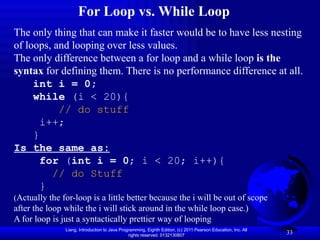
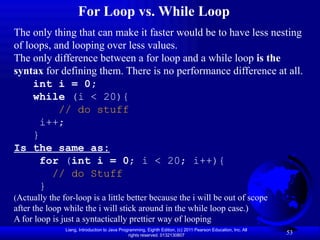
The only thing that can make it faster would be to have less nesting
of loops, and looping over less values.
The only difference between a for loop and a while loop is the
syntax for defining them. There is no performance difference at all.
int i = 0;
while (i < 20){
// do stuff
i++;
}
Is the same as:
for (int i = 0; i < 20; i++){
// do Stuff
}
(Actually the for-loop is a little better because the i will be out of scope
after the loop while the i will stick around in the while loop case.)
A for loop is just a syntactically prettier way of looping
For Loop vs. While Loop
34.
Liang, Introduction toJava Programming, Eighth Edition, (c) 2011 Pearson Education, Inc. All
rights reserved. 0132130807 34
Problem: Guessing Numbers
Write a program that randomly generates an
integer between 0 and 100, inclusive. The program
prompts the user to enter a number continuously
until the number matches the randomly generated
number. For each user input, the program tells the
user whether the input is too low or too high, so
the user can choose the next input intelligently.
Here is a video and sample run:
GuessNumber
Run
Video Link: Problem Guessing Numbers
35.
Liang, Introduction toJava Programming, Eighth Edition, (c) 2011 Pearson Education, Inc. All
rights reserved. 0132130807 35
import java.util.Scanner;
public class GuessNumber {
public static void main(String[] args) {
// Generate a random number to be guessed
int number = (int)(Math.random() * 101);
// static double, random() Returns a double value with a positive sign, greater than or
Scanner input = new Scanner(System.in); // scanner breakdown formatting/allocate input and
their data type
System.out.println("Guess a magic number between 0 and 100");
int guess = -1;
while (guess != number) {
// Prompt the user to guess the number
System.out.print("nEnter your guess: ");
guess = input.nextInt();
if (guess == number)
System.out.println("Yes, the number is " + number);
else if (guess > number)
System.out.println("Your guess is too high");
else
System.out.println("Your guess is too low");
} // End of loop
}
}
36.
Liang, Introduction toJava Programming, Eighth Edition, (c) 2011 Pearson Education, Inc. All
rights reserved. 0132130807 36
Problem: An Advanced Math Learning Tool
The Math subtraction learning tool program
generates just one question for each run. You can
use a loop to generate questions repeatedly. This
example gives a program that generates five
questions and reports the number of the correct
answers after a student answers all five questions.
Video Link: Problem SubtractionQuizLoop
37.
Liang, Introduction toJava Programming, Eighth Edition, (c) 2011 Pearson Education, Inc. All
rights reserved. 0132130807 37
import java.util.Scanner;
public class SubtractionQuizLoop {
public static void main(String[] args) {
final int NUMBER_OF_QUESTIONS = 5; // Number of questions
int correctCount = 0; // Count the number of correct answers
int count = 0; // Count the number of questions
long startTime = System.currentTimeMillis();
String output = ""; // output string is initially empty
Scanner input = new Scanner(System.in);
while (count < NUMBER_OF_QUESTIONS) {
// 1. Generate two random single-digit integers
int number1 = (int)(Math.random() * 10);
int number2 = (int)(Math.random() * 10);
// 2. If number1 < number2, swap number1 with number2
if (number1 < number2) {
int temp = number1;
number1 = number2;
number2 = temp;
}
// 3. Prompt the student to answer “What is number1 – number2?”
System.out.print(
"What is " + number1 + " - " + number2 + "? ");
int answer = input.nextInt();
// 4. Grade the answer and display the result
if (number1 - number2 == answer) {
System.out.println("You are correct!");
correctCount++;
}
else
System.out.println("Your answer is wrong.n" + number1
+ " - " + number2 + " should be " + (number1 - number2));
// Increase the count
count++;
output += "n" + number1 + "-" + number2 + "=" + answer +
((number1 - number2 == answer) ? " correct" : " wrong");
}
long endTime = System.currentTimeMillis();
long testTime = endTime - startTime;
System.out.println("Correct count is " + correctCount +
"nTest time is " + testTime / 1000 + " secondsn" + output);
}
}
Run
SubtractionQuizLoop
38.
Liang, Introduction toJava Programming, Eighth Edition, (c) 2011 Pearson Education, Inc. All
rights reserved. 0132130807 38
Ending a Loop with a Sentinel Value
Another technique for lop control is to designate a
special value. Often the number of times a loop is
executed is not predetermined. You may use an
input value to signify the end of the loop. Such a
special input values is known as a sentinel value.
Write a program that reads and calculates the sum
of an unspecified number of integers. The input 0
signifies the end of the input.
SentinelValue
Run
39.
Liang, Introduction toJava Programming, Eighth Edition, (c) 2011 Pearson Education, Inc. All
rights reserved. 0132130807 39
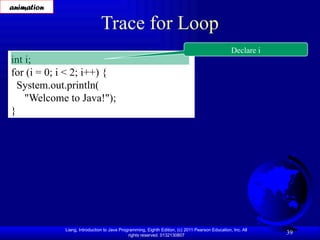
Trace for Loop
int i;
for (i = 0; i < 2; i++) {
System.out.println(
"Welcome to Java!");
}
Declare i
animation
40.
Liang, Introduction toJava Programming, Eighth Edition, (c) 2011 Pearson Education, Inc. All
rights reserved. 0132130807 40
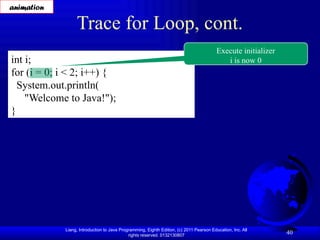
Trace for Loop, cont.
int i;
for (i = 0; i < 2; i++) {
System.out.println(
"Welcome to Java!");
}
Execute initializer
i is now 0
animation
41.
Liang, Introduction toJava Programming, Eighth Edition, (c) 2011 Pearson Education, Inc. All
rights reserved. 0132130807 41
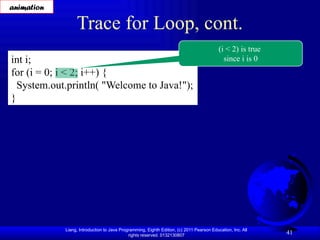
Trace for Loop, cont.
int i;
for (i = 0; i < 2; i++) {
System.out.println( "Welcome to Java!");
}
(i < 2) is true
since i is 0
animation
42.
Liang, Introduction toJava Programming, Eighth Edition, (c) 2011 Pearson Education, Inc. All
rights reserved. 0132130807 42
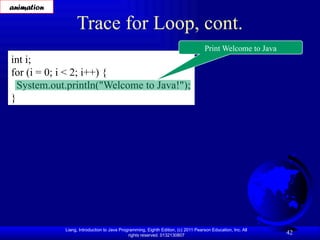
Trace for Loop, cont.
int i;
for (i = 0; i < 2; i++) {
System.out.println("Welcome to Java!");
}
Print Welcome to Java
animation
43.
Liang, Introduction toJava Programming, Eighth Edition, (c) 2011 Pearson Education, Inc. All
rights reserved. 0132130807 43
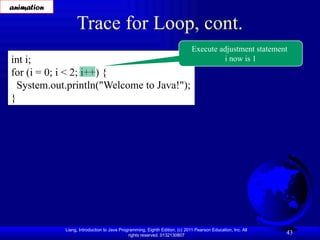
Trace for Loop, cont.
int i;
for (i = 0; i < 2; i++) {
System.out.println("Welcome to Java!");
}
Execute adjustment statement
i now is 1
animation
44.
Liang, Introduction toJava Programming, Eighth Edition, (c) 2011 Pearson Education, Inc. All
rights reserved. 0132130807 44
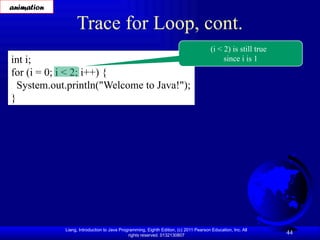
Trace for Loop, cont.
int i;
for (i = 0; i < 2; i++) {
System.out.println("Welcome to Java!");
}
(i < 2) is still true
since i is 1
animation
45.
Liang, Introduction toJava Programming, Eighth Edition, (c) 2011 Pearson Education, Inc. All
rights reserved. 0132130807 45
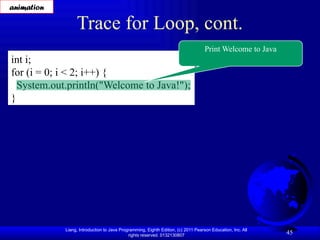
Trace for Loop, cont.
int i;
for (i = 0; i < 2; i++) {
System.out.println("Welcome to Java!");
}
Print Welcome to Java
animation
46.
Liang, Introduction toJava Programming, Eighth Edition, (c) 2011 Pearson Education, Inc. All
rights reserved. 0132130807 46
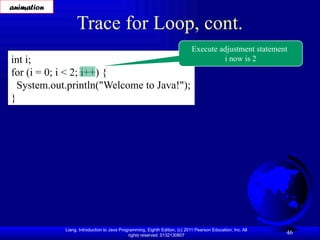
Trace for Loop, cont.
int i;
for (i = 0; i < 2; i++) {
System.out.println("Welcome to Java!");
}
Execute adjustment statement
i now is 2
animation
47.
Liang, Introduction toJava Programming, Eighth Edition, (c) 2011 Pearson Education, Inc. All
rights reserved. 0132130807 47
Trace for Loop, cont.
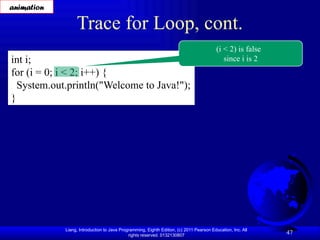
int i;
for (i = 0; i < 2; i++) {
System.out.println("Welcome to Java!");
}
(i < 2) is false
since i is 2
animation
48.
Liang, Introduction toJava Programming, Eighth Edition, (c) 2011 Pearson Education, Inc. All
rights reserved. 0132130807 48
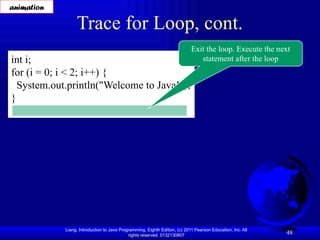
Trace for Loop, cont.
int i;
for (i = 0; i < 2; i++) {
System.out.println("Welcome to Java!");
}
Exit the loop. Execute the next
statement after the loop
animation
49.
Liang, Introduction toJava Programming, Eighth Edition, (c) 2011 Pearson Education, Inc. All
rights reserved. 0132130807 49
Note
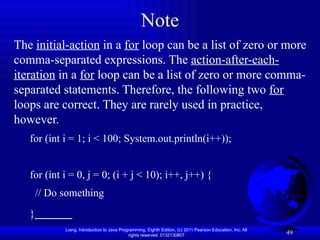
The initial-action in a for loop can be a list of zero or more
comma-separated expressions. The action-after-each-
iteration in a for loop can be a list of zero or more comma-
separated statements. Therefore, the following two for
loops are correct. They are rarely used in practice,
however.
for (int i = 1; i < 100; System.out.println(i++));
for (int i = 0, j = 0; (i + j < 10); i++, j++) {
// Do something
}
50.
Liang, Introduction toJava Programming, Eighth Edition, (c) 2011 Pearson Education, Inc. All
rights reserved. 0132130807 50
Note
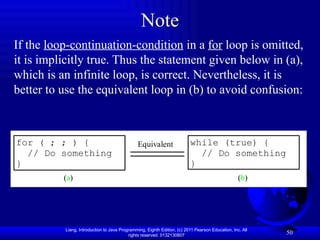
If the loop-continuation-condition in a for loop is omitted,
it is implicitly true. Thus the statement given below in (a),
which is an infinite loop, is correct. Nevertheless, it is
better to use the equivalent loop in (b) to avoid confusion:
for ( ; ; ) {
// Do something
}
(a)
Equivalent while (true) {
// Do something
}
(b)
51.
Liang, Introduction toJava Programming, Eighth Edition, (c) 2011 Pearson Education, Inc. All
rights reserved. 0132130807 51
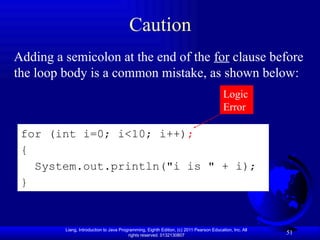
Caution
Adding a semicolon at the end of the for clause before
the loop body is a common mistake, as shown below:
Logic
Error
for (int i=0; i<10; i++);
{
System.out.println("i is " + i);
}
52.
Liang, Introduction toJava Programming, Eighth Edition, (c) 2011 Pearson Education, Inc. All
rights reserved. 0132130807 52
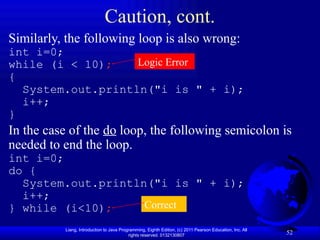
Caution, cont.
Similarly, the following loop is also wrong:
int i=0;
while (i < 10);
{
System.out.println("i is " + i);
i++;
}
In the case of the do loop, the following semicolon is
needed to end the loop.
int i=0;
do {
System.out.println("i is " + i);
i++;
} while (i<10);
Logic Error
Correct
53.
Liang, Introduction toJava Programming, Eighth Edition, (c) 2011 Pearson Education, Inc. All
rights reserved. 0132130807 53
The only thing that can make it faster would be to have less nesting
of loops, and looping over less values.
The only difference between a for loop and a while loop is the
syntax for defining them. There is no performance difference at all.
int i = 0;
while (i < 20){
// do stuff
i++;
}
Is the same as:
for (int i = 0; i < 20; i++){
// do Stuff
}
(Actually the for-loop is a little better because the i will be out of scope
after the loop while the i will stick around in the while loop case.)
A for loop is just a syntactically prettier way of looping
For Loop vs. While Loop
54.
Liang, Introduction toJava Programming, Eighth Edition, (c) 2011 Pearson Education, Inc. All
rights reserved. 0132130807 54
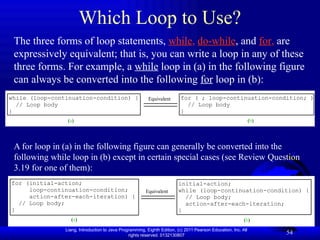
Which Loop to Use?
The three forms of loop statements, while, do-while, and for, are
expressively equivalent; that is, you can write a loop in any of these
three forms. For example, a while loop in (a) in the following figure
can always be converted into the following for loop in (b):
A for loop in (a) in the following figure can generally be converted into the
following while loop in (b) except in certain special cases (see Review Question
3.19 for one of them):
for (initial-action;
loop-continuation-condition;
action-after-each-iteration) {
// Loop body;
}
(a)
Equivalent
(b)
initial-action;
while (loop-continuation-condition) {
// Loop body;
action-after-each-iteration;
}
while (loop-continuation-condition) {
// Loop body
}
(a)
Equivalent
(b)
for ( ; loop-continuation-condition; ) {
// Loop body
}
55.
Liang, Introduction toJava Programming, Eighth Edition, (c) 2011 Pearson Education, Inc. All
rights reserved. 0132130807 55
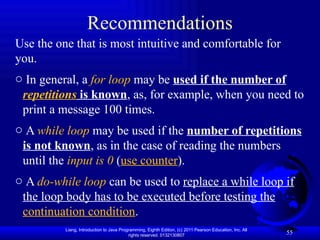
Recommendations
Use the one that is most intuitive and comfortable for
you.
o In general, a for loop may be used if the number of
repetitions is known, as, for example, when you need to
print a message 100 times.
o A while loop may be used if the number of repetitions
is not known, as in the case of reading the numbers
until the input is 0 (use counter).
o A do-while loop can be used to replace a while loop if
the loop body has to be executed before testing the
continuation condition.
56.
Liang, Introduction toJava Programming, Eighth Edition, (c) 2011 Pearson Education, Inc. All
rights reserved. 0132130807 56
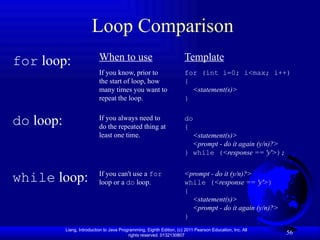
Loop Comparison
for loop:
do loop:
while loop:
When to use
If you know, prior to
the start of loop, how
many times you want to
repeat the loop.
If you always need to
do the repeated thing at
least one time.
If you can't use a for
loop or a do loop.
Template
for (int i=0; i<max; i++)
{
<statement(s)>
}
do
{
<statement(s)>
<prompt - do it again (y/n)?>
} while (<response == 'y'>);
<prompt - do it (y/n)?>
while (<response == 'y'>)
{
<statement(s)>
<prompt - do it again (y/n)?>
}
57.
Liang, Introduction toJava Programming, Eighth Edition, (c) 2011 Pearson Education, Inc. All
rights reserved. 0132130807 57
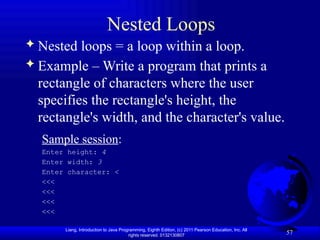
Nested Loops
Nested loops = a loop within a loop.
Example – Write a program that prints a
rectangle of characters where the user
specifies the rectangle's height, the
rectangle's width, and the character's value.
Sample session:
Enter height: 4
Enter width: 3
Enter character: <
<<<
<<<
<<<
<<<
58.
Liang, Introduction toJava Programming, Eighth Edition, (c) 2011 Pearson Education, Inc. All
rights reserved. 0132130807 58
Nested Loops
import java.util.Scanner;
public class RecAngle1
{
public static void main(String[] args)
{
Scanner stdIn = new Scanner(System.in);
int height, width; // rectangle's dimensions
char printCharacter; // this character forms the rectangle
System.out.print("Enter height: ");
height = stdIn.nextInt();
System.out.print("Enter width: ");
width = stdIn.nextInt();
System.out.print("Enter character: ");
printCharacter = stdIn.next().charAt(0);
for (int row=1; row<=height; row++)
{
for (int col=1; col<=width; col++)
{
System.out.print(printCharacter);
} //end of nested for
System.out.println();
} //end of for
} // end main
} // end class Rectangle
59.
Liang, Introduction toJava Programming, Eighth Edition, (c) 2011 Pearson Education, Inc. All
rights reserved. 0132130807 59
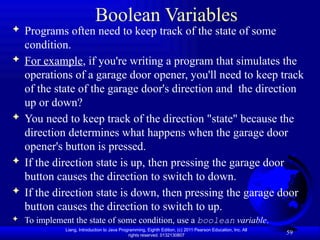
Boolean Variables
Programs often need to keep track of the state of some
condition.
For example, if you're writing a program that simulates the
operations of a garage door opener, you'll need to keep track
of the state of the garage door's direction and the direction
up or down?
You need to keep track of the direction "state" because the
direction determines what happens when the garage door
opener's button is pressed.
If the direction state is up, then pressing the garage door
button causes the direction to switch to down.
If the direction state is down, then pressing the garage door
button causes the direction to switch to up.
To implement the state of some condition, use a boolean variable.
60.
Liang, Introduction toJava Programming, Eighth Edition, (c) 2011 Pearson Education, Inc. All
rights reserved. 0132130807 60
Nested Loops
Problem: Write a program that uses nested for loops to
print a multiplication table. MultiplicationTable
Run
public class MultiTable {
/** Main method */
public static void main(String[] args) {
// Display the table heading
System.out.println(" Multiplication Table"); // table title – display a title on the first line in the output
// Display the number title
System.out.print(" ");
for (int j = 1; j <= 9; j++) //this for loop display the numbers 1 through 9 on the second line.
System.out.print(" " + j);
System.out.println("n-----------------------------------------"); // the dash (-) line displayed on the third line
// Print table body
for (int i = 1; i <= 9; i++) { //outer loop with the control variable i in the outer loop
System.out.print(i + " | ");
for (int j = 1; j <= 9; j++) {
// Display the product and align properly //inner loop with the control variable j in the inner loop
System.out.printf("%4d", i * j); // for each I, the product I * j is displayed on a line in the inner loop.
} //with j begin 1, 2, 3, …9.
System.out.println();
}
}
}
61.
Liang, Introduction toJava Programming, Eighth Edition, (c) 2011 Pearson Education, Inc. All
rights reserved. 0132130807 61
Minimizing Numerical Errors
Numeric errors involving floating-point numbers are
expected. This section discusses how to minimize such
errors through an example. Listing 4.7.
Here is an example that sums a series that starts with 0.01
and ends with 1.0. The numbers in the series will increment
by 0.01, as follows: 0.01 + 0.02 + 0.03 and so on.
public class TestSum {
public static void main(String[] args) {
// Initialize sum
float sum = 0;
// Add 0.01, 0.02, ..., 0.99, 1 to sum
for (float i = 0.01f; i <= 1.0f; i = i + 0.01f)
sum += i;
// Display result
System.out.println("The sum is " + sum);
}
}
TestSum
Run
Video Link: Problem TestSum
62.
Liang, Introduction toJava Programming, Eighth Edition, (c) 2011 Pearson Education, Inc. All
rights reserved. 0132130807 62
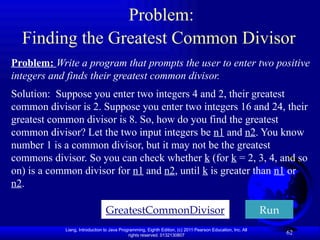
Problem:
Finding the Greatest Common Divisor
Problem: Write a program that prompts the user to enter two positive
integers and finds their greatest common divisor.
Solution: Suppose you enter two integers 4 and 2, their greatest
common divisor is 2. Suppose you enter two integers 16 and 24, their
greatest common divisor is 8. So, how do you find the greatest
common divisor? Let the two input integers be n1 and n2. You know
number 1 is a common divisor, but it may not be the greatest
commons divisor. So you can check whether k (for k = 2, 3, 4, and so
on) is a common divisor for n1 and n2, until k is greater than n1 or
n2.
GreatestCommonDivisor Run
63.
Liang, Introduction toJava Programming, Eighth Edition, (c) 2011 Pearson Education, Inc. All
rights reserved. 0132130807 63
import java.util.Scanner;
public class GreatestCommonDivisor {
/** Main method */
public static void main(String[] args) {
// Create a Scanner
Scanner input = new Scanner(System.in);
// Prompt the user to enter two integers
System.out.print("Enter first integer: ");
int n1 = input.nextInt();
System.out.print("Enter second integer: ");
int n2 = input.nextInt();
int gcd = 1;
int k = 2;
while (k <= n1 && k <= n2) {
if (n1 % k == 0 && n2 % k == 0)
gcd = k;
k++;
}
System.out.println("The greatest common divisor for " + n1 +
" and " + n2 + " is " + gcd);
}
}
64.
Liang, Introduction toJava Programming, Eighth Edition, (c) 2011 Pearson Education, Inc. All
rights reserved. 0132130807 64
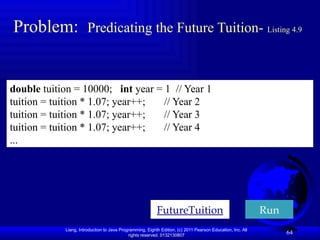
Problem: Predicating the Future Tuition- Listing 4.9
double tuition = 10000; int year = 1 // Year 1
tuition = tuition * 1.07; year++; // Year 2
tuition = tuition * 1.07; year++; // Year 3
tuition = tuition * 1.07; year++; // Year 4
...
FutureTuition Run
65.
Liang, Introduction toJava Programming, Eighth Edition, (c) 2011 Pearson Education, Inc. All
rights reserved. 0132130807 65
Problem: Predicating the Future Tuition
Problem: Suppose that the tuition for a university is $10,000 this
year and tuition increases 7% every year. In how many years will the
tuition be doubled?
Before you write this program try to solve this problem first by hand.
FutureTuition
Run
public class FutureTuition {
public static void main(String[] args) {
double tuition = 10000; // Year 1
int year = 1;
while (tuition < 20000) {
tuition = tuition * 1.07;
year++;
}
System.out.println("Tuition will be doubled in "
+ year + " years");
}
}
66.
Liang, Introduction toJava Programming, Eighth Edition, (c) 2011 Pearson Education, Inc. All
rights reserved. 0132130807 66
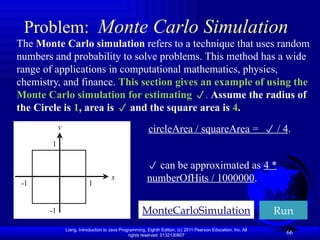
Problem: Monte Carlo Simulation
The Monte Carlo simulation refers to a technique that uses random
numbers and probability to solve problems. This method has a wide
range of applications in computational mathematics, physics,
chemistry, and finance. This section gives an example of using the
Monte Carlo simulation for estimating . Assume the radius of
the Circle is 1, area is and the square area is 4.
MonteCarloSimulation Run
x
y
1
-1
1
-1
circleArea / squareArea = / 4.
can be approximated as 4 *
numberOfHits / 1000000.
67.
Liang, Introduction toJava Programming, Eighth Edition, (c) 2011 Pearson Education, Inc. All
rights reserved. 0132130807 67
public class MonteCarloSimulation {
public static void main(String[] args) {
final int NUMBER_OF_TRIALS = 10000000;
int numberOfHits = 0;
for (int i = 0; i < NUMBER_OF_TRIALS; i++) {
double x = Math.random() * 2.0 - 1;
double y = Math.random() * 2.0 - 1;
if (x * x + y * y <= 1)
numberOfHits++;
} //end of while
double pi = 4.0 * numberOfHits / NUMBER_OF_TRIALS;
System.out.println("PI is " + pi);
} // end of main method
} //end of class
Problem: Monte Carlo Simulation
Web link: Class Math
Web Link: About Monte Carlo Simulation - Introduction
68.
Liang, Introduction toJava Programming, Eighth Edition, (c) 2011 Pearson Education, Inc. All
rights reserved. 0132130807 68
Using break and continue
Examples for using the break and continue
keywords that can be used in loop statements to
provide additional controls.
TestBreak.java
// you have to used the keyword break in a switch statement
// you can use break in a loop to immediately terminate the loop.
TestContinue.java
TestBreak
TestContinue
Run
Run
69.
Liang, Introduction toJava Programming, Eighth Edition, (c) 2011 Pearson Education, Inc. All
rights reserved. 0132130807 69
Guessing Number Problem Revisited
Here is a program for guessing a number. You can
rewrite it using a break statement. Listing 4.11
public class TestBreak {
public static void main(String[] args) {
int sum = 0;
int number = 0;
while (number < 20) {
number++;
sum += number;
if (sum >= 100)
break; // goes to println
}
System.out.println("The number is " + number);
System.out.println("The sum is " + sum);
}
}
GuessNumberUsingBreak
Run
70.
Liang, Introduction toJava Programming, Eighth Edition, (c) 2011 Pearson Education, Inc. All
rights reserved. 0132130807 70
Guessing Number Problem Revisited
Here is a program for guessing a number. You can
rewrite it using a continue statement. Listing 4.12
public class TestContinue {
public static void main(String[] args) {
int sum = 0;
int number = 0;
while (number < 20) {
number++;
if (number == 10 || number == 11) continue;
sum += number;
} //end of while
System.out.println("The sum is " + sum);
} //end of main method
} //end of class
TestContinue
Run
71.
Liang, Introduction toJava Programming, Eighth Edition, (c) 2011 Pearson Education, Inc. All
rights reserved. 0132130807 71
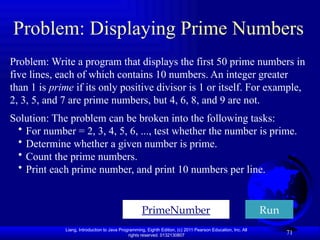
Problem: Displaying Prime Numbers
Problem: Write a program that displays the first 50 prime numbers in
five lines, each of which contains 10 numbers. An integer greater
than 1 is prime if its only positive divisor is 1 or itself. For example,
2, 3, 5, and 7 are prime numbers, but 4, 6, 8, and 9 are not.
Solution: The problem can be broken into the following tasks:
• For number = 2, 3, 4, 5, 6, ..., test whether the number is prime.
• Determine whether a given number is prime.
• Count the prime numbers.
• Print each prime number, and print 10 numbers per line.
PrimeNumber Run
72.
Liang, Introduction toJava Programming, Eighth Edition, (c) 2011 Pearson Education, Inc. All
rights reserved. 0132130807
Exercise 4_22
Financial application: Loan repayment schedule
72
Video Link: Exercise 4_22
Please refer to companion website for the program.
73.
Liang, Introduction toJava Programming, Eighth Edition, (c) 2011 Pearson Education, Inc. All
rights reserved. 0132130807 73
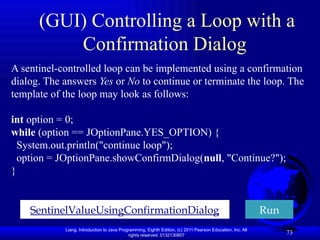
(GUI) Controlling a Loop with a
Confirmation Dialog
A sentinel-controlled loop can be implemented using a confirmation
dialog. The answers Yes or No to continue or terminate the loop. The
template of the loop may look as follows:
int option = 0;
while (option == JOptionPane.YES_OPTION) {
System.out.println("continue loop");
option = JOptionPane.showConfirmDialog(null, "Continue?");
}
SentinelValueUsingConfirmationDialog Run
Editor's Notes
#7 1. Here's a pseudocode vs. Java syntax comparison for the while loop.
2. What are the differences?
The Java while loop has:
a) parentheses around the condition
b) braces
3. Use braces for statements that are logically inside something else.
For example, use braces to surround the statements that are inside the main method.
Use braces to surround the statements that are inside the if.
Use braces to surround the statements that are inside the switch.
4. As before, don't include the <>'s in your program.
They are my classroom notation to indicate that the enclosed text is a description of something.
#11 1. Note that the while loop format does match the pattern on the previous slide – ()'s and braces.
2. Note that the sum variable must be initialized to 0.
3. Note that the same prompt statements appear above the loop and also at the bottom of the loop – that's very common!
4. Does anyone see an improvement we can make in terms of style?
I change sum = sum + x to this:
sum += x;
Also, you should insert a blank line between the three variable declarations and the rest of the program.
Why? Because you should separate logical chunks of code, and variable declarations are always considered to be a logical chunk of code.
#24 1. We talked about only one type of loop in pseudocode – the while loop.
There are three types of loops in Java – while loops, do loops, and for loops
Let's now talk about do loops …
2. By testing the condition at the bottom, it means that you're always guaranteed to execute the body of the loop at least one time.
3. Why is this an important style rule?
Because if you put the while part on a separate line, then it will look like the start of a while loop.
Even though in reality, it's the end of a do loop!
#26 1. Why must next() be used instead of nextLine()?
You might recall from the end of Chapter 3 that the nextLine method doesn’t work well with the other next methods.
nextInt, nextDouble, and next all skip leading whitespace before reading their int, double, or string value.
nextLine does not skip leading whitespace, so in this program, if nextLine were used for the ”Any more rooms?” response, it would read the leftover newline character (from the prior call to nextDouble) as the input and not read the next line.
2. Proper style dictates separating logical chunks of code with blank lines.
Since loops are considered a logical chunk of code, surround all your loops with blank lines unless they're very short loops.
#28 1. Let's now talk about the third type of loop - the for loop …
2. In your program, you'll need to print ten numbers, and you should print each number with the help of a print statement inside a loop.
Since the print statement should execute ten times, you know the exact number of iterations for the loop, 10.
Therefore, you should use a for loop.
I'll show a for loop solution for this problem on the next slide.
3. How many loop iterations for this problem?
For 4 factorial, you need to multiply the values 1 through 4: 1 * 2 * 3 * 4 = 24 (I write on the board).
The three *'s indicate that three multiplications are necessary.
So 4 factorial requires three loop iterations.
For the general case, where you need to find the factorial for a user-entered number, store the user-entered number in a count variable.
Then multiply the values 1 through count like this:
1 * 2 * 3 * … * count
The *'s indicate that count - 1 multiplications are necessary. So count factorial requires count – 1 loop iterations. Since you know the number of iterations for the loop (count - 1), use a for loop.
#29 1. Here's for loop syntax, for loop semantics, and a for loop example.
2. As with the while loop, use ()'s in the for loop heading and surround the body with braces.
3. Note the three components in the for loop heading.
I'll explain the 3 components by reading the semantics bullets and referring to the example code.
By the way, the example code implements the first example mentioned on the previous slide - it counts down from 10 to 1.
4. I read the semantics bullets and, for each item, I point out the associated syntax and example code.
5. I verbally trace the code:
i starts at 10. Is i > 0 ? Yes, so print 10 (because i is 10).
Decrement i from 10 to 9.
Is i > 0 ? Yes, so print 9.
Decrement i from 9 to 8.
etc.
Thus, you'll print 10 down to 1, and then print “Liftoff” after the loop.
6. Note that as an alternative, we could have implemented this solution using a while loop or a do loop.
Why is the for loop preferable?
With a while loop or a do loop, we'd need an extra statement to increment a count variable.
That would work OK, but using a for loop is more elegant!
7. How would you know to use a for loop for this implementation instead of a while loop or do loop?
I reread the previous slide's bullet item:
If you know the exact number of loop iterations (before the loop begins), use a for loop.
For this example, we knew the exact number of loop iterations in advance – ten!
#30 1. Let's make sure you really understand how the for loop works by doing a trace …
2. I read the first callout.
3. I read the second callout.
With all other variable declarations, proper style suggests that you put variable declarations at the top of the method.
The exception is with for loop index variables.
It's legal to declare them at the top of the method along with all the other variable declarations, but most programmers declare them within the for loop heading.
4. Why use a double for factorial instead of an int?
Because factorials can get pretty big and doubles can handle bigger numbers than ints (Integer.MAX_VALUE ≈ 2 billion, Double.MAX_VALUE ≈ 1.8*10308).
[To increase the number of significant digits stored, we could have used long (18 significant digits) as opposed to double (15 significant digits), but we wanted to be able to handle numbers larger than the maximum long value, 9 x 10¹⁸.
With a long, if there’s an attempt to store a value larger than the maximum, then a horribly inaccurate result occurs, due to overflow.
With a double, if there’s an attempt to store a value larger than the maximum, then a slightly inaccurate result occurs, due to rounding.]
[5. I don't mention default variable values for traces until Chapter 5 when I discuss default values in depth for local variables vs. instance variables.]
6. Trace:
input number factorial i output
3 3 1.0 2 Enter a whole number:
2.0 3 3! = 6
6.0 4
#56 1. With programming, there's usually lots of different ways to accomplish the same thing.
For example, for a problem that requires repetition, you can actually use any of the three loops to solve any repetition problem.
Even though that's the case, you should strive to make your programs elegant and that means choosing the most appropriate loop even though any loop could be made to work.
2. All that flexibility makes programming fun if you like to be creative.
But if you're just starting out, that flexibility can lead to confusion.
Here's my attempt at alleviating some of that confusion.
The table explains how to choose the right loop and how to get started with the loop's code.
3. When figuring out which loop to use, it's best to think about the loops in the order that they appear here.
Why?
Note how the for loop uses the fewest lines, the do loop uses the next fewest lines, and the while loop uses the most lines.
Using fewer lines is one characteristic of elegance, and so from that perspective, the for loop is the most elegant and the do loop is the next most elegant.
But that does not mean that you should try to use for loops or do loops for all your programs.
Use the loop that's most appropriate for your particular problem!
4. In upcoming examples, you'll have to pick the loop that's the most appropriate.
#58 1. To make sure you really understand how this works, trace it on your own tonight!
2. For most problems where you're dealing with a two-dimensional picture like this rectangle example, you'll want to use nested for loops with row and column indices.
As an alternative to using row and column for your index variable names, i and j are also common names for the index variables for nested for loops.
3. The homework extra credit program prints a triangle, which is a two-dimensional picture.
Thus, you'll want to use nested for loops.
The triangle program is similar to this rectangle program, but it's got a few twists ...
4. In this program, the inner for loop's col variable goes from 1 up to a specified width value.
In the triangle program, it goes from 1 up to a value that you need to figure out.
I draw the triangle program's triangle on the board and note how the number of columns is different for different rows:
Hollow version of this:
5. In the triangle program, instead of printing the same character every time, you need to print either the specified character or a blank space.
How can you determine which to print, the specified character or a blank space?
Use an if statement!
6. The bottom line of the triangle is a special case where you print the specified character at every position.
Since it's a special case, don't include it in the nested for loops.
Instead, put that code below and outside of your nested for loops.
#59 1. We've been talking about loops for a while now.
Sometimes within a loop, you'll want to change the truth or falsity of some condition.
boolean variables, our next topic, help you to keep track of the truth or falsity of some condition.

![Liang, Introduction to Java Programming, Eighth Edition, (c) 2011 Pearson Education, Inc. All
rights reserved. 0132130807 9
while Loop
int count = 0;
while (count < 100) {
System.out.println("Welcome to Java");
count++;
} // end of while
A while loop is a control structure that allows you to repeat a task
a certain number of times.
Using loop statement means tell the computer to print a string a
hundred times without coding:
public class Welcome {
public static void main (String [ ] args){
int count = 0;
while (count < 100) {
System.out.println("Welcome to Java");
count++;
} // end of while
} // end of main method
} // end of class](https://image.slidesharecdn.com/05-loops-250826192442-ed9d4040/85/05-Loops-pptx-data-structure-algorithm-hehe-9-320.jpg)
![Liang, Introduction to Java Programming, Eighth Edition, (c) 2011 Pearson Education, Inc. All
rights reserved. 0132130807 10
Here key point of the while loop is that the loop might not ever
run. When the expression is tested and the result is false, the loop
body will be skipped and the first statement after the while loop will
be executed. Syntax
while(Boolean_expression)
{ //Statements
}
Example:
public class Test1 {
public static void main(String args[]){
int x= 10;
while( x < 20 ){
System.out.print("value of x :" + x);
x++;
System.out.print("n");
} //end of while
} // end of main
} //end of class](https://image.slidesharecdn.com/05-loops-250826192442-ed9d4040/85/05-Loops-pptx-data-structure-algorithm-hehe-10-320.jpg)
![Liang, Introduction to Java Programming, Eighth Edition, (c) 2011 Pearson Education, Inc. All
rights reserved. 0132130807
while Loop
Write a main method that finds the sum of user-
entered integers where -99999 is a sentinel value.
public static void main(String[] args)
{
Scanner stdIn = new Scanner(System.in);
int sum = 0; // sum of user-entered values
int x; // a user-entered value
System.out.print("Enter an integer (-99999 to quit): ");
x = stdIn.nextInt();
while (x != -99999)
{
sum = sum + x;
System.out.print("Enter an integer (-99999 to quit): ");
x = stdIn.nextInt();
} // end of while
System.out.println("The sum is " + sum);
} // end main](https://image.slidesharecdn.com/05-loops-250826192442-ed9d4040/85/05-Loops-pptx-data-structure-algorithm-hehe-11-320.jpg)
![Liang, Introduction to Java Programming, Eighth Edition, (c) 2011 Pearson Education, Inc. All
rights reserved. 0132130807 12
import java.util.Scanner;
public class SentinelValue {
/** Main method */
public static void main(String[] args) {
// Create a Scanner
Scanner input = new Scanner(System.in);
// Read an initial data
System.out.print(
"Enter an int value (the program exits if the input is 0): ");
int data = input.nextInt();
// Keep reading data until the input is 0
int sum = 0;
while (data != 0) {
sum += data;
// Read the next data
System.out.print(
"Enter an int value (the program exits if the input is 0): ");
data = input.nextInt();
} //end of while
System.out.println("The sum is " + sum);
} //end of main
} //end of class
Run
Enter an int value (the program exits if the input is 0): 2
Enter an int value (the program exits if the input is 0): 3
Enter an int value (the program exits if the input is 0): 4
Enter an int value (the program exits if the input is 0): 0
The sum is 9](https://image.slidesharecdn.com/05-loops-250826192442-ed9d4040/85/05-Loops-pptx-data-structure-algorithm-hehe-12-320.jpg)
![Liang, Introduction to Java Programming, Eighth Edition, (c) 2011 Pearson Education, Inc. All
rights reserved. 0132130807
The do...while Loop
25
If the Boolean expression is true, the flow of control jumps back
up to do, and the statements in the loop execute again.
This process repeats until the Boolean expression is false.
public class Test2 {
public static void main(String args[]){
int x= 10;
do {
System.out.print("value of x : " + x );
x++;
System.out.print("n");
} while( x < 20 );
} // end of main
} //end of class](https://image.slidesharecdn.com/05-loops-250826192442-ed9d4040/85/05-Loops-pptx-data-structure-algorithm-hehe-25-320.jpg)
![Liang, Introduction to Java Programming, Eighth Edition, (c) 2011 Pearson Education, Inc. All
rights reserved. 0132130807 26
do while Loop
// FloorSpace.java – Calculates total floor space in a house
import java.util.Scanner;
public class FloorSpace {
public static void main(String[] args)
{
Scanner stdIn = new Scanner(System.in);
double length, width; // room dimensions
double floorSpace = 0; // house's total floor space
String response; // user's y/n response
do
{
System.out.print("Enter the length: ");
length = stdIn.nextDouble();
System.out.print("Enter the width: ");
width = stdIn.nextDouble();
floorSpace += length * width;
System.out.print("Any more rooms? (y/n): ");
response = stdIn.next();
} while (response.equalsIgnoreCase("y"));
System.out.println("The total floor space is " + floorSpace);
} // end main
} // end class](https://image.slidesharecdn.com/05-loops-250826192442-ed9d4040/85/05-Loops-pptx-data-structure-algorithm-hehe-26-320.jpg)
![Liang, Introduction to Java Programming, Eighth Edition, (c) 2011 Pearson Education, Inc. All
rights reserved. 0132130807 31
A for loop is a repetition control structure that allows you to
efficiently write a loop that needs to execute a specific number of
times.
A for loop is useful when you know how many times a task is to be
repeated.
public class Test3 {
public static void main(String args[]) {
for(int x = 10; x < 20; x = x+1){
System.out.print("value of x : " + x );
System.out.print("n");
} //end of for loop
} //end of main method
} // end of class
The for loop](https://image.slidesharecdn.com/05-loops-250826192442-ed9d4040/85/05-Loops-pptx-data-structure-algorithm-hehe-31-320.jpg)
![Liang, Introduction to Java Programming, Eighth Edition, (c) 2011 Pearson Education, Inc. All
rights reserved. 0132130807 35
import java.util.Scanner;
public class GuessNumber {
public static void main(String[] args) {
// Generate a random number to be guessed
int number = (int)(Math.random() * 101);
// static double, random() Returns a double value with a positive sign, greater than or
Scanner input = new Scanner(System.in); // scanner breakdown formatting/allocate input and
their data type
System.out.println("Guess a magic number between 0 and 100");
int guess = -1;
while (guess != number) {
// Prompt the user to guess the number
System.out.print("nEnter your guess: ");
guess = input.nextInt();
if (guess == number)
System.out.println("Yes, the number is " + number);
else if (guess > number)
System.out.println("Your guess is too high");
else
System.out.println("Your guess is too low");
} // End of loop
}
}](https://image.slidesharecdn.com/05-loops-250826192442-ed9d4040/85/05-Loops-pptx-data-structure-algorithm-hehe-35-320.jpg)
![Liang, Introduction to Java Programming, Eighth Edition, (c) 2011 Pearson Education, Inc. All
rights reserved. 0132130807 37
import java.util.Scanner;
public class SubtractionQuizLoop {
public static void main(String[] args) {
final int NUMBER_OF_QUESTIONS = 5; // Number of questions
int correctCount = 0; // Count the number of correct answers
int count = 0; // Count the number of questions
long startTime = System.currentTimeMillis();
String output = ""; // output string is initially empty
Scanner input = new Scanner(System.in);
while (count < NUMBER_OF_QUESTIONS) {
// 1. Generate two random single-digit integers
int number1 = (int)(Math.random() * 10);
int number2 = (int)(Math.random() * 10);
// 2. If number1 < number2, swap number1 with number2
if (number1 < number2) {
int temp = number1;
number1 = number2;
number2 = temp;
}
// 3. Prompt the student to answer “What is number1 – number2?”
System.out.print(
"What is " + number1 + " - " + number2 + "? ");
int answer = input.nextInt();
// 4. Grade the answer and display the result
if (number1 - number2 == answer) {
System.out.println("You are correct!");
correctCount++;
}
else
System.out.println("Your answer is wrong.n" + number1
+ " - " + number2 + " should be " + (number1 - number2));
// Increase the count
count++;
output += "n" + number1 + "-" + number2 + "=" + answer +
((number1 - number2 == answer) ? " correct" : " wrong");
}
long endTime = System.currentTimeMillis();
long testTime = endTime - startTime;
System.out.println("Correct count is " + correctCount +
"nTest time is " + testTime / 1000 + " secondsn" + output);
}
}
Run
SubtractionQuizLoop](https://image.slidesharecdn.com/05-loops-250826192442-ed9d4040/85/05-Loops-pptx-data-structure-algorithm-hehe-37-320.jpg)
![Liang, Introduction to Java Programming, Eighth Edition, (c) 2011 Pearson Education, Inc. All
rights reserved. 0132130807 58
Nested Loops
import java.util.Scanner;
public class RecAngle1
{
public static void main(String[] args)
{
Scanner stdIn = new Scanner(System.in);
int height, width; // rectangle's dimensions
char printCharacter; // this character forms the rectangle
System.out.print("Enter height: ");
height = stdIn.nextInt();
System.out.print("Enter width: ");
width = stdIn.nextInt();
System.out.print("Enter character: ");
printCharacter = stdIn.next().charAt(0);
for (int row=1; row<=height; row++)
{
for (int col=1; col<=width; col++)
{
System.out.print(printCharacter);
} //end of nested for
System.out.println();
} //end of for
} // end main
} // end class Rectangle](https://image.slidesharecdn.com/05-loops-250826192442-ed9d4040/85/05-Loops-pptx-data-structure-algorithm-hehe-58-320.jpg)
![Liang, Introduction to Java Programming, Eighth Edition, (c) 2011 Pearson Education, Inc. All
rights reserved. 0132130807 60
Nested Loops
Problem: Write a program that uses nested for loops to
print a multiplication table. MultiplicationTable
Run
public class MultiTable {
/** Main method */
public static void main(String[] args) {
// Display the table heading
System.out.println(" Multiplication Table"); // table title – display a title on the first line in the output
// Display the number title
System.out.print(" ");
for (int j = 1; j <= 9; j++) //this for loop display the numbers 1 through 9 on the second line.
System.out.print(" " + j);
System.out.println("n-----------------------------------------"); // the dash (-) line displayed on the third line
// Print table body
for (int i = 1; i <= 9; i++) { //outer loop with the control variable i in the outer loop
System.out.print(i + " | ");
for (int j = 1; j <= 9; j++) {
// Display the product and align properly //inner loop with the control variable j in the inner loop
System.out.printf("%4d", i * j); // for each I, the product I * j is displayed on a line in the inner loop.
} //with j begin 1, 2, 3, …9.
System.out.println();
}
}
}](https://image.slidesharecdn.com/05-loops-250826192442-ed9d4040/85/05-Loops-pptx-data-structure-algorithm-hehe-60-320.jpg)
![Liang, Introduction to Java Programming, Eighth Edition, (c) 2011 Pearson Education, Inc. All
rights reserved. 0132130807 61
Minimizing Numerical Errors
Numeric errors involving floating-point numbers are
expected. This section discusses how to minimize such
errors through an example. Listing 4.7.
Here is an example that sums a series that starts with 0.01
and ends with 1.0. The numbers in the series will increment
by 0.01, as follows: 0.01 + 0.02 + 0.03 and so on.
public class TestSum {
public static void main(String[] args) {
// Initialize sum
float sum = 0;
// Add 0.01, 0.02, ..., 0.99, 1 to sum
for (float i = 0.01f; i <= 1.0f; i = i + 0.01f)
sum += i;
// Display result
System.out.println("The sum is " + sum);
}
}
TestSum
Run
Video Link: Problem TestSum](https://image.slidesharecdn.com/05-loops-250826192442-ed9d4040/85/05-Loops-pptx-data-structure-algorithm-hehe-61-320.jpg)
![Liang, Introduction to Java Programming, Eighth Edition, (c) 2011 Pearson Education, Inc. All
rights reserved. 0132130807 63
import java.util.Scanner;
public class GreatestCommonDivisor {
/** Main method */
public static void main(String[] args) {
// Create a Scanner
Scanner input = new Scanner(System.in);
// Prompt the user to enter two integers
System.out.print("Enter first integer: ");
int n1 = input.nextInt();
System.out.print("Enter second integer: ");
int n2 = input.nextInt();
int gcd = 1;
int k = 2;
while (k <= n1 && k <= n2) {
if (n1 % k == 0 && n2 % k == 0)
gcd = k;
k++;
}
System.out.println("The greatest common divisor for " + n1 +
" and " + n2 + " is " + gcd);
}
}](https://image.slidesharecdn.com/05-loops-250826192442-ed9d4040/85/05-Loops-pptx-data-structure-algorithm-hehe-63-320.jpg)
![Liang, Introduction to Java Programming, Eighth Edition, (c) 2011 Pearson Education, Inc. All
rights reserved. 0132130807 65
Problem: Predicating the Future Tuition
Problem: Suppose that the tuition for a university is $10,000 this
year and tuition increases 7% every year. In how many years will the
tuition be doubled?
Before you write this program try to solve this problem first by hand.
FutureTuition
Run
public class FutureTuition {
public static void main(String[] args) {
double tuition = 10000; // Year 1
int year = 1;
while (tuition < 20000) {
tuition = tuition * 1.07;
year++;
}
System.out.println("Tuition will be doubled in "
+ year + " years");
}
}](https://image.slidesharecdn.com/05-loops-250826192442-ed9d4040/85/05-Loops-pptx-data-structure-algorithm-hehe-65-320.jpg)
![Liang, Introduction to Java Programming, Eighth Edition, (c) 2011 Pearson Education, Inc. All
rights reserved. 0132130807 67
public class MonteCarloSimulation {
public static void main(String[] args) {
final int NUMBER_OF_TRIALS = 10000000;
int numberOfHits = 0;
for (int i = 0; i < NUMBER_OF_TRIALS; i++) {
double x = Math.random() * 2.0 - 1;
double y = Math.random() * 2.0 - 1;
if (x * x + y * y <= 1)
numberOfHits++;
} //end of while
double pi = 4.0 * numberOfHits / NUMBER_OF_TRIALS;
System.out.println("PI is " + pi);
} // end of main method
} //end of class
Problem: Monte Carlo Simulation
Web link: Class Math
Web Link: About Monte Carlo Simulation - Introduction](https://image.slidesharecdn.com/05-loops-250826192442-ed9d4040/85/05-Loops-pptx-data-structure-algorithm-hehe-67-320.jpg)
![Liang, Introduction to Java Programming, Eighth Edition, (c) 2011 Pearson Education, Inc. All
rights reserved. 0132130807 69
Guessing Number Problem Revisited
Here is a program for guessing a number. You can
rewrite it using a break statement. Listing 4.11
public class TestBreak {
public static void main(String[] args) {
int sum = 0;
int number = 0;
while (number < 20) {
number++;
sum += number;
if (sum >= 100)
break; // goes to println
}
System.out.println("The number is " + number);
System.out.println("The sum is " + sum);
}
}
GuessNumberUsingBreak
Run](https://image.slidesharecdn.com/05-loops-250826192442-ed9d4040/85/05-Loops-pptx-data-structure-algorithm-hehe-69-320.jpg)
![Liang, Introduction to Java Programming, Eighth Edition, (c) 2011 Pearson Education, Inc. All
rights reserved. 0132130807 70
Guessing Number Problem Revisited
Here is a program for guessing a number. You can
rewrite it using a continue statement. Listing 4.12
public class TestContinue {
public static void main(String[] args) {
int sum = 0;
int number = 0;
while (number < 20) {
number++;
if (number == 10 || number == 11) continue;
sum += number;
} //end of while
System.out.println("The sum is " + sum);
} //end of main method
} //end of class
TestContinue
Run](https://image.slidesharecdn.com/05-loops-250826192442-ed9d4040/85/05-Loops-pptx-data-structure-algorithm-hehe-70-320.jpg)