While and Do-While Loops
15-110 Summer 2010
Margaret Reid-Miller
Summer 2010 15-110 (Reid-Miller)
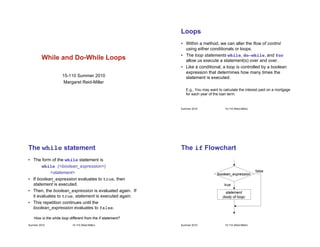
Loops
• Within a method, we can alter the flow of control
using either conditionals or loops.
• The loop statements while, do-while, and for
allow us execute a statement(s) over and over.
• Like a conditional, a loop is controlled by a boolean
expression that determines how many times the
statement is executed.
E.g., You may want to calculate the interest paid on a mortgage
for each year of the loan term.
Summer 2010 15-110 (Reid-Miller)
The while statement
• The form of the while statement is
while (<boolean_expression>)
<statement>
• If boolean_expression evaluates to true, then
statement is executed.
• Then, the boolean_expression is evaluated again. If
it evaluates to true, statement is executed again.
• This repetition continues until the
boolean_expression evaluates to false.
How is the while loop different from the if statement?
Summer 2010 15-110 (Reid-Miller)
The if Flowchart
boolean_expression
statement
(body of loop)
true
false
Summer 2010 15-110 (Reid-Miller)
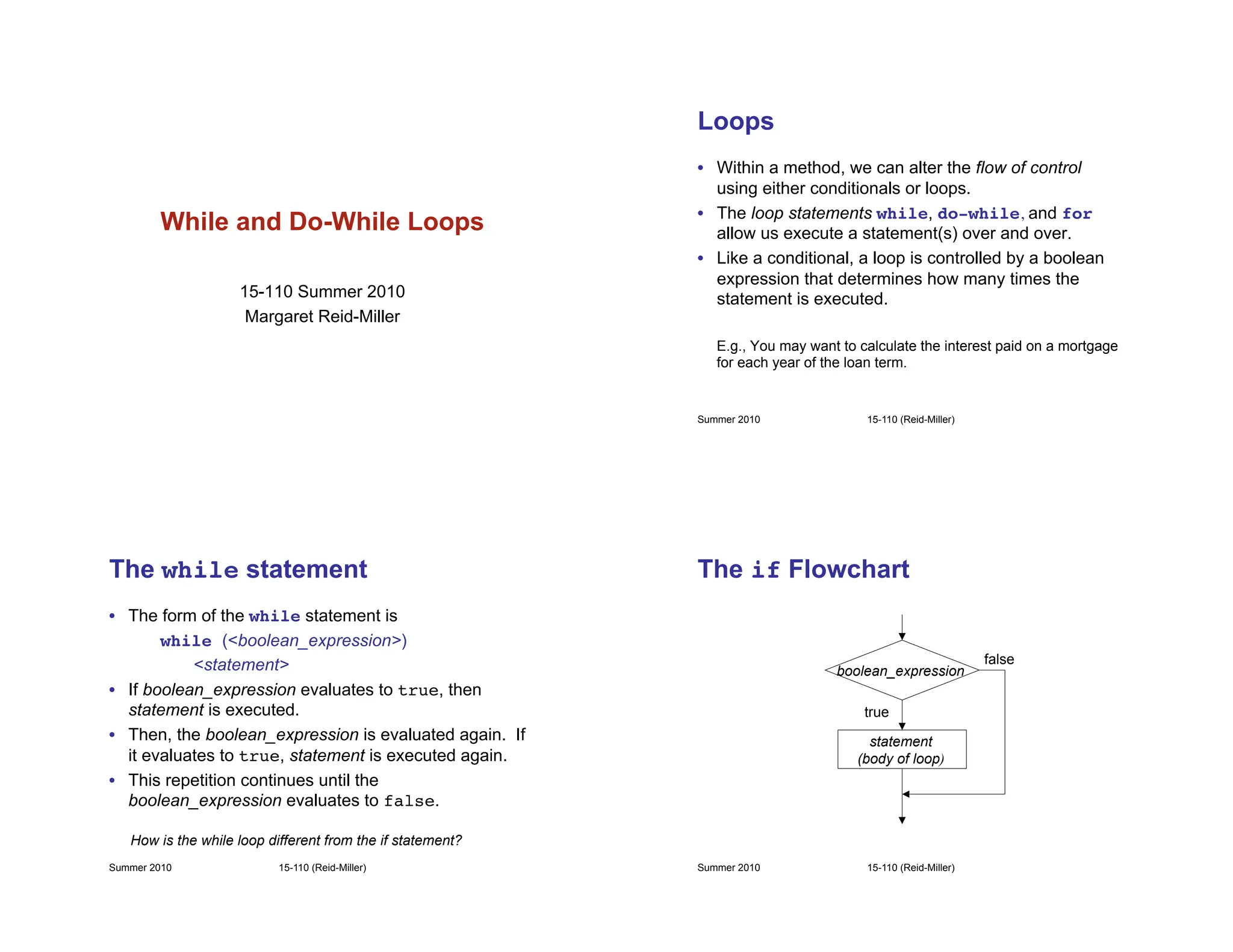
The while Flowchart
boolean_expression
statement
(body of loop)
true
false
Summer 2010 15-110 (Reid-Miller)
A while Example
Print n asterisks!
int i = 0; !
while (i < n) { ! !
System.out.print(“*”);!
!i++;!
}!
System.out.println();!
i output
n = 5
0
*!
1
**!
2
***!
3
****!
4
*****!
i < n ?
i < n ?
i < n ?
i < n ?
i < n ?
5
*****
i < n ?
Summer 2010 15-110 (Reid-Miller)
The Loop Control Variable
• The variable i (known as the loop control variable)
is used in three ways: it is initialized, tested, and
updated.!
!int i = 0; !
!while (i < n) {!
!! System.out.print(“*”);!
!! i++;!
!}!
!System.out.println();!
• All three things must be coordinated in order for
the loop to work correctly!
// initialize
// test
// update
Summer 2010 15-110 (Reid-Miller)
Off-by-1 Errors
int i = 0; !
while (i < n) { ! !
System.out.print(“*”);!
!i++;!
}!
System.out.println();!
For n = 5 the output is
***** (5 asterisks)
!int i = 1; !
!while (i < n) {!
! !System.out.print
(“*”);!
! !i++;!
!}!
!System.out.println();!
Output?
Summer 2010 15-110 (Reid-Miller)
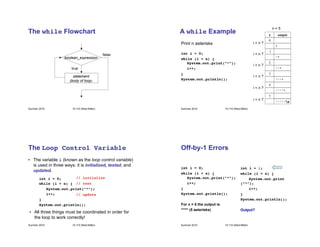
Off-by-1 Errors
int i = 0; !
while (i < n) { ! !
System.out.print(“*”);!
!i++;!
}!
System.out.println();!
For n = 5 the output is
***** (5 asterisks)
!int i = 0; !
!while (i <= n) {!
! !System.out.print
(“*”);!
! !i++;!
!}!
!System.out.println();!
Output?
Summer 2010 15-110 (Reid-Miller)
Warning!
!What is the output if n = 5?
int i = 0; !
while (i < n) {!
! !
System.out.print(“*”);!
!i--;!
}!
System.out.println();!
Summer 2010 15-110 (Reid-Miller)
Infinite Loops
Do you know which
company has this address?
1 Infinite Loop
Cupertino, CA 95014
Apple Computer
int i = 0; !
while (i < n) {!
! !
System.out.print(“*”);!
!i--;!
}!
System.out.println();!
Summer 2010 15-110 (Reid-Miller)
A while Example
int i = 0; !
while (i < n) { ! !
System.out.print(“*”);!
!i++;!
}!
System.out.println();!
!What is the output if n = 0?
Summer 2010 15-110 (Reid-Miller)
Exercise
• Write a method with a while loop to prints 1 through
n in square brackets. For example, if n = 6 print
! ![1] [2] [3] [4] [5] [6]!
Summer 2010 15-110 (Reid-Miller)
Exercise: Cumulative Sum
• Write a method with a while loop that computes the
sum of first n positive integers:
sum = 1 + 2 + 3 + … + n
Examples:
n = 5 sum = 15
n = 19 sum = 190
Summer 2010 15-110 (Reid-Miller)
Exercise: Fencepost Loop
• Write a method with a while loop that prints 1
through n, separated by commas. E.g., for n = 9 print
1, 2, 3, 4, 5, 6, 7, 8, 9!
Summer 2010 15-110 (Reid-Miller)
The do Statement
• The form of the do statement is
do!
<statement>
! !while (<boolean_expression>);
• First, statement is executed.
• Then, the boolean_expression is evaluated. If it
evaluates to true, statement is executed again.
• This repetition continues until the
boolean_expression evaluates to false.
Summer 2010 15-110 (Reid-Miller)
The do Flowchart
boolean_expression
statement
false
true
Summer 2010 15-110 (Reid-Miller)
Example
!int i = 0; // initialize!
!do {!
!! System.out.print(“*”); !
!! i++; // update!
!} while (i < n); // test!
!System.out.println();!
For n = 7 what is the output?
How is it different from the while loop?
Summer 2010 15-110 (Reid-Miller)
User Input
Scanner keyboard = new Scanner(System.in);!
System.out.print(!
! !“Please enter the month [1-12]: ”);!
int month = keyboard.nextInt();!
What if the user enters a month outside the range?
Summer 2010 15-110 (Reid-Miller)
User Input (cont’d)
• Use a do-while loop to test whether a user has entered
data of the correct form and, if not, ask repeatedly until
the data entered is correct.
Scanner keyboard = new Scanner(System.in);!
int month;!
do {!
!System.out.print(!
!!“Please enter the month [1-12]: ”);!
!month = keyboard.nextInt();!
} while ( );!
month < 1 || month > 12
Must be declared
outside the loop
Outside the scope
of the loop
Summer 2010 15-110 (Reid-Miller)
• Sometimes it is easier to think of what you want the
input to be and negate.
Scanner keyboard = new Scanner(System.in);!
int month;!
do {!
!System.out.print(!
! !“Please enter the month [1-12]: ”);!
!month = keyboard.nextInt();!
} while ( );!
Use de Morgan’s law to prove the Boolean expressions are the same!
!(month >= 1 && month <= 12)
User Input
What is the
loop control
variable?
Summer 2010 15-110 (Reid-Miller)
• Suppose you want to find the maximum of the data
entered from the keyboard.
• It is not known in advanced how many data values a
user might want to enter. (And the user may not want
to count them!)
• A sentinel is a special value that is used to detect a
special condition, in this case that the user is done
entering values.
• The sentinel, of course, must be distinct from any value
the user may want to input.
Sentinel Controlled Loops
Summer 2010 15-110 (Reid-Miller)
Scanner console = new Scanner(System.in);!
System.out.print(“Enter count (enter -1 to quit): “);!
int count = console.nextInt();!
int maxSoFar = count;!
while (count != -1) {!
if (count > maxSoFar) maxSoFar = count;
System.out.print(“Enter count (enter -1 to quit): “);!
count = console.nextInt();!
}!
if (maxSoFar > -1) !
!System.out.println(“The maximum is “ + maxSoFar);!
else !
!System.out.println(“No counts entered”);
Sentinel Example
Consider making -1
a named constant

while- loop understanding with -ease.pdf

  • 1.
    While and Do-WhileLoops 15-110 Summer 2010 Margaret Reid-Miller Summer 2010 15-110 (Reid-Miller) Loops • Within a method, we can alter the flow of control using either conditionals or loops. • The loop statements while, do-while, and for allow us execute a statement(s) over and over. • Like a conditional, a loop is controlled by a boolean expression that determines how many times the statement is executed. E.g., You may want to calculate the interest paid on a mortgage for each year of the loan term. Summer 2010 15-110 (Reid-Miller) The while statement • The form of the while statement is while (<boolean_expression>) <statement> • If boolean_expression evaluates to true, then statement is executed. • Then, the boolean_expression is evaluated again. If it evaluates to true, statement is executed again. • This repetition continues until the boolean_expression evaluates to false. How is the while loop different from the if statement? Summer 2010 15-110 (Reid-Miller) The if Flowchart boolean_expression statement (body of loop) true false
  • 2.
    Summer 2010 15-110(Reid-Miller) The while Flowchart boolean_expression statement (body of loop) true false Summer 2010 15-110 (Reid-Miller) A while Example Print n asterisks! int i = 0; ! while (i < n) { ! ! System.out.print(“*”);! !i++;! }! System.out.println();! i output n = 5 0 *! 1 **! 2 ***! 3 ****! 4 *****! i < n ? i < n ? i < n ? i < n ? i < n ? 5 ***** i < n ? Summer 2010 15-110 (Reid-Miller) The Loop Control Variable • The variable i (known as the loop control variable) is used in three ways: it is initialized, tested, and updated.! !int i = 0; ! !while (i < n) {! !! System.out.print(“*”);! !! i++;! !}! !System.out.println();! • All three things must be coordinated in order for the loop to work correctly! // initialize // test // update Summer 2010 15-110 (Reid-Miller) Off-by-1 Errors int i = 0; ! while (i < n) { ! ! System.out.print(“*”);! !i++;! }! System.out.println();! For n = 5 the output is ***** (5 asterisks) !int i = 1; ! !while (i < n) {! ! !System.out.print (“*”);! ! !i++;! !}! !System.out.println();! Output?
  • 3.
    Summer 2010 15-110(Reid-Miller) Off-by-1 Errors int i = 0; ! while (i < n) { ! ! System.out.print(“*”);! !i++;! }! System.out.println();! For n = 5 the output is ***** (5 asterisks) !int i = 0; ! !while (i <= n) {! ! !System.out.print (“*”);! ! !i++;! !}! !System.out.println();! Output? Summer 2010 15-110 (Reid-Miller) Warning! !What is the output if n = 5? int i = 0; ! while (i < n) {! ! ! System.out.print(“*”);! !i--;! }! System.out.println();! Summer 2010 15-110 (Reid-Miller) Infinite Loops Do you know which company has this address? 1 Infinite Loop Cupertino, CA 95014 Apple Computer int i = 0; ! while (i < n) {! ! ! System.out.print(“*”);! !i--;! }! System.out.println();! Summer 2010 15-110 (Reid-Miller) A while Example int i = 0; ! while (i < n) { ! ! System.out.print(“*”);! !i++;! }! System.out.println();! !What is the output if n = 0?
  • 4.
    Summer 2010 15-110(Reid-Miller) Exercise • Write a method with a while loop to prints 1 through n in square brackets. For example, if n = 6 print ! ![1] [2] [3] [4] [5] [6]! Summer 2010 15-110 (Reid-Miller) Exercise: Cumulative Sum • Write a method with a while loop that computes the sum of first n positive integers: sum = 1 + 2 + 3 + … + n Examples: n = 5 sum = 15 n = 19 sum = 190 Summer 2010 15-110 (Reid-Miller) Exercise: Fencepost Loop • Write a method with a while loop that prints 1 through n, separated by commas. E.g., for n = 9 print 1, 2, 3, 4, 5, 6, 7, 8, 9! Summer 2010 15-110 (Reid-Miller) The do Statement • The form of the do statement is do! <statement> ! !while (<boolean_expression>); • First, statement is executed. • Then, the boolean_expression is evaluated. If it evaluates to true, statement is executed again. • This repetition continues until the boolean_expression evaluates to false.
  • 5.
    Summer 2010 15-110(Reid-Miller) The do Flowchart boolean_expression statement false true Summer 2010 15-110 (Reid-Miller) Example !int i = 0; // initialize! !do {! !! System.out.print(“*”); ! !! i++; // update! !} while (i < n); // test! !System.out.println();! For n = 7 what is the output? How is it different from the while loop? Summer 2010 15-110 (Reid-Miller) User Input Scanner keyboard = new Scanner(System.in);! System.out.print(! ! !“Please enter the month [1-12]: ”);! int month = keyboard.nextInt();! What if the user enters a month outside the range? Summer 2010 15-110 (Reid-Miller) User Input (cont’d) • Use a do-while loop to test whether a user has entered data of the correct form and, if not, ask repeatedly until the data entered is correct. Scanner keyboard = new Scanner(System.in);! int month;! do {! !System.out.print(! !!“Please enter the month [1-12]: ”);! !month = keyboard.nextInt();! } while ( );! month < 1 || month > 12 Must be declared outside the loop Outside the scope of the loop
  • 6.
    Summer 2010 15-110(Reid-Miller) • Sometimes it is easier to think of what you want the input to be and negate. Scanner keyboard = new Scanner(System.in);! int month;! do {! !System.out.print(! ! !“Please enter the month [1-12]: ”);! !month = keyboard.nextInt();! } while ( );! Use de Morgan’s law to prove the Boolean expressions are the same! !(month >= 1 && month <= 12) User Input What is the loop control variable? Summer 2010 15-110 (Reid-Miller) • Suppose you want to find the maximum of the data entered from the keyboard. • It is not known in advanced how many data values a user might want to enter. (And the user may not want to count them!) • A sentinel is a special value that is used to detect a special condition, in this case that the user is done entering values. • The sentinel, of course, must be distinct from any value the user may want to input. Sentinel Controlled Loops Summer 2010 15-110 (Reid-Miller) Scanner console = new Scanner(System.in);! System.out.print(“Enter count (enter -1 to quit): “);! int count = console.nextInt();! int maxSoFar = count;! while (count != -1) {! if (count > maxSoFar) maxSoFar = count; System.out.print(“Enter count (enter -1 to quit): “);! count = console.nextInt();! }! if (maxSoFar > -1) ! !System.out.println(“The maximum is “ + maxSoFar);! else ! !System.out.println(“No counts entered”); Sentinel Example Consider making -1 a named constant