1











Type name
int x

int x,y,z;
Scope


Primitiveint , char.
ReferenceDate, time
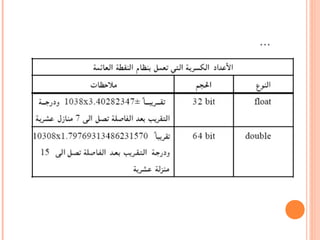
...
...
...



.
...

Member Variable
Local Variable
Method Parameter
Exception-Handler Parameter



{ }catchcatch.
...

i


byte b =10;
short s =150;
int i =500;
long l =450l;
float f =4.5f;
double d =4.7d;
char c = ‘c’;
boolean bn = true;
Final Variables
final int c=23;

final int c;
c=23;
c
K++ , +3)
)c = 5+x(
:?)
Arithmetic Operations
Relational and Conditional Operators
Shift and logical Operators
Assignment Operators

Expressions
Statements
Blocks


a= x+y/z;
a= x+(y/z(;
106(








 x=9.5;
 a++;
 System.out.print(x);
 MyClass o=new MyClass();
 int a=5;
 if(a>5) a--;


if(a<=5)
{
a++;
System.out.println("The number is less than or
equal 5 ");
}
else
System.out.println("The number is greater than 5
");


if-else, switch-case
for, while, do-while
try-catch-finally, throw
break, continue, label:, return
ifelse

if(x>5)
System.out.println("x is grater than 5");
else
System.out.println("x is less than or equal 5");
elseifnested if
if(x>0)
System.out.println("x is +ve");
else
if(x<0)
System.out.println("x is -ve");
else
System.out.println("x is zero");
if ( studentGrade >= 90 )
System.out.println( "A" );
else
if ( studentGrade >= 80 )
System.out.println( "B" );
else
if ( studentGrade >= 70 )
System.out.println( "C" );
else
if ( studentGrade >= 60 )
System.out.println( "D" );
else
System.out.println( "F" );
if/elseswitchcase.
switch (i)
{
case 1:
{
System.out.println(" i has the value of 1");
System.out.println("this statement is to show that you
can use a block");
}
break;
case2:
System.out.println(" ");
break;
default: ..............;
}
switchchar, byte, short, intlong, float, double.
breakswitch
default case

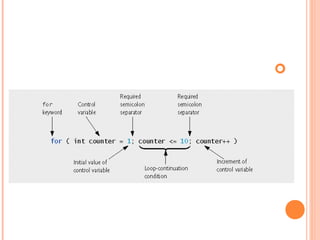
for (initialization; termination; increment)
{
statement // Or statements
}

EXAMPLES USING THE FOR
STATEMENT
Vary control variable from 1 to 100 in increments of 1
for ( int i = 1; i <= 100; i++ )
Vary control variable from 100 to 1 in increments of –1
for ( int i = 100; i >= 1; i-- )
Vary control variable from 7 to 77 in increments of 7
for ( int i = 7; i <= 77; i += 7 )
Vary control variable from 20 to 2 in decrements of 2
for ( int i = 20; i >= 2; i -= 2 )
Vary control variable over the sequence: 2, 5, 8, 11, 14,
17, 20
for ( int i = 2; i <= 20; i += 3 )
Vary control variable over the sequence: 99, 88, 77, 66,
55, 44, 33, 22, 11, 0
for ( int i = 99; i >= 0; i -= 11 )
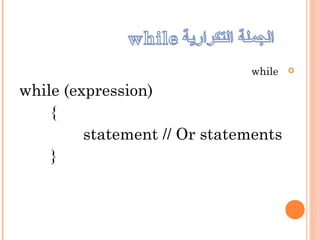
while
while (expression)
{
statement // Or statements
}
51 // processing phase
52 while ( gradeCounter < = 10 ) // loop 10 times
53 {
54 System.out.print( "Enter grade: " ); // prompt
55 grade = input.nextInt(); // input next grade
56 total = total + grade; // add grade to total
57 gradeCounter = gradeCounter + 1; // increment counter by 1
58 } // end while

do
{
statement(s)
} while (expression);
1
2 // do...while repetition statement.
3
4 public class DoWhileTest
5 {
6 public static void main( String args[] )
7 {
8 int counter = 1; // initialize counter
9
10 do
11 {
12 System.out.printf( "%d ", counter );
13 ++counter;
14 } while ( counter < = 10 ); // end do...while
15
16 System.out.println(); // outputs a newline
17 } // end main
18 } // end class DoWhileTest
1 2 3 4 5 6 7 8 9 10
Declares and initializes
control variable counter
Variable counter’s value is displayed
before testing counter’s final value
Exception


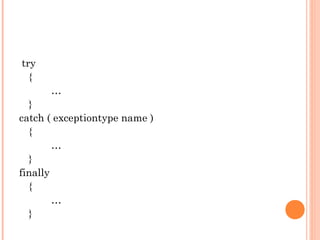
try
catchtrytry
finallytry
try
{
…
}
catch ( exceptiontype name )
{
…
}
finally
{
…
}

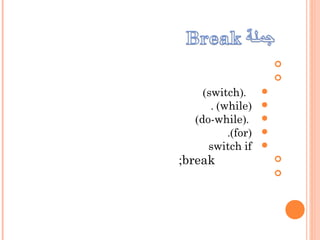
break
continue
return


).switch(
)while(.
).do-while(
)for(.
ifswitch
break;

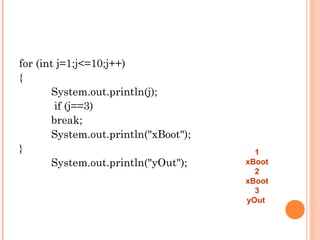
for (int j=1;j<=10;j++)
{
System.out.println(j);
if (j==3)
break;
System.out.println("xBoot");
}
System.out.println("yOut");
1
xBoot
2
xBoot
3
yOut


continue;
for (int j=1; j <= 3; j++ )
{
System.out.println (j);
if ( j == 2 ) continue ;
System.out.println ("Bottom of loop ");
}
System.out.println ("Out of loop "); 1     
Bottom of loop
2
3
Bottom of loop
Out of loop
return
voidreturn
...
 return 5;
 return x;
 return i++;
 return;
returnreturn

String
StringBuffer
public class StringsDemo
{
public static void main(String[] args)
{
String pal = "Dot saw I was Tod";
StringBuffer dest = new StringBuffer(pal);
System.out.println(dest);
}
}
String pal = "Dot saw I was Tod";
String pal = new String("Dot saw I was
Tod");

char[] alQuds = { 'A', 'l', 'Q', 'u', 'd','s' };
String s2 = new String(alQuds);
String
valueOf)(
String piString = "3.14159";
Double pi = Double.valueOf(piString);
Number
...
byteValue)(byte
shortValue)(short
toString)(String
شرح مقرر البرمجة 2   لغة جافا - الوحدة الثالثة

شرح مقرر البرمجة 2 لغة جافا - الوحدة الثالثة