Downloaded 10 times









![[TIP] Take inventory of your tech
bit.ly/tech-inventory](https://image.slidesharecdn.com/janezhangtechnologyplanning-160420202454/85/JANE-ZHANG-Technology-Planning-18-320.jpg)

![[CASE STUDY]
Brampton Caledon Community Living moved their back
office to the cloud. Read the full case study here:
techsoupcanada.ca/community/blog/office-365-for-nonprofits-lunch-learn-recap
43 locations on
one old, slow
email server
Documents
were emailed
out – risk of
missing up
versions
Got rid of server,
moved email to
the cloud (Office
365 for
Nonprofits)
Shares files
on OneDrive
– everyone
has the same
version
v2
v1](https://image.slidesharecdn.com/janezhangtechnologyplanning-160420202454/85/JANE-ZHANG-Technology-Planning-21-320.jpg)
![[TIP] Plan and
implement in
phases](https://image.slidesharecdn.com/janezhangtechnologyplanning-160420202454/85/JANE-ZHANG-Technology-Planning-23-320.jpg)
![[CASE STUDY]
“When we used Access and Excel
spreadsheets, it would take staff nearly a
month to produce one report ... now that
we have Sumac as our CRM, it takes
one hour to generate a report.”
- Cambridge Self Help Food Bank
techsoupcanada.ca/community/blog/crm-case-study-cambridge-self-help-food-bank-and-sumac](https://image.slidesharecdn.com/janezhangtechnologyplanning-160420202454/85/JANE-ZHANG-Technology-Planning-26-320.jpg)
![[CASE STUDY]
“Before using a CRM, we did not have one
place to store all of our information … now
that we use a CRM, I can look up past events
and have access to key information (such as
press releases, articles, contact information,
etc.)
in one place.”
- Maytree Foundation
techsoupcanada.ca/community/blog/crm-case-study-maytree-foundation-and-salesforce](https://image.slidesharecdn.com/janezhangtechnologyplanning-160420202454/85/JANE-ZHANG-Technology-Planning-27-320.jpg)

![[CASE STUDY]
Goodwill celebrated Labour Day by sharing 150 success
stories on Twitter. Read more about it at:
bethkanter.org/150jobs
Used Twitter and a
dedicated
hashtag, #150jobs
Shared one story per hour
of someone who has
found work, education or
volunteer opportunities
with support from Goodwill
Engaged the
community!
Industries International. Inc,](https://image.slidesharecdn.com/janezhangtechnologyplanning-160420202454/85/JANE-ZHANG-Technology-Planning-30-320.jpg)


![[CASE STUDY]
FurnitureBank collects donated furniture and housewares and provides them to people who have
recentlytransitioned out of homelessness, women and childrenescaping abusive situations, and
refugees &newcomers to Canada.
Learnmore@ furniturebank.org/ipad-can-change-500-families-lives
Manual Processing New Solution
Lotsofpaperwork.High
client waittimes(16
minutes)
Losttimeperyear
equivalentto50working
weeks
Able toserveanadditional
500clientsperyear!
iPad+ Salesforceintake
decreasedclientwait
times
(5minutes)](https://image.slidesharecdn.com/janezhangtechnologyplanning-160420202454/85/JANE-ZHANG-Technology-Planning-35-320.jpg)

![[CASE STUDY]
Timeraiser’s board and staff see technology as key to
achieving their mission. View their strategy and
budget online at planning.timeraiser.ca](https://image.slidesharecdn.com/janezhangtechnologyplanning-160420202454/85/JANE-ZHANG-Technology-Planning-38-320.jpg)


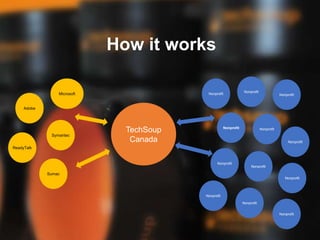
The document outlines the importance of technology for nonprofits and introduces TechSoup Canada's resources, including a technology donation program and eligibility criteria for registration. It provides best practices for adopting technology, featuring case studies demonstrating successful implementations of cloud services, customer relationship management (CRM) systems, and effective communication strategies. Additionally, it emphasizes the need for strategic alignment of technology goals with organizational objectives and offers steps for nonprofits to assess and improve their technology use.


