Programming Language for Mobile Phone
applications
Introduction to J2ME
J2ME:Programming mobile applications
J2ME architecture consists of layers located above the native
operating system, collectively referred to as the Connected
Limited Device Configuration (CLDC).
The CLDC, which is installed on top of the operating
system, forms the run-time environment for small
computing devices.
J2ME architecture
The J2ME architecture comprises three software layers .
The first layer is the configuration layer that includes the Java
Virtual Machine (JVM), which directly interacts with the native
operating system. The configuration layer also handles
interactions between the profile and the JVM.
The second layer is the profile layer, which consists of the
minimum set of application programming interfaces (APIs) for
the small computing device.
The third layer is the Mobile Information Device Profile
(MIDP).The MIDP layer contains Java APIs for user network
connections, persistence storage, and the user interface. It also
has access to CLDC libraries and MIDP libraries.
MIDlet
 A MIDlet is a J2ME application designed to operate on an MIDP small
computing device.
 A MIDlet is defined with at least a single class that is derived from the javax
.microedition.midlet.MIDlet abstract class.
 Developers commonly bundle related MIDlets into a MIDlet suite,
which is contained within the same package and implemented simultaneously on
a small computing device.
 All MIDlets within a MIDlet suite are considered a group and must be
installed and uninstalled as a group .
 Members of a MIDlet suite share resources of the host environment and
share the same instances of Java classes and run within the same JVM.
 This means if three MIDlets from the same MIDlet suite run the same
class, only one instance of the class is created at a time in the Java Virtual
Machine.
 A key benefit of the relationship among MIDlet suite members is that they
share the same data, including data in persistent storage such as user preferences.
A MIDlet suite is installed, executed, and removed by the
application manager running on the device.
The manufacturer of the small computing device provides the
application manager.
Once a MIDlet suite is installed, each member of the MIDlet
suite is given access to classes of the JVM and CLDC by the
application manager.
Likewise, a MIDlet can access classes defined in the MIDP to
interact with the user interface, network, and persistent storage.
The application manager also makes the Java archive (JAR)
file and the Java application descriptor (JAD) file
available to members of the MIDlet suite.
MIDlet Programming
A MIDlet is a class that extends the MIDlet class and is the
interface between application statements and the run-time
environment, which is controlled by the application
manager.
A MIDlet class must contain three abstract methods that are
called by the application manager to manage the life cycle of
the MIDlet.
These abstract methods are
startApp(),
pauseApp(), and
destroyApp()
The startApp() method is called by the application manager
when the MIDlet is started and contains statements that are
executed each time the application begins execution.
The pauseApp() method is called before the application
manager temporarily stops the MIDlet.
The application manager restarts the MIDlet by recalling the
startApp() method.
The destroyApp() method is called prior to the termination
of the MIDlet by the application manager.
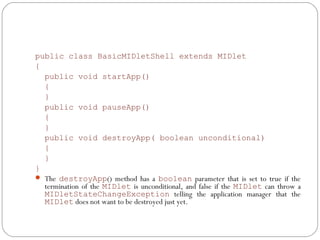
public class BasicMIDletShell extends MIDlet
{
public void startApp()
{
}
public void pauseApp()
{
}
public void destroyApp( boolean unconditional)
{
}
}
 The destroyApp() method has a boolean parameter that is set to true if the
termination of the MIDlet is unconditional, and false if the MIDlet can throw a
MIDletStateChangeException telling the application manager that the
MIDlet does not want to be destroyed just yet.
Event Handling
 AMIDlet is an event-based application. All routines executed in
the MIDlet are invoked in response to an event reported to the
MIDlet by the application manager.
The initial event that occurs is when the MIDlet is started and the
application manager invokes the startApp() method.
A Command object is used to present a user with a selection of
options to choose from when a screen is displayed. Each screen
must have a CommandListener.
The application manager calls methods of a MIDlet. A
CommandListener monitors user events with a screen and causes
the appropriate code to execute based on the current event.
User Interfaces
 A Form is the most commonly invoked user interface element found in a MIDlet and is used
to contain other user interface elements.
 Text is placed on a form as a stringItem, a List, a ChoiceGroup, and a Ticker.
 A StringItem contains text that appears on a form that cannot be changed by the user.  
 The TextBox class and TextField class differ in that the TextBox class is derived
from the Screen class, while the TextField class is derived from the Item class. This
means that an instance of the Form class cannot contain an instance of the TextBox class,
while an instance of a TextField class must be contained within an instance of the Form
class.
  An instance of the TextBox class is created by passing four parameters to the TextBox
class constructor.
 The first parameter is the title of the text box.
 The second parameter is text used to populate the instance.
 The third parameter is the maximum number of characters that can be entered into the instance. Keep
in mind that this parameter is a request and may not be fulfilled by the device. The device determines
the maximum number of characters for an instance of the TextBox class.
 The last parameter is the constraint used to limit the types of characters that can be placed within the
instance. The TextBox class has the same methods as found in the TextField class.

Introduction to j2me

  • 1.
    Programming Language forMobile Phone applications Introduction to J2ME
  • 2.
    J2ME:Programming mobile applications J2MEarchitecture consists of layers located above the native operating system, collectively referred to as the Connected Limited Device Configuration (CLDC). The CLDC, which is installed on top of the operating system, forms the run-time environment for small computing devices.
  • 3.
    J2ME architecture The J2MEarchitecture comprises three software layers . The first layer is the configuration layer that includes the Java Virtual Machine (JVM), which directly interacts with the native operating system. The configuration layer also handles interactions between the profile and the JVM. The second layer is the profile layer, which consists of the minimum set of application programming interfaces (APIs) for the small computing device. The third layer is the Mobile Information Device Profile (MIDP).The MIDP layer contains Java APIs for user network connections, persistence storage, and the user interface. It also has access to CLDC libraries and MIDP libraries.
  • 4.
    MIDlet  A MIDletis a J2ME application designed to operate on an MIDP small computing device.  A MIDlet is defined with at least a single class that is derived from the javax .microedition.midlet.MIDlet abstract class.  Developers commonly bundle related MIDlets into a MIDlet suite, which is contained within the same package and implemented simultaneously on a small computing device.  All MIDlets within a MIDlet suite are considered a group and must be installed and uninstalled as a group .  Members of a MIDlet suite share resources of the host environment and share the same instances of Java classes and run within the same JVM.  This means if three MIDlets from the same MIDlet suite run the same class, only one instance of the class is created at a time in the Java Virtual Machine.  A key benefit of the relationship among MIDlet suite members is that they share the same data, including data in persistent storage such as user preferences.
  • 5.
    A MIDlet suiteis installed, executed, and removed by the application manager running on the device. The manufacturer of the small computing device provides the application manager. Once a MIDlet suite is installed, each member of the MIDlet suite is given access to classes of the JVM and CLDC by the application manager. Likewise, a MIDlet can access classes defined in the MIDP to interact with the user interface, network, and persistent storage. The application manager also makes the Java archive (JAR) file and the Java application descriptor (JAD) file available to members of the MIDlet suite.
  • 6.
    MIDlet Programming A MIDletis a class that extends the MIDlet class and is the interface between application statements and the run-time environment, which is controlled by the application manager. A MIDlet class must contain three abstract methods that are called by the application manager to manage the life cycle of the MIDlet. These abstract methods are startApp(), pauseApp(), and destroyApp()
  • 7.
    The startApp() methodis called by the application manager when the MIDlet is started and contains statements that are executed each time the application begins execution. The pauseApp() method is called before the application manager temporarily stops the MIDlet. The application manager restarts the MIDlet by recalling the startApp() method. The destroyApp() method is called prior to the termination of the MIDlet by the application manager.
  • 8.
    public class BasicMIDletShellextends MIDlet { public void startApp() { } public void pauseApp() { } public void destroyApp( boolean unconditional) { } }  The destroyApp() method has a boolean parameter that is set to true if the termination of the MIDlet is unconditional, and false if the MIDlet can throw a MIDletStateChangeException telling the application manager that the MIDlet does not want to be destroyed just yet.
  • 9.
    Event Handling  AMIDletis an event-based application. All routines executed in the MIDlet are invoked in response to an event reported to the MIDlet by the application manager. The initial event that occurs is when the MIDlet is started and the application manager invokes the startApp() method. A Command object is used to present a user with a selection of options to choose from when a screen is displayed. Each screen must have a CommandListener. The application manager calls methods of a MIDlet. A CommandListener monitors user events with a screen and causes the appropriate code to execute based on the current event.
  • 10.
    User Interfaces  AForm is the most commonly invoked user interface element found in a MIDlet and is used to contain other user interface elements.  Text is placed on a form as a stringItem, a List, a ChoiceGroup, and a Ticker.  A StringItem contains text that appears on a form that cannot be changed by the user.    The TextBox class and TextField class differ in that the TextBox class is derived from the Screen class, while the TextField class is derived from the Item class. This means that an instance of the Form class cannot contain an instance of the TextBox class, while an instance of a TextField class must be contained within an instance of the Form class.   An instance of the TextBox class is created by passing four parameters to the TextBox class constructor.  The first parameter is the title of the text box.  The second parameter is text used to populate the instance.  The third parameter is the maximum number of characters that can be entered into the instance. Keep in mind that this parameter is a request and may not be fulfilled by the device. The device determines the maximum number of characters for an instance of the TextBox class.  The last parameter is the constraint used to limit the types of characters that can be placed within the instance. The TextBox class has the same methods as found in the TextField class.