JQUERY MOBILE
Biren Modi
MOBILE WEB APPLICATIONS
• Increasingly popular way to deliver content and
business applications to mobile devices
• Alternative to developing native mobile apps
• No need for download and installation via an App Store
• Run on any OS, desktop, tablet, smartphone
• Require browser and Internet connection
WHY JQUERY MOBILE?
• Touch-optimized JavaScript framework for smartphones & tablets
• Built on jQuery and jQuery UI foundation
• Unified user interface system across all popular mobile platforms
• Lightweight size and minimal image dependencies for speed
• Responsive design techniques allow the same underlying codebase to automatically scale
from smartphone to tablet and desktop-sized screens
• AJAX-based navigation system to enable animated page transitions while maintaining back
button, bookmarking and and clean URLs
• Support for touch and mouse events to allow for different user input methods using a simple
API
• Accessibility features like WAI-ARIA integrated throughout framework
• Support for screen readers and other assistive technologies
DIFFERENCES BETWEEN JQUERY AND
JQUERY MOBILE
• jQuery: Library that makes it easier to write JavaScript through
selectors, event handling and support for AJAX requests
• jQuery Mobile:
• Framework built on top of jQuery
• Used by developers to build mobile interfaces
• Coding is done using plain HTML markup for the most part
• jQuery Mobile automatically applies styles and add functionality to
widgets
FEATURES OF JQUERY MOBILE
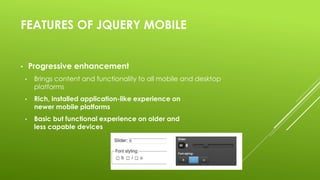
• Progressive enhancement
• Brings content and functionality to all mobile and desktop
platforms
• Rich, installed application-like experience on
newer mobile platforms
• Basic but functional experience on older and
less capable devices
FEATURES OF JQUERY MOBILE
• Customizable user interface
• Built-in theming
framework
• ThemeRoller
application
EVENTS
• Touch events: tap, tapholdswipe, swipeleft, swiperight
• Orientation change event: orientationchange
• Scroll events: scrollstart, scrollstop
• Page change events
• Page transition events
• Page initialization events
SUPPORTED PLATFORMS
• 3-level graded platform support system, supported platforms
include:
• Apple iOS (iPhone, iPod Touch, iPad)
• Android
• Windows Phone
• Blackberry
THANK YOU

jQuery Mobile

  • 1.
  • 2.
    MOBILE WEB APPLICATIONS •Increasingly popular way to deliver content and business applications to mobile devices • Alternative to developing native mobile apps • No need for download and installation via an App Store • Run on any OS, desktop, tablet, smartphone • Require browser and Internet connection
  • 3.
    WHY JQUERY MOBILE? •Touch-optimized JavaScript framework for smartphones & tablets • Built on jQuery and jQuery UI foundation • Unified user interface system across all popular mobile platforms • Lightweight size and minimal image dependencies for speed • Responsive design techniques allow the same underlying codebase to automatically scale from smartphone to tablet and desktop-sized screens • AJAX-based navigation system to enable animated page transitions while maintaining back button, bookmarking and and clean URLs • Support for touch and mouse events to allow for different user input methods using a simple API • Accessibility features like WAI-ARIA integrated throughout framework • Support for screen readers and other assistive technologies
  • 4.
    DIFFERENCES BETWEEN JQUERYAND JQUERY MOBILE • jQuery: Library that makes it easier to write JavaScript through selectors, event handling and support for AJAX requests • jQuery Mobile: • Framework built on top of jQuery • Used by developers to build mobile interfaces • Coding is done using plain HTML markup for the most part • jQuery Mobile automatically applies styles and add functionality to widgets
  • 5.
    FEATURES OF JQUERYMOBILE • Progressive enhancement • Brings content and functionality to all mobile and desktop platforms • Rich, installed application-like experience on newer mobile platforms • Basic but functional experience on older and less capable devices
  • 6.
    FEATURES OF JQUERYMOBILE • Customizable user interface • Built-in theming framework • ThemeRoller application
  • 7.
    EVENTS • Touch events:tap, tapholdswipe, swipeleft, swiperight • Orientation change event: orientationchange • Scroll events: scrollstart, scrollstop • Page change events • Page transition events • Page initialization events
  • 8.
    SUPPORTED PLATFORMS • 3-levelgraded platform support system, supported platforms include: • Apple iOS (iPhone, iPod Touch, iPad) • Android • Windows Phone • Blackberry
  • 9.