Mobile JS Frameworks
IBRAHIM ERSOY
MOBILE DEVELOPER @ SIMTERNET
Agenda

Introduction
• Mobile Apps
• Native vs Hybrid
vs Mobile Web
• Platforms/Stores
• App Builders
• PhoneGap

JS Frameworks
• Jquery Mobile
• iUI

JS Demo
• jQuery Mobile
ThemeRoller

Smartface
• Smartface Pros
• Smartface Cons
What is a ‘Mobile App’ ?
Mobile apps are software programs you can download and access
directly using your phone or tablet

«

Mobile App -> Software that runs on your mobile device

»
Native vs Hybrid vs Mobile Web


Native : Platform-based Programming Language,UI & libraries



Hybrid : Native-based HTML/JS mobile web apps.



Mobile Web : Websites that run responsive on mobile devices
Responsive Design
What is ‘Hybrid’ ?


What are mobile web applications?
•

Increasingly popular way to deliver content and
business applications to mobile devices

•

Alternative to developing native mobile apps

•

Run on any OS, desktop, tablet, smartphone

•

Easy to develop using standard web technologies and frameworks

•

Advances in HTML, CSS and JavaScript allow for shifting more functionality to the
browser, providing richer user experience and better performance

•

Easy to maintain and easy roll out of upgrades
Limitations of Hybrid


Browsers do not typically have access to advanced functions of a device,
like GPS, camera, address book...



Web apps are often slower than native apps



Mobile web apps require permanent Internet connection



Using offline web application caching and platforms like PhoneGap,
Titanium, etc. provides ways to address these limitations
Platforms & Marketplaces
•

iOS – iTunes Store

•

Android – Google Play

•

Blackberry – AppWorld

•

Windows Phone & Windows 8 – Windows Store

•

Tizen – Tizen Store
App Builders


Easy to use, No Coding skill required



AppyPie.com



appery.io



TheAppBuilder



MobinCube



ShoutEm
PhoneGap


build.phonegap.com or Standalone



Apache Cordova



Packaging in the Cloud



Github Support
JS FRAMEWORKS
jQuery Mobile and iUI’s Cons
jQuery Mobile

iUI

•

Page Transitions

•

Documentation

•

Large JS Files

•

No Native Support

•

Canvas Animations
jQuery Mobile and iUI’s Pros
jQuery Mobile
•

Familiarity with jQuery

•

Design & Layout

iUI
•

iOS UI
jQuery Mobile
• Touch-optimized JavaScript framework for smartphones & tablets
• Built on jQuery and jQuery UI foundation
• Unified user interface system across all popular mobile platforms
• Responsive design techniques allow the same underlying codebase to
automatically scale from smartphone to tablet and desktop-sized screens
• AJAX-based navigation system to enable animated page transitions
while maintaining back button
Differences between jQuery and
jQuery Mobile
• jQuery: Library that makes it easier to write JavaScript through selectors
• jQuery Mobile:

Framework built on top of jQuery
Used by developers to build mobile interfaces
Coding is done using plain HTML markup for the most part
jQuery Mobile automatically applies styles and add functionality to widgets
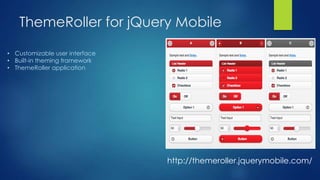
ThemeRoller for jQuery Mobile
• Customizable user interface
• Built-in theming framework
• ThemeRoller application

http://themeroller.jquerymobile.com/
Supported Platforms
3-level graded platform support system, supported platforms include:
• Apple iOS (iPhone, iPod Touch, iPad)
• Android
• Windows Phone
• Blackberry
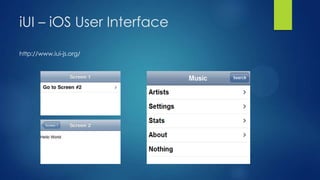
iUI – iOS User Interface
http://www.iui-js.org/
“

jQuery Mobile
ThemeRoller Demo

”
Smartface
Smartface Pros













WYSIWYG design editor
JavaScript code editor
On Device Emulator
Memory Management
Network Components Wizards
Ready to Use Libraries (Animation,
Security…)
Single Code Based Testing
On Device Debugging
Solving Device Specific Problems
New OS Updates doesnt cause
Fragmentation Problems
Plug-In
JavaScript Power



Customized JS Engine inside



Certified by Symantec



NATIVE and Cross-Platform
Smartface Cons


No game, no utilities



Some apps need more
knowledge



Mac and Linux support



Dependency
Questions?
“

Thanks for coming!

”

Mobile JS Frameworks

  • 1.
    Mobile JS Frameworks IBRAHIMERSOY MOBILE DEVELOPER @ SIMTERNET
  • 2.
    Agenda Introduction • Mobile Apps •Native vs Hybrid vs Mobile Web • Platforms/Stores • App Builders • PhoneGap JS Frameworks • Jquery Mobile • iUI JS Demo • jQuery Mobile ThemeRoller Smartface • Smartface Pros • Smartface Cons
  • 3.
    What is a‘Mobile App’ ? Mobile apps are software programs you can download and access directly using your phone or tablet « Mobile App -> Software that runs on your mobile device »
  • 4.
    Native vs Hybridvs Mobile Web  Native : Platform-based Programming Language,UI & libraries  Hybrid : Native-based HTML/JS mobile web apps.  Mobile Web : Websites that run responsive on mobile devices
  • 5.
  • 6.
    What is ‘Hybrid’?  What are mobile web applications? • Increasingly popular way to deliver content and business applications to mobile devices • Alternative to developing native mobile apps • Run on any OS, desktop, tablet, smartphone • Easy to develop using standard web technologies and frameworks • Advances in HTML, CSS and JavaScript allow for shifting more functionality to the browser, providing richer user experience and better performance • Easy to maintain and easy roll out of upgrades
  • 7.
    Limitations of Hybrid  Browsersdo not typically have access to advanced functions of a device, like GPS, camera, address book...  Web apps are often slower than native apps  Mobile web apps require permanent Internet connection  Using offline web application caching and platforms like PhoneGap, Titanium, etc. provides ways to address these limitations
  • 8.
    Platforms & Marketplaces • iOS– iTunes Store • Android – Google Play • Blackberry – AppWorld • Windows Phone & Windows 8 – Windows Store • Tizen – Tizen Store
  • 9.
    App Builders  Easy touse, No Coding skill required  AppyPie.com  appery.io  TheAppBuilder  MobinCube  ShoutEm
  • 10.
    PhoneGap  build.phonegap.com or Standalone  ApacheCordova  Packaging in the Cloud  Github Support
  • 11.
  • 12.
    jQuery Mobile andiUI’s Cons jQuery Mobile iUI • Page Transitions • Documentation • Large JS Files • No Native Support • Canvas Animations
  • 13.
    jQuery Mobile andiUI’s Pros jQuery Mobile • Familiarity with jQuery • Design & Layout iUI • iOS UI
  • 14.
    jQuery Mobile • Touch-optimizedJavaScript framework for smartphones & tablets • Built on jQuery and jQuery UI foundation • Unified user interface system across all popular mobile platforms • Responsive design techniques allow the same underlying codebase to automatically scale from smartphone to tablet and desktop-sized screens • AJAX-based navigation system to enable animated page transitions while maintaining back button
  • 15.
    Differences between jQueryand jQuery Mobile • jQuery: Library that makes it easier to write JavaScript through selectors • jQuery Mobile: Framework built on top of jQuery Used by developers to build mobile interfaces Coding is done using plain HTML markup for the most part jQuery Mobile automatically applies styles and add functionality to widgets
  • 16.
    ThemeRoller for jQueryMobile • Customizable user interface • Built-in theming framework • ThemeRoller application http://themeroller.jquerymobile.com/
  • 17.
    Supported Platforms 3-level gradedplatform support system, supported platforms include: • Apple iOS (iPhone, iPod Touch, iPad) • Android • Windows Phone • Blackberry
  • 18.
    iUI – iOSUser Interface http://www.iui-js.org/
  • 19.
  • 20.
  • 21.
    Smartface Pros             WYSIWYG designeditor JavaScript code editor On Device Emulator Memory Management Network Components Wizards Ready to Use Libraries (Animation, Security…) Single Code Based Testing On Device Debugging Solving Device Specific Problems New OS Updates doesnt cause Fragmentation Problems Plug-In JavaScript Power  Customized JS Engine inside  Certified by Symantec  NATIVE and Cross-Platform
  • 22.
    Smartface Cons  No game,no utilities  Some apps need more knowledge  Mac and Linux support  Dependency
  • 23.
  • 24.