Mobile Apps Development
Using HTML5, CSS3 and jQuery
Junejo Naeem Ahmed
WHAT YOU SHOULD ALREADY KNOW
JavaScript
HTML5 & CSS
Mobile Web Fundamentals
jQuery
INTRODUCTION TO JQUERY MOBILE
• jQuery Mobile is a cross platform way of building mobile
web apps.
• Now, remember, these are not native applications, these
are web applications and jQuery Mobile is a cross platform
framework for building these mobile web apps.
• jQuery Mobile relies on HTML5, CSS3, JavaScript and AJAX.
• jQuery Mobile enhances existing Web pages with a
consistent look across multiple modern mobile OSs.
• So, by using the jQuery Mobile library, you can give your
application a consistent look and feel, and it's configurable
enough where you can define your own CSS themes.
INTRODUCTION TO JQUERY MOBILE
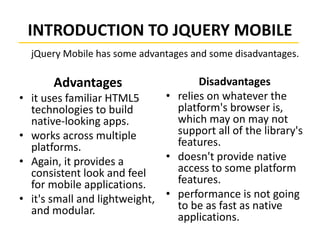
Advantages
• it uses familiar HTML5
technologies to build
native-looking apps.
• works across multiple
platforms.
• Again, it provides a
consistent look and feel
for mobile applications.
• it's small and lightweight,
and modular.
Disadvantages
• relies on whatever the
platform's browser is,
which may on may not
support all of the library's
features.
• doesn't provide native
access to some platform
features.
• performance is not going
to be as fast as native
applications.
jQuery Mobile has some advantages and some disadvantages.
FIRST JQUERY MOBILE APP
• 3 files to include: jQuery, jQuery Mobile, CSS.
• declare the viewport meta tag.
• The viewport meta tag explains to the mobile
browser how large the page is and what kind of
virtual page size it should use when displaying the
content.
• markup our content as usual.
• enclose content within data-role attribute set to
the word page.
data-role=“page”
JQUERY MOBILE PAGE ARCHITECTURE
Internal Pages
• <body>
<div data-role=“page”>
(page content)
</div>
<div data-role=“page”>
(page content)
</div>
</body>
HTML
Page 1
Page 2
JQUERY MOBILE PAGE TRANSITIONS
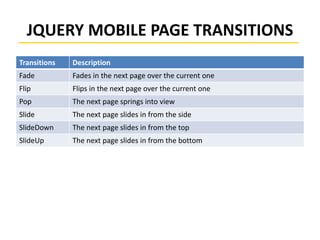
Transitions Description
Fade Fades in the next page over the current one
Flip Flips in the next page over the current one
Pop The next page springs into view
Slide The next page slides in from the side
SlideDown The next page slides in from the top
SlideUp The next page slides in from the bottom
JQUERY MOBILE FORM BASICS
• JQuery Mobile automatically enhances elements.
• All of the elements in a form should be wrapped in a
proper form tag.
• Form controls should have unique IDs across your
entire site.
• Form Submissions are handled automatically via AJAX.
• Items are grouped using CSS class ui-field-contain
• jQuery Mobile requires all form controls to have labels
for accessibility.
• To hide a label, use the built in CSS class called ui-
hidden-accessible.
JQUERY MOBILE BUTTONS
• <button> Button </button>
• <input type=“Button” value=“Button” />
• <a href=“#” class=“ui-btn”>Button</a>
Button

Jquery Mobile

  • 1.
    Mobile Apps Development UsingHTML5, CSS3 and jQuery Junejo Naeem Ahmed
  • 2.
    WHAT YOU SHOULDALREADY KNOW JavaScript HTML5 & CSS Mobile Web Fundamentals jQuery
  • 3.
    INTRODUCTION TO JQUERYMOBILE • jQuery Mobile is a cross platform way of building mobile web apps. • Now, remember, these are not native applications, these are web applications and jQuery Mobile is a cross platform framework for building these mobile web apps. • jQuery Mobile relies on HTML5, CSS3, JavaScript and AJAX. • jQuery Mobile enhances existing Web pages with a consistent look across multiple modern mobile OSs. • So, by using the jQuery Mobile library, you can give your application a consistent look and feel, and it's configurable enough where you can define your own CSS themes.
  • 4.
    INTRODUCTION TO JQUERYMOBILE Advantages • it uses familiar HTML5 technologies to build native-looking apps. • works across multiple platforms. • Again, it provides a consistent look and feel for mobile applications. • it's small and lightweight, and modular. Disadvantages • relies on whatever the platform's browser is, which may on may not support all of the library's features. • doesn't provide native access to some platform features. • performance is not going to be as fast as native applications. jQuery Mobile has some advantages and some disadvantages.
  • 5.
    FIRST JQUERY MOBILEAPP • 3 files to include: jQuery, jQuery Mobile, CSS. • declare the viewport meta tag. • The viewport meta tag explains to the mobile browser how large the page is and what kind of virtual page size it should use when displaying the content. • markup our content as usual. • enclose content within data-role attribute set to the word page. data-role=“page”
  • 6.
    JQUERY MOBILE PAGEARCHITECTURE Internal Pages • <body> <div data-role=“page”> (page content) </div> <div data-role=“page”> (page content) </div> </body> HTML Page 1 Page 2
  • 7.
    JQUERY MOBILE PAGETRANSITIONS Transitions Description Fade Fades in the next page over the current one Flip Flips in the next page over the current one Pop The next page springs into view Slide The next page slides in from the side SlideDown The next page slides in from the top SlideUp The next page slides in from the bottom
  • 8.
    JQUERY MOBILE FORMBASICS • JQuery Mobile automatically enhances elements. • All of the elements in a form should be wrapped in a proper form tag. • Form controls should have unique IDs across your entire site. • Form Submissions are handled automatically via AJAX. • Items are grouped using CSS class ui-field-contain • jQuery Mobile requires all form controls to have labels for accessibility. • To hide a label, use the built in CSS class called ui- hidden-accessible.
  • 9.
    JQUERY MOBILE BUTTONS •<button> Button </button> • <input type=“Button” value=“Button” /> • <a href=“#” class=“ui-btn”>Button</a> Button